Zotero-better-bibtex: Better BibTeX stuck at initializing stage. Workaround: disable citation key search
Support log ID: D1099386289
Expected behavior: Usually creates BibTeX keys pretty easily. Everything was working as expected yesterday.
Actual behavior: Initializing popup only closes when I quit Zotero and doesn't create BibTeX keys. I can't even open the BibTeX tab in preferences.
 esrztk
All 40 comments
It looks like you did not upload an support log. The support log is important; it gives @retorquere your current BBT settings and a copy of the problematic reference as a test case so he can best replicate your problem. Without it, @retorquere is effectively blind. Support logs are useful for both analysis and for enhancement requests; in the case of export enhancements, @retorquere need the copy of the references you have in mind.
If you did try to submit a support log, but the ID looked like D<number>, that is a Zotero debug report, which @retorquere cannot access. Please re-submit a BBT debug log by one of the methods below. BBT support log IDs end in -apse or -euc. Support logs that include sample references will end in -refs-apse or -refs-euc; these are the type @retorquere needs for export or citekey issues.
This request is much more likely than not to apply to you, too, _even if you think it unlikely_, and even if it does not, there's no harm in sending a debug log that turns out to be unnecessary. @retorquere will usually just end up saying "please send a debug log first". Let's just skip over the unnecesary delay this entails. Sending a debug log is very easy, depending on your situation, follow one of these procedures::
If your issue relates to how BBT behaves around a specific reference(s), such as citekey generation or export, select at least one of the problematic reference(s), right-click it, and submit an BBT support log from that popup menu. If the problem is with export, please do include a sample of what you see exported, and what you expected to see exported for these references, either by pasting it in a comment here (if it is small) or attaching it as a
.txtfile (if it's large). These logs will have an ID that ends in-refs-apseor-refs-euc.If the issue does not relate to references and is of a more general nature, generate an support log by restarting Zotero with debugging enabled (
Help->Debug Output Logging->Restart with logging enabled), reproducing your problem, and selectingSend Better BibTeX debug report...from the help menu.
Once done, you will see a support log ID in red. Please post that support log id in an issue comment here.
Thank you!
![github-actions[bot] picture](https://avatars.githubusercontent.com/in/15368?v=4&s=40) github-actions[bot]
on 28 May 2021
github-actions[bot]
on 28 May 2021
Hi, D1099386289 is a Zotero log, I don't have access to those. I need one as per point 2 above.
 retorquere
on 28 May 2021
retorquere
on 28 May 2021
Hi, I've been trying to create one as asked but Zotero doesn't let me click anything related to Better BibTeX.
Only think I see related to Better BibTeX is
[JavaScript Error: "TypeError: bbt_zoteropane is null" {file: "chrome://zotero/content/standalone/standalone.xul" line: 1}]
oncommand@chrome://zotero/content/standalone/standalone.xul:1:1


[JavaScript Error: "TypeError: myBrowser is null" {file: "chrome://zotero/content/xpcom/zotero.js" line: 2135}]

[JavaScript Error: "TypeError: bbt_zoteropane is null" {file: "chrome://zotero/content/standalone/standalone.xul" line: 1}]
oncommand@chrome://zotero/content/standalone/standalone.xul:1:1


[JavaScript Error: "TypeError: bbt_zoteropane is null" {file: "chrome://zotero/content/standalone/standalone.xul" line: 1}]
oncommand@chrome://zotero/content/standalone/standalone.xul:1:1


[JavaScript Error: "TypeError: itemProgress is undefined" {file: "chrome://zotfile/content/pdfOutline.js" line: 62}]

[JavaScript Error: "TypeError: bbt_zoteropane is null" {file: "chrome://zotero/content/standalone/standalone.xul" line: 1}]
oncommand@chrome://zotero/content/standalone/standalone.xul:1:1


[JavaScript Error: "TypeError: bbt_zoteropane is null" {file: "chrome://zotero/content/standalone/standalone.xul" line: 1}]
oncommand@chrome://zotero/content/standalone/standalone.xul:1:1


version => 5.0.97-beta.27+861d5787d, platform => MacIntel, oscpu => Intel Mac OS X 10.15, locale => en-US, appName => Zotero, appVersion => 5.0.97-beta.27+861d5787d, extensions => ODF Scan for Zotero (2.0.43, extension), ZotFile (5.0.16, extension), Zotero Roam Export (1.11, extension), Zotero LibreOffice Integration (5.0.25.SA.5.0.97-beta.27+861d5787d, extension), Zotero Word for Mac Integration (5.0.38.SA.5.0.97-beta.27+861d5787d, extension), Better BibTex for Zotero (5.4.19, extension)
Support log ID:
esrztk
on 28 May 2021
Can you install https://github.com/retorquere/zotero-debug-log/releases/tag/v1.0.4, restart with debug mode, and then select "send debug log to file.io" from the help menu? It will pop up an ID (not an -euc or -apse ID) that you can paste here.
retorquere
on 28 May 2021
Jumping in here as I noticed the same behavior as described by @esrztk. I tried to remediate by deactivating and reactivating BetterBibTex, after which it did install new translators (which did not happen before 'disable -> enable'), but the popup is still hanging on the phase 'Starting key manager'.
For the sake of completeness if deemed useful, my file-io Debug ID (Restart with Logging Enabled... ) of the startup phase is jYcyhfyXm6OZ
 floriandierickx
on 28 May 2021
floriandierickx
on 28 May 2021
After installing file.Io I've decided to re-install Zotero and Better BibTeX and now it works for me.
esrztk
on 28 May 2021
I see the problem. on it.
retorquere
on 28 May 2021
For now, go into the prefs and disable citekey search while I fix this.
retorquere
on 28 May 2021
@floriandierickx can you shut down zotero and get me a copy of better-bibtex-search.sqlite
retorquere
on 28 May 2021
@esrztk I'm happy you can proceed, but the snippet of log posted is knock-on damage, it's not the source of the problem, so I can't diagnose the problem you encountered. You can uninstall the file.io addon.
retorquere
on 28 May 2021
@retorquere, here is the better-bibtex-search.sqlite (after closing Zotero) : https://file.io/CsHGuXEq3njq It looks empty (?). Thanks btw for your prompt replies, happy to be able to continue debugging if deemed useful.
floriandierickx
on 28 May 2021
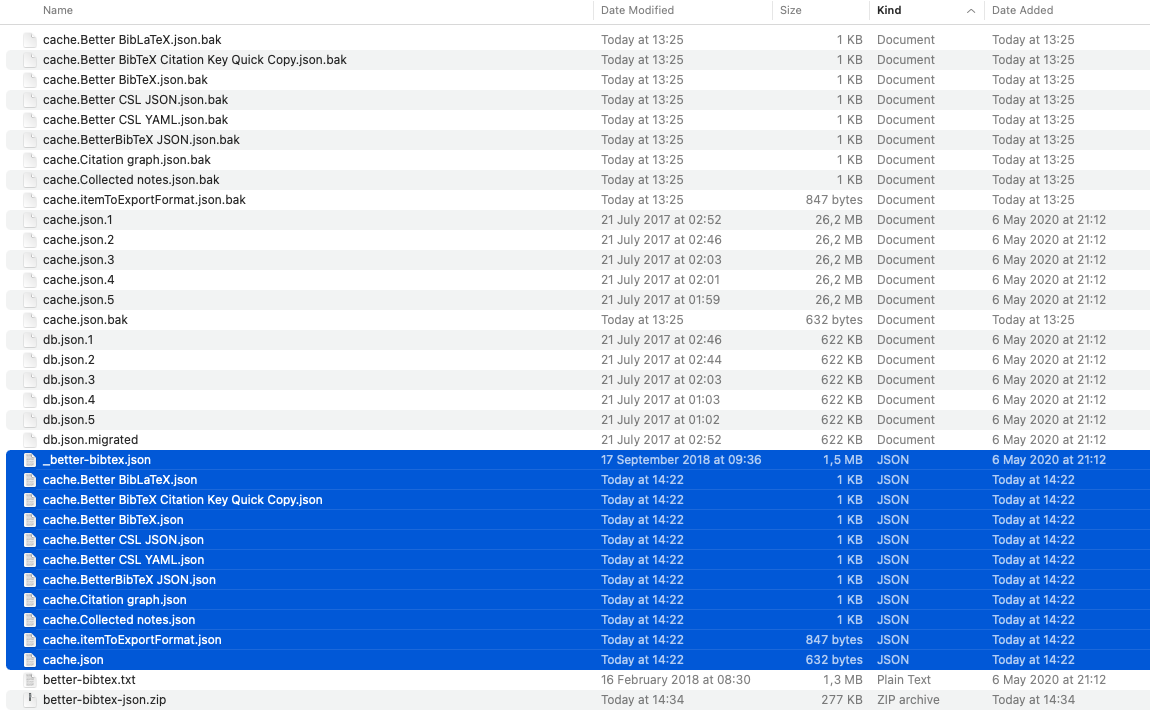
Indeed empty. Can I get a copy of the json files in the better-bibtex folder (after shutdown)?
retorquere
on 28 May 2021
Only the Json files? Here they are: https://file.io/vf1pHVPdhLlf
floriandierickx
on 28 May 2021
And better-bibtex.sqlite (after shutdown)?
retorquere
on 28 May 2021
In here: https://file.io/jzxD9OZ00iVM :)
floriandierickx
on 28 May 2021
OK, that's a situation I didn't think could happen. Can I also get your zotero.sqlite? (again when zotero not running)?
retorquere
on 28 May 2021
item keys are not unique across libraries. I know what to do. In the interim, disabling citekey search will suppress the problem.
retorquere
on 28 May 2021
@esrztk you only experienced the same problem if you previously synced your library + some groups, and now less than before.
retorquere
on 28 May 2021
Hey @retorquere, ok cool. Do you still need more info? If the zotero.sqlite is not needed anymore, in any case that will save a couple of GB transfer :p Thank you for the workaround tip (also for other readers who might get along), but personally there is no urgency whatsoever :)
About disabling citekey search, maybe another aspect that is important to mention: since this issue occurs, the settings pane of BetterBibTex (on OSx: Zotero --> Preferences --> BetterBibTex) is empty.
floriandierickx
on 28 May 2021
Not needed anymore. A fix will drop here when https://github.com/retorquere/zotero-better-bibtex/actions/runs/885801868 is finished running the test suite, which should be in 5 minutes or so.
retorquere
on 28 May 2021
About disabling citekey search, maybe another aspect that is important to mention: since this issue occurs, the settings pane of BetterBibTex (on OSx: Zotero --> Preferences --> BetterBibTex) is empty.
Right, that was pretty dense of me. You can disable it through hidden settings, but a fix is underway.
retorquere
on 28 May 2021
:robot: this is your friendly neighborhood build bot announcing test build 5.4.19.980 ("fixes #1829")
Install in Zotero by downloading test build 5.4.19.980, opening the Zotero "Tools" menu, selecting "Add-ons", open the gear menu in the top right, and select "Install Add-on From File...".
github-actions[bot]
on 28 May 2021
Hehe, cool! I was thinking about that but then I got 'consumed' by other tasks.. :p I will install the test build!
floriandierickx
on 28 May 2021
First impressions: I installed the test build (on top of the existing one, which seems to replace it?) + restarted, and:
- It asks again to install new translators (which it didn't before when doing a shutdown + restart-cycle with the previous BetterBibTex version)
- Unfortunately it (i) hangs again on 'Starting key manager' and the settings pane remains empty
floriandierickx
on 28 May 2021
I'll need a new log then (by the file.io plugin then). The translation reinstall was expected, that was already being prepped for a release.
retorquere
on 28 May 2021
As a general PSA -- if I need a log it's because neither my local install nor my pretty large test suite manages to replicate the problem. Any build that drops here has passed all tests and is generally release-ready, even if I may still want to strip diagnosis logging before I actually cut a new release.
retorquere
on 28 May 2021
Ok. The debug report (until the moment it hangs on 'Starting key manager'): QD9jlrdhjxOF
Collection at https://file.io/UBSTohPENqy5 of:
- better-bibtex.sqlite
- better-bibtex-search.sqlite
- better-bibtex-jsonfiles.zip
floriandierickx
on 28 May 2021
For some reason on your end the old code is still active? Can you update plugins to get the file.io update, restart (BBT will fail) and send a new file.io log? There will be a two-part ID now.
retorquere
on 28 May 2021
I'd love to get a copy of your zotero.sqlite. If I can replicate this locally it'll be much easier to fix.
retorquere
on 28 May 2021
Aha! Things are working now :) What I did as per your suggestion:
(i) uninstall completely BetterBibTex
(ii) restart
(iii) install new BetterBibTex zotero-better-bibtex-5.4.19.980.xpi
(iv) 'Loading key manager' took about a minute and completed succesfully.
The citekeys are displaying again, and on top of that the WebDAV-sync also works again (don't know if that was related, it goes on and off from time to time..)
floriandierickx
on 28 May 2021
I don't know why the previous installation did not fully succeed.. I might have done wrong by:
(i) disabling BetterBibTex
(ii) installing the new version (5.4.19.980)
(iii) re-enabling BetterBibTex
Do you still need a debug log / other files? In any case, this seems to have worked out perfectly... Thank you for the prompt replies and resolving the issue! (assuming successful remediation).
floriandierickx
on 28 May 2021
It shouldn't be possible for uninstall + install to be different than just an install over the existing plugin. There's not even a way for me to make that difference.
It's a bit disconcerting if this difference exists, because even if I do release a fix, the problem would remain, as plugin updates are not uninstall + install.
Can I still get a copy of your zotero.sqlite? If I can replicate the problem, I can check that the upgrade does what it's supposed to.
retorquere
on 28 May 2021
[Update] File.io does only seem to accept 100MB parts, that will get complicated.. I will upload it entirely to another file server :)
Ok, cool. Can I send it privately? I trust you with handling the file, but I prefer not to share a public link.
I notice that file.io only handles files up to 1 GB. Do you work with OSx, or do you know if the procedure of recombining file-parts using (stackexchange) :
split -b 5000m zotero.sqlite
cat x?? > zotero.sqlite
..will work for you?
Any other suggestion welcome! :)
floriandierickx
on 28 May 2021
I'm on MacOS, so no issue; how large is the DB? You can drop up to 10G into https://docs.google.com/forms/d/e/1FAIpQLScYPW6iJLAzzC5s8BRF8gjkobTX4JziWBjHg8-ddMlVp90NaA/viewform?usp=sf_link , and that's private.
retorquere
on 28 May 2021
I don't know why the previous installation did not fully succeed.. I might have done wrong by:
(i) disabling BetterBibTex
(ii) installing the new version (5.4.19.980)
(iii) re-enabling BetterBibTex
Should all be entirely the same, even at the technical level as just installing over the existing plugin.
Do you still need a debug log / other files? In any case, this seems to have worked out perfectly... Thank you for the prompt replies and resolving the issue! (assuming successful remediation).
I am certain I have found the problem. I just can't explain what I saw in QD9jlrdhjxOF, and that bugs me.
retorquere
on 28 May 2021
Ok perfect. I saved a backup of the zotero.sqlite right after Zotero was working again, which was around 1 GB (uploading now through the google forms). In the meantime (after using Zotero for a while) the original zotero.sqlite became around 1.14 GB (not uploading that one).
floriandierickx
on 28 May 2021
That should work -- it is the combo of 5.4.19, your zotero.sqlite, your better-bibtex.sqlite and better-bibtex-search.sqlite, and I still have the latter two.
retorquere
on 28 May 2021
Ok. I have submitted the file.
To be clear: this one is from right after I installed the new BetterBibTex version 5.4.19.980 (with (i) uninstall old version, (ii) restart, (iii) install new, (iv) restart).
If deemed useful I can also do a reinstall of the old BetterBibTex (5.4.19), copy the resulting zotero.sqlite (and maybe better-bibtex.sqlite and better-bibtex-search.sqlite), and upload again.
floriandierickx
on 28 May 2021
No need:
- I was misreading the log in QD9jlrdhjxOF
- with your database I replicated the problem
- upgrade in-place works
tests on a new release are running. Thanks for all the help people.
retorquere
on 28 May 2021
That sounds good :) Thanks to you !!(!)
floriandierickx
on 28 May 2021
Related issues
 richarddmorey
·
7Comments
richarddmorey
·
7Comments
 ghost
·
7Comments
ghost
·
7Comments
 Bubblbu
·
7Comments
Bubblbu
·
7Comments
 awesomeindustries
·
3Comments
awesomeindustries
·
3Comments
 element4l
·
7Comments
element4l
·
7Comments