Zotero-better-bibtex: Export speed issue with many attachments
I understand that exporting (unsing Better BibLaTeX) a very large Zotero database simply takes time and creates rather large bibtex files (in my case 13845 entries create a bibtex file that is 7.3 MB. So no squabbles here. My understanding with updates using the BBT "automatic update" feature is that those should happen incrementally? (Not sure, if that's the right description). So, after, say 10 or so more entries, the export shouldn't take as long as if you'd export from scratch. This does not seem to be the case in my set-up.
Report ID:
RRPZJI6J-euc
Exporter used:
BBT 5.2.7
Expected behavior:
Incremental update
Actual behavior:
Full update (very slow)
Also, the interaction with citr is veeeery slow. Not sure if those two things are related? The instructions on citr say that BBT is needed for this to work:
If you are using Zotero citr can access your reference database directly. For this to work, you need to install the Better BibTeX extension. Once the extension is installed and your reference manager is running, citr can access all your references and keep your bibliography file updated by adding missing references.
As suggested over at citr, I omit the following fields in the BBT "export" settings:
abstract, note, file, tag, attachment
So I thought I just might ask if there's a connection before starting a new issue.
 jrennstich
All 179 comments
:robot: this is your friendly neighborhood build bot announcing test build 5.2.7.5586 ("limit workers, more caching")
Install in Zotero by downloading test build 5.2.7.5586, opening the Zotero "Tools" menu, selecting "Add-ons", open the gear menu in the top right, and select "Install Add-on From File...".
 blip-bloop
on 11 Jan 2020
blip-bloop
on 11 Jan 2020
I first need to unpack a few things -- with large libraries things come to the surface about BBT that don't affect most people. Sorry for the wall of text that follows. It's not essential that you read all that follows, it's merely to provide backing context for the (very relevant) questions you asked. The TL;DR is there's still something wrong with BBT for you; a new debug log from an auto-export with 5586 will tell me more.
Still here? Alright then.
First -- 13k entries is a lot, but I have more in my test suite, largest being 24k items, and with a cold cache (which is the worst-case scenario), that takes 80-100 seconds on my MBPro. So unless your machine differs significantly, performance-wise, from mine, something is absolutely wrong.
In pre-5.2, only foreground exports were possible. Zotero imposes a limitation that exports, once started, must run to completion, and while doing so, block the UI completely. The first speedup I have in place is that for individual entries, when exported for a particular combination of preferences and export options, the output is remembered; when that same item is exported again, for the same combination of preferences and export options, it is not computed again, I just take the cached output.
If you have a lot of uncached entries (and changing any preferences drops the entire cache) for an export (again, for a particular combination of preferences), and I've detected earlier that an auto-export took more than 10 seconds, on the next auto-export, I split what you're about to export into batches of 10, export those and do nothing with the results -- but the bare fact I've exported them will put them in the cache, and after each small batch, the UI gets a breather. I then start the actual export again, and that will run to completion, but getting everything from the cache. Best-case scenario is that you change one entry, only that entry needs to be generated again, and everything but that comes from the cache.
In 5.2.3, that was changed. All BBT exports (except drag-and-dropped) now happen on a separate thread, so the export does not interfere with the UI, database, Zotero writing files, anything. It runs entirely isolated from the rest of Zotero, and I figured, it might not need the cache, so I didn't put it in, because it was a little complicated to access the cache from the now-isolated export. The plumbing was still there because for drag and drop it was still useful.
Turns out I had forgotten just how heavyweight BBT exports really are, so even if they happen in a separate process, it's still desirable to have them cached (for 24k items it is the difference between 80-100 seconds and 10-15 seconds for me). So 5.2.7 adds cache access for the workers.
So that brings me to your situation. The automatic exports in pre-5.2 and post-5.2.5 are incremental in the sense that if you have exported an entry before (and have not changed any preference between) it will take the cached output from memory (not from the file on disk) instead of regenerating it. In 5.2.3 - 5.2.5, the exports would behave as if the cache was always empty, and would not contribute back to the cache during export. 5.2.7 does read from the cache, and does contribute to the cache, so we have the pre-5.2 caching behavior, but with exports that should not block the UI even on an (largely) empty cache. So you are correct -- subsequent exports should get faster and faster until you're effectively always just generating the one entry you just changed and nothing else, plus some overhead for reading the cache and writing files to disk.
You are right that the problem with citr is likely collateral damage -- citr looks to be requesting the full library, not wholly sure what triggers the fetch, but an uncached request of a full library is going to be painful. 5.2.7 should have largely fixed that, but for you that does not seem to be the case.
 retorquere
on 11 Jan 2020
retorquere
on 11 Jan 2020
Sorry for the wall of text that follows
Those are the - only - kind of walls I want folks to build. So yes. Let's build THOSE walls.
jrennstich
on 11 Jan 2020
takes 80-100 seconds on my MBPro. So unless your machine differs significantly, performance-wise, from mine, something is absolutely wrong
Latest MBP, 2.7 GHz Quad-Core Intel Core i7, 16 GB 2133 MHz LPDDR3. It should run fast.
for a particular combination of preferences and export options,
Haven't really changed anything. Recently I have been using Zotero Betas (with plenty of updates). Would that make a difference?
You are right that the problem with citr is likely collateral damage -- citr looks to be requesting the full library, not wholly sure what triggers the fetch, but an uncached request of a full library is going to be painful. 5.2.7 should have largely fixed that, but for you that does not seem to be the case.
Nope. Unfortunately not. We are talking answering emails or coffee break kind of lengths here. 10+ minutes
Updated to Test build 5.2.7.5586. Then added three new entries. Took two verses, two choruses, a bridge and half a sax solo from a Billy Ocean song (about 160 sec). Definitely incremental.
Then added two more entries. That took 10 sec.
So the question is: how do I not change the cache? No BBT updates? (that seems to trigger them). No Zotero updates?
jrennstich
on 11 Jan 2020
Thanks for all the help!
jrennstich
on 11 Jan 2020
Latest MBP, 2.7 GHz Quad-Core Intel Core i7, 16 GB 2133 MHz LPDDR3. It should run fast.
You have the post-Jony-Ive MBPro. I should have waited for apple to come to its senses 😢 . Screw that stupid butterfly keyboard and the touchbar escape key.
So the absolutely strange thing here is that even in the worst-case scenario (cold cache), this should take about one minute, maybe even a little less because your system is faster than mine. And I can pretty consistently do 24k items in on average 90 seconds. With a hot cache, 10-15 seconds.
Haven't really changed anything. Recently I have been using Zotero Betas (with plenty of updates). Would that make a difference?
Yes! yes it would!
So the question is: how do I not change the cache? No BBT updates? (that seems to trigger them). No Zotero updates?
That is at least one of the issues. There used to be a setting where you could choose to keep the cache, if you accept the risk that fixes in BBT don't show up for you because the cache is not cleared. That setting is no longer there, but it's easy to reintroduce, and in fact I could prompt for it if a export took long.
That still doesn't explain why on your system exports take an order of magnitude longer than mine. Hopefully the log will give me some clues.
retorquere
on 11 Jan 2020
I'll need a new debug log from 5586 to see if you're using the cache.
retorquere
on 11 Jan 2020
So I went back to the stable Zotero (v. 5.0.81) and installed the test build. This sort of behavior happened before however in just exact the same manner. It's been a long time since I was able to do a cold cache export in under a minute, that's why I stopped using the "automatic export" feature. I have become used to the fact that exports just take up around 10+min from scratch.
After starting up the newly installed Zotero and hitting "export now" nothing happened for about 10 sec or so, then I got the spinning wheel. Then, after 6 min or so Zotero unfroze and the dialog box worked again, telling me, there is a background process in the works and gave the percentages. Unfortunately, I had not set up the logging mode.
I then started a new export set-up again. That took 7:30 min. Then I added some new entries and used the export now button as per usual.
Report-ID: TNCR35UK-euc
jrennstich
on 12 Jan 2020
Never mind, got it, hold on for the next build
retorquere
on 12 Jan 2020
:robot: this is your friendly neighborhood build bot announcing test build 5.2.7.5591 ("add option to retain cache")
Install in Zotero by downloading test build 5.2.7.5591, opening the Zotero "Tools" menu, selecting "Add-ons", open the gear menu in the top right, and select "Install Add-on From File...".
blip-bloop
on 12 Jan 2020
Right. No need to fiddle in the hidden prefs -- this build will reset the key to the proper value, and also introduces an option to retain the cache in the BBT advanced pane. You can turn it on. I'll need a log from 5591.
retorquere
on 12 Jan 2020
It should be OK to test on Zotero beta BTW. My test suite runs both the latest Zotero release and the latest beta.
retorquere
on 12 Jan 2020
:robot: this is your friendly neighborhood build bot announcing test build 5.2.7.5592 ("always full test suite for #1389")
Install in Zotero by downloading test build 5.2.7.5592, opening the Zotero "Tools" menu, selecting "Add-ons", open the gear menu in the top right, and select "Install Add-on From File...".
blip-bloop
on 12 Jan 2020
Installed BBT 5.2.7.5592. Then ran export with no changes. Then added two entries. Then ran again. Behaved as expected.
You are running Better BibTeX version 5.2.7.5592
Report ID: 98J68TR5-euc
jrennstich
on 12 Jan 2020
Then exported again w no changes. Again, as expected. Only a few seconds.
Report ID: 336BIAKF-euc
jrennstich
on 12 Jan 2020
So what you're saying is that the hot-cache behavior is as it's supposed to be? It's now just the cold-cache behavior that's the problem. That would at least be an improvement.
retorquere
on 12 Jan 2020
Yep. At the moment, that seems to be the case. I experienced similar improvements - though not this good - in the past with some versions of BBT. Then came a new version and it was slow again (even the hot caches). But it's never been this good.
Again, thanks so much for diving into this! If this problem with the cold cache could be addresses, than the citr function would really become super useful. Even after I have (re)connected the Zotero database with citr (which takes a very long time, as reported above), then I have to wait several seconds, when using it. Every time. This is not the case, when I only connect to the local .bib file that citr creates with my added references (which is awesome for producing reproducible documents).
jrennstich
on 12 Jan 2020
citr should be pulling a cached library now, so if that still gives problems, that still needs to be addressed -- but I'd prefer to do that in a separate issue. There may be something in the citr behavior that's not optimal for large libraries.
In your logs I see 3 exports -- one cold-cache that takes 234 seconds, and two warm (filled about 99%) that take 31 and 13 seconds respectively. This is still deeply puzzling to me -- one, why should there be such a large difference between those two warm-cache exports, and two, why cold-cache exports do so abysmal on your system. this line and the next show the cold-cache and warm-cache behavior on Travis -- which is a VM with 7.5G mem and a 2-core virtual processor of unspecified speed, I'll check -- and that does 24k items cold-caceh in 76seconds (which is actually pretty impressive for the free Travis account I have -- had not expected that) and 8 seconds (damn!) with a hot cache.
Since this build at least allows you to retain your cache between upgrades I'm inclined to roll this out in a release, but not close the issue yet. I'm still going through 336BIAKF-euc to see if can at least see hotspots.
retorquere
on 12 Jan 2020
citr is considerably faster with a hot cache. about 90 sec.
jrennstich
on 12 Jan 2020
Since this build at least allows you to retain your cache between upgrades I'm inclined to roll this out in a release, but not close the issue yet. I'm still going through 336BIAKF-euc to see if can at least see hotspots.
Thanks. Please let me know what I can send to help you with this.
jrennstich
on 12 Jan 2020
Yeah but it looks like it requests the full lib - maybe I can coordinate so that it can check whether there are updates at all. Really do prefer a separate issue for citr.
retorquere
on 12 Jan 2020
:robot: this is your friendly neighborhood build bot announcing test build 5.2.7.5597 ("trace logging")
Install in Zotero by downloading test build 5.2.7.5597, opening the Zotero "Tools" menu, selecting "Add-ons", open the gear menu in the top right, and select "Install Add-on From File...".
blip-bloop
on 12 Jan 2020
I don't see an obvious hotspot. 5597 is an instrumented build, which means it will generate a lot of logging, and will run slightly slower, but it will show me practically everything the translator is doing, so if I can get another build, that might give me a clue into the problem.
retorquere
on 12 Jan 2020
Ah wait, the trace wasn't enabled properly. I'll get a new build
retorquere
on 13 Jan 2020
Updated to test build 5.2.7.5597. Then exported as per usual through dialog box (to create hot cache after update). The triggered citr. Results in
Report ID: WB4IUKGQ-euc
jrennstich
on 13 Jan 2020
Yeah sorry about that but I'll need a log from 5603, but that's still building.
retorquere
on 13 Jan 2020
Wait, I'm seeing something strange -- it may be that the slowdown is not in the export, but in the prep for the export. 5606 removes trace logging but adds some logging for the prep. I'll need a log from that.
There's also something strange about your database -- I've posted about the at https://groups.google.com/forum/#!topic/zotero-dev/UebFnv5h00I . You don't have your Zotero directory synced by dropbox or somesuch, right?
retorquere
on 13 Jan 2020
:robot: this is your friendly neighborhood build bot announcing test build 5.2.7.5606 ("log actual export time")
Install in Zotero by downloading test build 5.2.7.5606, opening the Zotero "Tools" menu, selecting "Add-ons", open the gear menu in the top right, and select "Install Add-on From File...".
blip-bloop
on 13 Jan 2020
There's also something strange about your database
I feared as much.
You don't have your Zotero directory synced by dropbox or somesuch, right?
Nope. I use the Zotero option.
jrennstich
on 13 Jan 2020
BBT 5.2.7.5606 is not initializing on my end. It's stuck in Loading citation keys. Check the integrity of my Zoterodatabase, it claims, it's fine.
Report ID: RNUHKSC8-euc
jrennstich
on 13 Jan 2020
That's very strange because it passed all my tests. You can go back to an earlier build, I'll look at the log.
retorquere
on 13 Jan 2020
Oh dear. Downgrading didn't help. Reinstalled the citation keys. No change. Restarted. Reinstalled Zotero. No change. I cannot get BBT to initialize. Any advice what to do now? I keep having the "Better BibTeX: Initializing, Loading citation keyes" windows open and hovering over all other windows.
jrennstich
on 13 Jan 2020
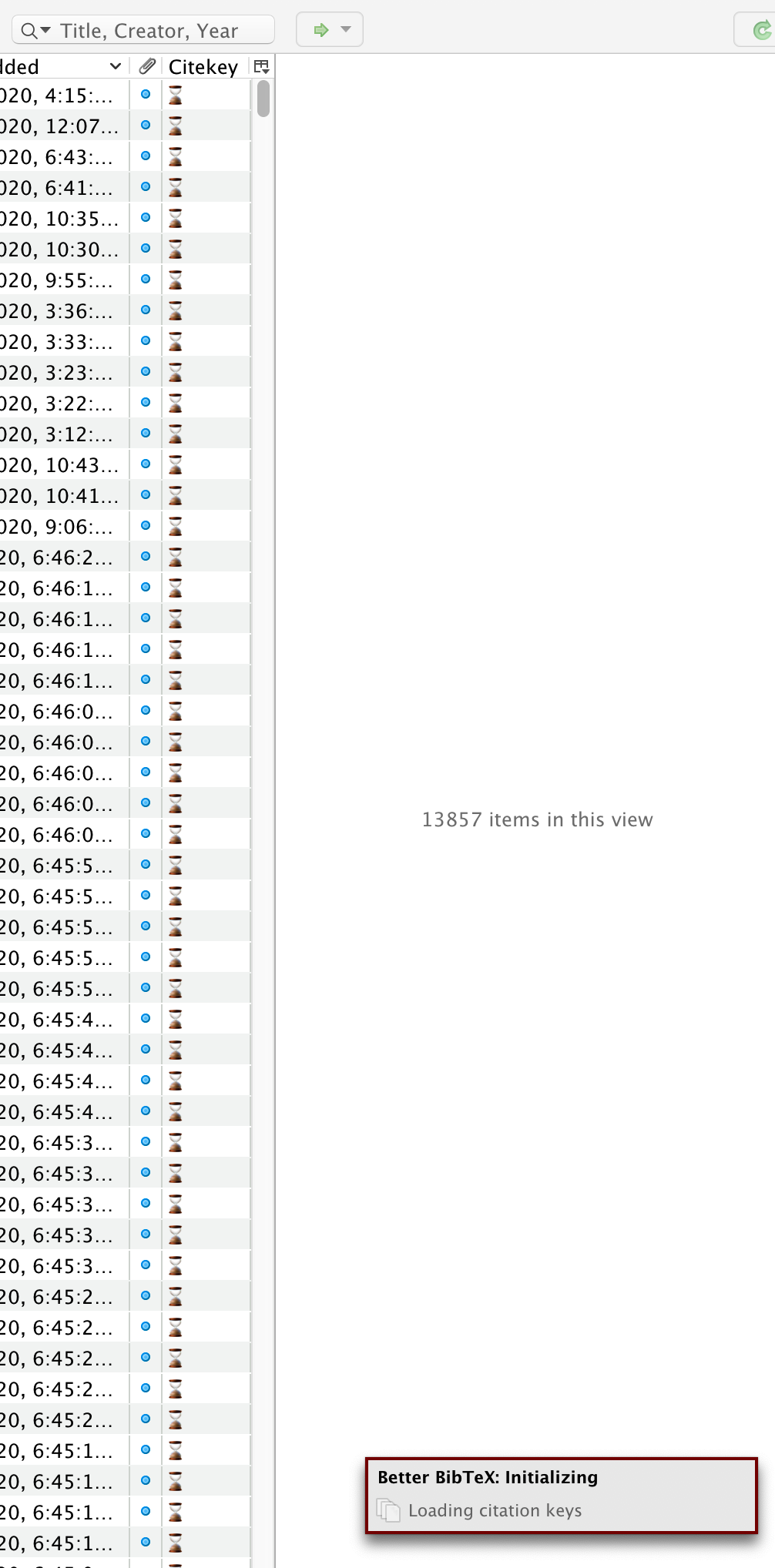
Ah. I just uninstalled BBT. Then reinstalled 5606. Now it's showing time-glass icons in the Citekey column. So I assume, I just need to let the citekeys run. For a long time given my database, presumably. Never seen these icons before.
Does that make sense?
jrennstich
on 13 Jan 2020
Sorry, I was unreachable for a while -- it was only in the cache (although I have no idea how you got there), so removing the cache files would have sufficed.
The icons are new. But if you only renamed, not deleted your better-bibtex.sqlite, you can move it back. 5608 will drop soon which will ignore the error in the cache, but just removing the .json files in the better-bibtex folder would have done it.
retorquere
on 13 Jan 2020
:robot: this is your friendly neighborhood build bot announcing test build 5.2.7.5608 ("how did you get items without metadata?")
Install in Zotero by downloading test build 5.2.7.5608, opening the Zotero "Tools" menu, selecting "Add-ons", open the gear menu in the top right, and select "Install Add-on From File...".
blip-bloop
on 13 Jan 2020
The strange thing I found earlier wasn't in the BBT database BTW, it was in the Zotero DB (which I don't touch). This error though is in the BBT DB, in the cache DB to be specific, but I really don't know yet how it could have gotten there.
retorquere
on 13 Jan 2020
How big is your Zotero storage dir including attachments? Would you be OK with me getting a copy so I can test this without disrupting you?
retorquere
on 13 Jan 2020
46 GB. That includes everything (the triple zotero.sqlite files, the files, etc.
jrennstich
on 13 Jan 2020
Thanks for the quick help. Deleting all the .json files did the trick. Updated to 5608. Clicking on "Export now" resulted in spinning wheel, no percentage updates (I guess, no reporter set up?). Here's the
Report-ID: DLJC24YA-euc
jrennstich
on 13 Jan 2020
Holy shit... the prep on your system takes 17 minutes. That's before BBT does anything at all. I have a 24k test library, and prep for that (on an empty cache) takes 11 seconds. It's the prep that causes the beachball for you. But this is insane.
Can you uninstall BBT, cmd-Q Zotero, and do a rough timing on the export of that lib with the standard Zotero BibTeX Exporter? Does that also take that long? I reckon it should, because it would do roughly the same prep.
To replicate this I should only need your zotero.sqlite and better-bibtex.sqlite (taken while Zotero is not running, cmd-Q). How big are those?
retorquere
on 13 Jan 2020
Holy shit... the prep on your system takes 17 minutes. That's before BBT does anything at all. I have a 24k test library, and prep for that (on an empty cache) takes 11 seconds. It's the prep that causes the beachball for you. But this is insane.
Welcome to my world.
Can you uninstall BBT, cmd-Q Zotero, and do a rough timing on the export of that lib with the standard Zotero BibTeX Exporter? Does that also take that long? I reckon it should, because it would do roughly the same prep.
Did as instructed. Took 17 sec. Checked it twice. Weird.
jrennstich
on 13 Jan 2020
To replicate this I should only need your zotero.sqlite and better-bibtex.sqlite (taken while Zotero is not running, cmd-Q). How big are those?
zotero.sqlite = 2.18 GB
bbt = 3.2 MB
jrennstich
on 13 Jan 2020
OK, and if you reinstall BBT, throw away the cache files, and then do a standard Zotero BibTeX export?
retorquere
on 13 Jan 2020
:robot: this is your friendly neighborhood build bot announcing test build 5.2.7.5612 ("why ItemGetter?")
Install in Zotero by downloading test build 5.2.7.5612, opening the Zotero "Tools" menu, selecting "Add-ons", open the gear menu in the top right, and select "Install Add-on From File...".
blip-bloop
on 13 Jan 2020
And is export any better on 5612?
retorquere
on 13 Jan 2020
I think It's be best if I got a copy of your database files. If I can reproduce the problem with that I should be able to hone in on the problem lots more easily.
retorquere
on 13 Jan 2020
How can I send it?
jrennstich
on 13 Jan 2020
retorquere
on 14 Jan 2020
Super frustrating all this. I'm using the actual prep framework that Zotero uses for exports. I have as of yet zero clue why this behaves so poorly for you specifically.
retorquere
on 14 Jan 2020
I'll need both.
retorquere
on 14 Jan 2020
:robot: this is your friendly neighborhood build bot announcing test build 5.2.7.5615 ("Revert \"why ItemGetter?\"\n\nThis reverts commit 58cb6b00e186841eba2bc52e48facfa83662ee8e.")
Install in Zotero by downloading test build 5.2.7.5615, opening the Zotero "Tools" menu, selecting "Add-ons", open the gear menu in the top right, and select "Install Add-on From File...".
blip-bloop
on 14 Jan 2020
And of course with your database on my system, it performs exactly as I am used to. Aggravating.
Can you cmd-q zotero, delete the cache files, and get me a log from 5615 exporting your library both to Better BibTeX and standard BibTeX?
retorquere
on 14 Jan 2020
Could it somehow be related to my Java set-up? Using Java 8 Update 231.
jrennstich
on 14 Jan 2020
I saw an email about a report id, but I don't see it here on github.
It shouldn't be possible that Java is related, but I'll install that version and see what happens.
retorquere
on 14 Jan 2020
Did as instructed. First time I tried, Zotero hung up. After 30 min I force-quitted it. Second time it worked. Rather fast given my standards.
Report-ID: HEJH6JFB-euc
jrennstich
on 14 Jan 2020
Did you clear the cache before the 2nd attempt?
retorquere
on 14 Jan 2020
I'm stuck in a 6.5 hour meeting followed by a 1.5 hour meeting so I won't be able to do much today.
retorquere
on 14 Jan 2020
Thx for the heads-up. Sorry about being sent to meeting-hell. I have to bring my MBP to the keyboard doctor. I have one of those bad ones it seems...
jrennstich
on 14 Jan 2020
Did you clear the cache before the 2nd attempt?
Yes!
jrennstich
on 14 Jan 2020
I was rather surprised seeing the totally different results from the first attempt.
jrennstich
on 14 Jan 2020
That's not what I'd hoped. Transient problems are the worst.
retorquere
on 14 Jan 2020
For perhaps later sessions (I thought the new MBPro's had the old keyboard again? Will it be gone long?), if Zotero really doesn't seem to start up,
/Applications/Zotero.app/Contents/MacOS/zotero -ZoteroDebugText > ~/zotero.log
will spit everything Zotero is doing to ~/zotero.log and that might tell me more about what it's stuck on.
retorquere
on 14 Jan 2020
One thing in HEJH6JFB-euc that's unexpected is that you're not using the serialization cache. When submitting a new log from 5617 (sorry) can you tick the include cache box? From a cold cache that shouldn't make a difference, but the 2nd export in this log should have used it. But both seem to be exports from an empty cache and that prep seems to have taken 15s... which is slower than I'd have expected given that your system is faster than mine, but sort of in line with what I would normally expect to see.
retorquere
on 14 Jan 2020
I'd still like to try to reproduce your problem locally... it'd be great if I could get a copy of your Zotero folder excluding attachments. Problem is, this will include your sync password for Zotero in prefs.js and/or user.js. I don't need (or want, actually) that, but the rest of the settings would give me a much more realistic view of your situation.
retorquere
on 14 Jan 2020
:robot: this is your friendly neighborhood build bot announcing test build 5.2.7.5617 ("prefs")
Install in Zotero by downloading test build 5.2.7.5617, opening the Zotero "Tools" menu, selecting "Add-ons", open the gear menu in the top right, and select "Install Add-on From File...".
blip-bloop
on 14 Jan 2020
Sorry, had to leave the MBP there. Hope to have it back in a few days.
jrennstich
on 14 Jan 2020
Alright. To be continued then.
retorquere
on 14 Jan 2020
The suspense is killing me. I want this fixed. You wouldn't happen to have backups from which you could take your Zotero directory?
retorquere
on 15 Jan 2020
Patience, young Skywalker. The replacement unit has been ordered.
jrennstich
on 15 Jan 2020
Ha! I might be older than you think.
retorquere
on 15 Jan 2020
Happily reunited. They had ordered the wrong keyboard and had to get another one...
New problem: I just updated to Zotero 5.0.82. When I try to install test build 5.2.7.5617 I get an error message:
The add-on "%S" could not be installed. It may be incompatible with this version of Zotero.
I am now running 56515.
jrennstich
on 22 Jan 2020
Happily reunited. They had ordered the wrong keyboard and had to get another one...
New problem: I just updated to Zotero 5.0.82. When I try to install test build 5.2.7.5617 I get an error message:
The add-on "%S" could not be installed. It may be incompatible with this version of Zotero.
I am now running 56515.
Report ID: Error: Request timed out (JZLSMKNX-euc, references: false)
Tried twice.
jrennstich
on 22 Jan 2020
:robot: this is your friendly neighborhood build bot announcing test build 5.2.10.5708 ("safeguard hitting root")
Install in Zotero by downloading test build 5.2.10.5708, opening the Zotero "Tools" menu, selecting "Add-ons", open the gear menu in the top right, and select "Install Add-on From File...".
blip-bloop
on 22 Jan 2020
Builds expire after a week.
retorquere
on 22 Jan 2020
But that you can't submit a debug log just adds to the craziness. All my tests pass as expected on 5.0.82, and I have no problem submitting a debug log.
retorquere
on 22 Jan 2020
Yeah. It's just all weird. Installed 5708. Currently running the export. Only got a short spinning wheel. Previously today it kept spinning for minutes before the actual export.
Report-ID: Error: Request timed out (XZPSIEWV-euc, references: false)
jrennstich
on 22 Jan 2020
What can I do about that reporting?
jrennstich
on 22 Jan 2020
I'm not yet sure. You can test whether it's a network issue (which would be unlikely, but who knows) by running
head -c $[20*1024*1024] < /dev/urandom > textfile.txt
time curl -H 'x-amz-storage-class: STANDARD' -H 'x-amz-acl: bucket-owner-full-control' -H 'Content-Type: text/plain' -X PUT -d @textfile.txt http://better-bibtex-error-reports-62200312-euc.s3-eu-central-1.amazonaws.com/jrennstich.txt
For me this takes about 20 seconds. You can remove the file textfile.txt after it's done, it's just (literally) random junk. This is assuming you don't have something important in textfile.txt because doing the above will obliterate it.
retorquere
on 22 Jan 2020
curl -H 'x-amz-storage-class: STANDARD' -H -H 'Content-Type: text/plain' -X 0.04s user 0.08s system 0% cpu 15.596 total
jrennstich
on 22 Jan 2020
There's stuff missing in that command line? Are you sure you copied it right? The file that ended up in the logs was also 9.9MB, not 20 as I had expected.
retorquere
on 22 Jan 2020
It was 21 MB here. Took 9 sec. I just did it again:
curl -H 'x-amz-storage-class: STANDARD' -H -H 'Content-Type: text/plain' -X 0.04s user 0.08s system 1% cpu 8.667 total
I assume this uploads the file that is being created?
jrennstich
on 22 Jan 2020
Yeah, but why is half the command line missing in what you pasted?
Super weird. It's 10MB now.
Can you run the script below and upload the generated file?
import random, string

line = ''.join([random.choice(string.ascii_letters) for i in range(20)])
text = '\n'.join([line for i in range(1024 * 1024)])
with open('textfile.txt', 'w+') as f:
  f.write('leader\n')
  f.write(text)
  f.write('\ntrailer')
(that's python BTW)
retorquere
on 22 Jan 2020
There ya go.
textfile.txt
jrennstich
on 22 Jan 2020
Can you upload it using curl as before? Then I can see whether the leader and trailer show up correctly.
retorquere
on 22 Jan 2020
Hope I did it right. Took longer now:
curl -H 'x-amz-storage-class: STANDARD' -H -H 'Content-Type: text/plain' -X 0.16s user 0.15s system 1% cpu 20.621 total
jrennstich
on 22 Jan 2020
:robot: this is your friendly neighborhood build bot announcing test build 5.2.10.5709 ("maybe fetch is better?")
Install in Zotero by downloading test build 5.2.10.5709, opening the Zotero "Tools" menu, selecting "Add-ons", open the gear menu in the top right, and select "Install Add-on From File...".
blip-bloop
on 22 Jan 2020
It's 20MB now. Must be something to do with that the original random-junk file was not actually text/plain.
OK, so there's no problem uploading files from your system. Can you try sending a new debug log from 5709? I used to use the Zotero methods for sending files but that build has the standard Firefox method. Maybe it makes a difference. But it shouldn't, really.
retorquere
on 22 Jan 2020
It worked. Did a second (hot cache) export with one added entry after the first cold one.
Report ID: XURPTTZ4-euc
jrennstich
on 22 Jan 2020
That's a keeper then. Strange, Zotero uses this method for all its sync work.
Whatever they did during the keyboard swap, you should do it again. I currently see a ~10s prep, 3.2 minute export for a cold cache, ~5s prep, 9s export for a hot cache. During these, only the prep should "beachball", and I think I can even do something about that, although I can't eliminate it fully.
retorquere
on 22 Jan 2020
Yep, that sounds about right. Spot on re beachball.
I think I can even do something about that, although I can't eliminate it fully.
Excellent.
Thanks for all the help.
jrennstich
on 22 Jan 2020
:robot: this is your friendly neighborhood build bot announcing test build 5.2.10.5710 ("stutter getter")
Install in Zotero by downloading test build 5.2.10.5710, opening the Zotero "Tools" menu, selecting "Add-ons", open the gear menu in the top right, and select "Install Add-on From File...".
blip-bloop
on 23 Jan 2020
You're very welcome.
The prep must run on the foreground thread, and if the foreground thread doesn't respond to screen redraws in a certain interval, the app is deemed hung, and we get the beachball. In the current Zotero architecture I can't make the prep async, but what 5710 does is every time two seconds have passed in the prep, it will yield to the UI code for 50msec, and assuming 2s is within the interval that the OS deems an app hung, this should "fix" it (or rather, hide it, and should en-passant make the UI semi-usable during prep) at the cost of prep taking roughly 2.5% longer than if it would just do the prep in one sitting.
retorquere
on 23 Jan 2020
Still strange though. Even in the improved situation, 24k takes on avg 90s on my system. And your system should be better than mine.
retorquere
on 23 Jan 2020
Report ID: 687615
Works as it should here.
jrennstich
on 23 Jan 2020
No beachball? Even on a cold cache?
retorquere
on 23 Jan 2020
Barely. Popped up, gone. Not even even a sec, I'd say.
jrennstich
on 23 Jan 2020
That's not a bbt debug code btw, but if it currently works as desired, I don't need one. If all's good, I'm going to merge and cut a new release.
retorquere
on 23 Jan 2020
:robot: this is your friendly neighborhood build bot announcing test build 5.2.10.5712 ("yield more often")
Install in Zotero by downloading test build 5.2.10.5712, opening the Zotero "Tools" menu, selecting "Add-ons", open the gear menu in the top right, and select "Install Add-on From File...".
blip-bloop
on 23 Jan 2020
5712 shouldn't beach-ball at all. I've set the mix to 1s/10ms.
retorquere
on 23 Jan 2020
Sorry, I forgot to first go into debug mode, so there is an export process that's begun already. Installed 5712 anew and then did the usual cold cache, hot cache mix.
No beachball. Short pause (states "running," but no action visible, before % start under "Cached"). Cold cache took considerably longer than in the previous tests today.
Report ID: 6KGHWDBP-euc
jrennstich
on 23 Jan 2020
:robot: this is your friendly neighborhood build bot announcing test build 5.2.10.5713 ("structured logging")
Install in Zotero by downloading test build 5.2.10.5713, opening the Zotero "Tools" menu, selecting "Add-ons", open the gear menu in the top right, and select "Install Add-on From File...".
blip-bloop
on 23 Jan 2020
Can I get a new log from 5713?
retorquere
on 23 Jan 2020
No beachball. Short pause (states "running," but no action visible, before % start under "Cached").
That's explainable -- normal (old-style) exports interleave output generation with item fetching from the Zotero database. The background exports cannot do this. So I pre-fetch all the items and collections (aka "prep"), and then start the export. While the prep is running, the cache percentage won't change.
Cold cache took considerably longer than in the previous tests today.
I don't like that word "considerably". If anything it should be slightly faster, because the minimum sleep between item batch fetching went from 50msecs per 2sec (2.5% minimum overhead) to 10msecs per 1sec (1% minimum overhead).
I say "minimum" because javascript is a strictly synchronous language, and until something says "I can wait at this point", code runs to completion. So if I say "I wait 10msecs", I'm actually saying "someone else can run now, and I don't need control back for 10msecs", but if that other takes 5 minutes, that's how long I'll have to wait, or if someone was already waiting to get a turn, that one will go first. Performance of async code is hard to predict in that sense. But if nothing else is going on, it should return after (approx) 10msecs.
retorquere
on 23 Jan 2020
Report ID: 2STH75I8-euc
No beachball. Cold cache still slow. Hot cache also slower than previously.
jrennstich
on 23 Jan 2020
I have all sorts of java-script errors within Zotero. Does this help?
Report ID for Zotero: 842914664
[JavaScript Error: "Style with ID http://www.zotero.org/styles/apa already loaded from apa.csl" {file: "chrome://zotero/content/xpcom/style.js" line: 178}]
Zotero.Styles</_readStylesFromDirectory<@chrome://zotero/content/xpcom/style.js:178:15
tryCatcher@resource://zotero/loader.jsm -> resource://zotero/bluebird/util.js:16:16
module.exports/PromiseSpawn.prototype._promiseFulfilled@resource://zotero/loader.jsm -> resource://zotero/bluebird/generators.js:97:18
module.exports/Promise.prototype._settlePromise@resource://zotero/loader.jsm -> resource://zotero/bluebird/promise.js:574:17
module.exports/Promise.prototype._settlePromise0@resource://zotero/loader.jsm -> resource://zotero/bluebird/promise.js:614:5
module.exports/Promise.prototype._settlePromises@resource://zotero/loader.jsm -> resource://zotero/bluebird/promise.js:693:13
Async.prototype._drainQueue@resource://zotero/loader.jsm -> resource://zotero/bluebird/async.js:133:13
Async.prototype._drainQueues@resource://zotero/loader.jsm -> resource://zotero/bluebird/async.js:143:5
Async/this.drainQueues@resource://zotero/loader.jsm -> resource://zotero/bluebird/async.js:17:9


[JavaScript Error: "Style with ID http://www.zotero.org/styles/apa already loaded from apa.csl" {file: "chrome://zotero/content/xpcom/style.js" line: 178}]
Zotero.Styles</_readStylesFromDirectory<@chrome://zotero/content/xpcom/style.js:178:15
tryCatcher@resource://zotero/loader.jsm -> resource://zotero/bluebird/util.js:16:16
module.exports/PromiseSpawn.prototype._promiseFulfilled@resource://zotero/loader.jsm -> resource://zotero/bluebird/generators.js:97:18
module.exports/Promise.prototype._settlePromise@resource://zotero/loader.jsm -> resource://zotero/bluebird/promise.js:574:17
module.exports/Promise.prototype._settlePromise0@resource://zotero/loader.jsm -> resource://zotero/bluebird/promise.js:614:5
module.exports/Promise.prototype._settlePromises@resource://zotero/loader.jsm -> resource://zotero/bluebird/promise.js:693:13
Async.prototype._drainQueue@resource://zotero/loader.jsm -> resource://zotero/bluebird/async.js:133:13
Async.prototype._drainQueues@resource://zotero/loader.jsm -> resource://zotero/bluebird/async.js:143:5
Async/this.drainQueues@resource://zotero/loader.jsm -> resource://zotero/bluebird/async.js:17:9


Warning: NetUtil.newChannel(uri) deprecated, please provide argument 'aWhatToLoad'

[JavaScript Error: "TypeError: this.keyformat is undefined" {file: "chrome://zotero-better-bibtex/content/BetterBibTeX.Preferences.js" line: 214}]
getCitekeyFormat@chrome://zotero-better-bibtex/content/BetterBibTeX.Preferences.js:214:32
onfocus@chrome://zotero/content/preferences/preferences.xul:1:1
focusInit@chrome://global/content/bindings/dialog.xml:170:15


[JavaScript Error: "XML Parsing Error: no root element found
Location: http://s3.eu-central-1.amazonaws.com/ping
Line Number 1, Column 1:" {file: "http://s3.eu-central-1.amazonaws.com/ping" line: 1}]

[JavaScript Error: "XML Parsing Error: no root element found
Location: http://s3.ap-southeast-1.amazonaws.com/ping
Line Number 1, Column 1:" {file: "http://s3.ap-southeast-1.amazonaws.com/ping" line: 1}]

[JavaScript Error: "XML Parsing Error: no root element found
Location: http://s3.eu-central-1.amazonaws.com/ping
Line Number 1, Column 1:" {file: "http://s3.eu-central-1.amazonaws.com/ping" line: 1}]

[JavaScript Error: "XML Parsing Error: no root element found
Location: http://s3.ap-southeast-1.amazonaws.com/ping
Line Number 1, Column 1:" {file: "http://s3.ap-southeast-1.amazonaws.com/ping" line: 1}]

version => 5.0.82, platform => MacIntel, oscpu => Intel Mac OS X 10.15, locale => en-US, appName => Zotero, appVersion => 5.0.82, extensions => Zotero DOI Manager (1.3.9, extension), ZotFile (5.0.14, extension), Zutilo Utility for Zotero (3.3.3, extension), ZoteroQuickLook (1.4.2, extension), Zotero Word for Mac Integration (5.0.24.SA.5.0.82, extension), Zotero LibreOffice Integration (5.0.21.SA.5.0.82, extension), Better BibTex for Zotero (5.2.10.5713, extension), Shockwave Flash (32.0.0.321, plugin), Zotero automatic export (1.2.4, extension, disabled)
Report ID: 2STH75I8-euc
No beachball. Cold cache still slow. Hot cache also slower than previously.
I'm seeing:
- cold: 205s, of which 6.3s prep
- hot: 32s, of which 12.5s prep
this might mean that part of the prep is inefficient. I can look at that. The error in the prefs pane needs attention but is not related to this.
retorquere
on 23 Jan 2020
:robot: this is your friendly neighborhood build bot announcing test build 5.2.10.5714 ("no cloning necessary for item2export cache")
Install in Zotero by downloading test build 5.2.10.5714, opening the Zotero "Tools" menu, selecting "Add-ons", open the gear menu in the top right, and select "Install Add-on From File...".
blip-bloop
on 23 Jan 2020
Can you try 5714?
retorquere
on 23 Jan 2020
The
Style with ID http://www.zotero.org/styles/apa already loaded
is not mine, that's always in Zotero. I have a build running which should remove the prefs pane errors.
retorquere
on 23 Jan 2020
:robot: this is your friendly neighborhood build bot announcing test build 5.2.10.5718 ("fetch all the things")
Install in Zotero by downloading test build 5.2.10.5718, opening the Zotero "Tools" menu, selecting "Add-ons", open the gear menu in the top right, and select "Install Add-on From File...".
blip-bloop
on 23 Jan 2020
Can you try 5714?
Do you still want me to try 5714 in addition?
jrennstich
on 23 Jan 2020
No, 5718 will do.
retorquere
on 24 Jan 2020
As per usual. Cold + hot cache.
Report ID: DDERWKRK-euc
jrennstich
on 24 Jan 2020
Another one out of a real-life working scenario. The hot-cache now still takes a bit longer than in previous versions it seems to me (no cold cache here). I only added two entries and changed another
Report ID: TJVMIQHG-euc
jrennstich
on 24 Jan 2020
That's:
- cold: 231s, of which 9.8s prep
- hot (or rather, very warm: 13828/13869 cached): 15s, of which 10.6 seconds prep
I'm surprised that the prep isn't faster. For reference, for 24k items I'm getting:
- 24352 items, 2.538066688567674msec/item, total duration 61.807s of which 7.539s prep, serialization cache 0%, export cache 0%
- 24352 items, 2.619415243101183msec/item, total duration 63.788s of which 7.767s prep, serialization cache 0%, export cache 0%
- 24352 items, 2.5694809461235217msec/item, total duration 62.572s of which 54.147s prep, serialization cache 0%, export cache 100%
It's a little disappointing that the cache seems to be an even trade-off, which actually makes it a worse trade-off. It's also different than I'm used to seeing, where the sum-total time would be an order of magnitude different. I'm doing a few more experiments and then I'll get a new build to you.
retorquere
on 24 Jan 2020
I am freak, it seems. Well, my Mac is :-)
jrennstich
on 24 Jan 2020
That hot-cache takes longer than previous hot-cache exports is explainable - I'm inserting delays of a minimum length but in principle no upper bound in the prep - it's guaranteed that it'd be slower, but noticeably so is a shame.
The new build should give more precise insight, but it'll take a a few hours before I'm home to trigger the build.
retorquere
on 24 Jan 2020
No wait, that was because I disabled the serialization cache. Oy vey.
It's hard to get meaningful, consistent numbers. For short tests, the overhead of Zotero dominates the number. Large tests take 5-10 minutes so it's painful to run a bunch of them. Here's the current run on my system:
- 24352 items, 3.883130749014455msec/item, total duration 94.562s of which 11.208s prep, serialization cache 0%, export cache 0%
- 24352 items, 6.06315703022339msec/item, total duration 147.65s of which 24.92s prep, serialization cache 100%, export cache 0%
- 24352 items, 0.7837549277266754msec/item, total duration 19.086s of which 8.743s prep, serialization cache 100%, export cache 100%
Also, CSL export is shockingly slow compared to BibTeX. I need to look into that. A new build is incoming.
retorquere
on 24 Jan 2020
:robot: this is your friendly neighborhood build bot announcing test build 5.2.10.5720 ("clearer stats")
Install in Zotero by downloading test build 5.2.10.5720, opening the Zotero "Tools" menu, selecting "Add-ons", open the gear menu in the top right, and select "Install Add-on From File...".
blip-bloop
on 24 Jan 2020
Report ID: KIKGLILA-euc
No real visible changes for the better her, I'm afraid.
jrennstich
on 24 Jan 2020
Decisions, decisions.
With beachball protection:
| items | duration | prep | serialization | export |
| --- | --- | --- | --- | --- |
| 24352 items, | total duration 115.932s | of which 11.641s prep, | serialization cache 0%, | export cache 0% |
| 24352 items, | total duration 19.936s | of which 9.774s prep, | serialization cache 100%, | export cache 100% |
| 24352 items, | total duration 21.081s | of which 11.279s prep, | serialization cache 100%, | export cache 100% |
| 24352 items, | total duration 8.524s | of which 3.886s prep, | serialization cache 100%, | export cache 100% |
| 24352 items, | total duration 14.346s | of which 3.521s prep, | serialization cache 100%, | export cache 100% |
| 24352 items, | total duration 14.59s | of which 6.831s prep, | serialization cache 100%, | export cache 100% |
| 24352 items, | total duration 21.748s | of which 10.13s prep, | serialization cache 100%, | export cache 100% |
| 24352 items, | total duration 20.905s | of which 10.246s prep, | serialization cache 100%, | export cache 100% |
| 24352 items, | total duration 20.135s | of which 11.312s prep, | serialization cache 100%, | export cache 100% |
without beachball protection:
| items | duration | prep | serialization | export |
| --- | --- | --- | --- | --- |
| 24352 items | total duration 59.485s | of which 10.371s prep | serialization cache 0% | export cache 0% |
| 24352 items | total duration 7.529s | of which 3.331s prep | serialization cache 100% | export cache 100% |
| 24352 items | total duration 7.654s | of which 3.258s prep | serialization cache 100% | export cache 100% |
| 24352 items | total duration 7.429s | of which 3.24s prep | serialization cache 100% | export cache 100% |
| 24352 items | total duration 7.381s | of which 3.223s prep | serialization cache 100% | export cache 100% |
| 24352 items | total duration 7.371s | of which 3.262s prep | serialization cache 100% | export cache 100% |
| 24352 items | total duration 7.434s | of which 3.349s prep | serialization cache 100% | export cache 100% |
| 24352 items | total duration 7.484s | of which 3.348s prep | serialization cache 100% | export cache 100% |
| 24352 items | total duration 7.523s | of which 3.375s prep | serialization cache 100% | export cache 100% |
retorquere
on 24 Jan 2020
KIKGLILA-euc shows:
- cool: total duration 226.875s of which 11.72s prep
- hot: total duration 17.789s of which 12.106s prep
which is still ridiculous compared to my system. And travis.
this is with beachball protection.
retorquere
on 24 Jan 2020
yep. I don't get it either.
jrennstich
on 24 Jan 2020
:robot: this is your friendly neighborhood build bot announcing test build 5.2.10.5721 ("use native setTimeout")
Install in Zotero by downloading test build 5.2.10.5721, opening the Zotero "Tools" menu, selecting "Add-ons", open the gear menu in the top right, and select "Install Add-on From File...".
blip-bloop
on 24 Jan 2020
There's so much strangeness here.
- My cold-cache does 24k items in approx half the time you export 13k items -- and then your scenario is actually a cool-cache, not a cold-cache1.
- the hot-cache scenario sits closer in absolute time but there's still the 1.8 times more items issue.
- the time not spent in prep is spent in a separate thread which is not (cannot be!) interrupted by anything once started and runs to completion in one go.
All these differences on a machine that's as far as we know inferior to yours:
  Model Name:   MacBook Pro
  Model Identifier: MacBookPro15,1
  Processor Name:   6-Core Intel Core i7
  Processor Speed:  2,2 GHz
  Number of Processors: 1
  Total Number of Cores:    6
  L2 Cache (per Core):  256 KB
  L3 Cache: 9 MB
  Hyper-Threading Technology:   Enabled
  Memory:   16 GB
  Boot ROM Version: 1037.60.58.0.0 (iBridge: 17.16.12551.0.0,0)
right now even if I had your system in my hands I wouldn't know where to begin to look. I'm still going through KIKGLILA-euc -- there must be something there to explain the difference.
1 BBT has multiple caches -- one for each translator, and one that caches the items as Zotero hands them to translators. Zotero hands translators a serialized copy of the items you export, and this serialization is pretty heavyweight. In your logs I don't see traces of a cache reset, but I can see that the translator cache is empty for the cool export, but also that the serialization cache is full. If the serialization cache were empty, it would be slower still.
retorquere
on 24 Jan 2020
Can you turn off automatic syncing and syncing of full-text content and try again?
retorquere
on 24 Jan 2020
I'm still going through KIKGLILA-euc -- there must be something there to explain the difference.
I cannot thank you enough for that persistence.
Seems faster. One change I noticed: usually it races to the 30s (%) and the starts to slow down bit by bit. Now that behavior started in the 50s.
Report ID: ZHW8VP7Y-euc
jrennstich
on 25 Jan 2020
I'd also still like to see if I can replicate the problem if I get your (mostly) full Zotero profile. It'd be a bit of work on your part to get that done; locating the profile, making sure your sync creds aren't in there, and then getting it to me. I don't need the attachments (your scenarios didn't include file exports I think).
retorquere
on 25 Jan 2020
K. So what do I do? Turn off sync again? Then copy all files except attachments (folder "storage")? Do you need the backups as well (zotero.sqlite.bak and zotero.sqlite.1.bak)? The folder "papermachines"?
Could you plz send the link for the upload?
jrennstich
on 25 Jan 2020
ZHW8VP7Y-euc does seem faster, but not much:
- 13875 items, total duration 197.089s of which 6.057s prep, serialization cache 99.9927927927928%, export cache 0%
- 13876 items, total duration 10.33s of which 7.352s prep, serialization cache 99.98558662438744%, export cache 99.93513980974345%
In the hot-cache scenario I previously saw a lot of activity where Zotero is checking attachment modifications, which it seems to do as part of a running sync. I could see how that could in principle affect export speed, but with the worker exports, it just shouldn't. It isn't present in ZHW8VP7Y-euc. In that log, I only see BBT activity while the export is running.
You can turn on sync again. Turns out you don't have to remove your sync creds; the password is not stored in the prefs, and your username is public anyhow (if it is indeed a lot shorter than your github username).
retorquere
on 25 Jan 2020
I left out all the .bak files. Correct?
jrennstich
on 25 Jan 2020
1.04 GB on their way.
jrennstich
on 25 Jan 2020
I left out all the .bak files. Correct?
Correct.
retorquere
on 25 Jan 2020
Alright. I'll give that a go.
Another thing we could try is running the test suite on your system. But you'd need to have node and python 3. Node is easy to install. For python3 I'd recommend miniconda.
retorquere
on 25 Jan 2020
I have a Python 3 installation, PythonLauncher (Version 3.6.2 (3.6.2)). Not quite sure how to work it tho.
jrennstich
on 25 Jan 2020
There's some setup, the rest is automated. Before anything else, I would not at all hold it against you if what follows sounds scary, and you'd rather not. If you have even an inkling of a doubt, don't do it. I'm very serious about this. I've done this for years, across multiple systems, but you need not necessarily accept the same risks I do.
The instructions to set up the tests are here. Once that is all done and verified, you can run
./test/behave --nightly --tags @rbwl
which will run the 24k test. ./test/behave will run all tests but the most heavyweight ones.
I will say, even after years of working with BBT, running the tests and seeing Zotero run like a pianola is still mesmerizing.
retorquere
on 25 Jan 2020
Ok. I am backing up first :-)
jrennstich
on 25 Jan 2020
(But I am relatively paranoid about backing up anyway.)
jrennstich
on 25 Jan 2020
OK, sorry, really silly q: when trying to follow the installation instructions, I am being told that I need to update my pip:
You are using pip version 18.1, however version 20.0.2 is available.
I'd forgo this, but I am unable to run the pip3 install -r requirements command because:
Could not open requirements file: [Errno 2] No such file or directory: 'requirements'
When I do this with the pip install --upgrade pip command, it goes for the Python 2.7 installation I have on my Mac, at least that's what I gather from this output:
Collecting pip
  Downloading https://files.pythonhosted.org/packages/54/0c/d01aa759fdc501a58f431eb594a17495f15b88da142ce14b5845662c13f3/pip-20.0.2-py2.py3-none-any.whl (1.4MB)
    100% |████████████████████████████████| 1.4MB 851kB/s
Installing collected packages: pip
  Found existing installation: pip 9.0.1
    Uninstalling pip-9.0.1:
Exception:
Traceback (most recent call last):
  File "/Library/Python/2.7/site-packages/pip-9.0.1-py2.7.egg/pip/basecommand.py", line 215, in main
    status = self.run(options, args)
  File "/Library/Python/2.7/site-packages/pip-9.0.1-py2.7.egg/pip/commands/install.py", line 342, in run
    prefix=options.prefix_path,
  File "/Library/Python/2.7/site-packages/pip-9.0.1-py2.7.egg/pip/req/req_set.py", line 778, in install
    requirement.uninstall(auto_confirm=True)
  File "/Library/Python/2.7/site-packages/pip-9.0.1-py2.7.egg/pip/req/req_install.py", line 754, in uninstall
    paths_to_remove.remove(auto_confirm)
  File "/Library/Python/2.7/site-packages/pip-9.0.1-py2.7.egg/pip/req/req_uninstall.py", line 115, in remove
    renames(path, new_path)
  File "/Library/Python/2.7/site-packages/pip-9.0.1-py2.7.egg/pip/utils/__init__.py", line 267, in renames
    shutil.move(old, new)
  File "/System/Library/Frameworks/Python.framework/Versions/2.7/lib/python2.7/shutil.py", line 323, in move
    rmtree(src)
  File "/System/Library/Frameworks/Python.framework/Versions/2.7/lib/python2.7/shutil.py", line 270, in rmtree
    rmtree(fullname, ignore_errors, onerror)
  File "/System/Library/Frameworks/Python.framework/Versions/2.7/lib/python2.7/shutil.py", line 275, in rmtree
    onerror(os.remove, fullname, sys.exc_info())
  File "/System/Library/Frameworks/Python.framework/Versions/2.7/lib/python2.7/shutil.py", line 273, in rmtree
    os.remove(fullname)
OSError: [Errno 13] Permission denied: '/Library/Python/2.7/site-packages/pip-9.0.1-py2.7.egg/EGG-INFO/PKG-INFO'
Any suggestions how to complete the installation?
jrennstich
on 25 Jan 2020
That should have been pip3 install -r requirements.txt. The site has been updated, but will take some time to deploy, in the interim, this will work I think.
We can also hop on gitter if you want.
retorquere
on 25 Jan 2020
I'm not entirely sure, but it looks like zotero_jkr was taken while Zotero was still running, as I see .sqlite-journal files. I'd prefer a copy of when Zotero is not running (cmd-Q).
Also, is it correct that this is the list of plugins you currently have installed?
- Zotero DOI Manager (1.3.9, extension)
- ZotFile (5.0.14, extension)
- Zutilo Utility for Zotero (3.3.3, extension)
- ZoteroQuickLook (1.4.2, extension)
- Zotero Word for Mac Integration (5.0.24.SA.5.0.82, extension)
- Zotero LibreOffice Integration (5.0.21.SA.5.0.82, extension)
- Better BibTex for Zotero (5.2.10.5721, extension)
- Zotero automatic export (1.2.4, extension, disabled)
retorquere
on 27 Jan 2020
I am pretty sure I cmd-q'ed Zotero. There's one file betterbibtex-lokijs.sqlite-journal that's present in my folder even though I have most definitely quit Zotero now. So if I send it again, this one would be in there as well or when I leave it out, you should have the same copy as sent previously.
Sending them nonetheless now. Profiles have been uploaded, the Zotero folder takes a bit has been sent.
Also, is it correct that this is the list of plugins you currently have installed?
All correct.
jrennstich
on 27 Jan 2020
The earlier zip had:
better-bibtex
better-bibtex-serialized-items.json
better-bibtex.sqlite
better-bibtex.sqlite-journal
betterbibtex-lokijs.sqlite-journal
betterbibtex.sqlite.bak
locate
papermachines
pdfinfo-MacIntel
pdfinfo-MacIntel.version
pdfinfo.sh
pdftotext-MacIntel
pdftotext-MacIntel.version
pipes
styles
translators
zotero.sqlite
zotero.sqlite-journal
betterbibtex-lokijs.sqlite-journal doesn't matter (you can delete it), but better-bibtex.sqlite-journal and zotero.sqlite-journal indicate Zotero was still running. Unless it crashed unceremoniously.
I'm downloading the new ones now.
retorquere
on 27 Jan 2020
These look good. Setting up the tests around them later today.
retorquere
on 27 Jan 2020
I don't know why it should make such a difference (since it is disabled), but simply removing the disabled auto-exporting plugin seemed to solve a substantial part of the problem when exporting with your profile.
retorquere
on 29 Jan 2020
Yes, I noticed that as well today.
jrennstich
on 29 Jan 2020
There's also still after removal an "auto-export to" entry in the right-click menu of "my library". The only thing I can imagine putting it there is that plugin.
It's still not solved though. I'm watching the Zotero object serialization happening, and the duration per serialization is climbing steadily. The strange thing about this is that
- BBT has nothing to do with this. It caches the results so it doesn't have to be done unnecessarily, but I also log the "native" serialization for when the cache entry isn't there, and it's that number that is climbing.
- Absolutely nothing else appears in the logs during serialization. Just "native" (started at 15msecs, now at 67msecs) and the cache store (0msecs).
During this time, nothing is changing about these items, so it can't be a plugin that listens to item changes. If there's something interfering (but what?!), it also logs nothing.
retorquere
on 29 Jan 2020
Well at least it's reproducible locally. I haven't been able to automate running this test -- there's something weird about this profile, I can't just use it as a replacement for the existing test profile as extensions don't get installed in it, so I have to do this by hand, one by one.
retorquere
on 29 Jan 2020
I am sort of relieved that it's no me, my imagination and my set-up. Sorry to burden you with this.
jrennstich
on 29 Jan 2020
Yeah, no worries. Definitely not you. Super aggravating to wait out just the bloody serialization. Takes forever.
Installing these plugins (sans auto-exporting) does not reproduce the problem though. It's specifically this profile.
retorquere
on 29 Jan 2020
Could it be something in the Zotero database? But that would log, I would assume. I always suspected it had to do with the fact, that I moved those entries many times from one software to another. I started out with Endnote 1.0 and tried them all, but finally settled for Zotero.
jrennstich
on 29 Jan 2020
Installing these plugins (sans auto-exporting) does not reproduce the problem though. It's specifically this profile.
So kill it?
jrennstich
on 29 Jan 2020
Not yet.
retorquere
on 29 Jan 2020
It's also not in the Zotero DB because I've ran a test with my test profile + your databases + your extensions. No problem.
retorquere
on 29 Jan 2020
There's also still after removal an "auto-export to" entry in the right-click menu of "my library". The only thing I can imagine putting it there is that plugin.
Never mind, that was me.
retorquere
on 29 Jan 2020
It's also not in the Zotero DB because I've ran a test with my test profile + your databases + your extensions. No problem.
that's VERY good to know
jrennstich
on 29 Jan 2020
Damn. I was wrong. Good news, I think I've found the cause. Bad news, there may not be much I can do about this.
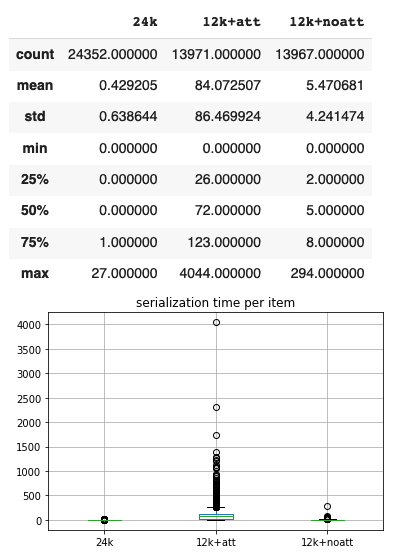
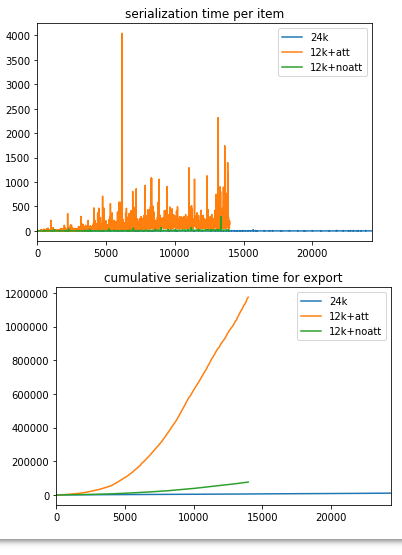
Your 13k had a sum total of some 22.6k attachments, and from the looks of it, serialization of attachments is not only slower than of regular items, that slowness is in some way increasing if I'm reading this right. The charts plot the per-toplevel-item serialization time (including any attachments and notes on that item) for my 24k lib (no attachments, no notes), your original lib (13k+att) and your lib with all attachments and notes deleted (13k+noatt)
Since most of your items have attachments, it would make sense that serialization per item would take longer. What doesn't make sense to me is that the per-item time seems to grow for your library rather than be a fairly constant higher number than my 24k.
The serialization cache will take take the pain out of of this for subsequent exports (you won't hit the native serializer for items that are in the serialization cache), but that is by default dropped when you upgrade to new Zotero versions, as the format of the serialized objects does sometimes change.
Am I reading this chart right?
retorquere
on 30 Jan 2020
Am I reading this chart right?
I think so. The green line is, as you point out, still puzzling, but the orange line pretty much tells the story of my BBT life :-) Basically I have no choice but to simply live with this and not update BBT too often.
- Would reducing the overall number of attachments help? (Not by much but a little, is my hypothesis). I don't really need many snapshots (especially for journal entries). I do, however, rely on Zotero as my main digital repository for all my research documents (mostly PDFs, some of them rather large - could that be a factor?).
- Am I right to assume, it would make no difference, whether I use the (suggested) Zotero sync and instead sync the files using another option (Dropbox, etc.).
I cannot thank you enough for all your incredible assistance and help with this!
jrennstich
on 30 Jan 2020
What's this large spike in the serialization per item chart? Is that related to the size of an attachment?
jrennstich
on 30 Jan 2020
I think so. The green line is, as you point out, still puzzling,
I can probably get to the bottom of that, but if that was all, I'd probably let it slide. The orange line is really problematic. I've posted on zotero-dev but it usually takes a while before things are picked up there. And it's not certain it is a priority for the Zotero devs -- from their point of view these kinds of exports are likely niche concerns.
but the orange line pretty much tells the story of my BBT life :-) Basically I have no choice but to simply live with this and not update BBT too often.
Actually that won't hurt. The serialization cache is dropped when Zotero upgrades, not when BBT updates.
1. Would reducing the overall number of attachments help? (Not by much but a little, is my hypothesis). I don't really need many snapshots (especially for journal entries). I do, however, rely on Zotero as my main digital repository for all my research documents (mostly PDFs, some of them rather large - could that be a factor?).
Yeah come on, let's not go that route. You need to be able to use Zotero as usual. I'd sooner try to implement a background serializer that would do these before any exports are kicked off. Not simple (nothing is simple when it comes to caching) but not in principle impossible.
It is a factor, but with n2 time complexity, this is always going to be a problem.
2. Am I right to assume, it would make no difference, whether I use the (suggested) Zotero sync and instead sync the files using another option (Dropbox, etc.).
Nope. Just the fact that these attachments are known to Zotero is the issue, it doesn't matter how they're known.
I cannot thank you enough for all your incredible assistance and help with this!
My pleasure. I'll be a little intermittent for at least a few days BTW -- I've been down with pneumonia since Tuesday.
What's this large spike in the serialization per item chart? Is that related to the size of an attachment?
Nope, size doesn't factor into it (or I wouldn't have seen it -- I don't have your attachments). The most likely explanation is that somethings was waithing urgently for the beachball protection to kick in and it took its chance. The serialization speed measures wall-clock time, so it's not an entirely clear measure, but the trend is pretty clear.
retorquere
on 30 Jan 2020
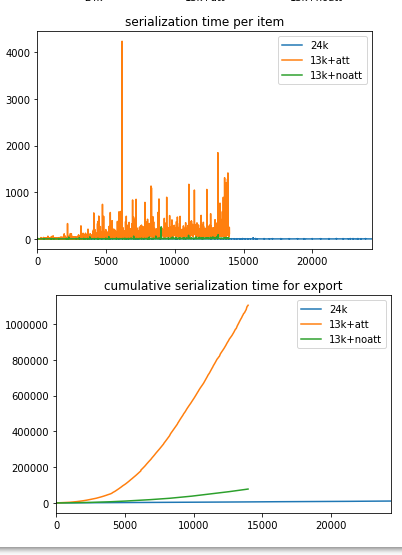
This is with beachball protection off. I can't tell the difference.
retorquere
on 30 Jan 2020
This is with beachball protection off. I can't tell the difference.
Me neither
jrennstich
on 31 Jan 2020
The zotero serializer is a shallow wrapper around another function. I'm going to see if I can just rebuild the serializer. For attachments they do extra work that's not relevant to bbt because I already have to strip and rebuild it anyway for the background exports.
retorquere
on 31 Jan 2020
:robot: this is your friendly neighborhood build bot announcing test build 5.2.11.5766 ("Merge branch 'gh-1389' into gh-1389-itoe")
Install in Zotero by downloading test build 5.2.11.5766, opening the Zotero "Tools" menu, selecting "Add-ons", open the gear menu in the top right, and select "Install Add-on From File...".
blip-bloop
on 1 Feb 2020
I think I've found the problem.
There may be a way to fix this if there is a structurally faster way to check whether a file exists, which there may well be -- there are two libraries for file handling in Firefox, and the newer one seems to be preferred by Mozilla over the slightly older one Zotero uses for most things, but whether that gets us a performance benefit is as of yet unknown.
If there isn't such a faster method, it would require a breaking change to a function used by some translators. Not many, just 6 AFAICT, but Zotero isn't big on breaking changes for translators (for fairly good reasons).
5766 has the private native serializer. Give that a shot. From my measurements it seems so fast that using caching might actually cost performance.
retorquere
on 1 Feb 2020
Works def faster. Will test it with citr later.
Report ID: REYC9USB-euc
jrennstich
on 1 Feb 2020
I'd say.
On my own tests with your profile:
- cold cache: total duration 178.384s of which 7.475s prep.
REYC9USB-euc:
- cold cache: total duration 226.577s of which 8.192s prep
- hot cache: total duration 15.622s of which 9.585s prep

Which still does not explain the difference between our systems but jeez louise this is a keeper.
15s is still too slow for citr I'd say, but combined with the endpoint I proposed so citr can set up an auto-export I'd say we've struck gold. I'm going to bake another version with serialization caching to see if that improves matters further,
retorquere
on 1 Feb 2020
I cannot say it often enough: Danke, grazie, thank you, merci!
jrennstich
on 1 Feb 2020
I cannot say it often enough: Danke, grazie, thank you, merci!
You're welcome 👍
Hoooly crap ..... I've tested with the serialization cache reenabled, and it's now:
- cold: total duration 268.368s of which 127.453s prep 😦
- hot: total duration 6.779 of which 3.132s prep 🎉
that seems a tradeoff worth making!
retorquere
on 1 Feb 2020
To think 3 weeks ago we were struggling with 17-minute exports... thanks for sticking this one out, could not have done it without your persistence.
retorquere
on 1 Feb 2020
Downside of this is that the serialization cache now only works for worker exports, not "regular" exports (with "background exporters" set to 0). To which I'd say "don't do those then".
retorquere
on 1 Feb 2020
:robot: this is your friendly neighborhood build bot announcing test build 5.2.11.5778 ("Merge branch 'master' into gh-1389")
Install in Zotero by downloading test build 5.2.11.5778, opening the Zotero "Tools" menu, selecting "Add-ons", open the gear menu in the top right, and select "Install Add-on From File...".
blip-bloop
on 1 Feb 2020
5778 will let you play along. There's a few open reports which I wish the posters would just respond to so I can fix what's there to fix, but I'm rolling this into a new release between now and a few days.
Thanks so much for reporting this!
retorquere
on 1 Feb 2020
:robot: this is your friendly neighborhood build bot announcing test build 5.2.11.5787 ("saveFile only if attachment exists like Zotero")
Install in Zotero by downloading test build 5.2.11.5787, opening the Zotero "Tools" menu, selecting "Add-ons", open the gear menu in the top right, and select "Install Add-on From File...".
blip-bloop
on 1 Feb 2020
5.2.12 is building for release. I needed to get a separate fix out, but #1389 is included in the release.
retorquere
on 1 Feb 2020
You’re awesome.
jrennstich
on 1 Feb 2020
🙇
retorquere
on 1 Feb 2020
This issue has been automatically locked since there has not been any recent activity after it was closed. Please open a new issue for related bugs.
![github-actions[bot] picture](https://avatars.githubusercontent.com/in/15368?v=4&s=40) github-actions[bot]
on 17 Feb 2021
github-actions[bot]
on 17 Feb 2021
Related issues
 visini
·
4Comments
visini
·
4Comments
 jvermaas
·
6Comments
jvermaas
·
6Comments
 floriandierickx
·
5Comments
floriandierickx
·
5Comments
 reidpr
·
6Comments
reidpr
·
6Comments
 JohnLukeBentley
·
6Comments
JohnLukeBentley
·
6Comments