Zotero-better-bibtex: relativePaths to pdf files are not exported instead absolute paths are used
Hi and thanks for the plugin.
From the great documentation I found that one could possibly export .bib file using relativePath for the pdfs.
So from the config editor I've set the value of that variable to True but again time after time and try after try all the paths to the pdf files in the .bib file are absolute instead of relative.
The structure of my folders is as follows:
/home/user/GDrive/articles
/home/user/GDrive/articles/bib --> in this folder is where the .bib file lives
/home/user/GDrive/articles/pdfs --> here's where the pdfs live.
After export in the .bib I see the following:
@article{author1,
  file = {/home/user/Drive/articles/pdfs/a/author1/1969/file1.pdf}
}

@unpublished{author2,
  file = {/home/user/Drive/articles/pdfs/a/author2/1956/fil2.pdf}
}

@inproceedings{author3,
  file = {/home/user/Drive/articles/pdfs/a/author3/file3.df}
}
The error report is important; it gives me your current BBT settings and a copy of the problematic reference as a test case so I can best replicate your problem. Without it, I'm effectively blind.
Report ID:
I tried to follow all the steps and get ad debug id but this is what I get:
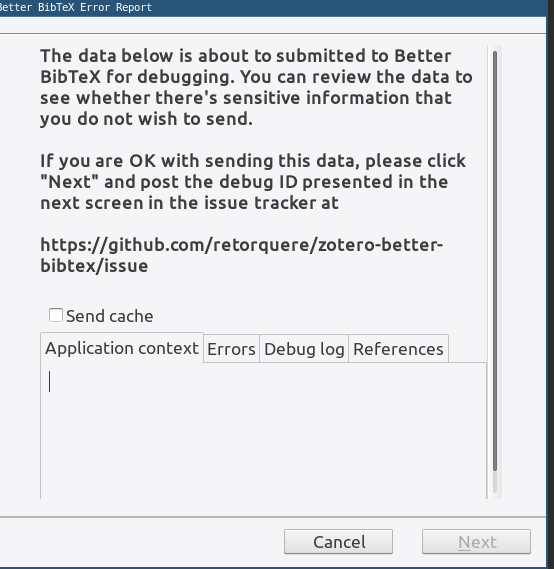
 kirk86
All 41 comments
You're on Linux, right? Can you start Zotero from the command line using
zotero -ZoteroDebugText > ~/bbt.txt 2>&1
That will start Zotero in debug mode and put the log in ~/bbt.txt, you could attach that here.
As to the relativeFilePaths variable, that only works if the bib file is exported to a folder that contains the attachments.
 retorquere
on 12 May 2019
retorquere
on 12 May 2019
Sure thing,
bbt.txt
As to the
relativeFilePathsvariable, that only works if the bib file is exported to a folder that contains the attachments.
Please allow for relative paths regardless of where the .bib file is located. In my case the pdfs folder has sub folders with author/year/etc/.... One thing would be to just read the pdfs path from the config and remove that substring from the absolute path that is using now.
kirk86
on 12 May 2019
Can you generate a new log while trying to submit through the regular debug submission screen? If the Next button doesn't activate, there's likely an error, but it's not in the current log you attached.
I will think about the option you describe, but it's not otherwise a matter of just allowing it. Zotero only gives me absolute paths and so I'd have to do cross-platform path manipulation in the translator to figure out what the relative path would be between the two.
retorquere
on 12 May 2019
Can you generate a new log while trying to submit through the regular debug submission screen? If the
Nextbutton doesn't activate, there's likely an error, but it's not in the current log you attached
Here's the new one
bbt.txt
still the next button is not activated, I think there must be some kind of error.
Zotero only gives me absolute paths and so I'd have to do cross-platform path manipulation in the translator to figure out what the relative path would be between the two.
Is it possible to get it from the Files and Folders under the Advanced tab in the zotero preferences? Usually we set those paths there, or maybe from the zotfile configs since we set the custom location of files there as well. If you can read that then you could subtract it from the current absolute path.
kirk86
on 12 May 2019
I can't access those from the translator. It's technically possible to read them from the plugin but then I'd have to get them to the translator somehow.
retorquere
on 12 May 2019
I'd have to get them to the translator somehow.
Sounds like the translator doesn't allow to override the relative or absolute path?
kirk86
on 12 May 2019
The translator isn't restricted in this (what it outputs is just text and Zotero doesn't care what that text is), but Zotero gives translators the absolute paths to attachments, nothing else. Translators are free to figure out to do with that, but to figure out what the relative path would look like from e.g. the zotfile config, I'd need to know the zotfile config, and translators are prohibited from reading settings that live outside the translators namespace.
retorquere
on 13 May 2019
Ok, now I understand the concept behind it, I'm not aware of how all the components work togehter (translators, zotero, plugins, etc.), so this is a very naive question, maybe there's another translator that does this already, I dunno maybe sth like File Hierarchy, or sth else? here it mentions that preferences are stored in a file pref.js
kirk86
on 13 May 2019
:robot: this is your friendly neighborhood build bot announcing test build 5.1.78.3988 ("fold-to-ascii update")
Install in Zotero by downloading test build 5.1.78.3988, opening the Zotero "Tools" menu, selecting "Add-ons", open the gear menu in the top right, and select "Install Add-on From File...".
 blip-bloop
on 13 May 2019
blip-bloop
on 13 May 2019
3988 should allow you to send debug logs the normal way again.
Yep, prefs are stored there, but translators are ran in a restricted sandbox and can only read preferences which start with extensions.zotero.translators.. All other preferences are simply not available to translators, and zotfile nor Zotero store their preferences there -- on purpose it seems, otherwise the sandbox restriction wouldn't make much sense.
I can think about ways to get the off-limits preferences to the translators, but I'd be fighting the sandbox Zotero put in place on purpose.
retorquere
on 13 May 2019
I wrote File Hierarchy BTW -- it can't do more than BBT, and in fact BBT translators can do more than others because I already escape the sandbox here and there. But the sandbox is there for a reason, I don't want to go punching holes in it willy-nilly.
retorquere
on 13 May 2019
@retorquere thanks for the great explanations. It seems from my understanding of your explanations that the zotero folks put the sandbox in place for particular reasons but why don't they expose in the same safe sandboxed way those settings? BTW thanks for file hierarchy, it's awesome, without the plugins zotero wouldn't be much, out of the box is very restricted and way back in terms usability and user friendliness. Hidden settings and what not, missing some basic stuff such as read/not, ratings, recently added, unsorted, yes I know there are tricks and tips but why, why make the users life harder than what it's already. Seems like mendeley to be in more usable state, plus it has mobile app, the only reason that haven't switched yet is cause it's proprietary but honestly spending days just searching through forums and wasting hours from your life just to make a piece of software to do the things that seem to be obvious its really frustrating, we're heading to 2020 and I still find it extremely hard to find a decent ref manager which does the actual job and get's out of your way so that you can focus on the actual work and not waisting time...
kirk86
on 13 May 2019
Most likely because most translators (such as mine, BTW) are community-provided and as such are considered untrusted code written by people whose competence is not easily judged, and that otherwise this untrusted code could do absolutely anything that you can on your system, starting with adversely affecting your Zotero library, up to and including rendering your entire system broken and unrecoverable. For which, without a shred of doubt, the Zotero developers would bear the brunt of the burden both in terms of criticicms and of feeling a sense of obligation to attempt to undo the damage.
It seems to me you're grossly underestimating how hard it is to write software that is usuable by a wide array of people and that's possible to support effectively by a small staff. Personally, I think Zotero does this admirably, while still providing a plugin system to allow others to fill niches. For my part, I've tried all reference managers under the sun, and found that, while all (including Zotero) have severe deficiencies, Zotero is the only one I could tolerate.
As to Mendeley, it is pretty, yes, and has some functionality Zotero lacks, also yes. But Mendeley has the means of Elsevier behind them while Zotero is being ran by a small staff and mostly volunteers; as such, you should expect Mendeley to be immensely better on every axis than Zotero, and for me, this is just not the case. Their LaTeX support is pathetic, and unfixable because they are closed source and have no plugin system. On top of that they are making it very clear that they intend to hold you hostage to their system -- PDF annotations are not embedded in the standard way that PDFs store these, hindering interoperability, and they have started encrypting their database a year ago so that you cannot access your database unless you go through Mendeley, which they coincidentally started doing at exactly the time Zotero implemented a migration tool to cleanly migrate Mendeley databases. For this, Mendeley offers a ridiculous excuse that GDPR made them do it, and when it is pointed out to them time and again that GDPR actually requires the linear opposite, and that the interop they promise is really, really broken, and could they please point out the part of the GDPR that they think mandates this, they sneer back fake news without actually addressing anyone's questions. This has been a year now and while initially they burped up some drivel about "needing time for a well-written response" they at some point just simply stopped responding to questions about this at all. Meanwhile, Zotero's database is open, there's libzotero, and their plugin system.
So as far as I'm concerned, Mendeley is a really nicely done-up prison for one of your most important research assets, being driven by the company that is one of the major abusers of academia. Zotero is community-driven; if you find something frustratingly undocumented but figure out how to do it, the documentation wiki is actually user-editable, but hardly anyone takes the effort to do so.
I will think about a way to do the relative paths, but more general questions about why Zotero does (or doesn't do) certain things is more fruitfully discussed on the Zotero forums. I acknowledge Zotero could use improvement, there's several things I wish it would do differently.
retorquere
on 13 May 2019
:robot: this is your friendly neighborhood build bot announcing test build 5.1.79.3992 ("attempt at cross-platform relative path resolution")
Install in Zotero by downloading test build 5.1.79.3992, opening the Zotero "Tools" menu, selecting "Add-ons", open the gear menu in the top right, and select "Install Add-on From File...".
blip-bloop
on 13 May 2019
Give 3992 a try.
retorquere
on 13 May 2019
@retorquere thanks a bunch, you're awesome!
kirk86
on 13 May 2019
:robot: this is your friendly neighborhood build bot announcing test build 5.1.79.3993 ("some cleanup")
Install in Zotero by downloading test build 5.1.79.3993, opening the Zotero "Tools" menu, selecting "Add-ons", open the gear menu in the top right, and select "Install Add-on From File...".
blip-bloop
on 13 May 2019
If 3992/3993 work to your satisfaction, I'm OK with integrating this in the new release.
retorquere
on 13 May 2019
Thank you so much for doing this, I've checked 3993 and it gives me this:
file = {../pdfs/h/holloway/1997/holloway1997.pdf}
It would be better if we remove ../pdfs/ and just have h/holloway/1997/holloway1997.pdf.
The path were the pdfs are is GoogleDrive/articles/pdfs/, so expect this base path to be the same across machines, if the final output from BB would be file = {h/holloway/1997/holloway1997.pdf} then I can use the same .bib file on every machine using different software/ref manager and everything would keep working properly since I'll make sure to have configured the base path GoogleDrive/articles/pdfs on all of them.
kirk86
on 13 May 2019
Gimme a sec to try it on in the other machines and let you know exactly how it works
kirk86
on 13 May 2019
I think I sort of see what you're trying to do, but h/holloway/1997/holloway1997.pdf is not a path relative to your bib file. Any program that would try to open the attachment using the path found in the bib file would (rightfully I'd say) assume it could be found at /home/user/Drive/articles/bib/h/holloway/1997/holloway1997.pdf
retorquere
on 13 May 2019
@retorquere Yeah, it works great on my mac using bibdesk so there's no need to change the path, scratch my last comment. This is great, thanks a lot.
kirk86
on 13 May 2019
The new release has it.
retorquere
on 13 May 2019
Do note that using relative paths disables BBTs cache, so BBT will be structurally slower, and zotero will lock up during large exports. There's nothing I can do about this, it requires (planned) changes in Zotero to get around this.
retorquere
on 13 May 2019
I'm ok with you posting on the zotero forums obviously but mind that zotero generally has very good reasons for the technological choices that were made, and that my view on zotero is pretty miopic (even if I do know zotero pretty well) because I view everything through the lens of "how can I best get bibtex out of it", not "what would work best for most zotero users".
retorquere
on 13 May 2019
Thanks for identifying me as a moth :smiley_cat: , don't forget that these moth users pay as well to support the project by buying additional storage, so even if they're moth users they still contribute back one way or another, in business terminology that's called demand/supply.
Listening to the community helps accelerate progress and get ahead of the curve. If zotero was do be developed in isolation without any input from the moth users then IMHO I don't think it would have had the same success.
kirk86
on 13 May 2019
Oy, sloppy, I meant "most", not "moth", I was on mobile.
retorquere
on 13 May 2019
But yes, feedback is always valuable and welcome.
retorquere
on 13 May 2019
@retorquere Sorry to bother you again but could have another look at release 5.1.8, there seem to be some differences between that and 5.1.79.3993. I only get the relative paths with 5.1.79.3993 and not with 5.1.8. Now I'm only using 5.1.79.3993 with disabled automatic updates.
kirk86
on 14 May 2019
@retorquere I think I might have an idea on what's going on. The keep updated option is overwriting the relative paths with absolute ones, I noticed that after having exported the .bib which had relative paths, I removed an item from one of the collections and the .bib got updated automatically, when I checked the relative paths where overwritten with absolute paths.
kirk86
on 14 May 2019
:robot: this is your friendly neighborhood build bot announcing test build 5.1.80.3999 ("log displayoptions")
Install in Zotero by downloading test build 5.1.80.3999, opening the Zotero "Tools" menu, selecting "Add-ons", open the gear menu in the top right, and select "Install Add-on From File...".
blip-bloop
on 14 May 2019
Can you trigger an auto export and send a debug log on 3999?
retorquere
on 14 May 2019
Sure thing,
bbt.txt
hope it helps.
kirk86
on 14 May 2019
I don't see the auto-export in the log. Can you try again, making sure you do it in this order?
- Install 3999 and let it restart (if you already have it installed, you can skip this step)
- Select
Restart with logging enabledfromHelp-Debug output logging - Trigger an auto-export
- Send a debug log via the normal
Help-Report BBT Errorsmenu
You can use the normal log submission again, you don't have to start with -ZoteroDebug anymore, and the normal log submission is preferable as it also gives me your BBT settings.
retorquere
on 14 May 2019
Ok, thanks for the detailed steps:
Report ID: 764D7ZLF-euc
kirk86
on 14 May 2019
This log was generated on 3993, I need it from 3999.
retorquere
on 14 May 2019
Oops, my bad,
here the new Report ID: L4I5UC5V-euc
kirk86
on 14 May 2019
:robot: this is your friendly neighborhood build bot announcing test build 5.1.80.4002 ("Merge branch 'master' into gh-1181")
Install in Zotero by downloading test build 5.1.80.4002, opening the Zotero "Tools" menu, selecting "Add-ons", open the gear menu in the top right, and select "Install Add-on From File...".
blip-bloop
on 14 May 2019
4002 seems to be working fine so far. Thanks again!
kirk86
on 14 May 2019
Thanks for the confirmation, I'll cut a new release. I'll be super happy when I can finally get rid of the cache.
retorquere
on 14 May 2019
This issue has been automatically locked since there has not been any recent activity after it was closed. Please open a new issue for related bugs.
![github-actions[bot] picture](https://avatars.githubusercontent.com/in/15368?v=4&s=40) github-actions[bot]
on 17 Feb 2021
github-actions[bot]
on 17 Feb 2021
Related issues
 alisonketz
·
6Comments
alisonketz
·
6Comments
 element4l
·
7Comments
element4l
·
7Comments
 zoushucai
·
4Comments
zoushucai
·
4Comments
 richarddmorey
·
7Comments
richarddmorey
·
7Comments
 awesomeindustries
·
3Comments
awesomeindustries
·
3Comments