Zotero-better-bibtex: [feature request] add 'export now' button or menu item
- [x] I have verified in the Zotero addons screen that I have the latest release of BBT (https://github.com/retorquere/zotero-better-bibtex/releases/latest) and Zotero installed
- [x] I am posting a single question, bug or feature request
- [x] I have included a descriptive subject of the problem
- [x] I am available for follow-up questions and testing
- [x] If I am posting an export or key-generation related bug report, I have included an error-report by right-clicking the problematic reference and submitting an BBT error report
Bug classification
My database is fairly big, and thus exporting it always stales my zotero (sometimes my whole computer) for a few seconds. Thus, the 'on change' export option is not really suitable for me as it used to export after every change. The 'on idle' I find too unpredictable, because I never know when that would be, and would often like to check the results in the bibtex/compiled document as soon as possible.
So at the moment I need to open the Zotero Preferences, open the BBT tab, and then manually export from there. Would there be a chance to add a menu entry or a button to zotero to 'export now'?
Many thanks!
 mbroedl
All 38 comments
I'm not sure how to go about it; one collection can be exported to multiple locations, so it couldn't be a button that just exported the current collection.
I'm more concerned about the stalling though. BBT caches fairly heavily; I'm not sure what counts as fairly big (how many references are we talking about here?) but a few thousand shouldn't noticably stall Zotero.
 retorquere
on 24 Jul 2018
retorquere
on 24 Jul 2018
Could one maybe add a button for each entry in the export-list? Or a submenu in the Tools-menu?
I don't know what would be common, but I only have one entry so that I always export my whole collection (my folder structure is pretty bad).
Just checked: 1840 references. So not that much.
zotero.sqlite has 160MB (maybe from many full text indices?)
and the bibtex.bib 1MB without notes or abstracts.
EDIT: from pressing 'export now' to the label showing 'done' it takes around 24-28 seconds.
mbroedl
on 24 Jul 2018
I had a similar problem when importing my bibtex into autocomplete-bibtex for atom, and the maintainer kindly added webworkers that work in the background to overcome this issue. Maybe that could be a solution?
mbroedl
on 24 Jul 2018
I'd rather not add an extra button there. It also saves very little. I can look at making that list multi-select.
Zotero.sqlite doesn't affect BBT, the BBT data lives in its own DB. I'll look at the performance issue, 1840 refs really isn't much. The cache must not be used for some reason; with a filled cache that should be about 4 seconds.
retorquere
on 24 Jul 2018
I can look into web workers, but they won't help as much as the caching, and they add extra complexity.
retorquere
on 24 Jul 2018
webworkers can't share state with the main process, so I'd have to keep a fully separate DB up to date with the main DB. I'll have a look when I have time (not in a few weeks), but first I need to make sure the cache works.
retorquere
on 24 Jul 2018
@retorquere I checked exporting again without changing anything, and the cache page then revealed it: I was faffing with the post-script settings. It's still at around 3-5 seconds. But during that time it nonetheless stales, which does not allow me to export 'on change' when I'm adding more changes, as then every single change is exported.
mbroedl
on 24 Jul 2018
Oh yeah any change in the settings drops the cache.
retorquere
on 24 Jul 2018
But the cache should not stale so fast; cache expiry is currently set at 30 days, and every export resets the timer for exported entries. So as long as you export a particular collection at least once a month, the cache should remain populated. If like to look into the cache expiry thing - the cache not working would be a real problem.
retorquere
on 22 Aug 2018
:robot: this is your friendly neighborhood build bot announcing test build 5.0.189.2600 ("cache logging").
 blip-bloop
on 22 Aug 2018
blip-bloop
on 22 Aug 2018
2600 shows the cache ratio for each auto-export, but will also log cache misses in the error log; when it gets unexpectedly slow, can you submit a new log?
retorquere
on 22 Aug 2018
:robot: this is your friendly neighborhood build bot announcing test build 5.0.190.2621 ("adjust tests").
blip-bloop
on 24 Aug 2018
I found some problems in the cache fetches so the cache was probably not always used when it should be; please try 2621.
retorquere
on 24 Aug 2018
:robot: this is your friendly neighborhood build bot announcing test build 5.0.190.2632 ("adjust test cases for #1038").
blip-bloop
on 24 Aug 2018
Can you try 2632?
retorquere
on 24 Aug 2018
Thanks so much for looking into this @retorquere !
It stalls already on startup with 2632:
[JavaScript Error: "TypeError: BBT.ready.isPending is not a function" {file: "chrome://zotero-better-bibtex/content/BetterBibTeX.js" line: 10024}]
Zotero.BetterBibTeX<[87]/</<@chrome://zotero-better-bibtex/content/BetterBibTeX.js:10024:9

version => 5.0.55, platform => Linux x86_64, oscpu => Linux x86_64, locale => en-US, appName => Zotero, appVersion => 5.0.55, extensions => Zutilo Utility for Zotero (2.0.4, extension), ZotFile (5.0.8, extension), Zotero LibreOffice Integration (5.0.14.SA.5.0.55, extension), Zotero Better Bib(La)Tex (5.0.190.2632, extension), Shockwave Flash (30.0.0.154, plugin), Zotero automatic export (1.2.4, extension, disabled)
With quite a few repeats of the error message!
mbroedl
on 25 Aug 2018
Debug ID D848185013 was my first try, and D838627974 the second one.
Here's the second one, in case you can't access the debugs: https://pastebin.com/H3sYhryS
In both cases it stalled and did not pass the _Loading citation keys_ stage.
Thanks a lot!
mbroedl
on 25 Aug 2018
:robot: this is your friendly neighborhood build bot announcing test build 5.0.190.2636 ("transactional DB upgrade").
blip-bloop
on 25 Aug 2018
Try 2636 -- thanks for the report!
retorquere
on 25 Aug 2018
I can't see the D reports BTW, those go to the Zotero crew, I don't have access.
retorquere
on 25 Aug 2018
First change after changing setting export on change expectedly took ages, with many messages from my OS that zotero wasn't responding anymore.
-> obvious because cache was cleared. -> killed zotero after 3 minutes.
-> tried again and it stalled for quite a while (don't know how long) but it finally worked
Log is from adding two fields in a dummy entry (citekey testname2018test). During typing in the second one, it stalled for a bit, but it eventually worked. The log is here: https://we.tl/t-xOL9Ete21J
mbroedl
on 25 Aug 2018
As far as I can tell, everything comes from the cache except those two changes. What kind of cache rates are you seeing in the auto-export prefs?
AFAICT I can't prevent the not-responding messages; for me to do so I'd have to do the export asynchronously, but I don't think this is possible without a change to Zotero.
edit: I've asked here but it's likely a non-trivial change to Zotero so I'm not holding my breath.
retorquere
on 25 Aug 2018
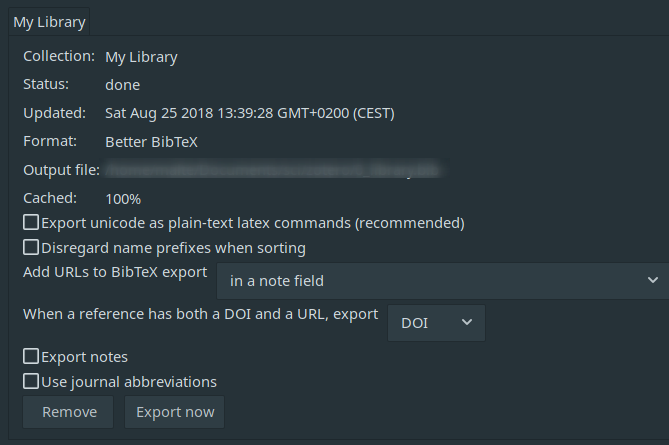
It looks like it's 100%.
Thanks a lot for your support! [EDIT: And also thanks for asking in the dev mailing list!]
I do have an SSD, but I could imagine a lot of the time required comes from I/O. After all it's a 2MB .bib file... maybe there's a way to log times, if that's a thing you would want to pursue further?
As mentioned before, for my case, I would be perfectly happy with a menu entry to trigger my previously defined export.
mbroedl
on 25 Aug 2018
I'll have a look, but there's really no infrastructure for these kind of things in Zotero. I'm patching the program as it runs to get a lot of these things done, and it's always a little fragile. Async export would be the best solution.
retorquere
on 25 Aug 2018
:robot: this is your friendly neighborhood build bot announcing test build 5.0.191.2650 ("fixes #1038").
blip-bloop
on 25 Aug 2018
Give 2650 a go.
retorquere
on 25 Aug 2018
Thanks a lot, this worked perfectly well!
It took me a while to find the menu item though, but this solves it for me, thanks a lot!!
mbroedl
on 25 Aug 2018
I couldn't think of a better place for it.
retorquere
on 25 Aug 2018
I had searched in the tools Menu entry first, to be honest. And then in File, because zotero's own export-option is there.
It seems only to come up in the context menu when I right click the "My library". Is that related to which part of the library I update or regardless of that?
mbroedl
on 25 Aug 2018
It only comes up in "My library" because that's the only auto-export you have set up. The auto-export menu shows up for collections/libraries that you've configured for auto-export. Some people (like me) have several auto-exports configured for multiple collections; neither the File menu nor the Tools menu allow for context of what to export.
retorquere
on 25 Aug 2018
(it also won't show up if you have auto-export set to "On Change")
retorquere
on 25 Aug 2018
Thanks, that's good to know.
Actually the earlier question was pointing at whether when I define an export for a collection it would show up in the context menu for that collection or only the "My Library" item. But both code and trial answered my question: no matter what collection is exported it's attached to the My Library item.
mbroedl
on 25 Aug 2018
(only repo contribs can close issues here, it's to make sure that I do the required wrap-up like releasing a new version)
retorquere
on 25 Aug 2018
Actually the earlier question was pointing at whether when I define an export for a collection it would show up in the context menu for that collection or only the "My Library" item. But both code and trial answered my question: no matter what collection is exported it's attached to the My Library item.
I don't fully understand what you mean by "attached" here, sorry. You set up auto-exports either on libraries or collections by right-clicking them, choosing export, and checking "Keep updated". The "Automatic export" menu option becomes available on the library/collection you originally used to set up the auto-export, nowhere else. Changes to underlying collections will trigger an auto-export for parent collections/libraries, but the "Automatic export" menu is only available at the level where the auto-export was set up.
Perhaps you overwrote an auto-export by choosing the same file; there can be no two auto-exports set up to point to the same export file, so if you pick the same file for another auto-export, the earlier one gets replaced by the new one.
retorquere
on 25 Aug 2018
(whether this is the case can be seen in the prefs, where you have an overview of all auto-exports)
retorquere
on 25 Aug 2018
Okay, my fault again. I thought I had exported a collection but did so via the File->Export (which exported the whole library), instead of via right click export.
Now it shows up where it should do, thanks!
mbroedl
on 25 Aug 2018
File->Export exclusively exports "My Library"; it doesn't matter what you have selected at the time.
retorquere
on 25 Aug 2018
This issue has been automatically locked since there has not been any recent activity after it was closed. Please open a new issue for related bugs.
![github-actions[bot] picture](https://avatars.githubusercontent.com/in/15368?v=4&s=40) github-actions[bot]
on 17 Feb 2021
github-actions[bot]
on 17 Feb 2021
Related issues
 danieltomasz
·
8Comments
danieltomasz
·
8Comments
 tea4or2wo
·
7Comments
tea4or2wo
·
7Comments
 element4l
·
7Comments
element4l
·
7Comments
 zoushucai
·
4Comments
zoushucai
·
4Comments
 awesomeindustries
·
3Comments
awesomeindustries
·
3Comments