Zotero-better-bibtex: Error report submission is very slow.
This is a follow-up of the author's attribute discussion on Zotero Forums.
It has been proposed that Creator: Last || First A. || Type format support should be added to BBT so that users can define their own authors' attributes that map to the authortype field in Bibtex via the Zotero Extra field.
This feature would be useful particularly for academics who write and cite works in Chinese, as elaborated over here.
 sati-bodhi
All 145 comments
Can you right-click a reference that has this and select "BBT -> Error report" (paste the resulting ID here). After that, please also paste here how you would like the biblatex to look like.
 retorquere
on 26 Jun 2018
retorquere
on 26 Jun 2018
Did you right-click the whole library (that could take a while) or just those that one reference (should be really quick)?
retorquere
on 26 Jun 2018
I clicked just one reference - the one I illustrated above. It took ages the last time I tried to submit one as well. I think that one didn't pull through...
sati-bodhi
on 26 Jun 2018
I don't know why it's so slow for you -- I just tried to submit a report for a single ref and it's near instantaneous.
I honestly have no idea what that stackexchange link tries to explain. I don't understand biblatex as well as some would assume.
@njbart?
retorquere
on 26 Jun 2018
Zotero says 'Network error' when I force it to shutdown after being unresponsive for a while.
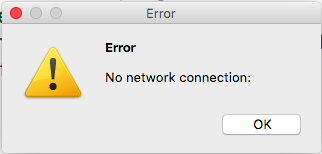
Just posted this as a separate issue on Zotero Forums.
sati-bodhi
on 26 Jun 2018
It doesn't seem to work. Can I just attach a file with text from the error report over here?
sati-bodhi
on 26 Jun 2018
Sure, if it's just a .txt file. But can you try downloading https://github.com/retorquere/zotero-better-bibtex/releases/download/release/error-report.html, opening it, and submitting your file through that? That should do the same, I'm curious to see why you can't submit logs as per usual. The upload through this won't give any feedback unless there's an error though.
retorquere
on 26 Jun 2018
It's done.
Generated on 20180626T000153Z
sati-bodhi
on 26 Jun 2018
Nothing out of the ordinary in the log. I'm actually looking for an export using BetterBibTeX JSON. That's what BBT does when you submit an error log by right-clicking a reference.
retorquere
on 26 Jun 2018
Is there anything else I need to do?
dstillman says that:
BBT issues should be reported to the BBT developer on GitHub.
on the Zotero forum where I reported the submission issue...
Just to double-check to make sure I am doing this correctly:

This is what I am supposed to do, right?
sati-bodhi
on 26 Jun 2018
Wrt the error submission, please enable extended debugging, and try to submit a bbt error log from the help menu. If it doesn't work, save the log contents to a text file and attach it here.
retorquere
on 26 Jun 2018
that screenshot is correct. Does the error submission screen not come up?
retorquere
on 26 Jun 2018
If author type isn't actually commonly used, perhaps the stackexchange answer is better. But I don't know what's proposed there, really.
retorquere
on 26 Jun 2018
The Debug ID is D720330192.
Error submission screen did came up, but I kept getting stuck here.
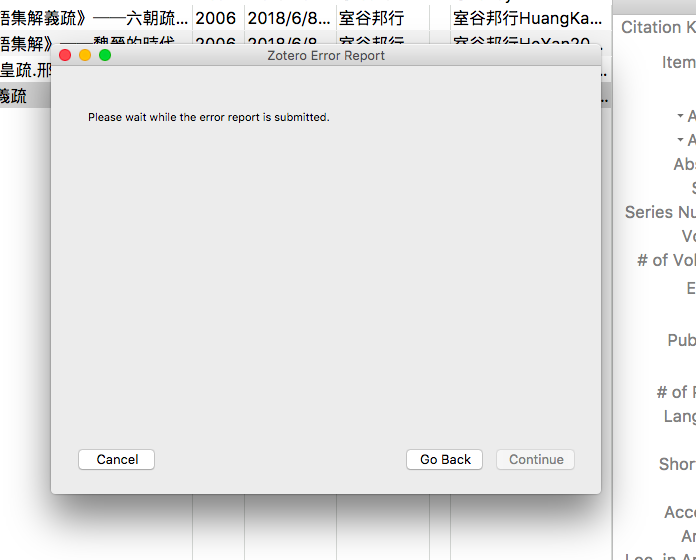
The above error ID is from the help menu.
sati-bodhi
on 26 Jun 2018
Then this error popped up:

sati-bodhi
on 26 Jun 2018
That ID is for reports sent to Zotero, I can't read those. You need to use "Help->Report Better BibTeX Errors".
retorquere
on 26 Jun 2018
Finally it went through...
The report ID is: LA62UE64
sati-bodhi
on 26 Jun 2018
No weird things in the log. Can you try again by right-clicking that reference?
retorquere
on 27 Jun 2018
The wizard.advance error popped up again. Reference error report is still taking a long time to submit...
sati-bodhi
on 27 Jun 2018
G2SVB23R
sati-bodhi
on 27 Jun 2018
Wait, do you still see this error after you cmd-quit and restart Zotero?
retorquere
on 27 Jun 2018
The wizard.advance error? No.
cmd-quit error was just No Network Connection.
sati-bodhi
on 27 Jun 2018
No I dont mean that cmd-quit causes any errors, but there's a known error in bbt when zotero is not closed using cmd-quit, and that could explain the wizard.advance problem at least.
retorquere
on 27 Jun 2018
The wizard.advance popped up in the middle of some of my sessions. Zotero has been restarted couple of times, sometimes with cmd-Q, sometimes through the error report for error logging. I cannot say for sure if or how it is related to cmd-Q...
The last restart was through the error log.
sati-bodhi
on 27 Jun 2018
With "in the middle of my sessions" you mean you were using zotero normally (not submitting any error) and that it just popped up?
With cmd-Q I just mean that there's a known problem with BBT if you close zotero with the red dot (close window) rather than cmd-Q or restart through the debug window (close app). The wizard.advance problem could be related to that, but only if you've closed zotero using the red dot and then tried to submit an error log. If one of those two is not true for you than I have no idea where the wizard.advance problem comes from yet.
retorquere
on 27 Jun 2018
I was in the mist of submitting the errors when wizard.advance popped up. I guess you are right, then. Because Zotero's been restarting either with cmd-Q or with the red dot or with the debug log for quite a few times when that happened. The first time it was just the no network connection error.
sati-bodhi
on 27 Jun 2018
No, that's not what I said; it's important to get this right otherwise I can't debug the problem.
If you restart with cmd-Q the problem should not appear. If you close with the red dot and reopen then the problem might appear (there is a known problem of bbt misbehaving after a red-dot close and reopen).
I need to know which of these you are experiencing. Maybe both, I can't tell from the description.
retorquere
on 27 Jun 2018
:robot: this is your friendly neighborhood build bot announcing test build 5.0.152.7246 ("temporarily revert to master var-extract").
 blip-bloop
on 27 Jun 2018
blip-bloop
on 27 Jun 2018
Can you try installing 7246 and submit a debug report from that? I've added some more diagnostic code.
retorquere
on 27 Jun 2018
ITGXXRJ9
sati-bodhi
on 27 Jun 2018
Can you submit twice in a row? Do you still see the slowness /wizard.advance error?
retorquere
on 27 Jun 2018
The process is real slow, but the error didn't pop up.
The Zotero error log from the help menu took less than half a minute.
sati-bodhi
on 27 Jun 2018
When BBT requested to restart Zotero for debug logging again, this error came up:
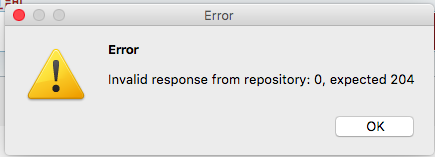
sati-bodhi
on 27 Jun 2018
So let me see if I understand correctly:
- You right-click, select "BBT->Submit error report"
- You get a message stating "Zotero debug logging is currently disabled. It will be easier to diagnose the problem if you enable it before submitting an error report."
- After you click OK to restart, but before Zotero actually restarts, you get this error popup?
Or something else? Can you give me the detailed step-by-step you're going through to get this?
retorquere
on 27 Jun 2018
Can you also still do the two-times-in-a-row submission? The 2nd submission will have debug info on the first.
retorquere
on 27 Jun 2018
Yes, I think you got the process right.
sati-bodhi
on 27 Jun 2018
We need to give Zotero some more time to submit the second report.
sati-bodhi
on 27 Jun 2018
The thing I don't understand is how you get the wizard.advance error. I don't see it, and the only code that triggers it lives on the pane that is shown after you give it permission to send. If you click the "restart" button, you never get to the permission page, so I really don't know who is calling that advance.
retorquere
on 27 Jun 2018
I also don't know why it's so slow. Your reports really aren't so big, and with the error-report.html (which does the same thing) you say it's pretty fast.
retorquere
on 27 Jun 2018
The error report didn't pull through. It ended with the same invalid response error above.
I am submitting through the html you sent to me a day ago. 2 files from successive error reports have just been uploaded. Do take a look.
sati-bodhi
on 28 Jun 2018
It seems that the original concern for the support of a new format is not a priority anymore.
Should we change the title of this issue to more accurately reflect what we are dealing with over here? Or would it be better for me to raise a new issue?
sati-bodhi
on 28 Jun 2018
I see timeouts in the S3 logs, but I still don't know why -- I'm not seeing it, and if you use error-report.html the reports go through. Looks like I'll have to dust off the macbook to see if it's maybe a mac-specific issue.
retorquere
on 28 Jun 2018
It's not MacOS perse; I've just submitted a report without issue from macOS. I do see timeouts in the S3 logs where the reports are stored, but that'd mean (I think) that it times out on your end... which doesn't make sense since a normal form submission just goes through.
Do you have any other Zotero add-ons installed?
retorquere
on 28 Jun 2018
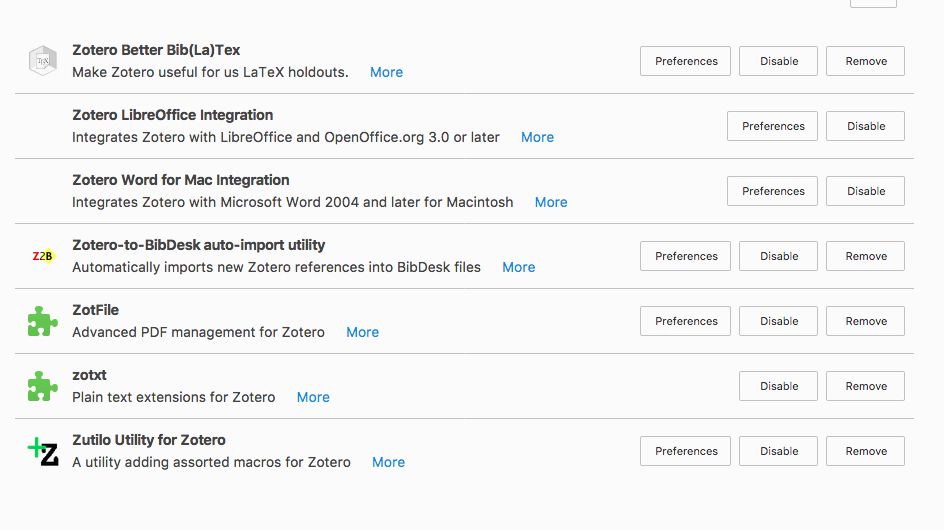
Here are all the add-ons I have.
sati-bodhi
on 28 Jun 2018
Can you try disabling all but BBT to see if that makes a difference?
retorquere
on 28 Jun 2018
Makes no difference. I've just sent 2 more error reports. Please take a look.
sati-bodhi
on 28 Jun 2018
:robot: this is your friendly neighborhood build bot announcing test build 5.0.152.7253 ("more logging").
blip-bloop
on 29 Jun 2018
I've looked at the logs but I don't even see the log submissions starting. Can you try again with 7253? I really need 2 submissions in a row, at least the first with the built-in error report, even if that takes a very long time or aborts with an error. Otherwise I can't see where it's errorring out.
retorquere
on 29 Jun 2018
This is the first submission, similar to error_report5.txt
PHDUT9IH
sati-bodhi
on 29 Jun 2018
The second submission hanged with this error.
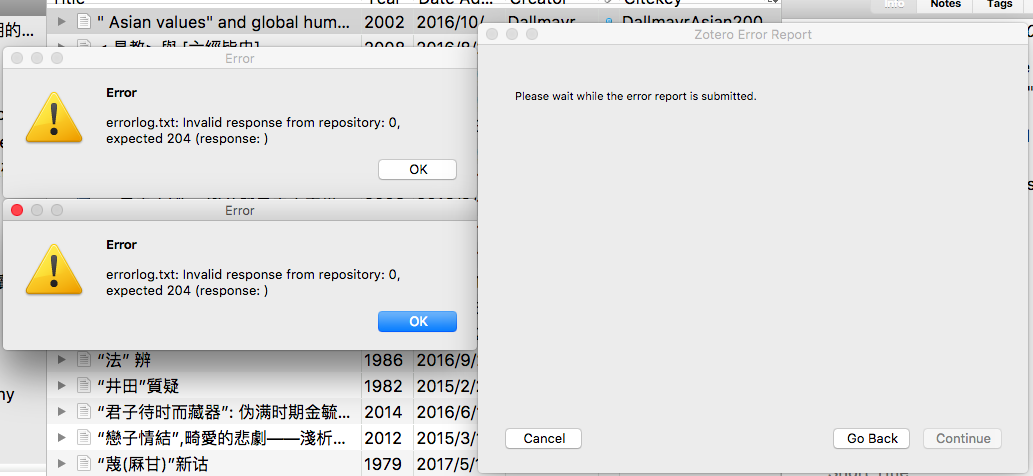
sati-bodhi
on 29 Jun 2018
I am submitting the second one through error_report6.txt
sati-bodhi
on 29 Jun 2018
This error is persistent when the error reports don't get through.
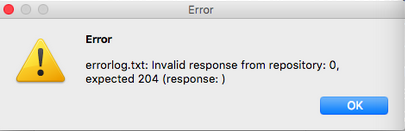
sati-bodhi
on 29 Jun 2018
The report that didn't make it through has been submitted as error_report7.txt
sati-bodhi
on 29 Jun 2018
Do you use a proxy of any kind?
retorquere
on 29 Jun 2018
Not that I am aware of - How to check?
sati-bodhi
on 29 Jun 2018
Is it correct that your IP address ends with .33?
retorquere
on 29 Jun 2018
You are not restarting Zotero between these attempts? I'm seeing an attempt to submit in PHDUT9IH, but not in report6 or report7, where I would have expected the exact opposite.
retorquere
on 29 Jun 2018
Can you try again? The error you're getting is possibly related to a CORS error (although then I really don't know why only you are seeing this), and I've set the CORS config to be more permissive. Won't help with the slowness though.
retorquere
on 29 Jun 2018
:robot: this is your friendly neighborhood build bot announcing test build 5.0.152.7259 ("is Zotero for macOS built on an older FF?").
blip-bloop
on 29 Jun 2018
With 7259, please submit an error report and after that, look in the error log (from the help menu) and find lines with ErrorReport::. If you can post those here (that's what I am looking for in the 2nd report), that should tell me something.
I really don't know what's going on at your end.
retorquere
on 29 Jun 2018
:robot: this is your friendly neighborhood build bot announcing test build 5.0.152.7300 ("submit to other host").
blip-bloop
on 30 Jun 2018
I'm still interested in the ErrorReport:: lines from 7259 after trying to submit, but can you also try 7300? 7300 will submit to a different host, just curious to see if the problem is structurally on your PC or something between the host and your PC.
retorquere
on 30 Jun 2018
The IP is correct
sati-bodhi
on 30 Jun 2018
Then you're not going through a proxy.
retorquere
on 30 Jun 2018
6XYU9SKV
This is for 7259
sati-bodhi
on 2 Jul 2018
The error report has 38387 lines and is taking a very long time to load as well.
sati-bodhi
on 2 Jul 2018
6XYU9SKV is the second submit? I need either the 2nd submit, or the ErrorReport lines after the 1st commit.
When you say it is taking a very long time as well, is that from 7259 or from 7300?
retorquere
on 2 Jul 2018
It is the second submit after 7259, from the error log
sati-bodhi
on 2 Jul 2018
So you've done two consecutive reports from 7259, and the second is 6XYU9SKV?
retorquere
on 2 Jul 2018
No. 6XYU9SKV is the first report for 7259.
sati-bodhi
on 2 Jul 2018
FCCHJCUH
This is the second one from 7259. Can't say if it can be considered as 'consecutive' or not. (probably not)
sati-bodhi
on 2 Jul 2018
I think 7259 doesn't take quite as long to submit error reports. Not as fast as I would like it to, though.
sati-bodhi
on 2 Jul 2018
D24EVMHN
This is also from 7259, right after FCCHJCUH.
Don't think I am able to provide the ErrorReport:: because it is taking very long to load.
sati-bodhi
on 2 Jul 2018
Nothing's changed in 7259 that would affect submission speed. 7300 might, because that version submits to a different log host.
There's nothing in either D24EVMHN or FCCHJCUH, but I'm seeing indications that Zotero restarted between those two -- is that correct? I need those two consecutive reports, directly after each other, without restart between them.
retorquere
on 2 Jul 2018
M49DTZUW
This is the consecutive without restart after D24EVMHN
sati-bodhi
on 2 Jul 2018
Wow, so if I'm interpreting that log correctly, it takes about 7 minutes to submit those logs?
How about 7300?
retorquere
on 2 Jul 2018
7300 is taking much longer...
sati-bodhi
on 2 Jul 2018
And only one of 2 came through even so. And these aren't astoundingly large files, just some 40MB.
I'm waiting for feedback on an alternative way to submit the logs but that requires feedback from the Zotero devs, They're usually very busy so that may take some time.
I'm looking into more alternatives, but since I can't replicate this at all at my end, I don't really have many solid ideas at this stage.
retorquere
on 2 Jul 2018
The last 7300 submit ended up with a type.wizard is not a function error.
sati-bodhi
on 2 Jul 2018
That error is literal? There is no type.wizard in my code.
retorquere
on 2 Jul 2018
It just popped up when the submission is automatically aborted.
sati-bodhi
on 2 Jul 2018
but you're sure it says type.wizard? Because that's not in BBT nor is it anywhere in Zotero.
retorquere
on 2 Jul 2018
Yes, I am pretty sure. Here is the resultant BBT error log:
[JavaScript Error: "Unix error 14 during operation stat (Bad address)" {file: "(unknown module)" line: 0}]
[JavaScript Error: "Unix error 14 during operation stat (Bad address)" {file: "(unknown module)" line: 0}]
[JavaScript Error: "Unix error 14 during operation stat (Bad address)" {file: "(unknown module)" line: 0}]
[JavaScript Error: "Unix error 14 during operation stat (Bad address)" {file: "(unknown module)" line: 0}]
[JavaScript Error: "The connection to wss://stream.zotero.org/ has terminated unexpectedly. Some data may have been transferred." {file: "chrome://zotero/content/xpcom/streamer.js" line: 155}]
[JavaScript Error: "WebSocket connection closed: 1006 "]
[JavaScript Error: "The connection to wss://stream.zotero.org/ has terminated unexpectedly. Some data may have been transferred." {file: "chrome://zotero/content/xpcom/streamer.js" line: 155}]
[JavaScript Error: "WebSocket connection closed: 1006 "]
[JavaScript Error: "Unix error 14 during operation stat (Bad address)" {file: "(unknown module)" line: 0}]
[JavaScript Error: "Unix error 14 during operation stat (Bad address)" {file: "(unknown module)" line: 0}]
It's just that the last error that popped up for you (wizard.advance) actually occurs in the code, and that's how I've always seen it. This one I can't find anywhere.
retorquere
on 2 Jul 2018
The only pointer I could find on the unix error 14 is this.
retorquere
on 2 Jul 2018
What does a traceroute to s3-eu-central-1.amazonaws.com/ show?
retorquere
on 3 Jul 2018
Which Amazon Simple Storage Service (Amazon S3) region is closest to where you are?
retorquere
on 7 Jul 2018
Asia Pacific (Singapore)
sati-bodhi
on 8 Jul 2018
Can you try with the latest release (5.0.164)?
retorquere
on 8 Jul 2018
:robot: this is your friendly neighborhood build bot announcing test build 5.0.164.7495 ("submit error logs to ap-southeast-1").
blip-bloop
on 8 Jul 2018
And can you also try 7495?
retorquere
on 8 Jul 2018
And can you get me the output of http://www.cloudping.info/ ?
retorquere
on 8 Jul 2018
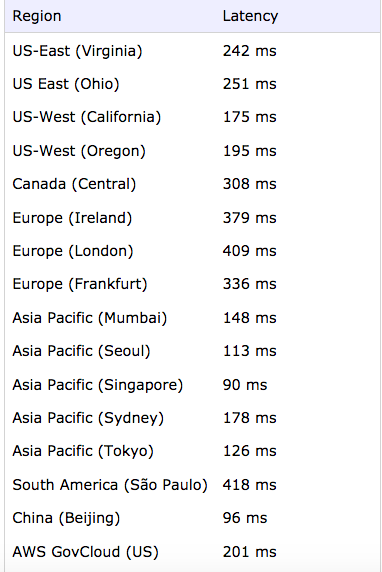
sati-bodhi
on 8 Jul 2018
T9ME49NU
This is from the new release.
sati-bodhi
on 8 Jul 2018
With new release you mean 5.0.164, or 5.0.164.7495? How long did it take?
Remember I can only see submission timing in the second consecutive attempt. The log to send is assembled just before being sent out, so the actual timing can not be part of it; the second submission reports the timing of the previous report.
5.0.164.7495 will submit to Singapore instead of Frankfurt and I'm curious to see if that makes a major difference.
retorquere
on 8 Jul 2018
JWB6J79Z
This is the subsequent report from the new release 5.0.164
sati-bodhi
on 8 Jul 2018
:robot: this is your friendly neighborhood build bot announcing test build 5.0.164.7504 ("auto-select s3 bucket").
blip-bloop
on 8 Jul 2018
7504 should auto-select Singapore for you. Please try two submissions with that without restart in between, but also tell me approximately what time you experienced the submissions took, roughly.
retorquere
on 8 Jul 2018
I think 5.0.164 did better
sati-bodhi
on 8 Jul 2018
Then I'm out of ideas. 5.0.164 does a standard PUT to the eu-central-1 bucket; nothing fancy, and the most efficient way to send the logs. 7504 PUTs to whatever pings faster from when you are, eu-central-1 or ap-southeast-1. With 7504, what ID did you get? And can you get me two consecutive submits from 7504?
retorquere
on 8 Jul 2018
Did 7504 finish the submit? I only see one of two files that I expect.
retorquere
on 8 Jul 2018
Is it correct that your library has 12k items? That would probably take some time to submit.
retorquere
on 8 Jul 2018
yes. my library has 12k items. I am still waiting for 7504 to complete the first submit.
sati-bodhi
on 8 Jul 2018

It is this error, once again.
sati-bodhi
on 8 Jul 2018
That was from the failed 7504 submission.
sati-bodhi
on 8 Jul 2018
Would it be possible to get me a copy of your Zotero DB?
retorquere
on 8 Jul 2018
You can drop it here. Zotero must be closed to do this safely, the DB must not be in use.
retorquere
on 8 Jul 2018
:robot: this is your friendly neighborhood build bot announcing test build 5.0.164.7510 ("more info in error popup").
blip-bloop
on 8 Jul 2018
just sent you the sqlite database.
sati-bodhi
on 8 Jul 2018
:robot: this is your friendly neighborhood build bot announcing test build 5.0.164.7514 ("bucket names not unique").
blip-bloop
on 8 Jul 2018
It's not there. No idea what went wrong. Can you try this:
time curl -X PUT -T zotero.sqlite -H "x-amz-acl: bucket-owner-full-control" -H "x-amz-storage-class: STANDARD" https://better-bibtex-error-reports-62200312-apse.s3-ap-southeast-1.amazonaws.com/zotero.sqlite
in a shell in the directory where zotero.sqlite lives (on one line, and when Zotero is not running -- use cmd-Q is you're on Mac) and tell me what it reports?
retorquere
on 8 Jul 2018
I may have found a race condition -- can you try 7547?
retorquere
on 8 Jul 2018
:robot: this is your friendly neighborhood build bot announcing test build 5.0.164.7559 ("smaller logs").
blip-bloop
on 9 Jul 2018
time curl -X PUT -T zotero.sqlite -H "x-amz-acl: bucket-owner-full-control" -H "x-amz-storage-class: STANDARD" https://better-bibtex-error-reports-62200312-apse1.s3-ap-southeast-1.amazonaws.com/zotero.sqlite
NoSuchBucket
real 0m0.691s
user 0m0.039s
sys 0m0.034s
sati-bodhi
on 9 Jul 2018
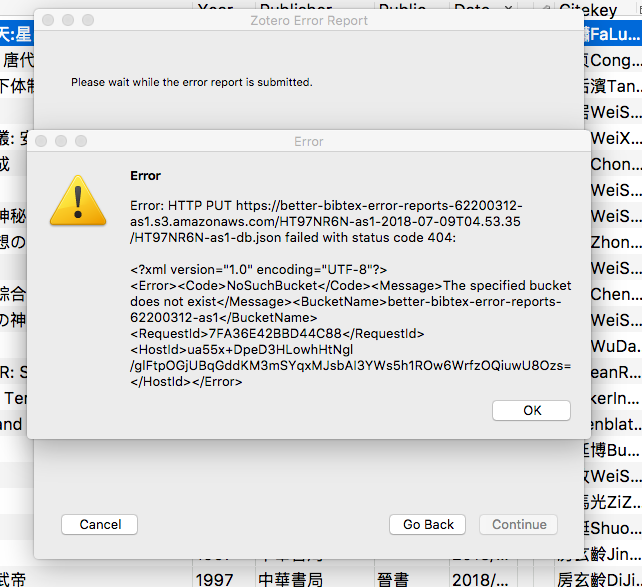
This error came up. That was from 7547.
sati-bodhi
on 9 Jul 2018
I had an error which I had hoped I had corrected before you saw it, but I had a 1 that shouldn't have been there, the command should have been time curl -X PUT -T zotero.sqlite -H "x-amz-acl: bucket-owner-full-control" -H "x-amz-storage-class: STANDARD" https://better-bibtex-error-reports-62200312-apse.s3-ap-southeast-1.amazonaws.com/zotero.sqlite.
retorquere
on 9 Jul 2018
That error popup can't have been from 7547, but try 7559 to be sure.
retorquere
on 9 Jul 2018
time curl -X PUT -T zotero.sqlite -H "x-amz-acl: bucket-owner-full-control" -H "x-amz-storage-class: STANDARD" https://better-bibtex-error-reports-62200312-apse.s3-ap-southeast-1.amazonaws.com/zotero.sqlite.
real 6m55.530s
user 0m15.159s
sys 0m7.793s
sati-bodhi
on 9 Jul 2018
F6ZDGLHF-apse
From 7559
sati-bodhi
on 9 Jul 2018
FBK6L9TZ-apse
Subsequent 7559
sati-bodhi
on 9 Jul 2018
And what does time curl -X PUT -T zotero.sqlite -H 'x-amz-acl: bucket-owner-full-control' -H 'x-amz-storage-class: STANDARD' https://better-bibtex-error-reports-62200312-euc.s3-eu-central-1.amazonaws.com/zotero.sqlite return?
retorquere
on 9 Jul 2018
time curl -X PUT -T zotero.sqlite -H 'x-amz-acl: bucket-owner-full-control' -H 'x-amz-storage-class: STANDARD' https://better-bibtex-error-reports-62200312-euc.s3-eu-central-1.amazonaws.com/zotero.sqlite
real 43m58.593s
user 0m14.378s
sys 0m4.371s
This took a whooping 43 minutes
sati-bodhi
on 9 Jul 2018
Holy crap. Well, that at least vindicates the region picker.
With your database I've found some problems that are unrelated to the upload, I'm trying to fix those now.
retorquere
on 9 Jul 2018
:robot: this is your friendly neighborhood build bot announcing test build 5.0.164.7579 ("new html parser").
blip-bloop
on 10 Jul 2018
7579 should be better -- can you try?
retorquere
on 10 Jul 2018
:robot: this is your friendly neighborhood build bot announcing test build 5.0.164.7587 ("keep logging centralized for tests").
blip-bloop
on 10 Jul 2018
Your DB allowed me to do some necessary performance work BTW -- try 7587.
retorquere
on 11 Jul 2018

It says 7579 is incompatible with my current version of Zotero.
sati-bodhi
on 11 Jul 2018
WGE5RX4-apse
C2DNQ4MA-apse
These are from 7587. Time taken for the subsequent submission has improved significantly.
sati-bodhi
on 11 Jul 2018
I'd say. Minute and a half if my calculations are correct? The speed is most likely attributable to the better way to assemble the logs I have implemented.
Still some puzzling things though:
- this is still way too slow. You're uploading just 5.5 MB of data
- you're not making use of the speedup I had implemented using parallel uploads, because that kicks in when the upload is larger than 10MB
- WGE5RX4-apse and C2DNQ4MA-apse differ in size only by a few Kb, and if anything, WGE5RX4 should have been faster because it's smaller.
retorquere
on 11 Jul 2018
I don't know why 7579 won't install; 7579 was tested automatically against Zotero 5.0.53 before release, so if it was incompatible with 5.0.53 all the tests would have failed and the release could not have gone out. If you look at the download that you have, can it be that it is a HTML file rather than a XPI? Maybe you downloaded the download page rather than the XPI?
retorquere
on 11 Jul 2018
It's done.
I think the last download was incomplete, which led to the error.
UAWUUVG4-apse
B69IAL8Y-euc
from 7579
sati-bodhi
on 11 Jul 2018
:robot: this is your friendly neighborhood build bot announcing test build 5.0.164.7594 ("configurable debug log").
blip-bloop
on 11 Jul 2018
On 7594, try setting the preference debugLog to 1 to see of that speeds things up.
retorquere
on 11 Jul 2018
:robot: this is your friendly neighborhood build bot announcing test build 5.0.164.7602 ("a little overzealous on pref hiding").
blip-bloop
on 11 Jul 2018
7602 should be a tad faster still. I'm not sure whether debugLog = 1 will make much of a difference (it doesn't for me), but still curious to know.
If @blip-bloop announces a new version, you can skip all the previous ones unless I specifically ask to test an older one.
retorquere
on 11 Jul 2018
I cannot find debugLog on the preference pane.

sati-bodhi
on 11 Jul 2018
It's not, sorry, it's a hidden preference.
retorquere
on 11 Jul 2018
:robot: this is your friendly neighborhood build bot announcing test build 5.0.169.7656 ("remove dbg prefix").
blip-bloop
on 13 Jul 2018
7656 should have a marked increase in speed for debug submission
retorquere
on 13 Jul 2018
:robot: this is your friendly neighborhood build bot announcing test build 5.0.170.7702 ("jurism being different").
blip-bloop
on 15 Jul 2018
assuming fixed
retorquere
on 15 Jul 2018
ZVBZDVZS-euc
AWZVVTHN-apse
This is from 7656. It is remarkably faster, indeed! Thank you for your kind assistance.
sati-bodhi
on 16 Jul 2018
"Can it work" is ambiguous between "do the laws of logic/physics prohibit" and "can it currently" and "can it sensibly be made to", to which the answers are no, no, and not really.
retorquere
on 16 Jul 2018
This issue has been automatically locked since there has not been any recent activity after it was closed. Please open a new issue for related bugs.
![github-actions[bot] picture](https://avatars.githubusercontent.com/in/15368?v=4&s=40) github-actions[bot]
on 17 Feb 2021
github-actions[bot]
on 17 Feb 2021
Related issues
 Bubblbu
·
7Comments
Bubblbu
·
7Comments
 tea4or2wo
·
7Comments
tea4or2wo
·
7Comments
 reidpr
·
6Comments
reidpr
·
6Comments
 SunHaozhe
·
3Comments
SunHaozhe
·
3Comments
 alisonketz
·
6Comments
alisonketz
·
6Comments