Zotero-better-bibtex: Z5: quick-copy & automatic journal abbreviation
- continuation of additional posts in https://github.com/retorquere/zotero-better-bibtex/issues/604
Thanks for a quick reply there! I am afraid however that it is still not working for me.
I installed pre-relase v5.0.22 (through the automated update) and updated Zotero to 5.0.20 (through the automated update too).
I see the new option in Better BibTeX settings Pane: Journal abbrevations, and I have the only option there checked.
Unfortunately still when I do quick copy of an entry with ctrl+shift+c the journal names don't get abbreviated. When I click it however with RMB and select export, then it does---just in case you'd be worried that the entry on which I am testing it is corrupted.
I will be happy to provide any additional details you may need.
 RafalSkolasinski
All 12 comments
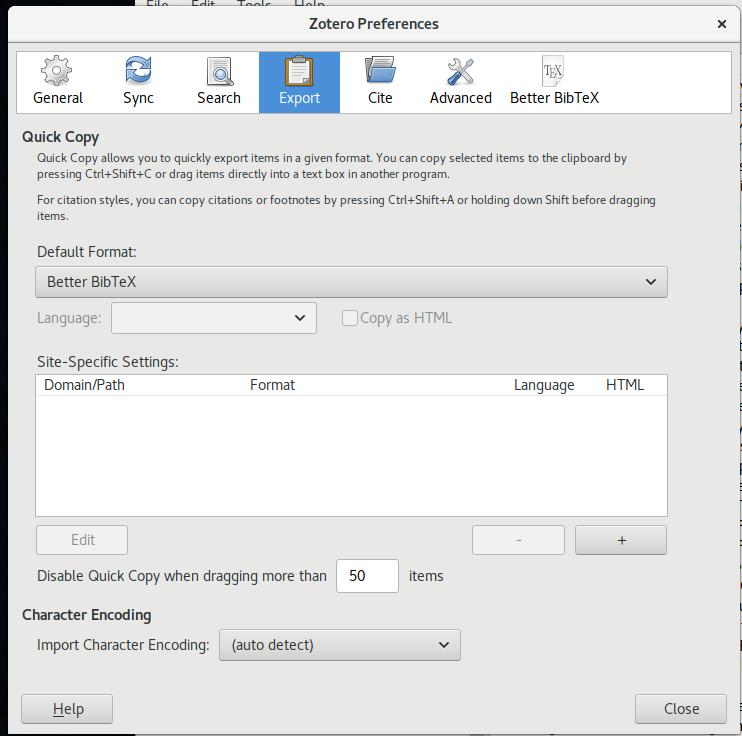
What quick-copy translator do you have set?
 retorquere
on 20 Sep 2017
retorquere
on 20 Sep 2017
It is Better BibTeX. This is the option I set. Is there any other place I should change settings in?
RafalSkolasinski
on 20 Sep 2017
Can you right-click the reference you were quick-copying and select "Send BBT error"?
retorquere
on 20 Sep 2017
Here it comes IZ8RPBY6
RafalSkolasinski
on 20 Sep 2017
Ah, that's a different matter. You're not looking for auto-abbreviation (which is what the preference controls) but to have the abbreviated title exported to the reference journal field instead of the full title.
What you want is not possible; during regular export you can check Use journal abbreviation, but there's no way to communicate this intent to quick-copy, and Zotero doesn't tell translators whether they're being used for quick-copy or regular exports, so I can't enforce it for quick-copy only.
retorquere
on 20 Sep 2017
Ah... I see... Do you know maybe about some extension that could go over all my entries and abbreviate them? Anyway, this issue can be closed then.
RafalSkolasinski
on 20 Sep 2017
You want all your reference titles replaced by their abbreviated titles? Or do you want the Abbreviated Title field filled for all your references?
retorquere
on 20 Sep 2017
I want to have Quick-Copy export abbreviated name as a title so I hope just substituting all names by abbreviated form would do the trick. I could always export first to file (checking abbreviate option) and then copy paste it wherever I want to but it seems like annoying hassle to do.
RafalSkolasinski
on 20 Sep 2017
If Zotero had export options for quick-copy I could make use of those, but as it is there's nothing I can do about this that would not also affect regular exports.
I don't know of any extensions that do what you want, sorry.
retorquere
on 21 Sep 2017
For reference if anyone comes across this issue:
A workaround to get journal abbreviations with Better BibTeX quick-copy is to edit Zotero\translators\Better BibTeX.js and set "useJournalAbbreviation" to true.
 stroitzsch
on 20 Nov 2019
stroitzsch
on 20 Nov 2019
Which will get overwritten the next time BBT updates.
retorquere
on 20 Nov 2019
This issue has been automatically locked since there has not been any recent activity after it was closed. Please open a new issue for related bugs.
![github-actions[bot] picture](https://avatars.githubusercontent.com/in/15368?v=4&s=40) github-actions[bot]
on 17 Feb 2021
github-actions[bot]
on 17 Feb 2021
Related issues
 rolandproducts
·
5Comments
rolandproducts
·
5Comments
 JohnLukeBentley
·
6Comments
JohnLukeBentley
·
6Comments
 SunHaozhe
·
3Comments
SunHaozhe
·
3Comments
 ghost
·
7Comments
ghost
·
7Comments
 richarddmorey
·
7Comments
richarddmorey
·
7Comments
Most helpful comment
For reference if anyone comes across this issue:
A workaround to get journal abbreviations with
Better BibTeXquick-copy is to editZotero\translators\Better BibTeX.jsand set"useJournalAbbreviation"totrue.