Zola: How to get syntax highlighting in shortcodes?
Bug Report
Syntax highlighting is not applied within a shortcode block properly.
Suppose we want to create a shortcut to mimic the details/summary collapsible section in markdown that GitHub and others use.
<details>
    <summary>{{ summary }}</summary>

{{ body | markdown(inline=true) | safe }}

</details>
Then, if we try and apply the shortcode as follows, with syntax highlighting enabled.
````
{% details(summary="Click Here") %}
<item>
  <title>Some title</title>
  <link>www.example.com</link>
</item>
{% end %}
<item>
  <title>Some title</title>
  <link>www.example.com</link>
</item>
````
Environment
Ubuntu 18.04
Zola version:
0.9.0
Expected Behavior
Tell us what should have happened.
We would expect that syntax highlighting is applied for both blocks of code.
Current Behavior
Tell us what happens instead of the expected behavior.
Instead, we see that the they are not rendered the same:
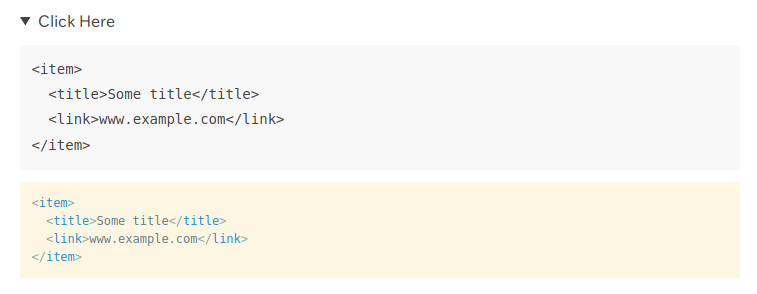
With the corresponding source:
<details>
<summary>Click Here</summary>
<pre><code class="language-xml"><item>
<title>Some title</title>
<link>www.example.com</link>
</item>
</code></pre>
</details>
<pre style="background-color:#fdf6e3;">
<span style="color:#93a1a1;"><</span><span style="color:#268bd2;">item</span><span style="color:#93a1a1;">>
<</span><span style="color:#268bd2;">title</span><span style="color:#93a1a1;">></span><span style="color:#657b83;">Some title</span><span style="color:#93a1a1;"></</span><span style="color:#268bd2;">title</span><span style="color:#93a1a1;">>
<</span><span style="color:#268bd2;">link</span><span style="color:#93a1a1;">></span><span style="color:#657b83;">www.example.com</span><span style="color:#93a1a1;"></</span><span style="color:#268bd2;">link</span><span style="color:#93a1a1;">>
</</span><span style="color:#268bd2;">item</span><span style="color:#93a1a1;">>
</span></pre>
Step to reproduce
Please provide the steps to reproduce the issue.
Use the shortcode and markdown file provided in the description.
 lukehsiao
All 12 comments
I should follow up that this is currently expected behavior, as the built-in markdown filter does NOT apply all the features of zola (see https://www.getzola.org/documentation/templates/overview/).
This is a question of what is the proper way to accomplish syntax highlighting in this type of scenario?
lukehsiao
on 11 Feb 2020
It should be possible to make the filter almost equivalent to the normal rendered with some work and that would be the recommended way to highlight things.
For your specific example though, it looks like you could just render the page in Zola as usual though with the built-in summary feature?
 Keats
on 11 Feb 2020
Keats
on 11 Feb 2020
In my actual use case this is shortcode would appear much later in the document, and several times, so the Page summary is not useful (unless I'm misunderstanding what you are suggesting).
Sounds like this will be a feature request then. I'd love to have the markdown filter be enhanced to support this.
lukehsiao
on 11 Feb 2020
@Keats, do you have pointers to how this could be cleanly implemented in Zola?
lukehsiao
on 5 Mar 2020
Change the builtin markdown filter to use the markdown renderer from the renderer crate I think
Keats
on 5 Mar 2020
If this change would also enable the markdown filter to render shortcodes from within the body of a shortcode (which is something I'd want), note that you'll also need to change how shortcodes are parsed such that {% outershortcode() %}{% innershortcode() %}some-content{% end %}{% end %} work such that outershortcode isn't greedily closed by the first end it encounters.
 mattly
on 30 May 2020
mattly
on 30 May 2020
@Keats, can I own this issue ? Of course if it helps you.
I have looked at it and I think I could be able fix it.
 uggla
on 1 Sep 2020
uggla
on 1 Sep 2020
sure, go ahead
Keats
on 1 Sep 2020
Seems like resolved by https://github.com/getzola/zola/commit/b5ddae023402e83dc1554c511e86dd1406e741ba!
 BasixKOR
on 6 Dec 2020
BasixKOR
on 6 Dec 2020
Yep, it should work!
Keats
on 6 Dec 2020
Seems like resolved by b5ddae0!
Hi, would you make a pull request with that feature? It would be very useful to me
 doppioandante
on 24 Dec 2020
doppioandante
on 24 Dec 2020
It's already merged in the next branch which will be the next release
Keats
on 24 Dec 2020
Related issues
 florianb
·
5Comments
florianb
·
5Comments
 nikhiljha
·
5Comments
nikhiljha
·
5Comments
 seanomlor
·
4Comments
seanomlor
·
4Comments
 phil-opp
·
6Comments
phil-opp
·
6Comments
 porglezomp
·
7Comments
porglezomp
·
7Comments
Most helpful comment
Change the builtin markdown filter to use the markdown renderer from the renderer crate I think