Currently, all resized images are JPEG (according to docs), which doesn't really work well with computer-generated images, such as screenshots. There is also no transparency which makes it even worse.
For example, the following image
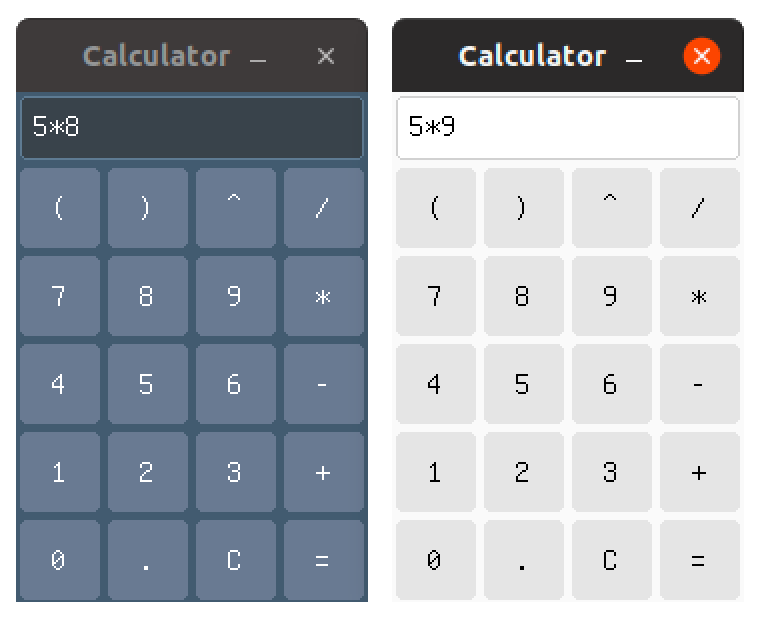
becomes (at 100% quality)
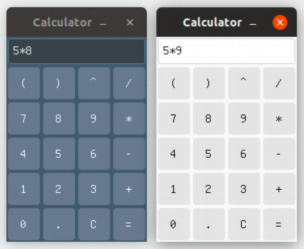
Any way to create PNGs in the future?
 BojanKogoj
All 12 comments
Looks like it should keep jpeg/png if possible yes.
 Keats
on 2 Dec 2018
Keats
on 2 Dec 2018
I'd be willing to try working on this, but beware: I'm a Rust beginner with a day job as a PHP developer. :smiley:
I was thinking of a possible implementation in two steps: the resize_image function should keep the format of the images it's fed by default, so if I try to process a PNG it'll keep the format. As a second step, we could add an optional argument to resize_image that specifies the desired extension, like ext=jpg.
Thoughts?
 MatteoGgl
on 3 Dec 2018
MatteoGgl
on 3 Dec 2018
Go for it!
What you said does make sense to me, although I don't know the support of images outside of jpeg in Rust :/
cc @vojtechkral who wrote the original code for feedback as well.
Keats
on 3 Dec 2018
I'll look at the image crate and we'll see if something can be done then!
MatteoGgl
on 3 Dec 2018
image AFAIK does support encoding of PNGs, so that sould not be a problem. As for preserving the format, I'm not sure you'd really want to do that. For example, making a bmp thumb for a bmp image doesn't make much sense to me, you most likely want png. Perhaps the best way would be to create jpgs for lossy formats and png for lossless formats.
I think the best way would be to have a format option with possible choices "auto" (which would do the above), "png" and "jpeg", defaulting to "auto". Should not be difficult to implement...
 vojtechkral
on 4 Dec 2018
vojtechkral
on 4 Dec 2018
I agree with @vojtechkral
Having options jpeg, png and auto (with default to auto) would be really nice.
BojanKogoj
on 4 Dec 2018
Btw. what's with the project rename? :) I must've missed that. Should we also replace pictures of Gutenberg with those of Émile Zola in the documentation? :)
vojtechkral
on 4 Dec 2018
Explained here: https://www.vincentprouillet.com/blog/releasing-zola-0-5-0/#a-bit-of-history-and-changing-name-to-zola
No need to change the pictures
Keats
on 4 Dec 2018
@vojtechkral I like this implementation, that's in the same general direction of what I was going for, just more polished :grin:
MatteoGgl
on 5 Dec 2018
The essential problem here is not, so far as I understand it, the encoding, but rather the resize filter. Gaussian, which is what is currently used, is producing unexpected blur. For reducing image size, which I believe is the common use case being targeted, Lanczos3 will almost always produce better results (certainly sharper). Switching should be a one line fix.
 bdjnk
on 25 Dec 2018
bdjnk
on 25 Dec 2018
I just ran some tests, and changing the filter doesn't seem to have made a whit of difference, but I could have done it wrong.
bdjnk
on 25 Dec 2018
I created a pull request. The same thumbnail using PNG looks like this:
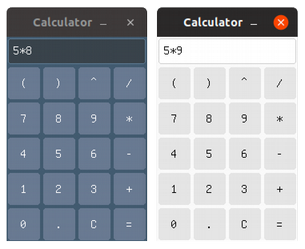
Transparency seems to be preserved as far as I can tell.
vojtechkral
on 28 Dec 2018
Related issues
Keats
·
7Comments
 upsuper
·
3Comments
upsuper
·
3Comments
 nikhiljha
·
5Comments
nikhiljha
·
5Comments
 codesections
·
5Comments
codesections
·
5Comments
 porglezomp
·
7Comments
porglezomp
·
7Comments
Most helpful comment
imageAFAIK does support encoding of PNGs, so that sould not be a problem. As for preserving the format, I'm not sure you'd really want to do that. For example, making abmpthumb for abmpimage doesn't make much sense to me, you most likely wantpng. Perhaps the best way would be to create jpgs for lossy formats and png for lossless formats.I think the best way would be to have a
formatoption with possible choices"auto"(which would do the above),"png"and"jpeg", defaulting to"auto". Should not be difficult to implement...