Zola: Provide a "snap" as software package — for Linux systems
Snaps are containerized software packages that are simple to create and install. They auto-update and are safe to run. And because they bundle their dependencies, they work on all major Linux systems without modification.
If you use snap packaging (Ubuntu's new universal packaging standard), we can submit this application to Ubuntu's Developer Portal and have it show up in the software store.
For more information, see here.
 x80486
All 11 comments
I've never heard of snap before. Is it more common to have it as pre-built or build from source?
 Keats
on 11 Feb 2018
Keats
on 11 Feb 2018
You can go either way. I think depending on the app's nature it will be easier to decide. There is a "language guide" here...you can take a look.
Some snaps looks "pretty dense" — by looking at its snapcraft.yaml file.
x80486
on 11 Feb 2018
Does this method work yet? Or still being considered?
 s0kil
on 29 Jul 2018
s0kil
on 29 Jul 2018
It currently doesn't work, the snapcraft builder seems to have some issues with rust (see #322 )
Keats
on 29 Jul 2018
It looks like it still doesn't work :(
Can anyone on Ubuntu try the snapcraft.yml on master and try to debug it?
Keats
on 17 Nov 2018
This is the result of running snapcraft cleanbuild --debug:
   Compiling bytes v0.4.10
   Compiling futures-cpupool v0.1.8
   Compiling mio v0.6.16
   Compiling resolv-conf v0.6.1
error: failed to run custom build command for `openssl-sys v0.9.39`
process didn't exit successfully: `/root/build_zola/parts/zola/build/target/debug/build/openssl-sys-2b71e6cab2b8c344/build-script-main` (exit code: 101)
--- stdout
cargo:rerun-if-env-changed=X86_64_UNKNOWN_LINUX_GNU_OPENSSL_LIB_DIR
cargo:rerun-if-env-changed=OPENSSL_LIB_DIR
cargo:rerun-if-env-changed=X86_64_UNKNOWN_LINUX_GNU_OPENSSL_INCLUDE_DIR
cargo:rerun-if-env-changed=OPENSSL_INCLUDE_DIR
cargo:rerun-if-env-changed=X86_64_UNKNOWN_LINUX_GNU_OPENSSL_DIR
cargo:rerun-if-env-changed=OPENSSL_DIR
run pkg_config fail: "Failed to run `\"pkg-config\" \"--libs\" \"--cflags\" \"openssl\"`: No such file or directory (os error 2)"

--- stderr
thread 'main' panicked at '

Could not find directory of OpenSSL installation, and this `-sys` crate cannot
proceed without this knowledge. If OpenSSL is installed and this crate had
trouble finding it,  you can set the `OPENSSL_DIR` environment variable for the
compilation process.

Make sure you also have the development packages of openssl installed.
For example, `libssl-dev` on Ubuntu or `openssl-devel` on Fedora.

If you're in a situation where you think the directory *should* be found
automatically, please open a bug at https://github.com/sfackler/rust-openssl
and include information about your system as well as this message.

    $HOST = x86_64-unknown-linux-gnu
    $TARGET = x86_64-unknown-linux-gnu
    openssl-sys = 0.9.39


It looks like you're compiling on Linux and also targeting Linux. Currently this
requires the `pkg-config` utility to find OpenSSL but unfortunately `pkg-config`
could not be found. If you have OpenSSL installed you can likely fix this by
installing `pkg-config`.

', /root/.cargo/registry/src/github.com-1ecc6299db9ec823/openssl-sys-0.9.39/build/main.rs:269:9
note: Run with `RUST_BACKTRACE=1` for a backtrace.

warning: build failed, waiting for other jobs to finish...
error: build failed
Failed to run '/root/build_zola/parts/zola/rust/bin/cargo test -j4' for 'zola': Exited with code 101.
Verify that the part is using the correct parameters and try again.
Debug mode enabled, dropping into a shell
root@snapcraft-strengtheningly-windowless-bridgette:~#
I'll look into it a bit more if I get time the next couple days. I am guessing that either snapcraft.yml needs to specify that OpenSSL is needed or OPENSSL_DIR needs to be set somehow.
 musoke
on 19 Nov 2018
musoke
on 19 Nov 2018
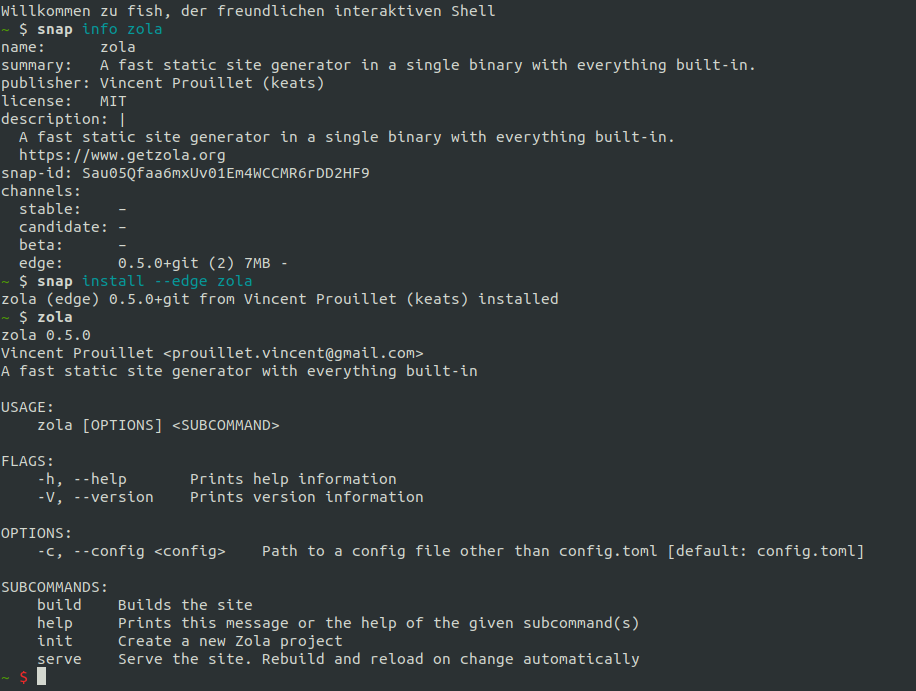
:fireworks:
Keats
on 19 Nov 2018
it looks good :+1:
 caemor
on 19 Nov 2018
caemor
on 19 Nov 2018
Will you add snap to the installation documentation site?
caemor
on 19 Nov 2018
Yes, unless someone beats me to it
Keats
on 19 Nov 2018
The snap worked for me too! (Debian Stretch)
musoke
on 19 Nov 2018
Related issues
 sternj
·
6Comments
sternj
·
6Comments
 jjbarr
·
5Comments
jjbarr
·
5Comments
 svenstaro
·
5Comments
svenstaro
·
5Comments
 phil-opp
·
3Comments
phil-opp
·
3Comments
 NuLL3rr0r
·
6Comments
NuLL3rr0r
·
6Comments
Most helpful comment
https://snapcraft.io/zola
:fireworks: