Zim-desktop-wiki: dark theme in ubuntu 18.04 (CTRL T)
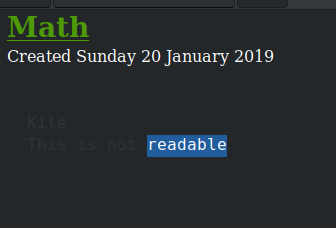
In dark theme when I press CTRL T to apply explicit content so zim does not try to do anything crazy with my text, I can no longer see it. See attached. The 'readable' section is visible because it's highlighted with my cursor.
OS: Ubuntu 18.04
Theme: Adwaita-dark
 charlierlee
All 2 comments
You can workaround this by setting foreground=#969896 in the [Tag pre] of the ~/.config/zim/style.conf file. Of course you can set to any other color ;) Check out the Config Files in the Zim help notebook for more ways to customize.
I also tweaked the links and headings to get a more balanced palette using the dark theme. If you want to give it a try here is the whole thing:
[TextView]
indent=30
tabs=None
font=Cantarell 11
justify=
linespacing=3
bullet_icon_size=GTK_ICON_SIZE_MENU

[Tag strong]
weight=PANGO_WEIGHT_BOLD

[Tag emphasis]
style=PANGO_STYLE_ITALIC

[Tag mark]
background=#705D36

[Tag strike]
strikethrough=True
foreground=#969896

[Tag code]
family=monospace
foreground=#969896

[Tag pre]
family=monospace
wrap-mode=GTK_WRAP_NONE
indent=20
foreground=#969896

[Tag link]
foreground=#81a2be

[Tag tag]
foreground=#de935f

[Tag h1]
underline=PANGO_UNDERLINE_SINGLE
weight=PANGO_WEIGHT_BOLD
scale=1.75
foreground=#b5bd68

[Tag h2]
weight=PANGO_WEIGHT_BOLD
scale=1.52
foreground=#b5bd68

[Tag h3]
style=PANGO_STYLE_ITALIC
weight=PANGO_WEIGHT_BOLD
scale=1.32
foreground=#b5bd68

[Tag h4]
weight=PANGO_WEIGHT_BOLD
scale=1.15
foreground=#b5bd68

[Tag h5]
weight=PANGO_WEIGHT_BOLD
foreground=#b5bd68

[Tag h6]
foreground=#b5bd68

[Tag checked-checkbox]
foreground=#969896

[Tag xchecked-checkbox]
foreground=#969896
strikethrough=True

[Tag migrated-checkbox]
foreground=#969896
style=PANGO_STYLE_ITALIC
 nelas
on 21 Sep 2019
nelas
on 21 Sep 2019
👍4
Thanks so much
charlierlee
on 24 Sep 2019
Was this page helpful?
0 / 5 - 0 ratings
Related issues
 lofidevops
·
4Comments
lofidevops
·
4Comments
 sojusnik
·
8Comments
sojusnik
·
8Comments
 muguu
·
5Comments
sojusnik
·
3Comments
muguu
·
5Comments
sojusnik
·
3Comments
 markfink
·
6Comments
markfink
·
6Comments
Most helpful comment
You can workaround this by setting
foreground=#969896in the[Tag pre]of the~/.config/zim/style.conffile. Of course you can set to any other color ;) Check out theConfig Filesin the Zim help notebook for more ways to customize.I also tweaked the links and headings to get a more balanced palette using the dark theme. If you want to give it a try here is the whole thing: