Zigbee2mqtt: Tuya Occupancy: Fail to configure
Hello,
I have Tuya occupancy sensor. I have tried several times to add to zigbee2mqtt, sometimes it works and sometimes not. In the log I can see these notes:
Sep 28 22:36:00 raspberrypi4 npm[7448]: Zigbee2MQTT:error 2020-09-28 22:36:00: Failed to configure 'tuyaoccupancy', attempt 1 (Error: Bind 0xec1bbdfffe90e552/1 genBasic from '0x00124b0014d47fe6/1' failed (AREQ - ZDO - bindRsp after 10000ms)
Sep 28 22:36:00 raspberrypi4 npm[7448]:     at Timeout._onTimeout (/opt/zigbee2mqtt/node_modules/zigbee-herdsman/dist/utils/waitress.js:46:35)
Sep 28 22:36:00 raspberrypi4 npm[7448]:     at listOnTimeout (internal/timers.js:549:17)
Sep 28 22:36:00 raspberrypi4 npm[7448]:     at processTimers (internal/timers.js:492:7))
It seems to overload zigbee2mqtt it becomes unavailable also for other devices. Can you help me, how to solve this issue?
 kremik
All 25 comments
Try to wakeup the device and right after that force a configure via https://www.zigbee2mqtt.io/information/mqtt_topics_and_message_structure.html#zigbee2mqttbridgeconfigure
 Koenkk
on 29 Sep 2020
Koenkk
on 29 Sep 2020
Thank you for a good tip, but it produces the same error:
Sep 29 21:34:08 raspberrypi4 npm[442]: Zigbee2MQTT:info  2020-09-29 21:34:08: Configuring 'tuyaoccupancy'
Sep 29 21:34:18 raspberrypi4 npm[442]: Zigbee2MQTT:error 2020-09-29 21:34:18: Failed to configure 'tuyaoccupancy', attempt 6 (Error: Bind 0xec1bbdfffe90e552/1 genBasic from '0x00124b0014d47fe6/1' failed (AREQ - ZDO - bindRsp after 10000ms)
Sep 29 21:34:18 raspberrypi4 npm[442]:     at Timeout._onTimeout (/opt/zigbee2mqtt/node_modules/zigbee-herdsman/dist/utils/waitress.js:46:35)
Sep 29 21:34:18 raspberrypi4 npm[442]:     at listOnTimeout (internal/timers.js:549:17)
Sep 29 21:34:18 raspberrypi4 npm[442]:     at processTimers (internal/timers.js:492:7))
But after a while without any response it sends the message
Sep 29 21:35:32 raspberrypi4 npm[442]: Zigbee2MQTT:info 2020-09-29 21:35:32: MQTT publish: topic 'zigbee2mqtt/tuyaoccupancy', payload '{"battery":67,"battery_low":false,"linkquality":5,"occupancy":false,"tamper":false,"voltage":0.28}'
Sometimes it works and sometimes not :(
kremik
on 29 Sep 2020
Strange that the bind doesn't work, given it's TuYa (and since they are not so compliant) I'm not sure wether it's a Zigbee2MQTT or device issue.
What is the model of your sensor?
Koenkk
on 29 Sep 2020
The package says it is Tuya PIR Sensor ZC-P1. In database.db of zigbee2mqtt is "manufName":"TUYATEC-53o41joc","modelId":"RH3040".
kremik
on 29 Sep 2020
@codegraffiti @PedroLamas does the sensor work correctly in your case?
Koenkk
on 30 Sep 2020
I have a RH3040 working and sending updates to Home Assistant with no issues at all (currently using the dev branch, but was working fine with latest releases also)!
 pedrolamas
on 30 Sep 2020
pedrolamas
on 30 Sep 2020
Just one thing that comes to my mind is that I've got several WARNs during zigbee2mqtt installation. So if there wasn't something crucial that went wrong during installation (RPi4B) and is causing those issues?
I did a copy and ignored them as it states in the installation instructions. Installation log attached.
zigbee2mqtt-install-warn.txt
kremik
on 30 Sep 2020
@kremik I'm quite sure that is not related to this issue. Can you try repairing the device very close to the coordinator? If that doesn't work we should sniff to see what is going on: https://www.zigbee2mqtt.io/how_tos/how_to_sniff_zigbee_traffic.html
Koenkk
on 30 Sep 2020
I would do that, but I don't the flashing components like debuger, etc. :( I obtained the pre-flashed module ...
It's interesting that configuration fails, but then some mqtt messages arrive, but you can't rely on that :(
Sep 30 17:20:47 raspberrypi4 npm[24376]: Zigbee2MQTT:error 2020-09-30 17:20:47: Failed to configure 'tuyaoccupancy', attempt 1 (Error: Bind 0xec1bbdfffe90e552/1 genBasic from '0x00124b0014d47fe6/1' failed (AREQ - ZDO - bindRsp after 10000ms)
Sep 30 17:20:47 raspberrypi4 npm[24376]:     at Timeout._onTimeout (/opt/zigbee2mqtt/node_modules/zigbee-herdsman/dist/utils/waitress.js:46:35)
Sep 30 17:20:47 raspberrypi4 npm[24376]:     at listOnTimeout (internal/timers.js:549:17)
Sep 30 17:20:47 raspberrypi4 npm[24376]:     at processTimers (internal/timers.js:492:7))
Sep 30 17:20:49 raspberrypi4 npm[24376]: Zigbee2MQTT:info  2020-09-30 17:20:49: Configuring 'tuyaoccupancy'
Sep 30 17:20:59 raspberrypi4 npm[24376]: Zigbee2MQTT:error 2020-09-30 17:20:59: Failed to configure 'tuyaoccupancy', attempt 2 (Error: Bind 0xec1bbdfffe90e552/1 genBasic from '0x00124b0014d47fe6/1' failed (AREQ - ZDO - bindRsp after 10000ms)
Sep 30 17:20:59 raspberrypi4 npm[24376]:     at Timeout._onTimeout (/opt/zigbee2mqtt/node_modules/zigbee-herdsman/dist/utils/waitress.js:46:35)
Sep 30 17:20:59 raspberrypi4 npm[24376]:     at listOnTimeout (internal/timers.js:549:17)
Sep 30 17:20:59 raspberrypi4 npm[24376]:     at processTimers (internal/timers.js:492:7))
Sep 30 17:22:13 raspberrypi4 npm[24376]: Zigbee2MQTT:info  2020-09-30 17:22:13: Configuring 'tuyaoccupancy'
Sep 30 17:22:23 raspberrypi4 npm[24376]: Zigbee2MQTT:error 2020-09-30 17:22:23: Failed to configure 'tuyaoccupancy', attempt 3 (Error: Bind 0xec1bbdfffe90e552/1 genBasic from '0x00124b0014d47fe6/1' failed (AREQ - ZDO - bindRsp after 10000ms)
Sep 30 17:22:23 raspberrypi4 npm[24376]:     at Timeout._onTimeout (/opt/zigbee2mqtt/node_modules/zigbee-herdsman/dist/utils/waitress.js:46:35)
Sep 30 17:22:23 raspberrypi4 npm[24376]:     at listOnTimeout (internal/timers.js:549:17)
Sep 30 17:22:23 raspberrypi4 npm[24376]:     at processTimers (internal/timers.js:492:7))
Sep 30 17:25:42 raspberrypi4 npm[24376]: Zigbee2MQTT:info  2020-09-30 17:25:42: MQTT publish: topic 'zigbee2mqtt/tuyaoccupancy', payload '{"battery":77,"battery_low":false,"linkquality":141,"occupancy":true,"tamper":false,"voltage":0.28}'
@kremik I'm quite sure that is not related to this issue. Can you try repairing the device very close to the coordinator? If that doesn't work we should sniff to see what is going on: https://www.zigbee2mqtt.io/how_tos/how_to_sniff_zigbee_traffic.html
@Koenkk Regarding the installation issues I’ve posted in a log file - is there any problem? I can’t evaluate if those WARNs are OK, or should I do anything about that? Like fix some settings, install some prerequisites? Because it seems to me like a lot of warnings.
Regarding Tuya presence sensor I tried to delete the device from database.db to see if the rest of other devices will work OK without error caused by Tuya. Because last days Tuya was generating those errors but other devices were responding too slowly. That’s why I was curious about the correctness of zigbee2mqtt installation.
kremik
on 2 Oct 2020
@kremik yes those warning are normal. Regarding the slow responsiveness, try Zigbee2MQTT 1.15.0, it's a known issue in 1.14.4
Koenkk
on 2 Oct 2020
@Koenkk 1.15.0 seems to solve the responsiveness issue. But Tuya issue is still there :-(
kremik
on 7 Oct 2020
@kremik I didn't expect 1.15.0 to fix it, we need to sniff (https://github.com/Koenkk/zigbee2mqtt/issues/4482#issuecomment-701368803)
Koenkk
on 7 Oct 2020
@kremik I didn't expect 1.15.0 to fix it, we need to sniff (#4482 (comment))
Just a short question. If I have CC2531 flashed with a sniffer firmware (which is required to run zigbee2mqtt I guess) I have to install PACKET-SNIFFER to the CC2531 with CC debugger?
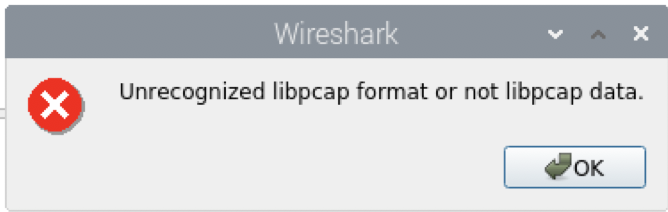
I tried to launch wireshark with sudo whsniff -c ZIGBEE_CHANNEL_NUMBER | wireshark -k -i - but I'm getting this message.
kremik
on 15 Oct 2020
Sniffer firmware != Z2M coordinator firmware (see https://www.zigbee2mqtt.io/how_tos/how_to_sniff_zigbee_traffic.html#1-flashing-the-cc2531-stick how to obtain the sniffer firmware)
Koenkk
on 15 Oct 2020
This issue is stale because it has been open 30 days with no activity. Remove stale label or comment or this will be closed in 7 days
![github-actions[bot] picture](https://avatars2.githubusercontent.com/in/15368?v=4&s=40) github-actions[bot]
on 15 Nov 2020
github-actions[bot]
on 15 Nov 2020
Ok, I took another look at this and indeed, it does completely fail to configure this device, although it works perfectly!
Here's the complete zigbee-herdsman debug log entries mentioning this device IEEE address: https://pastebin.com/3Fe8rFJ7
pedrolamas
on 16 Nov 2020
@pedrolamas can you remove the whole configure() and see if the device still works? (make sure to factory reset and repair to check)
Koenkk
on 16 Nov 2020
@Koenkk I assume that by "factory reset and repair" you mean removing it from my network and repairing it, correct? If not, I will need to use my "old" CC2531 to create a separate network for tests... as I do want to avoid using the main CC26X2R1 and then having to repair everything 😕
pedrolamas
on 16 Nov 2020
I just did the following:
- unpaired/removed the device from my network and then turned it off
- stopped z2m docker container and removed it
- pointed to herdsman checked out at v12.0.224 label (thus matching my z2m version)
- commented out the "configure" block for RH3040 in devices.js
- started a new z2m docker container
- paired/added the device back again
All is working fine, no errors at all, so I don't see the need for a configure on this particular device!
pedrolamas
on 17 Nov 2020
@pedrolamas is battery also being reported? (to check stop z2m, and remove it from state.json manually, start z2m and wait 24 hours and check if it is reported)
Koenkk
on 18 Nov 2020
@Koenkk Done! I made the state just be {"occupancy":false,"tamper":false} and removed everything else.
I will report back in 24h or sooner if I see it updating.
(on a side note, firmware 20201113 on my CC26X2R1 has been running with no problems at all, 1st time I see it running like that!)
pedrolamas
on 18 Nov 2020
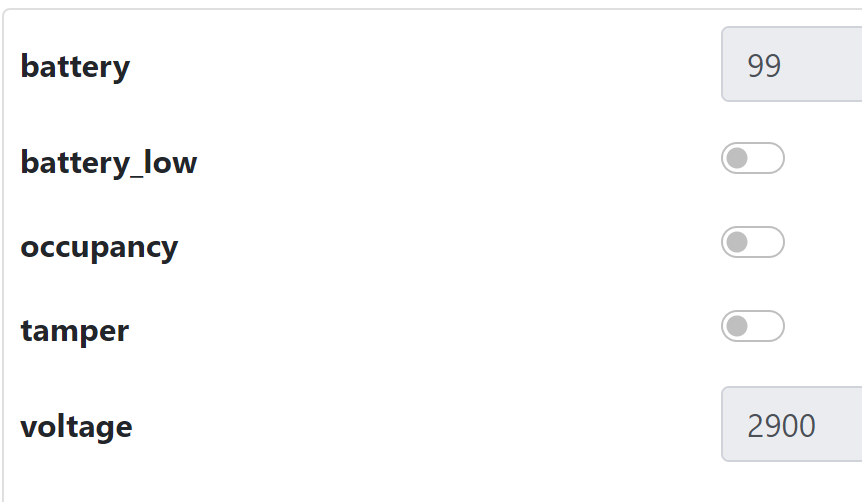
I just checked and even after disabling the configuration bit, battery seems to be reported as I can see it here now:
pedrolamas
on 19 Nov 2020
My battery level never dropped from 99, which I do find odd... Also, I have yet to see that tamper attribute change from false!
pedrolamas
on 19 Nov 2020
I've removed the configure() so this issue should be fixed now.
About the tamper, this typically triggers when you open the device (but it could also be that this device doesn't support it).
Koenkk
on 19 Nov 2020
Related issues
 sylarevan
·
5Comments
sylarevan
·
5Comments
 CodeFinder2
·
4Comments
CodeFinder2
·
4Comments
 jwilling
·
4Comments
jwilling
·
4Comments
 rm2kdev
·
3Comments
rm2kdev
·
3Comments
 z4rn0x
·
3Comments
z4rn0x
·
3Comments