Zigbee2mqtt: [RFC] Exposing device capabilities
Currently there is no way for clients to determine the capabilities of a device. With this change I would like to introduce this. Please let me know what you think!
Benefits
- Avoid having to maintain a manual mapping for integrations e.g.:
- homebridge-z2m @itavero
- domoticz-zigbee2mqtt-plugin @stas-demydiuk
- homeassistant.js
- ioBroker.zigbee @kirovilya
- Provide more info on what values to expect for a certain device on the device specific pages
- Improve controlling of devices through the frontend (as currently it does not know what it can send) (@nurikk)
- Get rid of non-uniform
supportsattribute
Proposal
EDIT: All devices have exposes now, docs can be found here: https://github.com/Koenkk/zigbee2mqtt.io/blob/new_api/docs/information/exposes.md
 Koenkk
All 128 comments
what about reading attributes from the device (something like power on state). Some devices can expose the same attribute for multiple endpoint (per endpoint configuration, like ZCL_CLUSTER_ID_GEN_ON_OFF_SWITCH_CONFIGfoe every button )
 nurikk
on 26 Sep 2020
nurikk
on 26 Sep 2020
For boolean(or other) attribute isn't clear whether the user can modify this state or no
nurikk
on 26 Sep 2020
For boolean(or other) attribute isn't clear whether the user can modify this state or no
Yes! Having a ‘writable’ indicator is a good idea.
Maybe with options range for int, or enum for int and str.
E.g.
color_mode = read, int, enum [0=Hue/Sat, 1=CIExy,2=ColorTemp]
Lots of this is in the zcl, so some way to encode these in herdsman and then pull that info into the device info would he great.
The enum hits is great for things like z2m-frontend and for writing say a native node-red binding.
 sjorge
on 26 Sep 2020
sjorge
on 26 Sep 2020
I have a positive attitude.
This partially overlaps with the classification of devices (as it is done here https://zigbee.blakadder.com/).
I also suggest putting this in devices.js as a list, since there are devices with different functionality. For example, distinguish light bulbs from sockets, switches or relays.
This all resembles the standardization of device capabilities, as is done in Apple HomeKit, Google Home, Amazon Alexa, Yandex Alice.
We declare what capabilities the device has, and the end systems themselves interpret how to display the work with this capability. If the device is specified as a "temperature sensor" or "socket with consumption measurement", then it is clear which attributes to display and which commands can be sent to the device.
But will we be able to describe all the capabilities of the device in this way? Basic - yes, but there are additional ones that are very different.
For example, it is possible to call selftest of a smoke detector or change its sensitivity, or switch the binding mode on the Opple remote control.
This should be described in more detail. And this possibility should have a name ("Sensor sensitivity", "Binding mode"), not just a type.
 kirovilya
on 27 Sep 2020
kirovilya
on 27 Sep 2020
what about reading attributes from the device (something like power on state). Some devices can expose the same attribute for multiple endpoint (per endpoint configuration, like ZCL_CLUSTER_ID_GEN_ON_OFF_SWITCH_CONFIGfoe every button )
I don't understand what you mean here.
@kirovilya @sjorge @nurikk regarding the settable part, if we e.g. take the sensitivity of a sensor we can easily add it with:
{
    "type": "enum",
    "property": "sensitivity",
    "values": ["low", "medium", "high"],
    "direction": 2, // 0 = get only, 1 = set only, 2 = get and set
}
Selftest:
{
    "type": "enum",
    "property": "self_test",
    "values": [""],
    "direction": 1, // 0 = get only, 1 = set only, 2 = get and set
}
Can we have typescript definitions for new exposes properties?
nurikk
on 28 Sep 2020
OK. I think I need to have an optional description of the property.
{
    "type": "enum",
    "property": "self_test",
    "description": "Invoke self-test mode (send any value)",
    "values": [""],
    "direction": 1, // 0 = get only, 1 = set only, 2 = get and set
}
@nurikk typescript defs shouldn't be a problem
@kirovilya description field is no problem!
Since I believe we agree on the general idea and structure, I will start implementing this for lights (since those represent the biggest share of supported devices).
Koenkk
on 28 Sep 2020
What is the plan for groups? For uniform groups we can probably publish the info too, not sure for mixed groups... only the common ones?
E.g. 4 bulbs that are ws and one that is cws, we could still publish the ws part as all 5 support it?
But probably something for after we have devices exposed
sjorge
on 29 Sep 2020
@sjorge lets do that after this indeed, I think we can also add Home Assistant discovery then.
Koenkk
on 29 Sep 2020
exposes is now available for all lights (+- 50% of the supported devices). Docs: https://github.com/Koenkk/zigbee2mqtt.io/blob/new_api/docs/information/mqtt_topics_and_message_structure.md#exposes
Koenkk
on 1 Oct 2020
I would like to see implementation of sensors and "set converters" (ex: power on state, how to read/set values)
nurikk
on 2 Oct 2020
First try, already available in dev

nurikk
on 2 Oct 2020
Currently implemented color_xy, color_temp, state, brightness
Kindly share device states with other color_XX features (I don't have anything but color_xy)
nurikk
on 2 Oct 2020
Also added for switch devices!
Koenkk
on 2 Oct 2020
@Koenkk what about lights like Innr RB 250 C which takes
- color_temp
- color_xy
- hue + saturation
(and it properly switches color_mode!)
Currently it is exported as color_xy + color_temp I believe.
sjorge
on 2 Oct 2020
Also added for switch devices!
Looks like the Ubisys S1 and S2 are not exposed? Or will you do them in a later set, as they also support power metering (and well voltage, but the later is not hooked up but the cluster is there)
sjorge
on 2 Oct 2020
@sjorge feel free to also add .withColorHs to that, about S1/S2 a device is either mapped in homeassitant.js OR has exposes. Since it also has the sensor which are not supported with exposes yet I didn't migrate them.
Koenkk
on 2 Oct 2020
Will open a PR against converters, I also discovered the E27 variant was missing the meta to enable Hue/Sat support, I just verified it works, will include that too.
sjorge
on 2 Oct 2020
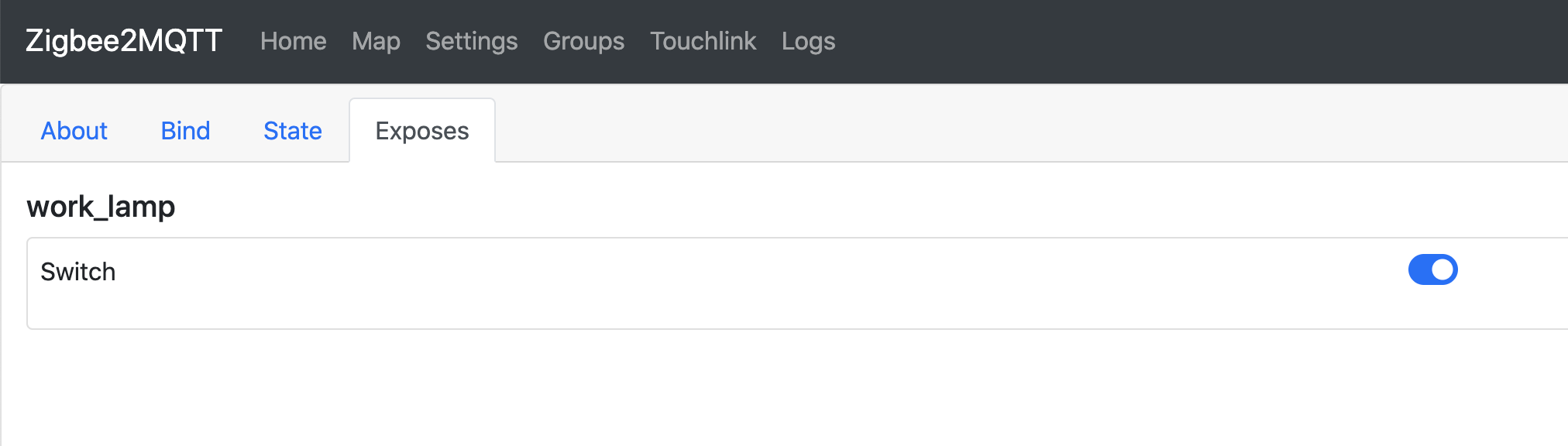
I've implemented switch support, it's quite dull component.
We need to test lights and switches with different endpoints.
nurikk
on 3 Oct 2020
Sorry I didn't get back to you sooner. The proposal looks interesting and it will definitely help to "speed" up the discovery process in homebridge-z2m.
One thing I'm really interested in would be remote controls.
If we could define a good definition for that, that would help a lot with itavero/homebridge-z2m#2.
With the current release of zigbee2mqtt, I don't see a good way to convert a remote control to a HomeKit entity without manual configuration, because I don't know all the possible values and how they relate to each other upfront.
Some background information: in HomeKit (and therefor in Homebridge) you have Stateless Programmable Switches and Stateful Programmable Switches.
I think for homebridge-z2m, I will (mostly) stick to the stateless service, as the state will probably be exposed as an "On/Off" characteristic on a Switch service.
Anyway, for both of them you must define a Programmable Switch Event characteristic.
HomeKit "assumes" that every button has the following events:
- Single Press
- Double Press
- Long Press
Ofcourse, these actions don't always exists on the actual devices compatible with z2m (and the long press sometimes even seems to send the same command for different physical buttons on a remote), so I reckon I either need to try and detect these things in the homebridge plugin or not support them, if the actual device does not support them.
But, if the actions do exist, they are different textual strings in the click property (for instance).
So for homebridge-z2m, what I would like to get out of the exposes information is which buttons exist on a remote control and what the different values are for different kind of events/actions for each button.
 itavero
on 5 Oct 2020
itavero
on 5 Oct 2020
@itavero no problem, for the action we can publish something like:
{
    "type": "action",
     "actions": ["single", "double", "triple", '"many"],
}
Would that solve your issue?
Koenkk
on 5 Oct 2020
@Koenkk I think that's a bit limited, at least for my plugin to be able to automatically configure it. I'll capture some of the values currently transmitted by the different remotes I have and see if I can make a sensible/flexible definition based on those.
itavero
on 7 Oct 2020
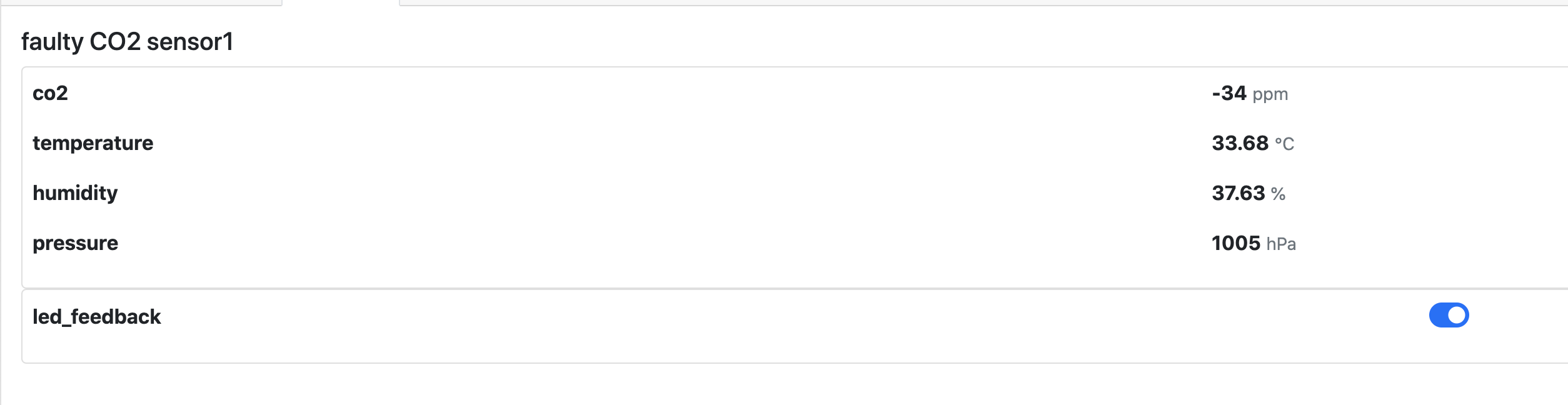
numeric and boolean exposes are now also available (https://github.com/Koenkk/zigbee2mqtt.io/blob/new_api/docs/information/mqtt_topics_and_message_structure.md#numeric). 634 out of 978 supported devices have exposes now.
Koenkk
on 7 Oct 2020
Can we mix those, switch + numeric for power. e.g. Ubisys S1 ?
sjorge
on 7 Oct 2020
Can we mix those, switch + numeric for power. e.g. Ubisys S1 ?
Yes, this is totally fine
nurikk
on 8 Oct 2020
Added the cover exposes type. Currently 705 out of 981 devices have exposes.
Koenkk
on 12 Oct 2020
Hi @Koenkk!
One question: where do you get those "705 out of 981" numbers from? :confused: I have had a look at the latest version of the devices.js file and I haven't been able to confirm that proportion (71.87% per your numbers).
Do you want us to create small pull requests adding the "exposes" field to our devices or you have an automatic tool to add them? Perhaps I haven't checked the correct file, sorry :wink:
Anyway, many many thanks for your awesome work, the zigbee2mqtt project is amazing! :+1:
Best regards,
Aitor
 bodiroga
on 12 Oct 2020
bodiroga
on 12 Oct 2020
@bodiroga a lot of devices (almost all lights, +- 500) get it via e.g. https://github.com/Koenkk/zigbee-herdsman-converters/blob/b40bd9ba117b40119a5dc609ebd6a11c25bad39b/devices.js#L263 , https://github.com/Koenkk/zigbee-herdsman-converters/blob/b40bd9ba117b40119a5dc609ebd6a11c25bad39b/devices.js#L1275
I have an automatic tool to do this: https://github.com/Koenkk/zigbee-herdsman-converters/blob/master/scripts/transformExposes.js (so no PRs required from users).
Koenkk
on 13 Oct 2020
@Koenkk
How about to add somethink like this:
const PropertyAccessMode = {
    READ_ONLY: 1,
    WRITE_ONLY: 2,
    READ_WRITE: 3,
};

class Base {
    withEndpoint(endpointName, accessMode = PropertyAccessMode.READ_WRITE) {
        this.endpoint = endpointName;
        this.accesMode = accessMode;
        return this;
    }
}
But better to remove default value, like this:
class Base {
    withEndpoint(endpointName, accessMode) {
        this.endpoint = endpointName;
        this.accesMode = accessMode;
        return this;
    }
}
Also I think it will be great to make some standartization for speicifc devices, like thermostats, which can have weekly schedule for example.
 Hacker-CB
on 13 Oct 2020
Hacker-CB
on 13 Oct 2020
@Hacker-CB I think access mode only makes sense for the generic types (currently numeric, boolean) and not for specific types.
For thermostat we can do something like {"type":"thermostat","features":["weekly_schedule"]}, for this to work the weekly_schedule format has to be the same for all thermostats, otherwise the client does not know what to send.
Koenkk
on 13 Oct 2020
@bodiroga a lot of devices (almost all lights, +- 500) get it via e.g. https://github.com/Koenkk/zigbee-herdsman-converters/blob/b40bd9ba117b40119a5dc609ebd6a11c25bad39b/devices.js#L263 , https://github.com/Koenkk/zigbee-herdsman-converters/blob/b40bd9ba117b40119a5dc609ebd6a11c25bad39b/devices.js#L1275
I have an automatic tool to do this: https://github.com/Koenkk/zigbee-herdsman-converters/blob/master/scripts/transformExposes.js (so no PRs required from users).
Great, thanks for the explanation @Koenkk!
What about something like WSDCGQ01LM? That is the only device I have tried in my test environment and it seems that it doesn't support the "exposes" field, bad luck :rofl: Do you mind if I create a PR for it? :+1:
Thank you very much for your help!
bodiroga
on 13 Oct 2020
For thermostat we can do something like
{"type":"thermostat","features":["weekly_schedule"]}, for this to work theweekly_scheduleformat has to be the same for all thermostats, otherwise the client does not know what to send.
@Koenkk you are right. In this case I suggest for thermostats/fans something like this:
class Dict extends Base {
    constructor(property, values, accessMode = PropertyAccessMode.READ_WRITE) {
        super();
        this.type = 'dict';
        this.property = property;
        this.values = values;
    }
}


class Climate extends Base {
    constructor(){
        super();
        this.type = 'climate';
        this.features = [];
    }

    withSystemModes(systemModes){
        this.features.push(new Dict('system_mode', systemModes));
        return this;
    }

    withPresets(presets){
        this.features.push(new Dict('preset',presets, PropertyAccessMode.READ_ONLY));
        return this;
    }

    withRoomTemperature(){
        this.features.push(new Numeric('room_temperature' PropertyAccessMode.READ_ONLY,));
        return this;
    }

    withFloorTemperature(){
        this.features.push(new Numeric('floor_temperature' PropertyAccessMode.READ_ONLY,));
        return this;
    }

    withFan(fanModes){
        this.features.push(Dict('fan',fanModes));
        return this;
    }

    withChildrenLock(){
        this.features.push('children_lock');
        return this;
    }

    withWeeklySchedule(scheduleMode, maxTransitions) {
        // HERE will be more complicated logic
    }
}
I can try to implement this if you agree with base logic.
Hacker-CB
on 13 Oct 2020
@Hacker-CB yes, looks good! But maybe features should be an object, this would allow for more extensions in the future. e.g.
{
  "type": "climate",
  "features": {
    "children_lock": {"type": "numeric", "direction": 0},
    "floor_temperature": {"type": "numeric", "direction": 0, "max": 30, "min": 7}
  }
}
If you agree, then we should also do the same for lights and cover.
@bodiroga I will migrate some Xiaomi devices to exposes soon.
Koenkk
on 13 Oct 2020
@Koenkk , You are right. It will be better if features should be object.
For the direction - I think it will be better to name it access or accessMode, or may be separate properties readable and writable. For my mind direction is not clear.
I will try to implement thermostat based on ETOP HT-08/HT-10 after you finish refactoring for lights and cover.
Hacker-CB
on 13 Oct 2020
One more comment about min and max, it is possible to change min/max boundaries for some thermostats.
Also min/max will work only during writing. It is useless when reading.
Hacker-CB
on 13 Oct 2020
@bodiroga I will migrate some Xiaomi devices to
exposessoon.
Perfect, thank you Koen!
bodiroga
on 13 Oct 2020
@Koenkk I forgot about devices with actions with params, like heiman_ir_remote:
{
    action: 'learn',
    action_result: msg.data.result === 1 ? 'success' : 'error',
    action_key_code: msg.data.keyCode,
    action_id: msg.data.result === 1 ? msg.data.id : undefined,
};
I don't have idea how to describe such action with exposes now.
UPD: Generally, I think it is very important to describe actions with exposes because currently you can't add automation in HA until you receive this action first time (e.g. click button)
Hacker-CB
on 13 Oct 2020
For my mind its better to wrap action to object, but it can break a lot.
{
  "action": {
     "type": "learn",
    "params": {...}
  }
}
But may be its possible to add legacy converters like action_XXX -> action['params']['XXX']
Hacker-CB
on 13 Oct 2020
@Hacker-CB currently @itavero is looking how we should define actions (https://github.com/Koenkk/zigbee2mqtt/issues/4466#issuecomment-704829177)
Koenkk
on 14 Oct 2020
@Hacker-CB currently @itavero is looking how we should define actions (#4466 (comment))
Ok, Iet's wait.
For the
direction- I think it will be better to name itaccessoraccessMode, or may be separate propertiesreadableandwritable. For my minddirectionis not clear.
@Koenkk what about this? For boolean it is very important for HA because it will be different domains. readonly - binary sensor, read/write - switch.
Hacker-CB
on 14 Oct 2020
@Hacker-CB this depends on the context right? We can do this in homeassistant.js.
Koenkk
on 14 Oct 2020
@Hacker-CB this depends on the context right? We can do this in
homeassistant.js.
I think it's important to have the exposes to be as generic as possible as this should not be homeassistant specific.
That might mean some extra mappings in homeassistant.js but that should, I hope, not be a issue.
sjorge
on 14 Oct 2020
I think the lights exposes should be changed to, e.g.:
{
  "type": "light",
  "features": {
    "state": {"type": "enum", "values": ["ON", "OFF"], "access": 2},
    "brightness": {"type": "numeric", "min": 0, "max": 254, "access": 2},
    "identify": {"type": "enum", "values": ["blink", "channel_change"], "access": 1},
  }
}
I like the idea of @Hacker-CB that every features element is one of the generic exposes type (numeric/enum/boolean, etc..)
Koenkk
on 14 Oct 2020
Is there a reason why 'access' is numeric? Having it be 'r', 'w', or 'rw' seems easier to read as a human (which should hopefully also make it easier/less error prone to write if people add new devices)
Should we also split the values to a 'state' and an 'action' like seperation?
For device.state is is indeed 'ON' or 'OFF' but you can also use 'toggle' as input... but 'toggle' will never be the returned value?
sjorge
on 14 Oct 2020
I will comment a little about the state ...
In the case of a light / socket, we need to map the values corresponding to the on and off, and not just a list of available ones.
Which value from the list indicates that the lamp should be turned on? :))
kirovilya
on 14 Oct 2020
I think a predefined type (not logical, not digital, not string) is suitable here - for example switch (and this type already has fixed values and their correspondences for state)
kirovilya
on 14 Oct 2020
@sjorge rw/r/w indeed makes much more sense, toggle is indeed a tricky one, not sure how to deal with this case yet
@kirovilya can you make a proposal by changing the example of: https://github.com/Koenkk/zigbee2mqtt/issues/4466#issuecomment-708242173
Koenkk
on 14 Oct 2020
{
  "type": "light",
  "features": {
    "state": {"type": "switch", "access": 2},
    "brightness": {"type": "numeric", "min": 0, "max": 254, "access": 2},
    "identify": {"type": "enum", "values": ["blink", "channel_change"], "access": 1},
  }
}
and somewhere in our code we know what the switch type is: ON - is for turn on, OFF - is for turn off, TOGGLE - for change state.
kirovilya
on 14 Oct 2020
Wouldn't switch be an abstraction that needs to go in homeassistant.js?
sjorge
on 14 Oct 2020
for switch type we can do something like
 {
     "name": "state",
     "type": "binary",
     "access": 2,
     "value_true": "LOCK",
     "value_false": "UNLOCK",
     "toggle": "TOGGLE"
 }
for switch type we can do something like
 {
     "name": "state",
     "type": "binary",
     "access": 2,
     "value_true": "LOCK",
     "value_false": "UNLOCK",
     "toggle": "TOGGLE"
 }
Maybe
 {
     "name": "state",
     "type": "binary",
     "access": 2,
     "value_true": "LOCK",
     "value_false": "UNLOCK",
     "value_input": ["LOCK", "UNLOCK", "TOGGLE"]
 }
If memory serves me right a bulb takes ON, OFF, toggle, alarm, ...
sjorge
on 14 Oct 2020
this depends on the context right? We can do this in
homeassistant.js.
@Koenkk of cause we will do this in homeassistant.js.
I think it's important to have the exposes to be as generic as possible as this should not be homeassistant specific.
@sjorge I agree with you. I just told that access or direction is very important.
If memory serves me right a bulb takes ON, OFF, toggle, alarm, ...
@sjorge I think better to have only ON/OFF values. Toggle can be implemented on the client-side of the MQTT API.
Is there a reason why 'access' is numeric? Having it be 'r', 'w', or 'rw' seems easier to read as a human (which should hopefully also make it easier/less error prone to write if people add new devices)
Looks nice.
const PropertyAccessMode = {
    R: 'r',
    W: 'w',
    RW: 'rw',
};
@sjorge I think better to have only
ON/OFFvalues. Toggle can be implemented on the client-side of the MQTT AP
toggle and alarm are already implemented though and are valid zigbee payloads to send, not all bulbs respond the same to alarm either for example but in general they all flash when send.
sjorge
on 14 Oct 2020
toggle and alarm are already implemented though and are valid zigbee payloads to send, not all bulbs respond the same to alarm either for example but in general they all flash when send.
@sjorge as @Koenkk already told, it's important to have the exposes to be as generic as possible and all lights should have one API in this case. So, for my opinion binary switch should have only ON/OFF exposes.
Hacker-CB
on 14 Oct 2020
@sjorge I think better to have only
ON/OFFvalues. Toggle can be implemented on the client-side of the MQTT APtoggle and alarm are already implemented though and are valid zigbee payloads to send, not all bulbs respond the same to alarm either for example but in general they all flash when send.
I don't see a problem in having a 'value_input' as in https://github.com/Koenkk/zigbee2mqtt/issues/4466#issuecomment-708261352, you can just ignore it and use value_true and value_false for your implementation.
But it does provide hints about other inputs you can give it. This for example would easily allow say mapping of an identify function for bulbs if they support alarm, if not you can still create a fallback logic if needed.
But this doesn't take away from the basic binary state with a true/false value as defined.
We just define that in the binary state example input_true and input_false are required fields, while input_values is optional. That allows for fitting many 'state' like properties into this .e.g the state of a bulb, the child_lock state of a TRV, ...
Yet still provides a basic and consistent config for consumers of the exposes property.
sjorge
on 14 Oct 2020
If memory serves me right a bulb takes ON, OFF, toggle, alarm, ...
Btw things like alarm and toggle can be exposed as separate features
[
    {
        "name": "state",
        "type": "enum",
        "values": ["TOGGLE"]
    },
    {
        "name": "state",
        "type": "binary",
        "access": 2,
        "value_true": "LOCK",
        "value_false": "UNLOCK"
    }
]
Instead of value_true/value_false I prefer value_on/value_off, i feel it's more generic I also don't see a problem with value_input although I would prefer to name it values instead, a binary expose will only have 2 values anyway (which you can discover through value_on/value_off. Combining everything together, we currently have:
{
    "type": "light",
    "features": [
        {"name": "state", "type": "binary", "value_on": "ON", "value_off": "OFF", "values": ["ON", "OFF", "TOGGLE"], "access": "rw"},
        {"name": "brightness", "type": "numeric", "min": 0, "max": 254, "access": "rw"},
        {"name": "identify", "type": "enum", "values": ["blink", "channel_change"], "access": "w"},
    ]
}
Instead of
value_true/value_falseI prefervalue_on/value_off, i feel it's more generic I also don't see a problem withvalue_inputalthough I would prefer to name itvaluesinstead, a binary expose will only have 2 values anyway (which you can discover throughvalue_on/value_off. Combining everything together, we currently have:{ "type": "light", "features": [ {"name": "state", "type": "binary", "value_on": "ON", "value_off": "OFF", "values": ["ON", "OFF", "TOGGLE"], "access": "rw"}, {"name": "brightness", "type": "numeric", "min": 0, "max": 254, "access": "rw"}, {"name": "identify", "type": "enum", "values": ["blink", "channel_change"], "access": "w"}, ] }
I really don't like the values in binary, if it's binary it only should have two values described in value_on/value_off, adding TOGGLE only adds inconsistency, if you need something more complex then use enum
nurikk
on 14 Oct 2020
Instead of
value_true/value_falseI prefervalue_on/value_off, i feel it's more generic I also don't see a problem withvalue_inputalthough I would prefer to name itvaluesinstead, a binary expose will only have 2 values anyway (which you can discover throughvalue_on/value_off. Combining everything together, we currently have:{ "type": "light", "features": [ {"name": "state", "type": "binary", "value_on": "ON", "value_off": "OFF", "values": ["ON", "OFF", "TOGGLE"], "access": "rw"}, {"name": "brightness", "type": "numeric", "min": 0, "max": 254, "access": "rw"}, {"name": "identify", "type": "enum", "values": ["blink", "channel_change"], "access": "w"}, ] }I really don't like the
valuesin binary, if it's binary it only should have two values described invalue_on/value_off, addingTOGGLEonly adds inconsistency, if you need something more complex then useenum
later edit:
binary _can_ have third property like value_toggle to indicate that it can be toggled
nurikk
on 14 Oct 2020
Having alarm/toggle expose as a seperate expose for the same property seems like a good way to solve it. If you set those to write only it’s also clear one should not expect them as a result.
~ sjorge
On 14 Oct 2020, at 12:34, John Doe notifications@github.com wrote:
Instead of value_true/value_false I prefer value_on/value_off, i feel it's more generic I also don't see a problem with value_input although I would prefer to name it values instead, a binary expose will only have 2 values anyway (which you can discover through value_on/value_off. Combining everything together, we currently have:{
"type": "light",
"features": [
{"name": "state", "type": "binary", "value_on": "ON", "value_off": "OFF", "values": ["ON", "OFF", "TOGGLE"], "access": "rw"},
{"name": "brightness", "type": "numeric", "min": 0, "max": 254, "access": "rw"},
{"name": "identify", "type": "enum", "values": ["blink", "channel_change"], "access": "w"},
]
}
I really don't like the values in binary, if it's binary it only should have two values described in value_on/value_off, adding TOGGLE only adds inconsistency, if you need something more complex then use enumlater edit:
binary can have third property like value_toggle to indicate that it can be toggled—
You are receiving this because you were mentioned.
Reply to this email directly, view it on GitHub, or unsubscribe.
sjorge
on 14 Oct 2020
I don't like the idea of having 2x a state exposes for a light. I like the idea of @nurikk about the value_toggle. So currently:
{
    "type": "light",
    "features": [
        {"name": "state", "type": "binary", "value_on": "ON", "value_off": "OFF", "value_toggle": "TOGGLE", "access": "rw"},
        {"name": "brightness", "type": "numeric", "min": 0, "max": 254, "access": "rw"},
        {"name": "identify", "type": "enum", "values": ["blink", "channel_change"], "access": "w"},
    ]
}
How does the alarm value fit into this one?
sjorge
on 14 Oct 2020
I really don't like the
valuesin binary, if it's binary it only should have two values described invalue_on/value_off, addingTOGGLEonly adds inconsistency, if you need something more complex then useenum
I agree with this point.
I don't like the idea of having 2x a state exposes for a light. I like the idea of @nurikk about the
value_toggle. So currently:{ "type": "light", "features": [ {"name": "state", "type": "binary", "value_on": "ON", "value_off": "OFF", "value_toggle": "TOGGLE", "access": "rw"}, {"name": "brightness", "type": "numeric", "min": 0, "max": 254, "access": "rw"}, {"name": "identify", "type": "enum", "values": ["blink", "channel_change"], "access": "w"}, ] }@Koenkk
One important point in this case:value_toggleshould benullby default. It should be added explicitely, for example, with.withToggle().
How does the alarm value fit into this one?
@sjorge
class Alarm extends Boolean {
    constructor(property) {
        super(value_on: 'ALARM', value_off: 'OK');
    }
}

class Lock extends Boolean {
    constructor(property) {
        super(value_on: 'LOCKED', value_off: 'UNLOCKED');
    }
}
@sjorge I will refactor alarm to identify, and alarm/flash will become deprecated (hope to do that today). identify is already provided in the example.
@Hacker-CB why not just leave it out when the device cannot be toggled?
Koenkk
on 14 Oct 2020
@sjorge I will refactor alarm to identify, and alarm/flash will become deprecated (hope to do that today). identify is already provided in the example.
Doesn't alarm fit better? One could also say contact or motion sensor is triggered. Not sure what it is called in the ZCL though. But yes, setting it via 'state' was indeed maybe an odd choice in hindsight.
sjorge
on 14 Oct 2020
@Hacker-CB why not just leave it out when the device cannot be toggled?
@Koenkk in this case frontend will display toggle button, but nothing will be happened when pressing it, isn't it?
So, may be it will be better to add toggle as feature?
Hacker-CB
on 14 Oct 2020
@sjorge it's called identify in the ZCL, so I think we should stick to that. Also with the new identify we will also expose other effects that can be triggered. (e.g. channel_change or stop).
@Hacker-CB if there is no value_toggle (and currently I can only think of the state binary expose that will have this), the frontend should not display a toggle button. I prefer to keep toggle close to the state, as they really belong together.
Koenkk
on 14 Oct 2020
@Koenkk
Do you have plans to add default values for value_on, value_off to the Boolean class? I guess value_on='ON', value_off='OFF'?
I just mean that value_toggle should be null in the default Boolean class.
Hacker-CB
on 14 Oct 2020
@Hacker-CB yes, value_on and value_off will always be present, value_toggle only when it supports toggling.
Koenkk
on 14 Oct 2020
@Koenkk good. Its main point.
Hacker-CB
on 14 Oct 2020
@sjorge it's called identify in the ZCL, so I think we should stick to that. Also with the new
identifywe will also expose other effects that can be triggered. (e.g.channel_changeorstop).
👍
sjorge
on 14 Oct 2020
Unfortunately I had a bit less spare time to spent on this then I wanted to.
Anyway, with regards to the action key, the difficult thing is that, in order to understand what the action is, you need context (related to the physical device) and I think you need to describe the possible values within a given context.
The context might be a remote control (a.k.a. push buttons), as I've mentioned before, but for a vibration sensor the context will be very different.
What I'm trying to say is that I don't think it is possible to make a "one size fits all" definition and ignore this context (or you could, but within the context of the plugin I'm developing, the exposes attribute would not bring a lot of benefits).
I don't have a clear overview of what kind of devices currently send the action key (other than some of the remote control/push buttons I have myself and a Xiaomi vibration sensor).
Is there someway to easily extract this information? Maybe with the possible values?
Based on that I might be able to define some "context-aware" definitions. Not yet sure how they would fit in the current paradigm of a type with features. Especially since the same action key can related to different buttons on a device for instance.
For remote controls, I had a look at the devices I own and looked at what kind of "actions" they support for each button. See below for the results and how I grouped them.
Ideally I would want to be able to recreate such an overview from the information in the exposes field.
I guess currently zigbee2mqtt isn't yet aware of the physical buttons that exist on a device, or is it?
IKEA E1743 On/Off switch
- On button:
- single press:
on - hold:
brightness_move_up - release:
brightness_stop
- single press:
- Off button:
- single press:
off - hold:
brightness_move_down - release:
brightness_stop
- single press:
IKEA E1766 Open/Close remote
- Open button:
- single press:
open - hold:
open - release:
stop
- single press:
- Close button:
- single press:
close - hold:
close - release:
stop
- single press:
IKEA E1524 Remote control
- Power button:
- single press:
toggle - long press:
toggle_hold(preceded bytoggle)
- single press:
- Up button (brighter):
- single press:
brightness_up_click - hold:
brightness_up_hold - release:
brightness_up_release
- single press:
- Down button (dimmer):
- single press:
brightness_down_click - hold:
brightness_down_hold - release:
brightness_down_release
- single press:
- Left button:
- single press:
arrow_left_click - hold:
arrow_left_hold - release:
arrow_left_release
- single press:
- Right button:
- single press:
arrow_right_click - hold:
arrow_right_hold - release:
arrow_right_release
- single press:
Hue tap
- Button 1 (single dot):
- single press:
toggle - no other actions supported, AFAIK
- single press:
- Button 2 (two dots):
- single press:
recall_scene_0 - no other actions supported, AFAIK
- single press:
- Button 3 (three dots):
- single press:
recall_scene_1 - no other actions supported, AFAIK
- single press:
- Button 4 (four dots):
- single press:
recall_scene_2 - no other actions supported, AFAIK
- single press:
itavero
on 14 Oct 2020
I really don't like the
valuesin binary, if it's binary it only should have two values described invalue_on/value_off, addingTOGGLEonly adds inconsistency, if you need something more complex then useenum
Just my two cents, but shouldn't it be value_true and value_false?
Or maybe value_set / value_clear.. I hope you get what I'm aiming at.
itavero
on 14 Oct 2020
@itavero Also it is possible to receive action for future devices like IR transceiver, which can send IR code action, for example,
{
   action: "ir_code",
   params: {
    device_id: 1,
    keycode_id: 5
   }
}
@itavero
I guess currently zigbee2mqtt isn't yet aware of the physical buttons that exist on a device, or is it?
No it isn't indeed, but it's unclear to me why you need this information.
Is there someway to easily extract this information? Maybe with the possible values?
Possible values will be added for sure. Currently thinking about:
{
  "type": "action",
  "values": ["single", "double", "triple", .....]
}
@Koenkk The reason is that I need to know which action value belongs to which physical button, because that is how the data is exposed in HomeKit (in my case).
Basically, within HomeKit, a device can have one or more buttons, and each button can have several events (single press, double press, long press).
With the current values that are used for the action, I have no way of knowing:
- if it is actually a button.
- how many buttons there are.
- which values belong to which button.
- what the value actually means
Based on my short test, I'd say there also isn't a clear scheme for the values. Maybe that would also help.
For instance, the E1524 almost has a consistent naming scheme (except for the toggle), but for the E1743 there is no relation between the value used for a single press and the value for holding down the button same physical button.
For me to goal of the exposes attribute would be to avoid having a manual mapping, but without this information, I don't see how I can automatically transform the data from zigbee2mqtt to a set of buttons with events.
I might be missing something in your proposal, so if you think this information can be deducted from the data format you propose, please let me know.
itavero
on 14 Oct 2020
@itavero what if you consider everything as one button? Is there a restriction on the values (actions) for the buttons?
Koenkk
on 14 Oct 2020
_Updated my comment to reflect some things I've learned today about the Stateless Programmable Switch in HomeKit._
@Koenkk It is possible to put every action in HomeKit as a button that only supports a single press, so it would be a possibility to just do that. I'm not yet sure if I can define decent textual labels for them as well, but I'll have to investigate that a bit further.
However, based on the values I've captured so far, this will mean that some functionality of the remote will get lost as I can't compensate in software for "stupid" values send by the remote (for example, the long press on some remotes that use the same start value as a single press and the same end value for all buttons).
For my personal usage of the plugin, but of course I want to try to get the best "out of the box" experience as possible. For me that also means trying to mimic official HomeKit device behavior as much as possible. 😉
Still, I would like to suggest if we can see if the naming scheme for the values can be made more consistent. What are the current values based on? Does this relate to the Zigbee spec some how?
Is there someway to easily extract this information? Maybe with the possible values?
With this question I actually meant extracting this information from the current code base. Sorry for the confusion, but I'm still interested in the answer, as it will also help with the future development of the Homebridge plugin.
itavero
on 15 Oct 2020
@itavero
for "stupid" values send by the remote (for example, the long press on some remotes that use the same start value as a single press and the same end value for all buttons).
Can you provide some examples? This should not be the case, each action should be unique per button of the device.
What are the current values based on? Does this relate to the Zigbee spec some how?
We are moving to this more and more, with e.g. these converters: https://github.com/Koenkk/zigbee-herdsman-converters/blob/2a860950bf6b564135b3fdb96e90f7db6afa9176/converters/fromZigbee.js#L1118 . But it's impossible to do this for all device since devices like e.g. Xiaomi misuse clusters for this (e.g. it uses the Zigbee on/off cluster to expose button clicks, according to the spec this cluster is for switches/bulbs to turn them on/off).
Koenkk
on 15 Oct 2020
Updated the exposes docs with all feedback: https://github.com/Koenkk/zigbee2mqtt.io/blob/new_api/docs/information/exposes.md
To all: feel free to provide any additional feedback. Also I'm still struggling how to define the color: {x/y} and {color: {hue/saturation}} for a light. Hope someone comes up with a good idea :smile:
Koenkk
on 15 Oct 2020
I wonder if we should seperate them to color_xy and color_hs parents instead of having them all be under color...
That might make exposing them easier, we then have color_temp, color_xy, and color_hs as seperate attributes to expose
sjorge
on 15 Oct 2020
@Koenkk For examples of "stupid" values, see "release" values I've shared from the IKEA remotes in this same issue (E1743 and E1766). I've assumed this was just because of how the device itself communicates, but if there is a way to distinguish them, that would be great.
itavero
on 15 Oct 2020
@itavero I understand what you mean now and this is indeed what the device sends. Most (ZCL spec compliant) buttons send command in this form, they express what "command" to execute, not what button was pressed. This makes them being bindable to e.g. bulbs as it can understand commands like "on", "brightness_move".
In case of the E1743 which button was released depends on the previous action (brightness_move_up or brightness_move_down when using the non-legacy integration).
Koenkk
on 16 Oct 2020
I've added the color exposes which uses the new json type. https://github.com/Koenkk/zigbee2mqtt.io/blob/new_api/docs/information/exposes.md#light
@sjorge not sure about adding color twice here, I don't think we should have duplicate names.
Koenkk
on 16 Oct 2020
@sjorge not sure about adding
colortwice here, I don't think we should have duplicate names
I was suggesting 2 different json properties one for xy and one for hs, which could then be expose seperatly. Not exposing the same one twice
sjorge
on 16 Oct 2020
@sjorge I see, but that would involve a big breaking change by changing the current color.
Koenkk
on 16 Oct 2020
We could keep the current color until v2, and maybe like with the action stuff have it be gone with the legacy parameter set?
sjorge
on 16 Oct 2020
@sjorge I don't see a reason to deprecate color, something like color_hue_saturation: {hue: xx, saturation: xx} does not look better in my opinion.
Koenkk
on 16 Oct 2020
Update:
- Refactored exposes according to https://github.com/Koenkk/zigbee2mqtt.io/blob/new_api/docs/information/exposes.md
- Migrated more devices to exposes (761 out of 994 devices support it now)
Koenkk
on 18 Oct 2020
I wonder if we’re going about it the wrong way.
Maybe if we reworked the fromZigbee converter a bit they could also inform us of what a device exposes.
If we have a fz converter for temperature, that also implies we expose temperature... perhaps we can link what we expose from there...
Although I guess that does have a few issues, with multiple endpoints...
Food for tought I guess.
sjorge
on 19 Oct 2020
@sjorge Yes I was also thinking about that, but it's not trivial and it can always be refactored later (the API won't change by that).
Koenkk
on 19 Oct 2020
Biggest hurdle there is I think, splitting some of the big converters into smaller ones.
e.g. the thermostat one now passes a lot, but not all of it is there for every device. So splitting those and having the correct smaller ones for the device would solve that.
That a lot of work thought, might be worth it or not, not sure.
~ sjorge
On 19 Oct 2020, at 09:29, Koen Kanters notifications@github.com wrote:
@sjorge Yes I was also thinking about that, but it's not trivial and it can always be refactored later (the API won't change by that).—
You are receiving this because you were mentioned.
Reply to this email directly, view it on GitHub, or unsubscribe.
sjorge
on 19 Oct 2020
@Koenkk what about options for cover?
For example, Xiaomi/Aqara curtain motors (ZNCLDJ11LM, ZNCLDJ12LM) has options reverse_direction (rw), hand_open (rw) and reset_limits (w). Also some TuYa covers has option reverse_direction (w)
There are some limitations in current converters implementation :
- Options are not on the root, they are inside
optionsobject. - It is imposible to set just one of the option for Xiaomi. all other will be filled by the default values.
I suggest two solutions. For my mind first one is better.
First solution:
withReverse() {
    this.features.push(new Binary('options.reverse_direction', 'rw', true, false));
    return this;
}

withHandOpen() {
    this.features.push(new Binary('options.hand_open', 'rw', true, false));
    return this;
}

withResetLimits() {
    this.features.push(new Binary('options.reset_limits', 'w', true, false));
    return this;
}
Need to refactor toZigbee.xiaomi_curtain_options to make possibility to change options one-by-one instead of filling with default values each time.
Second solution:
Use json.
Currently It has at least one limitation. json has access property for the entire object, not for each property.
But reverse_direction and hand_open are rw and reset_limits is w.
Hacker-CB
on 20 Oct 2020
@Hacker-CB I prefer to keep these separated from the cover (so the will be an additional object in the exposes array). I'm not sure how to deal with the reset_limits w yet, looking at the converter all attributes have to be send in one command, so we cannot separate it.
Koenkk
on 22 Oct 2020
@Hacker-CB I've had a chat with @nurikk and we've replaced the json with the composite type (https://github.com/Koenkk/zigbee2mqtt.io/blob/new_api/docs/information/exposes.md#composite). This allows to express the curtain options with different access attributes.
Koenkk
on 24 Oct 2020
@Koenkk, great.
Hacker-CB
on 24 Oct 2020
The more stuff I start implementing for my homebridge plugin, do more I think that this exposes attribute might come in handy for some "exotic" cases.
Just wondering when you plan to integrate this in an actual release.
PS: Not sure if I was clear about it, but I think your earlier suggestion for the action attribute (just listing all the possible values) will work for me.
I had a quick look at the action values in fromZigbee and apparently they are more consistent for most remote controls than the ones I have, so I can work with that.
itavero
on 24 Oct 2020
@itavero this will be included in the next release, currently +- 80% of all supported devices have been migrated. Note that it is only available via the new api: https://github.com/Koenkk/zigbee2mqtt/issues/3281
Koenkk
on 24 Oct 2020
I've implemented color_xy feature. Can you guys send me your dumps using websocat? @Hacker-CB @sjorge
Ps don't forget to update to the latest dev commit
nurikk
on 25 Oct 2020
sjorge
on 26 Oct 2020
@nurikk https://gist.github.com/sjorge/6dff9512f1cb7d9eec0b159bf0f5c259
Thanks, I've added color_hs support
nurikk
on 26 Oct 2020
I've migrated all devices except climate devices to exposes (983 out of 1014 supported devices have exposes now) and added 2 new types: fan and text.
Koenkk
on 30 Oct 2020
I've migrated all devices except climate devices to exposes (983 out of 1014 supported devices have exposes now) and added 2 new types:
fanandtext.
Added support into frontend
nurikk
on 31 Oct 2020
Maybe add sync states after start zigbee2mqtt? Now can sync manualy on invidual devices. I add request #4844
 shirou93
on 2 Nov 2020
shirou93
on 2 Nov 2020
I've added climate expose for climate devices, only migrated the easy ones for now as I want to get some feedback on this before moving to the more complicated ones. (@Hacker-CB )
Docs: https://github.com/Koenkk/zigbee2mqtt.io/blob/new_api/docs/information/exposes.md#climate
1003 of 1014 supported devices has exposes now, only 11 left 🥳
Koenkk
on 2 Nov 2020
I've added climate expose for climate devices, only migrated the easy ones for now as I want to get some feedback on this before moving to the more complicated ones. (@Hacker-CB )
Based on HA MQTT Climate and my experience with ETOP thermostats, I suggest next climate:
Indicates this device exposes climate functionality.
- Possible features are:
setpoint_temperature,local_temperature,system_mode,preset.- Possible values for
system_modeis ONLY subset of [off,heat,cool,dry,fan_only,auto].- Possible values for
presetare any preset names device supports. (Example:none,schedule,away,boost,comfort,eco, etc.)Example:
{
    "type": "climate",
    "features": [
        {"type":"numeric","name":"setpoint_temperature","property":"setpoint_temperature","value_min":7,"value_max":30,"value_step": 0.5,"access":"rw","unit":"°C"},
        {"type":"numeric","name":"local_temperature","property":"local_temperature","access":"r","unit":"°C"},
        {"type":"enum","name":"system_mode","property":"system_mode","values":["off", "auto", "heat", "cool"], "access":"rw"},
        {"type":"enum","name":"preset","property":"preset","values":["none", "away", "boost"],"access":"rw"},
    ]
}
General notes:
system_mode- Can be only subset of pre-defined arraysetpoint_temperature- instead ofcurrent_heating_setpoint, because climate can be cooling device. We can use propertycurrent_heating_setpointto keep compatibility with existing code.running_state- It was removed, because it is actuallysystem_modeproperty.
HA extension :
- HA has special behaviour for handling away mode with
away_mode_command_topic. Use it and removeAwayfrom presets array. - Do not add
nonemode to preset, because HA will add it by itself as first item.
@Koenkk my opinion is based on Tuya thermostats, so may be in ZigBee standard thermostats behavior is different.
Hacker-CB
on 2 Nov 2020
system_mode - Can be only subset of pre-defined array
Updated, docs this is also enforced here: https://github.com/Koenkk/zigbee-herdsman-converters/blob/master/lib/exposes.js#L229
setpoint_temperature - instead of current_heating_setpoint, because climate can be cooling device. We can use property current_heating_setpoint to keep compatibility with existing code.
I don't understand, instead of current_heating_setpoint use current_heating_setpoint? (what is the difference).
running_state - It was removed, because it is actually system_mode property.
I've added this because it was still used in the Home Assistant config, also running state is not equal to system mode, for running state you can have idle.
Regarding HA, I will make sure the discovered configs are exactly the same after adding exposes (I have a small script to dump these: https://github.com/Koenkk/zigbee2mqtt/blob/master/scripts/dumpHomeAssistantMapping.js)
Koenkk
on 3 Nov 2020
I don't understand, instead of current_heating_setpoint use current_heating_setpoint? (what is the difference).
I mean that it will be better to use setpoint_temperature instead of current_heating_setpoint or occupied_heating_setpoint:
- climate device can also make cooling, not only heating.
- one device currently can have only one property
current_heating_setpointoroccupied_heating_setpoint, not both of them. - it will be better, if all climate devices will have one property name for this value.
Regarding HA, I will make sure the discovered configs are exactly the same after adding exposes (I have a small script to dump these: https://github.com/Koenkk/zigbee2mqtt/blob/master/scripts/dumpHomeAssistantMapping.js)
I understand this point, but how to identify from the z2m API client side that current_heating_setpoint and occupied_heating_setpoint actually is the same feature? (In case it is not homeassistant).
I think any feature which was added by the withXXXX() method should have exactly one property name.
All other classes like Fan, Cover, Light has pre-defined property names for all features.
I've added this because it was still used in the Home Assistant config, also running state is not equal to system mode, for running state you can have idle.
Seems you are right, sorry.
Possible values for preset are any preset names device supports. (Example: none, schedule, away, boost, comfort, eco, etc.)
What about preset?
Hacker-CB
on 3 Nov 2020
The reason I separated those is because current_heating_setpoint and occupied_heating_setpoint mean something different. If I understand correctly devices having current_heating_setpoint do not have an unoccupied_heating_setpoint. My current view on it that it's a different feature.
I will add preset later
Koenkk
on 3 Nov 2020
The reason I separated those is because current_heating_setpoint and occupied_heating_setpoint mean something different.
I guess that it is different name of one parameter. Possible reason that different devices uses different names because such names was specified in device datasheets/manuals.
Hacker-CB
on 3 Nov 2020
@Hacker-CB thanks, if it means the same I will change the name to setpoint_temperature and keep the property as is.
Koenkk
on 3 Nov 2020
All devices have been migrated to exposes now 🥳 (exposes is mandatory now @kirovilya)
Koenkk
on 4 Nov 2020
Just wondering if the tests in koenkk/zigbee-herdsman-converters will also check if all definitions have this new, mandatory attribute. It might be a nice addition to the CI pipeline.
PS: Yay! 🥳
itavero
on 5 Nov 2020
I think it does: https://github.com/Koenkk/zigbee-herdsman-converters/blob/3b84762fd49faa045403ee6275179d5e1465f26d/test/index.test.js#L179
sjorge
on 5 Nov 2020
@sjorge I think you're right. Missed that part while browsing through the code on my smartphone. 😅
itavero
on 5 Nov 2020
The access property has been refactored to a 3 bit bitmask. This was required since the 2 option rw did not cover the case where a property can be found in the published state but cannot be /get. Updated docs: https://github.com/Koenkk/zigbee2mqtt.io/blob/new_api/docs/information/exposes.md#access
Koenkk
on 8 Nov 2020
@Koenkk
- I found that I made error bits support in ETOP, like
external_sensor_error,high_temperature, etc.
So, may be it will be better to add something like BinaryAlarm? In this case we can setdevice_classtoproblemin HA. Actually HA has many device classes for binary sensors. battery_lowshould also havedevice_class=problem- We still need to make standard for the
weekly_schedule.
Full JSON example from my HT-08 state
{
  "away_mode": "OFF",
  "battery_low": "OFF",
  "child_lock": "UNLOCKED",
  "current_heating_setpoint": "23.0",
  "device_offline": "OFF",
  "elapsed": 16,
  "external_sensor_error": "OFF",
  "high_temperature": "OFF",
  "internal_sensor_error": "OFF",
  "linkquality": 149,
  "local_temperature": "27.5",
  "low_temperature": "OFF",
  "preset": "none",
  "running_state": "idle",
  "system_mode": "heat",
  "weekly_schedule": {
    "1": {
      "dayofweek": 1,
      "mode": 1,
      "numoftrans": 4,
      "transitions": [
        {
          "heatSetpoint": "22.0",
          "transitionTime": 420
        },
        {
          "heatSetpoint": "19.0",
          "transitionTime": 510
        },
        {
          "heatSetpoint": "22.0",
          "transitionTime": 1020
        },
        {
          "heatSetpoint": "19.0",
          "transitionTime": 1320
        }
      ]
    },
    "2": {
      "dayofweek": 2,
      "mode": 1,
      "numoftrans": 4,
      "transitions": [
        {
          "heatSetpoint": "22.0",
          "transitionTime": 420
        },
        {
          "heatSetpoint": "19.0",
          "transitionTime": 510
        },
        {
          "heatSetpoint": "22.0",
          "transitionTime": 1020
        },
        {
          "heatSetpoint": "19.0",
          "transitionTime": 1320
        }
      ]
    },
    "3": {
      "dayofweek": 3,
      "mode": 1,
      "numoftrans": 4,
      "transitions": [
        {
          "heatSetpoint": "22.0",
          "transitionTime": 420
        },
        {
          "heatSetpoint": "19.0",
          "transitionTime": 510
        },
        {
          "heatSetpoint": "22.0",
          "transitionTime": 1020
        },
        {
          "heatSetpoint": "19.0",
          "transitionTime": 1320
        }
      ]
    },
    "4": {
      "dayofweek": 4,
      "mode": 1,
      "numoftrans": 4,
      "transitions": [
        {
          "heatSetpoint": "22.0",
          "transitionTime": 420
        },
        {
          "heatSetpoint": "19.0",
          "transitionTime": 510
        },
        {
          "heatSetpoint": "22.0",
          "transitionTime": 1020
        },
        {
          "heatSetpoint": "19.0",
          "transitionTime": 1320
        }
      ]
    },
    "5": {
      "dayofweek": 5,
      "mode": 1,
      "numoftrans": 4,
      "transitions": [
        {
          "heatSetpoint": "22.0",
          "transitionTime": 420
        },
        {
          "heatSetpoint": "19.0",
          "transitionTime": 510
        },
        {
          "heatSetpoint": "22.0",
          "transitionTime": 1020
        },
        {
          "heatSetpoint": "19.0",
          "transitionTime": 1320
        }
      ]
    },
    "6": {
      "dayofweek": 6,
      "mode": 1,
      "numoftrans": 4,
      "transitions": [
        {
          "heatSetpoint": "22.0",
          "transitionTime": 480
        },
        {
          "heatSetpoint": "22.0",
          "transitionTime": 510
        },
        {
          "heatSetpoint": "22.0",
          "transitionTime": 1020
        },
        {
          "heatSetpoint": "19.0",
          "transitionTime": 1320
        }
      ]
    },
    "7": {
      "dayofweek": 7,
      "mode": 1,
      "numoftrans": 4,
      "transitions": [
        {
          "heatSetpoint": "22.0",
          "transitionTime": 480
        },
        {
          "heatSetpoint": "22.0",
          "transitionTime": 510
        },
        {
          "heatSetpoint": "22.0",
          "transitionTime": 1020
        },
        {
          "heatSetpoint": "19.0",
          "transitionTime": 1320
        }
      ]
    }
  }
}
@Hacker-CB device classes can be mapped here: https://github.com/Koenkk/zigbee2mqtt/blob/431c7f7327a674fea55b5367eb8222ad67caf5d9/lib/extension/homeassistant.js#L354 , for the battery_low we use battery currently (which sounds more logic then problem?). Feel free to update this.
I think the weekly schedule can be expressed in the composite type. https://github.com/Koenkk/zigbee2mqtt.io/blob/new_api/docs/information/exposes.md#composite . If you can make a start on this I can provide assistance if needed.
Koenkk
on 10 Nov 2020

@Koenkk perhaps we should split out the 'color' convert into one for xy and one for hue/enhanced hue...
Hitting refresh on the xy one now seems to read both, also it looks like the redfix does not get applied when going through the frontend? It does when set via mqtt though.
Thats with an RB 250 C or RB 285 C
sjorge
on 12 Nov 2020
@sjorge there should be no difference with settings vs MQTT vs frontend. I'm not sure if I understood you correctly but if you want a separate refresh option this is something that has to be implemented in the frontend so it should be requested here: https://github.com/nurikk/z2m-frontend/issues
Koenkk
on 12 Nov 2020
@Koenkk Hi, I tried the new expose api but didn't find an easy way to determine the device type, is there a way to provide it, otherwise I seem to need to do some judging based on the nested json rules.
 hidaris
on 13 Nov 2020
hidaris
on 13 Nov 2020
@hidaris What exactly do you mean by "device type"?
itavero
on 13 Nov 2020
@itavero Like is this some kind of sensor ? For now, if the expose contains features I will know that it is a specific type, but if it is a sensor, do I need to know if it is a TemperatureSensor or ContactSensor by property name?
hidaris
on 13 Nov 2020
@hidaris I'm currently using the name for that.
The thing is that just saying it's a Temperature sensor or Contact sensor, still doesn't give you any guarantee as to what kind of features you can expect. For instance, some temperature sensors also provide Relative Humidity and/or Air Pressure.
To make it even more complex: I also have a Motion Sensor, that also provides temperature and illuminance information. So, how would you list that?
As far as I can tell from looking at the specifications and the data provided for all the devices I have, the safest way to determine the capabilities is looking at the name field. The property might change if you have multiple endpoints, for instance.
itavero
on 13 Nov 2020
To make it even more complex: I also have a Motion Sensor, that also provides temperature and illuminance information. So, how would you list that?
I expose my hue motion like this:
MotionSensor (parent service) linked to it are TemperatureSensor (linked service) IlluminanceSensor (linked service) and a BatteryService (linked service)
It shows up correctly for me in homekit and I can split or group them depending on the preference pre iOS 14, so I think his can indeed be done based on name, my manual rule for now is Motion/Occupancy > Temperature > Humidity > Illuminace for which becomes the parents
sjorge
on 13 Nov 2020
@hidaris I'm currently using the
namefor that.The thing is that just saying it's a Temperature sensor or Contact sensor, still doesn't give you any guarantee as to what kind of features you can expect. For instance, some temperature sensors also provide Relative Humidity and/or Air Pressure.
To make it even more complex: I also have a Motion Sensor, that also provides temperature and illuminance information. So, how would you list that?
As far as I can tell from looking at the specifications and the data provided for all the devices I have, the safest way to determine the capabilities is looking at the
namefield. Thepropertymight change if you have multiple endpoints, for instance.
Yes, I see what you mean, but in a practical adaptation (e.g. web of things), perhaps I could choose to have multiple types of such sensors.
hidaris
on 13 Nov 2020
@sjorge @hidaris I know you can have multiple services in things like HomeKit (I also have that in the homebridge-z2m plugin). I'm just trying to say that having yet another field to deduct information from won't really bring you anything more than the name field currently does.
itavero
on 13 Nov 2020
Related issues
 ophilips
·
4Comments
ophilips
·
4Comments
 pepp86
·
4Comments
pepp86
·
4Comments
 z4rn0x
·
3Comments
z4rn0x
·
3Comments
 andreasbrett
·
4Comments
andreasbrett
·
4Comments
 mpuff
·
4Comments
mpuff
·
4Comments
Most helpful comment
All devices have been migrated to exposes now 🥳 (exposes is mandatory now @kirovilya)