Zigbee2mqtt: Trying to get white spectrum control buttons on Ikea 5 button remotes to work with Ikea GU10 bulbs (Again!)
What happened
I Purchased 5 x IKEA white spectrum dimmable LED1537R6/LED1739R5 and paired them into my existing zigbee network. I updated their bulb firmware to the latest version (2.0.029), then added them to a group, and bound an IKEA E1810 remote to the group. The on/off button, the dimming up/down button and also the left/right buttons allowed me to select between three pre-defined colour temperatures (scenes?).
One bulb became unresponsive occasionally, so I re-paired it on its own, and it lost the ability to adjust the white spectrum via the remote, so I then re-paired all of them again, and they all lost the ability.
I can pair the remote directly to the bulb which restores white spectrum/scene control to the bulb but bypasses the coordinator, and then I loose control of the bulb through zigbee2mqtt, upon re-pairing, the white spectrum control is lost again.
I've seen references to this in a few other threads that were either closed through lack of responses or not completely 100% related. I will happily sniff some zigbee traffic if it could be a solution to the problem. I have some spare CC2351s, I have the bulbs and the remote, the only thing I don't have is the IKEA gateway, but I could get one at a push if it helps resolve this. Let me know what kind of traffic would reveal something useful If anything can be done, or if its a total loss.
What did you expect to happen
Being still able to adjust white colour/scenes
How to reproduce it (minimal and precise)
Pair new bulbs, update their firmware, add to a group, bind a remote, then re-pair.
Debug info
Zigbee2MQTT version: 1.14.4-dev
Adapter hardware: CC26X2R1 - ZZH
Adapter firmware version:20200830
 hoggerz
All 32 comments
First make sure your E1810 is also on the latest firmware.
Next provide a sniff when pairing the remote and bulbs to the IKEA bridge.
 Koenkk
on 20 Sep 2020
Koenkk
on 20 Sep 2020
Hi Koenkk,
Thanks, I appreciate your help. Remote is on latest firmware. I just got my gateway today. I've sniffed the remote pairing (Puck.pcapng & Puck2.pcapng) and the bulb being paired by the remote to the gateway(LED.pcapng), which is how its oddly implemented, there's no direct join facility to the gateway. I've also sniffed the remote controlling the colour temp and brightness of the bulb after pairing (LEDPuckControl.pcapng). Please let me know If these are correct, or If you need any more information.
hoggerz
on 26 Sep 2020
Thanks for the sniffs. Unfortunately the network key does not seems to be exposes here due to the touchlink joining.
Maybe you can retrieve the network key ("Transport key" message) by pairing a bulb without using a remote.
Koenkk
on 26 Sep 2020
Hi,
Although It says you have to use touchlink, I seemed to be able to manually do it and I think I have managed to capture It from the remote this time:
Transport Key: 86:be:88:4d:10:0b:6f:d3:49:17:1b:14:dd:b5:a4:48
Let me know If you need anymore.
hoggerz
on 26 Sep 2020
@hoggerz I see the remote is setting up scenes for the bulb. I believe the command send by the tradfri remote just makes the bulb cycle through the scenes. Luckily support for scenes has been implemented very recently! If my thinking is correct the following should work for Zigbee2MQTT.
- Switch to latest dev branch (https://www.zigbee2mqtt.io/how_tos/how-to-switch-to-dev-branch.html) (because scenes are only in the dev branch atm)
- Pair remote and bulb to Zigbee2MQTT
- Create a group and add the bulb to that group (https://www.zigbee2mqtt.io/information/groups.html) (for these instructions I will use groupID
3) - Unbind remote from default bind group (https://www.zigbee2mqtt.io/devices/E1524_E1810.html#binding)
- Bind remote to group 3
- Check if you now can control the state and brightness with the remote (to ensure steps above are executed correctly).
- Create 2 scenes via
scene_store(https://github.com/Koenkk/zigbee2mqtt.io/blob/develop/docs/information/scenes.md):
- Set bulb in desired state, send to
zigbee2mqtt/3/setpayload{"scene_store":0} - Set bulb in another desired state, send to
zigbee2mqtt/3/setpayload{"scene_store":1}
- Set bulb in desired state, send to
- Now pray and check if the arrow buttons cycle through the created scenes.
Koenkk
on 26 Sep 2020
Hi,
No go I'm afraid, It controls dimming and on/off. When I bind the remote to the group, it only says genOnOff and GenLevCtrl, nothing else seems to be bound, should there be anything else coming up as when I press the arrows, it just shows this in the logs:
Sep 26 15:51:46 SERVER-i5 npm[3368778]: Zigbee2MQTT:info 2020-09-26 15:51:46: MQTT publish: topic 'zigbee2mqtt/Remote3/action', payload 'arrow_right_click'
Sep 26 15:51:47 SERVER-i5 npm[3368778]: Zigbee2MQTT:info 2020-09-26 15:51:47: MQTT publish: topic 'zigbee2mqtt/Remote3', payload '{"action":"arrow_left_click","battery":47,"linkquality":54,"update":{"state":"idle"},"update_available":false}'
Also when I set the scene with the mqtt string {"scene_recall": SCENE_ID} it appears to change in the logs, and in home assistant, it reflects the value I set on the slider, but the bulb doesn't actually change its colour temperature.
Sep 26 15:49:30 SERVER-i5 npm[3368778]: Zigbee2MQTT:info 2020-09-26 15:49:30: MQTT publish: topic 'zigbee2mqtt/Kitchen_Lights', payload '{"brightness":254,"color":{"x":0.4599,"y":0.4106},"color_temp":153,"state":"ON"}'
Sep 26 15:52:58 SERVER-i5 npm[3368778]: Zigbee2MQTT:info 2020-09-26 15:52:58: MQTT publish: topic 'zigbee2mqtt/Kitchen_Lights', payload '{"brightness":254,"color":{"x":0.4599,"y":0.4106},"color_temp":500,"state":"ON"}'
The light didn't change temperature between these recalls.
If I use scene_add and include a brightness value, the brightness does changes with the mqtt string {"scene_recall": SCENE_ID} call, but not with the remote and the arrow buttons.
Sep 26 15:52:58 SERVER-i5 npm[3368778]: Zigbee2MQTT:info 2020-09-26 15:52:58: MQTT publish: topic 'zigbee2mqtt/Kitchen_Lights', payload '{"brightness":254,"color":{"x":0.4599,"y":0.4106},"color_temp":500,"state":"ON"}'
Sep 26 16:01:26 SERVER-i5 npm[3368778]: Zigbee2MQTT:info 2020-09-26 16:01:26: MQTT publish: topic 'zigbee2mqtt/Kitchen_Lights', payload '{"brightness":150,"color":{"x":0.4599,"y":0.4106},"color_temp":300,"state":"ON"}'
Sep 26 16:01:56 SERVER-i5 npm[3368778]: Zigbee2MQTT:info 2020-09-26 16:01:56: MQTT publish: topic 'zigbee2mqtt/Kitchen_Lights', payload '{"brightness":254,"color":{"x":0.4599,"y":0.4106},"color_temp":300,"state":"ON"}'
The x and y values don't seem to change when the colour is adjusted either.
Maybe the firmware is buggy, or only accepts the 3 hardcoded scenes/colour temperatures the bulb had before. Anything else you want me to try?
hoggerz
on 26 Sep 2020
- Can you try using the
scene_add, sniff it and make it match withLED.pcapngNo. 382? - Can you share the
data/database.dbentry of your remote?
Koenkk
on 26 Sep 2020
Hi,
I've got to head out for a little while, but I'll try when I'm back home. In the meantime, here's my database.db entry, hopefully its some help.
{"id":15,"ieeeAddr":"0x680ae2fffe4b3e23","nwkAddr":839,"epList":[],"endpoints":{},"interviewCompleted":false,"meta":{},"lastSeen":1593125171850}
{"id":38,"type":"EndDevice","ieeeAddr":"0x680ae2fffe4b3e23","nwkAddr":22746,"manufId":4476,"manufName":"IKEA of Sweden","powerSource":"Battery","modelId":"TRADFRI remote control","epList":[1],"endpoints":{"1":{"profId":260,"epId":1,"devId":2080,"inClusterList":[0,1,3,32,4096,64636],"outClusterList":[3,4,6,8,25,4096],"clusters":{"genBasic":{"attributes":{"modelId":"TRADFRI remote control","manufacturerName":"IKEA of Sweden","powerSource":3,"zclVersion":3,"appVersion":33,"stackVersion":98,"hwVersion":1,"dateCode":"20190401","swBuildId":"2.3.014"}},"genPowerCfg":{"attributes":{"batteryPercentageRemaining":47}}},"binds":[{"cluster":1,"type":"endpoint","deviceIeeeAddress":"0x00124b00219ecc19","endpointID":1},{"cluster":6,"groupID":2,"type":"group"},{"cluster":8,"groupID":2,"type":"group"}],"meta":{}}},"appVersion":33,"stackVersion":98,"hwVersion":1,"dateCode":"20190401","swBuildId":"2.3.014","zclVersion":3,"interviewCompleted":true,"meta":{"configured":1,"reporting":1},"lastSeen":1601132523994}
And another remote same model:
{"id":37,"type":"EndDevice","ieeeAddr":"0x000d6ffffe1c8aa4","nwkAddr":59261,"manufId":4476,"manufName":"IKEA of Sweden","powerSource":"Battery","modelId":"TRADFRI remote control","epList":[1],"endpoints":{"1":{"profId":260,"epId":1,"devId":2080,"inClusterList":[0,1,3,32,4096,64636],"outClusterList":[3,4,6,8,25,4096],"clusters":{"genBasic":{"attributes":{"modelId":"TRADFRI remote control","manufacturerName":"IKEA of Sweden","powerSource":3,"zclVersion":3,"appVersion":33,"stackVersion":98,"hwVersion":1,"dateCode":"20190708","swBuildId":"2.3.014"}},"genPowerCfg":{"attributes":{"batteryPercentageRemaining":47}}},"binds":[{"cluster":1,"type":"endpoint","deviceIeeeAddress":"0x00124b00219ecc19","endpointID":1},{"cluster":6,"groupID":5,"type":"group"},{"cluster":8,"groupID":5,"type":"group"}],"meta":{}}},"appVersion":33,"stackVersion":98,"hwVersion":1,"dateCode":"20190708","swBuildId":"2.3.014","zclVersion":3,"interviewCompleted":true,"meta":{"configured":1,"reporting":1},"lastSeen":1601072209539}
hoggerz
on 26 Sep 2020
Hi
The closest I can get is with {
"scene_add": {
"ID": 2,
"transition": 1,
"state": "ON",
"brightness": 254,
}
}
I can't figure out how to send the x= and y= values with scene_add, as it doesn't seem to be documented on the scenes page you linked, only colour temperature or RGB values, everything I've tried so far gives me the following error in zigbee2mqtt logs:
MQTT publish: topic 'zigbee2mqtt/bridge/log', payload '{"message":"Publish 'set' 'scene_add' to 'Kitchen_Lights' failed: 'TypeError: hex.replace is not a function'","meta":{"friendly_name":"Kitchen_Lights"},"type":"zigbee_publish_error"}'
Have x="" y="" values been implemented, and If so what's the format? Also the unknown Extension field set 4: Cluster: Unknown (0x0102), I can't reproduce this part either. Any suggestions?
hoggerz
on 27 Sep 2020
One fast of topic question:
Do some knowing how to extract / decrypting the network key from one touch link sniffing ?
I have all 3 parts sniffed from my IKEA GW plus the LL master key but don't getting it working.
(inter_pan_transaction_id * 2 + response_id * 2 / LLmaster key = Link key
encrypted_network_key / link key = Network key)
Perhaps problem with wireshark coding.
If getting it working I can sniffing the the 5 button remote and GU10 WS2 bulbs with the color change paring / steering commands.
 MattWestb
on 27 Sep 2020
MattWestb
on 27 Sep 2020
The trick I found was ignoring the Ikea instructions that said you can only pair using steering devices (which need to be paired using ZLL) is to pair them using their instructions. Then afterwards, while sniffing, open the gateway casing, hold the gateway pairing button down for about 5s until the LED starts to blink, then press the reset button on the back of the remote 5 times. It then pairs and reveals the Network transport key.
hoggerz
on 27 Sep 2020
I was missing that the ZLL devices is sending the network key then doing classical pairing and IKEA have not documented how to do classical joining.
All working well only that the GW was not blinking LED but working and now i have the NWK !!!
Thanks you very much and can sniffing the GU10 WS in the kitchen if needed :-))))))
MattWestb
on 27 Sep 2020
@hoggerz based on your sniff I've tried to fix the arrow buttons with my IKEA E1510 and TRADFRI color bulb but unfortunately failed to do. I've tried lots of things, including the bindings and IKEA specific commands, but nothing seems to work. I'm out of ideas to get this working, I think we really need help from IKEA itself to get this working.
Koenkk
on 27 Sep 2020
Hi Koenkk,
Thanks for your help so far, Its hard when either its crappy firmware or written deliberately to be difficult, like their coloured lightbulbs that on their own gateway support only 9 of their own pre-defined colours! Is there any way to add x= y= support to scene_add?, I also tried converting the x/y values to a colour hex code, which was accepted in scene_add without error in the logs, however the x=/y= values didn't change. I think the bulb seems to want these rather than the colour temperature value. I guess worst case, I can map the mqtt action to a homeassistant automation to change the values manually. I don't suppose IKEA will be that helpful, but you never know!
hoggerz
on 27 Sep 2020
I've added support for x/y in the latest dev branch. However I don't expect this to make a difference, I believe the difference is somewhere in the defaults of the manufacturer specific commands.
Koenkk
on 27 Sep 2020
Thanks again, I’ll try it, you never know, what’s the format to use the x/y? I’m thinking It might have been the firmware update, as when I first paired them on the slightly older firmware they worked perfectly, only after I updated them and then re-paired did they suddenly break. I might buy some more and see if the sniffed traffic/behaviour is different on the older firmware. Would that be any help?
hoggerz
on 27 Sep 2020
I've updated the docs: https://github.com/Koenkk/zigbee2mqtt.io/blob/develop/docs/information/scenes.md . I don't think that will add any value as the one you provided already contains everything I believe.
Koenkk
on 27 Sep 2020
Hi,
Well actually, now using scene_select works correctly with the mqtt command, and changes the colour temperature, so at least thats working. But, even stranger, I had one more bulb in another room I hadn't re-paired after updating the firmware. I've just used bind to connect another remote with it, and its allowing me to change between the three stored scenes. I've sniffed the traffic again, and attached the logs and database entries just in case there's something useful. Looking in the sniff, theres a lot of "unknown commands", is that the manufacturers specific commands you were talking about?
Remote:
{"id":66,"type":"EndDevice","ieeeAddr":"0x680ae2fffebf39bc","nwkAddr":60360,"manufId":4476,"manufName":"IKEA of Sweden","powerSource":"Battery","modelId":"TRADFRI remote control","epList":[1],"endpoints":{"1":{"profId":260,"epId":1,"devId":2080,"inClusterList":[0,1,3,32,4096,64636],"outClusterList":[3,4,6,8,25,4096],"clusters":{"genBasic":{"attributes":{"modelId":"TRADFRI remote control","manufacturerName":"IKEA of Sweden","powerSource":3,"zclVersion":3,"appVersion":33,"stackVersion":98,"hwVersion":1,"dateCode":"20190401","swBuildId":"2.3.014"}},"genPowerCfg":{"attributes":{"batteryPercentageRemaining":100}}},"binds":[{"cluster":1,"type":"endpoint","deviceIeeeAddress":"0x00124b00219ecc19","endpointID":1},{"cluster":6,"groupID":7,"type":"group"},{"cluster":8,"groupID":7,"type":"group"}],"meta":{}}},"appVersion":33,"stackVersion":98,"hwVersion":1,"dateCode":"20190401","swBuildId":"2.3.014","zclVersion":3,"interviewCompleted":true,"meta":{"configured":1,"reporting":1},"lastSeen":1601239345433}
Bulbs that works:
{"id":10,"type":"Router","ieeeAddr":"0x680ae2fffea9a4e6","nwkAddr":10723,"manufId":4476,"manufName":"IKEA of Sweden","powerSource":"Mains (single phase)","modelId":"TRADFRI bulb GU10 WS 400lm","epList":[1,242],"endpoints":{"1":{"profId":260,"epId":1,"devId":268,"inClusterList":[0,3,4,5,6,8,768,4096,64636],"outClusterList":[5,25,32,4096],"clusters":{"genBasic":{"attributes":{"modelId":"TRADFRI bulb GU10 WS 400lm","manufacturerName":"IKEA of Sweden","powerSource":1,"zclVersion":2,"appVersion":32,"stackVersion":98,"hwVersion":1,"dateCode":"20200312","swBuildId":"2.0.029"}},"genOnOff":{"attributes":{"onOff":0}},"genLevelCtrl":{"attributes":{"currentLevel":1}},"lightingColorCtrl":{"attributes":{"currentX":30138,"currentY":26909,"colorTemperature":250,"colorCapabilities":16}}},"binds":[{"cluster":6,"type":"endpoint","deviceIeeeAddress":"0x00124b00219ecc19","endpointID":1},{"cluster":8,"type":"endpoint","deviceIeeeAddress":"0x00124b00219ecc19","endpointID":1},{"cluster":768,"type":"endpoint","deviceIeeeAddress":"0x00124b00219ecc19","endpointID":1}],"meta":{}},"242":{"profId":41440,"epId":242,"devId":97,"inClusterList":[33],"outClusterList":[33],"clusters":{},"binds":[],"meta":{}}},"appVersion":32,"stackVersion":98,"hwVersion":1,"dateCode":"20200312","swBuildId":"2.0.029","zclVersion":2,"interviewCompleted":true,"meta":{"reporting":1},"lastSeen":1601237670154}
{"id":68,"type":"Group","groupID":7,"members":[{"deviceIeeeAddr":"0x680ae2fffea9a4e6","endpointID":1}],"meta":{}}
hoggerz
on 27 Sep 2020
That is very interesting! The unknown commands are indeed the manufacturer specific commands to cycle through the scenes.
Are you able to sniff the traffic when the remote sets up the scenes at the bulb when it's paired to Zigbee2MQTT? (do you know how to reproduce this? If you could do this I think there is a high chance we can fix this.
Koenkk
on 28 Sep 2020
Hi,
I can certainly try, here's a sniff from unbinding then binding the remote to the group in zigbee2mqtt.
I also tried adding the bulb and remote back to the Ikea gateway and sniffed that again. It shows some logs about adding scenes/get scene membership/view scene/view scene response but I don't know how useful they are.
The bulb does change colour spectrum when its back on the Ikea hub, however as soon as I reset them and re-pair them in zigbee2mqtt, they loose the ability again. If you can think of anything else, I'll gladly give it a go.
hoggerz
on 28 Sep 2020
@hoggerz Have you trying adding one new "mood" (I think its one normal sean in zigbee) and sniffing wat the GW is sending to the bulb.
The steering device (romeote) is not the failing part perhaps the binding but not very likely than its working until the bulbs is resetted.
One interesting thing but not relevant for this case then wi have the GW is if the controller device is setting up the seans in the bulbs then doing one touch link pairing without GW or if the bulbs having the scenes or the bulbs is loading some different defaults than making TL pairing then doing one classical (HA pairing).
Great work with the snipping !!!
MattWestb
on 28 Sep 2020
@hoggerz I've checked the sniff of the gateway, but it's similar to the earlier sniff. If I understood correctly in https://github.com/Koenkk/zigbee2mqtt/issues/4414#issuecomment-699687648 you managed to get the arrow buttons working when both remote and bulb were paired to Zigbee2MQTT. If would be great if you find a way to reproduce this, if we can make a sniff of that we can further investigate.
Koenkk
on 28 Sep 2020
Hi Koenkk,
The bulb that still has working scenes, had them from when pairing it after I purchased it, then upgraded the firmware. I think If I re-pair it, It will lose the functionality (like the others). Perhaps they are stored in the bulb from factory, but something is overwriting them in the newer firmware with zigbee2mqtt. I'm going to order another set, and see If leaving them on the older firmware makes any difference with them being re-paired. I don't suppose there is a way to downgrade IKEA bulb firmware is there?
@MattWestb I added a few moods and sniffed them, again there's scene add stuff there but the remote won't change between them, only the app can select the customized scenes, and all you can change is the brightness, which is disappointing (I wonder why people stop using vendors software/hardware!) . I've sniffed it anyhow, in case there's anything useful.
I'll add one more thing, when I try the arrow buttons, when the bulb and remote are paired and bound by zigbee2mqtt, they appear to stall the bulb for a 4-5 seconds, like it doesn't respond to other buttons briefly.
hoggerz
on 28 Sep 2020
I dont knowing if Z2M can doing manual firmware upgrades from local file. deCONZ is doing the OTA from local files that is downloaded thru script and shushing the newest then updating but its possible forcing one file for update the device (have done it one time with the wireless dimmer).
If possible doing it in Z2M i have many old IKEA firmware (2.5 years of deCONZ) that i can sending to you.
The "mood" thing sounds like real scenes that the app is sending (commands to the NCP) and the "hardcommands" can being special command IKEA is using like long press the toggle = resetting all bulbs in the groupe (for syncing the color of the bulbs).
Perhaps its touch link pairing that is doing the "magic" configuration with the bulbs and color change.
About vendors Im being very happy not putting my money on Osram (most broken protocols but I like the outdoor plug) and no name ones (I have HOMA ZB3 devices that working but without real ZB3 security) and xiaomi that have 95% not certified devices. IKEA have upgraded most (not my old RGBW bulb and old motion sensor) to certified ZB3 and working pretty good but not so expensive as HUE (that is ZLL certed and some ZB3 but do very much "magic" proprietary things.
IKEA devices is not liking being "spammed" with command then they getting firmware lock and being not responsive (before they was hard crash and needed power resetting).
MattWestb
on 28 Sep 2020
@hoggerz Is it possible pairing one bulb to the IKEA GW with the undocumented method direct to the GW without remote and touch liking (classical pairing) ?
If yes do they then having the "color scenes" or that is working with the remote ?
My remote was paring with the GW using Philips HUE Light Link master code and not the default Light Link Master code that should being used (if wireshark is saying the truth).
Way asking is that classical pairing is made in ZB3 mode (if the system can do ZB3) / HA mode and touch link can being done in LL mode (Light link) (and ZB3 if the GW is supporting it = IKEA GW is LL) and there for the bulb is making different default setting.
MattWestb
on 28 Sep 2020
Hi,
So I got a new set of bulbs & Remote. Bulbs still on older firmware and Remote on latest firmware, paired added to group and bound them, only now I can't control the colour temperature. I've added the sniffs below, but I imagine there's nothing new in them. Has anything possibly changed in zigbee2mqtt recently that might affect the bulb during interview/pairing that might be responsible for the scenes being lost? It seems that whatever dev version that I had installed when I last added the working one didn't affect the bulbs like it does now. Is there a was for me to downgrade zigbee2mqtt to an older version? The date I paired the bulb that still works was 12/09/20, how would I roll back zigbee2mqtt and its dependencies to what was in dev back then, might be worth a try to see If I pair another one on that and see the results/sniff traffic?
@MattWestb - I tried that as well, but the bulbs don't seem to complete pairing properly with the gateway and although they appear in the app, they are unresponsive afterwards.
hoggerz
on 3 Oct 2020
I was looking on my 3 GU10 WS that is running in ZHA and is bounded to one remote (groupe) and 2 is working with color chang and the 3d not.
Was reading the scenes clusters attribute count (0x0000) = 3 on the working ones and 0 on not working ones.
Current_groue(0x0005) = 65289 on working ones and 0 on not working ones.
ZHA have not implanting scene so was deleting the not working bulb and paring them in deCONZ.
All is the same as in ZHA.
Strange thing is i cant view the 3 scenes (0,1,2) in deCONZ but if if adding one number 4 i can "view 4" and getting the groupe and other parameters that is setted (can being wrong if not being configured OK).
Deleting and pairing the remote with the GU10 WS and its working (touch link pairing without coordinator alla LL). Then not having the network key i cant sniffing the paring traffic (only the TL handshaking but cant calculating the NWK).
Resetting bulb and pairing in deCONZ = not working and scene = 0.
Doing one OTA "downgrade" by forcing one older version OTA-file (ca 60 minutes).
After done reading scenes = 0.
Deleting and pairing ZHA sceanes = 0.
ZHA doing OTA updating the the latest version. Reading basic cluster and version is updated.
Reading scenes = 3.
Reading Current_groue(0x0005) = 65289.
Adding the remote in ZHA and binding it the groupe.
Adding the GU10 WS to the remotes groupe and its working like the 2 other.
Now i have all 3 GU10 WS working in ZHA and can changing color temp with the remote !!!
Some observations / brainstorming:
Firmware down gade and upgrade is restoring the "HW" scene in the bulbs.
The same suld working if downgrading one bulb in deCONZ and moving it to Z2M and doing one upgrade there then its paired and configured (as long Z2M can't do OTA with local files and enforcing it).
Touch link is setting the the scene (by observing not reading the clusters) but is losing the scenes then resetting the bulb for joining one TC- controlled network.
It can being that the OTA process is setting the default "HW" scene for not getting problems with losing them in one running IKEA GW system and if doing reset and TL joining the IKEA GW is (or the remote) sending them in the bulbs. The problem is then the remote must also sending the scenes then doing one TL pairing without IKEAs GW. IKEA can also doing that with setting some manufacturer attributes then doing paring.
I dont understand how 2 of my test GU10 WS still have the scene after being paired / resetted many times after having getting the OTA update (perhaps not doing one real reset of the 2 working than i have using the 3d as testing object) but good for my :-)))
Is the groupe 65289 one key thing and is it coming from the remote as one IKEA default groupe or one random LL groupe that is send to the bulbs from the remote ?
ZHA can reading scene attribute and other cluster things but the "upper part" is not implanted so not easy testingin in that evormet.
deCONZ is better but is doing too much strange things all the time but can force downgrading devices firmware.
I have 2 CC.2531 that i can using in Z2M for testing then my RapBee is in production and Z2M don't support EZSP but can using it as one good sniffer is needed. I have all the network keys for my running networks only cant calculating the network key for touchlink created networks (can sniff the encrypted network key but cant getting the decrypting OK) that one remote have doing without GW.
Have someone more ides wath to testing and how ?
Perhaps looking how IKEA is adding scene (added "mood" suld being possible changing with the remote) from the GW and sniffing it ?
I think the GW scene is "absolute" = is setting color temp and brightness and the "hardware" one is only setting the color temp but it should working the same then the remote is sending commands to the bulbs. I think adding scene 0, 1 and 2 with default (as the HW ones) CT to the bulbs should work the same as the HW ones if doing it right = working with groupe bounded remote.
The remote is sending "next / previous scene" what i can see in the ZHA logg that is cycling the scene so the problem is only on the bulb side. The reset bulbs (long pressing the toggle button) is working as expected = soft resetting the bulbs so all is being in sync.
Some that have some thinking about it is / can working ??
MattWestb
on 28 Oct 2020
I have doing more test with deCONZ and downgrading the GU10 WS firmware.
After pairing the "HW scenes" is not percents as of screenshot:
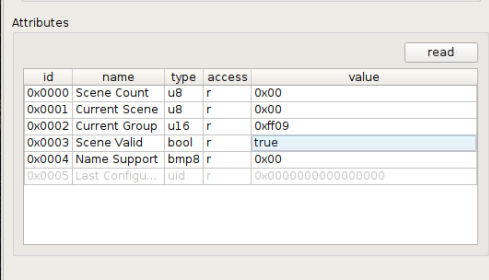
After forcing downgrading with one older OTA file I getting those attribute from scenes cluster:
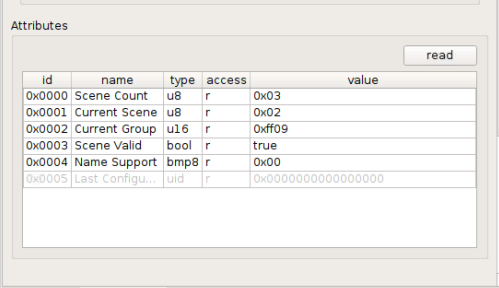
I can charging the bulb CT by sending scene command (0,1 and 2) and by group bounded remote.
The Scene Valid is true after the one scene is received but is changing the brightness its being falce = updated / not original stored scene.
Have doing firmware downgrading 3 times and moving the bulb to ZHA and adding it to one group with one bounded remote and letting ZHA upgrading it to current version and the "HW scenes" is working until the bulb is hardware resetted.
I think i knowing way IKEA is doing like this.
Then pairing one bulb with the GW or standalone (with controlling device ala LL without GW) the GW or the remote device is setting up the "HW scenes" so the spectrum buttons is working (with normal zigbee / interpan or manufacture commands). The problem is then doing on upgrad of the bulbs firmware and its resetted in the process its losing the "HW scenes". Therefore is the OTA file patching the config of the bulb so the factory default scenes is being restored. If not then the user is losing the function and must repairing the device (with GW or controlling device) for getting it back. If the user have making moods (IKEA scenes) in the GW thru the app they is lost in the bulbs but can being reloaded from the app / GW.
ZHA is looking on implanting OTA updates with overriding the device version if having one local stored file with same manufacturer and device images id and ignoring the device version and open for downgrading device without deCONZ as workaround for the spectrum control buttons.
I shall trying doing some sniffing off my IKEA GW and see if can catching some useful doing paring TC bulbs with one remote is all going well.
MattWestb
on 30 Oct 2020
@hoggerz Can you trying doing the same config that @Koenkk was writing but configuring the scenes in the bulbs to dec 65289 or hex 0xff09.
The reason its that the default scene is stored in the bulb and the remote with groupe 65289 / 0xff09. Your log is showing that the GW is reading the scenes and getting them with grope 0xff09 and then adding them with the "new groupe" =0x0003.
I have added 3 scenes in deCONZ (old web app) with the real grupe for the bulb / remote (0x0003) and one manual in the GUI with the 0xff09. The remote is trying switching to G 0xff09 S 0x00 then clicking previous scene and G 0x0ff09 S 0xff then next (0xff = false then scene dont exit).
Sending deconz G 0x00003 scene 0x01=OK, Scene =0x02=OK, Scene 0x03=OK (visual and also red from deCONZ GUI).
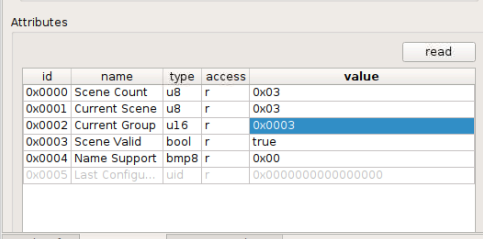
deCONZ added and selected scene.

Scene selected from remote.
If its working then you are controlling the the color of all your bulbs (then all have factory grope (0xff09) for the scenes) also very likely IKEA bulbs in other "normal" gropes.
So IKEA is using group 0xff09 for scenes and normal commands then then forming network without GW (TL controller formed networks) and its no problems then other devices not in the same network have different PAN-ID and network key so no conflict. Then using GW the GW is changing the group for the scene then configuration the remote (have not looking for the command in your sniffs).
MattWestb
on 30 Oct 2020
Some more testing in deCONZ:
Resetted GU10 WS paired and have group 3 added and the remote bounded to the group.
The remote cant changing TC then no "HW scenes" is stored in the bulb.
Adding 3 scenes from webapp.
Can changes scene with the webapp but not with remote.
Adding group dec 65289 or hex 0xff09 to the bulb but all is little mess after mutch tyres.
Force firmware downgrade.
After OTA the bulb have getting the 3 "HW scenes" and the 3 "webapp" scenes is gone.

The remote is working but not webapp.

Now the interesting thing thing.
The web app is finding the groupe dec 65289 and the 3 "HW scenes" !! (The scenes is renamed in the GUI).

The remote groupe is the bounded remote (3) and the 65289 is the stored in the bulb that deCINZ have finding.
The scene in group 3 is not working (is deleted in the bulb then doing firmware downgrading) so i deleting them in web app.
The 56289 scenes is working in the webapp and with the remote !!!
Then changing the color temperature in the webapp and storing it as new scenes (half warm and half cold) so having 5 scenes defined.
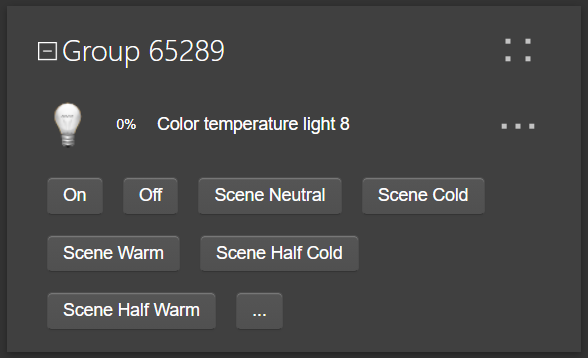
The "HW" and the new added scenes is working in the web app and with the remote !!!

As shown in the picture the bulb have 5 scenes in the group 0xff09 and the scene 0x04 is active and is visual verified.
Next step for testing is deleting the scenes and the bulb in deCONZ and then resetting the bulb so its losing all scenes and then pairing it and trying adding the scenes and see if i can getting it woking without firmware downgrading the bulb.
For the moment its looks like adding scenes that is working with the remote is possible in deCONZ if adding and using grupe 56289 for the bulbs. I think the same is possible with Z2M if some can trying verifying that.
The "remote" group (3) is bonded and working then the NCP is offline. 56289 is one second added group only for the scenes but is fully working. If adding light to tó one groupe it should being done in groups 3 and after that to 56289 (in GUI and perhaps possible in webapp).
Later its looking in the remotes pairing log if / how the GW is adding the binding to the "new" group and the scene connected 2 it.
MattWestb
on 31 Oct 2020
After deleting, resetting, joining and adding to group 3.
No "HW scenes is present as expected.
Then adding group 0xff09 in deCONz its saying OK but is not correct stored and not working.

The group table was 1 only 0x0003 before adding the 0xff09. After adding 0xff09 its having 3 records and the last is 0xfff0 !!!!
The requesting viue group its saying 0xff09 is not found but the 0xfff0 is found that is NOT defined :-((
Doing FW upgrade and see if i can getting group 0xff09 from the bulb in deCONZ and letting it before resetting the bulb.
MattWestb
on 31 Oct 2020
deCONZ / HA is working
If adding groupe 0xff09 to deCONZ (old web app) and then adding scenes to the group for one IKEA GU10 WS its possible controlling them thru the remote and HA.

(the TRADFRI remote control scenes is the normal and cant being controlled from the remote)
The new scenes is absolute = its saved states of the bulbs status with all attribute.
The "factory" one is only saved with colour attributes so only changing color with the remote for those scenes. I have not finding how configuring enchanted scenes with only some of the attributes (normal scenes dont have transition time engaged have that).
This was done with one resetted bulb that was not having the "restored factory scenes" that is coming after firmware updates.
Im interested if some Z2M user like trying to do the same and see if its working.
I have not finding any way changing the group that the remote is sending the scene commands so only 0xff09 that can being controlled by the remote(s) and all the remotes in the system is sending to the same group.
I keep trying analysing the sniffings and see if i can finding something more interesting magic to being discovered :-))
MattWestb
on 8 Nov 2020
Related issues
Koenkk
·
3Comments
 andreasbrett
·
3Comments
andreasbrett
·
3Comments
 rm2kdev
·
3Comments
rm2kdev
·
3Comments
 mpuff
·
4Comments
mpuff
·
4Comments
 sylarevan
·
5Comments
sylarevan
·
5Comments
Most helpful comment
Hi,
I can certainly try, here's a sniff from unbinding then binding the remote to the group in zigbee2mqtt.
unbind.bind.zip
I also tried adding the bulb and remote back to the Ikea gateway and sniffed that again. It shows some logs about adding scenes/get scene membership/view scene/view scene response but I don't know how useful they are.
gatewayadd.zip
The bulb does change colour spectrum when its back on the Ikea hub, however as soon as I reset them and re-pair them in zigbee2mqtt, they loose the ability again. If you can think of anything else, I'll gladly give it a go.