Zigbee2mqtt: ERRROR AFTER UPDATING -- Failed to start addon - configruation validation faled! Missing option availability_passlist in advanced.
What happened
After updating from 1.14.4 to 1.14.4.1 Z2M doesn't start. If I try to start it manually I got this error:
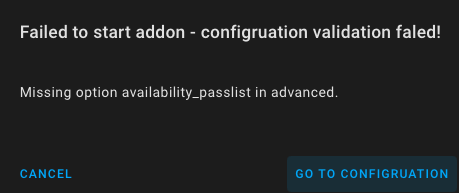
Failed to start addon - configruation validation faled!
Missing option availability_passlist in advanced.
What did you expect to happen
Start.
Debug info
Zigbee2MQTT version: 1.14.4.1
This is my advanced configuration:
advanced:
log_level: debug
report: true
availability_timeout: 60
pan_id: 6754
channel: 11
network_key:
- xxx
- xxx
availability_blacklist: []
If I try to save configuration, I get this error:
Failed to save addon configuration, not a valid value for dictionary value @ data['options']. Got {'data_path': '/share/zigbee2mqtt', 'external_converters': [], 'devices': 'devices.yaml', 'groups': 'groups.yaml', 'homeassistant': True, 'permit_join': False, 'mqtt': {'base_topic': 'zigbee2mqtt', 'server': 'mqtt://core-mosquitto', 'user': 'mosquito', 'password': 'xxxxxxxx'}, 'serial': {'port': '/dev/serial/by-id/usb-Texas_Instruments_XDS110__03.00.00.07__Embed_with_CMSIS-DAP_L1100G9S-if00'}, 'advanced': {'log_level': 'debug', 'report': True, 'availability_timeout': 60, 'pan_id': 6754, 'cha...
 jd1900
All 18 comments
Hi. Same problem, but not with availability_passlist option, but availability_blocklist. Same issue "Missing option availability_blocklist in advanced."
What i did just push "reset to default" button in addon config. After what changing needed config options. And addon back online after start. Maybe it helps.
 gettoboy22
on 18 Sep 2020
gettoboy22
on 18 Sep 2020
Having the same issue. Tried removing the optional values and when hitting save I also get the YAML error.
Needed to restore it back to an earlier version in order to get my devices back again.
 rbron01
on 18 Sep 2020
rbron01
on 18 Sep 2020
Same issue, fixed it by changing some configurations:
del "availability_blacklist: []"
add "availability_blocklist: []"
del "ban: []"
del "whitelist: []"
This starts back the addon, but now my entities are not being detected.
 nielssteyaert
on 18 Sep 2020
nielssteyaert
on 18 Sep 2020
Same issue, fixed it by changing some configurations:
del "availability_blacklist: []"
add "availability_blocklist: []"
del "ban: []"
del "whitelist: []"This starts back the addon, but now my entities are not being detected.
Could you do it using the config editor or manually outside the editor?
jd1900
on 18 Sep 2020
I restored the default settings. Then rewrote the username, password, channel and network key from previous settings. Now works without any problems :)
 mistahosi
on 18 Sep 2020
mistahosi
on 18 Sep 2020
Same issue, fixed it by changing some configurations:
del "availability_blacklist: []"
add "availability_blocklist: []"
del "ban: []"
del "whitelist: []"
This starts back the addon, but now my entities are not being detected.Could you do it using the config editor or manually outside the editor?
I did it in the config editor
nielssteyaert
on 18 Sep 2020
I restored the default settings. Then rewrote the username, password, channel and network key from previous settings. Now works without any problems :)
That helps!
 3AXAPOB
on 18 Sep 2020
3AXAPOB
on 18 Sep 2020
I restored the default settings. Then rewrote the username, password, channel and network key from previous settings. Now works without any problems :)
That helps!
It worked for me too!
 iboluda
on 18 Sep 2020
iboluda
on 18 Sep 2020
I also tried the copy-paste old config somewhere else to keep it safe, reset to default config and then copying over the mqtt user info, channel and network key. This of course solved the problem.
I did however also look at what had actually changed between this reset and found the following:
It seems the required config options have changed between updates, but the upgrade doesn't automatically upgrade the config.
The config reset had removed:
advanced:
  availability_blacklist: []
ban: []
whitelist: []
The config reset has added:
advanced:
  availability_blocklist: []
  availability_passlist: []
Which seems to be correct, as you can see in the error it generates (look at screenshot of first post on this issue) is complaining about the missing availability_passlist key.
 markheloking
on 18 Sep 2020
markheloking
on 18 Sep 2020
  # Optional: Prevent devices from being checked for availability (default: empty)
  # Previously called `availability_blacklist` (which is deprecated)
  availability_blocklist:
    - DEVICE_FRIENDLY_NAME or DEVICE_IEEE_ADDRESS
  # Optional: Only enable availability check for certain devices (default: empty)
  # Previously called `availability_whitelist` (which is deprecated)
  availability_passlist:
    - DEVICE_FRIENDLY_NAME or DEVICE_IEEE_ADDRESS
both availability_blocklist and availability_passlist are reported as optional.. but I have the same error as OP.
Changing availability_blacklist to availability_blocklist and adding availability_passlist fixed it.
 papinist
on 18 Sep 2020
papinist
on 18 Sep 2020
Apparently this is a known issue as documented here: #384
markheloking
on 18 Sep 2020
This is an issue of the addon, not Zigbee2MQTT itself, please open an issue here if this is still a problem: https://github.com/danielwelch/hassio-zigbee2mqtt/issues
 Koenkk
on 18 Sep 2020
Koenkk
on 18 Sep 2020
when you try to start the plugin it does not remove the
ban: []
whitelist: []
Also it adds the two below at the wrong place hence the YAML error. if corrected the way @markheloking has done all is fine
availability_blocklist: []
availability_passlist: []
Recap:
You can still use your config if you make the changes like this
- Remove
ban: []
whitelist: []
- Add
advanced:
  availability_blocklist: []
  availability_passlist: []
- Press Save and Press on the Reboot and everything is working again
rbron01
on 18 Sep 2020
I restored the default settings. Then rewrote the username, password, channel and network key from previous settings. Now works without any problems :)
I did the same, it worked, very happy
 Thangle12
on 18 Sep 2020
Thangle12
on 18 Sep 2020
I seems that "availability_blAcklist has changed to "availabilty_blOcklist".
 namadori
on 19 Sep 2020
namadori
on 19 Sep 2020
when you try to start the plugin it does not remove the
ban: []
whitelist: []Also it adds the two below at the wrong place hence the YAML error. if corrected the way @markheloking has done all is fine
availability_blocklist: []
availability_passlist: []Recap:
You can still use your config if you make the changes like this
- Remove
ban: [] whitelist: []
- Add
advanced:
  availability_blocklist: []
  availability_passlist: []
- Press Save and Press on the Reboot and everything is working again
Great, that worked!
But due to @markheloking 's info, I've also removed
availability_blacklist: []
 DrakeSeven
on 19 Sep 2020
DrakeSeven
on 19 Sep 2020
I restored the default settings. Then rewrote the username, password, channel and network key from previous settings. Now works without any problems :)
Thank You!
 Rubines
on 24 Sep 2020
Rubines
on 24 Sep 2020
I restored the default settings. Then rewrote the username, password, channel and network key from previous settings. Now works without any problems :)
Thanks, helped :)
 daubjon
on 25 Sep 2020
daubjon
on 25 Sep 2020
Related issues
 jwilling
·
4Comments
jwilling
·
4Comments
 ophilips
·
4Comments
ophilips
·
4Comments
 pepp86
·
4Comments
pepp86
·
4Comments
 andreasbrett
·
4Comments
andreasbrett
·
4Comments
 jeroenterheerdt
·
3Comments
jeroenterheerdt
·
3Comments
Most helpful comment
I restored the default settings. Then rewrote the username, password, channel and network key from previous settings. Now works without any problems :)