Zigbee2mqtt: [Experimental feature] Webbased frontend
This experimental feature allows to run a frontend straight from Zigbee2MQTT (so no additional setup is required).
This frontend is developed by @nurikk, the source code can be found here: https://github.com/nurikk/z2m-frontend
To enable this, switch to the dev branch and add the following to your configuration.yam.
experimental:
  new_api: true

frontend:
  port: 8080
In case you find any issues in the frontend, report them here: https://github.com/nurikk/z2m-frontend/issues
 Koenkk
All 192 comments
Initial impressions using firefox on macOS
the padding is a bit tight see the left side.- some of my devices are at half or less battery %, perhaps the battery icon could also reflect this.
- device/info page could perhaps link to the online docs, as they usually have pairing notes or even configuration notes.
- (not really a frontend thing but) perhaps we should update the product images so they have a transparent background
- product images are hotlinked from the main site, if you proxy the interface over ssl, you get mixed content warnings at best or they don't load at all. ==> fetch these in the background and cache them locally?
- perhaps the 'action' menu should just be 2 right aligned buttons
- log tail with maybe some color highlighting would be nice to have eventually too
- would be nice to have device_options editable via the settings tab
- per-device options would also be nice to have editable somewhere
- large networkmaps are... euhm useless

The group view is absolutely amazing!
Very promising start!
 sjorge
on 4 Sep 2020
sjorge
on 4 Sep 2020
The bind tab also no longer show the devices friendly name, the network address is still in the URL though, but would be nice to also have that visible.

sjorge
on 5 Sep 2020
Does using port 8080 conflict with Domoticz, when it's on the same RPi as Z2M?
 Westcott1
on 5 Sep 2020
Westcott1
on 5 Sep 2020
Does using port 8080 conflict with Domoticz, when it's on the same RPi as Z2M?
You can specify any port in configuration
 nurikk
on 6 Sep 2020
nurikk
on 6 Sep 2020
Sorting is working great, except for the power colomn.
sjorge
on 6 Sep 2020
Guys, as I understand it, the map is saved only for the current session in the browser?
 SAOPP
on 6 Sep 2020
SAOPP
on 6 Sep 2020
Guys, as I understand it, the map is saved only for the current session in the browser?
Yes, refresh page and you lose your data
nurikk
on 7 Sep 2020
Sorting is working great, except for the
powercolomn.
What wrong with it?
nurikk
on 7 Sep 2020
How do you find this way of showing logs? (only data from bridge/logging is shown)

nurikk
on 7 Sep 2020
It doesn’t do anything.
I would have expected the battery and mains powered one to be grouped together. (Or ideally sort the battery ones on battery level)
~ sjorge
On 7 Sep 2020, at 05:12, John Doe notifications@github.com wrote:
Sorting is working great, except for the power colomn.What wrong with it?
—
You are receiving this because you commented.
Reply to this email directly, view it on GitHub, or unsubscribe.
sjorge
on 7 Sep 2020
Interesting... I don't have a logs menu. It's optional menu? And it can be turn on from configuration?
SAOPP
on 7 Sep 2020
Interesting... I don't have a logs menu. It's optional menu? And it can be turn on from configuration?
it's sneak peek from my dev environment, stay tuned :)
nurikk
on 7 Sep 2020
It doesn’t do anything. I would have expected the battery and mains powered one to be grouped together. (Or ideally sort the battery ones on battery level) ~ sjorge
…
On 7 Sep 2020, at 05:12, John Doe @.*> wrote: Sorting is working great, except for the power colomn. What wrong with it? — You are receiving this because you commented. Reply to this email directly, view it on GitHub, or unsubscribe.
You should update dependencies, yesterday I've released update. It adds sorting by battery level

nurikk
on 7 Sep 2020
Also upcoming touchlink page

nurikk
on 7 Sep 2020
Also upcoming touchlink page
Oh how do you get the devices it detected? I was not aware z2m exposed that information, well i guess if you open the network for joining before doing the request you could see which ones publish a deviceJoined event.
sjorge
on 7 Sep 2020
Also upcoming touchlink page
Oh how do you get the devices it detected? I was not aware z2m exposed that information, well i guess if you open the network for joining before doing the request you could see which ones publish a deviceJoined event.
This feature yet to be implemented, but in general it's just splitting this code and exposing via z2m https://github.com/Koenkk/zigbee-herdsman/blob/33d13a2fba4cc306d11398bf608293c2a6c7aa63/src/controller/touchlink.ts#L16
nurikk
on 7 Sep 2020
So after some changes it could be publish under the zigbee2mqtt/bridge/config/touchlink/+ topic, that be nice.
sjorge
on 7 Sep 2020
@nurikk Given I have a large network map, would you be interested in the the output? real output to work off or create tests from is always useful IMHO.
sjorge
on 7 Sep 2020
very nice work! Any chance of having a linkable/proxyable config page from within HomeAssistant to get to the new Z2M GUI? I have Z2M, letsencrypt(incl NGINX rev. proxy) in separate containers so maybe an HA ingress based solution is needed?
I prefer not to open up another endpoint straight via the NGINX reverse proxy, as the page doesn't have authentication. So using the authentication of HA would be nice/enough.
 netweaver1970
on 7 Sep 2020
netweaver1970
on 7 Sep 2020
I might have missed it but is there already an interface for binding/unbinding remotes to groups? That part of Z2M can also use some GUI love.
netweaver1970
on 7 Sep 2020
Yes! If you view the remote’s details there is a binds tab, works pretty well.
~ sjorge
On 7 Sep 2020, at 17:10, netweaver1970 notifications@github.com wrote:
I might have missed it but is there already an interface for binding/unbinding remotes to groups? That part of Z2M can also use some GUI love.—
You are receiving this because you commented.
Reply to this email directly, view it on GitHub, or unsubscribe.
sjorge
on 7 Sep 2020
I've published next release of frontend. Mostly bug fixes
https://github.com/nurikk/z2m-frontend/blob/master/CHANGELOG.md#0148-2020-09-08
nurikk
on 8 Sep 2020
@nurikk Given I have a large network map, would you be interested in the the output? real output to work off or create tests from is always useful IMHO.
Yes, please! you can send me contents of bridge/response/networkmap (raw) ?
nurikk
on 8 Sep 2020
@nurikk Given I have a large network map, would you be interested in the the output? real output to work off or create tests from is always useful IMHO.
Yes, please! you can send me contents of
bridge/response/networkmap(raw) ?
https://gist.github.com/sjorge/332f92e691a2475590bdebaf7501b0d6
sjorge
on 8 Sep 2020
Been playing with the latest release, touchlink doesn't seem to work but I think it's missing the above mentioned changes to z2m.
For the logs page:

- would be nice to have a dropdown to change the level on runtime (thats the default anyway, so the options can be on hte log page I think)
- scroll bar for each long record is a bit odd, perhaps have a global one for the whole log tab? makes it easier to compare values in two long lines too.
on the devices page
- sorting on power still broken for me
- icons still show 100% while most devices are between 85-50% battery left
on map page
- broken on firefox now, no button to request the map (works fine on safari)
sjorge
on 8 Sep 2020
Yes! If you view the remote’s details there is a binds tab, works pretty well. ~ sjorge
…
On 7 Sep 2020, at 17:10, netweaver1970 @.*> wrote: I might have missed it but is there already an interface for binding/unbinding remotes to groups? That part of Z2M can also use some GUI love.
I made a new group with a single IKEA bulb (LED1732G11), that seems to work nicely.
But when trying to bind a Lumi/Aqara/Opple/Xiaomi WXKG06LM 1-gang wall switch to that new group, I'm not getting the OnOff cluster to select for binding.
I'm only getting these ones : genBasic, genGroups, genIdentify, Scenes, genOta, genMultistateInput. Which one can be used to simply toggle the lightbulb?
Or doesn't this switch allow direct binding?
Thanks.
netweaver1970
on 8 Sep 2020
icons still show 100% while most devices are between 85-50% battery left
Hi, @sjorge ! Can you please send me your bridge/devices and bridge/+ (device statuses) dumps?
nurikk
on 9 Sep 2020
icons still show 100% while most devices are between 85-50% battery left
Hi, @sjorge ! Can you please send me your
bridge/devicesandbridge/+(device statuses) dumps?
I've updated the previous gist, not sure what oyu mean with device statuses dump though?
sjorge
on 9 Sep 2020
icons still show 100% while most devices are between 85-50% battery left
Hi, @sjorge ! Can you please send me your
bridge/devicesandbridge/+(device statuses) dumps?I've updated the previous gist, not sure what oyu mean with device statuses dump though?
Everything that post into zigbee2mqtt/+
Example: zigbee2mqtt/0xabababababaab
nurikk
on 9 Sep 2020
Everything that post into zigbee2mqtt/+
Example: zigbee2mqtt/0xabababababaab
Thats a whole lot of data/topics to dump, any device in particular you need?
I could dump it all with mosquitto_sub -t zibgee2mqtt/+ but then it won't have the topics linked to it.
sjorge
on 9 Sep 2020
Everything that post into zigbee2mqtt/+
Example: zigbee2mqtt/0xabababababaabThats a whole lot of data/topics to dump, any device in particular you need?
I could dump it all withmosquitto_sub -t zibgee2mqtt/+but then it won't have the topics linked to it.
You can use mosquitto_sub with -F flag, to output topic + payload
https://mosquitto.org/man/mosquitto_sub-1.html#outputformat
nurikk
on 9 Sep 2020
sjorge
on 9 Sep 2020
https://gist.github.com/sjorge/ec2fde7d03ad518e6d72f4fa15549b5d
Oh, I see now. Didn't expect that someone will use / in friendly name
nurikk
on 9 Sep 2020
<room>/<device> or <room>/<group>/<device>
Makes it easy to get everything for a room or group.
sjorge
on 9 Sep 2020
/ or / / Makes it easy to get everything for a room or group. ~ sjorge
…
Yes, nice convention. Might start using it at my home:)
nurikk
on 9 Sep 2020
hi, @sjorge I just released version 0.1.52 can you try to update dependencies and check sorting?
Also I've added implementations for touchlink scan/reset calls (identify still pending)
nurikk
on 9 Sep 2020
Sorting on power now works! And LQI too, it even updates!
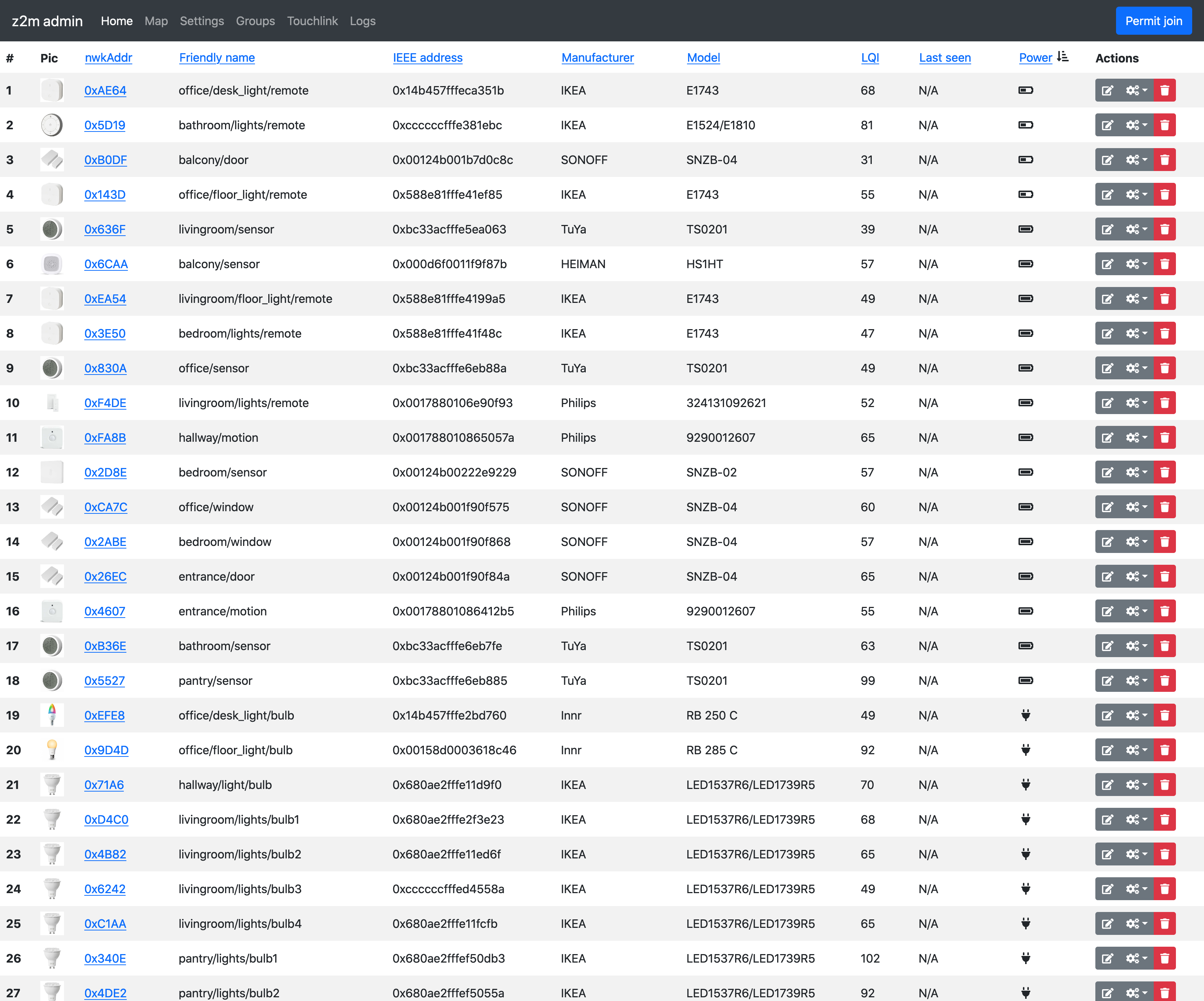
Maybe hide the last_seen colomn if we know it's not configured, which we do as the configuration page reflects that.
sjorge
on 9 Sep 2020
I have update frontend version, kindly update dependencies to continue testing
https://github.com/nurikk/z2m-frontend/blob/master/CHANGELOG.md
nurikk
on 10 Sep 2020
using the new touchlink stuff, if you identify a bulb and the immediately try to factory reset it, the command gives a timeout because the bulb still seems to be in the 'identifying' phase.
Maybe disable factory reset button for a few seconds to make sure the identify has finished.
sjorge
on 10 Sep 2020
My devices are missing icons or all white, and make the map harder to read. I wish I had ghost devices. :)

 JasonSwindle
on 10 Sep 2020
JasonSwindle
on 10 Sep 2020
Also 2x clicking on the scan button crashes the coordinator with
Zigbee2MQTT:error 2020-09-10 14:44:52: Request 'zigbee2mqtt/bridge/request/touchlink/scan' failed with error: 'SREQ '--> AF - interPanCtl - {"cmd":1,"data":[13]}' failed with status '(0xba: APS_NOT_ALLOWED)' (expected '(0x00: SUCCESS)')'
Then everything fails.
sjorge
on 10 Sep 2020
My devices are missing icons or all white, and make the map harder to read. I wish I had ghost devices. :)
Icons are definitely there, but damn hard to see. Eventually we will update device icons

nurikk
on 11 Sep 2020
Also 2x clicking on the scan button crashes the coordinator with
Zigbee2MQTT:error 2020-09-10 14:44:52: Request 'zigbee2mqtt/bridge/request/touchlink/scan' failed with error: 'SREQ '--> AF - interPanCtl - {"cmd":1,"data":[13]}' failed with status '(0xba: APS_NOT_ALLOWED)' (expected '(0x00: SUCCESS)')'Then everything fails.
Fixed, try npm install [email protected]
nurikk
on 11 Sep 2020
Looks like the device state tab is now broken

sjorge
on 11 Sep 2020
@sjorge @nurikk did some touchlink improvements, while a touchlink operation is in progress nothing else is allowed (also not a second touchlink operation).
Koenkk
on 11 Sep 2020
Seems more stable now, before the coordinator could crash, whoops doing a manual npm install seems to have broken my update script. I just need to reset packages.json and do npm cgi right to get back to whatever is in dev?
Edit: yep, seems so
sjorge
on 11 Sep 2020
Looks like the device state tab is now broken
Yeah, broken after very big refactoring 👎 Fixed already, kindly update your dependencies
nurikk
on 11 Sep 2020
Noticed few missing features:
- it's not possible to pass the ID for a group your creating
- readonly vs writable values seems like a lot of manual work, e.g. some sensors show temperature and humidity as writable, atleast for those sensors they aren't... can we auto detect this somehow?
sjorge
on 13 Sep 2020
- readonly vs writable values seems like a lot of manual work, e.g. some sensors show temperature and humidity as writable, atleast for those sensors they aren't... can we auto detect this somehow?
Perhaps we can iterate over zigbee-herdsman-converters/devices.js find toZigbee records and extract writeable states from key attribute, this doable :)
- it's not possible to pass the ID for a group your creating
Any practical reason to do this?
nurikk
on 14 Sep 2020
Btw, currently I'm working on big refactoring. If someone feeling adventurous enough, kindly help me to test frontend using next version
npm install [email protected]
When trying to delete a group from the admin (that previously existed, and then was removed from the config, I get the error:
zigbee2mqtt | Zigbee2MQTT:error 2020-09-14 22:44:05: Request 'zigbee2mqtt/bridge/request/group/remove' failed with error: 'message.trim is not a function'
 SteveEdson
on 14 Sep 2020
SteveEdson
on 14 Sep 2020
When trying to delete a group from the admin (that previously existed, and then was removed from the config, I get the error:
zigbee2mqtt | Zigbee2MQTT:error 2020-09-14 22:44:05: Request 'zigbee2mqtt/bridge/request/group/remove' failed with error: 'message.trim is not a function'
Hi! Can you share detailed steps to reproduce? Step by Step
nurikk
on 15 Sep 2020
Should I be able to connect this from other host or just from localhost? I get "Invalid Host header" when trying to connect from another host. Didn't figure how to allow access from other hosts.
 Kryzek
on 15 Sep 2020
Kryzek
on 15 Sep 2020
Frontend version has been updated, kindly update your dependencies or just npm install [email protected]
nurikk
on 16 Sep 2020
The labels are wrong in my iPhone, look ok on desktop.
https://share.icloud.com/photos/02R-3y2hsm-myaTSZ41lBaf5w
Also no tooltip as there is no hover action, having the percentage next to the power icon if battery would be nice too.
sjorge
on 16 Sep 2020
Looks like the bind target for existing binds no longer gets shown

I also noticed there are no timestamps with the log entries on the logs page, which makes it hard to track down when certain things happened.
sjorge
on 16 Sep 2020
Hi, @sjorge! Both issues are fixed. Thanks for testing!
Kindly update to latest frontend version to proceed with tests.
npm install [email protected]
binds looking good again, mobile view still has wrong labels though.
sjorge
on 16 Sep 2020
When trying to delete a group from the admin (that previously existed, and then was removed from the config, I get the error:
zigbee2mqtt | Zigbee2MQTT:error 2020-09-14 22:44:05: Request 'zigbee2mqtt/bridge/request/group/remove' failed with error: 'message.trim is not a function'Hi! Can you share detailed steps to reproduce? Step by Step
- Create a group in the
configuration.yamlwith devices. - Remove the devices
- Comment out the group configuration
- In the web dashboard, I see the following:

Clicking the remove button results in the error
2020-09-16 13:02:24: Request 'zigbee2mqtt/bridge/request/group/remove' failed with error: 'message.trim is not a function'
binds looking good again, mobile view still has wrong labels though.
I don't get youy about mobile view, can you attach screenshots?
nurikk
on 16 Sep 2020
binds looking good again, mobile view still has wrong labels though.
I don't get youy about mobile view, can you attach screenshots?
Is the posted link not working?
The labels are wrong in my iPhone, look ok on desktop.
https://share.icloud.com/photos/02R-3y2hsm-myaTSZ41lBaf5wAlso no tooltip as there is no hover action, having the percentage next to the power icon if battery would be nice too.
sjorge
on 16 Sep 2020
binds looking good again, mobile view still has wrong labels though.
I don't get youy about mobile view, can you attach screenshots?
Is the posted link not working?
The labels are wrong in my iPhone, look ok on desktop.
https://share.icloud.com/photos/02R-3y2hsm-myaTSZ41lBaf5w
Also no tooltip as there is no hover action, having the percentage next to the power icon if battery would be nice too.
link works, but this how it looks like since 0.2.3

nurikk
on 16 Sep 2020
Weird, still looks wrong for me but I am on 0.2.3
sjorge
on 17 Sep 2020
Weird, still looks wrong for me but I am on 0.2.3
try new build 0.2.4 and private mode
nurikk
on 17 Sep 2020
Weird, still looks wrong for me but I am on 0.2.3
try new build 0.2.4 and private mode
Still broken, but I think I know why.
The last seen column is hidden for me on desktop because I do not have this enabled. But it shows on mobile. If you remove that label everything lines up.
sjorge
on 17 Sep 2020
Weird, still looks wrong for me but I am on 0.2.3
try new build 0.2.4 and private mode
Still broken, but I think I know why.
Thelast seencolumn is hidden for me on desktop because I do not have this enabled. But it shows on mobile. If you remove that label everything lines up.
Aha, got it! Your fix in 0.2.5
nurikk
on 17 Sep 2020
Fields order/labels look good now.
Still no way to get the tooltip for the battery icon though, perhaps:
- add the % next to the icon (mobile only?)
- switch back to text only for mobile
- use a fancy color gradient of green to red so you have a better idea of the % based on color (seems a lot of work and not useful for color blind people)
sjorge
on 17 Sep 2020
Fields order/labels look good now.
Still no way to get the tooltip for the battery icon though, perhaps:
- add the % next to the icon (mobile only?)
- switch back to text only for mobile
- use a fancy color gradient of green to red so you have a better idea of the % based on color (seems a lot of work and not useful for color blind people)
Zigbee device isn't an android phone, why do you want this percentage so badly?)
nurikk
on 17 Sep 2020
Mostly just those <10% (or those on battery_low)
So I know which ones to replace.
~ sjorge
On 17 Sep 2020, at 10:11, John Doe notifications@github.com wrote:
Fields order/labels look good now.Still no way to get the tooltip for the battery icon though, perhaps:
add the % next to the icon (mobile only?)
switch back to text only for mobile
use a fancy color gradient of green to red so you have a better idea of the % based on color (seems a lot of work and not useful for color blind people)
Zigbee device isn't an android phone, why do you want this percentage so badly?)—
You are receiving this because you were mentioned.
Reply to this email directly, view it on GitHub, or unsubscribe.
sjorge
on 17 Sep 2020
Mostly just those <10% (or those on battery_low) So I know which ones to replace. ~ sjorge
…
On 17 Sep 2020, at 10:11, John Doe ***@***.***> wrote: Fields order/labels look good now. Still no way to get the tooltip for the battery icon though, perhaps: add the % next to the icon (mobile only?) switch back to text only for mobile use a fancy color gradient of green to red so you have a better idea of the % based on color (seems a lot of work and not useful for color blind people) Zigbee device isn't an android phone, why do you want this percentage so badly?) — You are receiving this because you were mentioned. Reply to this email directly, view it on GitHub, or unsubscribe.
Okay, you've got it :) on < 10% you'll see it. Update to 0.2.6
nurikk
on 17 Sep 2020
Works great! both on mobile and desktop.
Can we make the icon flash red too? Then we'd be consistent but still have visual queue for low battery.
And maybe also trigger it when a device sends the low_battery payload too? That way it also works for device that report that. (As some don't report a 0-100 value but just low_battery, although I have none of those currently)
sjorge
on 17 Sep 2020
@SteveEdson could you provide the debug logging of https://github.com/Koenkk/zigbee2mqtt/issues/4266#issuecomment-693359841 ?
To enable debug logging set in configuration.yaml:
advanced:
  log_level: debug
Works great! both on mobile and desktop.
Can we make the icon flash red too? Then we'd be consistent but still have visual queue for low battery.
And maybe also trigger it when a device sends the low_battery payload too? That way it also works for device that report that. (As some don't report a 0-100 value but just low_battery, although I have none of those currently)
Bells and whistles are always welcome to contribute 😀
nurikk
on 17 Sep 2020
There are CSS ways to round corners on image and filter them to adapt to darker themes - https://moduscreate.com/blog/dark-mode-images/
 blakadder
on 21 Sep 2020
blakadder
on 21 Sep 2020
This is now working with latest edge version of the Home Assistant add-on using ingress if people want to test is easier. Thanks to @nurikk for the quick fix.

 ciotlosm
on 24 Sep 2020
ciotlosm
on 24 Sep 2020
Hi, I'm liking it more and more ! :-)
Groups could have some kind of a more visible separation, I was adding a device to a group but I had to check twice if I was adding it to the good group.
On the main list, could offline devices be marked as such ?
Thanks
 lolorc
on 24 Sep 2020
lolorc
on 24 Sep 2020
I've implemented rudimentary endpoints/clusters viewer. Perhaps might be useful for developers

nurikk
on 26 Sep 2020
To prevent a breaking change in the future (on a release version) and since the next release will be soon (1 oct.) I've made the frontend non experimental. For existing users this will be a breaking change and they need to update their config from:
experimental:
  new_api: true
  frontend:
    port: 8080
to
frontend:
  port: 8080
experimental:
  new_api: true
Pining @ciotlosm as I believe the addon also needs adjustment for this.
Koenkk
on 27 Sep 2020
@Koenkk Add-on updated. It now uses:
frontend:
  port: 8099
experimental:
  new_api: true
8099 is the default ingress port in Home Assistant. Users can still customise it if they wish. Changes are available in latest Edge version of the add-on.
ciotlosm
on 28 Sep 2020
@Koenkk will you increase the major version to 2? Would be nice to have a major version jump with the new frontend and the many changes.
ciotlosm
on 1 Oct 2020
@ciotlosm no, Zigbee2MQTT follows semver, a bump in major version indicates a breaking change which is not the case. Todays release will be 1.15.0
Koenkk
on 1 Oct 2020
A few more small things I found today...
- the device list for groups should be sorted on friendly_name instead of device_id

- maybe pre-select ep1 for the endpoint, as it looks like it's nearly always 1
sjorge
on 1 Oct 2020
A few more small things I found today...
- the device list for groups should be sorted on friendly_name instead of device_id
- maybe pre-select ep1 for the endpoint, as it looks like it's nearly always 1
Good points will add them to the backlog
nurikk
on 1 Oct 2020
Actually we can probably always do a best efford guess for the correct endpoint. Usually only one endpoint will have the genScenes, genOnoff, genLevelCtrl attributes, and we have that info as we show it on the device page.
sjorge
on 1 Oct 2020
@Koenkk @nurikk It seem the new frontend is taking some time to load. One user reported up to 5 minutes until it was available after add-on was started. Is there any message when it completes the startup for the frontend? Could there be potential memory spikes with this new feature for users?
ciotlosm
on 1 Oct 2020
"Loading, please wait" for the last 10 mins. I have 8 devices.
I have 39 and it loads fine for me on a RPI3. The problem at startup (which for me is around 1 minute from add-on start, and 40 seconds from pm2 process starting node) is getting
502: Bad Gateway
and
20-10-01 17:08:46 ERROR (MainThread) [supervisor.api.ingress] Ingress error: Cannot connect to host 172.30.33.2:8099 ssl:default [Connection refused]
If you're using the add-on, make sure you set new_api: true in your options as the documentation states..
ciotlosm
on 1 Oct 2020
How do you access the frontend if zigbee2mqtt in home assistant is applied as a container https://github.com/danielwelch/hassio-zigbee2mqtt ?
 InvertedMinor
on 1 Oct 2020
InvertedMinor
on 1 Oct 2020
Use the show in sidebar ingress method specified in the docs https://github.com/danielwelch/hassio-zigbee2mqtt/blob/master/zigbee2mqtt/DOCS.md
ciotlosm
on 1 Oct 2020
Use the
show in sidebaringress method specified in the docs https://github.com/danielwelch/hassio-zigbee2mqtt/blob/master/zigbee2mqtt/DOCS.md
THNX!
InvertedMinor
on 1 Oct 2020
Using a Nginx reverse proxy with the configuration mentioned in the wiki including basic auth I also only see "Loading, please wait". As soon as I deactivate Basic Auth, the page loads normally.
EDIT: The problem seems to occur only in Safari. According to Nginx Log there is a repeated 401 error for /api. Even after deleting the saved login data or using a safari private browsing window. On iOS I get error 304 for different pages like runtime, main or scripts. But this also happens with basic auth disabled.
 kennymc-c
on 1 Oct 2020
kennymc-c
on 1 Oct 2020
Hi, I'm on the release 1.15.0. Tried to turn on frontend but get the following constant notification in the log and frontend. And this is despite the fact that epoch was enabled before. Also. setting it to disable and restarting z2m results in config change back to epoch. Any ideas where it stuck?
info  2020-10-01 16:36:50: Set last_seen to epoch
info  2020-10-01 16:36:50: Set last_seen to epoch
info  2020-10-01 16:36:50: Set last_seen to epoch
info  2020-10-01 16:36:50: Set last_seen to epoch
info  2020-10-01 16:36:50: Set last_seen to epoch
info  2020-10-01 16:36:50: Set last_seen to epoch
info  2020-10-01 16:36:50: Set last_seen to epoch
info  2020-10-01 16:36:50: Set last_seen to epoch
info  2020-10-01 16:36:50: Set last_seen to epoch
 lustyffh
on 1 Oct 2020
lustyffh
on 1 Oct 2020
Using the new exposed interface, clicking some colors like green and purple result the actualy color box to be a different shade of the selected color. I've seen this for both trådfri, hue and innr.
sjorge
on 2 Oct 2020
I've implemented rudimentary endpoints/clusters viewer. Perhaps might be useful for developers
nice...Maybe move it to its own tab?
Not sure it is something for the about tab
 timoline
on 2 Oct 2020
timoline
on 2 Oct 2020
Unknown feature | color_hs{"brightness":254,"color":{"hue":0,"saturation":100,"x":0.6982,"y":0.2982},"color_mode":1,"linkquality":47,"state":"OFF","color_temp":555}
-- | --
Showed up on the exposes tab after enabling exposing color_hs for some innr bulbs
sjorge
on 2 Oct 2020
Web frontend looks pretty nice. One detail. When i switch tabs and go back to the map, i get this:

 nldroid
on 2 Oct 2020
nldroid
on 2 Oct 2020
@Koenkk In regards to the nginx configuration in the docs the ssl directive is considered obsolete and should be replaced with the ssl parameter on the listen directive instead (context here)
So instead of
server {
    listen      443 http2;
    listen      [::]:443 http2;

    ssl on;
    ...
It should be:
server {
    listen      443 ssl http2;
    listen      [::]:443 ssl http2;
    ...
 pedrolamas
on 2 Oct 2020
pedrolamas
on 2 Oct 2020
Unknown feature | color_hs{"brightness":254,"color":{"hue":0,"saturation":100,"x":0.6982,"y":0.2982},"color_mode":1,"linkquality":47,"state":"OFF","color_temp":555}
-- | --
Showed up on the exposes tab after enabling exposing color_hs for some innr bulbs
Hi! May I ask you to share your devices data? The best way to do this is using wbsocat
websocat ws://192.168.1.200:8080/api > out.file.json
Unknown feature | color_hs{"brightness":254,"color":{"hue":0,"saturation":100,"x":0.6982,"y":0.2982},"color_mode":1,"linkquality":47,"state":"OFF","color_temp":555}
-- | --
Showed up on the exposes tab after enabling exposing color_hs for some innr bulbs
Hi! May I ask you to share your devices data? The best way to do this is using wbsocat
websocat ws://192.168.1.200:8080/api > out.file.json
websocat doesn't exist/build for my platform, can I get you the info using mosquitto_sub ?
I found another bug too, when changing the log level in settings, it applies but the UI stays locked on 'info', so it's not possible to restore to the info level or see what the actual log level i.
sjorge
on 2 Oct 2020
Unknown feature | color_hs{"brightness":254,"color":{"hue":0,"saturation":100,"x":0.6982,"y":0.2982},"color_mode":1,"linkquality":47,"state":"OFF","color_temp":555}
-- | --
Showed up on the exposes tab after enabling exposing color_hs for some innr bulbs
Hi! May I ask you to share your devices data? The best way to do this is using wbsocat
websocat ws://192.168.1.200:8080/api > out.file.jsonwebsocat doesn't exist/build for my platform, can I get you the info using mosquitto_sub ?
I found another bug too, when changing the log level in settings, it applies but the UI stays locked on 'info', so it's not possible to restore to the info level or see what the actual log level i.
Mosquito and websoket api are using slightly different data structure. Are there any another websoket clients for your platform?
nurikk
on 2 Oct 2020
Well thats not good, this was when running it on my mac using port forwarding to get to the websocket.
thread 'main' panicked at 'called `Result::unwrap()` on an `Err` value: Os { code: 22, kind: InvalidInput, message: "Invalid argument" }', /root/.cargo/registry/src/github.com-1ecc6299db9ec823/tokio-signal-0.2.7/src/unix.rs:118:57
sjorge
on 2 Oct 2020
sjorge
on 3 Oct 2020
I found another bug too, when changing the log level in settings, it applies but the UI stays locked on 'info', so it's not possible to restore to the info level or see what the actual log level i.
Yes, some issue here. Z2m republishes data to bridge/info with unchanged value. @Koenkk can you take a look on this?

nurikk
on 3 Oct 2020
Hey, quick drive by after some quick testing.
First of all, I love the GUI, really awesome work there!
If I were to ask for one small feature though, that would be the ability to one-click (or even zero-click) unbind for devices from the default_bind_group. I had to jump through some hoops, learn how it all works and manually send an MQTT message in order to make my IKEA Switch bind to a group of lights. After that one message the rest worked pretty much automagically from the GUI, but I still think that this first unbind might as well be triggered by clicking the "bind" button.
Hope it's not hard to implement. Kudos!
 ginkage
on 3 Oct 2020
ginkage
on 3 Oct 2020
Web frontend looks pretty nice. One detail. When i switch tabs and go back to the map, i get this:
Fixed, thanks
nurikk
on 3 Oct 2020
Can us poor souls who are still stuck on imperial temperature have an option to convert in the web interface from metric to imperial?
JasonSwindle
on 3 Oct 2020
I also experience exactly the same problem as @lustyffh above: As soon as I set new_api to true, the log fills up very quickly (more than 100 messages per _second_) with Set last_seen to epoch, practically rendering the system unusable. As soon as I disable the new API again, everything is fine again (but the frontend does not work - probably this is excepted).
I am using the HA addon (both addon and z2m on version 1.15.0, CC2652 still on 20200417) and this was my config:
external_converters: []
devices: devices.yaml
groups: groups.yaml
homeassistant: true
permit_join: false
mqtt:
  base_topic: zigbee2mqtt
  server: 'mqtt://core-mosquitto'
  user: zigbee2mqtt
  password: xxx
serial:
  port: /dev/ttyACM0
advanced:
  log_level: info
  channel: 11
  pan_id: xx
  network_key:
    - xx
    - ...
    - xx
  report: true
  availability_timeout: 300
  availability_blocklist: []
  availability_passlist: []
  ext_pan_id:
    - xx
    - ...
    - xx
  last_seen: epoch
device_options: {}
blocklist: []
passlist: []
queue: {}
frontend:
  port: 8099
experimental:
  new_api: true
last_seen: epoch was not part of my z2m addon config, it seems to get added by z2m automatically and even if I explicitly set it to disable it is being set to epoch automatically again.
 felixstorm
on 3 Oct 2020
felixstorm
on 3 Oct 2020
Are you sure the config is writable by the add-on? The default add-on config does not include this setting
ciotlosm
on 3 Oct 2020
Are you sure the config is writable by the add-on? The default add-on config does not include this setting
@ciotlosm Yes, definitely (that had been my first speculation as well). I even removed the line from the generated configration.yaml and it appeared again right after a restart of the addon despite definitely not being part of my options.json. I even searched the code of the addon to see if anything is dealing with last_seen in a special way before I found out that z2m is apparently setting it itself (this by the way also happens if new_api is set to false, but then the log does not get flooded).
And if you search the code for the log line, you can see that it appears right after a _set_ settings statement: settings.set(['advanced', 'last_seen'], message);
felixstorm
on 3 Oct 2020
I did update my zigbee2mqtt to version "1.15.0-dev"
and i have added
frontend:
port: 8080
experimental:
new_api: true
to my config but i can not access the frontend on port 8080
only if I set new_api: false
then the frontend will load without any data
I run my zigbee2mqtt on a raspberry pi.
 filoor
on 4 Oct 2020
filoor
on 4 Oct 2020
I did update my zigbee2mqtt to version "1.15.0-dev"
and i have added
frontend:
port: 8080
experimental:
new_api: trueto my config but i can not access the frontend on port 8080
only if I set new_api: false
then the frontend will load without any dataI run my zigbee2mqtt on a raspberry pi.
After waiting 10 min it works sorry
filoor
on 4 Oct 2020
@nurikk something is off with the color_hs color mapping.
The reds are off compared to color_xy.
However for example manuals setting red hue=0, sat=100 gives the correct result. But via the expose interface they are slightly more pink.
sjorge
on 4 Oct 2020
@nurikk something is off with the color_hs color mapping.
The reds are off compared to color_xy.
However for example manuals setting red hue=0, sat=100 gives the correct result. But via the expose interface they are slightly more pink.
xy to rgb conversion has some gamma corrections, this is why colors can slightly differ. Recently I've made some fixes, so colors should match more closely. Anyway, it's more than enough to test your light bulbs after joining (I assume the main interface to interact with light will be smart home system)
nurikk
on 5 Oct 2020
It's possible to use the frontend in the Docker version? I get a failure when try to expose 8080 port.
 vidalpascual
on 5 Oct 2020
vidalpascual
on 5 Oct 2020
@vidalpascual I'm using it right now! It depends on your whole system and docker stack, but might be worth trying a different port as you might have something else already on port 8080?
pedrolamas
on 5 Oct 2020
@PedroLamas I'm an idiot... I have Z2M in host mode. I don't need to expose anything... get it running. :)
vidalpascual
on 5 Oct 2020
I have a problem with the nginx configuration suggested. if I use
location /api {
    proxy_pass         http://localhost:8080/api;
    proxy_set_header Host $host;
    proxy_http_version 1.1;
    proxy_set_header Upgrade $http_upgrade;
    proxy_set_header Connection "upgrade";
}
it goes into conflict with Home Assistant's api, so home assistant does not start. if I change the location value the zigbee2mqtt page integrated in Home Assistant with panel_iframe remains empty
 andker87
on 5 Oct 2020
andker87
on 5 Oct 2020
@nurikk colors are now consistent between hs and xy!
But some new bugs showed up:
- brightness slider broken, but % buttons do still work
- using the full color picker will change the color but immediately revert
sjorge
on 5 Oct 2020
Thanks all for the great work :)
Would it be possible to add a section in the state tab of the Hue outdoor motion sensor to get current / change sensitivity as detailed here?
 ellnic
on 6 Oct 2020
ellnic
on 6 Oct 2020
Would it be possible to add a section in the state tab of the Hue outdoor motion sensor to get current / change sensitivity as detailed here?
That’s probably something that would automatically happen once those are exposed via #4466
sjorge
on 6 Oct 2020
Oh, I hadn’t seen that. Thanks for pointing it out. 👍
ellnic
on 6 Oct 2020
Another bug of sorts: If you open a device page and then remove the device, it will end up on the 'unknown device' message after a successful removal. Ideally it would redirect to the devices overview.
sjorge
on 6 Oct 2020
I have an issue with last_seen. When first viewing the webbased frontend, all device's last_seen values are N/A. If I stay on the web view, devices start to update the last_seen with just now. But if I refresh the browser window, all devices go back to N/A.
I have last_seen: ISO_8601_local set in the advanced section of config.
Example:

 kkellner
on 6 Oct 2020
kkellner
on 6 Oct 2020
@kkellner I can also reproduce this error
kennymc-c
on 6 Oct 2020
https://github.com/nurikk/z2m-frontend/issues/18
I have an issue with
last_seen. When first viewing the webbased frontend, all device'slast_seenvalues are N/A. If I stay on the web view, devices start to update thelast_seenwithjust now. But if I refresh the browser window, all devices go back to N/A.I have
last_seen: ISO_8601_localset in theadvancedsection of config.Example:
timoline
on 6 Oct 2020
Another bug of sorts: If you open a device page and then remove the device, it will end up on the 'unknown device' message after a successful removal. Ideally it would redirect to the devices overview.
This isn't a bug, I like this behaviour because it's really helps me during firmware development (I'm constantly doing rejoin cycles with my development kit), just keep page open and it's renders again as soon as device has joined back to the network
nurikk
on 6 Oct 2020
I have an issue with
last_seen. When first viewing the webbased frontend, all device'slast_seenvalues are N/A. If I stay on the web view, devices start to update thelast_seenwithjust now. But if I refresh the browser window, all devices go back to N/A.I have
last_seen: ISO_8601_localset in theadvancedsection of config.Example:
Option have to be enabled to fix this issue, may be @Koenkk can help to solve this?
device_options:
    retain: true
@nurikk colors are now consistent between hs and xy!
But some new bugs showed up:
- brightness slider broken, but % buttons do still work
- using the full color picker will change the color but immediately revert
Can you tell me more about brightness issue? For me it works fine
nurikk
on 6 Oct 2020
This isn't a bug, I like this behaviour because it's really helps me during firmware development (I'm constantly doing rejoin cycles with my development kit), just keep page open and it's renders again as soon as device has joined back to the network
Can we add some padding to the text then? Now it's squashed against the side and top nav.
Can you tell me more about brightness issue? For me it works fine
It working fine on firefox on macOS, but it's broken on firefox/safari on iOS...
I also noticed an odd issue with the colors mixer when changing the brightness on firefox on macOS.
I will try to do a recording on the ipad too for the slighter once I figure out how.
Here is one on my mac for the color picker changing with brightness https://i.imgur.com/G2WGdX1.mp4
brightness in indeed part of the xy or hue/sat mix for colors, but I'd expect them to be consistent though.
sjorge
on 6 Oct 2020
@nurikk I added the following but the behavior did not change. The last_seen is still lost upon UI refresh.
device_options:
    retain: true
Unknown last seen option has been fixed in the latest dev branch.
Koenkk
on 7 Oct 2020
Unknown last seen option has been fixed in the latest dev branch.
@Koenkk , so no need anymore to set device_options.retain: true, right? All should work without it?
 Hacker-CB
on 7 Oct 2020
Hacker-CB
on 7 Oct 2020
Unknown last seen option has been fixed in the latest dev branch.
@Koenkk , so no need anymore to set
device_options.retain: true, right? All should work without it?
yes
Koenkk
on 7 Oct 2020
If I enable new_api:
i will get high cpu usage and my zigbee2mqtt gets really slow :

i think because the amount off mqtt messages:

this is my config
homeassistant: true
permit_join: false
mqtt:
  base_topic: zigbee2mqtt
  server: 'mqtt://192.168.0.9'
serial:
  adapter: deconz
experimental:
  new_api: true
frontend:
  port: 8080
devices: devices.yaml
groups: groups.yaml
device_options:
  retain: false
advanced:
  report: true
  log_level: info
  availability_timeout: 60
  channel: 25
  pan_id: 6755
  network_key:
    - 7
    - 3
    - 2
    - 12
    - 8
    - 11
    - 13
    - 15
    - 0
    - 12
    - 1
    - 6
    - 8
    - 11
    - 12
    - 13
  elapsed: true
  last_seen: epoch
`
filoor
on 8 Oct 2020
I have a problem with the nginx configuration suggested. if I use
location /api {
    proxy_pass         http://localhost:8080/api;
    proxy_set_header Host $host;
    proxy_http_version 1.1;
    proxy_set_header Upgrade $http_upgrade;
    proxy_set_header Connection "upgrade";
}
it goes into conflict with Home Assistant's api, so home assistant does not start. if I change the location value the zigbee2mqtt page integrated in Home Assistant with panel_iframe remains empty
Am I the only one with this issue? I cannot find any way to solve this problem.
andker87
on 8 Oct 2020
@andker87 the info you provided is not enough... Are you using Hass.io? If not, how are you launching Home Assistant? For docker stuff, can you provide the docker commands you are using to launch zigbee2mqtt, homeassistant, and nginx, or the equivalent docker-compose file?
pedrolamas
on 8 Oct 2020
@andker87 the info you provided is not enough... Are you using Hass.io?
I'm using HA core in venv.
I think the problem is this: in the configuration provided to configure the reverse proxy, zigbee2mqtt needs to call domain:port/api, but domain:port/api is the same path that also uses home assistant, so it creates a conflict that does not allow HA boot.
if in the location configuration of the reverse proxy I indicate location /z2m_api rightly it does not work, because the frontend makes the call to domain:port/api. probably I'm wrong, but I think it is necessary to vary the api path in /z2m_api at code level.
I hope I have explained myself
andker87
on 8 Oct 2020
If the conflict is the zigbee2mqtt server port, you can change that in the config with something like:
frontend:
  port: 8081
That will fix any conflict with ports in use between HA and Zigbee2MQTT.
As for Nginx, if you are using HTTPS, the only way around that will be to use a different domain (hence why in the documentation you see server_name zigbee2mqtt.mydomain.com;)
pedrolamas
on 8 Oct 2020
If the conflict is the zigbee2mqtt server port, you can change that in the config with something like:
frontend:
  port: 8081
That will fix any conflict with ports in use between HA and Zigbee2MQTT.
As for Nginx, if you are using HTTPS, the only way around that will be to use a different domain (hence why in the documentation you see
server_name zigbee2mqtt.mydomain.com;)
the problem is not the port, the problem is in the url. if I enable another nginx server it will not start because both servers use ports 80 and 443.
if I understand correctly the purpose of the reverse proxy is to expose only one port (the 443 to be in https) and then to forward the calls according to the url called, for this I have enabled only 1 domain, in which I have inserted as main location home assistant, then the file editor etc... same thing I should do for zigbee2mqtt, but the path of the api conflicts with that of home assistant
andker87
on 8 Oct 2020
Lovely! Just found out about this feature. Thanx a lot.
First impression
- listview ("datatables"?): possible to provide a search box?
- map:
- overwelming, and therefore (at this moment) not very usefull
- buggy. changing selection at top changes also "zoomfactor" of map
- switching tab messes up map (see attachments)
from

to

for the moment not compatible with nginx? I have nginx running on another machine, handling reverse proxy & certificates. It must be possible to publish this frontend without any modification to nginx. Another addon "Zigbee2MqttAssistant" does is also, using ingress, so it should be possible here to!
last seen not working?

But still: a very cool feature! looking forward to next version.
Kind regards,
Bart Plessers
 bartplessers
on 10 Oct 2020
bartplessers
on 10 Oct 2020
I am using SSL to access Home Assistant.
When enabled in the addon conf
frontend:
  port: 8499
experimental:
  new_api: true
Going to the web UI, I get the error: 502: Bad Gateway.
How to make SSL and Frontend friends?
 Valen13776
on 11 Oct 2020
Valen13776
on 11 Oct 2020
I also experience exactly the same problem as @lustyffh above: As soon as I set
new_apitotrue, the log fills up very quickly (more than 100 messages per _second_) withSet last_seen to epoch, practically rendering the system unusable. As soon as I disable the new API again, everything is fine again (but the frontend does not work - probably this is excepted).
Doing further troubleshooting, it looks like in my case the message flooding had been caused by zigbee2mqttassistant for whatever reason. I have stopped it now (won't need it anymore anyway) and up to now there are no more Set last_seen to epoch messages.
felixstorm
on 11 Oct 2020
If I enable new_api:
i will get high cpu usage and my zigbee2mqtt gets really slow :i think because the amount off mqtt messages:
@filoor Do you have zigbee2mqttassistant running in parallel by any chance? For me, zigbee2mqttassistant was the source of all the messages and stopping it fixed it...
felixstorm
on 12 Oct 2020
I found one problem. Ota update button not working. One of my Ikeas got OTA update but when I click on OTA update it do nothing. Also in log there is no sign of any action nor error.
Running docker latest version. zigbee2mqttassistant stopped. I started zigbee2mqttassistant and with it I could run OTA update without any problem.
Edit:
this is in browser console

 deadly667
on 14 Oct 2020
deadly667
on 14 Oct 2020
I found one problem. Ota update button not working. One of my Ikeas got OTA update but when I click on OTA update it do nothing. Also in log there is no sign of any action nor error.
Running docker latest version. zigbee2mqttassistant stopped. I started zigbee2mqttassistant and with it I could run OTA update without any problem.
Edit:
this is in browser console
How do you open frontend? Is it any iframe if sandboxed environment?
nurikk
on 15 Oct 2020
HomeAssistant Iframe. Yes, I can confirm that if I open it directly then update is started also I got confirm pop up.
So problem is if you use it in iframe.
deadly667
on 15 Oct 2020
I installed a fresh ubuntu server 20.04 lts and checked out zigbee2mqtt.
Then I configured my dongle, devices,mqtt, this is all working.
But experimental frontent stuck on loading and I dont see devices, networkmap not work. I see only the menu.
Then I switch to dev-branch, the same problem?
Any idea about the problem?
 zfrank2601
on 19 Oct 2020
zfrank2601
on 19 Oct 2020
Would like to confirm that frontend works great except for the missing last seen value
 joshuakoh1
on 21 Oct 2020
joshuakoh1
on 21 Oct 2020
Not sure I saw it working before, but with "version": "1.15.0-dev" the color cannot be set/read from the WebUI. Instead, it prints an error "Unknown feature json(color)" with the value of the full JSON.
Is color not implemented in the UI or is this a regression to previous versions?
 CSchlipp
on 22 Oct 2020
CSchlipp
on 22 Oct 2020
my Osram lamps are also no longer displayed correctly. Before there were color fields to switch!


 salopette
on 22 Oct 2020
salopette
on 22 Oct 2020
my Osram lamps are also no longer displayed correctly. Before there were color fields to switch!
This feature is still in design phase, yet to be implemented
nurikk
on 23 Oct 2020
@nurikk
But it did show color fields in the previous version, why is that gone now?
salopette
on 24 Oct 2020
Not sure I saw it working before, but with "version": "1.15.0-dev" the color cannot be set/read from the WebUI. Instead, it prints an error "Unknown feature json(color)" with the value of the full JSON.
Is color not implemented in the UI or is this a regression to previous versions?
This seems to be fixed in the last version c702bad.
CSchlipp
on 25 Oct 2020
Now is back in part.
With the Osram GU10, the color fields are there, but with the Osram e27 there aren't any.
I cleaned browser cashe!


salopette
on 25 Oct 2020
Has anyone found a workaround for the endless wait if you access the page from behind a ssl enabled reverse proxy? Going straight to the IP it works, but the 'proper' dns name shows the ui, but no data with a spinning icon that never goes away.
 LostJen
on 28 Oct 2020
LostJen
on 28 Oct 2020
@LostJen my setup is as such (nginx with SSL pointing to z2m frontend), however I am using z2m via Docker, so that might make a difference!
Docker compose and nginx configuration are hosted here: https://github.com/pedrolamas/nanopineo2-docker-config/blob/master/docker-compose.yml
pedrolamas
on 29 Oct 2020
How do I upgrade the frontend? I've done a git pull of z2m but the frontend still has the missing last seen issue that was supposedly already fixed. https://github.com/nurikk/z2m-frontend/issues/72
joshuakoh1
on 30 Oct 2020
How do I upgrade the frontend? I've done a git pull of z2m but the frontend still has the missing last seen issue that was supposedly already fixed. nurikk/z2m-frontend#72
you can use zigbee2mqtt dev branch
nurikk
on 30 Oct 2020
@LostJen my setup is as such (nginx with SSL pointing to z2m frontend), however I am using z2m via Docker, so that might make a difference!
Docker compose and nginx configuration are hosted here: https://github.com/pedrolamas/nanopineo2-docker-config/blob/master/docker-compose.yml
Well I went ahead and switched over to docker although it caused a few issues with permissions on log files when I had to delete the container and restart my service for the night routines. The next morning even the service had failed. Docker wouldn't work either so I ended up having to reflash my CC2652R. Then the docker build magically worked. However even though HA is happy and I have the local pages working fine, the reverse proxy still doesn't. Did you have to add any special redirections to your nginx site configuration file?
LostJen
on 30 Oct 2020
@LostJen I use pretty much the same nginx settings for all my containers, they are described here.
Alongside those settings, I have these for SSL locally!
The SSL certificate is generated by a separate container running acme.sh.
pedrolamas
on 30 Oct 2020
There is an issue with ip4/ip6 at my raspberry. Connection to mqtt server is Ok (IPv4), but frontent bind to IPv6 [TCP *:8080 LISTEN] and I am unable to change it to IPv4.
Feature (or advice) request:
frontend:
  port: 8080
  host: 127.0.0.1 <= something like that, please
Thanks !
 NHS7
on 31 Oct 2020
NHS7
on 31 Oct 2020
nginx works well this way (as per docs):
location / {
  proxy_pass http://localhost:81/;
  ...
}
but this gives message "Loading devices takes too long time. Consider reading documentation"
location /z2m/ {
  proxy_pass http://localhost:81/api;
  ...
}
Any way to make it working for /z2m/ ?
NHS7
on 31 Oct 2020
Feature request:
- show current version on Settings tab or Home screen
- add update button (+ new version info/changelog) + master/dev branch switch
- add progress bar when updating OTA firmware (% or/and ETA)
 nonflammable
on 1 Nov 2020
nonflammable
on 1 Nov 2020
add progress bar when updating OTA firmware (% or/and ETA)
I think this is already implemented? I remember having one last time I updated a device.
sjorge
on 1 Nov 2020
Hey guys I can't seem to make the ingress work, I have the following in the logs:
20-11-03 17:39:37 ERROR (MainThread) [supervisor.api.ingress] Ingress error: Cannot connect to host 172.30.33.3:8099 ssl:default [Connect call failed ('172.30.33.3', 8099)]
I'm using the edge version.
 Matssa56
on 3 Nov 2020
Matssa56
on 3 Nov 2020
@Matssa56 Ingress takes a few minutes to load, especially on rpi3 or older. Give it 5-10 minutes before you try loading the interface, just to make sure. It all depends also on the amount of other add-ons and their resource consumption.
ciotlosm
on 3 Nov 2020
@Matssa56 Ingress takes a few minutes to load, especially on rpi3 or older. Give it 5-10 minutes before you try loading the interface, just to make sure. It all depends also on the amount of other add-ons and their resource consumption.
Hi thanks for your help. I'm on a rpi4 with 4Gb of RAM, it can take it ;-) When accessing Deconz ingress or even ziggbee2mqttassistant it works fine and onlyy takes a few seconds.
Here, I'm getting a bad gateway error (502), which I don't have with other ingress stuff :S
////EDIT
My bad, ingress didn't work cuz the whole addon didn't work (forgot to add the adapter stuff since I'm using Conbee stick). Nut yeah now it works but takes time to load (even though I didn't add any devices ^^)
Matssa56
on 3 Nov 2020
How do I set includeRoutes to be true please?
My map view just has a collection of devices with no links between them, and when I press the refresh icon, the green box pop-up and logs say Starting network scan (includeRoutes 'false')
Thanks.
 jarrah31
on 10 Nov 2020
jarrah31
on 10 Nov 2020
How do I set includeRoutes to be true please?
My map view just has a collection of devices with no links between them, and when I press the refresh icon, the green box pop-up and logs say
Starting network scan (includeRoutes 'false')Thanks.
You don't need this property be enabled in order to render map.
nurikk
on 11 Nov 2020
I'm currently working on migrating ui framework to material ui
Development in very early stage, but already can experience upcoming look and feel.
Feel free to install and give feedback
npm install zigbee2mqtt-frontend@1


nurikk
on 11 Nov 2020
Hello, what's the right way to install this?
pi@raspberrypi:~ $ npm install zigbee2mqtt-frontend@1
or:
pi@raspberrypi:/opt/zigbee2mqtt $ npm install zigbee2mqtt-frontend@1
salopette
on 11 Nov 2020
The 2nd one
sjorge
on 11 Nov 2020
ok i made the second variant, but now there is a problem or conflict with the zigbee2mqtt update.
salopette
on 11 Nov 2020
pi@raspberrypi:/opt/zigbee2mqtt $ sudo systemctl stop zigbee2mqtt
pi@raspberrypi:/opt/zigbee2mqtt $ cp -R data data-backup
pi@raspberrypi:/opt/zigbee2mqtt $ git checkout HEAD -- npm-shrinkwrap.json
pi@raspberrypi:/opt/zigbee2mqtt $ git pull
remote: Enumerating objects: 5, done.
remote: Counting objects: 100% (5/5), done.
remote: Total 5 (delta 4), reused 5 (delta 4), pack-reused 0
Entpacke Objekte: 100% (5/5), Fertig.
Von https://github.com/Koenkk/zigbee2mqtt
ee50fb4..21b8e01 dev -> origin/dev
Aktualisiere ee50fb4..21b8e01
Fast-forward
lib/extension/publish.js | 11 +++++------
1 file changed, 5 insertions(+), 6 deletions(-)
pi@raspberrypi:/opt/zigbee2mqtt $ npm ci
npm WARN prepare removing existing node_modules/ before installation
npm ERR! cipm can only install packages when your package.json and package-lock.json or npm-shrinkwrap.json are in sync. Please update your lock file with npm install before continuing.
npm ERR!
npm ERR!
npm ERR! Invalid: lock file's [email protected] does not satisfy zigbee2mqtt-frontend@^1.0.2
npm ERR!
npm ERR! A complete log of this run can be found in:
npm ERR! /home/pi/.npm/_logs/2020-11-11T16_35_52_802Z-debug.log
pi@raspberrypi:/opt/zigbee2mqtt $
salopette
on 11 Nov 2020
You also need
git checkout HEAD -- package.json before npm ci, and after you need to install the newer frontend again.
sjorge
on 11 Nov 2020
Thank you! You are my savior!
does the update script have to be adapted?
`#!/bin/bash -e
if [ -d data-backup ]; then
echo "ERROR: Backup directory exists. May be previous restoring was failed?"
echo "1. Save 'data-backup' and 'data' dirs to safe location to make possibility to restore config later."
echo "2. Manually delete 'data-backup' dir and try again."
exit 1
fi
echo "Stopping Zigbee2MQTT..."
sudo systemctl stop zigbee2mqtt
echo "Creating backup of configuration..."
cp -R data data-backup
echo "Updating..."
git checkout HEAD -- npm-shrinkwrap.json
_git checkout HEAD -- package.json_
git pull
echo "Installing dependencies..."
npm ci
echo "Restore configuration..."
cp -R data-backup/* data
rm -rf data-backup
echo "Starting Zigbee2MQTT..."
sudo systemctl start zigbee2mqtt
echo "Done!"`
salopette
on 11 Nov 2020
Well package.json gets update because an updated package gets installed manually by running npm install zigbee2mqtt-frontend@1 but normall this won't happen, as we just run npm ci to sync what is described in package.json with the actually installed state,.. since this file in the repo there is now a merge conflict...
Which is to be expected I guess, you could also git stash and pop but then you miss updates done in the repo.
sjorge
on 11 Nov 2020
Ok, this is very complicated for me.
I can not do it.
Can you uninstall the (pi @ raspberrypi: / opt / zigbee2mqtt $ npm install zigbee2mqtt-frontend @ 1) again and just like before:
use port: 8080 in the configuratins.yaml
salopette
on 11 Nov 2020
How do I set includeRoutes to be true please?
My map view just has a collection of devices with no links between them, and when I press the refresh icon, the green box pop-up and logs sayStarting network scan (includeRoutes 'false')
Thanks.You don't need this property be enabled in order to render map.
That's good to know, thanks.
Do you have any suggestions as to why my map isn't showing links between devices please? I'm using the latest 16.1 Z2M software if it helps.

jarrah31
on 11 Nov 2020
How do I set includeRoutes to be true please?
My map view just has a collection of devices with no links between them, and when I press the refresh icon, the green box pop-up and logs sayStarting network scan (includeRoutes 'false')
Thanks.You don't need this property be enabled in order to render map.
That's good to know, thanks.
Do you have any suggestions as to why my map isn't showing links between devices please? I'm using the latest 16.1 Z2M software if it helps.
Try to switch to dev branch
nurikk
on 12 Nov 2020
Turns out I needed to clear the browser cache because the IsASibling option now works.
jarrah31
on 12 Nov 2020
I've just merged few fixes for map. Kindly help me to test, if you see any oddness kindly attach screenshot and state from settings page.
And yes, this example map has very few links
Before:

After:

nurikk
on 14 Nov 2020
Before:

After:

Not really an improvement
sjorge
on 14 Nov 2020
here is what it looks like using graphv circle output:
https://pkg.blackdot.be/cores/networkmap.png (large file!)
I'm using source routing, and most devices are nicely connected with routes aside from a few.
sjorge
on 14 Nov 2020
I'd recon that the "circle" layout approach of the ha_zigbee2mqtt_networkmap is more adequate:

pedrolamas
on 14 Nov 2020
A new map iteration is ready to test
nurikk
on 15 Nov 2020
A new map iteration is ready to test


Then only helps to update the page and reload the map.
zigbee2mqtt version
1.16.1-dev commit: 4c9dd74
coordinator type
zStack3x0
coordinator revision
20201026
frontend version
0.2.83
salopette
on 15 Nov 2020
A new map iteration is ready to test
Then only helps to update the page and reload the map.
zigbee2mqtt version
1.16.1-dev commit: 4c9dd74
coordinator type
zStack3x0
coordinator revision
20201026
frontend version
0.2.83
Would you mind to click "download state" link and attach it here?
nurikk
on 15 Nov 2020
https://cloud.mail.ru/public/1Ais%2F5NpdBEPSc
I've just tried again, but haven't been able to reproduce the bug.
salopette
on 15 Nov 2020
https://cloud.mail.ru/public/1Ais%2F5NpdBEPSc
I've just tried again, but haven't been able to reproduce the bug.
if there is no issue, can you attach screenshot how your map looks like?
nurikk
on 15 Nov 2020


salopette
on 15 Nov 2020
- add update button (+ new version info/changelog) + master/dev branch switch
I have been playing around with the frontend. Looks very nice!
Only at the settings page I have the following feedback:
LOG level select box:
- Selected is level not updated in configuration.yaml
- Selected level is not updated in front end select box
- Update button is missing
- Selected level in RAW file shows “info” but should be “debug
Network map:
During scan one device is reported with no LQI. And shown in map as not connected in network.
But that is not true. It does have An LQI, according to device info and also in graphviz Network scan
 Anjerlaan
on 15 Nov 2020
Anjerlaan
on 15 Nov 2020
Hi, can you take another look at the Seirene (SmartThings SZ-SRN12N), the state is not displayed.
sensor:
- platform: "mqtt"
state_topic: "zigbee2mqtt/"
availability_topic: "zigbee2mqtt/bridge/state"
unit_of_measurement: "lqi"
value_template: "{{ value_json.linkquality }}"
icon: "mdi:signal"


THX!
salopette
on 15 Nov 2020
Related issues
 RefineryX
·
4Comments
RefineryX
·
4Comments
 Courty40
·
4Comments
Koenkk
·
3Comments
Courty40
·
4Comments
Koenkk
·
3Comments
 alwashe
·
4Comments
alwashe
·
4Comments
 rm2kdev
·
3Comments
rm2kdev
·
3Comments
Most helpful comment
Initial impressions using firefox on macOS
the padding is a bit tight see the left side.The group view is absolutely amazing!
Very promising start!