Zigbee2mqtt: LoraTap SC400 curtain switch (TUYA Zigbee model 'TS130F')
New device
I have a LoraTap SC400 curtain switch (TUYA Zigbee model 'TS130F')
https://es.aliexpress.com/item/4001190275372.html?spm=a2g0s.9042311.0.0.56d863c0iyL2vS
What happened
From scratch it says that it is not recognized (i'm on branch master up to date)
After setting the debug mode
I saw the device was
'TS130F'
and checked some of the messages
I declared a new device that seems to work
 {
        zigbeeModel: ['TS130F'],
        model: 'TS130F',
        vendor: 'TuYa',
        description: 'Curtain/blind switch',
        whiteLabel: [
             {vendor: 'loraTap', model: 'SC400'},
        ],
        supports: 'open, close, stop, position',
        fromZigbee: [fz.tuya_curtain, fz.ZMCSW032D_cover_position_tilt],
        // toZigbee: [tz.tuya_curtain_control], //, tz.tuya_curtain_options, tz.cover_position_tilt],
    toZigbee: [tz.cover_state, tz.cover_position_tilt_inverted],
        meta: {configureKey: 1, multiEndpoint: true},
        configure: async (device, coordinatorEndpoint) => {
            const endpoint = device.getEndpoint(1);
            await bind(endpoint, coordinatorEndpoint, ['closuresWindowCovering']);
     },
    },
using the commands
zigbee2mqtt/DEVICE/set
{"position":"XXX"}
with XXX from 0 to 100
and
{"state":"CLOSE"} {"state":"OPEN"} {"state":"STOP"}
But I don't understand the internals of the to/from zigbee nor the async funcion.. So even that it is working I should say that I'm not sure of the solution I did so I will not post a pull request ;-)
I still have some messages in the log like:
```Received Zigbee message from 'z_per', type 'attributeReport', cluster 'genBasic', data '{"65506":27,"appVersion":68}' from endpoint 1 with groupID 0
No converter available for 'TS130F' with cluster 'genBasic' and type 'attributeReport' and data '{"65506":27,"appVersion":68}'
The messages that work are:
Received Zigbee message from 'z_per', type 'attributeReport', cluster 'closuresWindowCovering', data '{"61440":1,"currentPositionLiftPercentage":0}' from endpoint 1 with groupID 0
```
What is missing:
Calibration.
I can't calibrate the device and the opening/close times are too short.
Best and thanks for the package
 joancf
All 65 comments
I don't know how to calibrate the device
I do not have any idea of the messages to be sent. Anybody knows how to calibrate these devices?, even if it's not the same model I can try to send messages to check if any of them has any effect!
Thanks
joancf
on 4 Sep 2020
I found this from tuya...

but i don't know what to do with it...;-)
joancf
on 5 Sep 2020
I have a similar curtain switch a have the exact same problem. I have tried contacting the seller but up until now the only response is that it will contact the factory. In the tuya app it seems to exist the calibration function. I don't have a tuya hub, so I also need to figure out what is the command to start calibration. Have you also tried asking your seller?
 cobirnm
on 6 Sep 2020
cobirnm
on 6 Sep 2020
I found this from tuya...
...but i don't know what to do with it...;-)
Where you found this table?
 janmo0
on 8 Sep 2020
janmo0
on 8 Sep 2020
i went into IOT.tuya.com and i registered as developer.
Then just moving there around there is some information.
I think that you can try to develop your own module and also debug the protocol but I was not able to reach that point.
I think that the best solution is to have a tuya zigbee router and perform the calibration from the app while sniffing the traffic, but I don't have the router :-(
joancf
on 8 Sep 2020
I think that the discussion here:
Loratap Tuya Smart Life ZigBee 3.0 Curtain Blind Switch for Roller Shutter Electric motor dresden-elektronik/deconz-rest-plugin#3134
has more information
joancf
on 8 Sep 2020
I have the same device, and indeed cannot find a way to get into calibration mode.
I got following data from my Homey
All the 'Nulls' are attributes I tried to write.
Only the 2x time and the position are writable
2020-09-11 14:53:24 [log] [ManagerDrivers] [curtain] [0] ZigBeeDevice has been inited
2020-09-11 14:53:24 [log] [ManagerDrivers] [curtain] [0] ------------------------------------------
2020-09-11 14:53:24 [log] [ManagerDrivers] [curtain] [0] Node: 9af200f1-9106-4bf7-9a79-91a39f188d71
2020-09-11 14:53:24 [log] [ManagerDrivers] [curtain] [0] - Battery: false
2020-09-11 14:53:24 [log] [ManagerDrivers] [curtain] [0] - Endpoints: 0
2020-09-11 14:53:24 [log] [ManagerDrivers] [curtain] [0] -- Clusters:
2020-09-11 14:53:24 [log] [ManagerDrivers] [curtain] [0] --- zapp
2020-09-11 14:53:24 [log] [ManagerDrivers] [curtain] [0] --- genBasic
2020-09-11 14:53:24 [log] [ManagerDrivers] [curtain] [0] ---- 65503 :
2020-09-11 14:53:24 [log] [ManagerDrivers] [curtain] [0] ---- 65506 : 27
2020-09-11 14:53:24 [log] [ManagerDrivers] [curtain] [0] ---- cid : genBasic
2020-09-11 14:53:24 [log] [ManagerDrivers] [curtain] [0] ---- sid : attrs
2020-09-11 14:53:24 [log] [ManagerDrivers] [curtain] [0] ---- appVersion : 68
2020-09-11 14:53:24 [log] [ManagerDrivers] [curtain] [0] --- genGroups
2020-09-11 14:53:24 [log] [ManagerDrivers] [curtain] [0] ---- 65533 : 1
2020-09-11 14:53:24 [log] [ManagerDrivers] [curtain] [0] ---- cid : genGroups
2020-09-11 14:53:24 [log] [ManagerDrivers] [curtain] [0] ---- sid : attrs
2020-09-11 14:53:24 [log] [ManagerDrivers] [curtain] [0] ---- nameSupport : 0
2020-09-11 14:53:24 [log] [ManagerDrivers] [curtain] [0] --- genScenes
2020-09-11 14:53:24 [log] [ManagerDrivers] [curtain] [0] ---- 65533 : 1
2020-09-11 14:53:24 [log] [ManagerDrivers] [curtain] [0] ---- cid : genScenes
2020-09-11 14:53:24 [log] [ManagerDrivers] [curtain] [0] ---- sid : attrs
2020-09-11 14:53:24 [log] [ManagerDrivers] [curtain] [0] ---- count : 0
2020-09-11 14:53:24 [log] [ManagerDrivers] [curtain] [0] ---- currentScene : 0
2020-09-11 14:53:24 [log] [ManagerDrivers] [curtain] [0] ---- currentGroup : 0
2020-09-11 14:53:24 [log] [ManagerDrivers] [curtain] [0] ---- sceneValid : 0
2020-09-11 14:53:24 [log] [ManagerDrivers] [curtain] [0] ---- nameSupport : 0
2020-09-11 14:53:24 [log] [ManagerDrivers] [curtain] [0] --- genOnOff
2020-09-11 14:53:24 [log] [ManagerDrivers] [curtain] [0] ---- 20480 : 0
2020-09-11 14:53:24 [log] [ManagerDrivers] [curtain] [0] ---- 32769 : 0
2020-09-11 14:53:24 [log] [ManagerDrivers] [curtain] [0] ---- cid : genOnOff
2020-09-11 14:53:24 [log] [ManagerDrivers] [curtain] [0] ---- sid : attrs
2020-09-11 14:53:24 [log] [ManagerDrivers] [curtain] [0] ---- onTime : 90
2020-09-11 14:53:24 [log] [ManagerDrivers] [curtain] [0] ---- offWaitTime : 90
2020-09-11 14:53:24 [log] [ManagerDrivers] [curtain] [0] ---- onOff : null
2020-09-11 14:53:24 [log] [ManagerDrivers] [curtain] [0] --- genTime
2020-09-11 14:53:24 [log] [ManagerDrivers] [curtain] [0] ---- cid : genTime
2020-09-11 14:53:24 [log] [ManagerDrivers] [curtain] [0] ---- sid : attrs
2020-09-11 14:53:24 [log] [ManagerDrivers] [curtain] [0] ---- localTime : 0
2020-09-11 14:53:24 [log] [ManagerDrivers] [curtain] [0] --- genOta
2020-09-11 14:53:24 [log] [ManagerDrivers] [curtain] [0] ---- cid : genOta
2020-09-11 14:53:24 [log] [ManagerDrivers] [curtain] [0] ---- sid : attrs
2020-09-11 14:53:24 [log] [ManagerDrivers] [curtain] [0] --- closuresWindowCovering
2020-09-11 14:53:24 [log] [ManagerDrivers] [curtain] [0] ---- 10 : null
2020-09-11 14:53:24 [log] [ManagerDrivers] [curtain] [0] ---- 19 : null
2020-09-11 14:53:25 [log] [ManagerDrivers] [curtain] [0] ---- 20 : null
2020-09-11 14:53:25 [log] [ManagerDrivers] [curtain] [0] ---- 4338 : null
2020-09-11 14:53:25 [log] [ManagerDrivers] [curtain] [0] ---- 32768 : 0
2020-09-11 14:53:25 [log] [ManagerDrivers] [curtain] [0] ---- 61440 : 1
2020-09-11 14:53:25 [log] [ManagerDrivers] [curtain] [0] ---- 61441 : 1
2020-09-11 14:53:25 [log] [ManagerDrivers] [curtain] [0] ---- 61442 : 0
2020-09-11 14:53:25 [log] [ManagerDrivers] [curtain] [0] ---- 61443 : 100
2020-09-11 14:53:25 [log] [ManagerDrivers] [curtain] [0] ---- cid : closuresWindowCovering
2020-09-11 14:53:25 [log] [ManagerDrivers] [curtain] [0] ---- sid : attrs
2020-09-11 14:53:25 [log] [ManagerDrivers] [curtain] [0] ---- currentPositionLiftPercentage : 100
2020-09-11 14:53:25 [log] [ManagerDrivers] [curtain] [0] ---- physicalCloseLimitTiltDdegree : null
2020-09-11 14:53:25 [log] [ManagerDrivers] [curtain] [0] ---- physicalCloseLimitLiftCm : null
2020-09-11 14:53:25 [log] [ManagerDrivers] [curtain] [0] ---- currentPositionLiftCm : null
2020-09-11 14:53:25 [log] [ManagerDrivers] [curtain] [0] ---- windowCoveringType : null
2020-09-11 14:53:25 [log] [ManagerDrivers] [curtain] [0] ---- currentPositionTiltPercentage : null
2020-09-11 14:53:25 [log] [ManagerDrivers] [curtain] [0] ---- installedOpenLimitLiftCm : null
2020-09-11 14:53:25 [log] [ManagerDrivers] [curtain] [0] ---- installedClosedLimitLiftCm : null
2020-09-11 14:53:25 [log] [ManagerDrivers] [curtain] [0] ---- installedOpenLimitTiltDdegree : null
2020-09-11 14:53:25 [log] [ManagerDrivers] [curtain] [0] ---- configStatus : null
2020-09-11 14:53:25 [log] [ManagerDrivers] [curtain] [0] ---- intermediateSetpointsLift : null
2020-09-11 14:53:25 [log] [ManagerDrivers] [curtain] [0] ------------------------------------------
 djfanatix
on 11 Sep 2020
djfanatix
on 11 Sep 2020
I think that the only way is to have a tuya zigbee gateway and use the zigbbee dongle as a sniffer. Then calibrate the device using the app while sniffing the messages to discover which are the codes sent.
joancf
on 11 Sep 2020
I ordered a Zigbee Gateway on Amazon. (I could always return it ;-) ), so will see
djfanatix
on 11 Sep 2020
I asked Tuya technical support. Their answer:
'' Hello, it is not possible to use this way. The device must be connected to Tuya Cloud through a gateway to work normally. We cannot provide more technical support through zigbeee2mqtt. Thank you for your understanding.''
joancf
on 16 Sep 2020
I have ordered the same for testing and it arrived today. I have found this model in devices.js but somehow it is not working. Maybe it's something different.
// Lonsonho
{
fingerprint: [
{modelID: 'TS130F', manufacturerName: '_TZ3000_egq7y6pr'},
],
model: '11830304',
vendor: 'Lonsonho',
description: 'Curtain switch',
supports: 'open, close, stop, position',
fromZigbee: [fz.tuya_curtain, fz.ignore_basic_report],
toZigbee: [tz.tuya_curtain_control, tz.tuya_curtain_options],
}
 slashbv
on 17 Sep 2020
slashbv
on 17 Sep 2020
were you able to make it work ?
slashbv
on 26 Sep 2020
I don't have a gateway, let's see if @djfanatix is able to do it!
joancf
on 26 Sep 2020
Hi,I have sent the gateway back and also the loratap stuff.
I have now shelly's in place, which are much more reliable.
I guess the calibration is in the Tuya specific zigbee header.
djfanatix
on 27 Sep 2020
I have shellys too but I want to move to zigbee becasue I have changed 2 routers so far. After a while I have to reboot them regularly ... maybe becasue of too many devices.
slashbv
on 27 Sep 2020
I have also one Zemismart ZM-CSW032-D, it works well now but I wanted to see if this loratap is better. At least it doesn't have an annoying light shining all the time as zemismart :)
slashbv
on 27 Sep 2020
I have also one Zemismart ZM-CSW032-D, it works well now but I wanted to see if this loratap is better. At least it doesn't have an annoying light shining all the time as zemismart :)
Were you able to calibrate the Zenismart devices?
janmo0
on 28 Sep 2020
yes, check this: https://github.com/Koenkk/zigbee2mqtt/issues/3216
slashbv
on 28 Sep 2020
yes, check this: #3216
Hi, so you basically changed the time in configuration.yaml with
time_close: <sec>
time_open: <sec>
properties?
 barsurfer
on 28 Sep 2020
barsurfer
on 28 Sep 2020
2x time
@djfanatix Hi, can you please share how you've changed 2x time?
barsurfer
on 28 Sep 2020
I didn't. I only use time_close and time_open.
slashbv
on 29 Sep 2020
@slashbv thanks for your reply! I have SC400 and trying to configure it at the moment. I've tried the same approach as for CSW032, using fz.ZMCSW032D_cover_position_tilt and setting time_close and time_open in configuration.yaml but it seems to not work since I've it is reporting position -1 every time I'm trying to perform actions on it. Will try adding more logs to understand the possible issue.
Is it reporting the current position properly in your case when using time_close / time_open for ZMCSW032D?
barsurfer
on 29 Sep 2020
this time_close and time_open was implemented because the switch is not reporting position well, after adding this I have no problems so far, just I was not able to open to a specific position in automation but I tried only one as I didn't have time to investigate more, I might have done something wrong.
slashbv
on 29 Sep 2020
I also haven’t configured it. I used a Homey btw
djfanatix
on 29 Sep 2020
@slashbv Got it! Thanks!
For Loratap I was able to successfully pair it with HA making the changes to devices.js with the following config:
    {
        zigbeeModel: ['TS130F'],
        fingerprint: [
            {modelID: 'TS130F', manufacturerName: '_TZ3000_8kzqqzu4'}
        ],
        model: 'SC400',
        vendor: 'Loratap',
        description: 'Curtain switch',
        supports: 'open, close, stop, position',
        fromZigbee: [fz.cover_position_tilt, fz.ignore_basic_report],
        toZigbee: [tz.cover_state, tz.cover_position_tilt],
        meta: {configureKey: 1, coverInverted: true},
    }
and also making a mapping like'SC400': [cfg.cover_position, cfg.sensor_cover],.
After these changes, I could see it and control it in the devices, like:

The issue happened when I installed the second switch I have for the doors, which are 1.5x-2x higher than the window.
It seems like the default time for the switch is around 10 secs, so for the window, it works great as it takes around 9 seconds to be closed, but in case of the door, it doesn't work well (since it will take around 18 seconds to fully close it). Without calibration or having the ability to set times I can't use it in a normal way :( Using fz.ZMCSW032D_cover_position_tilt with time_close / time_open properties doesn't work well too since it reports -1 for the position in my case:

And of course, I'm not excited about buying a Tuya hub for just a calibration purpose...
Would be great if anyone can assist in solving this issue.
barsurfer
on 29 Sep 2020
I also hope someone will help with this model
slashbv
on 29 Sep 2020
I was also trying desperately to calibrate it.
Perhaps this could take us one step closer, there's a bit more info on the deconz page:
https://github.com/dresden-elektronik/deconz-rest-plugin/issues/3134
but they also didn't succeed.
 ronsrons
on 15 Oct 2020
ronsrons
on 15 Oct 2020
I'm gonna try ordering a tuya hub and then sniffing the traffic but it could take some time for me to wait for a hub to be delivered.
barsurfer
on 15 Oct 2020
I also have a bunch of theese switches and the same problems. I got a tuya hub and sniffered the zigbee traffic.
Here are the results:
Cluster | CMD | Attributes | Data Type | Value | Description
(0x0102) | Write Attributes (0x02) | 0xf002 | 8-Bit (0x30) | 1 (0x01) | Motor reversal on
(0x0102) | Write Attributes (0x02) | 0xf002 | 8-Bit (0x30) | 0 (0x00) | Motor reversal off
(0x0102) | Write Attributes (0x02) | 0xf001 | 8-Bit (0x30) | 0 (0x00) | Start Calibration
(0x0102) | Write Attributes (0x02) | 0xf001 | 8-Bit (0x30) | 1 (0x01) | End Calibration
(0x0006) | Write Attributes (0x02) | 0x8001 | 8-Bit (0x30) | 0 (0x00) | Light Mode 1
(0x0006) | Write Attributes (0x02) | 0x8001 | 8-Bit (0x30) | 1 (0x01) | Light Mode 2
(0x0006) | Write Attributes (0x02) | 0x8001 | 8-Bit (0x30) | 2 (0x02) | Light Mode 3
(0x0102) | Command (0x00) | | | | open
(0x0102) | Command (0x01) | | | | close
(0x0102) | Command (0x02) | | | | stopp
(0x0102) | Report Attributes (0x0a) | 0x0008 | 8-Bit (0x20) | 0 (0x00) | Position 0%
(0x0102) | Report Attributes (0x0a) | 0x0008 | 8-Bit (0x20) | 100 (0x64) | Position 100%
(0x0102) | Report Attributes (0x0a) | 0xf000 | 8-Bit (0x30) | 0 (0x00) | Moving up
(0x0102) | Report Attributes (0x0a) | 0xf000 | 8-Bit (0x30) | 1 (0x01) | Stopp
(0x0102) | Report Attributes (0x0a) | 0xf000 | 8-Bit (0x30) | 2 (0x02) | Moving down
So is someone able to add it to the zigbee2mqtt converters?
 1subu
on 17 Oct 2020
1subu
on 17 Oct 2020
I got it working, quick an dirty. I tested only the calibration.
If someone wants to test it, here are my changes:
In cluster.ts add attributes to cluster closuresWindowCovering
tuyaMovingState: { ID: 0xf000, type: dataType_1.default.enum8 },
tuyaCalibration: { ID: 0xf001, type: dataType_1.default.enum8 },
tuyaMotorReversal: { ID: 0xf002, type: dataType_1.default.enum8 },
In cluster.ts add attributes to cluster genOnOff
tuyaBacklightMode: { ID: 0x8001, type: dataType_1.default.enum8 },
In fromZigbee.js add to converter cover_position_tilt:
if (msg.data.hasOwnProperty('tuyaMovingState')) {
const value = msg.data['tuyaMovingState'];
const movingLookup = {0: 'up', 1: 'stop', 2: 'down'};
result.moving = movingLookup[value];
}
if (msg.data.hasOwnProperty('tuyaCalibration')) {
const value = msg.data['tuyaCalibration'];
result.moving = value;
}
if (msg.data.hasOwnProperty('tuyaMotorReversal')) {
const value = msg.data['tuyaMotorReversal'];
result.moving = value;
}
In toZigbee.js add converters
tuya_cover_calibration: {
key: ['tuya_cover_calibration'],
convertSet: async (entity, key, value, meta) => {
await entity.write('closuresWindowCovering', {tuyaCalibration: value});
return {state: {tuya_cover_calibration: value}};
},
convertGet: async (entity, key, meta) => {
await entity.read('closuresWindowCovering', ['tuyaCalibration']);
},
},
tuya_cover_reversal: {
key: ['tuya_cover_reversal'],
convertSet: async (entity, key, value, meta) => {
await entity.write('closuresWindowCovering', {tuyaMotorReversal: value});
return {state: {tuya_cover_reversal: value}};
},
convertGet: async (entity, key, meta) => {
await entity.read('closuresWindowCovering', ['tuyaMotorReversal']);
},
},
tuya_backlight_mode: {
key: ['tuya_backlight_mode'],
convertSet: async (entity, key, value, meta) => {
await entity.write('genOnOff', {tuyaBacklightMode: value});
return {state: {tuya_backlight_mode: value}};
},
convertGet: async (entity, key, meta) => {
await entity.read('genOnOff', ['tuyaBacklightMode']);
},
},
in devices.js
// LoraTap SC400 curtain switch
{
zigbeeModel: ['TS130F'],
fingerprint: [{modelID: 'TS130F', manufacturerName: '_TZ3000_8kzqqzu4'}],
model: 'TS0601_curtain_switch',
vendor: 'TuYa',
description: 'Curtain/Blind switch',
supports: 'open, close, stop, position',
fromZigbee: [fz.cover_position_tilt],
toZigbee: [tz.cover_state, tz.cover_position_tilt, tz.tuya_cover_calibration, tz.tuya_cover_reversal, tz.tuya_backlight_mode],
whiteLabel: [
{vendor: 'LoraTap', model: 'SC400'},
],
},
i hope i forgot nothing
1subu
on 18 Oct 2020
can you share the files please, thanks
 demonio2332
on 18 Oct 2020
demonio2332
on 18 Oct 2020
@1subu Great job! I will try it in the nearest future. Can you describe the process of calibration?
barsurfer
on 19 Oct 2020
nice work, I will test in the next days. How can we do the calibration ?
slashbv
on 19 Oct 2020
Calibration:
- Fully open the cover
- Start calibration
- Push the down-button at the switch
- When the cover is fully closed, push the stop-button
- End calibration.
That´s all. The switch will store the time
1subu
on 19 Oct 2020
what do we have to to to start and stop calibration process? What about going up ? Usually the time to go up is longer than going down.
slashbv
on 19 Oct 2020
I think is thought for curtains that move horizontally...
The first problem is that you need to install it with the blinds fully open, otherwise, you must press the down button and wait the seconds you think it will take to do the full movement even if it's already closed.
And I think that it is better to give always some extra seconds, to avoid problems if you don't close/open it completely for some times, because the different speeds for going up and down create accumulative errors that are only reset when you open/close it completely.
joancf
on 19 Oct 2020
what do we have to to to start and stop calibration process? What about going up ? Usually the time to go up is longer than going down.
I made a fork of zigbee-herdsman and the zigbee-herdsman-converters.
https://github.com/1subu/zigbee-herdsman/tree/tuya-ts130f-cluster-attributes
https://github.com/1subu/zigbee-herdsman-converters/tree/tuya-ts130f-support
Clone it and you can test it i. e with MQTT.fx
Publish 'on' or 'off' to
zigbee2mqtt/my_curtain/set/calibration
Report any errors
1subu
on 19 Oct 2020
I managed to add it but I didn't manage to start calibration. Also in HA the controls are switched meaning when I press close button it does open and open does close. Same for position 0 should be closed and 100 opened.
There is this message when Z2M starts: warn 2020-10-20 22:44:19: Supported device 'TS0601_curtain_switch' has no Home Assistant mapping
and this error:
error 2020-10-20 22:44:53: Failed to setup reporting for '0xbc33acfffe47afe2' - Error: ConfigureReporting 0xbc33acfffe47afe2/1 genOnOff([{"attribute":"onOff","minimumReportInterval":0,"maximumReportInterval":300,"reportableChange":0}], {"timeout":10000,"disableResponse":false,"disableRecovery":false,"disableDefaultResponse":true,"direction":0,"srcEndpoint":null,"reservedBits":0,"manufacturerCode":null,"transactionSequenceNumber":null}) failed (Timeout - 23665 - 1 - 3 - 6 - 7 after 10000ms)
at Timeout._onTimeout (/app/node_modules/zigbee-herdsman/dist/utils/waitress.js:46:35)
at listOnTimeout (internal/timers.js:554:17)
at processTimers (internal/timers.js:497:7)
slashbv
on 21 Oct 2020
@slashbv haven't tried this yet but looks like there should be an additional change to add a mapping for HA here:
https://github.com/Koenkk/zigbee2mqtt/blob/master/lib/extension/homeassistant.js#L2089
like I did initially, can you try something like that:
'TS0601_curtain_switch': [cfg.cover_position, cfg.sensor_cover]
Probably to switch the controls you could try tuya_cover_reversal?
barsurfer
on 21 Oct 2020
Zigbee2MQTT:info 2020-10-21 16:24:20: MQTT publish: topic 'zigbee2mqtt/bridge/log', payload '{"message":"Publish 'set' 'calibration' to 'persiana_despacho' failed: 'Error: Unknown attribute 'tuyaCalibration', specify either an existing attribute or a number'","meta":{"friendly_name":"persiana_despacho"},"type":"zigbee_publish_error"}'
demonio2332
on 21 Oct 2020
The new cluster attributes are merged and are available in dev branch.
I updated the PR for the new converters and the device
I can't help with HA. I am using openHAB. But i added exposes. Maybe that will help
1subu
on 22 Oct 2020
I have tested again with the latest dev. In Home Assistant the controls works well (down is down, up is up) but the position 100% should be open and 0% should be closed. Could you change this? The calibration works as you described its stores the closing time but not the opening so it assumes the closing time is the same as opening. Backlight works fine. Tilt does nothing so maybe you can take it out as it ads extra controls in Home Assistant.
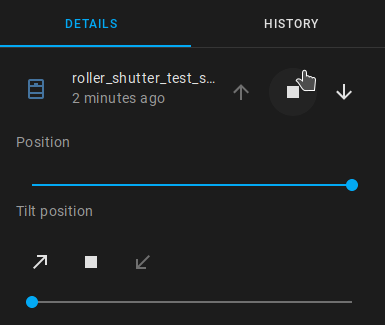
slashbv
on 26 Oct 2020
Zigbee officially expects 'open' to be 0 and 'closed' to be 100. So the implementation ist right. I know HA is a bit special. OpenHAB supports the zigbee standard.
Did you try motor_reversal option? Maybe this works for HA
An other option may be, to add Device specific configuration in devices.yaml. Try to add "invert_cover: true" to your device.
The used converter "cover_position_tilt" should support this.
For cover position i used the existing converter and standard is lift and tilt. But tilt values are only add to mqtt message when the device supports it.
Is it not possible to customize the controls in HA?
1subu
on 26 Oct 2020
invert_cover: true works fine but considering Koenkk's the comment here it seems it is the other way around: open is 100 and close is 0 https://github.com/Koenkk/zigbee2mqtt/issues/4412#issuecomment-703168083
Regarding tilt this device does not support it and there is no point in having tilt implemented.
slashbv
on 27 Oct 2020
if you do exposes: [e.cover_position(), ... instead of exposes: [e.cover_position_tilt(), ... in devices.js seems to be fine in Home Assistant
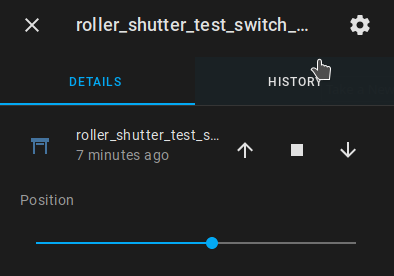
slashbv
on 28 Oct 2020
@1subu THANK YOU VERY MUCH, just received a TS130F, was going to patch by myself and I saw your commit, came here...and found the solution to the blind not fully opening! Now after calibrating it with what you said works beautifully. Thanks again!
 vide
on 28 Oct 2020
vide
on 28 Oct 2020
@slashbv I will change this with the next PR, thanks
1subu
on 29 Oct 2020
How are you supposed to control the backlight? I tried with
mosquitto_pub -t zigbee2mqtt/0x842e14fffe9a5673/set/backlight_mode -m off
and also low as the payload but the blue light is still on. No errors in Z2M logs thou. Anyway this device has enough specific things that it is worth having a wiki page for it. I could prepare a PR for that if you don't mind @1subu but I still need to figure out more info on how to operate it (backlights specifically)
vide
on 29 Oct 2020
Payload for backlight is LOW, MEDIUM or HIGH.
There are 3 light modes in the Tuya app.
Unfortunately my switch-model has no backlight, so i could not test the function. But the cluster attributes are set correctly.
It would be great if you make a wiki page for the device.
Please report if backlight works and a picture wit the backlight would be nice
1subu
on 29 Oct 2020
Ok, just tried. With MEDIUM and HIGH I get the stop/pause button turned on, like this:
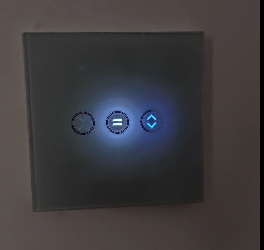
while with LOW the stop/pause button turns off. The blue light that indicates the device is paired with a zigbee controller, stays always on no matter what.
vide
on 29 Oct 2020
@vide where did you buy this switch from ? Mine doesn't have backlight either but a light is shown when I press a button and I can control the intensity of that light with LOW, MEDIUM or HIGH.
slashbv
on 29 Oct 2020
@slashbv it's this one I think they changed the actual model over time thou (because in the reviews someone said it worked with zigbee2mqtt out of the box and it wasn't the case with my device)
vide
on 29 Oct 2020
@vide yours is a different device different manufacturer check this: https://github.com/Koenkk/zigbee2mqtt/issues/3216
slashbv
on 29 Oct 2020
@slashbv actually it's what I thought I bought but it identifies itself as TS130F, that's why I'm here. Unfortunately I don't have the box anymore to check the device name there but it identifies itself as a TS103F.
vide
on 29 Oct 2020
@vide everything is working except the lighting ?
slashbv
on 30 Oct 2020
@slashbv yep, everything is working..well I guess somehow the backlight is working in a manner, there is just no difference between HIGH and MEDIUM and LOW is actually an off, and it applies to the "stop" light and not the always-on blue light but calibration works, position works and obviously open/close work.
vide
on 30 Oct 2020
interesting, I have the old version and there is no calibration and also no always in blue light, only always on white light for the stop. The blue stays on only when it's not paired.
slashbv
on 30 Oct 2020
@slashbv I have the same as OP (from the same seller), had a chance today to test the dev branch, so there are my observations:
1) calibration works;
2) controls for tilt - agree they should be removed since not supported;
3) strange issue with the UP / DOWN controls where they are reversed in HA (the same you had), will try invert_cover tomorrow, but why this shouldn't be set in device definition?
4) backlight is not working, don't know the reason, there was a yellow led on, while not being paired, but now I see nothing, is it the same for you?
barsurfer
on 30 Oct 2020
for me UP / Down works fine just that when it's opened it shows closed (0%) and when it's closed it's opened (100%). Considering Koenekk's comment on the other thread I think this should be changed too. If you use invert_cover should be fine. Maybe @1subu will fix it and he will use invert_cover for Openhab. I don't have backlight either, there is only yellow light when going Up or Down and seems the intensity can be changed with LOW MEDIUM HIGH. I think those Loratap switches don't have any backlight. I had also wifi ones from Loratap and they were the same without backlight. The one from Zemismart has backlight. Probably the one @vide has it's an improved version of the old Zemismart (the one I have) and this Loratap (it's a Loratap with Zemismart lights :)) )
slashbv
on 30 Oct 2020
Regarding cover position.
This device reports position= 0 as open.
In devices.js you can read "coverInverted: Set to true for cover controls that report position=100 as open"
For cover position I use the existing converter cover_position_tilt.
There are currently 15 different devices listed using this converter. Only 4 have the option coverInverted
It could not be so wrong :)
Has anyone tested the motor_reversal funktion? In the Tuya app this inverts the position, but I dont know if up/down is also inverted.
1subu
on 31 Oct 2020
it seems I have this error in Z2M log, any idea ?
error 2020-11-09 17:54:38: Failed to setup reporting for '0xbc33acfffe47afe2' - Error: Bind 0xbc33acfffe47afe2/1 genOnOff from '0x00124b0021cc0b8a/1' failed (AREQ - ZDO - bindRsp after 10000ms)
at Timeout._onTimeout (/app/node_modules/zigbee-herdsman/dist/utils/waitress.js:46:35)
at listOnTimeout (internal/timers.js:554:17)
at processTimers (internal/timers.js:497:7)
slashbv
on 9 Nov 2020
Hi,
I have just received one of these LoraTap SC400 curtain switch (TUYA Zigbee model 'TS130F').
I am using Hassio on a raspberry pi 4 with a CC2531 as a zigbee hub, connected to the rasp USB.
I have installed the addon Zigbee2MQTT and the curtain switch has been discovered easily (1 device/ 6 entities).
I have added the cover entity to a card on the lovely lace.
Calibration works fine by doing as per indicated in this thread
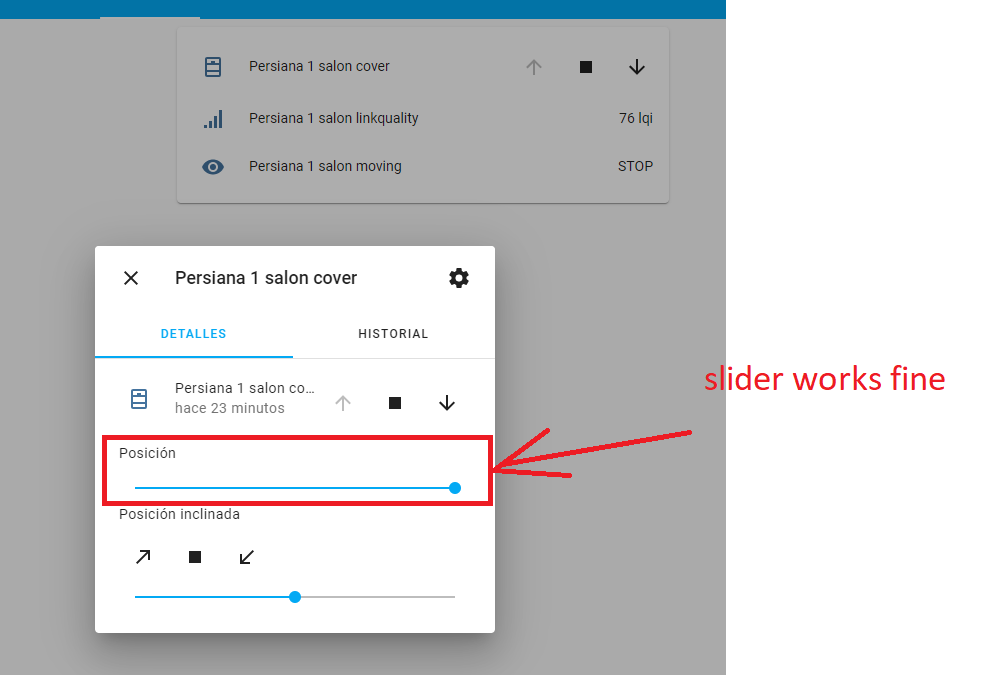
But....this is my issue:
When I push/touch the “up” button, the curtain goes up and after the configured time the curtain stops but then the “down” button goes into disable stage and the “up” button remains enable. Shouldn’t it be vice versa?. At this point, it is not possible to move the curtain down anymore.
In the same way, if I reset everything and push/touch the “DOWN” button, the curtain goes down and after the configured time the curtain stops but then the “UP” button goes into disable stage and the “DOWN” button remains enable. Not possible to go up now…..
I am quite lost to short out this issue. Any help will be welcome.
Note: Fortunately, getting into de coder, the slider works fine.
a couple of screeshots:
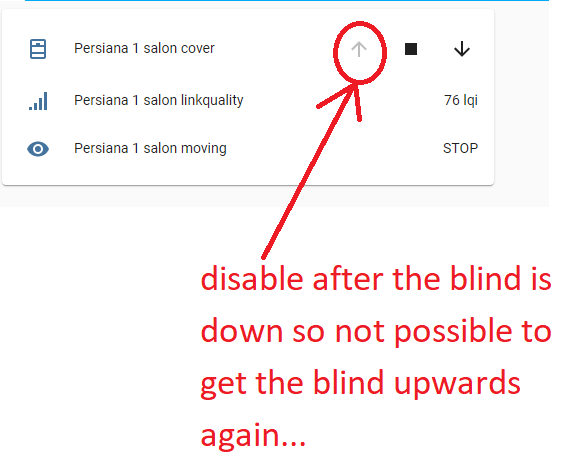
By the way, this is the device I just got:
https://es.aliexpress.com/item/4001265818693.html?spm=a2g0s.9042311.0.0.274263c0JbGr1A
 irrintxi
on 17 Nov 2020
irrintxi
on 17 Nov 2020
add invert_cover: true to configuration.yaml should be fine after.
slashbv
on 18 Nov 2020
@1subu motor_reversal is also inverting up/down buttons for me. If we don't want to change coverInverted I think we are done then. Thanks for your effort!
barsurfer
on 18 Nov 2020
add invert_cover: true to configuration.yaml should be fine after.
Thanks for the response-
I forgot to mention i did already try that but no succeed... It behaves in the same manner....
Edit: WRONG!!! I though I was cover inverting but I was not.
I will try that
Cheers!!!
Edit2:
Adding "invert_cover: true" in device.yaml solves the issue!
Thanks!!!!
irrintxi
on 18 Nov 2020
Related issues
 Courty40
·
4Comments
Courty40
·
4Comments
 LCerebo
·
3Comments
LCerebo
·
3Comments
 Underknowledge
·
4Comments
Underknowledge
·
4Comments
 CodeFinder2
·
4Comments
CodeFinder2
·
4Comments
 tb-killa
·
3Comments
tb-killa
·
3Comments
Most helpful comment
The new cluster attributes are merged and are available in dev branch.
I updated the PR for the new converters and the device
I can't help with HA. I am using openHAB. But i added exposes. Maybe that will help