Zigbee2mqtt: Danalock is not working properly after it is connected to two CC2531 routers
Bug Report
What happened
I have been using Danalock for 3 months now and it has been working fine being connected to one of my CC2531 routers (specially after I changed the firmware of my CC2531 coordinator to source_routing), but last week I switched off that router for an hour or so, and after I switched the router on again I realized Danalock had connected to the same router and also to another one. From that moment I am having intermittent issues where Danalock stops sending messages with the lock status and I have to manually send the "zigbee2mqtt/bridge/configure" message to fix it. And even this command sometimes fails, this is one example of the message I received when the command failed (I sent commands configure and get and both commands failed):
zigbee2mqtt:error 2020-08-03 23:33:27: Failed to configure 'DEVICE_ID_REMOVED', attempt 9 (Error: Bind DEVICE_ID_REMOVED/1 closuresDoorLock from 'COORDINATOR_ID/1' failed (AREQ - ZDO - bindRsp after 10000ms)
    at Timeout._onTimeout (/zigbee2mqtt-1.14.2/node_modules/zigbee-herdsman/dist/utils/waitress.js:46:35)
    at listOnTimeout (internal/timers.js:549:17)
    at processTimers (internal/timers.js:492:7))

zigbee2mqtt:error 2020-08-03 23:33:50: Publish 'get' 'state' to 'DEVICE_ID_REMOVED' failed: 'Error: Read DEVICE_ID_REMOVED/1 closuresDoorLock(["lockState"], {"timeout":10000,"disableResponse":false,"disableDefaultResponse":true,"direction":0,"srcEndpoint":null,"reservedBits":0,"manufacturerCode":null,"transactionSequenceNumber":null}) failed (Timeout - 53636 - 1 - 142 - 257 - 1 after 10000ms)'
zigbee2mqtt:info  2020-08-03 23:33:50: MQTT publish: topic 'zigbee2mqtt/bridge/log', payload '{"type":"zigbee_publish_error","message":"Publish 'get' 'state' to 'DEVICE_ID_REMOVED' failed: 'Error: Read DEVICE_ID_REMOVED/1 closuresDoorLock([\"lockState\"], {\"timeout\":10000,\"disableResponse\":false,\"disableDefaultResponse\":true,\"direction\":0,\"srcEndpoint\":null,\"reservedBits\":0,\"manufacturerCode\":null,\"transactionSequenceNumber\":null}) failed (Timeout - 53636 - 1 - 142 - 257 - 1 after 10000ms)'","meta":{"friendly_name":"DEVICE_ID_REMOVED"}}'
This is the zigbee map where I can see Danalock connected to two routers (as mentioned above, before it was connected just to one of them and it was working fine):

How can I fix this issue? Is there any way to avoid devices to connect to two routers at the same time?
What did you expect to happen
How to reproduce it (minimal and precise)
Debug Info
Zigbee2mqtt version: 1.14.2
Adapter hardware: CC2531
Adapter firmware version: CC2531_SOURCE_ROUTING_20190619
 elbueno222
All 88 comments
That looks normal, zigbee is a mesh so each device will connect to multiple nearest neighbors. If you generate a net map including route you will see which path back to the coordinator it uses.
Edit: hMm that is an end device, yeah maybe that is not normal
 sjorge
on 5 Aug 2020
sjorge
on 5 Aug 2020
I am not sure if an endpoint connected to two routers is normal (I guess it is, because as you can see in the picture I have another device connected to two routers and it is working fine), but in this case the device is not working as expected, and even the "zigbee2mqtt/bridge/configure" message that never failed before (when the device was connected to one router) is failing now (it is not failing every time, it fails just sometimes so it is like a trial and error)
elbueno222
on 5 Aug 2020
Can you provide a sniff of the failing configure while sniffing at the location of the danalock? https://www.zigbee2mqtt.io/how_tos/how_to_sniff_zigbee_traffic.html
 Koenkk
on 5 Aug 2020
Koenkk
on 5 Aug 2020
Can you provide a sniff of the failing configure while sniffing at the location of the danalock? https://www.zigbee2mqtt.io/how_tos/how_to_sniff_zigbee_traffic.html
Ok, it won't be easy as the error happens every 1-2 days at random times but I will try. Should I filter the messages using another filter apart from zbee.sec.key?
elbueno222
on 6 Aug 2020
Can you provide a sniff of the failing configure while sniffing at the location of the danalock? https://www.zigbee2mqtt.io/how_tos/how_to_sniff_zigbee_traffic.html
I got lucky, the error just happened and I was able to sniff 5 different errors (4 of them after sending message zigbee2mqtt/bridge/configure and 1 more after sending zigbee2mqtt/[device_id]/get). In all 5 cases I cannot see any message sent by Danalock (I use the filter (zbee_nwk.src64 == [Danalock_address]), but I don't really know what I should be looking for, @Koenkk how can I send you the logs?
elbueno222
on 7 Aug 2020
@elbueno222 on telegram @koenkk
Koenkk
on 8 Aug 2020
@elbueno222 on telegram @Koenkk
Done
elbueno222
on 9 Aug 2020
I've investigated your sniff, the problem is the following. In Zigbee the parent (= router in this case, could also be the coordinator itself) is responsible for holding the message for the end device, when the end device does a "Data request" to the parent it should send any messages that it holds.
Zigbee2MQTT sends the bind request to the lock with the destination being 0x8444 (this should be the parent of the lock)

However the lock considers 0x96f8 as it's parent, not 0x8444!
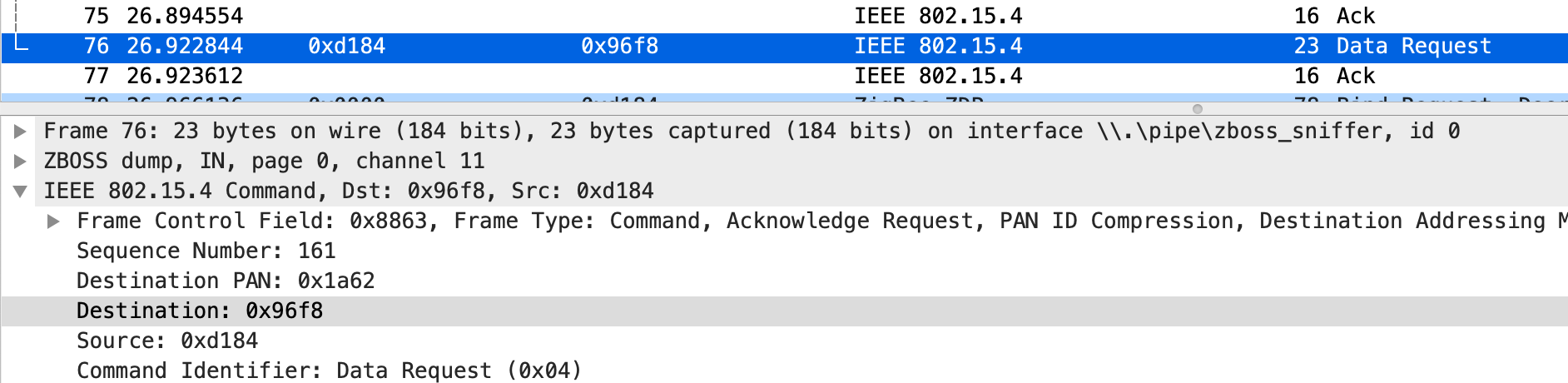
This is similar to https://github.com/Koenkk/zigbee2mqtt/issues/3870 and I've posted a possible fix here: https://github.com/Koenkk/zigbee2mqtt/issues/3870#issuecomment-669801601 , please let me know if this fixes it for you (you can skip the adapter firmware part).
Koenkk
on 9 Aug 2020
Thank you very much for the analysis, I think I understand the issue now, if the end device (the lock in this case) is connected to two routers according to the zigbee map, but it just considers one of the routers as its parent, when a message is sent through the other router the lock won't pick it up.
I'm running zigbee2mqtt Hass.io Add-on, can I follow those instructions from #3870 or are they just valid for bare metal?
elbueno222
on 9 Aug 2020
@elbueno222 since there are a lot of changes (to many files) I would recommend waiting until wednesday. After the z2m release I will merge these change so they will be available in the edge addon after this.
Koenkk
on 10 Aug 2020
Sure, more than happy to wait, just let me know when the changes are available in the edge version and I will test it.
elbueno222
on 10 Aug 2020
Fix will be in the edge addon +- 2 hours from now
Koenkk
on 12 Aug 2020
Edge version enabled, I will let you know if the issue happens again during the next days
elbueno222
on 12 Aug 2020
Unfortunately after uninstalling and installing the edge version to get the latest changes the error happened again. I will try to sniff the messages when the next error happens.
elbueno222
on 13 Aug 2020
The error has happened again, but I haven't been able to prepare the sniff because the behaviour is different. Previously just after the error happened once I was able to reproduce the error sending the configure message as many times as I needed during some time (at least 30 minutes or so until the error was fixed automatically and Danalock started to respond to messages), but now even the configure message reached the 10 seconds timeout and failed, the device was actually fixed around 13 seconds later. I know that because my automation requests the lock status 10 seconds after sending the configure message (22:48:37 in this case), and this time Danalock replied with the status at 22:48:50 (13 seconds later). This is the zigbee2mqtt-edge log:
Zigbee2MQTT:info  2020-08-14 **22:48:27**: Configuring 'DANALOCK_ID'
Zigbee2MQTT:error 2020-08-14 **22:48:37**: Failed to configure 'DANALOCK_ID', attempt 3 (Error: Bind DANALOCK_ID/1 closuresDoorLock from 'COORDINATOR_ID/1' failed (AREQ - ZDO - bindRsp after 10000ms)
    at Timeout._onTimeout (/app/node_modules/zigbee-herdsman/dist/utils/waitress.js:46:35)
    at listOnTimeout (internal/timers.js:549:17)
    at processTimers (internal/timers.js:492:7))
Zigbee2MQTT:info  2020-08-14 **22:48:50**: MQTT publish: topic 'zigbee2mqtt/DANALOCK_ID', payload '{"linkquality":55,"state":"UNLOCK","lock_state":"unlocked","battery":89}'
I have disabled my automation (the one that sends the configure message and request the lock status every time Danalock is over an hour without sending the status) to try and sniff the messages next time the error happens.
elbueno222
on 15 Aug 2020
@Koenkk the error happened again and it´s a bit worse, as Danalock has not responded to messages during the last 12 hours, I have sent you the sniff on Telegram
elbueno222
on 16 Aug 2020
@elbueno222 checked your sniff again.
As the first requests fails, Zigbee2MQTT tries to discover the route again:

However as can be seen, 2 devices respond to it! The old 0xd814 and new 0x96f8. At this point you have to be lucky for the coordinator to pick the correct one.
@ptvoinfo do you know if child ageing is enabled for the router firmwares? This should prevent such issues.
Koenkk
on 18 Aug 2020
I guess this issue would be solved if the device was connected to the coordinator just through one router, but why is the device connected to the coordinator through two different routers at the same time? is this expected in a zigbee network? If the end device is holding information about the router/coordinator it is connected to, and it can hold information about just one router/coordinator, shouldn´t the zigbee network remove the old connections (if that is possible) and keep just one route or path from every device to the coordinator to avoid this type of issue?
elbueno222
on 19 Aug 2020
@elbueno222 and end device can only be connected to one router (two connections is impossible). The problem is that 2 routers think it's connected to it, leading to a wrong route. Therefore my question about child ageing in https://github.com/Koenkk/zigbee2mqtt/issues/4038#issuecomment-675694507
Koenkk
on 19 Aug 2020
@elbueno222 and end device can only be connected to one router (two connections is impossible). The problem is that 2 routers think it's connected to it, leading to a wrong route. Therefore my question about child ageing in #4038 (comment)
Thank you for the clarification, it makes complete sense
elbueno222
on 19 Aug 2020
@ptvoinfo please let us know if there is any way to fix this issue.
elbueno222
on 21 Aug 2020
@Koenkk, I asked @ptvoinfo about this on his website (https://ptvo.info/cc2531-based-router-firmware-136/) and according to his comment (Posted at 12:15 August 21, 2020) he seems to believe the path is stored on the coordinator side, do you think the routers are also storing the information about the end devices connected to them?
I guess as a workaround I could reset the routers and/or coordinator so the problematic double connection disappears, but I have seen other people having issues with different devices due to these double connections, and I would like to find a solution to the issue so nobody else has this problem in the future.
elbueno222
on 24 Aug 2020
@elbueno222 ~the path is stored on the router side, you can verify it by shortly turning of the "invalid" parent router. After that I expect it to work.~
EDIT: the path is indeed stored at the coordinator side. However the problem is that the routers send the wrong path to the coordinator. The routers should age out end devices if they have not checked in for some time. After this only the actual parent will send the route.
Koenkk
on 24 Aug 2020
@Koenkk when the coordinator see two routers pointing to the same end device, is there any way for the coordinator to know what router is sending the wrong path (i.e. by checking last successful connection with the device or something like that) in order to ignore/remove that path?
elbueno222
on 24 Aug 2020
@elbueno222 I was thinking something similar, but z-stack does not expose such commands externally. This still would be a hack rather then a fix, since other devices in the network still have 2 routes to chose between. The correct solution would be to enable child aging for the routers.
@ptvoinfo I've checked this and it can easily be done, just change uint8 zgChildAgingEnable = FALSE; to uint8 zgChildAgingEnable = TRUE; in Components/stack/sys/ZGlobals.c.
Koenkk
on 25 Aug 2020
@Koenkk What about zgNwkParentInformation and other related options in the same file?
 ptvoinfo
on 26 Aug 2020
ptvoinfo
on 26 Aug 2020
@ptvoinfo I don't think you need to change anything else.
@elbueno222 do you have Xiaomi devices on your network? (if yes, are they connected to the CC2530 router?)
Koenkk
on 26 Aug 2020
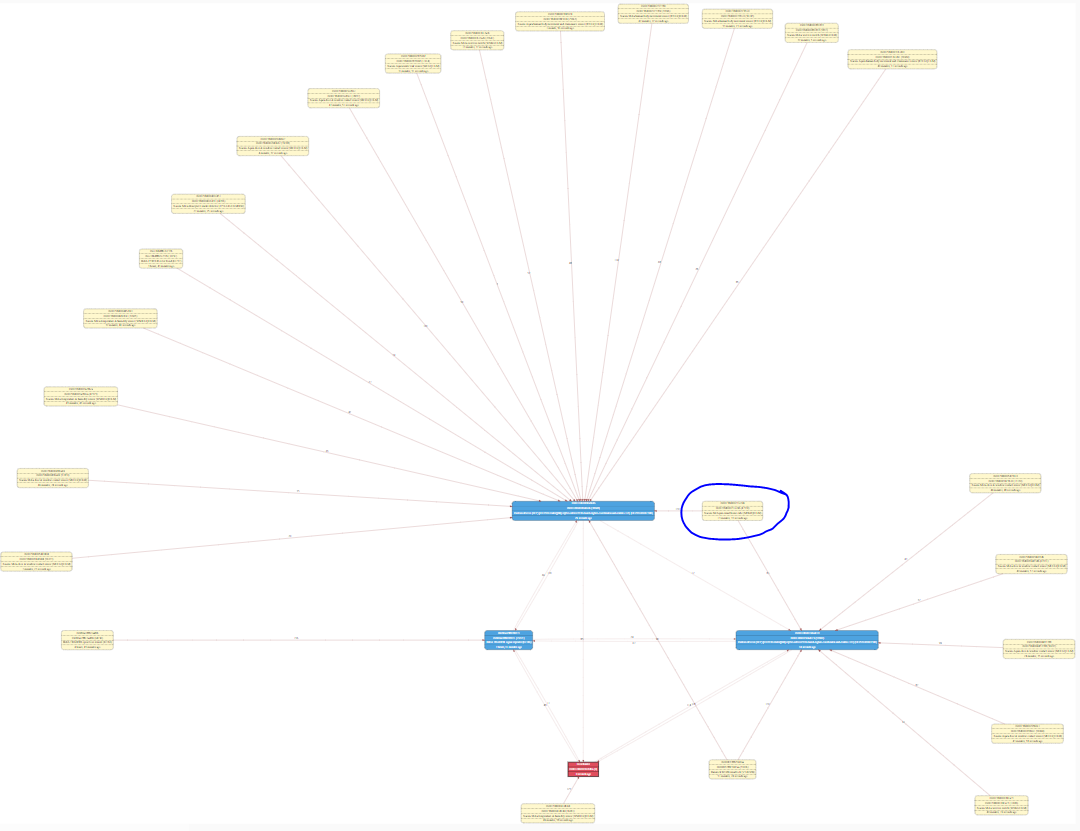
My routers are CC2531 (not CC2530) but yes, most of my devices (21 out of 24) are Xiaomi, and many of them are connected to the routers (one of them is actually connected to two routers now, but for some reason that doesn´t cause any issue as with the Danalock):
elbueno222
on 26 Aug 2020
@Koenkk I saw that the default aging time is 256 minutes. Are you sure it is ok for the most end-devices?
ptvoinfo
on 26 Aug 2020
@elbueno222 Please, try the following firmware. I did the changes suggested by @Koenkk
https://ptvo.info/download/cc2531_1.2.2a.44539_firmware_20200826.zip
ptvoinfo
on 26 Aug 2020
@ptvoinfo we need to test! Since @elbueno222 has a lot of Xiaomi devices, it could be that they are kicked of the network now, let's see what happens.
Koenkk
on 26 Aug 2020
Sure, I will install the firmware in both routers and will let you know if it fix the "double path" issue and also if it produces any new issues with my devices.
Just FYI, with the current firmware all my Xiaomi devices work properly, except a Xiaomi leak sensor that sometimes is disconnected from the network (around once a month or so)
elbueno222
on 26 Aug 2020
@elbueno222 Please, note that the map may contain duplicate path for up to 256 minutes (about 4 hours).
ptvoinfo
on 26 Aug 2020
Thanks @ptvoinfo I am aware of that.
Just as a quick note, writing the original router-cc2531-std.hex firmware the process reported 12176 lines read and 96 pages:
  ID = b524.
  reading line 12170.
  file loaded (12176 lines read).
writing page  96/ 96.
verifying page  96/ 96.
 flash OK.
And with this new firmware it reported 12073 lines read and 95 pages:
  ID = b524.
  reading line 12070.
  file loaded (12073 lines read).
writing page  95/ 95.
verifying page  95/ 95.
 flash OK.
@ptvoinfo I have bad news, after flashing the new firmware in the two CC2531 they cannot join the network. I have enabled the option to allow new devices to join, but they are both doing short fast blinks (one per second) and they are not discovered by the network.
EDIT: after flashing the original router firmware into one of the the routers, this router has joined the network, so it looks like the new firmware has some issue.
EDIT 2: after pressing the S2 button for 5 seconds the router with the new firmware has joined the network. I will flash the new firmware in the second router to test it.
elbueno222
on 26 Aug 2020
Yesterday I reconnected all the devices to the network (most of the required to hold the reset button for 5 seconds, of course I didn´t do anything to the devices that were connected to the other Ikea router I have). I checked the zigbee map and around half of the devices connected to each router, so every device was connected to one of the routers and it looked fine (no double connections, but that was expected as the double connections happens when I turn off one of the routers).
Unfortunately today all the Xiaomi devices appear as not connected to the network, but actually they work (I guess they can still find the path to the coordinator through the routers, even the routers think they are not connected through them?)
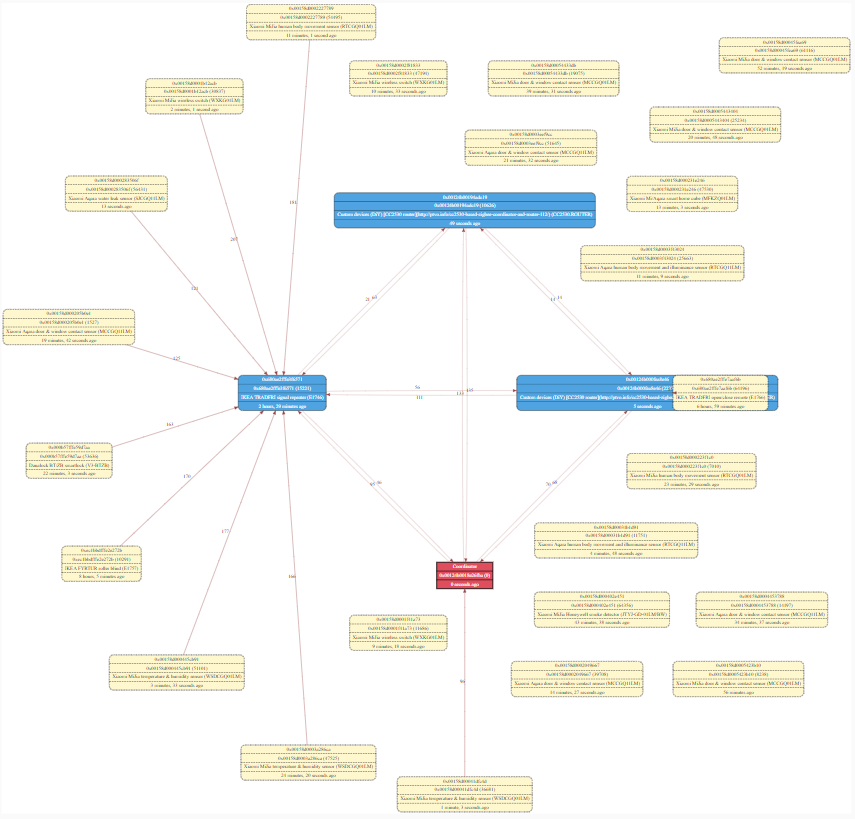
If the "timeout" is 256 minutes that shouldn´t have happened, as I believe most of the Xiaomi devices send data every hour or so. I have executed this command to check the last time every device sent data:
{%- set ns = namespace(time=0,device="") %}
{% for state in states.sensor if 'linkquality' in state.entity_id -%}
  {%- set temp = (((as_timestamp (now()) - as_timestamp (state.last_updated)) / 60) | round(0)) %}
  {{state.name}} sent data {{temp}} minutes ago
{%- endfor %}
And this is the result:
  Aqara Cube Linkquality sent data 172 minutes ago
  Bedroom Button Linkquality sent data 42 minutes ago
  Bedrom Window1 Sensor Linkquality sent data 35 minutes ago
  CC2531 Router1 Linkquality sent data 2 minutes ago
  CC2531 Router2 Linkquality sent data 49 minutes ago
  Cloakroom Motion Sensor Linkquality sent data 9 minutes ago
  Danalock Main Door Linkquality sent data 62 minutes ago
  Downstairs Motion Sensor Linkquality sent data 49 minutes ago
  Garden Door Sensor Linkquality sent data 59 minutes ago
  Honeywell Smoke Sensor Linkquality sent data 246 minutes ago
  Hot Water Thermostat Linkquality sent data 6 minutes ago
  Ikea Blind Linkquality sent data 586 minutes ago
  Ikea Open Closer Button Linkquality sent data 1008 minutes ago
  Kitchen Button Linkquality sent data 50 minutes ago
  Kitchen Garden Sensor Linkquality sent data 726 minutes ago
  Kitchen Motion Sensor Linkquality sent data 27 minutes ago
  Kitchen Temperature Sensor Linkquality sent data 6 minutes ago
  Kitchen Window1 Sensor Linkquality sent data 32 minutes ago
  Kitchen Window2 Sensor Linkquality sent data 605 minutes ago
  Leak Sensor Linkquality sent data 40 minutes ago
  Living Room Button Linkquality sent data 713 minutes ago
  Living Room Temperature Sensor Linkquality sent data 41 minutes ago
  Living Room Window1 Sensor Linkquality sent data 18 minutes ago
  Living Room Window2 Sensor Linkquality sent data 24 minutes ago
  Main Door Sensor Linkquality sent data 4 minutes ago
  Upstairs Sensor Linkquality sent data 1 minutes ago
As you can see most of the devices has sent data in the last hour, so why have they been disconnected?
elbueno222
on 27 Aug 2020
FYI: my Xiaomi Door sensors may sleep 6 hours and more. Your image has low quality and I do not see your sensor types.
ptvoinfo
on 27 Aug 2020
From Xiaomi I have door sensors, motion sensors, one leak sensor and one smoke sensor. I agree that some devices may sleep over 4 hours sometimes, but I don´t think every single device I have was sleeping for more than 4 hours overnight, but all of them were disconnected in the morning. Actually they are still disconnected as I haven't pressed the reset button in any of them, but as I mentioned before they are working.
elbueno222
on 27 Aug 2020
Same story today just with a small difference, 2 of my Xiaomi devices (one door sensor and the leak sensor) stayed connected overnight, but all the other Xiaomi devices got disconnected.
This was the map yesterday after I reconnected most of the devices:
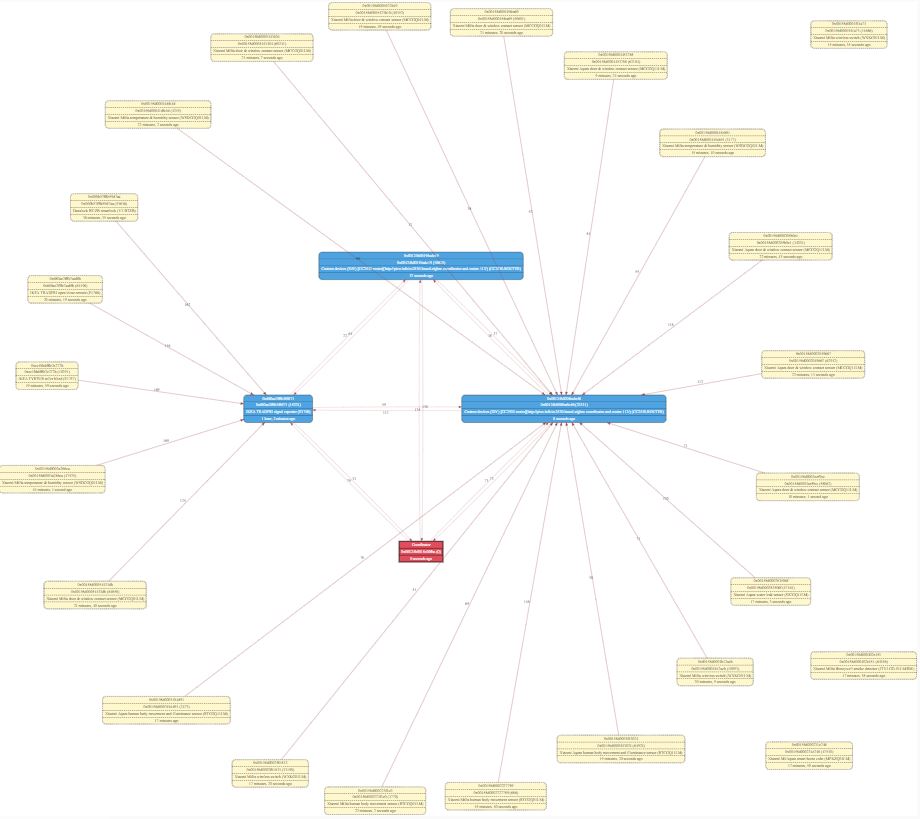
And this is the map today (I have marked the 2 Xiaomi devices still connected):
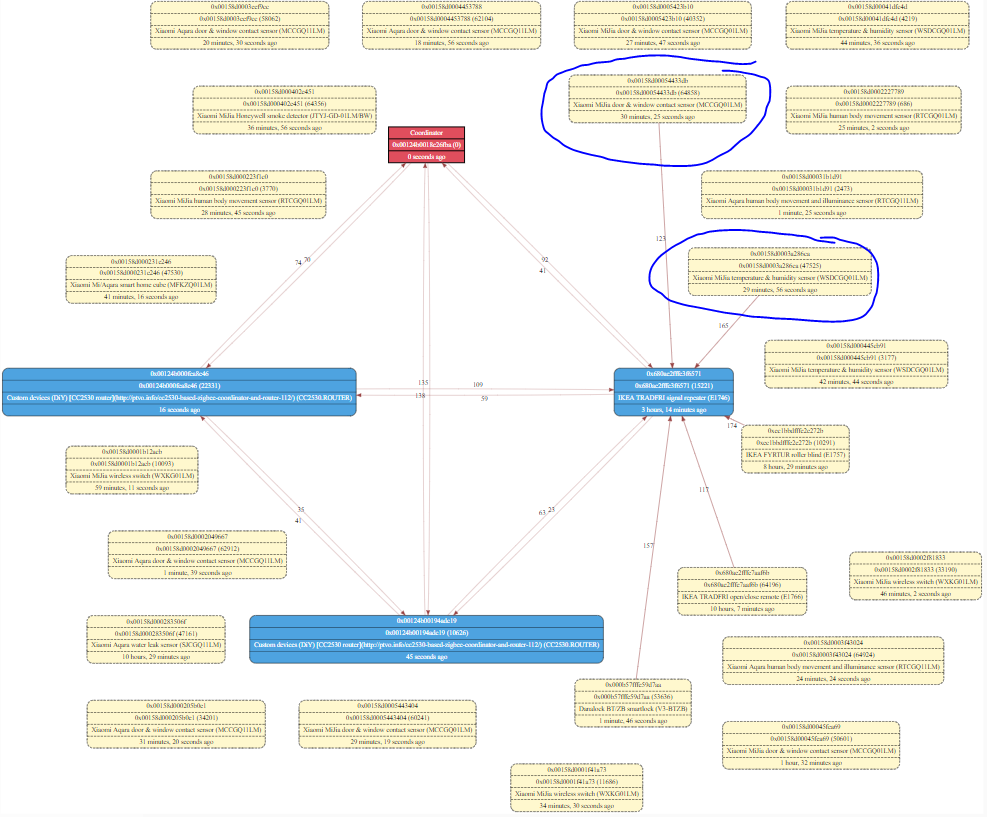
@Koenkk it looks like this fix doesn´t work for Xiaomi devices, is there any other option? Ideally the fix should just affect the devices with double connection to avoid impacting devices connected just to one router.
EDIT: The 2 Xiaomi devices still connected are actually connected to my other router (Ikea), so all the Xiaomi devices were disconnected from the CC2531 router, but they still work, as yesterday.
elbueno222
on 28 Aug 2020
@elbueno222 Please, try another version. I've increased the timeout to 1024 minutes.
https://ptvo.info/download/cc2531_1.2.2a.44539_firmware_20200828.zip
ptvoinfo
on 28 Aug 2020
@elbueno222 if they Xiaomi devices still work (in terms of sending data) I wouldn't worry to much.
Koenkk
on 28 Aug 2020
@elbueno222 if they Xiaomi devices still work (in terms of sending data) I wouldn't worry to much.
They work, but they appear as disconnected in the zigbee map, what means none of the routers think they are connected to them, right? I actually don´t understand why they work
elbueno222
on 28 Aug 2020
@elbueno222 that's not what it means, it means that the parent is unknown, this does not mean they can't send data anymore! The problem we are trying to fix is that a router considers an end device it's child while the child has already moved on to a different parent. To determine this the router now has a timeout, if the child hasn't checked in for an X amount of time it will not consider it a child anymore (the original router firmware had no timeout). Since Xiaomi devices sleep for very long time (longer than the timeout), none of the routers considers them as a child anymore. Knowing the parent of an end device is crucial when sending data to it, but since no data is send to Xiaomi devices (besides while pairing), this doesn't matter.
Note that further increasing the timeout has its downsides (https://github.com/Koenkk/zigbee2mqtt/issues/4038#issuecomment-682402153), as it will take longer for a router not to consider an end device it's child while it has already moved to a different router.
Koenkk
on 28 Aug 2020
@Koenkk but then this could cause a problem for other devices that need to receive data in case they don´t send data for 4 hours (i.e. if Danalock doesn´t send data for 4 hours and the router doesn´t consider it a child anymore, it will be impossible to lock/unlock the door as the coordinator won´t be able to send data to Danalock). In that case I think a longer timeout as @ptvoinfo has suggested would be better, what do you think?
elbueno222
on 28 Aug 2020
@elbueno222 if a device would really sleep for 4 hours, you will only be able to send data when it is awake (once every 4 hours). This would of course not make sense for a lock. A router cannot "wakeup" a child/end device.
End devices that are "controllable" (battery powered locks, curtains, etc.) constantly check their parent if new data is available for them. You can see this in the sniffed traffic as a "Data request".
The way sending data to end devices works is that the coordinator sends the message to the router (parent) of the end device. The router then holds the message until the end device does a "Data request", when it does it will send the message to the end device.
Koenkk
on 28 Aug 2020
That make sense, in that case the only issue of this fix would be for the Xiaomi devices to appear as disconnected in the zigbee map as none of the routers will consider them their children, but they would still work as the devices will keep the information of the router they are connected to.
elbueno222
on 28 Aug 2020
@Koenkk If I'll release the router firmware to public, we'll get a lot of reports where devices are unconnected on the map :) Please, consider to keep the last known parent on the server-side for the map only. Maybe, mark by a color or add a note.
ptvoinfo
on 28 Aug 2020
But how to know the last parent?
Koenkk
on 28 Aug 2020
@Koenkk Build the map every 4 hours?
ptvoinfo
on 28 Aug 2020
@ptvoinfo regularly executing a network scan it not possible, it will put a lot of stress on the network making the network unusable for some time, not nice if you just wanted to turn on a bulb.
I think it's better to provide a good explanation why it happens and what the reason for it is (I can add this to the zigbee2mqtt docs) as this is just how Zigbee works. Note that many users already experience this since devices like Hue, OSRAM etc already have this timeout.
Koenkk
on 28 Aug 2020
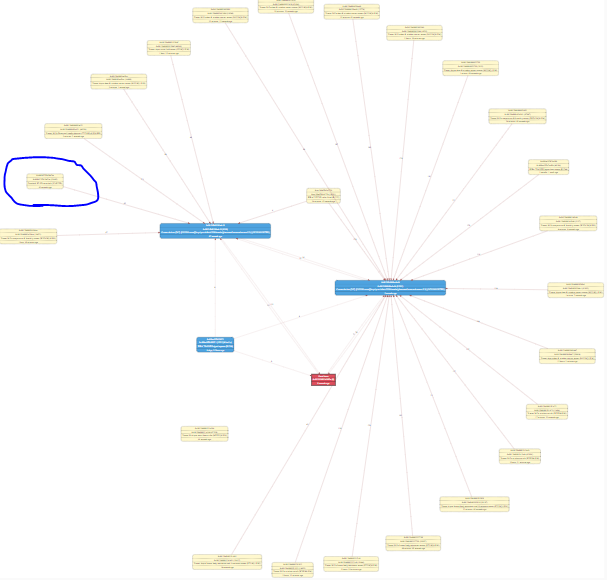
I just found an unexpected behavior, I still have the latest firmware with timeout = 1024 (cc2531_1.2.2a.44539_firmware_20200828.zip) in both CC2531 routers, but to perform a better test I disconnected the Ikea router so all the devices are connected to the CC2531 routers with the new firmware, and for some reason Danalock gets disconnected after one hour and I cannot send lock/unlock commands. After it was disconnected the first time I reconnected it, and it got disconnected again.
This is the map after I disconnected the Ikea router with all devices connected to the CC2531 routers (danalock in a blue circle):
And this is aprox. one hour later:
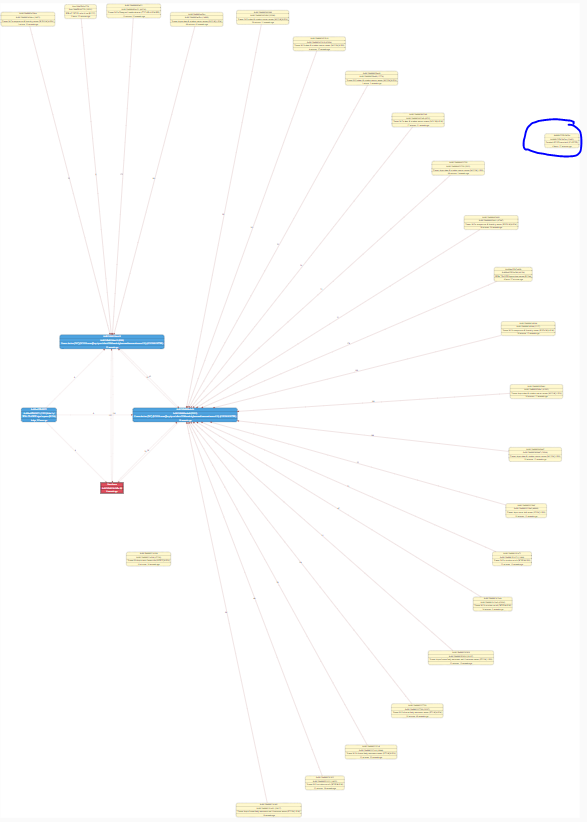
Also the other device that was connected to both routers (Ikea blind) is now connected to one router after just one hour, when it should have been connected to both routers for 1024 minutes (17 hours).
Something is not working as expected with the new option, are you guys sure the timeout is define in minutes? (i.e. if it was defined in seconds, that might explain this behavior).
elbueno222
on 28 Aug 2020
I think it's better to provide a good explanation why it happens and what the reason for it is (I can add this to the zigbee2mqtt docs) as this is just how Zigbee works. Note that many users already experience this since devices like Hue, OSRAM etc already have this timeout.
If this is going to be documented, will this allow us to rentable child aging in the coordinator firmware’s too? IIRC it is currently disabled for this.
sjorge
on 28 Aug 2020
@elbueno222 but does the lock still work as expected?
@sjorge when I've tested this with CC2652 it caused the Xiaomi devices to be completely removed from the network (not sending data anymore), however when this happens to the coordinator Zigbee2MQTT is able to recover it, so enabling this won't fix anything (as far as I know now).
Koenkk
on 28 Aug 2020
@Koenkk Danalock doesn´t work as expected, after it was disconnected it doesn´t send the lock status every hour as usual, and if I send lock/unlock commands they can´t reach the device (I can see the timeout error in the log), it is completely disconnected from the network.
elbueno222
on 28 Aug 2020
could you sniff the traffic again (close to the lock)?
Koenkk
on 29 Aug 2020
Done, I just sent you the sniff
P.S.: I would love to know how to read the sniff traffic from zigbee, so if there is any guide or document about the different fields and how to filter and read the messages please share
elbueno222
on 29 Aug 2020
@ptvoinfo can you try changing uint8 zgNwkParentInformation = NWK_PARENT_INFO_ORPHAN_NOTIFICATION; to uint8 zgNwkParentInformation = NWK_PARENT_INFO_MAC_DATA_POLL;
Koenkk
on 29 Aug 2020
@Koenkk, @elbueno222 Done. Could you please try?
https://ptvo.info/download/cc2531_1.2.2a.44539_firmware_20200831.zip
ptvoinfo
on 31 Aug 2020
I flashed both routers with the new firmware but now they are not connecting to the network. This already happened before so I will keep trying to connect them, but there might be some issue in the router firmware as sometimes they can't connect to the network and I have to reset them multiple times until they finally connect.
EDIT: after discussing it with Koenkk, he suggested to reflash the coordinator firmware as this connection issue could be caused by the coordinator having the children table full and he was right, this solved the issue and after reflashing the coordinator firmware both routers connected immediately.
elbueno222
on 31 Aug 2020
@Koenkk @ptvoinfo unfortunately with the latest firmware Danalock still gets disconnected in the zigbee map and it cannot received messages. I have created an automation to know how long it takes for Danalock to disconnect by request the lock status every minute, and the lock stops responding 10 minutes after it has joined the network (I have tested twice, and in both times it took 10 minutes to stop responding).
@Koenkk something that I don't understand is why Danalock gets disconnected after 10 minutes but the rest of my devices stay connected. I thought the reason could be Danalock is an "active" device (i.e. it is sending data request every 5 seconds) but another of my devices is an ikea blind which is also an "active" device (sending data request every second), and this ikea blind doesn't get disconnected with the new firmware, any idea why Danalock lock and Ikea blind have different behaviours when both are active devices?
elbueno222
on 31 Aug 2020
I can only suppose that Danalock requires a special command/response from Z2M. We have a similar problem with Livolo in the past.
ptvoinfo
on 1 Sep 2020
@Koenkk I sent you a sniff of the 10 minutes from the moment Danalock joins the network until the moment it stops responding to messages, please let me know if that helps you to understand why this is happening.
If you need more information I could revert the firmware of the routers back to the original version (without the timeout) and sniff the same 10 minutes (Danalock should keep responding to messages after those 10 minutes), please let me know if that would help.
elbueno222
on 1 Sep 2020
I've investigated the sniffs and I'm quite sure the issue is on the router side and not some kind of special command like suggested in https://github.com/Koenkk/zigbee2mqtt/issues/4038#issuecomment-684194576.
In the screenshot below, 0xb776 is the lock, 0xe6fe is the parent (cc2530 router). This is the first point of failure.
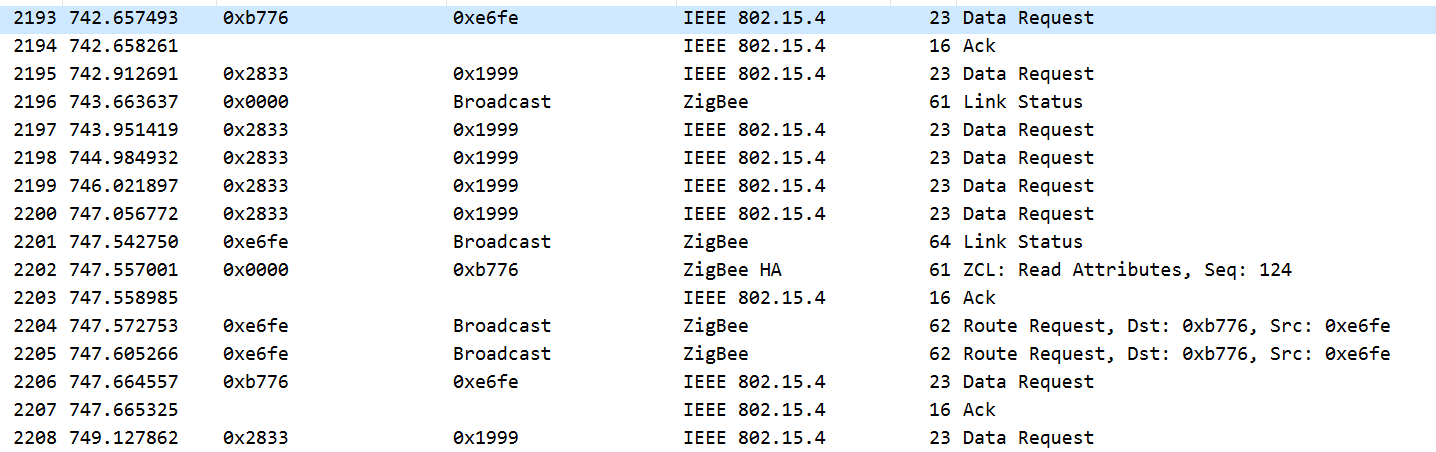
As can be seen, the lock is still sending data requests to the router every 5 seconds, the coordinator sends the read request and suddenly the router decides to figure out the route to the lock (Route request), while it received a Data request from it 5 seconds ago!
Few seconds after that, because the request failed, Zigbee2MQTT attempts to figure out the route. As can be seen, the router does not respond to it, meaning it doesn't recognize the lock as being a child anymore.

I've found something interesting when the lock joined:
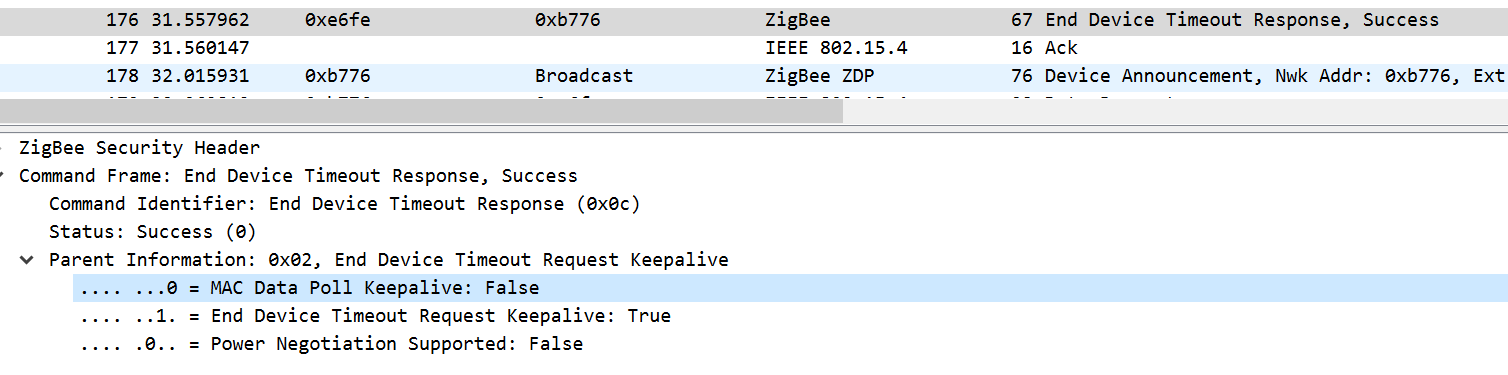
As can be seen here, the MAC data poll keepalive is false, I expected this to be true after https://github.com/Koenkk/zigbee2mqtt/issues/4038#issuecomment-683278446
@ptvoinfo can you compile a firmware having the following changes:
- ZGlobals.c:
uint8 zgNwkParentInformation = NWK_PARENT_INFO_ORPHAN_NOTIFICATION;->uint8 zgNwkParentInformation = NWK_PARENT_INFO_MAC_DATA_POLL; - ZGlobals.c:
uint8 zgChildAgingEnable = FALSE;->uint8 zgChildAgingEnable = TRUE; - nwk_globals.c: Uncomment the following (determines how long the router holds the message for the lock, default seems to be 7 which could be tricky when the lock polls every 5 seconds):
// #define CNT_RTG_TIMER            1
// #define NWK_INDIRECT_MSG_TIMEOUT 30
- f8wConfig.cfg:
-DNWK_INDIRECT_MSG_TIMEOUT=7->-DNWK_INDIRECT_MSG_TIMEOUT=30 - f8wConfig.cfg:
-DAPSC_ACK_WAIT_DURATION_POLLED=3000->-DAPSC_ACK_WAIT_DURATION_POLLED=10000
EDIT: Found something more interesting, the lock requests a timeout of 8 minutes to the router:
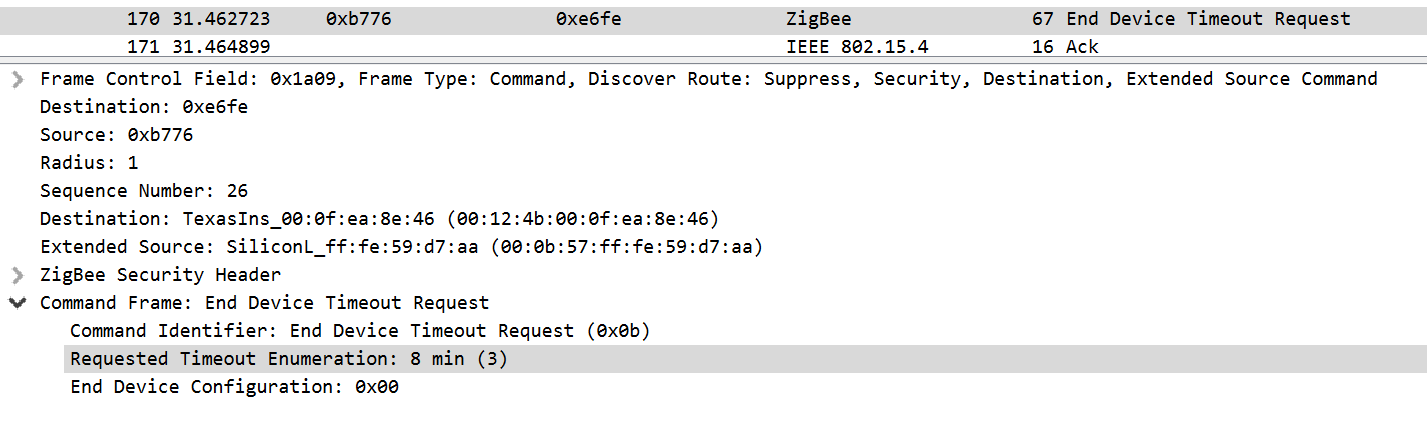
The syncs well with the story that the lock is disconnected after +- 10 minutes. I have high confidence that the issue here is the router not seeing a Data request as a keep alive message.
Koenkk
on 1 Sep 2020
@elbueno222 Could you please try the updated firmware again and capture a dump?
https://ptvo.info/download/cc2531_1.2.2a.44539_firmware_20200902.zip
@Koenkk MAC Poll in the header should be valid now.
ptvoinfo
on 2 Sep 2020
@Koenkk @ptvoinfo I have good news and bad news. With the new firmware Danalock is working as expected (staying connected after 10min, and being able to send the lock status every hour), but after some time (I would say around 6-8 hours) the xiaomi devices are disconnected from the network and they stop working.
I sniffed the traffic of one of the devices that got disconnected (a xiaomi motion sensor) and after the device sent a data request to the router, the router sent a Leave command to the device:

After that the device stops sending or receiving messages.
elbueno222
on 2 Sep 2020
Unfortunately that what I was afraid of already (as this is the reason child ageing has been disabled for the coordinator).
I've checked but the actual code where it sends the leave request is in the closed source part of the firmware. We basically want child ageing without the router sending leave requests.
Maybe we can trick the router a little bit, @ptvoinfo can you try changing #define MAX_NOT_MYCHILD_DEVICES 5 to #define MAX_NOT_MYCHILD_DEVICES 0 in nwk_globals.h?
Koenkk
on 2 Sep 2020
@Koenkk MAC MAX_NOT_MYCHILD_DEVICES cannot be zero. I've changed the corresponding constant value in nwk_globals.c
@elbueno222 Could you please try the updated firmware again?
https://ptvo.info/download/cc2531_1.2.2a.44539_firmware_20200903.zip
ptvoinfo
on 3 Sep 2020
Today something strange has happened. Yesterday three of my xiaomi devices were disconnected, I reconnected one of them and I was expecting all the xiaomi devices to be disconnected overnight, but it didn´t happen, all the devices are still connected including the one I reconnected:
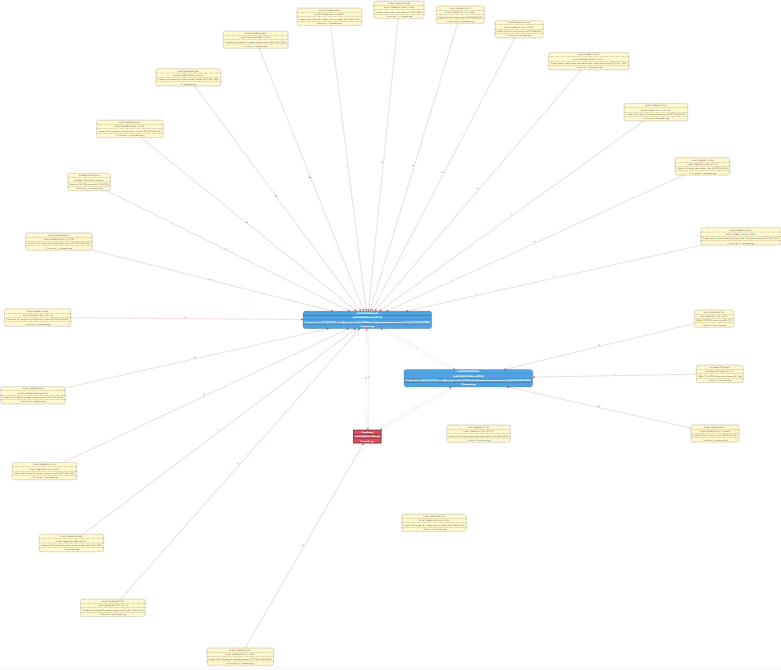
The three devices that got disconnected are two motion sensors and one door sensor, and other motion sensor and door sensor are exactly the same model but didn´t get disconnected.
I think this is great news as the disconnection of the three devices could have been cause for different reasons (maybe they didn´t join the network properly? or maybe they didn´t send data in 4 hours and were disconnected due to the timeout, in which case I think we should increase the timeout), so I have reconnected the two devices and I will keep checking the network map.
P.S.: I think it is worth testing the current firmware, but let me know if you still want me to flash the new one
elbueno222
on 3 Sep 2020
@elbueno222 It would great if you can test the latest firmware too.
ptvoinfo
on 3 Sep 2020
I will flash the new firmware today and test it.
With the previous firmware, this morning again none of my xiaomi devices were disconnected overnight, so the firmware looks promising.
elbueno222
on 4 Sep 2020
I flashed the new firmware in both routers 8 hours ago and so far everything looks good, all the devices are connected to the routers and none of them has lost connection. Danalock is also responding to messages and sending the lock status every hour as expected
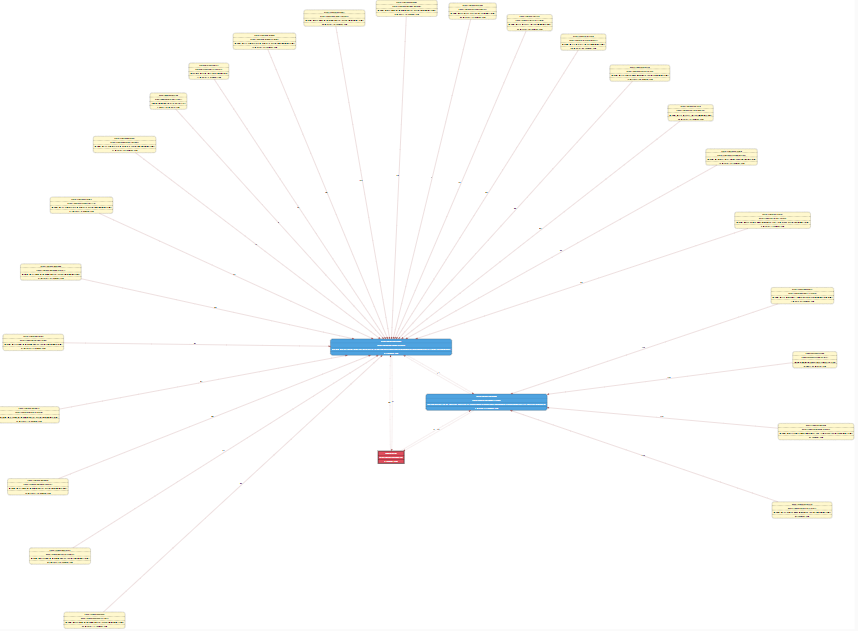
I will keep testing it over the weekend.
elbueno222
on 4 Sep 2020
@ptvoinfo
@Koenkk MAC MAX_NOT_MYCHILD_DEVICES cannot be zero. I've changed the corresponding constant value in nwk_globals.c
I'm not sure what you changed now, but it looks good, did you set it to 1 ?
Koenkk
on 4 Sep 2020
After more testing the firmware still looks good. As the network was stable I decided to replace my CC2531 coordinator with a CC2652R. After installing the new coordinator I had to pair and rename all the devices and entities in Home Assistant (yes, it was a bit painful, but the network is now up and running again).
After pairing all the devices, one of them got disconnected after 2-3 hours, but I don't think this is related to the new firmware as I paired it again and after 12 hours all the devices are still connected:
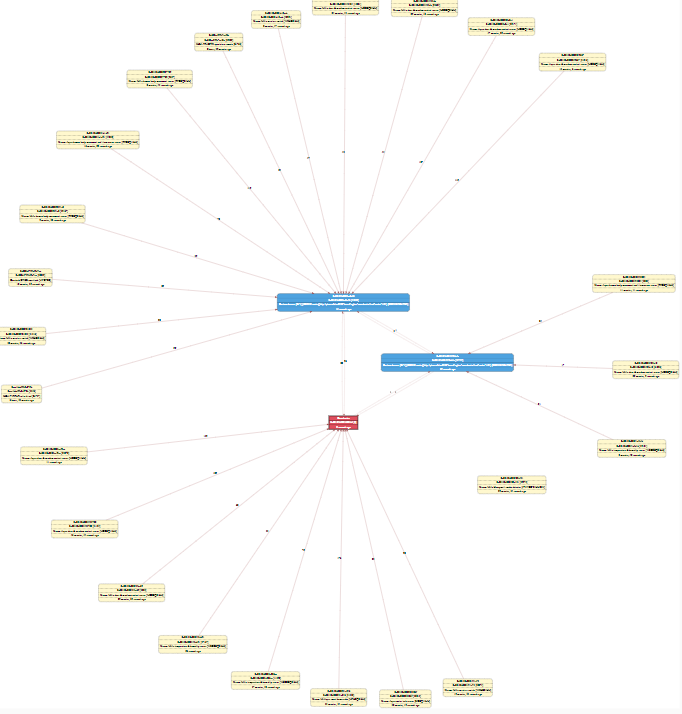
P.S.: the device that appears as disconnected on the map is a xiaomi honeywell smoke detector that is getting disconnected instantly after connecting, but it is not related to the router firmware as the device connects to the coordinator. I guess this is an issue with the new coordinator 3.0 so I might open a different issue if I can't figure out what is going on.
elbueno222
on 6 Sep 2020
@Koenkk
I'm not sure what you changed now, but it looks good, did you set it to 1 ?
nwk_globals.c
CONST uint8 gMAX_NOT_MYCHILD_DEVICES = MAX_NOT_MYCHILD_DEVICES
to
CONST uint8 gMAX_NOT_MYCHILD_DEVICES = 0
ptvoinfo
on 7 Sep 2020
Weekend is over and my network is still working as expected, and none of the devices has been disconnected.
To bring the test a bit further and trying to test the "double connection" issue I turned one of the routers off, expecting Danalock to connect to the other router. Instead of connecting to the other router Danalock (marked with a blue circle) connected to the coordinator:
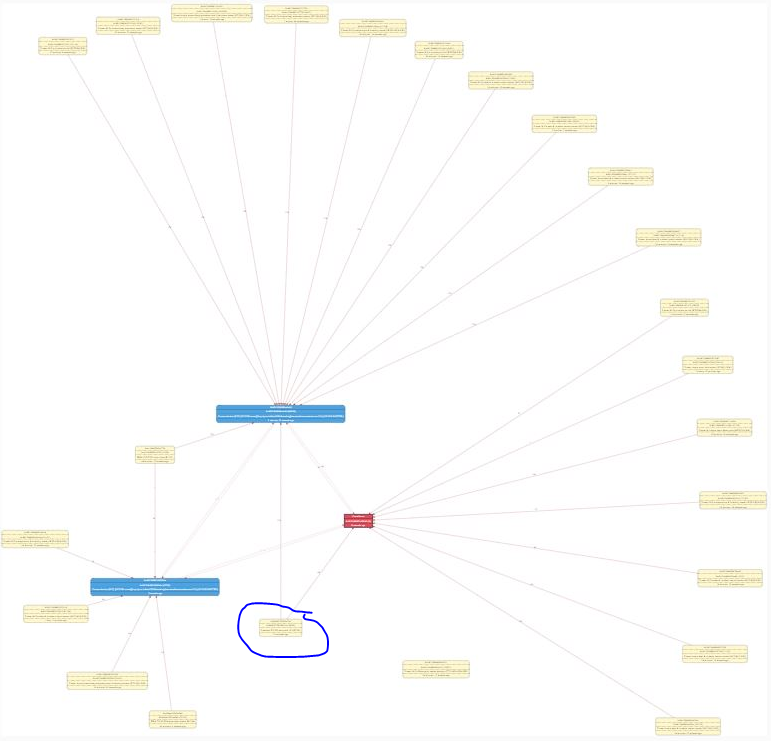
But my other active device (Ikea Blind) connected to the other router, so the test was ready to begin. After an hour or so I checked the map and Danalock had already been fixed (not sure why it was so quick, I guess even the router still had Danalock in its children table, the coordinator ignored any "extra" connection for Danalock as it was already connected directly to the coordinator):
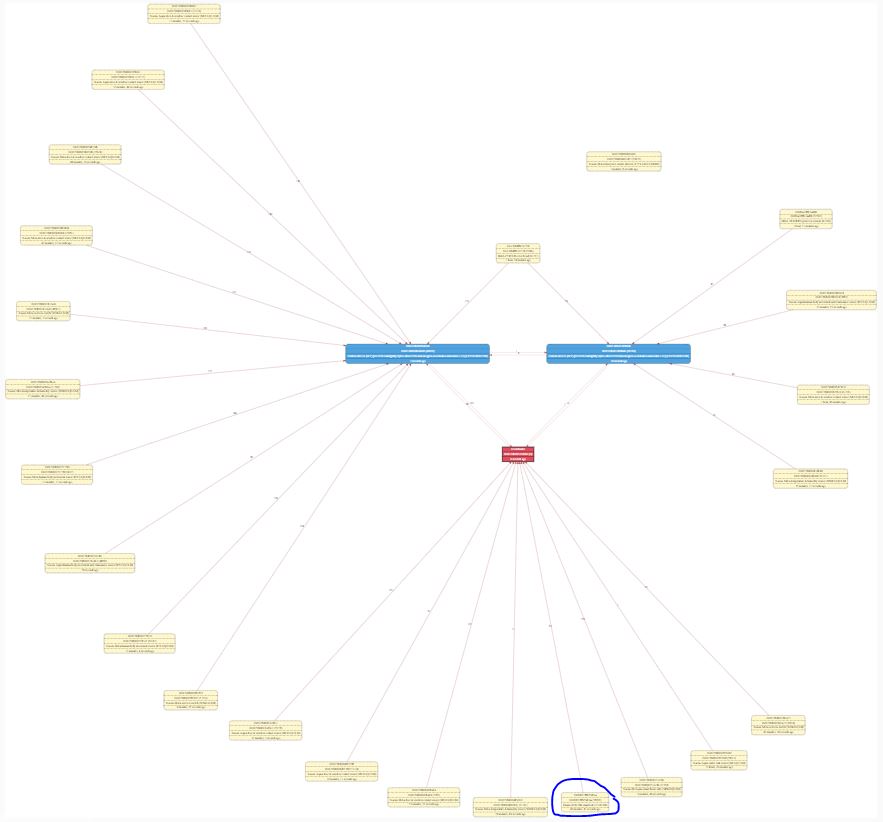
As you can see in the map the Ikea blind was still connected to both routers, as expected.
I checked the map again 5 hours later and this was the result:
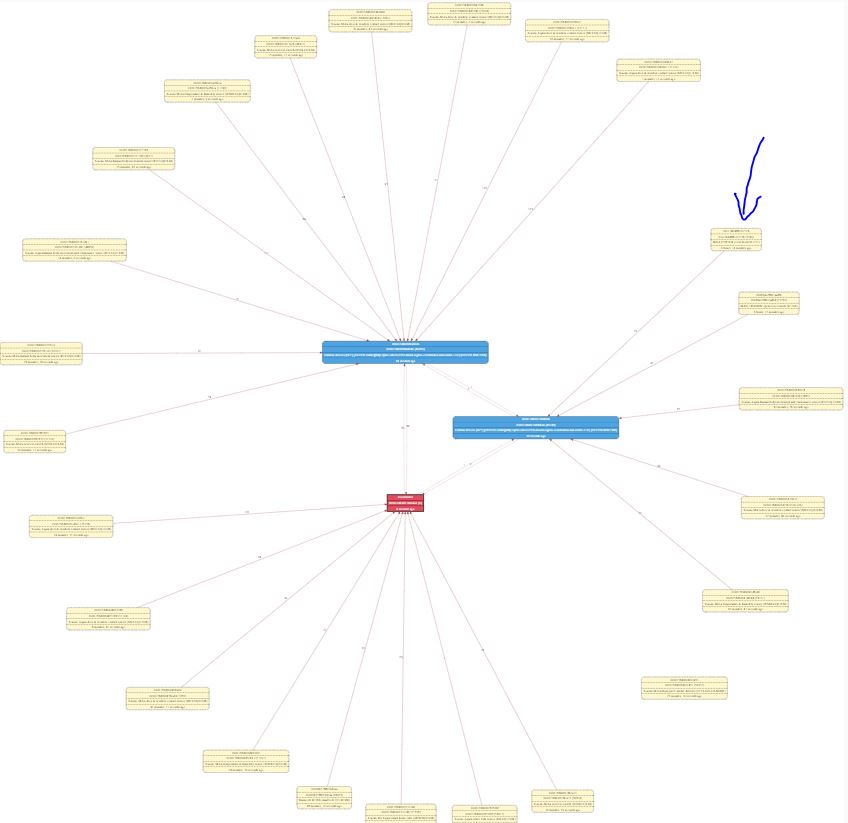
With the Ikea blind connected to just one of the routers, proving the fix applied to the updated router firmware works!!
@ptvoinfo @Koenkk To summarize, from my side and unless you guys want to do any other test, it is a green light for the new firmware!!
elbueno222
on 7 Sep 2020
@ptvoinfo @Koenkk
Should we expect a new router firmware version for cc2530 and cc2530_cc2591 with the changes done for cc2531? I have a few new cc2530_cc2591 to flash in the next days and am wondering if I do with current 2019_02 or I better wait. Thanks. Stay safe.
 ccorderod
on 22 Sep 2020
ccorderod
on 22 Sep 2020
@ptvoinfo I flashed the previous version of the router firmware in my two CC2531 routers, because @Koenkk and I believe the last modification regarding gMAX_NOT_MYCHILD_DEVICES was not required, and after a week I can confirm everything is working as expected. I have forced the double connection issue by switching off and back on one of the routers, and the routers has fixed the double connections in 256 minutes or less (as expected), can you please publish that version of the firmware (https://ptvo.info/download/cc2531_1.2.2a.44539_firmware_20200902.zip) and also a similar one for CC2530?
elbueno222
on 22 Sep 2020
@ptvoinfo can you publish the firmwares for all (cc2530, cc2531, cc2531+cc2590) so I can add them to my repo?
Koenkk
on 28 Sep 2020
@Koenkk
Sure. It is here:
https://ptvo.info/download/cc2531_1.2.2a.44539_firmware.zip
https://ptvo.info/download/cc2530_1.2.2a.44539_firmware.zip
ptvoinfo
on 28 Sep 2020
@ptvoinfo is MAX_NOT_MYCHILD_DEVICES modified here? @elbueno222 and I tested that a change is not needed, MAX_NOT_MYCHILD_DEVICES 5 is fine.
Koenkk
on 28 Sep 2020
@Koenkk The current settings.
MAX_NOT_MYCHILD_DEVICES = 5
uint8 zgNwkParentInformation = NWK_PARENT_INFO_MAC_DATA_POLL
@ptvoinfo what about gMAX_NOT_MYCHILD_DEVICES in nwk_globals.c?
elbueno222
on 29 Sep 2020
gMAX_NOT_MYCHILD_DEVICES = MAX_NOT_MYCHILD_DEVICES = 5
ptvoinfo
on 29 Sep 2020
Perfect, thanks for the confirmation, issue is fixed
elbueno222
on 29 Sep 2020
@ptvoinfo big thanks, also updated firmware in z-stack-firmware repo!
Koenkk
on 29 Sep 2020
@Koenkk
Sure. It is here:
https://ptvo.info/download/cc2531_1.2.2a.44539_firmware.zip
https://ptvo.info/download/cc2530_1.2.2a.44539_firmware.zip
Hello, same issue from my side with Danalock. Notice that is runnig well while is only connected to CC2531 Coordinator, but not working when I see that has another conection to a HUE bulb acting as router. I shouldn't try this new firmware as it's only for cc2531 acting as router, right? Any update for cc2531 coordinator?
Best Regards
 marcospg75
on 9 Nov 2020
marcospg75
on 9 Nov 2020
@marcospg75 The problem was related to a CC2530 or CC2531 based router. Therefore, you need the corresponding update for your HUE bulb, not a coordinator.
ptvoinfo
on 9 Nov 2020
@marcospg75 The problem was related to a CC2530 or CC2531 based router. Therefore, you need the corresponding update for your HUE bulb, not a coordinator.
Understood..., but, there is no firmware update for HUE bulbs... and I can't prevent Danalock to connect with them :S
marcospg75
on 9 Nov 2020
Related issues
 ophilips
·
4Comments
ophilips
·
4Comments
 pepp86
·
4Comments
pepp86
·
4Comments
 Underknowledge
·
4Comments
Underknowledge
·
4Comments
 sylarevan
·
5Comments
sylarevan
·
5Comments
 alwashe
·
4Comments
alwashe
·
4Comments