Zigbee2mqtt: Add support to Legrand Netatmo devices
Hi,
I've been trying since a couple of days adding the support of a device from Legrand (Europe Manufacturer), and especially a roller shutter switch (https://www.legrand.fr/pro/catalogue/42566-version-celiane-with-netatmo/interrupteur-filaire-connecte-celiane-with-netatmo-pour-volet-roulant-blanc).
I know there is some issues like the #1994, but as it's not the same product & same errors. I prefered to open a new issue.
I manage to make the switch connect to my CC2531, but a soon as it joins, it throws a bunch of logs and then leaves the network. If I try to join again (by using the reset button on the switch), it then throws more errors : my current solution is to remove the database & clean the configuration.yml file as the device is still listed.
First attempt logs: https://pastebin.com/6H12D7ev
Second attempt logs: https://pastebin.com/a8kZNk8y
I tried with 2 firmwares : last one stable on 1.2 & 3.0 (as it seems the device is zigbee 3.0 I tried), the logs are identical. Zigbee2mqtt was the last dev version. The network only has the coordinator and that device.
My device.js contains the current following code:
{
    zigbeeModel: [" Shutter switch with neutral\u0000\u0000\u0000"],
    model: 'Shutter',
    vendor: 'Legrand',
    description: 'Test ',
    supports: '',
    fromZigbee: [fz.cover_position_tilt],
    toZigbee: [tz.cover_state, tz.cover_position_tilt],
}
I've also gathered some info on Legrand (especially Netatmo products as it's the ones with Zigbee) from other githubs projects. The current device has not been updated (I dont have the gateway), some people have reported that after an update it may require a router between the devices & the coordinator. The update also adds more functionnalities on light switches (dimmer) and on outlets (power mettering), no information on the shutter switch yet.
There is a manufacterer specific cluster (0xfc01) and more info on this pull : https://github.com/dresden-elektronik/deconz-rest-plugin/pull/962/files
I'm a tech engineer and have been reading a lot on the zigbee protocol recently, I have some ground knowledge if necessary to help patch things if required.
Any help would be greatly appreciated, thanks !
 cemonneau
All 154 comments
The device seems to pair successfully so that looks OK. I don't know yet why it almost immediately leaves the network. Perhaps sniffing could give some pointers: https://www.zigbee2mqtt.io/how_tos/how_to_sniff_zigbee_traffic.html
 Koenkk
on 25 Nov 2019
Koenkk
on 25 Nov 2019
I could not figure out why it would leave. The only thing that could explain it to me is the coordinator not sending a response to the 2/3 first requests of the device (type 'readResponse', cluster 'genBasic').
I'm not sure what I could add to respond to those requests.
I do not have the Legrand Gateway, but if I can't figure it out I may try to get one to sniff an "official" network.
cemonneau
on 25 Nov 2019
What does it try to read, can you share the wireshark logs?
Koenkk
on 26 Nov 2019
Ho,
The request "type 'readResponse', cluster 'genBasic'" is in the log I provided above, and present 3 times before the device leaves the network.
zigbee2mqtt:debug 2019-11-16T21:18:23: Received Zigbee message from '0x00047400008b44a2', type 'readResponse', cluster 'genBasic', data '{"modelId":" Shutter switch with neutral\u0000\u0000\u0000","manufacturerName":" Legrand\u0000\u0000\u0000\u0000\u0000\u0000\u0000\u0000\u0000\u0000\u0000\u0000\u0000\u0000\u0000\u0000\u0000\u0000\u0000\u0000\u0000\u0000\u0000","powerSource":1}' from endpoint 1 with groupID 0
zigbee2mqtt:warn  2019-11-16T21:18:23: Received message from unsupported device with Zigbee model ' Shutter switch with neutral'
zigbee2mqtt:warn  2019-11-16T21:18:23: Please see: https://www.zigbee2mqtt.io/how_tos/how_to_support_new_devices.html.
I did not tried yet the wireshark as I'm not sure it would be usefull so sniff between the CC2531 and the device. If you feel it would provide more usefull data I will flash one and sniff everything to report it back.
cemonneau
on 27 Nov 2019
This is expected, zigbee-herdsman reads information from the device (e.g. modelid, powersource, etc.). The readResponse are answers to these read requests. Probably not the reason why the device is leaving.
Koenkk
on 27 Nov 2019
Hi,
I got my hands on the official gateway, changed a CC2531 to be a sniffer, and learned a LOT of things. I'm planning to write something somewhere.
It has been a real pain to be able to link the shutter switch even to the official gateway as the problem was the same : join and then leave. It took me the whole day to find something to join, and it worked well after (I had to power off and on BOTH devices at the same time & initiate a permit join just after).
What i can resume:
- the gateway has a built in coordinator & router (probably the power outlet as it's a "double" device). Sometimes the network trames goes through the router, sometimes not.
- there is some useless but always nice cluster (identify (cluster 3) makes the LED blink in blue)
- the LED stays green 15min when the configuration succeeds
- and some other data on reporting
- not all channels seems to be supported ([25;+[) & I haven't found a way to change the gateway channel
- wireless switches seems to be able to join the CC2561 network, but their commands are scene commands (at least for the one I tried), i will investigate more once the shutter works
I wasn't able to reproduce the join on the network made by the CC2531 BUT I found some things in the wireshark logs that could explain it (see screens linked, or PM me for logs)
1) the coordinator sends a "Confirm Key, SUCESS" packet
2) the coordinator sends a "Bind Request Src (cluster ID: 0x000f)", same for 0x0102, 0x0003
What is interesting is that when the switch wasn't able to join the network the "Bind Response, Status: Sucess" (after the Bind request) wasn't present, I may be linked.
I'm not sure what 1 is.
Regarding 2, are those things configured with
configure: async (device, coordinatorEndpoint) => {
       const endpoint = device.getEndpoint(1);
       await bind(endpoint, coordinatorEndpoint, ['genOnOff']);
       await configureReporting.onOff(endpoint);
},
If it is the case, could you give me more info on what those commands are, I'm not 100% what they do. Can we use an hex number instead of 'genOnOff' (didn't found the dictionary, EDIT: found, see lower)
Thanks !
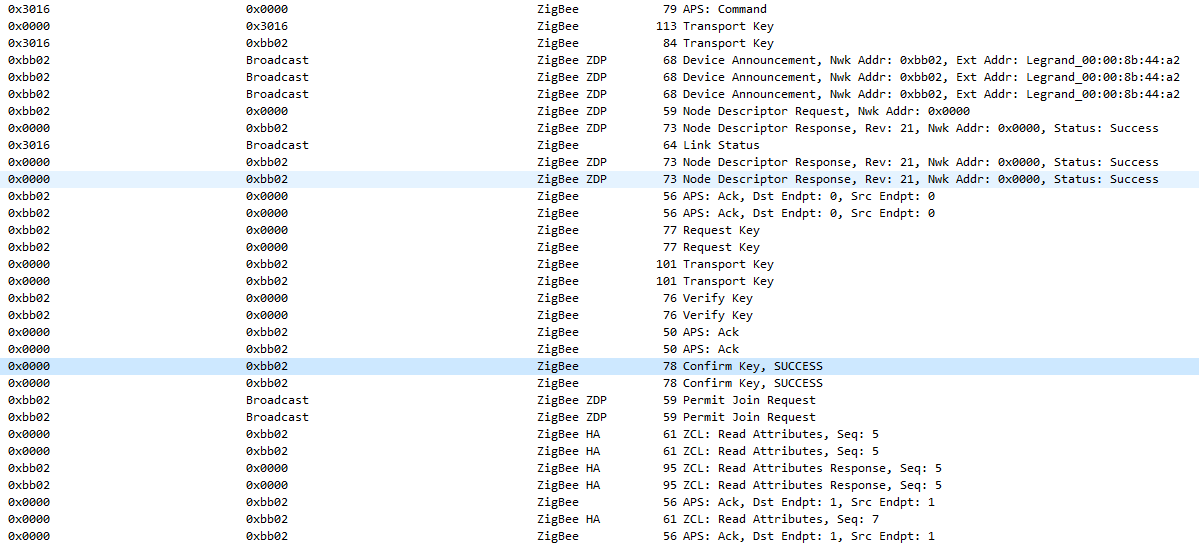
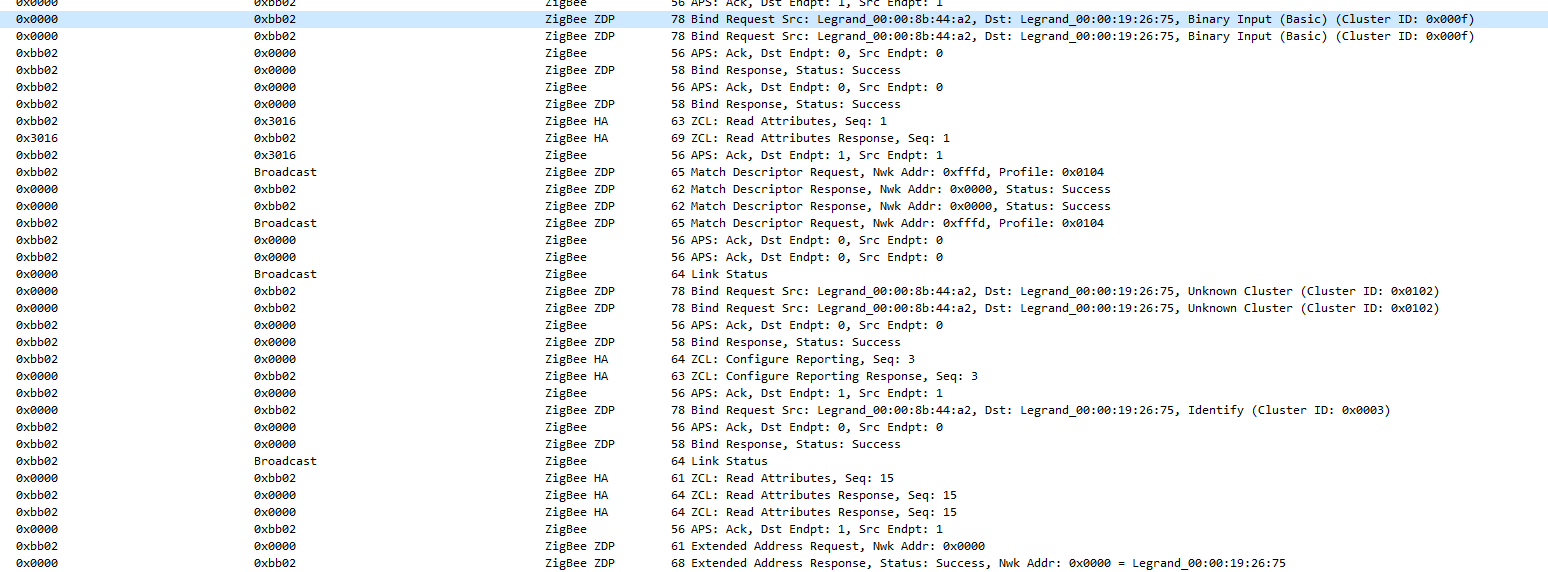
EDIT1: i found the dictionnary, 0x0003=>genIdentify,0x000f=>genBinaryInput but 0x0102(258) is missing, will look more into it to add it
cemonneau
on 1 Dec 2019
What is interesting is that when the switch wasn't able to join the network the "Bind Response, Status: Sucess" (after the Bind request) wasn't present, I may be linked.
This is expected, when the device didn't join successfully it cannot respond to commands. For the other commands please refer to the zigbee documentation (should be described well there). But note that if it is even difficult to pair with the original gateway, this might require a lot of debugging to make it pair with the CC2531. Time wise it will probably be easier to buy an already supported devices (as it doesn't seem to be very zigbee "compliant").
Koenkk
on 3 Dec 2019
If I am not mistaken they are similar to the soon to be released niko devices that use an enocean module... so we need green power support I think?
 sjorge
on 3 Dec 2019
sjorge
on 3 Dec 2019
Regarding Niko according to a friend working in that area it's not the same pairing process/code, but I haven't tested at all.
From what I saw during my tests the wireless switch might be green power BUT works with zigbee2mqtt without troubles (at least the pairing worked, after it sends scenes commands and I think zigbee2mqtt doesn't have the support, can you confirm @Koenkk ? ).
@Koenkk I'm ready to work on the integration as I already have those devices installed and well I'm not ready to replace them ^^. Zigate supports Legrand devices without troubles, so it's doable.
The main problem I currently have is just understanding the zigbee2mqtt code and doing the link with what it's supposed to do according to the specifications.
I think the problem with pairing with the official gateway is "only" a security in their gateway as it's explained (but badly) in their documentation, their devices seems to match the spefications, and the peoples working on it on the Zigate project didn't had a lot of troubles (it seems). I will improve my benchmark table to get a better environment to work with.
Is it possible to get more info on what part of the code should be doing (or does not support)
1) "Confirm Key, SUCESS" packet
2) "Bind Request Src (cluster ID: 0x000f)" (I think it's the code I mentionned, didn't had the time to trace everything yet before doing some tests)
cemonneau
on 4 Dec 2019
- This comes from the CC2531 firmware, not from zigbee2mqtt or herdmsan.
- This one can be done by zigbee2mqtt, an example can be found here: https://github.com/Koenkk/zigbee-herdsman-converters/blob/master/devices.js#L762 but just
genBasicinstead (as that is what is shown in your sniffer logs).
Koenkk
on 5 Dec 2019
Hi,
I'm back with great news : I nailed it and successfully integrated Legrand netatmo Switches.
There is some little things to change in zigbee2mqtt-herdsman as it was lacking things required for me to integrate it.
Short version, every powered devices from Legrand ask every other devices on the network since how long there are poweron, and if the value is too high, it leaves the network.
I think it's a security to force people to shutdown their electric installation when doing the installation.
The device sends a read attribute to the coordinator and it needs to respond, that's what I did.
I basically modified the controller.js(ts) file to send global read to their respective device handler (plugged on 'fromZigbee' currently). In my custom handler I sent the required 'readResponse' and it worked. I added some code to be able to transmit the original frame too (for the transactionSequenceNumber).
The zclFrameConverted.ts had to be a little bit modified too to allow the variables to not disapear when looping.
The endpoint.ts too was modified : the readResponse was modified to allow custom attributes with type (similar to the write function).
I will do longer tests to ensure they are not dropping and then I will see to integrate the proper clusters.
How do you want to proceed @Koenkk to expose the "global read" (read attribute in zigbee) to devices as it's the main thing required.
I can do a push but I thought you might prefer to handle this part.
For anyone reading my current CC2531 version is the last version with zigbee3.0, I will try later with the 1.2 version.
cemonneau
on 7 Dec 2019
Awesome job!
Can you make a pr of your current changes? I will probably not immediately merge them but allows me to think about a proper solution.
Koenkk
on 7 Dec 2019
Will do this week-end on respective projects to allow you to see what's needed.
I can also report 2 switches are connected since 4 hours and stable with a CC2531 separated by 1m.
I also found the right values for the identify cluster (allows way more things like colors than the official app does), I'm on it get a nice support too.
The cluster closuresWindowCovering seems to work properly but I need to do more tests.
I'm still not sure about the binaryInput report I'm getting, weird. I will investigate.
Should I rename this thread Legrand Netatmo Support ?
cemonneau
on 7 Dec 2019
Yes you can rename it.
Koenkk
on 8 Dec 2019
@Koenkk I made the pull request to zigbee-herdsman and added an example of the code I'm currently using to test.
I can also report that I flashed the CC2531 back to the 1.2 version and it paired well too again, and was way easier than with the official gateway.
I also tried another switch that received an OTA update from the official gateway and it works too, and contrary to the Zigate (from what I red) it does not require another router on the network (yeah). The network was only the CC2531 and the switch and no troubles in 1 hour of tests.
cemonneau
on 8 Dec 2019
@romainalca I saw you were interested by this support on another thread, could you indicate me the products you have ? If I have them I will ensure they works.
Currently the support should be for 1 - shutters, 2 - wireless switch (classic or enter/leave, it seems there is a difference), 3 - "normal" switch.
I can speak french if necessary
cemonneau
on 9 Dec 2019
I ranned into something while doing some tests with wireless switch today.
They do not report their battery status/voltage by default. The only way to get it is to make a read call on the "deviceAnnounce" event.
In the best world, it would be better to not call it at every announce to preserve the battery : it may be neglibeable, or not, not sure on the long term, but still.
Is there a way (store ?) to make a counter and call it every X call ? I'm not sure about the philosophy you have or if we could make that per device dependent/modifiable (or a user setting ?).
I'm almost done with the support, but only working on 1 switch, I wasn't able to pair another switch, but it may be related to the device itself (that's the one allowing the permit join, it may not be possible to "unjoin" it from the official gateway :( )
cemonneau
on 9 Dec 2019
Okay so here is my initial commit.
I'm not creating a PR yet as I want to finish to check some attributes on my real installation (this test bench if powered off when I'm done so I'm not getting all values/reports).
Most devices have a "configure" button that sends an identify command to the coordinator.
I added a custom from, but the value stays when we look at the report in MQTT. Is there a way to make it disapear after X seconds ? I dont feel it should stay as it's not how it works on the official gateway : every devices LED turn green, and then off done by the coordinator sending an identify to everyone.
Here is the corresponding code.
https://github.com/cemonneau/zigbee-herdsman-converters/blob/legrand/converters/fromZigbee.js#L3220
cemonneau
on 15 Dec 2019
To avoid the value being cached, change return {identify: 'configuration'}; to return {action: 'identify'};
Koenkk
on 15 Dec 2019
I hitted a second wall today, some products do not respect at all (it seems) the specification. I'm unable to get either a node descriptor or list endpoints or anything else.
The affected products are the same as the ones not in the list of the zigate (https://zigate.fr/produits-legrand-compatibles-zigate/).
I will try to see what I can do but I'm going to focus on the ones that works "out of the box" (wireless switch, shutter switch & power outlet) for now.
cemonneau
on 17 Dec 2019
I made some progress on 1 device : the wired light switch. I made it join but it was painfull (more).
It requires another router on the network, and every device from Legrand needs to be powered "at the same time" due to their security. But it also requires for the device to join to see a "permit join" while on (and within 10s/20s). On the official box when powered on & in join mode it spams "permit join" during the first 30s.
I passed that part by sending a permit off & permit on to force a frame to be sent (the configuration.yml was on permit_join=true).
What's your idea on that part @Koenkk : documentation ? or spam more permit joins ?
Another product is searching for a device with the ability to deliver OTA (thanks to the sniffer), so unable to use it outside of the box.
The wired switch doesn't have every function available without OTA it seems (like dimming, even if it reports it). Peoples on the zigate forum talked about that, I still need to check the firmware version.
cemonneau
on 17 Dec 2019
@cemonneau let's for now at it to the docs.
Koenkk
on 19 Dec 2019
I'm back, and with "bad" news.
I've been working on adding new devices support, and received an OTA from the manufacturer box.
Only 1 product was affected (shutter switch, the other wasn't working as it needed an OTA to work...), and ... it does not join anymore.
I think I have the answer but couldn't find anything related in every project. I suspected it's in the zstack but I need your expertise on that @Koenkk
Please find in attachment an example of:
- a working join
- a "failed" one (on zigbee2mqtt)
- a working join on another product (not updated)
I believe the problem is the device not sending a data request after the association response, thus not receiving the transport key.
Is there a way to "force" that on our side (application) and not doing something on the zstack ?
I'm on the 1.2 coordinator version, haven't tested on 3.0 yet but I suspect the result will be the same.
Screen from the official gateway (working example) after OTA

Failed join (infinite loop) with zigbee2mqtt
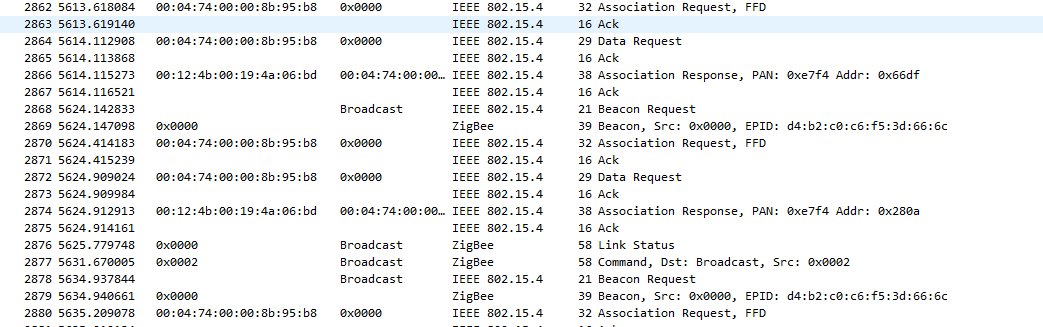
Successfull join on zigbee2mqtt of another product

cemonneau
on 23 Dec 2019
Got a bit of time to play, and new results.
I was able to join the device after I upgraded to 3.0, nothing else to change. The diference was as mentioned above, the transport key was sent without the need of a "data request". I will try to flash back to 1.2 and see if the problem is still there.
In my recent commit I added the support of the "Master Switch" (Home/Leave button, and the center button put the network in permit join mode on the original gateway). There is a small (big?) thing that I still need to monitor : it seems that the specific command to prevent the leave is sent (sometimes) before the full pairing, thus the converter not beeing able to respond. A patch was needed to "deviceReceive.js" (easiest way i found) to send the answer BUT when I tried to repair twice after the full support it worked without that patch, not sure why.
That product wont work out of the box as it requires an OTA (or at least an answer to an OTA request), after pairing to the official box it works.
I just need to rebase and I think an initial support could be reviewed & merged. More products will be added once(if) I get them.
cemonneau
on 26 Dec 2019
I had a problem with the genPollCtrl cluster. The master switch is by default on fastPoll (draining a lot the battery, lost 20%(3v battery) in 1hour of test). I initially wanted to respond to a frame sent by the device, but I was unable to send the reply (not sure why as the logs where showing no errors).
I ended up sending another command (and not responding).
It works but it's not as clean as I would like.
See https://github.com/cemonneau/zigbee-herdsman-converters/blob/legrand/devices.js#L6519 for the part I'm talking about
cemonneau
on 26 Dec 2019
I'm back with more feedback.
I migrated my network (test) to the new CC1352P-2 (light bulbs/legrand shutter switch/legrand wireless switch).
All those products worked with 0 troubles.
The one that I wasn't able to pair is the "master switch", same problem as above.
It sends a read command BEFORE pairing, as the converter is not yet associated it cannot answer, and thus is leaving. My patch above works.
Is there a way to implement the answer to that command (legrand specific/security) at a higher level ?
@Koenkk
cemonneau
on 3 Jan 2020
@cemonneau I guess you are talking about this code? https://github.com/Koenkk/zigbee-herdsman-converters/blob/master/devices.js#L441
What about adding a general onEvent method which is always called when a zigbee message is received (event when it does not have a modelID yet).
Koenkk
on 7 Jan 2020
@Koenkk yes that's exactly that part of the code, I should have mentioned it.
The idea of a global onEvent seems to be the best I think (most generic if required for other specific things). Maybe it could be filtered (or exposed in the event) the manufacturerCode(of the frame) to ensure the right response "in case of".
cemonneau
on 7 Jan 2020
@cemonneau done, see https://github.com/Koenkk/zigbee-herdsman-converters/blob/master/index.js#L35
Koenkk
on 8 Jan 2020
Hello all,
This topic is really insteresting even if a bit too technical for me :-(
I have switched my branch to dev but i'm still not able to pair my Legrand Netatmo switch.
The device is listed on the MQTT topic but then the LED goes to red+blue.
Would you have a kind of a procedure to pair these devices?
In any case, thanks a lot for all your work.
Alexis
 alexisfradel
on 8 Jan 2020
alexisfradel
on 8 Jan 2020
@Koenkk perfect, thanks ! Will test and migrate if working in the next patch I'm preparing
cemonneau
on 9 Jan 2020
Hi @alexisfradel,
What kind of device do you have as Switch ? (wireless, wired, double button ?).
In theory the procedure is start zigbee2mqtt, permit join, power on the device (it needs to be power off due to a security couting the seconds since on). After that the LED should become green after 5/10s.
The zigbee network MUST be on the channel 11 too (haven't been able to join on any other sadly).
A device on Zigbee 3.0 seems to reduce bugs (at least one).
If you could provide your logs too that would be perfect !
I will probably work on the documentation this week, it's on my todo.
cemonneau
on 9 Jan 2020
Hello @cemonneau
Thank you for your reply.
I have micromodules. I think that my mistake is that I havent swith them off before pairing.
Reading the thread, I thought that it was not necessary after your last improvements.
I will try again later today.
Additional question: how do we define the Zigbee channel?
Best regards
alexisfradel
on 9 Jan 2020
@alexisfradel
I do not have Micromodules so they wont currently stay in the network (paired) due to a security. It will be fixed with a new commit I'm working on (currently we need to add a specific code for each Legrand device, that won't be the case after).
I will need your zigbee2mqtt log to add them if possible (you can PM the logs me if you want).
The channel can be debine in the configuration.yml, it's by default on 11.
cemonneau
on 9 Jan 2020
@cemonneau
Indeed I have noticed in the logs that the micromodules are not supported.
Do you want me to do some test to confirm that what you plan on doing will work?
I can also try to modify some files on my RPI in order to try and find the specific code.
Could you please just point me in the right direction? Where is it done for the switch for example?
Finally, please find below my logs:
zigbee2mqtt:debug 2020-01-09 18:19:51: Received Zigbee message from '0x00047400001f05a6', type 'readResponse', cluster 'genBasic', data '{"modelId":" Micromodule switch\u0000\u0000\u0000\u0000\u0000\u0000\u0000\u0000\u0000\u0000\u0000\u0000","manufacturerName":" Legrand\u0000\u0000\u0000\u0000\u0000\u0000\u0000\u0000\u0000\u0000\u0000\u0000\u0000\u0000\u0000\u0000\u0000\u0000\u0000\u0000\u0000\u0000\u0000","powerSource":1}' from endpoint 1 with groupID 0
zigbee2mqtt:warn 2020-01-09 18:19:51: Received message from unsupported device with Zigbee model ' Micromodule switch'
zigbee2mqtt:warn 2020-01-09 18:19:51: Please see: https://www.zigbee2mqtt.io/how_tos/how_to_support_new_devices.html.
zigbee-herdsman:adapter:zStack:unpi:parser --- parseNext [] +10ms
zigbee-herdsman:controller:device Interview - got 'modelId,manufacturerName,powerSource' for device '0x00047400001f05a6' +89ms
zigbee-herdsman:adapter:zStack:znp:SREQ --> AF - dataRequest - {"dstaddr":15095,"destendpoint":1,"srcendpoint":1,"clusterid":0,"transid":2,"options":0,"radius":30,"len":9,"data":{"type":"Buffer","data":[16,3,0,0,0,1,0,2,0]}} +85ms
zigbee-herdsman:adapter:zStack:unpi:writer --> frame [254,19,36,1,247,58,1,1,0,0,2,0,30,9,16,3,0,0,0,1,0,2,0,254] +85ms
zigbee-herdsman:adapter:zStack:unpi:parser <-- [254,1,100,1,0,100] +14ms
zigbee-herdsman:adapter:zStack:unpi:parser --- parseNext [254,1,100,1,0,100] +1ms
zigbee-herdsman:adapter:zStack:unpi:parser --> parsed 1 - 3 - 4 - 1 - [0] - 100 +0ms
zigbee-herdsman:adapter:zStack:znp:SRSP <-- AF - dataRequest - {"status":0} +85ms
zigbee-herdsman:adapter:zStack:unpi:parser --- parseNext [] +0ms
zigbee-herdsman:adapter:zStack:unpi:parser <-- [254,3,68,128,0,1,2,196] +6ms
zigbee-herdsman:adapter:zStack:unpi:parser --- parseNext [254,3,68,128,0,1,2,196] +0ms
zigbee-herdsman:adapter:zStack:unpi:parser --> parsed 3 - 2 - 4 - 128 - [0,1,2] - 196 +1ms
zigbee-herdsman:adapter:zStack:znp:AREQ <-- AF - dataConfirm - {"status":0,"endpoint":1,"transid":2} +31ms
zigbee-herdsman:adapter:zStack:unpi:parser --- parseNext [] +0ms
zigbee-herdsman:adapter:zStack:unpi:parser <-- [254,38,68,129,0,0,0,0,247,58,1,1,0,34,0,96,151,151,0,0,18,24,3,1,0,0,0,32,2,1,0,0,32,0,2,0,0,32,66,247,58,19,217] +33ms
zigbee-herdsman:adapter:zStack:unpi:parser --- parseNext [254,38,68,129,0,0,0,0,247,58,1,1,0,34,0,96,151,151,0,0,18,24,3,1,0,0,0,32,2,1,0,0,32,0,2,0,0,32,66,247,58,19,217] +0ms
zigbee-herdsman:adapter:zStack:unpi:parser --> parsed 38 - 2 - 4 - 129 - [0,0,0,0,247,58,1,1,0,34,0,96,151,151,0,0,18,24,3,1,0,0,0,32,2,1,0,0,32,0,2,0,0,32,66,247,58,19] - 217 +1ms
zigbee-herdsman:adapter:zStack:znp:AREQ <-- AF - incomingMsg - {"groupid":0,"clusterid":0,"srcaddr":15095,"srcendpoint":1,"dstendpoint":1,"wasbroadcast":0,"linkquality":34,"securityuse":0,"timestamp":9934688,"transseqnumber":0,"len":18,"data":{"type":"Buffer","data":[24,3,1,0,0,0,32,2,1,0,0,32,0,2,0,0,32,66]}} +34ms
zigbee-herdsman:controller:log Received 'zcl' data '{"frame":{"Header":{"frameControl":{"frameType":0,"manufacturerSpecific":false,"direction":1,"disableDefaultResponse":true},"transactionSequenceNumber":3,"manufacturerCode":null,"commandIdentifier":1},"Payload":[{"attrId":0,"status":0,"dataType":32,"attrData":2},{"attrId":1,"status":0,"dataType":32,"attrData":0},{"attrId":2,"status":0,"dataType":32,"attrData":66}],"Cluster":{"ID":0,"attributes":{"zclVersion":{"ID":0,"type":32,"name":"zclVersion"},"appVersion":{"ID":1,"type":32,"name":"appVersion"},"stackVersion":{"ID":2,"type":32,"name":"stackVersion"},"hwVersion":{"ID":3,"type":32,"name":"hwVersion"},"manufacturerName":{"ID":4,"type":66,"name":"manufacturerName"},"modelId":{"ID":5,"type":66,"name":"modelId"},"dateCode":{"ID":6,"type":66,"name":"dateCode"},"powerSource":{"ID":7,"type":48,"name":"powerSource"},"appProfileVersion":{"ID":8,"type":48,"name":"appProfileVersion"},"swBuildId":{"ID":16384,"type":66,"name":"swBuildId"},"locationDesc":{"ID":16,"type":66,"name":"locationDesc"},"physicalEnv":{"ID":17,"type":48,"name":"physicalEnv"},"deviceEnabled":{"ID":18,"type":16,"name":"deviceEnabled"},"alarmMask":{"ID":19,"type":24,"name":"alarmMask"},"disableLocalConfig":{"ID":20,"type":24,"name":"disableLocalConfig"}},"name":"genBasic","commands":{"resetFactDefault":{"ID":0,"parameters":[],"name":"resetFactDefault"}},"commandsResponse":{}}},"address":15095,"endpoint":1,"linkquality":34,"groupID":0}' +63ms
zigbee2mqtt:debug 2020-01-09 18:19:51: Received Zigbee message from '0x00047400001f05a6', type 'readResponse', cluster 'genBasic', data '{"zclVersion":2,"appVersion":0,"stackVersion":66}' from endpoint 1 with groupID 0
zigbee2mqtt:warn 2020-01-09 18:19:51: Received message from unsupported device with Zigbee model ' Micromodule switch'
zigbee2mqtt:warn 2020-01-09 18:19:51: Please see: https://www.zigbee2mqtt.io/how_tos/how_to_support_new_devices.html.
zigbee-herdsman:adapter:zStack:unpi:parser --- parseNext [] +4ms
zigbee-herdsman:controller:device Interview - got 'zclVersion,appVersion,stackVersion' for device '0x00047400001f05a6' +60ms
zigbee-herdsman:adapter:zStack:znp:SREQ --> AF - dataRequest - {"dstaddr":15095,"destendpoint":1,"srcendpoint":1,"clusterid":0,"transid":3,"options":0,"radius":30,"len":9,"data":{"type":"Buffer","data":[16,4,0,3,0,6,0,0,64]}} +60ms
zigbee-herdsman:adapter:zStack:unpi:writer --> frame [254,19,36,1,247,58,1,1,0,0,3,0,30,9,16,4,0,3,0,6,0,0,64,190] +60ms
zigbee-herdsman:adapter:zStack:unpi:parser <-- [254,1,100,1,0,100] +15ms
zigbee-herdsman:adapter:zStack:unpi:parser --- parseNext [254,1,100,1,0,100] +1ms
zigbee-herdsman:adapter:zStack:unpi:parser --> parsed 1 - 3 - 4 - 1 - [0] - 100 +0ms
zigbee-herdsman:adapter:zStack:znp:SRSP <-- AF - dataRequest - {"status":0} +61ms
zigbee-herdsman:adapter:zStack:unpi:parser --- parseNext [] +0ms
zigbee-herdsman:adapter:zStack:unpi:parser <-- [254,3,68,128,0,1,3,197] +26ms
zigbee-herdsman:adapter:zStack:unpi:parser --- parseNext [254,3,68,128,0,1,3,197] +1ms
zigbee-herdsman:adapter:zStack:unpi:parser --> parsed 3 - 2 - 4 - 128 - [0,1,3] - 197 +0ms
zigbee-herdsman:adapter:zStack:znp:AREQ <-- AF - dataConfirm - {"status":0,"endpoint":1,"transid":3} +47ms
zigbee-herdsman:adapter:zStack:unpi:parser --- parseNext [] +0ms
zigbee-herdsman:adapter:zStack:unpi:parser <-- [254,57,68,129,0,0,0,0,247,58,1,1,0,31,0,101,152,151,0,0,37,24,4,1,3,0,0,32,21,6,0,0,66,15,32,0,50,48,49,57,48,53,50,57,0,0,0,0,0,0,64,0,66,4,48,48,49,99,247,58,19,175] +37ms
zigbee-herdsman:adapter:zStack:unpi:parser --- parseNext [254,57,68,129,0,0,0,0,247,58,1,1,0,31,0,101,152,151,0,0,37,24,4,1,3,0,0,32,21,6,0,0,66,15,32,0,50,48,49,57,48,53,50,57,0,0,0,0,0,0,64,0,66,4,48,48,49,99,247,58,19,175] +0ms
zigbee-herdsman:adapter:zStack:unpi:parser --> parsed 57 - 2 - 4 - 129 - [0,0,0,0,247,58,1,1,0,31,0,101,152,151,0,0,37,24,4,1,3,0,0,32,21,6,0,0,66,15,32,0,50,48,49,57,48,53,50,57,0,0,0,0,0,0,64,0,66,4,48,48,49,99,247,58,19] - 175 +0ms
zigbee-herdsman:adapter:zStack:znp:AREQ <-- AF - incomingMsg - {"groupid":0,"clusterid":0,"srcaddr":15095,"srcendpoint":1,"dstendpoint":1,"wasbroadcast":0,"linkquality":31,"securityuse":0,"timestamp":9934949,"transseqnumber":0,"len":37,"data":{"type":"Buffer","data":[24,4,1,3,0,0,32,21,6,0,0,66,15,32,0,50,48,49,57,48,53,50,57,0,0,0,0,0,0,64,0,66,4,48,48,49,99]}} +38ms
zigbee-herdsman:controller:log Received 'zcl' data '{"frame":{"Header":{"frameControl":{"frameType":0,"manufacturerSpecific":false,"direction":1,"disableDefaultResponse":true},"transactionSequenceNumber":4,"manufacturerCode":null,"commandIdentifier":1},"Payload":[{"attrId":3,"status":0,"dataType":32,"attrData":21},{"attrId":6,"status":0,"dataType":66,"attrData":" \u000020190529\u0000\u0000\u0000\u0000\u0000"},{"attrId":16384,"status":0,"dataType":66,"attrData":"001c"}],"Cluster":{"ID":0,"attributes":{"zclVersion":{"ID":0,"type":32,"name":"zclVersion"},"appVersion":{"ID":1,"type":32,"name":"appVersion"},"stackVersion":{"ID":2,"type":32,"name":"stackVersion"},"hwVersion":{"ID":3,"type":32,"name":"hwVersion"},"manufacturerName":{"ID":4,"type":66,"name":"manufacturerName"},"modelId":{"ID":5,"type":66,"name":"modelId"},"dateCode":{"ID":6,"type":66,"name":"dateCode"},"powerSource":{"ID":7,"type":48,"name":"powerSource"},"appProfileVersion":{"ID":8,"type":48,"name":"appProfileVersion"},"swBuildId":{"ID":16384,"type":66,"name":"swBuildId"},"locationDesc":{"ID":16,"type":66,"name":"locationDesc"},"physicalEnv":{"ID":17,"type":48,"name":"physicalEnv"},"deviceEnabled":{"ID":18,"type":16,"name":"deviceEnabled"},"alarmMask":{"ID":19,"type":24,"name":"alarmMask"},"disableLocalConfig":{"ID":20,"type":24,"name":"disableLocalConfig"}},"name":"genBasic","commands":{"resetFactDefault":{"ID":0,"parameters":[],"name":"resetFactDefault"}},"commandsResponse":{}}},"address":15095,"endpoint":1,"linkquality":31,"groupID":0}' +85ms
zigbee2mqtt:debug 2020-01-09 18:19:51: Received Zigbee message from '0x00047400001f05a6', type 'readResponse', cluster 'genBasic', data '{"hwVersion":21,"dateCode":" \u000020190529\u0000\u0000\u0000\u0000\u0000","swBuildId":"001c"}' from endpoint 1 with groupID 0
zigbee2mqtt:warn 2020-01-09 18:19:51: Received message from unsupported device with Zigbee model ' Micromodule switch'
zigbee2mqtt:warn 2020-01-09 18:19:51: Please see: https://www.zigbee2mqtt.io/how_tos/how_to_support_new_devices.html.
zigbee-herdsman:adapter:zStack:unpi:parser --- parseNext [] +5ms
zigbee-herdsman:controller:device Interview - got 'hwVersion,dateCode,swBuildId' for device '0x00047400001f05a6' +85ms
zigbee-herdsman:controller:device Interview - completed for device '0x00047400001f05a6' +3ms
zigbee-herdsman:controller:log Succesfully interviewed '0x00047400001f05a6' +8ms
zigbee2mqtt:info 2020-01-09 18:19:51: Successfully interviewed '0x00047400001f05a6', device has successfully been paired
zigbee2mqtt:warn 2020-01-09 18:19:51: Device '0x00047400001f05a6' with Zigbee model ' Micromodule switch' is NOT supported, please follow https://www.zigbee2mqtt.io/how_tos/how_to_support_new_devices.html
zigbee2mqtt:info 2020-01-09 18:19:51: MQTT publish: topic 'zigbee2mqtt/bridge/log', payload '{"type":"pairing","message":"interview_successful","meta":{"friendly_name":"0x00047400001f05a6","supported":false}}'
zigbee-herdsman:adapter:zStack:unpi:parser <-- [254,27,68,129,0,0,0,0,247,58,1,1,0,31,0,188,235,151,0,0,7,20,33,16,1,0,0,240,247,58,19,193] +7s
zigbee-herdsman:adapter:zStack:unpi:parser --- parseNext [254,27,68,129,0,0,0,0,247,58,1,1,0,31,0,188,235,151,0,0,7,20,33,16,1,0,0,240,247,58,19,193] +1ms
zigbee-herdsman:adapter:zStack:unpi:parser --> parsed 27 - 2 - 4 - 129 - [0,0,0,0,247,58,1,1,0,31,0,188,235,151,0,0,7,20,33,16,1,0,0,240,247,58,19] - 193 +1ms
zigbee-herdsman:adapter:zStack:znp:AREQ <-- AF - incomingMsg - {"groupid":0,"clusterid":0,"srcaddr":15095,"srcendpoint":1,"dstendpoint":1,"wasbroadcast":0,"linkquality":31,"securityuse":0,"timestamp":9956284,"transseqnumber":0,"len":7,"data":{"type":"Buffer","data":[20,33,16,1,0,0,240]}} +7s
zigbee-herdsman:controller:log Received 'zcl' data '{"frame":{"Header":{"frameControl":{"frameType":0,"manufacturerSpecific":true,"direction":0,"disableDefaultResponse":true},"transactionSequenceNumber":1,"manufacturerCode":4129,"commandIdentifier":0},"Payload":[{"attrId":61440}],"Cluster":{"ID":0,"attributes":{"zclVersion":{"ID":0,"type":32,"name":"zclVersion"},"appVersion":{"ID":1,"type":32,"name":"appVersion"},"stackVersion":{"ID":2,"type":32,"name":"stackVersion"},"hwVersion":{"ID":3,"type":32,"name":"hwVersion"},"manufacturerName":{"ID":4,"type":66,"name":"manufacturerName"},"modelId":{"ID":5,"type":66,"name":"modelId"},"dateCode":{"ID":6,"type":66,"name":"dateCode"},"powerSource":{"ID":7,"type":48,"name":"powerSource"},"appProfileVersion":{"ID":8,"type":48,"name":"appProfileVersion"},"swBuildId":{"ID":16384,"type":66,"name":"swBuildId"},"locationDesc":{"ID":16,"type":66,"name":"locationDesc"},"physicalEnv":{"ID":17,"type":48,"name":"physicalEnv"},"deviceEnabled":{"ID":18,"type":16,"name":"deviceEnabled"},"alarmMask":{"ID":19,"type":24,"name":"alarmMask"},"disableLocalConfig":{"ID":20,"type":24,"name":"disableLocalConfig"}},"name":"genBasic","commands":{"resetFactDefault":{"ID":0,"parameters":[],"name":"resetFactDefault"}},"commandsResponse":{}}},"address":15095,"endpoint":1,"linkquality":31,"groupID":0}' +7s
zigbee2mqtt:debug 2020-01-09 18:19:57: Received Zigbee message from '0x00047400001f05a6', type 'read', cluster 'genBasic', data '[61440]' from endpoint 1 with groupID 0
zigbee2mqtt:warn 2020-01-09 18:19:57: Received message from unsupported device with Zigbee model ' Micromodule switch'
zigbee2mqtt:warn 2020-01-09 18:19:58: Please see: https://www.zigbee2mqtt.io/how_tos/how_to_support_new_devices.html.
zigbee-herdsman:adapter:zStack:unpi:parser --- parseNext [] +9ms
zigbee-herdsman:adapter:zStack:unpi:parser <-- [254,28,68,129,0,0,0,4,42,239,1,1,0,73,0,244,103,158,0,0,8,24,218,10,0,0,33,7,0,42,239,29,98] +2m
zigbee-herdsman:adapter:zStack:unpi:parser --- parseNext [254,28,68,129,0,0,0,4,42,239,1,1,0,73,0,244,103,158,0,0,8,24,218,10,0,0,33,7,0,42,239,29,98] +0ms
zigbee-herdsman:adapter:zStack:unpi:parser --> parsed 28 - 2 - 4 - 129 - [0,0,0,4,42,239,1,1,0,73,0,244,103,158,0,0,8,24,218,10,0,0,33,7,0,42,239,29] - 98 +1ms
alexisfradel
on 9 Jan 2020
@Koenkk just tested (and it works perfectly) & moved the code to the onEvent (see https://github.com/cemonneau/zigbee-herdsman-converters/commit/24c4337746e3bcdc6836b37aa3f1cddd73b5f4ff#diff-168726dbe96b3ce427e7fedce31bb0bcR41) BUT would it be possible to add manufacturerCode (sometimes called manufacturerID) somewhere to filter messages ? Currently it's unavailable is the device is not paired. On my version I added it to meta (in data) taken from the Frame Header
cemonneau
on 9 Jan 2020
@alexisfradel can you please fill me on some details on the device:
- does it has a physical LED ?
- do you know if there is a dimming functionnality ?
- could you give me the line in data/database.db matching the device ? (to check the exposed functionalities)
I made an experimental support on my repository. If you want to test you need to apply all the modification to the respective files made on https://github.com/Koenkk/zigbee-herdsman-converters/pull/891/files (the code is based on the latest dev branch).
cemonneau
on 9 Jan 2020
Hello @cemonneau
I just saw that you included a first draft for the micromodule. I'm currently downloading it on my RPI to test.
I will keep you updated :-)
Regarding the information you have requested:
- it has a physical LED (colors: red, blue and green)
- on my Legrand (Home +) there is only on/off
- here is the entry in my database.db file:
{
"id": 11,
"type": "Router",
"ieeeAddr": "0x00047400001f05a6",
"nwkAddr": 19841,
"manufId": 4129,
"manufName": " Legrand\u0000\u0000\u0000\u0000\u0000\u0000\u0000\u0000\u0000\u0000\u0000\u0000\u0000\u0000\u0000\u0000\u0000\u0000\u0000\u0000\u0000\u0000\u0000",
"powerSource": "Mains (single phase)",
"modelId": " Micromodule switch\u0000\u0000\u0000\u0000\u0000\u0000\u0000\u0000\u0000\u0000\u0000\u0000",
"epList": [
1,
242
],
"endpoints": {
"1": {
"profId": 260,
"epId": 1,
"devId": 256,
"inClusterList": [
0,
3,
4,
6,
5,
15,
64513
],
"outClusterList": [
0,
64513,
25
],
"clusters": {
"genBasic": {
"attributes": {
"modelId": " Micromodule switch\u0000\u0000\u0000\u0000\u0000\u0000\u0000\u0000\u0000\u0000\u0000\u0000",
"manufacturerName": " Legrand\u0000\u0000\u0000\u0000\u0000\u0000\u0000\u0000\u0000\u0000\u0000\u0000\u0000\u0000\u0000\u0000\u0000\u0000\u0000\u0000\u0000\u0000\u0000",
"powerSource": 1,
"zclVersion": 2,
"appVersion": 0,
"stackVersion": 66,
"hwVersion": 21,
"dateCode": " \u000020190529\u0000\u0000\u0000\u0000\u0000",
"swBuildId": "001c"
}
}
},
"binds": [
  ]
},
"242": {
  "profId": 41440,
  "epId": 242,
  "devId": 97,
  "inClusterList": [

  ],
  "outClusterList": [
    33
  ],
  "clusters": {

  },
  "binds": [

  ]
}
},
"appVersion": 0,
"stackVersion": 66,
"hwVersion": 21,
"dateCode": " \u000020190529\u0000\u0000\u0000\u0000\u0000",
"swBuildId": "001c",
"zclVersion": 2,
"interviewCompleted": true,
"meta": {
}
alexisfradel
on 9 Jan 2020
@alexisfradel can you please edit your post (i think it broke the log) and add ``` before and after it ?
it will do something like
some log
I have tried to include your latest version and here are the new logs
We can see that the device joined the network and then leaved.
Hope that helps:
zigbee-herdsman:controller:log Device announce '0x00047400001f05a6' +21s
zigbee-herdsman:controller:log Device '0x00047400001f05a6' announced with new networkAddress '15095' +0ms
zigbee2mqtt:debug 2020-01-09 22:35:59: Device '0x00047400001f05a6' announced itself
zigbee-herdsman:adapter:zStack:unpi:parser --- parseNext [] +10ms
zigbee2mqtt:info 2020-01-09 22:35:59: Configuring '0x00047400001f05a6'
zigbee-herdsman:adapter:zStack:znp:SREQ --> ZDO - bindReq - {"dstaddr":19841,"srcaddr":"0x00047400001f05a6","srcendpoint":1,"clusterid":6,"dstaddrmode":3,"dstaddress":"0x00124b00193e523a","dstendpoint":1} +2m
zigbee-herdsman:adapter:zStack:unpi:writer --> frame [254,23,37,33,129,77,166,5,31,0,0,116,4,0,1,6,0,3,58,82,62,25,0,75,18,0,1,0] +2m
zigbee-herdsman:adapter:zStack:unpi:parser <-- [254,1,101,33,0,69] +19ms
zigbee-herdsman:adapter:zStack:unpi:parser --- parseNext [254,1,101,33,0,69] +0ms
zigbee-herdsman:adapter:zStack:unpi:parser --> parsed 1 - 3 - 5 - 33 - [0] - 69 +1ms
zigbee-herdsman:adapter:zStack:znp:SRSP <-- ZDO - bindReq - {"status":0} +2m
zigbee-herdsman:adapter:zStack:unpi:parser --- parseNext [] +0ms
zigbee2mqtt:error 2020-01-09 22:36:09: Failed to configure '0x00047400001f05a6', attempt 2 (Error: AREQ - ZDO - bindRsp after 10000ms
at Timeout._onTimeout (/opt/zigbee2mqtt/node_modules/zigbee-herdsman/dist/utils/waitress.js:44:24)
at listOnTimeout (internal/timers.js:531:17)
at processTimers (internal/timers.js:475:7))
zigbee-herdsman:adapter:zStack:unpi:parser <-- [254,27,68,129,0,0,6,0,47,223,1,1,0,65,0,28,218,99,0,0,7,24,192,10,0,0,16,0,47,223,29,228] +13s
zigbee-herdsman:adapter:zStack:unpi:parser --- parseNext [254,27,68,129,0,0,6,0,47,223,1,1,0,65,0,28,218,99,0,0,7,24,192,10,0,0,16,0,47,223,29,228] +0ms
zigbee-herdsman:adapter:zStack:unpi:parser --> parsed 27 - 2 - 4 - 129 - [0,0,6,0,47,223,1,1,0,65,0,28,218,99,0,0,7,24,192,10,0,0,16,0,47,223,29] - 228 +1ms
zigbee-herdsman:adapter:zStack:znp:AREQ <-- AF - incomingMsg - {"groupid":0,"clusterid":6,"srcaddr":57135,"srcendpoint":1,"dstendpoint":1,"wasbroadcast":0,"linkquality":65,"securityuse":0,"timestamp":6543900,"transseqnumber":0,"len":7,"data":{"type":"Buffer","data":[24,192,10,0,0,16,0]}} +13s
zigbee-herdsman:controller:log Received 'zcl' data '{"frame":{"Header":{"frameControl":{"frameType":0,"manufacturerSpecific":false,"direction":1,"disableDefaultResponse":true},"transactionSequenceNumber":192,"manufacturerCode":null,"commandIdentifier":10},"Payload":[{"attrId":0,"dataType":16,"attrData":0}],"Cluster":{"ID":6,"attributes":{"onOff":{"ID":0,"type":16,"name":"onOff"},"globalSceneCtrl":{"ID":16384,"type":16,"name":"globalSceneCtrl"},"onTime":{"ID":16385,"type":33,"name":"onTime"},"offWaitTime":{"ID":16386,"type":33,"name":"offWaitTime"}},"name":"genOnOff","commands":{"off":{"ID":0,"parameters":[],"name":"off"},"on":{"ID":1,"parameters":[],"name":"on"},"toggle":{"ID":2,"parameters":[],"name":"toggle"},"offWithEffect":{"ID":64,"parameters":[{"name":"effectid","type":32},{"name":"effectvariant","type":32}],"name":"offWithEffect"},"onWithRecallGlobalScene":{"ID":65,"parameters":[],"name":"onWithRecallGlobalScene"},"onWithTimedOff":{"ID":66,"parameters":[{"name":"ctrlbits","type":32},{"name":"ontime","type":33},{"name":"offwaittime","type":33}],"name":"onWithTimedOff"}},"commandsResponse":{}}},"address":57135,"endpoint":1,"linkquality":65,"groupID":0}' +13s
zigbee2mqtt:debug 2020-01-09 22:36:12: Received Zigbee message from '0x00158d0003f3af3f', type 'attributeReport', cluster 'genOnOff', data '{"onOff":0}' from endpoint 1 with groupID 0
zigbee2mqtt:info 2020-01-09 22:36:12: MQTT publish: topic 'zigbee2mqtt/0x00158d0003f3af3f', payload '{"battery":100,"voltage":3015,"contact":true,"linkquality":65}'
zigbee-herdsman:adapter:zStack:unpi:parser --- parseNext [] +6ms
zigbee-herdsman:adapter:zStack:unpi:parser <-- [254,12,69,202,171,122,166,5,31,0,0,116,4,0,0,0,158] +33s
zigbee-herdsman:adapter:zStack:unpi:parser --- parseNext [254,12,69,202,171,122,166,5,31,0,0,116,4,0,0,0,158] +0ms
zigbee-herdsman:adapter:zStack:unpi:parser --> parsed 12 - 2 - 5 - 202 - [171,122,166,5,31,0,0,116,4,0,0,0] - 158 +1ms
zigbee-herdsman:adapter:zStack:znp:AREQ <-- ZDO - tcDeviceInd - {"nwkaddr":31403,"extaddr":"0x00047400001f05a6","parentaddr":0} +33s
zigbee-herdsman:controller:log Device '0x00047400001f05a6' joined +33s
zigbee-herdsman:adapter:zStack:unpi:parser --- parseNext [] +2ms
zigbee-herdsman:controller:log Device '0x00047400001f05a6' accepted by handler +1ms
zigbee-herdsman:controller:log Device '0x00047400001f05a6' is already in database with different networkAddress, updating networkAddress +0ms
zigbee-herdsman:controller:log Not interviewing '0x00047400001f05a6', completed 'true', in progress 'false' +3ms
zigbee-herdsman:adapter:zStack:unpi:parser <-- [254,13,69,193,171,122,171,122,166,5,31,0,0,116,4,0,142,203] +739ms
zigbee-herdsman:adapter:zStack:unpi:parser --- parseNext [254,13,69,193,171,122,171,122,166,5,31,0,0,116,4,0,142,203] +1ms
zigbee-herdsman:adapter:zStack:unpi:parser --> parsed 13 - 2 - 5 - 193 - [171,122,171,122,166,5,31,0,0,116,4,0,142] - 203 +0ms
zigbee-herdsman:adapter:zStack:znp:AREQ <-- ZDO - endDeviceAnnceInd - {"srcaddr":31403,"nwkaddr":31403,"ieeeaddr":"0x00047400001f05a6","capabilities":142} +742ms
zigbee-herdsman:controller:log Device announce '0x00047400001f05a6' +737ms
zigbee2mqtt:debug 2020-01-09 22:36:46: Device '0x00047400001f05a6' announced itself
zigbee-herdsman:adapter:zStack:unpi:parser --- parseNext [] +3ms
zigbee2mqtt:info 2020-01-09 22:36:46: Configuring '0x00047400001f05a6'
zigbee-herdsman:adapter:zStack:znp:SREQ --> ZDO - bindReq - {"dstaddr":19841,"srcaddr":"0x00047400001f05a6","srcendpoint":1,"clusterid":6,"dstaddrmode":3,"dstaddress":"0x00124b00193e523a","dstendpoint":1} +47s
zigbee-herdsman:adapter:zStack:unpi:writer --> frame [254,23,37,33,129,77,166,5,31,0,0,116,4,0,1,6,0,3,58,82,62,25,0,75,18,0,1,0] +47s
zigbee-herdsman:adapter:zStack:unpi:parser <-- [254,1,101,33,0,69] +18ms
zigbee-herdsman:adapter:zStack:unpi:parser --- parseNext [254,1,101,33,0,69] +0ms
zigbee-herdsman:adapter:zStack:unpi:parser --> parsed 1 - 3 - 5 - 33 - [0] - 69 +0ms
zigbee-herdsman:adapter:zStack:znp:SRSP <-- ZDO - bindReq - {"status":0} +47s
zigbee-herdsman:adapter:zStack:unpi:parser --- parseNext [] +1ms
zigbee-herdsman:adapter:zStack:unpi:parser <-- [254,27,68,129,0,0,0,0,171,122,1,1,0,39,0,97,207,101,0,0,7,20,33,16,1,0,0,240,171,122,19,242] +7s
zigbee-herdsman:adapter:zStack:unpi:parser --- parseNext [254,27,68,129,0,0,0,0,171,122,1,1,0,39,0,97,207,101,0,0,7,20,33,16,1,0,0,240,171,122,19,242] +0ms
zigbee-herdsman:adapter:zStack:unpi:parser --> parsed 27 - 2 - 4 - 129 - [0,0,0,0,171,122,1,1,0,39,0,97,207,101,0,0,7,20,33,16,1,0,0,240,171,122,19] - 242 +0ms
zigbee-herdsman:adapter:zStack:znp:AREQ <-- AF - incomingMsg - {"groupid":0,"clusterid":0,"srcaddr":31403,"srcendpoint":1,"dstendpoint":1,"wasbroadcast":0,"linkquality":39,"securityuse":0,"timestamp":6672225,"transseqnumber":0,"len":7,"data":{"type":"Buffer","data":[20,33,16,1,0,0,240]}} +7s
zigbee-herdsman:controller:log Received 'zcl' data '{"frame":{"Header":{"frameControl":{"frameType":0,"manufacturerSpecific":true,"direction":0,"disableDefaultResponse":true},"transactionSequenceNumber":1,"manufacturerCode":4129,"commandIdentifier":0},"Payload":[{"attrId":61440}],"Cluster":{"ID":0,"attributes":{"zclVersion":{"ID":0,"type":32,"name":"zclVersion"},"appVersion":{"ID":1,"type":32,"name":"appVersion"},"stackVersion":{"ID":2,"type":32,"name":"stackVersion"},"hwVersion":{"ID":3,"type":32,"name":"hwVersion"},"manufacturerName":{"ID":4,"type":66,"name":"manufacturerName"},"modelId":{"ID":5,"type":66,"name":"modelId"},"dateCode":{"ID":6,"type":66,"name":"dateCode"},"powerSource":{"ID":7,"type":48,"name":"powerSource"},"appProfileVersion":{"ID":8,"type":48,"name":"appProfileVersion"},"swBuildId":{"ID":16384,"type":66,"name":"swBuildId"},"locationDesc":{"ID":16,"type":66,"name":"locationDesc"},"physicalEnv":{"ID":17,"type":48,"name":"physicalEnv"},"deviceEnabled":{"ID":18,"type":16,"name":"deviceEnabled"},"alarmMask":{"ID":19,"type":24,"name":"alarmMask"},"disableLocalConfig":{"ID":20,"type":24,"name":"disableLocalConfig"}},"name":"genBasic","commands":{"resetFactDefault":{"ID":0,"parameters":[],"name":"resetFactDefault"}},"commandsResponse":{}}},"address":31403,"endpoint":1,"linkquality":39,"groupID":0}' +7s
zigbee2mqtt:debug 2020-01-09 22:36:53: Received Zigbee message from '0x00047400001f05a6', type 'read', cluster 'genBasic', data '[61440]' from endpoint 1 with groupID 0
zigbee2mqtt:warn 2020-01-09 22:36:53: No converter available for '064888' with cluster 'genBasic' and type 'read' and data '[61440]'
zigbee-herdsman:adapter:zStack:unpi:parser --- parseNext [] +3ms
zigbee2mqtt:error 2020-01-09 22:36:56: Failed to configure '0x00047400001f05a6', attempt 3 (Error: AREQ - ZDO - bindRsp after 10000ms
at Timeout._onTimeout (/opt/zigbee2mqtt/node_modules/zigbee-herdsman/dist/utils/waitress.js:44:24)
at listOnTimeout (internal/timers.js:531:17)
at processTimers (internal/timers.js:475:7))
zigbee-herdsman:adapter:zStack:unpi:parser <-- [254,13,69,201,171,122,166,5,31,0,0,116,4,0,0,0,0,156] +10s
zigbee-herdsman:adapter:zStack:unpi:parser --- parseNext [254,13,69,201,171,122,166,5,31,0,0,116,4,0,0,0,0,156] +1ms
zigbee-herdsman:adapter:zStack:unpi:parser --> parsed 13 - 2 - 5 - 201 - [171,122,166,5,31,0,0,116,4,0,0,0,0] - 156 +0ms
zigbee-herdsman:adapter:zStack:znp:AREQ <-- ZDO - leaveInd - {"srcaddr":31403,"extaddr":"0x00047400001f05a6","request":0,"removechildren":0,"rejoin":0} +10s
zigbee-herdsman:controller:log Device leave '0x00047400001f05a6' +10s
zigbee-herdsman:controller:log Removing device from database '0x00047400001f05a6' +1ms
alexisfradel
on 9 Jan 2020
@alexisfradel Are you sure to have updated the dependencies ? (npm update). it requires the latest version of everything (zigbee2mqtt, zigbee-herdsman & zigbee-herdsman-converters).
Can you edit the log present in https://github.com/Koenkk/zigbee2mqtt/issues/2399#issuecomment-572766394 ? (I'm almost sure it's missing some critical parts as "inClusterList")
cemonneau
on 9 Jan 2020
No i haven't run nom update but rather manually updated the files in the module folder.
i'm currently doing it and i let you know.
alexisfradel
on 9 Jan 2020
Where i'm not fully sure if i will pull your latest changes it's because i have only cloned the zigbee2mqtt repository.
So i have switched to the DEV branch on this repo and then launch the npm update.
To be honest, i'm not familiar with npm :-(
alexisfradel
on 9 Jan 2020
npm is basically a dependency manager. when you switched to the dev branch if you did not run "npm update" it didn't updated/upgraded dependencies, thus 99% sure "breaking" some of the stuff required for the latest patch I made
cemonneau
on 9 Jan 2020
@cemonneau
I'm probably doing something wrong since, when i'm doing 'npm update', i do not get your latest devices.js file (i cannot find the micromodule section).
Here is the procedure I do:
- go to /opt/zigbee2mqtt folder
- rm -rf node_modules => to remove the old modules
- npm update
Thank you again for your support
PS: maybe there is another communication method that could be easier for you?
alexisfradel
on 9 Jan 2020
@alexisfradel just added you to a private projet to be able to talk / exchange more data
cemonneau
on 11 Jan 2020
@cemonneau I have joined the project. Thanks
I will probably have some time tonight to do some additional tests.
I will send you my log files and findings.
alexisfradel
on 12 Jan 2020
Hello
@cemonneau thank's a lot for support shutter with neutral works perfect for me auto integration in home assistant too
i have 1 Legrand connected power outlet works but no auto integration in home assistant
i have 2 legrand micromodule works but no auto integration in home assistant
i have 1 067723 same as 067773 Wireless remote switch works after change model in devices.js but no auto integration in home assistant
and 1 067646 pairing ok but not work can you help me ?
and how to process for home assistant auto integration homeassistant.js
thank's in advance
Soory for my poor english
 ozer59
on 12 Jan 2020
ozer59
on 12 Jan 2020
@ozer59 getting them working in zigbee2mqtt and having the discovered by ha are two separate things.
They need to be added to https://github.com/Koenkk/zigbee2mqtt/blob/master/lib/extension/homeassistant.js#L474 for ha to discover them.
sjorge
on 12 Jan 2020
Thanks for tour feedback @ozer59
HA support is planned for this week, I wanted to have a working integration before doing it. I will probably write the documentation this week too.
Can you give me the modelId you added for 067723 please ?
Regarding 067646 did it joined ? If yes, can you give me the line matching in data/database.db?
Just to know (simple curiosity) where did you get those product (France? Online. I have some troubles to find some of those products)
cemonneau
on 12 Jan 2020
@ozer59 just realized you said the shutter works in HA ?! Never saw it appears/recognized and I didn't added the support. Maybe someone did it but I didn't saw the commit
cemonneau
on 12 Jan 2020
with homeassistant.js (dev branch legrand ) shutter works in HA
for 067723 i use 067773 is the but with another color from dev branch legrand
i am french electrician I buy from my local dealer if you want i can help you to get those product
thank's a lot
for 067646:
{"id":2,"type":"EndDevice","ieeeAddr":"0x0004740000892ee5","nwkAddr":28210,"manufId":4129,"manufName":" Legrand\u0000\u0000\u0000\u0000\u0000\u0000\u0000\u0000\u0000\u0000\u0000\u0000\u0000\u0000\u0000\u0000\u0000\u0000\u0000\u0000\u0000\u0000\u0000","powerSource":"Battery","modelId":" Shutters central remote switch","epList":[1],"endpoints":{"1":{"profId":260,"epId":1,"devId":515,"inClusterList":[0,3,15,32,1],"outClusterList":[3,258,0,64513,25],"clusters":{"genBasic":{"attributes":{"modelId":" Shutters central remote switch","manufacturerName":" Legrand\u0000\u0000\u0000\u0000\u0000\u0000\u0000\u0000\u0000\u0000\u0000\u0000\u0000\u0000\u0000\u0000\u0000\u0000\u0000\u0000\u0000\u0000\u0000","powerSource":3,"zclVersion":2,"appVersion":0,"stackVersion":64,"hwVersion":1,"dateCode":" \u000020171221\u0000\u0000\u0000\u0000\u0000","swBuildId":"012\u0000\u0000\u0000\u0000\u0000\u0000\u0000\u0000\u0000\u0000\u0000\u0000��!\u0002\u0000\u0000\u0000\u0000\u0000\u0000\u0000\u0000\u000e�\u0014\u0000 \u0001\u0000\u0000\u00008\u0007\u0003\u0000\u0000\u0000\u0000\u0000\u0000\u0000\u0000\u0000"}}},"binds":[]}},"appVersion":0,"stackVersion":64,"hwVersion":1,"dateCode":" \u000020171221\u0000\u0000\u0000\u0000\u0000","swBuildId":"012\u0000\u0000\u0000\u0000\u0000\u0000\u0000\u0000\u0000\u0000\u0000\u0000��!\u0002\u0000\u0000\u0000\u0000\u0000\u0000\u0000\u0000\u000e�\u0014\u0000 \u0001\u0000\u0000\u00008\u0007\u0003\u0000\u0000\u0000\u0000\u0000\u0000\u0000\u0000\u0000","zclVersion":2,"interviewCompleted":true,"meta":{},"lastSeen":1578859033613}
ozer59
on 12 Jan 2020
i have this in my homeassistant.js but power consumption dont work in ha for micromodule and connected power outlet
'067776': [cfg.cover_position],
'067723': [cfg.sensor_action, cfg.sensor_battery],
'067771': [cfg.switch],
'064873': [cfg.sensor_action],
'064888': [cfg.light_brightness, cfg.sensor_power],
'K3004C': [cfg.switch],
'067775': [cfg.switch, cfg.sensor_power],
@ozer59
Regarding 067646 could you add to devices.js the following code, subscribe to everything in Mqtt and see if the actions are properly reported ?
{
        zigbeeModel: [
            ' Shutters central remote switch',
        ],
        model: '067646',
        vendor: 'Legrand',
        description: 'Wireless shutter switch',
        supports: 'action',
        fromZigbee: [
            fz.identify,
            fz.ignore_basic_report,
            fz.cover_position_tilt,
            fz.battery_3V
        ],
        toZigbee: [],
        meta: {configureKey: 2},
        configure: async (device, coordinatorEndpoint) => {
            const endpoint = device.getEndpoint(1);
            await bind(endpoint, coordinatorEndpoint, ['genPowerCfg', 'genBinaryInput', 'closuresWindowCovering', 'genIdentify']);
        },
        onEvent: async (type, data, device, options) => {
            await legrand.read_initial_battery_state(type, data, device);

            if (data.type === 'commandCheckin' && data.cluster === 'genPollCtrl') {
                // TODO current solution is a work around, it would be cleaner to answer to the request
                const endpoint = device.getEndpoint(1);
                const options = {manufacturerCode: 0x1021, disableDefaultResponse: true};
                /* await endpoint.command('genPollCtrl', 'checkinRsp', {
                    startfastpolling: false,
                    fastpolltimeout: 0,
                }, {
                    transactionSequenceNumber:data.meta.zclTransactionSequenceNumber,
                    manufacturerCode: 0x1021, disableDefaultResponse: true
                }); */
                await endpoint.command('genPollCtrl', 'fastPollStop', {}, options);
            }
        },
    },
(I didn't bought this product as I prefered to use wireless light switch or wireless home/away switch for my shutters).
Regarding 067723 modifying to 067773 is useless, only the modelId matters. I took the 067723 reference as every paper doc Legrand has sends back to this one (that's how i decide which reference I use when they have variants).
Thanks for the home assistant code, I will take a look later and add power consumption.
I dont think the microcromodule has power consumption feature though (i can check if you send me the line in database.db to see the exposed features).
NB: I can speak french if you have some troubles to translate some sentences (but prefer english as this project is global).
cemonneau
on 13 Jan 2020
@ozer59 here is my corrected homeassistant.js (I will make a PR once your shutter remote works).
I tested on the power outlet and it reports the power properly (in watts).
067646 is empty as I'm waiting your feedback.
    '067776': [cfg.cover_position],
    '067773': [cfg.sensor_action, cfg.sensor_battery],
    '067771': [cfg.switch],
    '067775': [cfg.switch, cfg.sensor_power],
    '064888': [cfg.switch],
    '064873': [cfg.sensor_action, cfg.sensor_battery],
    '067646': [],
    'K3004C': [cfg.switch],
for 067646 actions are properly reported thank you
but 067775 power outlet not reports power consuption strange maybe need update
yes microcromodule has power consumption feature but brightness no ?
info db connected outlet
{"id":9,"type":"Router","ieeeAddr":"0x0004740000096589","nwkAddr":18823,"manufId":4129,"manufName":" Legrand\u0000\u0000\u0000\u0000\u0000\u0000\u0000\u0000\u0000\u0000\u0000\u0000\u0000\u0000\u0000\u0000\u0000\u0000\u0000\u0000\u0000\u0000\u0000","powerSource":"Mains (single phase)","modelId":" Connected outlet\u0000\u0000\u0000\u0000\u0000\u0000\u0000\u0000\u0000\u0000\u0000\u0000\u0000\u0000","epList":[1],"endpoints":{"1":{"profId":260,"epId":1,"devId":266,"inClusterList":[0,3,4,6,5,64513],"outClusterList":[0,64513,25],"clusters":{"genBasic":{"attributes":{"modelId":" Connected outlet\u0000\u0000\u0000\u0000\u0000\u0000\u0000\u0000\u0000\u0000\u0000\u0000\u0000\u0000","manufacturerName":" Legrand\u0000\u0000\u0000\u0000\u0000\u0000\u0000\u0000\u0000\u0000\u0000\u0000\u0000\u0000\u0000\u0000\u0000\u0000\u0000\u0000\u0000\u0000\u0000","powerSource":1,"zclVersion":2,"appVersion":0,"stackVersion":64,"hwVersion":1,"dateCode":" \u000020180115\u0000\u0000\u0000\u0000\u0000","swBuildId":"00e\u0000\u0000\u0000\u0000\u0000\u0000\u0000\u0000\u0000\u0000\u0000\u0000��!\u0002\u0001\u0000\u0000\u0000\u0000\u0001\u0001u\u0010\u0000 \u0000\u0000\u0000\u0000\u0000\u0000\u0000\u0000\u0000\u0000\u0000\u0000\u0000\u0000\u0000\u0000\u0000\u0000"}},"haElectricalMeasurement":{"attributes":{}},"genOnOff":{"attributes":{"onOff":1}}},"binds":[{"cluster":6,"type":"endpoint","deviceIeeeAddress":"0x00124b001ca5fdae","endpointID":1},{"cluster":3,"type":"endpoint","deviceIeeeAddress":"0x00124b001ca5fdae","endpointID":1},{"cluster":2820,"type":"endpoint","deviceIeeeAddress":"0x00124b001ca5fdae","endpointID":1}]}},"appVersion":0,"stackVersion":64,"hwVersion":1,"dateCode":" \u000020180115\u0000\u0000\u0000\u0000\u0000","swBuildId":"00e\u0000\u0000\u0000\u0000\u0000\u0000\u0000\u0000\u0000\u0000\u0000\u0000��!\u0002\u0001\u0000\u0000\u0000\u0000\u0001\u0001u\u0010\u0000 \u0000\u0000\u0000\u0000\u0000\u0000\u0000\u0000\u0000\u0000\u0000\u0000\u0000\u0000\u0000\u0000\u0000\u0000","zclVersion":2,"interviewCompleted":true,"meta":{"reporting":1,"configured":3},"lastSeen":1578932223779}
info db micromodule
{"id":5,"type":"Router","ieeeAddr":"0x00047400001d50f1","nwkAddr":11209,"manufId":4129,"manufName":" Legrand\u0000\u0000\u0000\u0000\u0000\u0000\u0000\u0000\u0000\u0000\u0000\u0000\u0000\u0000\u0000\u0000\u0000\u0000\u0000\u0000\u0000\u0000\u0000","powerSource":"Mains (single phase)","modelId":" Micromodule switch\u0000\u0000\u0000\u0000\u0000\u0000\u0000\u0000\u0000\u0000\u0000\u0000","epList":[1],"endpoints":{"1":{"profId":260,"epId":1,"devId":256,"inClusterList":[0,3,4,6,5,15],"outClusterList":[0,25],"clusters":{"genBasic":{"attributes":{"modelId":" Micromodule switch\u0000\u0000\u0000\u0000\u0000\u0000\u0000\u0000\u0000\u0000\u0000\u0000","manufacturerName":" Legrand\u0000\u0000\u0000\u0000\u0000\u0000\u0000\u0000\u0000\u0000\u0000\u0000\u0000\u0000\u0000\u0000\u0000\u0000\u0000\u0000\u0000\u0000\u0000","powerSource":1,"zclVersion":2,"appVersion":0,"stackVersion":64,"hwVersion":1,"dateCode":" \u000020171026\u0000\u0000\u0000\u0000\u0000","swBuildId":"006\u0000\u0000\u0000\u0000\u0000\u0000\u0000\u0000\u0000\u0000\u0000\u0000��!\u0002\u0001\u0000\u0000\u0000\u0000\u0001\u0001�\u0010\u0000 \u0000\u0000\u0000\u0000\u0000\u0000\u0000\u0000\u0000\u0000\u0000\u0000\u0000\u0000\u0000\u0000\u0000\u0000"}},"genBinaryInput":{"attributes":{"presentValue":0}},"genOnOff":{"attributes":{"onOff":1}}},"binds":[{"cluster":6,"type":"endpoint","deviceIeeeAddress":"0x00124b001ca5fdae","endpointID":1},{"cluster":15,"type":"endpoint","deviceIeeeAddress":"0x00124b001ca5fdae","endpointID":1}]}},"appVersion":0,"stackVersion":64,"hwVersion":1,"dateCode":" \u000020171026\u0000\u0000\u0000\u0000\u0000","swBuildId":"006\u0000\u0000\u0000\u0000\u0000\u0000\u0000\u0000\u0000\u0000\u0000\u0000��!\u0002\u0001\u0000\u0000\u0000\u0000\u0001\u0001�\u0010\u0000 \u0000\u0000\u0000\u0000\u0000\u0000\u0000\u0000\u0000\u0000\u0000\u0000\u0000\u0000\u0000\u0000\u0000\u0000","zclVersion":2,"interviewCompleted":true,"meta":{"reporting":1,"configured":2},"lastSeen":1578935383349}
ozer59
on 13 Jan 2020
@ozer59 can you update your homeassistant.js and use the following for the wireless shutter switch :
'067646': [cfg.cover_position, cfg.sensor_battery],
It should be good with that.
On your outlet it might require an update yes (I didn't updated mine/never connected it to the official gateway even). The cluster required for electrical measurement is the 2820, but when we look at your cluster(cluster=exposed functionnality) (from database.db, see "inClusterList":[0,3,4,6,5,64513],"outClusterList":[0,64513,25] ) it's not in it. Mine reports "inClusterList":[0,3,4,6,5,64513,2820],"outClusterList":[0,64513,25]. However, your dateCode (fimware version I think) is 20180115, mine is 2018-07-18. An update will probably fix that.
Same for the micromodule, the power measurement is not reported, an update might be required. Please try, remove the module from the database.db file & pair it again after the upgrade. We will then see if it reports the cluster. It does not have the brightness feature too (maybe after OTA).
cemonneau
on 13 Jan 2020
when i try to use i have this message
and no reaction in ha
debug 2020-01-13 21:01:50: Device '0x0004740000892ee5' announced itself
debug 2020-01-13 21:01:50: Received Zigbee message from '0x0004740000892ee5', type 'commandDownClose', cluster 'closuresWindowCovering', data '{}' from endpoint 1 with groupID 0
debug 2020-01-13 21:01:50: No converter available for '067646' with cluster 'closuresWindowCovering' and type 'commandDownClose' and data '{}'
debug 2020-01-13 21:01:50: Received Zigbee message from '0x0004740000892ee5', type 'raw', cluster 'manuSpecificLegrandDevices', data '{"type":"Buffer","data":[21,33,16,0,5,229,46,137,0,0,116,4,0]}' from endpoint 1 with groupID 0
debug 2020-01-13 21:01:50: No converter available for '067646' with cluster 'manuSpecificLegrandDevices' and type 'raw' and data '{"type":"Buffer","data":[21,33,16,0,5,229,46,137,0,0,116,4,0]}'
debug 2020-01-13 21:01:51: Received Zigbee message from '0x0004740000892ee5', type 'attributeReport', cluster 'genBinaryInput', data '{"presentValue":1}' from endpoint 1 with groupID 0
debug 2020-01-13 21:01:51: No converter available for '067646' with cluster 'genBinaryInput' and type 'attributeReport' and data '{"presentValue":1}'
debug 2020-01-13 21:01:51: Received Zigbee message from '0x0004740000892ee5', type 'readResponse', cluster 'genPowerCfg', data '{"batteryVoltage":30}' from endpoint 1 with groupID 0
info 2020-01-13 21:01:51: MQTT publish: topic 'zigbee2mqtt/0x0004740000892ee5', payload '{"battery":"100.00","voltage":3000,"linkquality":96}'
ozer59
on 13 Jan 2020
@ozer59 You should have that code in your devices.js
    {
        zigbeeModel: [
            ' Shutters central remote switch',
        ],
        model: '067646',
        vendor: 'Legrand',
        description: 'Wireless shutter switch',
        supports: 'action',
        fromZigbee: [
            fz.identify,
            fz.ignore_basic_report,
            fz.cover_position_tilt,
            fz.battery_3V
        ],
        toZigbee: [],
        meta: {configureKey: 2},
        configure: async (device, coordinatorEndpoint) => {
            const endpoint = device.getEndpoint(1);
            await bind(endpoint, coordinatorEndpoint, ['genPowerCfg', 'genBinaryInput', 'closuresWindowCovering', 'genIdentify']);
        },
        onEvent: async (type, data, device, options) => {
            await legrand.read_initial_battery_state(type, data, device);

            if (data.type === 'commandCheckin' && data.cluster === 'genPollCtrl') {
                // TODO current solution is a work around, it would be cleaner to answer to the request
                const endpoint = device.getEndpoint(1);
                const options = {manufacturerCode: 0x1021, disableDefaultResponse: true};
                /* await endpoint.command('genPollCtrl', 'checkinRsp', {
                    startfastpolling: false,
                    fastpolltimeout: 0,
                }, {
                    transactionSequenceNumber:data.meta.zclTransactionSequenceNumber,
                    manufacturerCode: 0x1021, disableDefaultResponse: true
                }); */
                await endpoint.command('genPollCtrl', 'fastPollStop', {}, options);
            }
        },
    },
Hi @cemonneau.
I've been using Legrand's Valena Next series without a gateway integrated with zigbee2mqtt for a long time thanks to the great work of @Koenkk.
I love seeing people also interested in the project.
I currently have in use:
- 2 Socket (7 418 11)
- 2 Switch (7 418 10)
- 1 Micromodule (0 648 88)
- 1 Wireless switch (7 418 13)
Everything working except the wireless switch. Not counting that I don't get socket consumption data or brightness control on the switch.
If I can help with something, you just have to ask for it.
I will be aware of the progress, thank you very much.
 TRuHa83
on 18 Jan 2020
TRuHa83
on 18 Jan 2020
@cemonneau
I have updated all my modules with officel gateway
Yes i have the code in my devices.js
when i pairing wireless shutter switch :
info 2020-01-18 16:39:03: Device '0x0004740000892ee5' joined
info 2020-01-18 16:39:03: MQTT publish: topic 'zigbee2mqtt/bridge/log', payload '{"type":"device_connected","message":{"friendly_name":"0x0004740000892ee5"}}'
info 2020-01-18 16:39:03: Starting interview of '0x0004740000892ee5'
info 2020-01-18 16:39:03: MQTT publish: topic 'zigbee2mqtt/bridge/log', payload '{"type":"pairing","message":"interview_started","meta":{"friendly_name":"0x0004740000892ee5"}}'
debug 2020-01-18 16:39:05: Received Zigbee message from '0x0004740000892ee5', type 'readResponse', cluster 'genBasic', data '{"modelId":" Shutters central remote switch","manufacturerName":" Legrand\u0000\u0000\u0000\u0000\u0000\u0000\u0000\u0000\u0000\u0000\u0000\u0000\u0000\u0000\u0000\u0000\u0000\u0000\u0000\u0000\u0000\u0000\u0000","powerSource":3}' from endpoint 1 with groupID 0
info 2020-01-18 16:39:05: MQTT publish: topic 'homeassistant/sensor/0x0004740000892ee5/action/config', payload '{"icon":"mdi:gesture-double-tap","value_template":"{{ value_json.action }}","state_topic":"zigbee2mqtt/0x0004740000892ee5","json_attributes_topic":"zigbee2mqtt/0x0004740000892ee5","name":"0x0004740000892ee5_action","unique_id":"0x0004740000892ee5_action_zigbee2mqtt","device":{"identifiers":["zigbee2mqtt_0x0004740000892ee5"],"name":"0x0004740000892ee5","sw_version":"Zigbee2mqtt 1.8.0-dev","model":"Wireless shutter switch (067646)","manufacturer":"Legrand"},"availability_topic":"zigbee2mqtt/bridge/state"}'
info 2020-01-18 16:39:05: MQTT publish: topic 'homeassistant/sensor/0x0004740000892ee5/battery/config', payload '{"unit_of_measurement":"%","device_class":"battery","value_template":"{{ value_json.battery }}","state_topic":"zigbee2mqtt/0x0004740000892ee5","json_attributes_topic":"zigbee2mqtt/0x0004740000892ee5","name":"0x0004740000892ee5_battery","unique_id":"0x0004740000892ee5_battery_zigbee2mqtt","device":{"identifiers":["zigbee2mqtt_0x0004740000892ee5"],"name":"0x0004740000892ee5","sw_version":"Zigbee2mqtt 1.8.0-dev","model":"Wireless shutter switch (067646)","manufacturer":"Legrand"},"availability_topic":"zigbee2mqtt/bridge/state"}'
info 2020-01-18 16:39:05: MQTT publish: topic 'homeassistant/sensor/0x0004740000892ee5/linkquality/config', payload '{"unit_of_measurement":"-","value_template":"{{ value_json.linkquality }}","state_topic":"zigbee2mqtt/0x0004740000892ee5","json_attributes_topic":"zigbee2mqtt/0x0004740000892ee5","name":"0x0004740000892ee5_linkquality","unique_id":"0x0004740000892ee5_linkquality_zigbee2mqtt","device":{"identifiers":["zigbee2mqtt_0x0004740000892ee5"],"name":"0x0004740000892ee5","sw_version":"Zigbee2mqtt 1.8.0-dev","model":"Wireless shutter switch (067646)","manufacturer":"Legrand"},"availability_topic":"zigbee2mqtt/bridge/state"}'
debug 2020-01-18 16:39:05: Received Zigbee message from '0x0004740000892ee5', type 'readResponse', cluster 'genBasic', data '{"zclVersion":2,"appVersion":0,"stackVersion":64}' from endpoint 1 with groupID 0
debug 2020-01-18 16:39:06: Received Zigbee message from '0x00047400000964df', type 'attributeReport', cluster 'haElectricalMeasurement', data '{"activePower":43}' from endpoint 1 with groupID 0
info 2020-01-18 16:39:06: MQTT publish: topic 'zigbee2mqtt/0x00047400000964df', payload '{"power":43,"linkquality":87,"state":"ON"}'
debug 2020-01-18 16:39:06: Received Zigbee message from '0x0004740000892ee5', type 'readResponse', cluster 'genBasic', data '{"hwVersion":1,"dateCode":" \u000020171221\u0000\u0000\u0000\u0000\u0000","swBuildId":"012\u0000\u0000\u0000\u0000\u0000\u0000\u0000\u0000\u0000\u0000\u0000\u0000��!\u0002\u0000\u0000\u0000\u0000\u0000\u0000\u0000\u0000\u000e�\u0014\u0000 \u0001\u0000\u0000\u00008\u0007\u0003\u0000\u0000\u0000\u0000\u0000\u0000\u0000\u0000\u0000"}' from endpoint 1 with groupID 0
info 2020-01-18 16:39:06: Successfully interviewed '0x0004740000892ee5', device has successfully been paired
info 2020-01-18 16:39:06: Device '0x0004740000892ee5' is supported, identified as: Legrand Wireless shutter switch (067646)
info 2020-01-18 16:39:06: MQTT publish: topic 'zigbee2mqtt/bridge/log', payload '{"type":"pairing","message":"interview_successful","meta":{"friendly_name":"0x0004740000892ee5","model":"067646","vendor":"Legrand","description":"Wireless shutter switch","supported":true}}'
info 2020-01-18 16:39:06: Configuring '0x0004740000892ee5'
info 2020-01-18 16:39:08: Successfully configured '0x0004740000892ee5'
When i push button on wireless shutter switch :
debug 2020-01-18 16:28:18: Received Zigbee message from '0x0004740000892ee5', type 'commandUpOpen', cluster 'closuresWindowCovering', data '{}' from endpoint 1 with groupID 0
debug 2020-01-18 16:28:18: No converter available for '067646' with cluster 'closuresWindowCovering' and type 'commandUpOpen' and data '{}'
debug 2020-01-18 16:28:18: Received Zigbee message from '0x0004740000892ee5', type 'raw', cluster 'manuSpecificLegrandDevices', data '{"type":"Buffer","data":[21,33,16,0,5,229,46,137,0,0,116,4,0]}' from endpoint 1 with groupID 0
debug 2020-01-18 16:28:18: No converter available for '067646' with cluster 'manuSpecificLegrandDevices' and type 'raw' and data '{"type":"Buffer","data":[21,33,16,0,5,229,46,137,0,0,116,4,0]}'
debug 2020-01-18 16:28:18: Received Zigbee message from '0x0004740000892ee5', type 'readResponse', cluster 'genPowerCfg', data '{"batteryVoltage":30}' from endpoint 1 with groupID 0
info 2020-01-18 16:28:18: MQTT publish: topic 'zigbee2mqtt/0x0004740000892ee5', payload '{"battery":"100.00","voltage":3000,"linkquality":66}'
debug 2020-01-18 16:28:18: Received Zigbee message from '0x0004740000892ee5', type 'attributeReport', cluster 'genBinaryInput', data '{"presentValue":0}' from endpoint 1 with groupID 0
debug 2020-01-18 16:28:18: No converter available for '067646' with cluster 'genBinaryInput' and type 'attributeReport' and data '{"presentValue":0}'
in database.db
{"id":26,"type":"EndDevice","ieeeAddr":"0x0004740000892ee5","nwkAddr":40448,"manufId":4129,"manufName":" Legrand\u0000\u0000\u0000\u0000\u0000\u0000\u0000\u0000\u0000\u0000\u0000\u0000\u0000\u0000\u0000\u0000\u0000\u0000\u0000\u0000\u0000\u0000\u0000","powerSource":"Battery","modelId":" Shutters central remote switch","epList":[1],"endpoints":{"1":{"profId":260,"epId":1,"devId":515,"inClusterList":[0,3,15,32,1],"outClusterList":[3,258,0,64513,25],"clusters":{"genBasic":{"attributes":{"modelId":" Shutters central remote switch","manufacturerName":" Legrand\u0000\u0000\u0000\u0000\u0000\u0000\u0000\u0000\u0000\u0000\u0000\u0000\u0000\u0000\u0000\u0000\u0000\u0000\u0000\u0000\u0000\u0000\u0000","powerSource":3,"zclVersion":2,"appVersion":0,"stackVersion":64,"hwVersion":1,"dateCode":" \u000020171221\u0000\u0000\u0000\u0000\u0000","swBuildId":"012\u0000\u0000\u0000\u0000\u0000\u0000\u0000\u0000\u0000\u0000\u0000\u0000��!\u0002\u0000\u0000\u0000\u0000\u0000\u0000\u0000\u0000\u000e�\u0014\u0000 \u0001\u0000\u0000\u00008\u0007\u0003\u0000\u0000\u0000\u0000\u0000\u0000\u0000\u0000\u0000"}},"genBinaryInput":{"attributes":{"presentValue":0}},"genPowerCfg":{"attributes":{"batteryVoltage":30}}},"binds":[{"cluster":1,"type":"endpoint","deviceIeeeAddress":"0x00124b001ca5fdae","endpointID":1},{"cluster":15,"type":"endpoint","deviceIeeeAddress":"0x00124b001ca5fdae","endpointID":1},{"cluster":258,"type":"endpoint","deviceIeeeAddress":"0x00124b001ca5fdae","endpointID":1},{"cluster":3,"type":"endpoint","deviceIeeeAddress":"0x00124b001ca5fdae","endpointID":1}]}},"appVersion":0,"stackVersion":64,"hwVersion":1,"dateCode":" \u000020171221\u0000\u0000\u0000\u0000\u0000","swBuildId":"012\u0000\u0000\u0000\u0000\u0000\u0000\u0000\u0000\u0000\u0000\u0000\u0000��!\u0002\u0000\u0000\u0000\u0000\u0000\u0000\u0000\u0000\u000e�\u0014\u0000 \u0001\u0000\u0000\u00008\u0007\u0003\u0000\u0000\u0000\u0000\u0000\u0000\u0000\u0000\u0000","zclVersion":2,"interviewCompleted":true,"meta":{"configured":2},"lastSeen":1579361298961}
after update 067775 power outlet reports power consumption
but sometimes
debug 2020-01-18 17:30:01: Received MQTT message on 'zigbee2mqtt/0x0004740000096589/set' with data 'ON'
debug 2020-01-18 17:30:01: Publishing 'set' 'state' to '0x0004740000096589'
error 2020-01-18 17:30:07: Publish 'set' 'state' to '0x0004740000096589' failed: 'Error: SRSP - AF - dataRequest after 6000ms'
debug 2020-01-18 17:30:07: Error: SRSP - AF - dataRequest after 6000ms
at Timeout.object.timer.setTimeout [as _onTimeout] (/app/node_modules/zigbee-herdsman/dist/utils/waitress.js:44:24)
at ontimeout (timers.js:436:11)
at tryOnTimeout (timers.js:300:5)
at listOnTimeout (timers.js:263:5)
at Timer.processTimers (timers.js:223:10)
info 2020-01-18 17:30:07: MQTT publish: topic 'zigbee2mqtt/bridge/log', payload '{"type":"zigbee_publish_error","message":"Publish 'set' 'state' to '0x0004740000096589' failed: 'Error: SRSP - AF - dataRequest after 6000ms'","meta":{"friendly_name":"0x0004740000096589"}}'
debug 2020-01-18 17:30:15: Received MQTT message on 'zigbee2mqtt/0x0004740000096589/set' with data 'ON'
debug 2020-01-18 17:30:15: Publishing 'set' 'state' to '0x0004740000096589'
info 2020-01-18 17:30:15: MQTT publish: topic 'zigbee2mqtt/0x0004740000096589', payload '{"state":"ON","linkquality":87,"power":0}'
debug 2020-01-18 17:30:15: Received Zigbee message from '0x0004740000096589', type 'attributeReport', cluster 'genOnOff', data '{"onOff":1}' from endpoint 1 with groupID 0
info 2020-01-18 17:30:15: MQTT publish: topic 'zigbee2mqtt/0x0004740000096589', payload '{"state":"ON","linkquality":87,"power":0}'
in datatbase.db
{"id":28,"type":"Router","ieeeAddr":"0x0004740000096589","nwkAddr":21132,"manufId":4129,"manufName":" Legrand\u0000\u0000\u0000\u0000\u0000\u0000\u0000\u0000\u0000\u0000\u0000\u0000\u0000\u0000\u0000\u0000\u0000\u0000\u0000\u0000\u0000\u0000\u0000","powerSource":"Mains (single phase)","modelId":" Connected outlet\u0000\u0000\u0000\u0000\u0000\u0000\u0000\u0000\u0000\u0000\u0000\u0000\u0000\u0000","epList":[1,242],"endpoints":{"1":{"profId":260,"epId":1,"devId":266,"inClusterList":[0,3,4,6,5,64513,2820],"outClusterList":[0,64513,25],"clusters":{"genBasic":{"attributes":{"modelId":" Connected outlet\u0000\u0000\u0000\u0000\u0000\u0000\u0000\u0000\u0000\u0000\u0000\u0000\u0000\u0000","manufacturerName":" Legrand\u0000\u0000\u0000\u0000\u0000\u0000\u0000\u0000\u0000\u0000\u0000\u0000\u0000\u0000\u0000\u0000\u0000\u0000\u0000\u0000\u0000\u0000\u0000","powerSource":1}},"haElectricalMeasurement":{"attributes":{"acVoltageMultiplier":0,"acVoltageDivisor":0,"acCurrentMultiplier":0,"acCurrentDivisor":0,"acPowerMultiplier":1,"acPowerDivisor":1,"activePower":0}},"genOnOff":{"attributes":{"onOff":0}}},"binds":[{"cluster":6,"type":"endpoint","deviceIeeeAddress":"0x00124b001ca5fdae","endpointID":1},{"cluster":3,"type":"endpoint","deviceIeeeAddress":"0x00124b001ca5fdae","endpointID":1},{"cluster":2820,"type":"endpoint","deviceIeeeAddress":"0x00124b001ca5fdae","endpointID":1}]},"242":{"profId":41440,"epId":242,"devId":97,"inClusterList":[],"outClusterList":[33],"clusters":{},"binds":[]}},"interviewCompleted":false,"meta":{"reporting":1,"configured":3},"lastSeen":1579364679683}
i have 2 067723 wireless switch i try configuring but when i try a have this message 👍
debug 2020-01-18 17:36:39: Device '0x0004740000abcbd2' announced itself
info 2020-01-18 17:36:39: Configuring '0x0004740000abcbd2'
debug 2020-01-18 17:36:46: Received Zigbee message from '0x0004740000abcbd2', type 'read', cluster 'genBasic', data '[61440]' from endpoint 1 with groupID 0
debug 2020-01-18 17:36:46: No converter available for '067723' with cluster 'genBasic' and type 'read' and data '[61440]'
error 2020-01-18 17:36:49: Failed to configure '0x0004740000abcbd2', attempt 2 (Error: AREQ - ZDO - bindRsp after 10000ms
at Timeout.object.timer.setTimeout [as _onTimeout] (/app/node_modules/zigbee-herdsman/dist/utils/waitress.js:44:24)
at ontimeout (timers.js:436:11)
at tryOnTimeout (timers.js:300:5)
at listOnTimeout (timers.js:263:5)
at Timer.processTimers (timers.js:223:10))
debug 2020-01-18 17:36:53: Device '0x0004740000abcbd2' announced itself
info 2020-01-18 17:36:53: Configuring '0x0004740000abcbd2'
debug 2020-01-18 17:36:58: Device '0x0004740000abcbd2' announced itself
error 2020-01-18 17:37:03: Failed to configure '0x0004740000abcbd2', attempt 3 (Error: AREQ - ZDO - bindRsp after 10000ms
at Timeout.object.timer.setTimeout [as _onTimeout] (/app/node_modules/zigbee-herdsman/dist/utils/waitress.js:44:24)
at ontimeout (timers.js:436:11)
at tryOnTimeout (timers.js:300:5)
at listOnTimeout (timers.js:263:5)
at Timer.processTimers (timers.js:223:10))
in database.db
{"id":10,"type":"EndDevice","ieeeAddr":"0x0004740000abcbd2","nwkAddr":45190,"manufId":4129,"manufName":" Legrand\u0000\u0000\u0000\u0000\u0000\u0000\u0000\u0000\u0000\u0000\u0000\u0000\u0000\u0000\u0000\u0000\u0000\u0000\u0000\u0000\u0000\u0000\u0000","powerSource":"Battery","modelId":" Remote switch\u0000\u0000\u0000\u0000\u0000\u0000\u0000\u0000\u0000\u0000\u0000\u0000\u0000\u0000\u0000\u0000\u0000","epList":[1],"endpoints":{"1":{"profId":260,"epId":1,"devId":260,"inClusterList":[0,3,15,32,1,64513],"outClusterList":[3,6,8,0,64513,25],"clusters":{"genBasic":{"attributes":{"modelId":" Remote switch\u0000\u0000\u0000\u0000\u0000\u0000\u0000\u0000\u0000\u0000\u0000\u0000\u0000\u0000\u0000\u0000\u0000","manufacturerName":" Legrand\u0000\u0000\u0000\u0000\u0000\u0000\u0000\u0000\u0000\u0000\u0000\u0000\u0000\u0000\u0000\u0000\u0000\u0000\u0000\u0000\u0000\u0000\u0000","powerSource":3,"zclVersion":2,"appVersion":0,"stackVersion":65,"hwVersion":1,"dateCode":" \u000020190606\u0000\u0000\u0000\u0000\u0000","swBuildId":"001e"}},"genPowerCfg":{"attributes":{"batteryVoltage":28}}},"binds":[]}},"appVersion":0,"stackVersion":65,"hwVersion":1,"dateCode":" \u000020190606\u0000\u0000\u0000\u0000\u0000","swBuildId":"001e","zclVersion":2,"interviewCompleted":true,"meta":{},"lastSeen":1579365258420}
in devices.js
},
{
zigbeeModel: [
' Remote switch\u0000\u0000\u0000\u0000\u0000\u0000\u0000'+
'\u0000\u0000\u0000\u0000\u0000\u0000\u0000\u0000\u0000\u0000',
],
model: '067723',
vendor: 'Legrand',
// led blink RED when battery is low
description: 'Wireless remote switch',
supports: 'action',
fromZigbee: [fz.identify, fz.command_on, fz.command_off, fz.cmd_move, fz.cmd_stop, fz.battery_3V],
toZigbee: [],
meta: {configureKey: 2},
configure: async (device, coordinatorEndpoint) => {
const endpoint = device.getEndpoint(1);
await bind(endpoint, coordinatorEndpoint, ['genPowerCfg', 'genOnOff', 'genLevelCtrl']);
},
onEvent: async (type, data, device, options) => {
await legrand.read_initial_battery_state(type, data, device);
},
},
ozer59
on 18 Jan 2020
after reboot 067723 wireless switch with permit joint false
067723 working but whan i make long press i have this message in loop
info 2020-01-18 18:10:53: MQTT publish: topic 'zigbee2mqtt/0x0004740000abcbd2', payload '{"battery":"60.00","voltage":2800,"linkquality":99,"rate":255,"brightness":9,"action":"rotate_left"}'
info 2020-01-18 18:10:53: MQTT publish: topic 'zigbee2mqtt/0x0004740000abcbd2', payload '{"battery":"60.00","voltage":2800,"linkquality":99,"rate":255,"brightness":9,"action":""}'
info 2020-01-18 18:10:53: MQTT publish: topic 'zigbee2mqtt/0x0004740000abcbd2', payload '{"battery":"60.00","voltage":2800,"linkquality":99,"rate":255,"brightness":9,"action":"rotate_left"}'
info 2020-01-18 18:10:53: MQTT publish: topic 'zigbee2mqtt/0x0004740000abcbd2', payload '{"battery":"60.00","voltage":2800,"linkquality":99,"rate":255,"brightness":9,"action":""}'
info 2020-01-18 18:10:53: MQTT publish: topic 'zigbee2mqtt/0x0004740000abcbd2', payload '{"battery":"60.00","voltage":2800,"linkquality":99,"rate":255,"brightness":9,"action":"rotate_left"}'
info 2020-01-18 18:10:53: MQTT publish: topic 'zigbee2mqtt/0x0004740000abcbd2', payload '{"battery":"60.00","voltage":2800,"linkquality":99,"rate":255,"brightness":9,"action":""}'
info 2020-01-18 18:10:54: MQTT publish: topic 'zigbee2mqtt/0x0004740000abcbd2', payload '{"battery":"60.00","voltage":2800,"linkquality":99,"rate":255,"brightness":9,"action":"rotate_left"}'
info 2020-01-18 18:10:54: MQTT publish: topic 'zigbee2mqtt/0x0004740000abcbd2', payload '{"battery":"60.00","voltage":2800,"linkquality":99,"rate":255,"brightness":9,"action":""}'
info 2020-01-18 18:10:54: MQTT publish: topic 'zigbee2mqtt/0x0004740000abcbd2', payload '{"battery":"60.00","voltage":2800,"linkquality":99,"rate":255,"brightness":9,"action":"rotate_left"}'
info 2020-01-18 18:10:54: MQTT publish: topic 'zigbee2mqtt/0x0004740000abcbd2', payload '{"battery":"60.00","voltage":2800,"linkquality":99,"rate":255,"brightness":9,"action":""}'
info 2020-01-18 18:10:54: MQTT publish: topic 'zigbee2mqtt/0x0004740000abcbd2', payload '{"battery":"60.00","voltage":2800,"linkquality":99,"rate":255,"brightness":9,"action":"rotate_left"}'
info 2020-01-18 18:10:54: MQTT publish: topic 'zigbee2mqtt/0x0004740000abcbd2', payload '{"battery":"60.00","voltage":2800,"linkquality":99,"rate":255,"brightness":9,"action":""}'
info 2020-01-18 18:10:54: MQTT publish: topic 'zigbee2mqtt/0x0004740000abcbd2', payload '{"battery":"60.00","voltage":2800,"linkquality":99,"rate":255,"brightness":9,"action":"rotate_left"}'
info 2020-01-18 18:10:54: MQTT publish: topic 'zigbee2mqtt/0x0004740000abcbd2', payload '{"battery":"60.00","voltage":2800,"linkquality":99,"rate":255,"brightness":9,"action":""}'
info 2020-01-18 18:10:54: MQTT publish: topic 'zigbee2mqtt/0x0004740000abcbd2', payload '{"battery":"60.00","voltage":2800,"linkquality":99,"rate":255,"brightness":9,"action":"rotate_left"}'
info 2020-01-18 18:10:54: MQTT publish: topic 'zigbee2mqtt/0x0004740000abcbd2', payload '{"battery":"60.00","voltage":2800,"linkquality":99,"rate":255,"brightness":9,"action":""}'
info 2020-01-18 18:10:55: MQTT publish: topic 'zigbee2mqtt/0x0004740000abcbd2', payload '{"battery":"60.00","voltage":2800,"linkquality":99,"rate":255,"brightness":9,"action":"rotate_left"}'
info 2020-01-18 18:10:55: MQTT publish: topic 'zigbee2mqtt/0x0004740000abcbd2', payload '{"battery":"60.00","voltage":2800,"linkquality":99,"rate":255,"brightness":9,"action":""}'
info 2020-01-18 18:10:55: MQTT publish: topic 'zigbee2mqtt/0x0004740000abcbd2', payload '{"battery":"60.00","voltage":2800,"linkquality":99,"rate":255,"brightness":9,"action":"rotate_left"}'
info 2020-01-18 18:10:55: MQTT publish: topic 'zigbee2mqtt/0x0004740000abcbd2', payload '{"battery":"60.00","voltage":2800,"linkquality":99,"rate":255,"brightness":9,"action":""}'
info 2020-01-18 18:10:55: MQTT publish: topic 'zigbee2mqtt/0x0004740000abcbd2', payload '{"battery":"60.00","voltage":2800,"linkquality":99,"rate":255,"brightness":9,"action":"rotate_left"}'
info 2020-01-18 18:10:55: MQTT publish: topic 'zigbee2mqtt/0x0004740000abcbd2', payload '{"battery":"60.00","voltage":2800,"linkquality":99,"rate":255,"brightness":9,"action":""}'
info 2020-01-18 18:10:55: MQTT publish: topic 'zigbee2mqtt/0x0004740000abcbd2', payload '{"battery":"60.00","voltage":2800,"linkquality":99,"rate":255,"brightness":9,"action":"rotate_left"}'
info 2020-01-18 18:10:55: MQTT publish: topic 'zigbee2mqtt/0x0004740000abcbd2', payload '{"battery":"60.00","voltage":2800,"linkquality":99,"rate":255,"brightness":9,"action":""}'
info 2020-01-18 18:10:55: MQTT publish: topic 'zigbee2mqtt/0x0004740000abcbd2', payload '{"battery":"60.00","voltage":2800,"linkquality":99,"rate":255,"brightness":9,"action":"rotate_left"}'
info 2020-01-18 18:10:55: MQTT publish: topic 'zigbee2mqtt/0x0004740000abcbd2', payload '{"battery":"60.00","voltage":2800,"linkquality":99,"rate":255,"brightness":9,"action":""}'
info 2020-01-18 18:10:56: MQTT publish: topic 'zigbee2mqtt/0x0004740000abcbd2', payload '{"battery":"60.00","voltage":2800,"linkquality":99,"rate":255,"brightness":9,"action":"rotate_left"}'
info 2020-01-18 18:10:56: MQTT publish: topic 'zigbee2mqtt/0x0004740000abcbd2', payload '{"battery":"60.00","voltage":2800,"linkquality":99,"rate":255,"brightness":9,"action":""}'
info 2020-01-18 18:10:56: MQTT publish: topic 'zigbee2mqtt/0x0004740000abcbd2', payload '{"battery":"60.00","voltage":2800,"linkquality":99,"rate":255,"brightness":9,"action":"rotate_left"}'
info 2020-01-18 18:10:56: MQTT publish: topic 'zigbee2mqtt/0x0004740000abcbd2', payload '{"battery":"60.00","voltage":2800,"linkquality":99,"rate":255,"brightness":9,"action":""}'
info 2020-01-18 18:10:56: MQTT publish: topic 'zigbee2mqtt/0x0004740000abcbd2', payload '{"battery":"60.00","voltage":2800,"linkquality":99,"rate":255,"brightness":9,"action":"rotate_left"}'
info 2020-01-18 18:10:56: MQTT publish: topic 'zigbee2mqtt/0x0004740000abcbd2', payload '{"battery":"60.00","voltage":2800,"linkquality":99,"rate":255,"brightness":9,"action":""}'
info 2020-01-18 18:10:56: MQTT publish: topic 'zigbee2mqtt/0x0004740000abcbd2', payload '{"battery":"60.00","voltage":2800,"linkquality":99,"rate":255,"brightness":9,"action":"rotate_left"}'
info 2020-01-18 18:10:56: MQTT publish: topic 'zigbee2mqtt/0x0004740000abcbd2', payload '{"battery":"60.00","voltage":2800,"linkquality":99,"rate":255,"brightness":9,"action":""}'
info 2020-01-18 18:10:56: MQTT publish: topic 'zigbee2mqtt/0x0004740000abcbd2', payload '{"battery":"60.00","voltage":2800,"linkquality":99,"rate":255,"brightness":9,"action":"rotate_left"}'
info 2020-01-18 18:10:56: MQTT publish: topic 'zigbee2mqtt/0x0004740000abcbd2', payload '{"battery":"60.00","voltage":2800,"linkquality":99,"rate":255,"brightness":9,"action":""}'
info 2020-01-18 18:10:57: MQTT publish: topic 'zigbee2mqtt/0x0004740000abcbd2', payload '{"battery":"60.00","voltage":2800,"linkquality":99,"rate":255,"brightness":9,"action":"rotate_left"}'
info 2020-01-18 18:10:57: MQTT publish: topic 'zigbee2mqtt/0x0004740000abcbd2', payload '{"battery":"60.00","voltage":2800,"linkquality":99,"rate":255,"brightness":9,"action":""}'
info 2020-01-18 18:10:57: MQTT publish: topic 'zigbee2mqtt/0x0004740000abcbd2', payload '{"battery":"60.00","voltage":2800,"linkquality":99,"rate":255,"brightness":9,"action":"rotate_left"}'
info 2020-01-18 18:10:57: MQTT publish: topic 'zigbee2mqtt/0x0004740000abcbd2', payload '{"battery":"60.00","voltage":2800,"linkquality":99,"rate":255,"brightness":9,"action":""}'
info 2020-01-18 18:10:57: MQTT publish: topic 'zigbee2mqtt/0x0004740000abcbd2', payload '{"battery":"60.00","voltage":2800,"linkquality":99,"rate":255,"brightness":9,"action":"rotate_left"}'
info 2020-01-18 18:10:57: MQTT publish: topic 'zigbee2mqtt/0x0004740000abcbd2', payload '{"battery":"60.00","voltage":2800,"linkquality":99,"rate":255,"brightness":9,"action":""}'
info 2020-01-18 18:10:57: MQTT publish: topic 'zigbee2mqtt/0x0004740000abcbd2', payload '{"battery":"60.00","voltage":2800,"linkquality":99,"rate":255,"brightness":9,"action":"rotate_left"}'
info 2020-01-18 18:10:57: MQTT publish: topic 'zigbee2mqtt/0x0004740000abcbd2', payload '{"battery":"60.00","voltage":2800,"linkquality":99,"rate":255,"brightness":9,"action":""}'
info 2020-01-18 18:10:57: MQTT publish: topic 'zigbee2mqtt/0x0004740000abcbd2', payload '{"battery":"60.00","voltage":2800,"linkquality":99,"rate":255,"brightness":9,"action":"rotate_left"}'
info 2020-01-18 18:10:57: MQTT publish: topic 'zigbee2mqtt/0x0004740000abcbd2', payload '{"battery":"60.00","voltage":2800,"linkquality":99,"rate":255,"brightness":9,"action":""}'
info 2020-01-18 18:10:58: MQTT publish: topic 'zigbee2mqtt/0x0004740000abcbd2', payload '{"battery":"60.00","voltage":2800,"linkquality":99,"rate":255,"brightness":9,"action":"rotate_left"}'
info 2020-01-18 18:10:58: MQTT publish: topic 'zigbee2mqtt/0x0004740000abcbd2', payload '{"battery":"60.00","voltage":2800,"linkquality":99,"rate":255,"brightness":9,"action":""}'
info 2020-01-18 18:10:58: MQTT publish: topic 'zigbee2mqtt/0x0004740000abcbd2', payload '{"battery":"60.00","voltage":2800,"linkquality":99,"rate":255,"brightness":9,"action":"rotate_left"}'
info 2020-01-18 18:10:58: MQTT publish: topic 'zigbee2mqtt/0x0004740000abcbd2', payload '{"battery":"60.00","voltage":2800,"linkquality":99,"rate":255,"brightness":9,"action":""}'
info 2020-01-18 18:10:58: MQTT publish: topic 'zigbee2mqtt/0x0004740000abcbd2', payload '{"battery":"60.00","voltage":2800,"linkquality":99,"rate":255,"brightness":9,"action":"rotate_left"}'
info 2020-01-18 18:10:58: MQTT publish: topic 'zigbee2mqtt/0x0004740000abcbd2', payload '{"battery":"60.00","voltage":2800,"linkquality":99,"rate":255,"brightness":9,"action":""}'
info 2020-01-18 18:10:58: MQTT publish: topic 'zigbee2mqtt/0x0004740000abcbd2', payload '{"battery":"60.00","voltage":2800,"linkquality":99,"rate":255,"brightness":9,"action":"rotate_left"}'
info 2020-01-18 18:10:58: MQTT publish: topic 'zigbee2mqtt/0x0004740000abcbd2', payload '{"battery":"60.00","voltage":2800,"linkquality":99,"rate":255,"brightness":9,"action":""}'
info 2020-01-18 18:10:58: MQTT publish: topic 'zigbee2mqtt/0x0004740000abcbd2', payload '{"battery":"60.00","voltage":2800,"linkquality":99,"rate":255,"brightness":9,"action":"rotate_left"}'
info 2020-01-18 18:10:58: MQTT publish: topic 'zigbee2mqtt/0x0004740000abcbd2', payload '{"battery":"60.00","voltage":2800,"linkquality":99,"rate":255,"brightness":9,"action":""}'
info 2020-01-18 18:10:59: MQTT publish: topic 'zigbee2mqtt/0x0004740000abcbd2', payload '{"battery":"60.00","voltage":2800,"linkquality":99,"rate":255,"brightness":9,"action":"rotate_left"}'
info 2020-01-18 18:10:59: MQTT publish: topic 'zigbee2mqtt/0x0004740000abcbd2', payload '{"battery":"60.00","voltage":2800,"linkquality":99,"rate":255,"brightness":9,"action":""}'
info 2020-01-18 18:10:59: MQTT publish: topic 'zigbee2mqtt/0x0004740000abcbd2', payload '{"battery":"60.00","voltage":2800,"linkquality":99,"rate":255,"brightness":9,"action":"rotate_left"}'
info 2020-01-18 18:10:59: MQTT publish: topic 'zigbee2mqtt/0x0004740000abcbd2', payload '{"battery":"60.00","voltage":2800,"linkquality":99,"rate":255,"brightness":9,"action":""}'
info 2020-01-18 18:10:59: MQTT publish: topic 'zigbee2mqtt/0x0004740000abcbd2', payload '{"battery":"60.00","voltage":2800,"linkquality":99,"rate":255,"brightness":9,"action":"rotate_left"}'
info 2020-01-18 18:10:59: MQTT publish: topic 'zigbee2mqtt/0x0004740000abcbd2', payload '{"battery":"60.00","voltage":2800,"linkquality":99,"rate":255,"brightness":9,"action":""}'
ozer59
on 18 Jan 2020
@TRuHa83 thanks for your feedback. If devices are paired, that's at least a good start, adding their functionnalities is easier in theory.
Could you provide me the associated line in database.db matching every type of device you have ?
Were they connected to an official gateway before ? (so they probably received OTAs).
Do you have a CC2531 as coordinator ? Which version ? (usefull for the wiki I'm working on)
cemonneau
on 20 Jan 2020
@ozer59 i will try to no forget anything:
- wireless shutter switch : I need to take an in depth look, should not be too hard. It reports a custom command (manuSpecificLegrandDevices) if you have any idea what it could be ?
- 067775 : perfect if it works. Regarding the timeout I think it's minor, but I will keep an eye on it
- 067723 : I had better success pairing near the coordinator and moving it after : what worked best for you ? Regarding the spam it's the dimming functionnality, i have the same thing. I dont know if it's a bug or not (I dont think it is). @Koenkk can you confirm if the "spam" on dimming when the max is reached is "okay" ?
cemonneau
on 20 Jan 2020
@ozer59 new version for the wireless shutter switch. It should work this time
{
        zigbeeModel: [
            ' Shutters central remote switch',
        ],
        model: '067646',
        vendor: 'Legrand',
        description: 'Wireless shutter switch',
        supports: 'action',
        fromZigbee: [
            fz.identify,
            fz.ignore_basic_report,
            fz.cover_open,
            fz.cover_close,
            fz.cover_stop,
            fz.battery_3V,
            fz.legrand_binary_input_moving,
        ],
        toZigbee: [],
        meta: {configureKey: 2},
        configure: async (device, coordinatorEndpoint) => {
            const endpoint = device.getEndpoint(1);
            await bind(endpoint, coordinatorEndpoint, ['genPowerCfg', 'genBinaryInput', 'closuresWindowCovering', 'genIdentify']);
        },
        onEvent: async (type, data, device, options) => {
            await legrand.read_initial_battery_state(type, data, device);

            if (data.type === 'commandCheckin' && data.cluster === 'genPollCtrl') {
                // TODO current solution is a work around, it would be cleaner to answer to the request
                const endpoint = device.getEndpoint(1);
                const options = {manufacturerCode: 0x1021, disableDefaultResponse: true};
                /* await endpoint.command('genPollCtrl', 'checkinRsp', {
                    startfastpolling: false,
                    fastpolltimeout: 0,
                }, {
                    transactionSequenceNumber:data.meta.zclTransactionSequenceNumber,
                    manufacturerCode: 0x1021, disableDefaultResponse: true
                }); */
                await endpoint.command('genPollCtrl', 'fastPollStop', {}, options);
            }
        },
    },
with the last Shutters central remote switch whan i press up button :
debug 2020-01-20 21:25:18: Device '0x0004740000892ee5' announced itself
debug 2020-01-20 21:25:18: Received Zigbee message from '0x0004740000892ee5', type 'commandUpOpen', cluster 'closuresWindowCovering', data '{}' from endpoint 1 with groupID 0
info 2020-01-20 21:25:18: MQTT publish: topic 'zigbee2mqtt/0x0004740000892ee5', payload '{"battery":"80.00","voltage":2900,"linkquality":84,"click":"open"}'
info 2020-01-20 21:25:18: MQTT publish: topic 'zigbee2mqtt/0x0004740000892ee5', payload '{"battery":"80.00","voltage":2900,"linkquality":84,"click":""}'
debug 2020-01-20 21:25:18: Received Zigbee message from '0x0004740000892ee5', type 'raw', cluster 'manuSpecificLegrandDevices', data '{"type":"Buffer","data":[21,33,16,0,5,229,46,137,0,0,116,4,0]}' from endpoint 1 with groupID 0
debug 2020-01-20 21:25:18: No converter available for '067646' with cluster 'manuSpecificLegrandDevices' and type 'raw' and data '{"type":"Buffer","data":[21,33,16,0,5,229,46,137,0,0,116,4,0]}'
debug 2020-01-20 21:25:18: Received Zigbee message from '0x0004740000892ee5', type 'attributeReport', cluster 'genBinaryInput', data '{"presentValue":0}' from endpoint 1 with groupID 0
info 2020-01-20 21:25:18: MQTT publish: topic 'zigbee2mqtt/0x0004740000892ee5', payload '{"battery":"80.00","voltage":2900,"linkquality":87,"action":"stopped"}'
info 2020-01-20 21:25:18: MQTT publish: topic 'zigbee2mqtt/0x0004740000892ee5', payload '{"battery":"80.00","voltage":2900,"linkquality":87,"action":""}'
debug 2020-01-20 21:25:18: Received Zigbee message from '0x0004740000892ee5', type 'readResponse', cluster 'genPowerCfg', data '{"batteryVoltage":30}' from endpoint 1 with groupID 0
info 2020-01-20 21:25:18: MQTT publish: topic 'zigbee2mqtt/0x0004740000892ee5', payload '{"battery":"100.00","voltage":3000,"linkquality":87}'
with the last Shutters central remote switch whan i press down button :
debug 2020-01-20 21:30:55: Received Zigbee message from '0x0004740000892ee5', type 'raw', cluster 'manuSpecificLegrandDevices', data '{"type":"Buffer","data":[21,33,16,0,5,229,46,137,0,0,116,4,0]}' from endpoint 1 with groupID 0
debug 2020-01-20 21:30:55: No converter available for '067646' with cluster 'manuSpecificLegrandDevices' and type 'raw' and data '{"type":"Buffer","data":[21,33,16,0,5,229,46,137,0,0,116,4,0]}'
debug 2020-01-20 21:30:55: Received Zigbee message from '0x0004740000892ee5', type 'attributeReport', cluster 'genBinaryInput', data '{"presentValue":0}' from endpoint 1 with groupID 0
info 2020-01-20 21:30:55: MQTT publish: topic 'zigbee2mqtt/0x0004740000892ee5', payload '{"battery":"100.00","voltage":3000,"linkquality":63,"action":"stopped"}'
info 2020-01-20 21:30:55: MQTT publish: topic 'zigbee2mqtt/0x0004740000892ee5', payload '{"battery":"100.00","voltage":3000,"linkquality":63,"action":""}'
debug 2020-01-20 21:31:02: Received Zigbee message from '0x0004740000892ee5', type 'attributeReport', cluster 'genBinaryInput', data '{"presentValue":1}' from endpoint 1 with groupID 0
info 2020-01-20 21:31:02: MQTT publish: topic 'zigbee2mqtt/0x0004740000892ee5', payload '{"battery":"100.00","voltage":3000,"linkquality":60,"action":"moving"}'
info 2020-01-20 21:31:02: MQTT publish: topic 'zigbee2mqtt/0x0004740000892ee5', payload '{"battery":"100.00","voltage":3000,"linkquality":60,"action":""}'
debug 2020-01-20 21:31:02: Received Zigbee message from '0x0004740000892ee5', type 'commandDownClose', cluster 'closuresWindowCovering', data '{}' from endpoint 1 with groupID 0
info 2020-01-20 21:31:02: MQTT publish: topic 'zigbee2mqtt/0x0004740000892ee5', payload '{"battery":"100.00","voltage":3000,"linkquality":54,"click":"close"}'
info 2020-01-20 21:31:02: MQTT publish: topic 'zigbee2mqtt/0x0004740000892ee5', payload '{"battery":"100.00","voltage":3000,"linkquality":54,"click":""}'
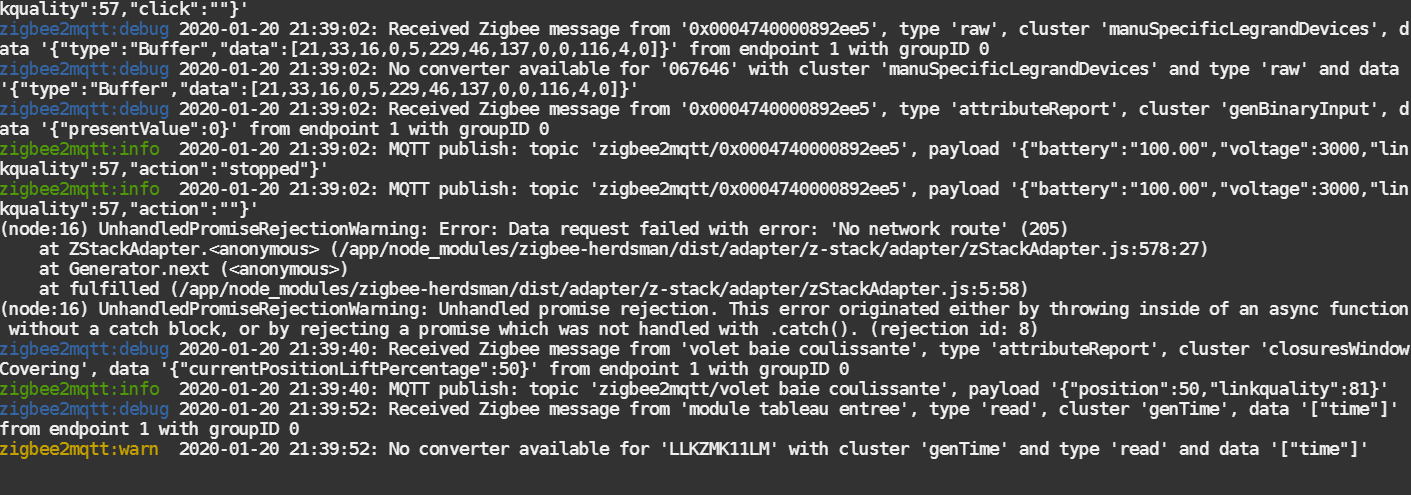
sometimes i have data request error with device but not only with wireless switch but nothing in log i can see only in docker terminal
for custom command (manuSpecificLegrandDevices) i don't know how i can help you ?
yes pairing near coordinator is better or power off all other devices pairing new device on power on all
ozer59
on 20 Jan 2020
i found this
Descente sur l'appui bas :
- appui court descend jusqu'en bas,
- appui prolongé descend jusqu'au relâchement
Montée sur l'appui haut : - appui court monte jusqu'en haut,
- appui prolongé monte jusqu'au relâchement
here =>http://docdif.fr.grpleg.com/general/MEDIAGRP/NP-FT-GT/F02506FR-00.pdf
ozer59
on 20 Jan 2020
@TRuHa83 thanks for your feedback. If devices are paired, that's at least a good start, adding their functionnalities is easier in theory.
Could you provide me the associated line in database.db matching every type of device you have ?
Were they connected to an official gateway before ? (so they probably received OTAs).
Do you have a CC2531 as coordinator ? Which version ? (usefull for the wiki I'm working on)
Here you have my database of each of the devices:
{"id":2,"type":"Router","ieeeAddr":"0x00047400001d632c","nwkAddr":37256,"manufId":4129,"manufName":" Legrand\u0000\u0000\u0000\u0000\u0000\u0000\u0000\u0000\u0000\u0000\u0000\u0000\u0000\u0000\u0000\u0000\u0000\u0000\u0000\u0000\u0000\u0000\u0000","powerSource":"Mains (single phase)","modelId":" Micromodule switch\u0000\u0000\u0000\u0000\u0000\u0000\u0000\u0000\u0000\u0000\u0000\u0000","epList":[1],"endpoints":{"1":{"profId":260,"epId":1,"devId":256,"inClusterList":[0,3,4,6,5,15,64513],"outClusterList":[0,64513,25],"clusters":{"64513":{"dir":{"value":3},"attributes":{}},"genBasic":{"dir":{"value":3},"attributes":{}},"genIdentify":{"dir":{"value":1},"attributes":{"65533":1,"identifyTime":0}},"genGroups":{"dir":{"value":1},"attributes":{"65533":1,"nameSupport":0}},"genScenes":{"dir":{"value":1},"attributes":{"65533":1,"count":0,"currentScene":0,"currentGroup":0,"sceneValid":1,"nameSupport":0}},"genOnOff":{"dir":{"value":1},"attributes":{"16387":255,"65533":1,"onOff":0,"globalSceneCtrl":1,"onTime":0,"offWaitTime":0}},"genBinaryInput":{"dir":{"value":1},"attributes":{"65533":1,"outOfService":0,"presentValue":0,"statusFlags":0}},"genOta":{"dir":{"value":2},"attributes":{}}},"binds":[{"cluster":6,"type":"endpoint","deviceIeeeAddress":"0x00124b0009ef8dd5","endpointID":1},{"cluster":15,"type":"endpoint","deviceIeeeAddress":"0x00124b0009ef8dd5","endpointID":1}]}},"appVersion":0,"stackVersion":64,"hwVersion":1,"dateCode":" \u000020171224\u0000\u0000\u0000\u0000\u0000","zclVersion":2,"meta":{"configured":2},"lastSeen":1579556716426}
{"id":3,"type":"Router","ieeeAddr":"0x00047400000ad84f","nwkAddr":49881,"manufId":4129,"manufName":" Legrand\u0000\u0000\u0000\u0000\u0000\u0000\u0000\u0000\u0000\u0000\u0000\u0000\u0000\u0000\u0000\u0000\u0000\u0000\u0000\u0000\u0000\u0000\u0000","powerSource":"Mains (single phase)","modelId":" Connected outlet\u0000\u0000\u0000\u0000\u0000\u0000\u0000\u0000\u0000\u0000\u0000\u0000\u0000\u0000","epList":[1],"endpoints":{"1":{"profId":260,"epId":1,"devId":266,"inClusterList":[0,3,4,6,5,64513,2820],"outClusterList":[0,64513,25],"clusters":{"genOnOff":{"attributes":{"onOff":1}},"haElectricalMeasurement":{"attributes":{"acVoltageMultiplier":0,"acVoltageDivisor":0,"acCurrentMultiplier":0,"acCurrentDivisor":0,"acPowerMultiplier":1,"acPowerDivisor":1,"activePower":229}}},"binds":[{"cluster":3,"type":"endpoint","deviceIeeeAddress":"0x00124b0009ef8dd5","endpointID":1},{"cluster":6,"type":"endpoint","deviceIeeeAddress":"0x00124b0009ef8dd5","endpointID":1},{"cluster":2820,"type":"endpoint","deviceIeeeAddress":"0x00124b0009ef8dd5","endpointID":1}]}},"appVersion":0,"stackVersion":64,"hwVersion":1,"dateCode":" \u000020181219\u0000\u0000\u0000\u0000\u0000","zclVersion":2,"meta":{"configured":3},"lastSeen":1579554256924}
{"id":5,"type":"Router","ieeeAddr":"0x00047400009a6b9e","nwkAddr":14683,"manufId":4129,"manufName":" Legrand\u0000\u0000\u0000\u0000\u0000\u0000\u0000\u0000\u0000\u0000\u0000\u0000\u0000\u0000\u0000\u0000\u0000\u0000\u0000\u0000\u0000\u0000\u0000","powerSource":"Mains (single phase)","modelId":" Dimmer switch w/o neutral\u0000\u0000\u0000\u0000\u0000","epList":[1],"endpoints":{"1":{"profId":260,"epId":1,"devId":256,"inClusterList":[0,3,4,8,6,5,15,64513],"outClusterList":[0,64513,25],"clusters":{"genBasic":{"attributes":{"modelId":" Dimmer switch w/o neutral\u0000\u0000\u0000\u0000\u0000","manufacturerName":" Legrand\u0000\u0000\u0000\u0000\u0000\u0000\u0000\u0000\u0000\u0000\u0000\u0000\u0000\u0000\u0000\u0000\u0000\u0000\u0000\u0000\u0000\u0000\u0000","powerSource":1,"zclVersion":2,"appVersion":0,"stackVersion":64,"hwVersion":1,"dateCode":" \u000020181102\u0000\u0000\u0000\u0000\u0000","swBuildId":"01a\u0000\u0000\u0000\u0000\u0000\u0000\u0000\u0000\u0000\u0000\u0000\u0000\u0000\u0000 \u0002\u0000\u0001\u0000 \u0002\u0000\u0002\u0000!\u0012\u0000\u0000\u0000\u0000��\u0003\u0000\u0010\u0002\u0001\u0004\u0000\u0018\u0002\u0000��!"}},"genOnOff":{"attributes":{"onOff":0}},"genLevelCtrl":{"attributes":{"currentLevel":0}},"genBinaryInput":{"attributes":{"presentValue":0}},"genIdentify":{"attributes":{"identifyTime":180}}},"binds":[{"cluster":3,"type":"endpoint","deviceIeeeAddress":"0x00124b0009ef8dd5","endpointID":1},{"cluster":6,"type":"endpoint","deviceIeeeAddress":"0x00124b0009ef8dd5","endpointID":1},{"cluster":8,"type":"endpoint","deviceIeeeAddress":"0x00124b0009ef8dd5","endpointID":1},{"cluster":15,"type":"endpoint","deviceIeeeAddress":"0x00124b0009ef8dd5","endpointID":1}]}},"appVersion":0,"stackVersion":64,"hwVersion":1,"dateCode":" \u000020181102\u0000\u0000\u0000\u0000\u0000","swBuildId":"01a\u0000\u0000\u0000\u0000\u0000\u0000\u0000\u0000\u0000\u0000\u0000\u0000\u0000\u0000 \u0002\u0000\u0001\u0000 \u0002\u0000\u0002\u0000!\u0012\u0000\u0000\u0000\u0000��\u0003\u0000\u0010\u0002\u0001\u0004\u0000\u0018\u0002\u0000��!","zclVersion":2,"interviewCompleted":true,"meta":{"configured":2},"lastSeen":1579554037773}
{"id":6,"type":"Router","ieeeAddr":"0x00047400009a6b98","nwkAddr":39824,"manufId":4129,"manufName":" Legrand\u0000\u0000\u0000\u0000\u0000\u0000\u0000\u0000\u0000\u0000\u0000\u0000\u0000\u0000\u0000\u0000\u0000\u0000\u0000\u0000\u0000\u0000\u0000","powerSource":"Mains (single phase)","modelId":" Dimmer switch w/o neutral\u0000\u0000\u0000\u0000\u0000","epList":[1],"endpoints":{"1":{"profId":260,"epId":1,"devId":256,"inClusterList":[0,3,4,8,6,5,15,64513],"outClusterList":[0,64513,25],"clusters":{"genBasic":{"attributes":{"modelId":" Dimmer switch w/o neutral\u0000\u0000\u0000\u0000\u0000","manufacturerName":" Legrand\u0000\u0000\u0000\u0000\u0000\u0000\u0000\u0000\u0000\u0000\u0000\u0000\u0000\u0000\u0000\u0000\u0000\u0000\u0000\u0000\u0000\u0000\u0000","powerSource":1,"zclVersion":2,"appVersion":0,"stackVersion":64,"hwVersion":1,"dateCode":" \u000020181102\u0000\u0000\u0000\u0000\u0000","swBuildId":"01a\u0000\u0000\u0000\u0000\u0000\u0000\u0000\u0000\u0000\u0000\u0000\u0000\u0000\u0000 \u0002\u0000\u0001\u0000 \u0002\u0000\u0002\u0000!\u0012\u0000\u0000\u0000\u0000��\u0003\u0000\u0010\u0002\u0001\u0004\u0000\u0018\u0002\u0000��!"}},"genOnOff":{"attributes":{"onOff":1}},"genLevelCtrl":{"attributes":{"currentLevel":254}}},"binds":[{"cluster":3,"type":"endpoint","deviceIeeeAddress":"0x00124b0009ef8dd5","endpointID":1},{"cluster":6,"type":"endpoint","deviceIeeeAddress":"0x00124b0009ef8dd5","endpointID":1},{"cluster":8,"type":"endpoint","deviceIeeeAddress":"0x00124b0009ef8dd5","endpointID":1},{"cluster":15,"type":"endpoint","deviceIeeeAddress":"0x00124b0009ef8dd5","endpointID":1}]}},"appVersion":0,"stackVersion":64,"hwVersion":1,"dateCode":" \u000020181102\u0000\u0000\u0000\u0000\u0000","swBuildId":"01a\u0000\u0000\u0000\u0000\u0000\u0000\u0000\u0000\u0000\u0000\u0000\u0000\u0000\u0000 \u0002\u0000\u0001\u0000 \u0002\u0000\u0002\u0000!\u0012\u0000\u0000\u0000\u0000��\u0003\u0000\u0010\u0002\u0001\u0004\u0000\u0018\u0002\u0000��!","zclVersion":2,"interviewCompleted":true,"meta":{"configured":2},"lastSeen":1579554112881}
{"id":7,"type":"EndDevice","ieeeAddr":"0x0004740000a97f60","nwkAddr":53915,"manufId":4129,"manufName":" Legrand\u0000\u0000\u0000\u0000\u0000\u0000\u0000\u0000\u0000\u0000\u0000\u0000\u0000\u0000\u0000\u0000\u0000\u0000\u0000\u0000\u0000\u0000\u0000","powerSource":"Battery","modelId":" Remote switch\u0000\u0000\u0000\u0000\u0000\u0000\u0000\u0000\u0000\u0000\u0000\u0000\u0000\u0000\u0000\u0000\u0000","epList":[1],"endpoints":{"1":{"profId":260,"epId":1,"devId":260,"inClusterList":[0,3,15,32,1,64513],"outClusterList":[3,6,8,0,64513,25],"clusters":{"genBasic":{"attributes":{"modelId":" Remote switch\u0000\u0000\u0000\u0000\u0000\u0000\u0000\u0000\u0000\u0000\u0000\u0000\u0000\u0000\u0000\u0000\u0000","manufacturerName":" Legrand\u0000\u0000\u0000\u0000\u0000\u0000\u0000\u0000\u0000\u0000\u0000\u0000\u0000\u0000\u0000\u0000\u0000\u0000\u0000\u0000\u0000\u0000\u0000","powerSource":3,"zclVersion":2,"appVersion":0,"stackVersion":64,"hwVersion":1,"dateCode":" \u000020190104\u0000\u0000\u0000\u0000\u0000","swBuildId":"019\u0000\u0000\u0000\u0000\u0000\u0000\u0000\u0000\u0000\u0000\u0000\u0000��!\u0002\u0000\u0000��!\u0002\u0001\u0000\u0000\u0000#\u0010@8\u0000\u0000\u0000\u0000\u0000\u0000\u0000\u0000n\u0000\u0001\u0000#\u0012\u0014"}},"genPowerCfg":{"attributes":{"batteryVoltage":31}}},"binds":[{"cluster":1,"type":"endpoint","deviceIeeeAddress":"0x00124b0009ef8dd5","endpointID":1},{"cluster":6,"type":"endpoint","deviceIeeeAddress":"0x00124b0009ef8dd5","endpointID":1},{"cluster":8,"type":"endpoint","deviceIeeeAddress":"0x00124b0009ef8dd5","endpointID":1}]}},"appVersion":0,"stackVersion":64,"hwVersion":1,"dateCode":" \u000020190104\u0000\u0000\u0000\u0000\u0000","swBuildId":"019\u0000\u0000\u0000\u0000\u0000\u0000\u0000\u0000\u0000\u0000\u0000\u0000��!\u0002\u0000\u0000��!\u0002\u0001\u0000\u0000\u0000#\u0010@8\u0000\u0000\u0000\u0000\u0000\u0000\u0000\u0000n\u0000\u0001\u0000#\u0012\u0014","zclVersion":2,"interviewCompleted":true,"meta":{"configured":2},"lastSeen":1579475041927}
I have no official gateway y use a CC2531 as coordinator with version Z-Stack_3.0.x
I have to indicate that of the two switches that I have, one matches with green light and another with violet light (blue and red). They are bought one after the other, perhaps for a more updated version?
Yesterday I updated to the latest version, I did not know that they had already taken official support.
An incredible job. At last I have consumption measures on my devices.
One question, is there no support for brightness control on the switches?
TRuHa83
on 20 Jan 2020
@TRuHa83 the merge on the master branch is recent. Power consumption is really recent.
I have heard some devices came with a newer firmware than others (outlets or switch). Power consumption is only on recent firmware, not sure about your firmware (20181219).
It may require to send a message to the outlet to enable it : I will investigate.
The wireless switch should have dimming (I have it), maybe it requires a more up to date firmware too (yours: 20190104, I think mine is more recent). On the powered switch it requires to be enabled, maybe it's the same for yours. I will see If i can reproduce it.
Sadly OTA requires the official gateway and Legrand do not give theirs (but I intercepted them, so if zigbee2mqtt adds the support to OTA it may be possible to update them).
Regarding the purple light, I have no clue, even my recent firmware are green (when pairing is enabled, off otherwise).
cemonneau
on 21 Jan 2020
@ozer59 from what I'm reading in your logs the detection seems good, can you confirm you are receiving what's expected in mqtt ?
Regarding the error "no network route", nothing I can do, it's your network stability
Specific frames (manuSpecificLegrandDevices) are really hard to decypher, I only have some of them (1 or 2), and it requires the official gateway to try to understand what they are sending. Without the product/more data, nothing I can do.
I will take a look at the link you gave and see what i can find with that.
EDIT: can you try to do those physical actions ? long press up & down. I think it will trigger new commands that we need to add
cemonneau
on 21 Jan 2020
More or less related to this issue, I tried to pair a 067775 power socket qith my cc2531 (1.8.0) and it was not working.
zigbee2mqtt/bridge/log {"type":"pairing","message":"interview_started","meta":{"friendly_name":"0x00047400000be6ef"}}
zigbee2mqtt/bridge/log {"type":"pairing","message":"interview_failed","meta":{"friendly_name":"0x00047400000be6ef"}}
zigbee2mqtt/bridge/log {"type":"pairing","message":"interview_started","meta":{"friendly_name":"0x00047400000be6ef"}}
zigbee2mqtt/bridge/log {"type":"pairing","message":"interview_failed","meta":{"friendly_name":"0x00047400000be6ef"}}
zigbee2mqtt/bridge/log {"type":"pairing","message":"interview_started","meta":{"friendly_name":"0x00047400000be6ef"}}
zigbee2mqtt/bridge/log {"type":"pairing","message":"interview_failed","meta":{"friendly_name":"0x00047400000be6ef"}}
zigbee2mqtt/bridge/log {"type":"pairing","message":"interview_started","meta":{"friendly_name":"0x00047400000be6ef"}}
zigbee2mqtt/bridge/log {"type":"pairing","message":"interview_failed","meta":{"friendly_name":"0x00047400000be6ef"}}
zigbee2mqtt/bridge/log {"type":"pairing","message":"interview_started","meta":{"friendly_name":"0x00047400000be6ef"}}
zigbee2mqtt/bridge/log {"type":"pairing","message":"interview_failed","meta":{"friendly_name":"0x00047400000be6ef"}}
I then updated z2m to 1.9.0 and the 'interview' (no clue what it is) went successful and looks like the device removed itself
zigbee2mqtt/bridge/log {"type":"pairing","message":"interview_successful","meta":{"friendly_name":"0x00047400000be6ef","supported":false}}
zigbee2mqtt/bridge/log {"type":"device_removed","message":"left_network","meta":{"friendly_name":"0x00047400000be6ef"}}
zigbee2mqtt/bridge/log {"type":"device_removed","message":"left_network","meta":{"friendly_name":"0x00047400000be6ef"}}
I don't see anything from this device since the one posted above.
I tried to shutdown the power on this device and bring it back without success. Is there a way to reset it and/or put it in pairing mode again ?
EDIT
Posted a bit early and finally read almost the whole thread. From what I understand, I should be able to pair 067775 with my cc2531 but I don't receive any message at all.
I tried to:
- stop z2m
- poweroff power socket for almost 1m
- start z2m
- poweron socket
and still receive nothing.
I noticed that there is a reset like button on the socket. Tried to short / long press. Long press just blink the led red once and nothing more.
 jffz
on 22 Jan 2020
jffz
on 22 Jan 2020
@jffz
try this
poweroff zigbee2mqtt remove device form database
reset long press until blinking red
power off all devices =>bootzigbee2mtt => power up only new device =>try pairing and if is ok power up other devices
pairing near coordinator is better
@cemonneau
short press up
debug 2020-01-24 22:40:48: Received Zigbee message from '0x0004740000892ee5', type 'attributeReport', cluster 'genBinaryInput', data '{"presentValue":0}' from endpoint 1 with groupID 0
info 2020-01-24 22:40:48: MQTT publish: topic 'zigbee2mqtt/0x0004740000892ee5', payload '{"battery":"100.00","voltage":3000,"linkquality":66,"action":"stopped"}'
info 2020-01-24 22:40:48: MQTT publish: topic 'zigbee2mqtt/0x0004740000892ee5', payload '{"battery":"100.00","voltage":3000,"linkquality":66,"action":""}'
debug 2020-01-24 22:40:48: Received Zigbee message from '0x0004740000892ee5', type 'commandUpOpen', cluster 'closuresWindowCovering', data '{}' from endpoint 1 with groupID 0
info 2020-01-24 22:40:48: MQTT publish: topic 'zigbee2mqtt/0x0004740000892ee5', payload '{"battery":"100.00","voltage":3000,"linkquality":63,"click":"open"}'
info 2020-01-24 22:40:48: MQTT publish: topic 'zigbee2mqtt/0x0004740000892ee5', payload '{"battery":"100.00","voltage":3000,"linkquality":63,"click":""}'
short press down
debug 2020-01-24 22:41:45: Device '0x0004740000892ee5' announced itself
debug 2020-01-24 22:41:45: Received Zigbee message from '0x0004740000892ee5', type 'commandDownClose', cluster 'closuresWindowCovering', data '{}' from endpoint 1 with groupID 0
info 2020-01-24 22:41:45: MQTT publish: topic 'zigbee2mqtt/0x0004740000892ee5', payload '{"battery":"100.00","voltage":3000,"linkquality":69,"click":"close"}'
info 2020-01-24 22:41:45: MQTT publish: topic 'zigbee2mqtt/0x0004740000892ee5', payload '{"battery":"100.00","voltage":3000,"linkquality":69,"click":""}'
debug 2020-01-24 22:41:45: Received Zigbee message from '0x0004740000892ee5', type 'attributeReport', cluster 'genBinaryInput', data '{"presentValue":1}' from endpoint 1 with groupID 0
info 2020-01-24 22:41:45: MQTT publish: topic 'zigbee2mqtt/0x0004740000892ee5', payload '{"battery":"100.00","voltage":3000,"linkquality":72,"action":"moving"}'
info 2020-01-24 22:41:45: MQTT publish: topic 'zigbee2mqtt/0x0004740000892ee5', payload '{"battery":"100.00","voltage":3000,"linkquality":72,"action":""}'
debug 2020-01-24 22:41:47: Received Zigbee message from '0x0004740000892ee5', type 'raw', cluster 'manuSpecificLegrandDevices', data '{"type":"Buffer","data":[21,33,16,0,5,229,46,137,0,0,116,4,0]}' from endpoint 1 with groupID 0
debug 2020-01-24 22:41:47: No converter available for '067646' with cluster 'manuSpecificLegrandDevices' and type 'raw' and data '{"type":"Buffer","data":[21,33,16,0,5,229,46,137,0,0,116,4,0]}'
long press up
debug 2020-01-24 22:43:18: Received Zigbee message from '0x0004740000892ee5', type 'commandUpOpen', cluster 'closuresWindowCovering', data '{}' from endpoint 1 with groupID 0
info 2020-01-24 22:43:18: MQTT publish: topic 'zigbee2mqtt/0x0004740000892ee5', payload '{"battery":"100.00","voltage":3000,"linkquality":66,"click":"open"}'
info 2020-01-24 22:43:18: MQTT publish: topic 'zigbee2mqtt/0x0004740000892ee5', payload '{"battery":"100.00","voltage":3000,"linkquality":66,"click":""}'
debug 2020-01-24 22:43:19: Saving state to file /app/data/state.json
debug 2020-01-24 22:43:19: Received Zigbee message from '0x0004740000892ee5', type 'commandStop', cluster 'closuresWindowCovering', data '{}' from endpoint 1 with groupID 0
info 2020-01-24 22:43:19: MQTT publish: topic 'zigbee2mqtt/0x0004740000892ee5', payload '{"battery":"100.00","voltage":3000,"linkquality":63,"click":"release"}'
info 2020-01-24 22:43:19: MQTT publish: topic 'zigbee2mqtt/0x0004740000892ee5', payload '{"battery":"100.00","voltage":3000,"linkquality":63,"click":""}'
long press down
i think it ok in mqtt
i try use in ha
but i can use stop but no open or close only differrence i see is stop is on action and open is click
ozer59
on 24 Jan 2020
yes good in ha with :
'067646': [cfg.sensor_action, cfg.sensor_click, cfg.sensor_battery],
ozer59
on 24 Jan 2020
@ozer59
I tried to follow the steps you described but still nothing happens
poweroff zigbee2mqtt remove device form database
The Legrand device is already not in the DB
reset long press until blinking red
It does only blink once and then go back to full red, is it intended ?
power off all devices =>bootzigbee2mtt => power up only new device
Literaly nothing in the broker, no messge
I might be missing something.
Maybe I should delete all the devices from my db ?
Is there a place where we could talk together in french ?
jffz
on 25 Jan 2020
@jffz
maybe you can try
poweroff zigbee2mqtt remove device form database
reset long press until blinking red
power off all devices =>bootzigbee2mtt => power up ALL legrand device at the same time
try pairing new device
if possible try pairing device with routeur between device and coordinator (pairing near routeur)
ozer59
on 27 Jan 2020
ozer59
on 27 Jan 2020
@jffz
maybe you can try
poweroff zigbee2mqtt remove device form database
reset long press until blinking red
power off all devices =>bootzigbee2mtt => power up ALL legrand device at the same time
try pairing new deviceif possible try pairing device with routeur between device and coordinator (pairing near routeur)
This is exactly what I did (I tried with only 1 legrand device) and just nothing happens. I don't even see the legrand device trying to pair.
Also is it intended that it only blink once ?
EDIT
I finally achieved to get something but not what I expected.
Here is what I did:
- Stop zigbee2mqtt
- Delete database, state.json files
- Delete devices from configuration.yaml
- Reset CC2531 key
- Start zigbee2mqtt
- Boot Legrand devices
This led me to the following logs:
zigbee2mqtt/bridge/log {"type":"device_connected","message":{"friendly_name":"0x00047400000be6ef"}}
zigbee2mqtt/bridge/log {"type":"pairing","message":"interview_started","meta":{"friendly_name":"0x00047400000be6ef"}}
zigbee2mqtt/bridge/log {"type":"device_connected","message":{"friendly_name":"0x00047400000be6f3"}}
zigbee2mqtt/bridge/log {"type":"pairing","message":"interview_started","meta":{"friendly_name":"0x00047400000be6f3"}}
zigbee2mqtt/bridge/log {"type":"device_connected","message":{"friendly_name":"0x00047400000be6e7"}}
zigbee2mqtt/bridge/log {"type":"pairing","message":"interview_started","meta":{"friendly_name":"0x00047400000be6e7"}}
zigbee2mqtt/bridge/log {"type":"pairing","message":"interview_failed","meta":{"friendly_name":"0x00047400000be6ef"}}
zigbee2mqtt/bridge/log {"type":"pairing","message":"interview_started","meta":{"friendly_name":"0x00047400000be6ef"}}
zigbee2mqtt/bridge/log {"type":"pairing","message":"interview_failed","meta":{"friendly_name":"0x00047400000be6f3"}}
zigbee2mqtt/bridge/log {"type":"pairing","message":"interview_started","meta":{"friendly_name":"0x00047400000be6f3"}}
zigbee2mqtt/bridge/log {"type":"pairing","message":"interview_failed","meta":{"friendly_name":"0x00047400000be6e7"}}
zigbee2mqtt/bridge/log {"type":"pairing","message":"interview_started","meta":{"friendly_name":"0x00047400000be6e7"}}
Not sure if the interview is really needed or so but I can see the devices through a graphviz.
Full npm logs saying that the pairing failed. (spoiler)
Jan 27 19:47:32 k3s-node-3.domain.lan npm[1485]: zigbee2mqtt:info  2020-01-27 19:47:32: Currently 0 devices are joined:
Jan 27 19:47:32 k3s-node-3.domain.lan npm[1485]: zigbee2mqtt:warn  2020-01-27 19:47:32: `permit_join` set to  `true` in configuration.yaml.
Jan 27 19:47:32 k3s-node-3.domain.lan npm[1485]: zigbee2mqtt:warn  2020-01-27 19:47:32: Allowing new devices to join.
Jan 27 19:47:32 k3s-node-3.domain.lan npm[1485]: zigbee2mqtt:warn  2020-01-27 19:47:32: Set `permit_join` to `false` once you joined all devices.
Jan 27 19:47:32 k3s-node-3.domain.lan npm[1485]: zigbee2mqtt:info  2020-01-27 19:47:32: Zigbee: allowing new devices to join.
Jan 27 19:47:32 k3s-node-3.domain.lan npm[1485]: zigbee2mqtt:info  2020-01-27 19:47:32: Connecting to MQTT server at mqtt://bigboy:1883
Jan 27 19:47:33 k3s-node-3.domain.lan npm[1485]: zigbee2mqtt:info  2020-01-27 19:47:33: Connected to MQTT server
Jan 27 19:47:33 k3s-node-3.domain.lan npm[1485]: zigbee2mqtt:info  2020-01-27 19:47:33: MQTT publish: topic 'zigbee2mqtt/bridge/state', payload 'online'
Jan 27 19:47:33 k3s-node-3.domain.lan npm[1485]: zigbee2mqtt:info  2020-01-27 19:47:33: MQTT publish: topic 'zigbee2mqtt/bridge/config', payload '{"version":"1.9.0-dev","commit":"61a3f0e","coordinator":{"type":"zStack12","meta":{"transportrev":2,"product":0,"majorrel":2,"minorrel":6,"maintrel":3,"revision":20190608}},"log_level":"info","permit_join":true}'
Jan 27 19:47:49 k3s-node-3.domain.lan npm[1485]: zigbee2mqtt:info  2020-01-27 19:47:49: Starting network scan (includeRoutes 'false')
Jan 27 19:47:49 k3s-node-3.domain.lan npm[1485]: zigbee2mqtt:info  2020-01-27 19:47:49: Network scan finished
Jan 27 19:47:49 k3s-node-3.domain.lan npm[1485]: zigbee2mqtt:info  2020-01-27 19:47:49: MQTT publish: topic 'zigbee2mqtt/bridge/networkmap/graphviz', payload 'digraph G {
Jan 27 19:47:49 k3s-node-3.domain.lan npm[1485]: node[shape=record];
Jan 27 19:47:49 k3s-node-3.domain.lan npm[1485]:   "0x00124b000be893b6" [style="bold, filled", fillcolor="#e04e5d", fontcolor="#ffffff", label="{Coordinator|0x00124b000be893b6 (0)|2020-01-27T19:47:49+01:00}"];
Jan 27 19:47:49 k3s-node-3.domain.lan npm[1485]: }'
Jan 27 19:48:07 k3s-node-3.domain.lan npm[1485]: zigbee2mqtt:info  2020-01-27 19:48:07: Device '0x00047400000be6ef' joined
Jan 27 19:48:07 k3s-node-3.domain.lan npm[1485]: zigbee2mqtt:info  2020-01-27 19:48:07: MQTT publish: topic 'zigbee2mqtt/bridge/log', payload '{"type":"device_connected","message":{"friendly_name":"0x00047400000be6ef"}}'
Jan 27 19:48:07 k3s-node-3.domain.lan npm[1485]: zigbee2mqtt:info  2020-01-27 19:48:07: Starting interview of '0x00047400000be6ef'
Jan 27 19:48:07 k3s-node-3.domain.lan npm[1485]: zigbee2mqtt:info  2020-01-27 19:48:07: MQTT publish: topic 'zigbee2mqtt/bridge/log', payload '{"type":"pairing","message":"interview_started","meta":{"friendly_name":"0x00047400000be6ef"}}'
Jan 27 19:48:07 k3s-node-3.domain.lan npm[1485]: zigbee2mqtt:info  2020-01-27 19:48:07: Device '0x00047400000be6f3' joined
Jan 27 19:48:07 k3s-node-3.domain.lan npm[1485]: zigbee2mqtt:info  2020-01-27 19:48:07: MQTT publish: topic 'zigbee2mqtt/bridge/log', payload '{"type":"device_connected","message":{"friendly_name":"0x00047400000be6f3"}}'
Jan 27 19:48:07 k3s-node-3.domain.lan npm[1485]: zigbee2mqtt:info  2020-01-27 19:48:07: Starting interview of '0x00047400000be6f3'
Jan 27 19:48:07 k3s-node-3.domain.lan npm[1485]: zigbee2mqtt:info  2020-01-27 19:48:07: MQTT publish: topic 'zigbee2mqtt/bridge/log', payload '{"type":"pairing","message":"interview_started","meta":{"friendly_name":"0x00047400000be6f3"}}'
Jan 27 19:48:07 k3s-node-3.domain.lan npm[1485]: zigbee2mqtt:info  2020-01-27 19:48:07: Device '0x00047400000be6e7' joined
Jan 27 19:48:07 k3s-node-3.domain.lan npm[1485]: zigbee2mqtt:info  2020-01-27 19:48:07: MQTT publish: topic 'zigbee2mqtt/bridge/log', payload '{"type":"device_connected","message":{"friendly_name":"0x00047400000be6e7"}}'
Jan 27 19:48:07 k3s-node-3.domain.lan npm[1485]: zigbee2mqtt:info  2020-01-27 19:48:07: Starting interview of '0x00047400000be6e7'
Jan 27 19:48:07 k3s-node-3.domain.lan npm[1485]: zigbee2mqtt:info  2020-01-27 19:48:07: MQTT publish: topic 'zigbee2mqtt/bridge/log', payload '{"type":"pairing","message":"interview_started","meta":{"friendly_name":"0x00047400000be6e7"}}'


Jan 27 19:49:44 k3s-node-3.domain.lan npm[1485]: zigbee2mqtt:info  2020-01-27 19:49:44: Starting network scan (includeRoutes 'false')
Jan 27 19:49:57 k3s-node-3.domain.lan npm[1485]: zigbee2mqtt:error 2020-01-27 19:49:57: Failed to interview '0x00047400000be6ef', device has not successfully been paired
Jan 27 19:49:57 k3s-node-3.domain.lan npm[1485]: zigbee2mqtt:info  2020-01-27 19:49:57: MQTT publish: topic 'zigbee2mqtt/bridge/log', payload '{"type":"pairing","message":"interview_failed","meta":{"friendly_name":"0x00047400000be6ef"}}'
Jan 27 19:49:59 k3s-node-3.domain.lan npm[1485]: zigbee2mqtt:info  2020-01-27 19:49:59: Starting interview of '0x00047400000be6ef'
Jan 27 19:49:59 k3s-node-3.domain.lan npm[1485]: zigbee2mqtt:info  2020-01-27 19:49:59: MQTT publish: topic 'zigbee2mqtt/bridge/log', payload '{"type":"pairing","message":"interview_started","meta":{"friendly_name":"0x00047400000be6ef"}}'
Jan 27 19:50:07 k3s-node-3.domain.lan npm[1485]: zigbee2mqtt:error 2020-01-27 19:50:07: Failed to interview '0x00047400000be6f3', device has not successfully been paired
Jan 27 19:50:07 k3s-node-3.domain.lan npm[1485]: zigbee2mqtt:info  2020-01-27 19:50:07: MQTT publish: topic 'zigbee2mqtt/bridge/log', payload '{"type":"pairing","message":"interview_failed","meta":{"friendly_name":"0x00047400000be6f3"}}'
Jan 27 19:50:07 k3s-node-3.domain.lan npm[1485]: zigbee2mqtt:error 2020-01-27 19:50:07: Failed to execute LQI for '0x00047400000be6ef'
Jan 27 19:50:10 k3s-node-3.domain.lan npm[1485]: zigbee2mqtt:info  2020-01-27 19:50:10: Starting interview of '0x00047400000be6f3'
Jan 27 19:50:10 k3s-node-3.domain.lan npm[1485]: zigbee2mqtt:info  2020-01-27 19:50:10: MQTT publish: topic 'zigbee2mqtt/bridge/log', payload '{"type":"pairing","message":"interview_started","meta":{"friendly_name":"0x00047400000be6f3"}}'
Jan 27 19:50:17 k3s-node-3.domain.lan npm[1485]: zigbee2mqtt:error 2020-01-27 19:50:17: Failed to interview '0x00047400000be6e7', device has not successfully been paired
Jan 27 19:50:17 k3s-node-3.domain.lan npm[1485]: zigbee2mqtt:info  2020-01-27 19:50:17: MQTT publish: topic 'zigbee2mqtt/bridge/log', payload '{"type":"pairing","message":"interview_failed","meta":{"friendly_name":"0x00047400000be6e7"}}'
Jan 27 19:50:21 k3s-node-3.domain.lan npm[1485]: zigbee2mqtt:info  2020-01-27 19:50:21: Starting interview of '0x00047400000be6e7'
Jan 27 19:50:21 k3s-node-3.domain.lan npm[1485]: zigbee2mqtt:info  2020-01-27 19:50:21: MQTT publish: topic 'zigbee2mqtt/bridge/log', payload '{"type":"pairing","message":"interview_started","meta":{"friendly_name":"0x00047400000be6e7"}}'
Jan 27 19:50:27 k3s-node-3.domain.lan npm[1485]: zigbee2mqtt:error 2020-01-27 19:50:27: Failed to execute LQI for '0x00047400000be6f3'
Jan 27 19:50:47 k3s-node-3.domain.lan npm[1485]: zigbee2mqtt:error 2020-01-27 19:50:47: Failed to execute LQI for '0x00047400000be6e7'
Jan 27 19:50:47 k3s-node-3.domain.lan npm[1485]: zigbee2mqtt:info  2020-01-27 19:50:47: Network scan finished
Jan 27 19:50:47 k3s-node-3.domain.lan npm[1485]: zigbee2mqtt:info  2020-01-27 19:50:47: MQTT publish: topic 'zigbee2mqtt/bridge/networkmap/graphviz', payload 'digraph G {
Jan 27 19:50:47 k3s-node-3.domain.lan npm[1485]: node[shape=record];
Jan 27 19:50:47 k3s-node-3.domain.lan npm[1485]:   "0x00124b000be893b6" [style="bold, filled", fillcolor="#e04e5d", fontcolor="#ffffff", label="{Coordinator|0x00124b000be893b6 (0)|2020-01-27T19:50:47+01:00}"];
Jan 27 19:50:47 k3s-node-3.domain.lan npm[1485]:   "0x00047400000be6ef" [style="rounded, dashed, filled", fillcolor="#fff8ce", fontcolor="#000000", label="{0x00047400000be6ef|0x00047400000be6ef (16058)failed: lqi|undefined undefined|2020-01-27T19:50:37+01:00}"];
Jan 27 19:50:47 k3s-node-3.domain.lan npm[1485]:   "0x00047400000be6ef" -> "0x00124b000be893b6" [penwidth=0.5, weight=0, color="#994444", label="170"]
Jan 27 19:50:47 k3s-node-3.domain.lan npm[1485]:   "0x00047400000be6f3" [style="rounded, dashed, filled", fillcolor="#fff8ce", fontcolor="#000000", label="{0x00047400000be6f3|0x00047400000be6f3 (20594)failed: lqi|undefined undefined|2020-01-27T19:50:36+01:00}"];
Jan 27 19:50:47 k3s-node-3.domain.lan npm[1485]:   "0x00047400000be6f3" -> "0x00124b000be893b6" [penwidth=0.5, weight=0, color="#994444", label="170"]
Jan 27 19:50:47 k3s-node-3.domain.lan npm[1485]:   "0x00047400000be6e7" [style="rounded, dashed, filled", fillcolor="#fff8ce", fontcolor="#000000", label="{0x00047400000be6e7|0x00047400000be6e7 (31780)failed: lqi|undefined undefined|2020-01-27T19:50:37+01:00}"];
Jan 27 19:50:47 k3s-node-3.domain.lan npm[1485]:   "0x00047400000be6e7" -> "0x00124b000be893b6" [penwidth=0.5, weight=0, color="#994444", label="170"]
Jan 27 19:50:47 k3s-node-3.domain.lan npm[1485]: }'
Jan 27 19:52:07 k3s-node-3.domain.lan npm[1485]: zigbee2mqtt:error 2020-01-27 19:52:07: Failed to interview '0x00047400000be6ef', device has not successfully been paired
Jan 27 19:52:07 k3s-node-3.domain.lan npm[1485]: zigbee2mqtt:info  2020-01-27 19:52:07: MQTT publish: topic 'zigbee2mqtt/bridge/log', payload '{"type":"pairing","message":"interview_failed","meta":{"friendly_name":"0x00047400000be6ef"}}'
Jan 27 19:52:13 k3s-node-3.domain.lan npm[1485]: zigbee2mqtt:info  2020-01-27 19:52:13: Starting interview of '0x00047400000be6ef'
Jan 27 19:52:13 k3s-node-3.domain.lan npm[1485]: zigbee2mqtt:info  2020-01-27 19:52:13: MQTT publish: topic 'zigbee2mqtt/bridge/log', payload '{"type":"pairing","message":"interview_started","meta":{"friendly_name":"0x00047400000be6ef"}}'
Jan 27 19:52:17 k3s-node-3.domain.lan npm[1485]: zigbee2mqtt:error 2020-01-27 19:52:17: Failed to interview '0x00047400000be6f3', device has not successfully been paired
Jan 27 19:52:17 k3s-node-3.domain.lan npm[1485]: zigbee2mqtt:info  2020-01-27 19:52:17: MQTT publish: topic 'zigbee2mqtt/bridge/log', payload '{"type":"pairing","message":"interview_failed","meta":{"friendly_name":"0x00047400000be6f3"}}'
Jan 27 19:52:27 k3s-node-3.domain.lan npm[1485]: zigbee2mqtt:error 2020-01-27 19:52:27: Failed to interview '0x00047400000be6e7', device has not successfully been paired
Jan 27 19:52:27 k3s-node-3.domain.lan npm[1485]: zigbee2mqtt:info  2020-01-27 19:52:27: MQTT publish: topic 'zigbee2mqtt/bridge/log', payload '{"type":"pairing","message":"interview_failed","meta":{"friendly_name":"0x00047400000be6e7"}}'
Jan 27 19:52:29 k3s-node-3.domain.lan npm[1485]: zigbee2mqtt:info  2020-01-27 19:52:29: Starting interview of '0x00047400000be6f3'
Jan 27 19:52:29 k3s-node-3.domain.lan npm[1485]: zigbee2mqtt:info  2020-01-27 19:52:29: MQTT publish: topic 'zigbee2mqtt/bridge/log', payload '{"type":"pairing","message":"interview_started","meta":{"friendly_name":"0x00047400000be6f3"}}'
Jan 27 19:52:29 k3s-node-3.domain.lan npm[1485]: zigbee2mqtt:info  2020-01-27 19:52:29: Starting interview of '0x00047400000be6e7'
Jan 27 19:52:29 k3s-node-3.domain.lan npm[1485]: zigbee2mqtt:info  2020-01-27 19:52:29: MQTT publish: topic 'zigbee2mqtt/bridge/log', payload '{"type":"pairing","message":"interview_started","meta":{"friendly_name":"0x00047400000be6e7"}}'
Full log using DEBUG=* npm start
zigbe2mqtt_version: 1.9.0-dev
commit: 61a3f0e
CC2531 firmware: CC2531ZNP-Prod.hex 20190608 Master Z-Stack 1.2
jffz
on 27 Jan 2020
power up ### ALL legrand device at the same time
from Smanar
on https://github.com/dresden-elektronik/deconz-rest-plugin/issues/883#issuecomment-431661174
"Hu !
I m seing something, (the device have the adress BD86) so it's the device itself who ask for "basic read attribute" (Request n 159) to the device router, not the coordinator. And this request is make in the first trame, so perhpas the blocking request is just between the commissioning frame (Request n 96 ) and this one.
In fact in normal mode the device is more active.
I have others devices ikea bulb, usb device, there is a way to force the installation to work like the original one ? In fact the central have a buildin device inside, it s 'not possible to use the original central without the router, the prb is perhaps from here."
ozer59
on 27 Jan 2020
I did powered up all legrand devices at the same time, they are all plugged to the same powercord...
https://imgur.com/a/yhsnnOm
The 3rd one is plugged to the same circuit breaker and I did powered them on using the root circuit breaker.
Retried with a router between the coord and Legrand device and it does pair and left the network.
Full procedure:
- Stop z2m
- delete db / state / devices in config
- reset cc2531 key
- stop legrand devices
- start z2m
- reset and reassociate cc2531 router
- turn on ALL Legrand devices at same time
jffz
on 27 Jan 2020
@jffz
when you make a reset 7-10sec do you ear a electrial relay sound "clak clak" and led blinking red
do you have non legrand routeur on your zigbee network ?
if yes try pairing near this non legrand routeur
ozer59
on 28 Jan 2020
@jffz
when you make a reset 7-10sec do you ear a electrial relay sound "clak clak" and led blinking red
do you have non legrand routeur on your zigbee network ?
if yes try pairing near this non legrand routeur
This is actually what I was doing n times since 3 days. It finally worked today (only 2 of 3 power socket), I will try to pair the last one.
It looks like the pairing is really random.
After another retry, it finally worked (I did the exact same process as yesterday).
For anyone wondering, here is the exact process I used ot make it works
- stop zigbee2mqtt
- set premit_join: false in configuration.yaml  # seems important
- delete state.json, database.db, clean configuration.yaml from all devices
- reset CC2531 coordinator
- reset CC2531 router
- Start zigbee2mqtt
- Send mqtt message to permit_join
- Start CC2531 router and pair it
- Stop zigbee2mqtt
- Start zigbee2mqtt
- Send message to permit_join
- Start all Legrand devices at once
- pray
Is there any hope to trick this first device boot check from zigbee2mqtt side ?
Another thing that I noticed is that all other devices on the network tends to leave it after some time. I can make them join again but they will leave. I will dig it coming days but in case you have any input, it is very welcome
jffz
on 28 Jan 2020
Does Legrand devices work as routers for anyone ?
I am trying with xiaomi devices but they only works for 30 to 60 minutes then stop sending messages to the network, a graphviz show them not connected to the network.
I tried to reset my whole network without success over time.
jffz
on 30 Jan 2020
@cemonneau
I tried to pair the "Master Switch" (Home/Leave button) to zigbee2mqtt version 1.9.0. I'm using the one bundled with the starter pack Legrand Gateway (REF 067700).
Unfortunately, The device sends beacons and the communication stops here. Can you confirm that you buy this device separatly?
I think the packaged version of the master switch comes with a restricted firmware. It is locked to the Legrand Gateway.
Maybe you can to specify this limitation on the documentation https://www.zigbee2mqtt.io/devices/064873.html
 bsheepdiy
on 4 Feb 2020
bsheepdiy
on 4 Feb 2020
Bump, still having issues with 067775 and z2m 1.10.0.
I can pair them without issue but as long as those devices are in my zigbee network, non routers devices stop sending messages after more or less 1 hour. No problem without Legrand devices on my network.
Any help / input is appreciated.
jffz
on 20 Feb 2020
Hello @cemonneau @Koenkk ,
I'm also having issue to pair the roller shutter.
No converter seems available for the model 067776
Here is the debug output:
zigbee2mqtt:info  2020-02-22 19:53:24: Zigbee: allowing new devices to join.
zigbee2mqtt:info  2020-02-22 19:53:24: MQTT publish: topic 'zigbee2mqtt/bridge/config', payload '{"version":"1.10.0","commit":"unknown","coordinator":{"type":"zStack12","meta":{"transportrev":2,"product":0,"majorrel":2,"minorrel":6,"maintrel":3,"revision":20190608}},"log_level":"debug","permit_join":true}'
zigbee2mqtt:info  2020-02-22 19:53:49: Device '0x00047400008c34cb' joined
zigbee2mqtt:info  2020-02-22 19:53:49: MQTT publish: topic 'zigbee2mqtt/bridge/log', payload '{"type":"device_connected","message":{"friendly_name":"0x00047400008c34cb"}}'
zigbee2mqtt:info  2020-02-22 19:53:49: Starting interview of '0x00047400008c34cb'
zigbee2mqtt:info  2020-02-22 19:53:49: MQTT publish: topic 'zigbee2mqtt/bridge/log', payload '{"type":"pairing","message":"interview_started","meta":{"friendly_name":"0x00047400008c34cb"}}'
zigbee2mqtt:debug 2020-02-22 19:53:50: Received Zigbee message from '0x00047400008c34cb', type 'readResponse', cluster 'genBasic', data '{"modelId":" Shutter switch with neutral\u0000\u0000\u0000","manufacturerName":" Legrand\u0000\u0000\u0000\u0000\u0000\u0000\u0000\u0000\u0000\u0000\u0000\u0000\u0000\u0000\u0000\u0000\u0000\u0000\u0000\u0000\u0000\u0000\u0000"}' from endpoint 1 with groupID 0
zigbee2mqtt:debug 2020-02-22 19:53:50: Received Zigbee message from '0x00047400008c34cb', type 'readResponse', cluster 'genBasic', data '{"powerSource":1,"zclVersion":2}' from endpoint 1 with groupID 0
zigbee2mqtt:debug 2020-02-22 19:53:50: Received Zigbee message from '0x00047400008c34cb', type 'readResponse', cluster 'genBasic', data '{"appVersion":0,"stackVersion":65}' from endpoint 1 with groupID 0
zigbee2mqtt:debug 2020-02-22 19:53:50: Received Zigbee message from '0x00047400008c34cb', type 'readResponse', cluster 'genBasic', data '{"hwVersion":1,"dateCode":" \u000020191127\u0000\u0000\u0000\u0000\u0000"}' from endpoint 1 with groupID 0
zigbee2mqtt:debug 2020-02-22 19:53:50: Device '0x00047400008c34cb' announced itself
zigbee2mqtt:debug 2020-02-22 19:53:50: Received Zigbee message from '0x00047400008c34cb', type 'readResponse', cluster 'genBasic', data '{"swBuildId":"001a"}' from endpoint 1 with groupID 0
zigbee2mqtt:info  2020-02-22 19:53:50: Successfully interviewed '0x00047400008c34cb', device has successfully been paired
zigbee2mqtt:info  2020-02-22 19:53:50: Device '0x00047400008c34cb' is supported, identified as: Legrand Netatmo wired shutter switch (067776)
zigbee2mqtt:info  2020-02-22 19:53:50: MQTT publish: topic 'zigbee2mqtt/bridge/log', payload '{"type":"pairing","message":"interview_successful","meta":{"friendly_name":"0x00047400008c34cb","model":"067776","vendor":"Legrand","description":"Netatmo wired shutter switch","supported":true}}'
zigbee2mqtt:info  2020-02-22 19:53:50: Configuring '0x00047400008c34cb'
zigbee2mqtt:info  2020-02-22 19:53:50: Successfully configured '0x00047400008c34cb'
zigbee2mqtt:debug 2020-02-22 19:53:57: Received Zigbee message from '0x00047400008c34cb', type 'read', cluster 'genBasic', data '[61440]' from endpoint 1 with groupID 0
zigbee2mqtt:debug 2020-02-22 19:53:57: No converter available for '067776' with cluster 'genBasic' and type 'read' and data '[61440]'
zigbee2mqtt:warn  2020-02-22 19:53:57: Device '0x00047400008c34cb' left the network
zigbee2mqtt:info  2020-02-22 19:53:57: MQTT publish: topic 'zigbee2mqtt/bridge/log', payload '{"type":"device_removed","message":"left_network","meta":{"friendly_name":"0x00047400008c34cb"}}'
zigbee2mqtt:warn  2020-02-22 19:53:57: Device '0x00047400008c34cb' left the network
zigbee2mqtt:info  2020-02-22 19:53:57: MQTT publish: topic 'zigbee2mqtt/bridge/log', payload '{"type":"device_removed","message":"left_network","meta":{"friendly_name":"0x00047400008c34cb"}}'
 ellavas
on 22 Feb 2020
ellavas
on 22 Feb 2020
@TRuHa83, @cemonneau
I just tested the first roller shutter switch, and it works perfect thanks to your efforts.
I don't have their gateway.
But when I press down (or up), it will never stops. I have to press the stop button manually. I guess there are more than one mode for key press behavior, also the should be adjustable internal timer for pressing stop.
Does anyone know if there are such features and how they can be configured without gateway?
 smirzai
on 26 Feb 2020
smirzai
on 26 Feb 2020
@TRuHa83, @cemonneau
I just tested the first roller shutter switch, and it works perfect thanks to your efforts.
I don't have their gateway.
But when I press down (or up), it will never stops. I have to press the stop button manually. I guess there are more than one mode for key press behavior, also the should be adjustable internal timer for pressing stop.
Does anyone know if there are such features and how they can be configured without gateway?
Hi @smirzai.
Unfortunately I do not have that model, but if you say it works well, already configuring the control system that is I suppose it can be done.
What system do you use?
I use Node-Red and from there I could guide you a little.
You tell me, greetings.
TRuHa83
on 29 Feb 2020
@TRuHa83,
I guess common things like controlling led should be common in all models in the "valena life with Netatmo" series. I can start from there.
Besides Zigbee2Mqtt I am using Home assistant. I think I should be able to control the led and setting the timer by putting some specific payload in some specific queue.
If you know how it can be done in node red, I can install one and start from there as well.
smirzai
on 1 Mar 2020
Hi,
I just tried to pair a 067723 (the same as the 067773, but in white) and it doesn't work. I see nothing in standard logs (joining enabled, changed the coin battery, a few centimeters away from my CC1352P-2).
Herdsman logs are very verbose in my network, what need I to search?
Any ideas?
 julien-w
on 7 Mar 2020
julien-w
on 7 Mar 2020
If your switch is already connected to another gateway, you have to unpair it before pairing to the zigbee2mqtt gateway
ellavas
on 9 Mar 2020
Can these also work in 'decoupled' mode where the button doesn't actually toggle the switch but sends a message to a bound group instead?
sjorge
on 11 Mar 2020
@sjorge
Actually there are two models for rollers. 752190 and 752191. The former has actuators and what you want is not possible (at least is easy). The latter is only sender and no actuator and is exactly what you want. It is also cheaper.
smirzai
on 11 Mar 2020
If your switch is already connected to another gateway, you have to unpair it before pairing to the zigbee2mqtt gateway
It's a new switch and I removed the cover to push the reset button a lot of times (single press, double press, long press, 5x press, 10x press... nothing is working, but LEDS)
julien-w
on 11 Mar 2020
Actually there are two models for rollers. 752190 and 752191. The former has actuators and what you want is not possible (at least is easy). The latter is only sender and no actuator and is exactly what you want. It is also cheaper.
Aww that's a shame, i was hoping I could still toggle the 'switch' via zigbee, but have the botton controll a group of lights. But good to know that atleast the wireless only unit can be bound to a group.
sjorge
on 11 Mar 2020
@sjorge
Oh, that might be possible. The 752190, also sends messages when you operate it manually.
It should be possible to trigger other rollers, using it.
here is a log of traffic when I try to bring one down and up manually:
zigbee2mqtt:info 2020-03-11 18:06:58: MQTT publish: topic topic, payload '{"linkquality":52,"position":0}'
zigbee2mqtt:info 2020-03-11 18:07:02: MQTT publish: topic topic, payload '{"linkquality":55,"position":0,"action":"moving"}'
zigbee2mqtt:info 2020-03-11 18:07:02: MQTT publish: topic topic, payload '{"linkquality":55,"position":0,"action":""}'
zigbee2mqtt:info 2020-03-11 18:07:02: MQTT publish: topic topic, payload '{"linkquality":57,"position":0,"action":"identify"}'
zigbee2mqtt:info 2020-03-11 18:07:02: MQTT publish: topic topic, payload '{"linkquality":57,"position":0,"action":""}'
zigbee2mqtt:info 2020-03-11 18:07:03: MQTT publish: topic topic, payload '{"linkquality":44,"position":0,"action":"identify"}'
zigbee2mqtt:info 2020-03-11 18:07:03: MQTT publish: topic topic, payload '{"linkquality":44,"position":0,"action":""}'
zigbee2mqtt:info 2020-03-11 18:07:04: MQTT publish: topic topic, payload '{"linkquality":49,"position":0,"action":"identify"}'
zigbee2mqtt:info 2020-03-11 18:07:04: MQTT publish: topic topic, payload '{"linkquality":49,"position":0,"action":""}'
zigbee2mqtt:info 2020-03-11 18:07:04: MQTT publish: topic topic, payload '{"linkquality":34,"position":0,"action":"stopped"}'
zigbee2mqtt:info 2020-03-11 18:07:04: MQTT publish: topic topic, payload '{"linkquality":34,"position":0,"action":""}'
zigbee2mqtt:info 2020-03-11 18:07:04: MQTT publish: topic topic, payload '{"linkquality":39,"position":0,"action":"identify"}'
zigbee2mqtt:info 2020-03-11 18:07:04: MQTT publish: topic topic, payload '{"linkquality":39,"position":0,"action":""}'
zigbee2mqtt:info 2020-03-11 18:07:05: MQTT publish: topic topic, payload '{"linkquality":31,"position":0,"action":"moving"}'
zigbee2mqtt:info 2020-03-11 18:07:05: MQTT publish: topic topic, payload '{"linkquality":31,"position":0,"action":""}'
zigbee2mqtt:info 2020-03-11 18:07:05: MQTT publish: topic topic, payload '{"linkquality":34,"position":50}'
zigbee2mqtt:info 2020-03-11 18:07:05: MQTT publish: topic topic, payload '{"linkquality":34,"position":50,"action":"identify"}'
zigbee2mqtt:info 2020-03-11 18:07:05: MQTT publish: topic topic, payload '{"linkquality":34,"position":50,"action":""}'
zigbee2mqtt:info 2020-03-11 18:07:09: MQTT publish: topic topic, payload '{"linkquality":47,"position":50}'
smirzai
on 11 Mar 2020
Beware ! My device still doesn't work, and I read that Legrand devices work only on zigbee channel 11 !
I can't test it for the moment...
julien-w
on 9 Apr 2020
Beware ! My device still doesn't work, and I read that Legrand devices work _only_ on zigbee channel 11 !
I can't test it for the moment...
Sorry, I don't have wireless switch from Legrand. So I can't test/debug this one.
For wired switch, you have to switch off and on the circuit breaker to get it paired.
You also have to push the reset button only if the device is already paired to another gateway.
ellavas
on 9 Apr 2020
@sjorge
Oh, that might be possible. The 752190, also sends messages when you operate it manually.
It should be possible to trigger other rollers, using it.
here is a log of traffic when I try to bring one down and up manually:zigbee2mqtt:info 2020-03-11 18:06:58: MQTT publish: topic topic, payload '{"linkquality":52,"position":0}'
zigbee2mqtt:info 2020-03-11 18:07:02: MQTT publish: topic topic, payload '{"linkquality":55,"position":0,"action":"moving"}'
zigbee2mqtt:info 2020-03-11 18:07:02: MQTT publish: topic topic, payload '{"linkquality":55,"position":0,"action":""}'
zigbee2mqtt:info 2020-03-11 18:07:02: MQTT publish: topic topic, payload '{"linkquality":57,"position":0,"action":"identify"}'
zigbee2mqtt:info 2020-03-11 18:07:02: MQTT publish: topic topic, payload '{"linkquality":57,"position":0,"action":""}'
zigbee2mqtt:info 2020-03-11 18:07:03: MQTT publish: topic topic, payload '{"linkquality":44,"position":0,"action":"identify"}'
zigbee2mqtt:info 2020-03-11 18:07:03: MQTT publish: topic topic, payload '{"linkquality":44,"position":0,"action":""}'
zigbee2mqtt:info 2020-03-11 18:07:04: MQTT publish: topic topic, payload '{"linkquality":49,"position":0,"action":"identify"}'
zigbee2mqtt:info 2020-03-11 18:07:04: MQTT publish: topic topic, payload '{"linkquality":49,"position":0,"action":""}'
zigbee2mqtt:info 2020-03-11 18:07:04: MQTT publish: topic topic, payload '{"linkquality":34,"position":0,"action":"stopped"}'
zigbee2mqtt:info 2020-03-11 18:07:04: MQTT publish: topic topic, payload '{"linkquality":34,"position":0,"action":""}'
zigbee2mqtt:info 2020-03-11 18:07:04: MQTT publish: topic topic, payload '{"linkquality":39,"position":0,"action":"identify"}'
zigbee2mqtt:info 2020-03-11 18:07:04: MQTT publish: topic topic, payload '{"linkquality":39,"position":0,"action":""}'
zigbee2mqtt:info 2020-03-11 18:07:05: MQTT publish: topic topic, payload '{"linkquality":31,"position":0,"action":"moving"}'
zigbee2mqtt:info 2020-03-11 18:07:05: MQTT publish: topic topic, payload '{"linkquality":31,"position":0,"action":""}'
zigbee2mqtt:info 2020-03-11 18:07:05: MQTT publish: topic topic, payload '{"linkquality":34,"position":50}'
zigbee2mqtt:info 2020-03-11 18:07:05: MQTT publish: topic topic, payload '{"linkquality":34,"position":50,"action":"identify"}'
zigbee2mqtt:info 2020-03-11 18:07:05: MQTT publish: topic topic, payload '{"linkquality":34,"position":50,"action":""}'
zigbee2mqtt:info 2020-03-11 18:07:09: MQTT publish: topic topic, payload '{"linkquality":47,"position":50}'
This seems to be an exact tween of the BTcino K4027C (legrand brand). I think that if we solve one we can solve both.
 blackwiz4rd
on 14 Apr 2020
blackwiz4rd
on 14 Apr 2020
@TRuHa83, @cemonneau
I just tested the first roller shutter switch, and it works perfect thanks to your efforts.
I don't have their gateway.
But when I press down (or up), it will never stops. I have to press the stop button manually. I guess there are more than one mode for key press behavior, also the should be adjustable internal timer for pressing stop.
Does anyone know if there are such features and how they can be configured without gateway?
@smirzai, I could properly pair it with no problem (with CC1352P-2).
But I have that problem as well. I can't get it to choose an actual position. I'll report in a different post to be a bit more clear.
@TRuHa83,
I guess common things like controlling led should be common in all models in the "valena life with Netatmo" series. I can start from there.
Besides Zigbee2Mqtt I am using Home assistant. I think I should be able to control the led and setting the timer by putting some specific payload in some specific queue.
If you know how it can be done in node red, I can install one and start from there as well.
I'm also very interested in those config. According to official documentation the led can be configured, as well as dimming options in light switch, and probably different options in the shutter.
 jd1900
on 1 May 2020
jd1900
on 1 May 2020
Triple tap
Just as some extra information.
The official documentation uses the triple tap to pair devices.
I've been doing a little research and found that soon after activating any of the devices, if you move them the LED changes the colour. It should have a little motion sensor, even in the remotes and the plug.
It makes sense, if to devices has motion at the same time, it means "they are together, so link them".
I don't know if there is anything more than that. I guess that the rest is done in the official gateway, so that's why we have no more info.
But maybe is done with green power?
jd1900
on 1 May 2020
OTA Updates
Sadly OTA requires the official gateway and Legrand do not give theirs (but I intercepted them, so if zigbee2mqtt adds the support to OTA it may be possible to update them).
@cemonneau zigbee2mqtt has now OTA updates support. Could you take a look into this?
jd1900
on 1 May 2020
If you have the binaries, I think they can just be added to the OTA repo?
sjorge
on 1 May 2020
Legrand switches (wired and remote) issues
I've just installed the Legrand switches (https://www.zigbee2mqtt.io/devices/067773.html and https://www.zigbee2mqtt.io/devices/067771.html) , also the Spanish versions (Valena Next with Netatmo - http://www.legrand.es/valena-next/), which have these codes:
Wired --> 7 418 10, 7 418 40 and 7 418 70 (https://www.grupolegrand.es/e-catalogo/docs/NP-FT-GT/Valena-Next/741810-40-70_LE11247_ES.pdf)
Wireless --> 7 418 13, 7 418 43 and 7 418 73 (https://www.grupolegrand.es/e-catalogo/docs/NP-FT-GT/Valena-Next/741813-43-73_F02775ES-00.pdf)
I've also found a few issues.
Too verbose remote
There seem to be too many messages each time I press the button. Here an example for just one pressing (off)
zigbee2mqtt:info  2020-05-01 08:33:41: MQTT publish: topic 'zigbee2mqtt/legrand_wireless', payload '{"linkquality":81,"battery":100,"voltage":3200,"rate":255,"brightness":101,"action":"off"}'
zigbee2mqtt:info  2020-05-01 08:33:41: MQTT publish: topic 'zigbee2mqtt/legrand_wireless', payload '{"linkquality":81,"battery":100,"voltage":3200,"rate":255,"brightness":101,"action":""}'
zigbee2mqtt:info  2020-05-01 08:33:41: MQTT publish: topic 'zigbee2mqtt/legrand_wireless/action', payload 'off'
zigbee2mqtt:info  2020-05-01 08:33:41: MQTT publish: topic 'zigbee2mqtt/legrand_wireless', payload '{"linkquality":81,"battery":100,"voltage":3200,"rate":255,"brightness":101,"action":"off","action_group":3}'
zigbee2mqtt:info  2020-05-01 08:33:41: MQTT publish: topic 'zigbee2mqtt/legrand_wireless', payload '{"linkquality":81,"battery":100,"voltage":3200,"rate":255,"brightness":101,"action":""}'
zigbee2mqtt:info  2020-05-01 08:33:41: MQTT publish: topic 'zigbee2mqtt/legrand_wireless/action', payload 'off'
Binding
Binding is working properly. I've bound the wireless remote to a group, and work fine (most of the functionality).
I will push a change to update documentation with this information as well as different models.
Brightness issues (dimming)
According to the documentation both (wired and wireless) support dimming, but should be configured.
I can't find a way in the wired to configure to support dimming, since I don't have the official gateway.
However, I've bound the wireless to an Ikea Trådfri bulb, and I've seen a few interesting things.
First, brightness is sent and stored in the remote itself. Here an example increasing:
zigbee2mqtt:info  2020-05-01 08:35:53: MQTT publish: topic 'zigbee2mqtt/legrand_wireless/action', payload 'rotate_right'
zigbee2mqtt:info  2020-05-01 08:35:54: MQTT publish: topic 'zigbee2mqtt/legrand_wireless', payload '{"linkquality":90,"battery":100,"voltage":3200,"rate":255,"brightness":12,"action":"rotate_right"}'
zigbee2mqtt:info  2020-05-01 08:35:54: MQTT publish: topic 'zigbee2mqtt/legrand_wireless', payload '{"linkquality":90,"battery":100,"voltage":3200,"rate":255,"brightness":12,"action":""}'
zigbee2mqtt:info  2020-05-01 08:35:54: MQTT publish: topic 'zigbee2mqtt/legrand_wireless/action', payload 'rotate_right'
zigbee2mqtt:info  2020-05-01 08:35:54: MQTT publish: topic 'zigbee2mqtt/legrand_wireless', payload '{"linkquality":105,"battery":100,"voltage":3200,"rate":255,"brightness":32,"action":"rotate_right"}'
zigbee2mqtt:info  2020-05-01 08:35:54: MQTT publish: topic 'zigbee2mqtt/legrand_wireless', payload '{"linkquality":105,"battery":100,"voltage":3200,"rate":255,"brightness":32,"action":""}'
zigbee2mqtt:info  2020-05-01 08:35:54: MQTT publish: topic 'zigbee2mqtt/legrand_wireless/action', payload 'rotate_right'
zigbee2mqtt:info  2020-05-01 08:35:54: MQTT publish: topic 'zigbee2mqtt/legrand_wireless', payload '{"linkquality":105,"battery":100,"voltage":3200,"rate":255,"brightness":52,"action":"rotate_right"}'
zigbee2mqtt:info  2020-05-01 08:35:54: MQTT publish: topic 'zigbee2mqtt/legrand_wireless', payload '{"linkquality":105,"battery":100,"voltage":3200,"rate":255,"brightness":52,"action":""}'
zigbee2mqtt:info  2020-05-01 08:35:54: MQTT publish: topic 'zigbee2mqtt/legrand_wireless/action', payload 'rotate_right'
zigbee2mqtt:info  2020-05-01 08:35:54: MQTT publish: topic 'zigbee2mqtt/legrand_wireless', payload '{"linkquality":105,"battery":100,"voltage":3200,"rate":255,"brightness":72,"action":"rotate_right"}'
zigbee2mqtt:info  2020-05-01 08:35:54: MQTT publish: topic 'zigbee2mqtt/legrand_wireless', payload '{"linkquality":105,"battery":100,"voltage":3200,"rate":255,"brightness":72,"action":""}'
zigbee2mqtt:info  2020-05-01 08:35:54: MQTT publish: topic 'zigbee2mqtt/legrand_wireless/action', payload 'rotate_right'
zigbee2mqtt:info  2020-05-01 08:35:54: MQTT publish: topic 'zigbee2mqtt/legrand_wireless', payload '{"linkquality":105,"battery":100,"voltage":3200,"rate":255,"brightness":92,"action":"rotate_right"}'
zigbee2mqtt:info  2020-05-01 08:35:54: MQTT publish: topic 'zigbee2mqtt/legrand_wireless', payload '{"linkquality":105,"battery":100,"voltage":3200,"rate":255,"brightness":92,"action":""}'
zigbee2mqtt:info  2020-05-01 08:35:54: MQTT publish: topic 'zigbee2mqtt/legrand_wireless/action', payload 'rotate_right'
zigbee2mqtt:info  2020-05-01 08:35:55: MQTT publish: topic 'zigbee2mqtt/legrand_wireless', payload '{"linkquality":105,"battery":100,"voltage":3200,"rate":255,"brightness":112,"action":"rotate_right"}'
zigbee2mqtt:info  2020-05-01 08:35:55: MQTT publish: topic 'zigbee2mqtt/legrand_wireless', payload '{"linkquality":105,"battery":100,"voltage":3200,"rate":255,"brightness":112,"action":""}'
zigbee2mqtt:info  2020-05-01 08:35:55: MQTT publish: topic 'zigbee2mqtt/legrand_wireless/action', payload 'rotate_right'
zigbee2mqtt:info  2020-05-01 08:35:55: MQTT publish: topic 'zigbee2mqtt/legrand_wireless', payload '{"linkquality":105,"battery":100,"voltage":3200,"rate":255,"brightness":132,"action":"rotate_right"}'
zigbee2mqtt:info  2020-05-01 08:35:55: MQTT publish: topic 'zigbee2mqtt/legrand_wireless', payload '{"linkquality":105,"battery":100,"voltage":3200,"rate":255,"brightness":132,"action":""}'
zigbee2mqtt:info  2020-05-01 08:35:55: MQTT publish: topic 'zigbee2mqtt/legrand_wireless/action', payload 'rotate_right'
zigbee2mqtt:info  2020-05-01 08:35:55: MQTT publish: topic 'zigbee2mqtt/legrand_wireless', payload '{"linkquality":105,"battery":100,"voltage":3200,"rate":255,"brightness":152,"action":"rotate_right"}'
zigbee2mqtt:info  2020-05-01 08:35:55: MQTT publish: topic 'zigbee2mqtt/legrand_wireless', payload '{"linkquality":105,"battery":100,"voltage":3200,"rate":255,"brightness":152,"action":""}'
zigbee2mqtt:info  2020-05-01 08:35:55: MQTT publish: topic 'zigbee2mqtt/legrand_wireless/action', payload 'rotate_right'
zigbee2mqtt:info  2020-05-01 08:35:55: MQTT publish: topic 'zigbee2mqtt/legrand_wireless', payload '{"linkquality":105,"battery":100,"voltage":3200,"rate":255,"brightness":172,"action":"rotate_right"}'
zigbee2mqtt:info  2020-05-01 08:35:55: MQTT publish: topic 'zigbee2mqtt/legrand_wireless', payload '{"linkquality":105,"battery":100,"voltage":3200,"rate":255,"brightness":172,"action":""}'
zigbee2mqtt:info  2020-05-01 08:35:55: MQTT publish: topic 'zigbee2mqtt/legrand_wireless/action', payload 'rotate_right'
zigbee2mqtt:info  2020-05-01 08:35:55: MQTT publish: topic 'zigbee2mqtt/legrand_wireless', payload '{"linkquality":105,"battery":100,"voltage":3200,"rate":255,"brightness":192,"action":"rotate_right"}'
zigbee2mqtt:info  2020-05-01 08:35:55: MQTT publish: topic 'zigbee2mqtt/legrand_wireless', payload '{"linkquality":105,"battery":100,"voltage":3200,"rate":255,"brightness":192,"action":""}'
zigbee2mqtt:info  2020-05-01 08:35:55: MQTT publish: topic 'zigbee2mqtt/legrand_wireless/action', payload 'rotate_right'
zigbee2mqtt:info  2020-05-01 08:35:56: MQTT publish: topic 'zigbee2mqtt/legrand_wireless', payload '{"linkquality":105,"battery":100,"voltage":3200,"rate":255,"brightness":212,"action":"rotate_right"}'
zigbee2mqtt:info  2020-05-01 08:35:56: MQTT publish: topic 'zigbee2mqtt/legrand_wireless', payload '{"linkquality":105,"battery":100,"voltage":3200,"rate":255,"brightness":212,"action":""}'
zigbee2mqtt:info  2020-05-01 08:35:56: MQTT publish: topic 'zigbee2mqtt/legrand_wireless/action', payload 'rotate_right'
zigbee2mqtt:info  2020-05-01 08:35:56: MQTT publish: topic 'zigbee2mqtt/legrand_wireless', payload '{"linkquality":105,"battery":100,"voltage":3200,"rate":255,"brightness":232,"action":"rotate_right"}'
zigbee2mqtt:info  2020-05-01 08:35:56: MQTT publish: topic 'zigbee2mqtt/legrand_wireless', payload '{"linkquality":105,"battery":100,"voltage":3200,"rate":255,"brightness":232,"action":""}'
zigbee2mqtt:info  2020-05-01 08:35:56: MQTT publish: topic 'zigbee2mqtt/legrand_wireless/action', payload 'rotate_right'
zigbee2mqtt:info  2020-05-01 08:35:56: MQTT publish: topic 'zigbee2mqtt/legrand_wireless', payload '{"linkquality":105,"battery":100,"voltage":3200,"rate":255,"brightness":252,"action":"rotate_right"}'
zigbee2mqtt:info  2020-05-01 08:35:56: MQTT publish: topic 'zigbee2mqtt/legrand_wireless', payload '{"linkquality":105,"battery":100,"voltage":3200,"rate":255,"brightness":252,"action":""}'
zigbee2mqtt:info  2020-05-01 08:35:56: MQTT publish: topic 'zigbee2mqtt/legrand_wireless/action', payload 'rotate_right'
zigbee2mqtt:info  2020-05-01 08:35:56: MQTT publish: topic 'zigbee2mqtt/legrand_wireless', payload '{"linkquality":105,"battery":100,"voltage":3200,"rate":255,"brightness":252,"action":"rotate_right"}'
zigbee2mqtt:info  2020-05-01 08:35:56: MQTT publish: topic 'zigbee2mqtt/legrand_wireless', payload '{"linkquality":105,"battery":100,"voltage":3200,"rate":255,"brightness":252,"action":""}'
zigbee2mqtt:info  2020-05-01 08:35:56: MQTT publish: topic 'zigbee2mqtt/legrand_wireless/action', payload 'rotate_right'
zigbee2mqtt:info  2020-05-01 08:35:56: MQTT publish: topic 'zigbee2mqtt/legrand_wireless', payload '{"linkquality":105,"battery":100,"voltage":3200,"rate":255,"brightness":252,"action":"rotate_right"}'
zigbee2mqtt:info  2020-05-01 08:35:56: MQTT publish: topic 'zigbee2mqtt/legrand_wireless', payload '{"linkquality":105,"battery":100,"voltage":3200,"rate":255,"brightness":252,"action":""}'
zigbee2mqtt:info  2020-05-01 08:35:56: MQTT publish: topic 'zigbee2mqtt/legrand_wireless/action', payload 'rotate_right'
zigbee2mqtt:info  2020-05-01 08:35:57: MQTT publish: topic 'zigbee2mqtt/legrand_wireless', payload '{"linkquality":105,"battery":100,"voltage":3200,"rate":255,"brightness":252,"action":"rotate_right"}'
zigbee2mqtt:info  2020-05-01 08:35:57: MQTT publish: topic 'zigbee2mqtt/legrand_wireless', payload '{"linkquality":105,"battery":100,"voltage":3200,"rate":255,"brightness":252,"action":""}'
zigbee2mqtt:info  2020-05-01 08:35:57: MQTT publish: topic 'zigbee2mqtt/legrand_wireless/action', payload 'rotate_right'
zigbee2mqtt:info  2020-05-01 08:35:57: MQTT publish: topic 'zigbee2mqtt/legrand_wireless', payload '{"linkquality":87,"battery":100,"voltage":3200,"rate":255,"brightness":252,"action":"rotate_stop"}'
zigbee2mqtt:info  2020-05-01 08:35:57: MQTT publish: topic 'zigbee2mqtt/legrand_wireless', payload '{"linkquality":87,"battery":100,"voltage":3200,"rate":255,"brightness":252,"action":""}'
zigbee2mqtt:info  2020-05-01 08:35:57: MQTT publish: topic 'zigbee2mqtt/legrand_wireless/action', payload 'rotate_stop'
zigbee2mqtt:info  2020-05-01 08:35:57: MQTT publish: topic 'zigbee2mqtt/legrand_wireless', payload '{"linkquality":87,"battery":100,"voltage":3200,"rate":255,"brightness":252,"action":"rotate_stop"}'
zigbee2mqtt:info  2020-05-01 08:35:57: MQTT publish: topic 'zigbee2mqtt/legrand_wireless', payload '{"linkquality":87,"battery":100,"voltage":3200,"rate":255,"brightness":252,"action":""}'
zigbee2mqtt:info  2020-05-01 08:35:57: MQTT publish: topic 'zigbee2mqtt/legrand_wireless/action', payload 'rotate_stop'
As seen, very verbose as well and it sends the brightness from the remote, that has nothing to do with the brightness in the bulb.
But..., it doesn't work properly.
I can only do two thing using the wireless remote with the Ikea bulbs:
1.- Set to maximum brightness.
2.-Set to minimum brightness.
There is no middle ground even though brightness in the middle are sent from the remote.
UPDATE: See my message below, but basically the "rate" is too high. There should be a way to configure it.
Action group
I am wondering. What is action_group?
Why do I get action_group":3?
Debug Info
Zigbee2mqtt version: 1.13.0
Adapter hardware: CC26X2R1 / CC1352P-2
Adapter firmware version: CC26X2R1_20200417.zip
jd1900
on 1 May 2020
Legrand wired shutter switch issues
I've just installed the Legrand wired shutter switch (https://www.zigbee2mqtt.io/devices/067776.html). Not the french version, but the Spanish (Legrand Valena Next --> codes 7 418 07 - 7 418 37 or 7 418 67 depending on the colour, here the technical specs https://www.grupolegrand.es/e-catalogo/docs/NP-FT-GT/Valena-Next/741807-37-67_LE11246_ES.pdf). It seems to have the very same internals (as it is identified as 067776). However, I've found a few issues.
Position is always 50 and never stops
Every time I change the cover position, either from the physical switch or MQTT (through HA) I get a similar message to this when finished the action:
zigbee2mqtt:info 2020-05-01 19:07:16: MQTT publish: topic 'zigbee2mqtt/legrand_shutter', payload '{"linkquality":114,"position":50}'
Furthermore, I have to press "Stop" (physically in the switch or in MQTT), otherwise it seems to never stop (I can hear a "click" when pressing stop the first time, not in the following times).
If, instead of pressing up or down I try to fix a specific value, any value different to 0 elevates the blinds to the top, and only 0 sends the "down" signal.
And until I press the "stop" button, it never stops, no matter wether I chose 1, 99, 20 or 0.
UNSUPPORTED_ATTRIBUTE error when configuring and starting
When I tried configuring the shutter and every time I start zigbee2mqtt I get this error:
**zigbee2mqtt:error** 2020-04-30 22:19:31: Failed to setup reporting for '0x00047400008b8046' - Error: ConfigureReporting 0x00047400008b8046/1 closuresWindowCovering([{"attribute":"currentPositionLiftPercentage","minimumReportInterval":3,"maximumReportInterval":300,"reportableChange":1},{"attribute":"currentPositionTiltPercentage","minimumReportInterval":3,"maximumReportInterval":300,"reportableChange":1}], {"timeout":10000,"manufacturerCode":null,"disableDefaultResponse":true}) failed (Error: Status 'UNSUPPORTED_ATTRIBUTE')
    at Endpoint.<anonymous> (/zigbee2mqtt-1.13.0/node_modules/zigbee-herdsman/dist/controller/model/endpoint.js:326:23)
    at Generator.next (<anonymous>)
    at fulfilled (/zigbee2mqtt-1.13.0/node_modules/zigbee-herdsman/dist/controller/model/endpoint.js:5:58)
It seems that it has something to do with configuring the shutter, what is not done properly.
Maybe the configuration is in the official app with the official gateway. I guess that there must be some config commands available. Sniffing the traffic between the official gateway and the shutter could help.
Any ideas of how to fix any of the issues? CC/ @cemonneau @smirzai
Debug Info
Zigbee2mqtt version: 1.13.0
Adapter hardware: CC26X2R1 / CC1352P-2
Adapter firmware version: CC26X2R1_20200417.zip
jd1900
on 1 May 2020
Regarding the "Legrand switches (wired and remote) issues", I've done a little bit more of research. Now I know why the transition only allows minimum and maximum brightness.
This is what is sent using the Ikea remote:
zigbee2mqtt:debug 2020-05-03 20:04:31: Received Zigbee message from 'ikea_remote', type 'commandMove', cluster 'genLevelCtrl', data '{"movemode":1,"rate":83}' from endpoint 1 with groupID 3
This is using the Legrand remote:
zigbee2mqtt:debug 2020-05-03 20:03:52: Received Zigbee message from 'legrand_wireless', type 'commandMove', cluster 'genLevelCtrl', data '{"movemode":1,"rate":255}' from endpoint 1 with groupID 3
So..., the rate is too much. There should be a way to reduce the rate, and have a "nicer" transition. Again, using the original gateway and eavesdrop or sniffing the traffic when configuring would be very useful.
jd1900
on 3 May 2020
Legrand wired shutter switch issues
I've just installed the Legrand wired shutter switch (https://www.zigbee2mqtt.io/devices/067776.html). Not the french version, but the Spanish (Legrand Valena Next --> codes 7 418 07 - 7 418 37 or 7 418 67 depending on the colour, here the technical specs https://www.grupolegrand.es/e-catalogo/docs/NP-FT-GT/Valena-Next/741807-37-67_LE11246_ES.pdf). It seems to have the very same internals (as it is identified as 067776). However, I've found a few issues.
Position is always 50 and never stops
Every time I change the cover position, either from the physical switch or MQTT (through HA) I get a similar message to this when finished the action:
zigbee2mqtt:info 2020-05-01 19:07:16: MQTT publish: topic 'zigbee2mqtt/legrand_shutter', payload '{"linkquality":114,"position":50}'Furthermore, I have to press "Stop" (physically in the switch or in MQTT), otherwise it seems to never stop (I can hear a "click" when pressing stop the first time, not in the following times).
If, instead of pressing up or down I try to fix a specific value, any value different to 0 elevates the blinds to the top, and only 0 sends the "down" signal.
And until I press the "stop" button, it never stops, no matter wether I chose 1, 99, 20 or 0.
UNSUPPORTED_ATTRIBUTE error when configuring and starting
When I tried configuring the shutter and every time I start zigbee2mqtt I get this error:
**zigbee2mqtt:error** 2020-04-30 22:19:31: Failed to setup reporting for '0x00047400008b8046' - Error: ConfigureReporting 0x00047400008b8046/1 closuresWindowCovering([{"attribute":"currentPositionLiftPercentage","minimumReportInterval":3,"maximumReportInterval":300,"reportableChange":1},{"attribute":"currentPositionTiltPercentage","minimumReportInterval":3,"maximumReportInterval":300,"reportableChange":1}], {"timeout":10000,"manufacturerCode":null,"disableDefaultResponse":true}) failed (Error: Status 'UNSUPPORTED_ATTRIBUTE')
    at Endpoint.<anonymous> (/zigbee2mqtt-1.13.0/node_modules/zigbee-herdsman/dist/controller/model/endpoint.js:326:23)
    at Generator.next (<anonymous>)
    at fulfilled (/zigbee2mqtt-1.13.0/node_modules/zigbee-herdsman/dist/controller/model/endpoint.js:5:58)
It seems that it has something to do with configuring the shutter, what is not done properly.
Maybe the configuration is in the official app with the official gateway. I guess that there must be some config commands available. Sniffing the traffic between the official gateway and the shutter could help.
Any ideas of how to fix any of the issues? CC/ @cemonneau @smirzai
Debug Info
Zigbee2mqtt version: 1.13.0
Adapter hardware: CC26X2R1 / CC1352P-2
Adapter firmware version: CC26X2R1_20200417.zip
I have a similar situation on the K4027C. When I trigger position 50 (opening) or 100 (closing), I have to press stop manually or via zigbee2mqtt. To partially solve this issue, I have calibrated the ends of the motor. This is because in my case the ends (open and closing position) of the motor can be regulated.
blackwiz4rd
on 4 May 2020
I've made some progress.
I've managed to activate dimming in the wired switch. To use LEDs, and so on. They all are actually supported by zigbee2mqtt, but there is no documentation. I think most part if from @cemonneau , that made a great work.
However, dimming is not working properly.
Once dimming is activated, I get this errors:
2020-05-06.08-44-40/log.txt:debug 2020-05-06 08:51:06: No converter available for '067771' with cluster 'genBasic' and type 'readResponse' and data '{"zclVersion":2}'
2020-05-06.08-44-40/log.txt:debug 2020-05-06 08:51:30: No converter available for '067771' with cluster 'genLevelCtrl' and type 'attributeReport' and data '{"currentLevel":244}'
2020-05-06.08-44-40/log.txt:debug 2020-05-06 08:51:33: No converter available for '067771' with cluster 'genLevelCtrl' and type 'attributeReport' and data '{"currentLevel":0}'
2020-05-06.08-44-40/log.txt:debug 2020-05-06 08:51:56: No converter available for '067771' with cluster 'genBinaryInput' and type 'attributeReport' and data '{"presentValue":1}'
I didn't get any of those before activating "dimming".
Is seems that the device configuration doesn't support the behaviour of the wired switch. But it doesn't work physically pressing the switch either, something that IMO should work.
Anyone with experience to fix this errors?
This is the documentation I have submitted to add to the Legrand switch (applies to plug as well, but should be completed):
Device type specific configuration
How to use device type specific configuration
LED configuration
permanent_led: enable or disable the permanent blue LED. Values:ON/OFF(default)led_when_on: enables the LED when the light is on. Values:ON/OFF(default)
Example of MQTT message payload to disable permanent LED and enable LED when the lights are on. This shouuld be sent to zigbee2mqtt/[FRIENDLY_NAME]/set:
{
"permanent_led": "OFF",
"led_when_on": "ON"
}
Dimmer
dimmer_enabled: enable or disable the dimming functions. Values:ON/OFF(default)
Example of MQTT message payload to enable dimming. This shouuld be sent to zigbee2mqtt/[FRIENDLY_NAME]/set:
{
"dimmer_enabled": "ON"
}
Identify
Helps to identify the switch using the LED.
identify['effect']: only works for blink3 & fixed ineffect. Values:blink3fixedblinkgreenblinkblue
identify['color']: only works for blink3 & fixed ineffect. Values:defaultredgreenbluelightblueyellowpinkwhite
Example of MQTT message payload to Identify the switch. This shouuld be sent to zigbee2mqtt/[FRIENDLY_NAME]/set:
{"identify":
{
"effect": "blink3",
"color": "white"
}
}
Coming back to my original issue with legrand power sockets 067775, where when used as router, those devices would kick other nodes (xiaomi in my case) from the network. I also tried with different coordinators (cc2531, cc1352p-2) and different z2m firmwares (all compatibles with those devices) and the issue is always present.
I am not sure of what is happening exactly as there is no log message saying a device left the network o whatever, they just stop sending messages. I have no issue if using another router like cc2531 or osram smart+ plug but only with those Legrand power socket. I grabbed a Legrand starter kit in order to update the power socket to latest firmware, without success. I am currently running out of ideas to make this works and would happily help to find what's up exactly and a possible way to fix it.
jffz
on 8 May 2020
I have a similar problem
Coming back to my original issue with legrand power sockets 067775, where when used as router, those devices would kick other nodes (xiaomi in my case) from the network. I also tried with different coordinators (cc2531, cc1352p-2) and different z2m firmwares (all compatibles with those devices) and the issue is always present.
I am not sure of what is happening exactly as there is no log message saying a device left the network o whatever, they just stop sending messages. I have no issue if using another router like cc2531 or osram smart+ plug but only with those Legrand power socket. I grabbed a Legrand starter kit in order to update the power socket to latest firmware, without success. I am currently running out of ideas to make this works and would happily help to find what's up exactly and a possible way to fix it.
 duncan-valleix
on 8 May 2020
duncan-valleix
on 8 May 2020
Hi, how about devices other than XIamoi. They have the known bug of not
searching for the router when they lose theirs.
I have several Legrand devices (Not the power socket though), My OSRAM
devices work fine, but Xiamoi devices (Window sensor, temperature sensor,
PIR sensor) lose their connections once a while.
To me, this is a problem with Xiaami and not Legrand.
On Fri, May 8, 2020 at 1:12 PM jffz notifications@github.com wrote:
Coming back to my original issue with legrand power sockets 067775
https://www.zigbee2mqtt.io/devices/067775.html, where when used as
router, those devices would kick other nodes (xiaomi in my case) from the
network. I also tried with different coordinators (cc2531, cc1352p-2) and
different z2m firmwares (all compatibles with those devices) and the issue
is always present.I am not sure of what is happening exactly as there is no log message
saying a device left the network o whatever, they just stop sending
messages. I have no issue if using another router like cc2531 or osram
smart+ plug but only with those Legrand power socket. I grabbed a Legrand
starter kit in order to update the power socket to latest firmware, without
success. I am currently running out of ideas to make this works and would
happily help to find what's up exactly and a possible way to fix it.—
You are receiving this because you were mentioned.
Reply to this email directly, view it on GitHub
https://github.com/Koenkk/zigbee2mqtt/issues/2399#issuecomment-625765932,
or unsubscribe
https://github.com/notifications/unsubscribe-auth/AATAW7S2N7VWVRY7VR7YLZTRQPSKLANCNFSM4JQ4R2RA
.
smirzai
on 8 May 2020
Not sure with other devices than xiaomi as i don't have one under hand but I did tried with multiple routers and only legrand ones led to this issue. For me, it does not disconnect once in a while but clearly less than one hour after being paired with legrand routers.
jffz
on 8 May 2020
Legrand can't make router for Xiaomi device https://github.com/dresden-elektronik/deconz-rest-plugin/issues/2704
But it's a know bug from Xiaomi, and we can't do something for it.
 Smanar
on 8 May 2020
Smanar
on 8 May 2020
I've just discovered (through @Smanar) this page from @pipiche38 which is gold for Legrand devices development:
https://github.com/pipiche38/Domoticz-Zigate-Wiki/blob/master/en-eng/Legrand-Netatmo-corner.md
CC / @Koenkk @cemonneau
jd1900
on 8 May 2020
My summary after a few days testing:
- dimmer_enabled option doesn't work. However, it works in DeCONZ and in Zigate. There must be something different in the implementations. But I can't find out what. The rest of the settings (permanent LED, identify...) work fine.
- shutter switch never stops and doesn't allow intermediate values. This has been confirmed by Legrand.
I'm stuck trying to get dimmer to work.
jd1900
on 12 May 2020
- shutter switch never stops and doesn't allow intermediate values. This has been confirmed by Legrand.
This is interesting for the shutter switch. Can you get any insight if the shutter switch position is regulated by software in the original gateway? Thanks. Otherwise I don't understand how they regulate the position.
blackwiz4rd
on 15 May 2020
The Shutter switch has :
Up, Down and Stop. This is how you regulate.
On 15 May 2020, at 12:26, Luca notifications@github.com wrote:
shutter switch never stops and doesn't allow intermediate values. This has been confirmed by Legrand.
This is interesting for the shutter switch. Can you get any insight if the shutter switch position is regulated by software in the original gateway? Thanks. Otherwise I don't understand how they regulate the position.—
You are receiving this because you were mentioned.
Reply to this email directly, view it on GitHub https://github.com/Koenkk/zigbee2mqtt/issues/2399#issuecomment-629159158, or unsubscribe https://github.com/notifications/unsubscribe-auth/AB7IKWU7Y2VITLHROCH3J3LRRUKHFANCNFSM4JQ4R2RA.
 pipiche38
on 15 May 2020
pipiche38
on 15 May 2020
I have found the error that made the dimmer to not work.
I've send a pull request (actually two, https://github.com/Koenkk/zigbee-herdsman-converters/pull/1281 and https://github.com/Koenkk/zigbee-herdsman-converters/pull/1282) to fix it. It works now.
However, I find 2 issues:
1.- Brightness works in Home Assistant, but only setting and getting the value manually (e.g. {
"state": "ON", "brightness": 254 }). No visual bar to set it in Home Assistant like with bulbs.
2.- I can't find a way to only setup brightness when dimmer is enabled on the device. Device can use dimmer or not. Brightness only makes sense when dimmer is on.
jd1900
on 5 Jun 2020
For those interested, I've just made a pull request to add the device '412015' from Legrand. DIN power consumption module.
I hope this is helpful for you ;)
https://github.com/Koenkk/zigbee-herdsman-converters/pull/1313 and https://github.com/Koenkk/zigbee2mqtt/pull/3739
jd1900
on 14 Jun 2020
For those interested, I've just made a pull request to add the device '412015' from Legrand. DIN power consumption module.
I hope this is helpful for you ;)
Koenkk/zigbee-herdsman-converters#1313 and #3739
thanks. works. does the device only show power? It does not consider consumption?
 VOVAiS
on 25 Jun 2020
VOVAiS
on 25 Jun 2020
For those interested, I've just made a pull request to add the device '412015' from Legrand. DIN power consumption module.
I hope this is helpful for you ;)
Koenkk/zigbee-herdsman-converters#1313 and #3739thanks. works. does the device only show power? It does not consider consumption?
Yes. Just power (at least sent by the device). Is consumption shown in the official app?
jd1900
on 25 Jun 2020
I don't have an official app. In xiaomi outlets shows power and consumption.This is convenient.
VOVAiS
on 25 Jun 2020
I don't have an official app. In xiaomi outlets shows power and consumption.This is convenient.
Ask Legrand to add support for it. Their support is really kind.
jd1900
on 25 Jun 2020
I don't have an official app. In xiaomi outlets shows power and consumption.This is convenient.
Ask Legrand to add support for it. Their support is really kind.
but to change the firmware need an original gateway. I don't have one and I won't have one
VOVAiS
on 25 Jun 2020
I don't have an official app. In xiaomi outlets shows power and consumption.This is convenient.
Ask Legrand to add support for it. Their support is really kind.
but to change the firmware need an original gateway. I don't have one and I won't have one
No real need. Other folks are working on this. I've been able to update manually in Zigbee2mqtt.
jd1900
on 25 Jun 2020
on the legrand website it is written that you can view the power consumption
https://qna.legrand.com/home-control/b2e83fb2-e7f2-4d9a-b106-62fe3b444f8f/MGL0133?lang=en-GB
VOVAiS
on 25 Jun 2020
on the legrand website it is written that you can view the power consumption
https://qna.legrand.com/home-control/b2e83fb2-e7f2-4d9a-b106-62fe3b444f8f/MGL0133?lang=en-GB
AFAIK it's a feature from the app using the power from the devices (for example the power in the outlets as well). But... again, try and ask them to know more. The only thing I can tell you is that I didn't find more information sent from the device either in the official gateway or in Zigbee2mqtt.
jd1900
on 25 Jun 2020
My 2 cents, the Power consumption provided by Legrand is there for Connected Outlet, only if you get the device upgraded. The device that you buy in store has just the minimum firmware an you get the basic feature.
https://github.com/pipiche38/Domoticz-Zigate-Wiki/blob/master/en-eng/Legrand-Netatmo-corner.md
pipiche38
on 25 Jun 2020
My 2 cents, the Power consumption provided by Legrand is there for Connected Outlet, only if you get the device upgraded. The device that you buy in store has just the minimum firmware an you get the basic feature.
https://github.com/pipiche38/Domoticz-Zigate-Wiki/blob/master/en-eng/Legrand-Netatmo->corner.md
I have a 412015 device. I can't update the firmware. I don't have the original gateway. 412015 is there a firmware that adds a consumption counter? And how is it possible to update the firmware without the original gateway?
VOVAiS
on 25 Jun 2020
jd1900
How to change values in topics?
• power_alarm_active_value 0
• power_alarm_enabled 0
• power_alarm_wh_threshold 0
VOVAiS
on 25 Jun 2020
jd1900
How to change values in topics?
• power_alarm_active_value 0
• power_alarm_enabled 0
• power_alarm_wh_threshold 0
Explained in documentation and in a previous post by me in here.
jd1900
on 25 Jun 2020
I've just sent a pull request for two new Legrand devices:
067774 and 067694.
067774 --> Wireless double remote switch: https://www.legrand.es/documentos/Ficha-Comando-doble-iluminacion-741812-42-72.pdf
067694 --> Remote toggle switch: https://zigbee.blakadder.com/Legrand_067694.html or https://www.grupolegrand.es/e-catalogo/pdf-prod.php?product=067694
Pull request in here. https://github.com/Koenkk/zigbee-herdsman-converters/pull/1355
jd1900
on 27 Jun 2020
Hi,
I have an issue with 067771.
I activated dimmer_enabled option.
I receive the good value of brightness when I dim physically ex : {"state": "ON", "brightness": 251}
But, I can't change brightness (with HomeAssistant or when I sent manually command with MQTT).
I see the command but the brightness don't change on my bulb.
info 2020-07-01 16:00:22: MQTT publish: topic 'zigbee2mqtt/0x00047400008b2ec5', payload '{"state":"ON","linkquality":15,"brightness":125}'
Have you an idea to fix this ?
Debug Info
Zigbee2mqtt version: 1.14.1
Adapter hardware: CC2531
 TiTo8945
on 1 Jul 2020
TiTo8945
on 1 Jul 2020
Hi,
I have an issue with 067771.
I activateddimmer_enabledoption.
I receive the good value of brightness when I dim physically ex :{"state": "ON", "brightness": 251}But, I can't change brightness (with HomeAssistant or when I sent manually command with MQTT).
I see the command but the brightness don't change on my bulb.
info 2020-07-01 16:00:22: MQTT publish: topic 'zigbee2mqtt/0x00047400008b2ec5', payload '{"state":"ON","linkquality":15,"brightness":125}'Have you an idea to fix this ?
Debug Info
Zigbee2mqtt version: 1.14.1
Adapter hardware: CC2531
I haven't received the update yet. As soon as I receive it, I'll test.
jd1900
on 1 Jul 2020
Hi,
I have an issue with 067771.
I activateddimmer_enabledoption.
I receive the good value of brightness when I dim physically ex :{"state": "ON", "brightness": 251}But, I can't change brightness (with HomeAssistant or when I sent manually command with MQTT).
I see the command but the brightness don't change on my bulb.
info 2020-07-01 16:00:22: MQTT publish: topic 'zigbee2mqtt/0x00047400008b2ec5', payload '{"state":"ON","linkquality":15,"brightness":125}'Have you an idea to fix this ?
Debug Info
Zigbee2mqtt version: 1.14.1
Adapter hardware: CC2531
I've got a few problems pairing. I had to pair, unplug, replug, and then it again.
After that, it worked fine. Before, it only worked (for me) using HA, but not with the physical button.
And maybe depends on the firmware version (I tried with the latest).
So...., try this.
Pair. Activate dimmer. Unplug. Re-plug. Re-test.
jd1900
on 3 Jul 2020
Hi, I'm "back" after somes troubles, and dont have my installation ready/available (should be back soon in my flat in a month and then be able to work on it).
@pipiche38 you are right, almost every device I encontered are NOT updated when bought out of the shelves. It means some functionnalities are missing (like power mettering AND dimming for their respective products).
I'm working on getting the firmwares to be able to provide an OTA.
I just want to remind here (before I put a pull request on the documentation if missing) that the channel IS REQUIRED to be 11, products dont want to connect to anything else (it's a shame).
Most of the time when I had problems with pairing/devices leaving the network it was due to their security (the custom frame I had to implement to answer to a custom message devices send and joinning/powering).
Best method to pair is:
1) power off the device
2) power on
3) press the reset button
If it doest work, redo 1 & 2
cemonneau
on 5 Jul 2020
@cemonneau
I'm working on getting the firmwares to be able to provide an OTA.
Just for information @pipiche38 and other users are already able to get them, but we are in touch with someone from netatmo who ask us to wait some weeks before publishing the firmwares. They are waiting for some validations and perhaps propose something, at least for devs. So will be nice if you can wait for netatmo decision on your side too.
Smanar
on 5 Jul 2020
Hi, I'm "back" after somes troubles, and dont have my installation ready/available (should be back soon in my flat in a month and then be able to work on it).
Great to see you back after so much time!
It would be great if you could check my contributions to see if I did everything right, as I based much of my work in yours.
jd1900
on 5 Jul 2020
jd1900
How to change values in topics?
• power_alarm_active_value 0
• power_alarm_enabled 0
• power_alarm_wh_threshold 0
Sorry, I tough I had already set the documentation.
I have updated it, in the meanwhile, you can check it here:
https://github.com/Koenkk/zigbee2mqtt.io/pull/334
You only have to change one value, the other values are internal to the device. No need to touch them.
jd1900
on 6 Jul 2020
Still have things to sort out I dont receive notifications, weird.
@jd1900 the merge request was merged so I assume it's good ?
I'm not sure to understand what you are talking about with "power_alarm_active_value" and other values, could you explain me more ?
Regarding OTAs, I'm in touch with other peoples (Smanar and pipiche28), I have some firmwares and going to try to update them locally before an official answer from Legrand. It will at least allow to test and see if everything is compatible.
A really good documentation (technical one) can be found here: https://github.com/pipiche38/Domoticz-Zigate-Wiki/blob/master/en-eng/Legrand-Netatmo-corner.md
I will try to update the z2m documentation in the following weeks with missing details and to improve the linked document with details I have.
cemonneau
on 8 Jul 2020
Still have things to sort out I dont receive notifications, weird.
@jd1900 the merge request was merged so I assume it's good ?
AFAIK, yes.
I'm not sure to understand what you are talking about with "power_alarm_active_value" and other values, could you explain me more ?
Sure.
Legrand returns 3 attributes for the DIN module:
- 0xf000 --> I named 'alarm_active_value'. Its value is 0 when the alarm is not active. and 2 (0x10) when the alarm is active. Meaning active that the current power is over the set threshold in attribute 0xf002 (alarm_wh_threshold).
- 0xf001 --> I named 'alarm_enabled'. By default this is disabled (0x00). You can enable the alarm setting this attribute to '0x01'. When enabled, if the current power is over the set threshold in attribute 0xf002, the alarm triggers and the attribute 0xf000 (that I named alarm_active_value) changes to 0x10 (2 in decimal).
- 0xf002 --> I named 'alarm_wh_threshold'. This is the threshold at which the alarms triggers if enabled. 1.2 KWh would be 1200. So is in Wh (thus the name).
Keep in mind that this are all internal values, to the user I just exposed one value to enabled or disable the alarm, and a boolean sensor which reports if the alarm activates.
Regarding OTAs, I'm in touch with other peoples (Smanar and pipiche28), I have some firmwares and going to try to update them locally before an official answer from Legrand. It will at least allow to test and see if everything is compatible.
They are. I got a firmware file from them. And updated the device using zigbee2mqtt (with some minor and easy modifications). So the only real problem is to get the files from a repository.
A really good documentation (technical one) can be found here: https://github.com/pipiche38/Domoticz-Zigate-Wiki/blob/master/en-eng/Legrand-Netatmo-corner.md
I will try to update the z2m documentation in the following weeks with missing details and to improve the linked document with details I have.
Great!!
jd1900
on 8 Jul 2020
- 0xf001 --> I named 'alarm_enabled'. By default this is disabled (0x00). You can enable the alarm setting this attribute to '0x01'. When enabled, if the current power is over the set threshold in attribute 0xf002, the alarm triggers and the attribute 0xf000 (that I named alarm_active_value) changes to 0x10 (2 in decimal).
VOVAiS
on 9 Jul 2020
- 0xf001 --> I named 'alarm_enabled'. By default this is disabled (0x00). You can enable the alarm setting this attribute to '0x01'. When enabled, if the current power is over the set threshold in attribute 0xf002, the alarm triggers and the attribute 0xf000 (that I named alarm_active_value) changes to 0x10 (2 in decimal).
I don't get the meaning of your message.
jd1900
on 9 Jul 2020
- 0xf001 --> I named 'alarm_enabled'. By default this is disabled (0x00). You can enable the alarm setting this attribute to '0x01'. When enabled, if the current power is over the set threshold in attribute 0xf002, the alarm triggers and the attribute 0xf000 (that I named alarm_active_value) changes to 0x10 (2 in decimal).
I don't get the meaning of your message.
error
need so
payload.power_alarm_active_value >0
VOVAiS
on 9 Jul 2020
- 0xf001 --> I named 'alarm_enabled'. By default this is disabled (0x00). You can enable the alarm setting this attribute to '0x01'. When enabled, if the current power is over the set threshold in attribute 0xf002, the alarm triggers and the attribute 0xf000 (that I named alarm_active_value) changes to 0x10 (2 in decimal).
I don't get the meaning of your message.
error
need so
payload.power_alarm_active_value >0
Sorry. I still don't understand what you mean.
jd1900
on 9 Jul 2020
- 0xf001 --> I named 'alarm_enabled'. By default this is disabled (0x00). You can enable the alarm setting this attribute to '0x01'. When enabled, if the current power is over the set threshold in attribute 0xf002, the alarm triggers and the attribute 0xf000 (that I named alarm_active_value) changes to 0x10 (2 in decimal).
I don't get the meaning of your message.
error
need so
payload.power_alarm_active_value >0Sorry. I still don't understand what you mean.
there is an error in the code
if (msg.data.hasOwnProperty('61440')) {
                payload.power_alarm_active_value = msg.data['61440'];
                payload.power_alarm_active = (payload.alarm_active_value > 0);
corrected
payload.power_alarm_active = (payload.power_alarm_active_value > 0);
VOVAiS
on 9 Jul 2020
- 0xf001 --> I named 'alarm_enabled'. By default this is disabled (0x00). You can enable the alarm setting this attribute to '0x01'. When enabled, if the current power is over the set threshold in attribute 0xf002, the alarm triggers and the attribute 0xf000 (that I named alarm_active_value) changes to 0x10 (2 in decimal).
I don't get the meaning of your message.
error
need so
payload.power_alarm_active_value >0Sorry. I still don't understand what you mean.
there is an error in the code
if (msg.data.hasOwnProperty('61440')) { payload.power_alarm_active_value = msg.data['61440']; payload.power_alarm_active = (payload.alarm_active_value > 0);corrected
payload.power_alarm_active = (payload.power_alarm_active_value > 0);
You're right.
This is the code I sent in the pull request:
````
convert: (model, msg, publish, options, meta) => {
const payload = {};
        // 0xf000 = 61440
        // This attribute returns usually 2 when power is over the defined threshold.
        if (msg.data.hasOwnProperty('61440')) {
            payload.alarm_active_value = msg.data['61440'];
            payload.alarm_active = (payload.alarm_active_value > 0);
        }
        // 0xf001 = 61441
        if (msg.data.hasOwnProperty('61441')) {
            payload.alarm_enabled = msg.data['61441'];
        }
        // 0xf002 = 61442
        if (msg.data.hasOwnProperty('61442')) {
            payload.alarm_wh_threshold = msg.data['61442'];
        }
        return payload;
    },
````
Maybe @Koenkk changed the code to be more explanatory and introduced the typo.
I've sent a pull request to change it.
jd1900
on 9 Jul 2020
Thanks @jd1900 I discovered a product ! didn't knew there even was an alarm on this kind of product, so many new things.
Do you have a repository with your custom code to test OTA with local firmware ? I can do it easelly but we could probably start from there and I could try your implementation on my products.
cemonneau
on 9 Jul 2020
Thanks @jd1900 I discovered a product ! didn't knew there even was an alarm on this kind of product, so many new things.
Do you have a repository with your custom code to test OTA with local firmware ? I can do it easelly but we could probably start from there and I could try your implementation on my products.
No.
I did a very dirty code. Just a proof of concept.
In ota/index.js I added this:
legrand: require('./legrand'),
I created legrand.js with this code:
````
const axios = require('axios');
//const url = 'https://fw.ota.homesmart.ikea.net/feed/version_info.json';
const assert = require('assert');
const common = require('./common');
async function getImageMeta(imageType, logger) {
return {
fileVersion: 54532609,
fileSize: 248828,
url: 'https://mywebpage/NLF-46.fw',
};
}
async function getNewImage(current, logger, device) {
const meta = await getImageMeta(current.imageType, logger);
const download = await axios.get(meta.url, {responseType: 'arraybuffer'});
const start = download.data.indexOf(common.upgradeFileIdentifier);

const image = common.parseImage(download.data.slice(start));
logger.debug(` meta.fileVersion is '${meta.fileVersion}', image.header.fileVersion '${image.header.fileVersion}'`);
logger.debug(` meta.fileSize is '${meta.fileSize}', image.header.totalImageSize '${image.header.totalImageSize}'`);
logger.debug(` image.header.manufacturerCode is '${image.header.manufacturerCode}'`);
logger.debug(` image.header.imageType is '${image.header.imageType}', current.imageType '${current.imageType}'`);

assert(image.header.manufacturerCode === 4129, 'Manufacturer code mismatch');
assert(image.header.imageType === current.imageType, 'Image type mismatch');
return image;
}
async function isNewImageAvailable(current, logger, device) {
const meta = await getImageMeta(current.imageType, logger);
const [currentS, metaS] = [JSON.stringify(current), JSON.stringify(meta)];
logger.debug(Is new image available for '${device.ieeeAddr}', current '${currentS}', latest meta '${metaS}');
logger.debug(current.fileVersion is '${current.fileVersion}', meta.fileVersion '${meta.fileVersion}');
logger.debug(Math.sign(current.fileVersion - meta.fileVersion));
return Math.sign(current.fileVersion - meta.fileVersion);
}
async function isUpdateAvailable(device, logger, requestPayload=null) {
return common.isUpdateAvailable(device, logger, isNewImageAvailable, requestPayload);
}
async function updateToLatest(device, logger, onProgress) {
return common.updateToLatest(device, logger, onProgress, getNewImage);
}
module.exports = {
isUpdateAvailable,
updateToLatest,
};
````
As you can see, a lot of forced code, debug lines to see what was going on, with many manual values (such as the fileVersion and fileSize) and I downloaded from a personal webserver where I uploaded the file (https://mywebpage/NLF-46.fw).
However, with this and adding the in the device, it worked.
jd1900
on 9 Jul 2020
@jd1900 It works for tests, that's the principle. I will do my tests and try to "predict" what the final code should look like with different models. Thanks !
cemonneau
on 10 Jul 2020
I've bound a Legrand remote to an IKEA bulb.
And I'm seeing a problem with this. When I press the remote to change intensity, it sends the following commands:
Move command to start dimming (move up in this case):
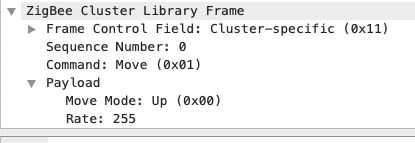
Stop command when done.

However, the move is with 255 rate. This (I guess) makes the bulb to only change to maximum or minimum brightness, but middle values. And, more importantly, this doesn't happen when bound to a Legrand device, the Legrand device (I guess) ignores the rate, working just fine.
Are my though right or am I missing something?
Is there a way to ignore or change the rate?
Or this should be changed in the Legrand firmware?
jd1900
on 25 Jul 2020
@jd1900 hum, on my remotes if my memory is fine it's not a rate of 255 that is sent. I would have to check as I'm using nodered to process inputs & forward commands.
I dont recall any method back in november to change that value (I might be wrong). I'm soon will have my final setup and will check again then.
Regarding the 255 value & the light going to max & min is right to me.
cemonneau
on 27 Jul 2020
@jd1900 hum, on my remotes if my memory is fine it's not a rate of 255 that is sent. I would have to check as I'm using nodered to process inputs & forward commands.
I dont recall any method back in november to change that value (I might be wrong). I'm soon will have my final setup and will check again then.Regarding the 255 value & the light going to max & min is right to me.
Did you directly connected binding the device?
jd1900
on 28 Jul 2020
This issue is stale because it has been open 30 days with no activity. Remove stale label or comment or this will be closed in 7 days
![github-actions[bot] picture](https://avatars2.githubusercontent.com/in/15368?v=4&s=40) github-actions[bot]
on 28 Aug 2020
github-actions[bot]
on 28 Aug 2020
@jd1900 It works for tests, that's the principle. I will do my tests and try to "predict" what the final code should look like with different models. Thanks !
@cemonneau Have you made any progress in this?
jd1900
on 8 Sep 2020
Related issues
 ophilips
·
4Comments
ophilips
·
4Comments
 jwilling
·
4Comments
jwilling
·
4Comments
 jerrychong25
·
4Comments
jerrychong25
·
4Comments
 RefineryX
·
4Comments
RefineryX
·
4Comments
 Courty40
·
4Comments
Courty40
·
4Comments
Most helpful comment
@Koenkk I made the pull request to zigbee-herdsman and added an example of the code I'm currently using to test.
I can also report that I flashed the CC2531 back to the 1.2 version and it paired well too again, and was way easier than with the official gateway.
I also tried another switch that received an OTA update from the official gateway and it works too, and contrary to the Zigate (from what I red) it does not require another router on the network (yeah). The network was only the CC2531 and the switch and no troubles in 1 hour of tests.