Zigbee2mqtt: question about ti cc1352p-2
)
zigbee2mqtt:info 2019-10-19T12:50:02: Starting zigbee-herdsman...
zigbee2mqtt:error 2019-10-19T12:50:09: Error while starting zigbee-herdsman
zigbee2mqtt:error 2019-10-19T12:50:09: Failed to start zigbee
zigbee2mqtt:error 2019-10-19T12:50:09: Exiting...
zigbee2mqtt:error 2019-10-19T12:50:09: Error: SRSP - SYS - version after 6000ms
at Timeout.object.timer.setTimeout [as _onTimeout] (/app/node_modules/zigbee-herdsman/dist/utils/waitress.js:44:24)
at ontimeout (timers.js:436:11)
at tryOnTimeout (timers.js:300:5)
at listOnTimeout (timers.js:263:5)
at Timer.processTimers (timers.js:223:10)
npm
ERR! code
ELIFECYCLE
npm
ERR! errno 1
npm
ERR! [email protected] start: node index.js
npm
ERR! Exit status 1
npm ERR!
npm ERR! Failed at the [email protected] start script.
npm ERR! This is probably not a problem with npm. There is likely additional logging output above.
npm ERR! A complete log of this run can be found in:
npm
ERR! /root/.npm/_logs/2019-10-19T12_50_09_649Z-debug.log
2019-10-19T20:50:09: PM2 log: App [npm:0] exited with code [1] via signal [SIGINT]
2019-10-19T20:50:09: PM2 log: App [npm:0] starting in -fork mode-
2019-10-19T20:50:09: PM2 log: App
 flower87lucky
All 91 comments
serial:
/dev/ttyACM1
/dev/ttyACM0
/dev/serial/by-id/usb-Texas_Instruments_XDS110__02.03.00.18__Embed_with_CMSIS-DAP_L43000GM-if03
/dev/ttyAMA0
/dev/serial/by-id/usb-Texas_Instruments_XDS110__02.03.00.18__Embed_with_CMSIS-DAP_L43000GM-if00
input:
flower87lucky
on 19 Oct 2019
"serial": {
"port": "/dev/ttyACM0"
},
"advanced": {
"pan_id": 6758,
"channel": 15,
flower87lucky
on 19 Oct 2019
I got the same error message with my 2652R board :-(
I also tried to change panid and channel in my configuration.
 hdo
on 19 Oct 2019
hdo
on 19 Oct 2019
-
 bertran1
on 20 Oct 2019
bertran1
on 20 Oct 2019
Can you try with
"serial": {
"port": null,
},
 Koenkk
on 20 Oct 2019
Koenkk
on 20 Oct 2019
Can you try with
"serial": {
"port": null,
},
Thanks.null is not allowed in Zigbee2mqtt Hass.io Add-on .I used Zigbee2mqtt Hass.io Add-on,maybe it may not support at present. I try to install ZigBee 2mqtt directly
flower87lucky
on 21 Oct 2019
Can you try with
"serial": {
"port": null,
},
I'm worried if I flash the firmware in the wrong way?
After cc1352p-2 flashed the firmware, I press reset key and it has no effect.
flower87lucky
on 21 Oct 2019
- Can you try the steps from https://www.zigbee2mqtt.io/information/zigbee2mqtt_fails_to_start.html
- Can you make a screenshot when flashing via Flash programmer v2?
Koenkk
on 21 Oct 2019
- Can you try the steps from https://www.zigbee2mqtt.io/information/zigbee2mqtt_fails_to_start.html
- Can you make a screenshot when flashing via Flash programmer v2?
@Koenkk
I still have the problem that i need to soft reset first (via button press) to start the firmware.
Do you know how to disable this behaviour?
Little change request:
Let the green LED light up when firmware has loaded for quick check ;-)
hdo
on 21 Oct 2019
- Can you try the steps from https://www.zigbee2mqtt.io/information/zigbee2mqtt_fails_to_start.html
- Can you make a screenshot when flashing via Flash programmer v2?

pi@raspberrypi:~ $ ls -l /dev/serial/by-id
total 0
lrwxrwxrwx 1 root root 13 Oct 21 14:23 usb-Texas_Instruments_XDS110__02.03.00.18__Embed_with_CMSIS-DAP_L43000GM-if00 -> ../../ttyACM0
lrwxrwxrwx 1 root root 13 Oct 21 14:23 usb-Texas_Instruments_XDS110__02.03.00.18__Embed_with_CMSIS-DAP_L43000GM-if03 -> ../../ttyACM1
pi@raspberrypi:~ $ test -w /dev/ttyACM0 && echo success || echo failure
success
pi@raspberrypi:~ $ test -w /dev/ttyACM1 && echo success || echo failure
success
pi@raspberrypi:~ $
- Can you try the steps from https://www.zigbee2mqtt.io/information/zigbee2mqtt_fails_to_start.html
- Can you make a screenshot when flashing via Flash programmer v2?
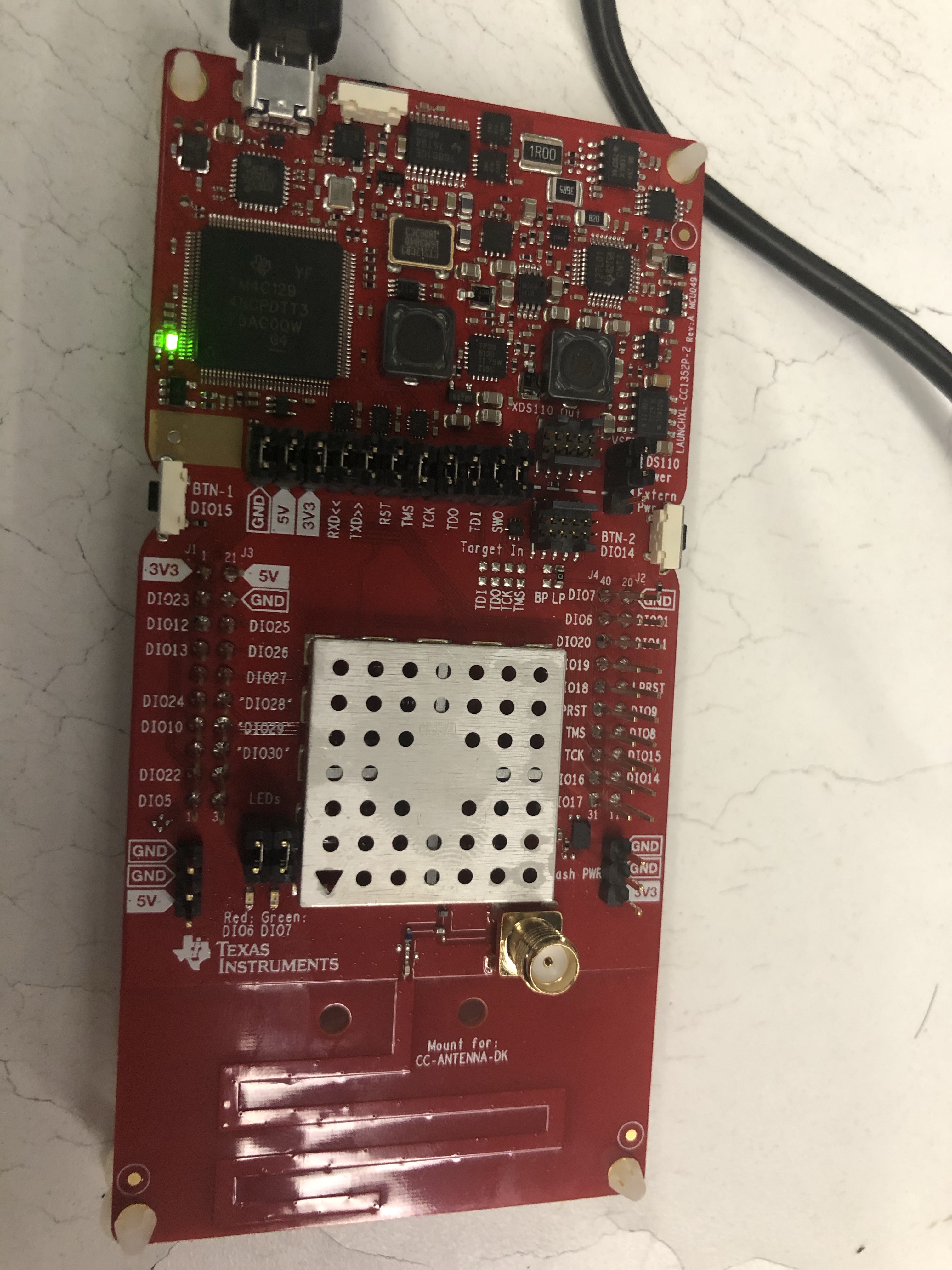
When I connect to raspiberry pi 4b+ ,only the green led on.
flower87lucky
on 21 Oct 2019
@fredrikgk chip revision C is an older revision, right? Is it binary compatible with the E revision?
Koenkk
on 21 Oct 2019
@fredrikgk chip revision C is an older revision, right? Is it binary compatible with the E revision?
@Koenkk How to fix binary to compatible,thanks.
flower87lucky
on 21 Oct 2019
@flower87lucky , @Koenkk , IC revision C is deprecated and not supported. SW is not binary compatible between rev. C and rev. E.
The only alternative is to order a new LaunchPad.
 fredrikgk
on 21 Oct 2019
fredrikgk
on 21 Oct 2019
@fredrikgk
BTW Do you have an idea why i need to soft reset (via button press) each time after USB plug to start the firmware?
hdo
on 21 Oct 2019
@fredrikgk
BTW Do you have an idea why i need to soft reset (via button press) each time after USB plug to start the firmware?
I agree you.
flower87lucky
on 21 Oct 2019
@fredrikgk thanks, I will close this.
Koenkk
on 21 Oct 2019
@fredrikgk
BTW Do you have an idea why i need to soft reset (via button press) each time after USB plug to start the firmware?
I got caught out with the need for soft reset too.
(and thanks for your assistance with this in the z2m issue @hdo)
I agree with your suggestion that either/both of the following would be good:
- No need for soft reset on plug in of device
- One of the LEDs on the MCU side will be used to indicate status or "success"
@Koenkk are either of these doable? should I raise an issue on the zstack fw repo?
 james-fry
on 28 Oct 2019
james-fry
on 28 Oct 2019
@james-fry
This is not a simple task.
I compiled a custom firmware version with LED support and that is also not a good indicator for this problem. I learned the firmware is loading correctly. However the culprit is the onbard debugger of the launchpad. On my Intel NUC i need the soft reset but not on my raspberry pi. There seems to be an issue with the usb handshake or something like this. I don't have any issues using the UART so that's why i think it's the usb part. The UART have other issues though (sending leading ZERO in some circumstances).
hdo
on 28 Oct 2019
Thanks for the info @hdo
I am also on intel so maybe that is why I also need the reset, but its not a big deal when you know you need to do this.
james-fry
on 28 Oct 2019
@hdo Do you have to press the reset button also when the USB cable has been disconnected for a long time?
fredrikgk
on 29 Oct 2019
I compiled a custom firmware version with LED support and that is also not a good indicator for this problem. I learned the firmware is loading correctly. However the culprit is the onbard debugger of the launchpad. On my Intel NUC i need the soft reset but not on my raspberry pi. There seems to be an issue with the usb handshake or something like this. I don't have any issues using the UART so that's why i think it's the usb part. The UART have other issues though (sending leading ZERO in some circumstances).
This is strange, as the reset button only resets the CC1352P, not the debugger.
How is your LaunchPad configured (jumpers) when you are "using UART"?
fredrikgk
on 29 Oct 2019
@hdo Do you have to press the reset button also when the USB cable has been disconnected for a long time?
I have to soft reset each time i plug in the usb power cable.
This is strange, as the reset button only resets the CC1352P, not the debugger.
I not sure about that.
How is your LaunchPad configured (jumpers) when you are "using UART"?
I removed the TX/RX jumpers.
It could also work without removing those jumpers but i noticed some preceeding '0'-byte which disturbs the communication, at least in my environment.
I'm currently working on a zigbee-herdsmann modification to use my tcp2serial adapter without socat (not working with docker) and this (0-byte) happens with the tcp2serial adapter.
Also see: 0-byte
hdo
on 29 Oct 2019
I seem to have a B revision of the launchpad board is this supposed to work?
pi@raspberrypi:~ $ test -w /dev/ttyACM0 && echo success || echo failure
failure
pi@raspberrypi:~ $ test -w /dev/ttyACM1 && echo success || echo failure
failure
getting failure on both write tests.
 a-bailey
on 13 Nov 2019
a-bailey
on 13 Nov 2019
I have board revision B, chip revision E and have same error - zigbee2mqtt won't start.
what could be a problem ?
 dariuszqrek
on 8 Dec 2019
dariuszqrek
on 8 Dec 2019
How do you know what revision board you've got? Going to be a bit annoyed if I wasted $50 on a board that isn't supported when the z2m docs don't mention that only certain revs work :(
 timdonovanuk
on 22 Dec 2019
timdonovanuk
on 22 Dec 2019
It looks like i was wrong, everything is working well now.
There was need to change pan_id in configuration.
As far as i know TI is sending only correct revision now (Board revision B
with chip revision E)
niedz., 22 gru 2019, 18:39 użytkownik timdonovanuk notifications@github.com
napisał:
How do you know what revision board you've got? Going to be a bit annoyed
if I wasted $50 on a board that isn't supported when the z2m docs don't
mention that only certain revs work :(—
You are receiving this because you commented.
Reply to this email directly, view it on GitHub
https://github.com/Koenkk/zigbee2mqtt/issues/2162?email_source=notifications&email_token=AN7QRNMKLWF4HXPQMZH4MLLQZ6Q4VA5CNFSM4JCPVVB2YY3PNVWWK3TUL52HS4DFVREXG43VMVBW63LNMVXHJKTDN5WW2ZLOORPWSZGOEHPVW3I#issuecomment-568286061,
or unsubscribe
https://github.com/notifications/unsubscribe-auth/AN7QRNMT6UHMZBUAIYBKKELQZ6Q4VANCNFSM4JCPVVBQ
.
dariuszqrek
on 23 Dec 2019
I am also having the "need to push the board's reset button before I can start Z2M" issue (CC1352P-2) with my laptop (Intel i7, Xubuntu 16.04) but not on my Odroid XU4 (Ubuntu 18.04). Both connected via USB, jumpers are on their factory defaults.
Am I right that there's nothing we can do about it now? Does anyone know whether it can be fixed at all?
For posterity, this is my working config:
homeassistant: false
permit_join: true
mqtt:
  base_topic: zigbee2mqtt
  server: 'mqtt://localhost'
  user: YOUR_USERNAME
  password: YOUR_PASSWORD
serial:
  port: null
advanced:
  pan_id: 6755
  baudrate: 115200
  report: true
  rtscts: false
  channel: 20
  log_level: debug
  network_key:
    - 1
    - 3
    - 5
    - 7
    - 9
    - 11
    - 13
    - 15
    - 0
    - 2
    - 4
    - 6
    - 8
    - 10
    - 12
    - 13
Hardware (board revision B, printed on both sides of my board):
$ ls -l /dev/serial/by-id
lrwxrwxrwx 1 root root 13 Dez 24 01:39 usb-Texas_Instruments_XDS110__03.00.00.05__Embed_with_CMSIS-DAP_L43001PF-if00 -> ../../ttyACM0
lrwxrwxrwx 1 root root 13 Dez 24 01:39 usb-Texas_Instruments_XDS110__03.00.00.05__Embed_with_CMSIS-DAP_L43001PF-if03 -> ../../ttyACM1

$ test -w /dev/ttyACM0 && echo success || echo failure
success
$ test -w /dev/ttyACM1 && echo success || echo failure
success

$ npm start

> [email protected] start /opt/zigbee2mqtt
> node index.js

zigbee2mqtt:info  2019-12-24 01:50:50: Logging to console and directory: '/opt/zigbee2mqtt/data/log/2019-12-24.01-50-50'
zigbee2mqtt:debug 2019-12-24 01:50:50: Removing old log directory '/opt/zigbee2mqtt/data/log/2019-12-24.01-11-43'
zigbee2mqtt:debug 2019-12-24 01:50:50: Loaded state from file /opt/zigbee2mqtt/data/state.json
zigbee2mqtt:info  2019-12-24 01:50:50: Starting zigbee2mqtt version 1.8.0-dev (commit #66b3bcb)
zigbee2mqtt:info  2019-12-24 01:50:50: Starting zigbee-herdsman...
zigbee2mqtt:debug 2019-12-24 01:50:50: Using zigbee-herdsman with settings: '{"network":{"panID":6755,"extendedPanID":[221,221,221,221,221,221,221,221],"channelList":[20],"networkKey":"HIDDEN"},"databasePath":"/opt/zigbee2mqtt/data/database.db","databaseBackupPath":"/opt/zigbee2mqtt/data/database.db.backup","backupPath":"/opt/zigbee2mqtt/data/coordinator_backup.json","serialPort":{"baudRate":115200,"rtscts":false,"path":null}}'
zigbee2mqtt:info  2019-12-24 01:50:51: zigbee-herdsman started
zigbee2mqtt:info  2019-12-24 01:50:51: Coordinator firmware version: '{"type":"zStack3x0","meta":{"transportrev":2,"product":1,"majorrel":2,"minorrel":7,"maintrel":1,"revision":20191106}}'
zigbee2mqtt:debug 2019-12-24 01:50:51: Zigbee network parameters: {"panID":6755,"extendedPanID":"0xdddddddddddddddd","channel":20}
zigbee2mqtt:info  2019-12-24 01:50:51: Currently 1 devices are joined:
zigbee2mqtt:info  2019-12-24 01:50:51: 0x086bd7fffee976a6 (0x086bd7fffee976a6): 2AJZ4KPKEY - Konke Multi-function button (EndDevice)
zigbee2mqtt:warn  2019-12-24 01:50:51: `permit_join` set to  `true` in configuration.yaml.
zigbee2mqtt:warn  2019-12-24 01:50:51: Allowing new devices to join.
zigbee2mqtt:warn  2019-12-24 01:50:51: Set `permit_join` to `false` once you joined all devices.
zigbee2mqtt:info  2019-12-24 01:50:51: Zigbee: allowing new devices to join.
zigbee2mqtt:info  2019-12-24 01:50:51: Connecting to MQTT server at mqtt://localhost
zigbee2mqtt:info  2019-12-24 01:50:51: Connected to MQTT server
zigbee2mqtt:info  2019-12-24 01:50:51: MQTT publish: topic 'zigbee2mqtt/bridge/state', payload 'online'
zigbee2mqtt:info  2019-12-24 01:50:51: MQTT publish: topic 'zigbee2mqtt/0x086bd7fffee976a6', payload '{"linkquality":99}'
zigbee2mqtt:info  2019-12-24 01:50:51: MQTT publish: topic 'zigbee2mqtt/bridge/config', payload '{"version":"1.8.0-dev","commit":"66b3bcb","coordinator":{"type":"zStack3x0","meta":{"transportrev":2,"product":1,"majorrel":2,"minorrel":7,"maintrel":1,"revision":20191106}},"log_level":"debug","permit_join":true}'
Note: the reset button is the button next to the micro USB port and port: null correctly auto-detected my board.
 CodeFinder2
on 24 Dec 2019
CodeFinder2
on 24 Dec 2019
How do you know what revision board you've got? Going to be a bit annoyed if I wasted $50 on a board that isn't supported when the z2m docs don't mention that only certain revs work :(
The board revision is printed on the back of the board "HW Rev", the chip version can be read out using the Uniflash tool.
For reference, I bought mine on Mouser (Dutch version of the site, but the board came from Texas). I have a HW Rev B and Chip Rev E (2.1).
Still need to test it. I read that you need to re-pair all devices because of the bump to Zigbee stack version 3, is this correct? Perhaps this should be stated on the supported adapters page.
Currently I have a CC2531 hooked up to a Beaglebone Black running native zigbee2mqtt, other than changing the serial:port to whatever the TI board enumerates as, anything else I should know or take into consideration before doing the big ol' switcharoo (re-pair-a-roo?)
Also, does the board auto-detect when you attach an antenna? I have two antenna's connected to 2 CC2531's which I can obviously do without if this board is up and running.
 TASSDevon
on 2 Jan 2020
TASSDevon
on 2 Jan 2020
@TASSDevon: no, it does not auto-detect an external antenna. You have to resolder a tiny capacitor on the board (CC1352P-2) to use the external antenna...unfortunately.
This is how it must look like to use the SMA connector:

I can report an increased signal strength (compared with the PCB antenna), raised from 53.77 to 87.58 on average over 25 measurements (Wifi and Bluetooth nearby, through 2 walls, ~5-6m, hand/finger close to the device for button pressing to generate messages). Tested with a single device (HEIMAN HS2SK smart metering plug, a router).
__Comparison (signal strength, out of 255, all in my locally "best" channel 11):__
- CC1352P-2, PCB antenna (in 3D PLA printed case): 53.77
- CC1352P-2, SMA antenna (dito): 87.58
- CC1352P-2, SMA antenna (dito), shielded using self-adhesive copper foil (0.1mm): 84.72 vs 77.78 (unshielded without any case, recorded right after the shielded measurements were taken to reduce the impact of environmental conditions)
- dito but with
transmit_powerset to19(max): 87,09 - CC2531, PCB antenna: 0.55
- CC2531, SMA antenna (re-soldered): 30.50
- CC2530 + CC2591 (SMA antenna + amplifier): 35.15
=> A shielded CC1352P-2 in a case for protection purposes with an external antenna seems to be the best option (also showed less deviations in the signal quality) :see_no_evil:
Nothing special that I am aware of, you should consider when moving to this chip, except for the re-pairing. And even re-pairing may not be necessary.
CodeFinder2
on 2 Jan 2020
See https://github.com/Koenkk/zigbee-herdsman/issues/113#issuecomment-569619621 - there is hope that repairing all devices is not necessary. I'm holding off moving to the CC1352P-2 until confirmed. I have 60+ devices and repairing will take an entire weekend :)
timdonovanuk
on 4 Jan 2020
@Koenkk may (some of) these information be relevant for the docs (=> update)?
CodeFinder2
on 7 Jan 2020
See Koenkk/zigbee-herdsman#113 (comment) - there is hope that repairing all devices is not necessary. I'm holding off moving to the CC1352P-2 until confirmed. I have 60+ devices and repairing will take an entire weekend :)
Unless something changed, moving from a z-stack 1.2.x to z-stack 3.x coordinator requires a re-pair of all devices.
james-fry
on 7 Jan 2020
See Koenkk/zigbee-herdsman#113 (comment) - there is hope that repairing all devices is not necessary. I'm holding off moving to the CC1352P-2 until confirmed. I have 60+ devices and repairing will take an entire weekend :)
Unless something changed, moving from a z-stack 1.2.x to z-stack 3.x coordinator requires a re-pair of all devices.
Have you actually tried this yourself (and failed)? As it is still said in the linked issue by Koenkk ("I think this can already be done without any code changes [...]."), it may be possible ...
CodeFinder2
on 7 Jan 2020
Indeed, has anyone actually already tried this so they can confirm it works or not (and perhaps for which devices it does not work).
I will give it a try on Saturday and report back.
TASSDevon
on 7 Jan 2020
What is the solution to the problem? I have the exact same error with a brand new CC1352P-2 (board rev. B, chip rev. E):
pi@rpi4:~/zigbee2mqtt $ npm start

> [email protected] start /home/pi/zigbee2mqtt
> node index.js

zigbee2mqtt:info  2020-01-14 18:07:33: Logging to console and directory: '/home/pi/zigbee2mqtt/data/log/2020-01-14.18-07-33'
zigbee2mqtt:info  2020-01-14 18:07:34: Starting zigbee2mqtt version 1.8.0 (commit #da4d26a)
zigbee2mqtt:info  2020-01-14 18:07:34: Starting zigbee-herdsman...
zigbee2mqtt:error 2020-01-14 18:07:41: Error while starting zigbee-herdsman
zigbee2mqtt:error 2020-01-14 18:07:41: Failed to start zigbee
zigbee2mqtt:error 2020-01-14 18:07:41: Exiting...
zigbee2mqtt:error 2020-01-14 18:07:41: Error: SRSP - SYS - version after 6000ms
    at Timeout._onTimeout (/home/pi/zigbee2mqtt/node_modules/zigbee-herdsman/dist/utils/waitress.js:44:24)
    at listOnTimeout (internal/timers.js:531:17)
    at processTimers (internal/timers.js:475:7)
npm ERR! code ELIFECYCLE
npm ERR! errno 1
npm ERR! [email protected] start: `node index.js`
npm ERR! Exit status 1
npm ERR!
npm ERR! Failed at the [email protected] start script.
npm ERR! This is probably not a problem with npm. There is likely additional logging output above.

npm ERR! A complete log of this run can be found in:
npm ERR!     /home/pi/.npm/_logs/2020-01-14T17_07_41_611Z-debug.log
The ports are writeable, and I changed the pan ID. The setup works perfectly, if I re-connect the CC2531.
The mentioned log file contains:
0 info it worked if it ends with ok
1 verbose cli [ '/usr/bin/node', '/usr/bin/npm', 'start' ]
2 info using [email protected]
3 info using [email protected]
4 verbose run-script [ 'prestart', 'start', 'poststart' ]
5 info lifecycle [email protected]~prestart: [email protected]
6 info lifecycle [email protected]~start: [email protected]
7 verbose lifecycle [email protected]~start: unsafe-perm in lifecycle true
8 verbose lifecycle [email protected]~start: PATH: /usr/lib/node_modules/npm/node_modules/npm-lifecycle/node-gyp-bin:/home/pi/zigbee2mqtt/node_modules/.bin:/usr/local/sbin:/usr/local/bin:/usr/sbin:/usr/bin:/sbin:/bin:/usr/local/games:/usr/games
9 verbose lifecycle [email protected]~start: CWD: /home/pi/zigbee2mqtt
10 silly lifecycle [email protected]~start: Args: [ '-c', 'node index.js' ]
11 silly lifecycle [email protected]~start: Returned: code: 1  signal: null
12 info lifecycle [email protected]~start: Failed to exec start script
13 verbose stack Error: [email protected] start: `node index.js`
13 verbose stack Exit status 1
13 verbose stack     at EventEmitter.<anonymous> (/usr/lib/node_modules/npm/node_modules/npm-lifecycle/index.js:332:16)
13 verbose stack     at EventEmitter.emit (events.js:223:5)
13 verbose stack     at ChildProcess.<anonymous> (/usr/lib/node_modules/npm/node_modules/npm-lifecycle/lib/spawn.js:55:14)
13 verbose stack     at ChildProcess.emit (events.js:223:5)
13 verbose stack     at maybeClose (internal/child_process.js:1021:16)
13 verbose stack     at Process.ChildProcess._handle.onexit (internal/child_process.js:283:5)
14 verbose pkgid [email protected]
15 verbose cwd /home/pi/zigbee2mqtt
16 verbose Linux 4.19.75-v7l+
17 verbose argv "/usr/bin/node" "/usr/bin/npm" "start"
18 verbose node v12.14.1
19 verbose npm  v6.13.4
20 error code ELIFECYCLE
21 error errno 1
22 error [email protected] start: `node index.js`
22 error Exit status 1
23 error Failed at the [email protected] start script.
23 error This is probably not a problem with npm. There is likely additional logging output above.
24 verbose exit [ 1, true ]
Any help is really appreciated! :-)
 jrhansen
on 14 Jan 2020
jrhansen
on 14 Jan 2020
@jrhansen connect the board and then press the reset button...
CodeFinder2
on 14 Jan 2020
@CodeFinder2 Already tried it, but tried it again with the same error. The correct sequence is to power the board, and THEN momentarily press the button close to the USB connector, right? Not press the button while connecting the board? Should I see any activity on the LEDs when resetting the board?
jrhansen
on 14 Jan 2020
I just did the switch, used port 'null' for autodetect, with the database restore 'trick' and changing the pan_id as stated on the config page, here's what I found:
- Eurotronics Zigbee valve automatically got picked up, no re-pairing required
- Xiaomi Mija sensors all needed to be re-paired but it was SO much easier than with the old CC2351 (with that one I usually had to try it a couple of times close to the coordinator for them to pair, here it went from first try even across my house)
- 2 of my 5 ikea tradfri outlets re-paired immediately, for the other 3 I had to explicitly remove them from the network first for some reason
- CC2351 router repaired immediately
The signal quality before:

The signal quality after:

So a nice little bit of improvement there, I should get an SMA antenna to increase that even more, anyone can recommend me one?
If anyone else has questions about switching to the TI hardware, let me know. Aside from the 3 tradfri outlets and figuring out how to solve the situation that they didn't want to repair, it took me perhaps an hour or so to do everything.
TASSDevon
on 14 Jan 2020
“database restore 'trick'”? :-)
jrhansen
on 14 Jan 2020
“database restore 'trick'”? :-)
https://github.com/Koenkk/zigbee-herdsman/issues/113#issuecomment-569619621
CodeFinder2
on 14 Jan 2020
[...]
So a nice little bit of improvement there, I should get an SMA antenna to increase that even more, anyone can recommend me one? [...]
I bought this one (because it was also labeled "Zigbee") and it works good, see my post above: https://www.digikey.de/product-detail/de/linx-technologies-inc/ANT-2.4-CW-HW-SMA/ANT-2.4-CW-HW-SMA-ND/2391322 (8€)
Don't know if any similar (Cheap Chinese 😂) SMA 2.4 GHz antenna would do the same job. 😁
CodeFinder2
on 14 Jan 2020
What is the solution to the problem? I have the exact same error with a brand new CC1352P-2 (board rev. B, chip rev. E):
pi@rpi4:~/zigbee2mqtt $ npm start

> [email protected] start /home/pi/zigbee2mqtt
> node index.js

zigbee2mqtt:info  2020-01-14 18:07:33: Logging to console and directory: '/home/pi/zigbee2mqtt/data/log/2020-01-14.18-07-33'
zigbee2mqtt:info  2020-01-14 18:07:34: Starting zigbee2mqtt version 1.8.0 (commit #da4d26a)
zigbee2mqtt:info  2020-01-14 18:07:34: Starting zigbee-herdsman...
zigbee2mqtt:error 2020-01-14 18:07:41: Error while starting zigbee-herdsman
zigbee2mqtt:error 2020-01-14 18:07:41: Failed to start zigbee
zigbee2mqtt:error 2020-01-14 18:07:41: Exiting...
zigbee2mqtt:error 2020-01-14 18:07:41: Error: SRSP - SYS - version after 6000ms
    at Timeout._onTimeout (/home/pi/zigbee2mqtt/node_modules/zigbee-herdsman/dist/utils/waitress.js:44:24)
    at listOnTimeout (internal/timers.js:531:17)
    at processTimers (internal/timers.js:475:7)
npm ERR! code ELIFECYCLE
npm ERR! errno 1
npm ERR! [email protected] start: `node index.js`
npm ERR! Exit status 1
npm ERR!
npm ERR! Failed at the [email protected] start script.
npm ERR! This is probably not a problem with npm. There is likely additional logging output above.

npm ERR! A complete log of this run can be found in:
npm ERR!     /home/pi/.npm/_logs/2020-01-14T17_07_41_611Z-debug.log
The ports are writeable, and I changed the pan ID. The setup works perfectly, if I re-connect the CC2531.
The mentioned log file contains:
0 info it worked if it ends with ok
1 verbose cli [ '/usr/bin/node', '/usr/bin/npm', 'start' ]
2 info using [email protected]
3 info using [email protected]
4 verbose run-script [ 'prestart', 'start', 'poststart' ]
5 info lifecycle [email protected]~prestart: [email protected]
6 info lifecycle [email protected]~start: [email protected]
7 verbose lifecycle [email protected]~start: unsafe-perm in lifecycle true
8 verbose lifecycle [email protected]~start: PATH: /usr/lib/node_modules/npm/node_modules/npm-lifecycle/node-gyp-bin:/home/pi/zigbee2mqtt/node_modules/.bin:/usr/local/sbin:/usr/local/bin:/usr/sbin:/usr/bin:/sbin:/bin:/usr/local/games:/usr/games
9 verbose lifecycle [email protected]~start: CWD: /home/pi/zigbee2mqtt
10 silly lifecycle [email protected]~start: Args: [ '-c', 'node index.js' ]
11 silly lifecycle [email protected]~start: Returned: code: 1  signal: null
12 info lifecycle [email protected]~start: Failed to exec start script
13 verbose stack Error: [email protected] start: `node index.js`
13 verbose stack Exit status 1
13 verbose stack     at EventEmitter.<anonymous> (/usr/lib/node_modules/npm/node_modules/npm-lifecycle/index.js:332:16)
13 verbose stack     at EventEmitter.emit (events.js:223:5)
13 verbose stack     at ChildProcess.<anonymous> (/usr/lib/node_modules/npm/node_modules/npm-lifecycle/lib/spawn.js:55:14)
13 verbose stack     at ChildProcess.emit (events.js:223:5)
13 verbose stack     at maybeClose (internal/child_process.js:1021:16)
13 verbose stack     at Process.ChildProcess._handle.onexit (internal/child_process.js:283:5)
14 verbose pkgid [email protected]
15 verbose cwd /home/pi/zigbee2mqtt
16 verbose Linux 4.19.75-v7l+
17 verbose argv "/usr/bin/node" "/usr/bin/npm" "start"
18 verbose node v12.14.1
19 verbose npm  v6.13.4
20 error code ELIFECYCLE
21 error errno 1
22 error [email protected] start: `node index.js`
22 error Exit status 1
23 error Failed at the [email protected] start script.
23 error This is probably not a problem with npm. There is likely additional logging output above.
24 verbose exit [ 1, true ]
Any help is really appreciated! :-)
I also have the same issues...
Started out with 2x CC2531 w/ SMA antenna (coordinator and router), but signal strength was far from ideal. Therefore, "upgraded" to a brand new CC1352P-2 (in future with the SMA antenna). Upgrade part seems to be very tricky to say the least. Platform: Home-Assistant w/ add-on ZigBee2MQTT (dev branch also tested) and Mosquitto broker (official). No luck until now. IMHO: hold off the upgrade part until it is/has been resolved. BTW the null (even with quotes) trick or using two serial ports is not permitted with the Home-Assistant ZigBee2MQTT addon.
Will update this post if solved.
SOLVED! See the 2 comments beneath from CodeFinder2:
https://github.com/Koenkk/zigbee2mqtt/issues/2162#issuecomment-574414860
https://github.com/Koenkk/zigbee2mqtt/issues/2162#issuecomment-574416110
 remkolems
on 14 Jan 2020
remkolems
on 14 Jan 2020
@remkolems I got it working already with HA and hassio addon (just as a test / proof of concept before I really use the CC1352 as my daily driver).
This should give you a working start (Hassio addon zigbee2mqtt):
{
  "data_path": "/share/zigbee2mqtt-edge",
  "devices": "devices.yaml",
  "groups": "groups.yaml",
  "homeassistant": true,
  "permit_join": false,
  "mqtt": {
    "base_topic": "zigbee2mqtt",
    "server": "mqtt://core-mosquitto",
    "user": "YOUR_USERNAME",
    "password": "YOUR_PASSWORD"
  },
  "serial": {
    "port": "/dev/ttyACM0"
  },
  "advanced": {
    "baudrate": 115200,
    "log_level": "info",
    "rtscts": false,
    "report": true,
    "pan_id": 6755,
    "last_seen": "ISO_8601",
    "channel": 25,
    "availability_blacklist": [],
    "network_key": [ YOUR_KEY_HERE ]
  },
  "ban": [],
  "whitelist": [],
  "queue": {},
  "socat": {
    "enabled": false,
    "master": "pty,raw,echo=0,link=/dev/ttyZ2M,mode=777",
    "slave": "tcp-listen:8485,keepalive,nodelay,reuseaddr,keepidle=1,keepintvl=1,keepcnt=5",
    "restartdelay": 1,
    "initialdelay": 1,
    "options": "-d -d",
    "log": false
  }
}
PS: the CC2531s are really cheap/simple boards, see my post here regarding signal strength.
EDIT: only tested with -edge variant yet.
CodeFinder2
on 15 Jan 2020
@CodeFinder2 Already tried it, but tried it again with the same error. The correct sequence is to power the board, and THEN momentarily press the button close to the USB connector, right? Not press the button while connecting the board? Should I see any activity on the LEDs when resetting the board?
Exactly:
- Connect it first.
- After that (you just need to do this once, the delay after you connected your board doesn't matter), press the button next ot the USB connector once (momentarily/shortly).
- On my board, there's neither LED activitiy nor a hearable "click" when pushing the button shortly.
- Then start zigbee2mqtt.
This is working for me (tested with dev branch but should also work with v1.8.0).
CodeFinder2
on 15 Jan 2020
@CodeFinder2 Thank you! It is working now! Looks like we almost had the same config! I copied some missing items from your advanced section and pressed the reset button once!
For reference purposes: my previous ZigBee2MQTT Home-Assistant addon config.
Note: don't use what I did before mqtt://YOUR_BROKER:1883. In the end it causes random connections issues with MQTT server. Use what @CodeFinder2 suggested: mqtt://core-mosquitto.
{
  "data_path": "/share/zigbee2mqtt",
  "devices": "devices.yaml",
  "groups": "groups.yaml",
  "homeassistant": true,
  "permit_join": false,
  "mqtt": {
    "base_topic": "zigbee2mqtt",
    "server": "mqtt://YOUR_BROKER:1883",
    "user": "YOUR_USERNAME",
    "password": "YOUR_PASSWORD"
  },
  "serial": {
    "port": "/dev/ttyACM1"
  },
  "advanced": {
    "pan_id": 6755,
    "channel": 25,
    "network_key": [
      1,
      3,
      5,
      7,
      9,
      11,
      13,
      15,
      0,
      2,
      4,
      6,
      8,
      10,
      12,
      13
    ],
    "availability_blacklist": []
  },
  "ban": [],
  "whitelist": [],
  "queue": {},
  "socat": {
    "enabled": false,
    "master": "pty,raw,echo=0,link=/dev/ttyZ2M,mode=777",
    "slave": "tcp-listen:8485,keepalive,nodelay,reuseaddr,keepidle=1,keepintvl=1,keepcnt=5",
    "restartdelay": 1,
    "initialdelay": 1,
    "options": "-d -d",
    "log": false
  }
}
My current config that works wonders. Thanks to @CodeFinder2. Hugely appreciated!
{
  "data_path": "/share/zigbee2mqtt",
  "devices": "devices.yaml",
  "groups": "groups.yaml",
  "homeassistant": true,
  "permit_join": false,
  "mqtt": {
    "base_topic": "zigbee2mqtt",
    "server": "mqtt://core-mosquitto",
    "user": "YOUR_USERNAME",
    "password": "YOUR_PASSWORD"
  },
  "serial": {
    "port": "/dev/ttyACM1"
  },
  "advanced": {
    "baudrate": 115200,
    "log_level": "info",
    "rtscts": false,
    "report": true,
    "pan_id": 6755,
    "last_seen": "ISO_8601",
    "channel": 25,
    "network_key": [
      1,
      3,
      5,
      7,
      9,
      11,
      13,
      15,
      0,
      2,
      4,
      6,
      8,
      10,
      12,
      13
    ],
    "availability_blacklist": []
  },
  "ban": [],
  "whitelist": [],
  "queue": {},
  "socat": {
    "enabled": false,
    "master": "pty,raw,echo=0,link=/dev/ttyZ2M,mode=777",
    "slave": "tcp-listen:8485,keepalive,nodelay,reuseaddr,keepidle=1,keepintvl=1,keepcnt=5",
    "restartdelay": 1,
    "initialdelay": 1,
    "options": "-d -d",
    "log": false
  }
}
Oh to find out which ACM to use (in my case ttyACM1). Use command: ls -l /dev/serial/by-id
YOUR_USERNAME@YOUR_HOSTNAME:~$ ls -l /dev/serial/by-id
total 0
lrwxrwxrwx 1 root root 13 Jan 15 00:28 usb-0658_0200-if00 -> ../../ttyACM0
lrwxrwxrwx 1 root root 13 Jan 15 00:28 usb-FTDI_FT232R_USB_UART_AL1MWEYZ-if00-port0 -> ../../ttyUSB0
lrwxrwxrwx 1 root root 13 Jan 15 00:28 usb-RFXCOM_RFXtrx433_A12HDMML-if00-port0 -> ../../ttyUSB1
lrwxrwxrwx 1 root root 13 Jan 15 00:28 usb-Texas_Instruments_XDS110__03.00.00.05__Embed_with_CMSIS-DAP_L43001DM-if00 -> ../../ttyACM1
lrwxrwxrwx 1 root root 13 Jan 15 00:28 usb-Texas_Instruments_XDS110__03.00.00.05__Embed_with_CMSIS-DAP_L43001DM-if03 -> ../../ttyACM2
I'm in the middle of a broken setup, too. I was getting the Error: SRSP - SYS - version after 6000ms error until I made the following changes (not sure if all were needed):
- I'm running in Proxmox, so I changed from USB Vendor Device ID to USB port assignment
- Rebooted the whole Proxmox computer
- Hit the reset button on board
Since "null" isn't supported via HA, I'm running with "port": "/dev/ttyACM1" and I got a connection in the end. However, I still haven't managed to get any traffic to show up. I restored the database.db and it looks like they're all getting loaded, but nothing past that yet.
Edit: Well, I tried reconnecting one of my Xiaomi buttons and it started working after I did the reconnect. This won't be fun if I need to reconnect them all (~70 devices).
 docBliny
on 15 Jan 2020
docBliny
on 15 Jan 2020
I'm in the middle of a broken setup, too. I was getting the
Error: SRSP - SYS - version after 6000mserror until I made the following changes (not sure if all were needed):
- I'm running in Proxmox, so I changed from USB Vendor Device ID to USB port assignment
- Rebooted the whole Proxmox computer
- Hit the reset button on board
Since "null" isn't supported via HA, I'm running with
"port": "/dev/ttyACM1"and I got a connection in the end. However, I still haven't managed to get any traffic to show up. I restored thedatabase.dband it looks like they're all getting loaded, but nothing past that yet.Edit: Well, I tried reconnecting one of my Xiaomi buttons and it started working after I did the reconnect. This won't be fun if I need to reconnect them all (~70 devices).
That is what I had to do also (still doing to be honest). A real pain in the a s s ....
remkolems
on 15 Jan 2020
Yup, just spent the evening resetting everything. Found several water sensors that had run out of battery while I was at it, so something positive. Also looked like the Aqara water sensors would connect just by activating them twice (short press). The first connect would fail with Failed to interview 'water_leak_15', device has not successfully been paired but the second attempt would register it (without the long hold to "reset").
Now I just need to get my IKEA remotes to work via groups. I guess I'll need to do the whole network sniffing thing to get them connected again.
Edit: Thank goodness. You can get the group ID by turning on debug logging now instead of building a sniffer USB stick etc...
docBliny
on 15 Jan 2020
- Powered up an old RPi3 with a fresh Raspbian lite SD card.
- Installed Mosquitto.
- Followed the Z2M installation instructions.
- Setup the correct port (and initially forgot to set a different pan_id than my existing Zigbee network).
- On first 'npm start' I got the 'SRSP - SYS - version after 6000ms' error.
- Pushed the reset button.
- 'npm start' again -> Same error.
- Disconnected the CC1352P-2 from the USB port.
- Reconnected the board.
- 'npm start' again -> Same error.
- Pushed the reset button.
- 'npm start' -> Error saying that the pan_is already in use!
- Changed the pan_id.
- 'npm start' -> Z2M now starts up correctly :-)
So, it seems that things have started to work now even though I tried the reset button and all kinds of other stuff yesterday to no avail. I tried to break it again by reconnecting the board (in different USB ports), rebooting, pressing the reset button, changing the pan_id, going from '/dev/ACM0' to 'null' in the port setup, but it seems unbreakable now. I can join new devices without trouble, and I don't have to press the reset button again - even after a power cycle (??).
Now, I will go back to implementing the board in my existing setup with the risk of having the rejoin everything.
When I did experiments yesterday with my existing network, when the CC1352P-2 failed I had to go back to the CC2531, and I had to rejoin all devices even though I had backed up the 'data' folder. So...
Should I backup other folders than the 'data' folder? The entire Z2M folder, or something else in the system?
jrhansen
on 15 Jan 2020
@jrhansen IMHO, the data directory is sufficient. But going forward and backward between z stack versions (1.2 vs 3) can be tricky / may require re-pairing (regardless of a backup).
My CC1352P-2 is now running as my daily driver for a few days now with Z2M 1.9.0 from HassIO and everything's working fine so far. No issues and (re-) pairing of all my devices was SO smooth (I did not even try w/o re-pairing as I wanted a fresh install), it even made kinda fun. 😂
CodeFinder2
on 20 Jan 2020
@jrhansen IMHO, the
datadirectory is sufficient. But going forward and backward between z stack versions (1.2 vs 3) can be tricky / may require re-pairing (regardless of a backup).My CC1352P-2 is now running as my daily driver for a few days now with Z2M 1.9.0 from HassIO and everything's working fine so far. No issues and (re-) pairing of all my devices was SO smooth (I did not even try w/o re-pairing as I wanted a fresh install), it even made kinda fun. 😂
@CodeFinder2
I've just started playing with z2m and installed a standalone docker installation on a RPi4 with the CC2531. Currently I'm waiting for my CC1352P-2, and when it arrives I would like to move my z2m to my HA hardware running on a NUC i7.
My question to you would be; should I run the z2m HA addon or would I benefit from running z2m as a docker install on the same hardware?
 TheStigh
on 26 Jan 2020
TheStigh
on 26 Jan 2020
[...]
My question to you would be; should I run the z2m HA addon or would I benefit from running z2m as a docker install on the same hardware?
The advantage of the hassio addon is it's simplicity in installing / managing it (single web instance: HA). Behind the scenes, it's a docker container as well (you might want to take a look at the "Portrainer" addon).
I am using the hassio addon and I'm quite happy with it. Also having features like 'secrets' and accessing the log in HA should be taken into consideration.
The disadvantage is mainly that you are depending on the release cycle of the addon (although this is normally the same as for Z2M). Also switching between stable/dev might be a bit more complicated sometimes.
So, as usual: it depends. 🙈 I would suggest that you start using the hassio addon first. By the way, you can also use somewhat both: install both, do all the pairing and configuration you require in the addon. Then you should be fine in copying the config over to the docker instance. Of cause you shouldn't run both simultaneously. (Going the other way round is also possible but requires YAML > JSON converting and a bit care.) But this way, switching between both should be just a 'stop one, start the other' (possibly updating / copying config first).
Hope this helps!
CodeFinder2
on 26 Jan 2020
The disadvantage is mainly that you are depending on the release cycle of the addon (although this is normally the same as for Z2M).
There is an edge version of the addon that installs the latest dev z2m.
Downside is that to upgrade you need to delete the addon and reinstall. (Needing to copy/paste the config ofc)
james-fry
on 26 Jan 2020
The disadvantage is mainly that you are depending on the release cycle of the addon (although this is normally the same as for Z2M).
There is an edge version of the addon that installs the latest dev z2m.
Downside is that to upgrade you need to delete the addon and reinstall. (Needing to copy/paste the config ofc)
Yes, but (although this is solved now): https://github.com/danielwelch/hassio-zigbee2mqtt/issues/284
I wrote that because one should consider that there's the "addon in between", adding an additional/potential source of errors.
CodeFinder2
on 27 Jan 2020
@CodeFinder2 @james-fry
Thanks to both of you for the answers!
I already use Portainer on my RPi4 running the test-installation of z2m together with z2m-assistant.
May I ask another question;
My house do have several floors and there is no way my Coordinator (or any powered zigbee devices) will reach one particular floor as it is concrete in all walls. The only thing I have there that reaches the rest of the house are cabled Cat6 network. My plan was to set my RPi4 on this floor with a CC2531, but the question is then, what firmware should I use on this so it communicates correct with HA/z2m (with CC1352P-2) on the main floor? Or am I totally off understanding how z2m works?
PS; my CC1352P-2 arrives next week - is there any difference in setting it up on z2m addon vs z2m standalone? Anything I should be aware of (hoping I don't get a deprecated revision, but it is coming directly from TI).
TheStigh
on 27 Jan 2020
[...]
So a nice little bit of improvement there, I should get an SMA antenna to increase that even more, anyone can recommend me one? [...]I bought this one (because it was also labeled "Zigbee") and it works good, see my post above: https://www.digikey.de/product-detail/de/linx-technologies-inc/ANT-2.4-CW-HW-SMA/ANT-2.4-CW-HW-SMA-ND/2391322 (8€)
Don't know if any similar (Cheap Chinese 😂) SMA 2.4 GHz antenna would do the same job. 😁
If you already have paired devices to the CC1352P-2 and then do the mod/add the external antenna, do you have to re-pair afterwards? Or is that part 'plug-and-play' after re-soldering the capacitor?
TheStigh
on 28 Jan 2020
@CodeFinder2 @james-fry
Thanks to both of you for the answers!
I already use Portainer on my RPi4 running the test-installation of z2m together with z2m-assistant.May I ask another question;
My house do have several floors and there is no way my Coordinator (or any powered zigbee devices) will reach one particular floor as it is concrete in all walls. The only thing I have there that reaches the rest of the house are cabled Cat6 network. My plan was to set my RPi4 on this floor with a CC2531, but the question is then, what firmware should I use on this so it communicates correct with HA/z2m (with CC1352P-2) on the main floor? Or am I totally off understanding how z2m works?
If you are sure that it's impossible to get any Zigbee signal to that floor, you can surely use your RPi (connected via Ethernet) and create a separate Zigbee network (in addition to the one created by your CC1352P-2 coordinator). On the RPi would then run Z2M as well, publishing messages to the same MQTT broker (via Ethernet). The CC2531 would then be a coordinator as well (but spawning a DIFFERENT network). Although I have never used this kind of setup myself but you are welcome to report your experiences here! :-)
PS; my CC1352P-2 arrives next week - is there any difference in setting it up on z2m addon vs z2m standalone? Anything I should be aware of (hoping I don't get a deprecated revision, but it is coming directly from TI).
Not really. Except that the addon requires JSON and Z2M requires YAML configuration. Also "port: null" does not work in the Hassio addon. According to my knowledge, TI only sends the recent revisions so no need to worry.
CodeFinder2
on 28 Jan 2020
[...]
So a nice little bit of improvement there, I should get an SMA antenna to increase that even more, anyone can recommend me one? [...]I bought this one (because it was also labeled "Zigbee") and it works good, see my post above: https://www.digikey.de/product-detail/de/linx-technologies-inc/ANT-2.4-CW-HW-SMA/ANT-2.4-CW-HW-SMA-ND/2391322 (8€)
Don't know if any similar (Cheap Chinese 😂) SMA 2.4 GHz antenna would do the same job. 😁If you already have paired devices to the CC1352P-2 and then do the mod/add the external antenna, do you have to re-pair afterwards? Or is that part 'plug-and-play' after re-soldering the capacitor?
I have started the pairing (re-pairing because I used a CC2531 previously) after I did the mod but if you do the pairing before the mod, no re-pairing should be required. You may want to keep in mind that IF you damage the board during the re-soldering (which is VERY unlikely), you have to go back to the CC2531 (= repairing). However, it's virtually impossible to destroy the board although it can happen that you destroy the capacitor because its very tiny and it depends on your soldering skills. Nonetheless, this isn't a real problem as well since they are really cheap. ;-)
CodeFinder2
on 28 Jan 2020
I did the the capacitor mod and was not successful. I destroyed the capacitor completely. Signal with the antenna became half of CC2531 (oops to say the least), So watch out! I had to buy a new board to continue my journey.... The bloody cap is tiny! You will need a magnifying glass.
Planning to repair my board, once I have the correct soldering station and miscellaneous required tools. I will keep this thread up to date.
See also (specs of capacitor and where to buy):
(https://zigbee2mqtt.discourse.group/t/cc1352p-switch-to-external-antenna-instead-of-pcb/681/6?u=rlems)
and
https://zigbee2mqtt.discourse.group/t/cc1352p-switch-to-external-antenna-instead-of-pcb/681/7?u=rlems
remkolems
on 7 Feb 2020
I really don't understand the design. Why even bother putting a SMA connector on...but then require phsyical modification to the board to actually support it. facepalm.
timdonovanuk
on 7 Feb 2020
I really don't understand the design. Why even bother putting a SMA connector on...but then require phsyical modification to the board to actually support it. facepalm.
Because its a hardware dev kit not an "end user" device.
TI are expecting this to be used to develop new devices - hence assumption there will be support engineers well able to resolder a SMD device.
james-fry
on 7 Feb 2020
I understand that, but thats not really a good justification, IMO. They also could have just shipped the entire board as a bag of parts and expect Ikea style self assembly? 😆
There are various jumpers on the board that allow changes, rather than having to solder a trace on..same principle.
timdonovanuk
on 7 Feb 2020
I understand that, but thats not really a good justification, IMO. They also could have just shipped the entire board as a bag of parts and expect Ikea style self assembly? 😆
There are various jumpers on the board that allow changes, rather than having to solder a trace on..same principle.
I thought on this too when I 1st saw the design.
I'm no RF engineer, but I think the losses and EMC issues from adding a jumper in the signal path would be unacceptable.
james-fry
on 7 Feb 2020
@remkolems Sorry to hear that and thanks for sharing your insights with us! That's why I warned about the mod/resoldering. 😑
Hope you can finally repair it!
CodeFinder2
on 7 Feb 2020
I really don't understand the design. Why even bother putting a SMA connector on...but then require phsyical modification to the board to actually support it. facepalm.
You cannot use a conventional jumper for RF signals, that will introduce impedance mismatch and RF signal loss.
Similarly, you cannot simply split the RF path in two. Even when using a proper RF design splitter, which can be implemented on PCB, you would get 3 dB loss. That is not acceptable.
The design is made for TI´s customers to easily be able to evaluate the radiated performance out of the box. Thus, the PCB antennas are connected by default. The SMA is intended primarily for customers who want to do advanced RF testing by connecting the radio directly to RF instruments (spectrum analyser, RF signal generator, etc.). These are typically fully capable of soldering a 0402 component.
@remkolems , the simplest way to solder the capacitor is to use a hot-air soldering iron. Combine with generous amounts of liquid flux and a good microscope and it is quite easy.
fredrikgk
on 7 Feb 2020
Thanks guys for the clue to press the soft reset button next to the USB connector. So happy it's working now.
 patrickharris
on 6 Mar 2020
patrickharris
on 6 Mar 2020
I flashed my CC1352P-2 and I'm ready to change the panID and the channel (avoid wifi interferences) so I must repair my devices (no problem).
But I have a question: after paired the devices z2m will change the actual ID (eg 0x....) of my devices?
 valepe
on 25 Mar 2020
valepe
on 25 Mar 2020
@valepe No, those IDs won't change.
CodeFinder2
on 25 Mar 2020
@TASSDevon: no, it does not auto-detect an external antenna. You have to resolder a tiny capacitor on the board (CC1352P-2) to use the external antenna...unfortunately.
Can you tell me how you move this capacitor? Did you use a hot air station or a solder tip?
Thanks
valepe
on 28 Mar 2020
With a fine solder tip ;-)
CodeFinder2
on 28 Mar 2020
With a fine solder tip ;-)
Did it in a breaveheart moment. :)
I used and edge tip but wtf these 0402 components are too small for my tastes...
valepe
on 28 Mar 2020
Did the need to reset CC1352P-2/CC26X2R1 ever get solved? Is it possible to solve this in firmware or was it a really bad choice to buy those boards when it randomly require a reset?
 alekslyse
on 21 May 2020
alekslyse
on 21 May 2020
Did the need to reset CC1352P-2/CC26X2R1 ever get solved? Is it possible to solve this in firmware or was it a really bad choice to buy those boards when it randomly require a reset?
Mine has been running for months without a reset required.
TASSDevon
on 21 May 2020
Did the need to reset CC1352P-2/CC26X2R1 ever get solved? Is it possible to solve this in firmware or was it a really bad choice to buy those boards when it randomly require a reset?
Mine has been running for months without a reset required.
Dito 😏
CodeFinder2
on 21 May 2020
Strange. On raspberry pi or nuc/pc? I'm running on a nuc and seem to need a reset from time to time. From what I understand it has not been a problem on pi's
alekslyse
on 21 May 2020
Strange. On raspberry pi or nuc/pc? I'm running on a nuc and seem to need a reset from time to time. From what I understand it has not been a problem on pi's
Only thing I do experience is that my NUC i7 on reboot, about every 3-5th reboot I need to power-cycle the CC, but on my NUC i5 that never happens. Either it is an USB issue, or one of my CC's are faulty. I could of course try to re-flash but it hasn't been that big issue to me :)
TheStigh
on 21 May 2020
Mine is hooked up to a Beaglebone Black (rev B) which is never rebooted
TASSDevon
on 22 May 2020
Did the need to reset CC1352P-2/CC26X2R1 ever get solved? Is it possible to solve this in firmware or was it a really bad choice to buy those boards when it randomly require a reset?
I messed around with a bunch of stuff to try and fix this. Using an oscilloscope I have seen that when it fails, the CC1352P is trying to send data back to the PC, but the PC never receives it. The XDS110 debugger (the on-board one) somehow gets into a state where it doesn't relay this data.
What seems to have solved it is updating the XDS110 to the latest version. The firmware is included here:
https://software-dl.ti.com/ccs/esd/documents/xdsdebugprobes/emu_xds_software_package_download.html
And instructions; use the path "C:\ti\ccs_base\common\uscifxds110":
http://software-dl.ti.com/ccs/esd/documents/xdsdebugprobes/emu_xds110.html#updating-the-firmware
It used to need a reset every time I reboot the PC, but now I have not needed to reset it and I've rebooted the PC at least a half dozen times.
 presslab-us
on 30 May 2020
presslab-us
on 30 May 2020
Did the need to reset CC1352P-2/CC26X2R1 ever get solved? Is it possible to solve this in firmware or was it a really bad choice to buy those boards when it randomly require a reset?
I messed around with a bunch of stuff to try and fix this. Using an oscilloscope I have seen that when it fails, the CC1352P is trying to send data back to the PC, but the PC never receives it. The XDS110 debugger (the on-board one) somehow gets into a state where it doesn't relay this data.
What seems to have solved it is updating the XDS110 to the latest version. The firmware is included here:
https://software-dl.ti.com/ccs/esd/documents/xdsdebugprobes/emu_xds_software_package_download.htmlAnd instructions; use the path "C:\ti\ccs_base\common\uscifxds110":
http://software-dl.ti.com/ccs/esd/documents/xdsdebugprobes/emu_xds110.html#updating-the-firmwareIt used to need a reset every time I reboot the PC, but now I have not needed to reset it and I've rebooted the PC at least a half dozen times.
Nice analysis :)
Thanks
james-fry
on 30 May 2020
Did the need to reset CC1352P-2/CC26X2R1 ever get solved? Is it possible to solve this in firmware or was it a really bad choice to buy those boards when it randomly require a reset?
I messed around with a bunch of stuff to try and fix this. Using an oscilloscope I have seen that when it fails, the CC1352P is trying to send data back to the PC, but the PC never receives it. The XDS110 debugger (the on-board one) somehow gets into a state where it doesn't relay this data.
What seems to have solved it is updating the XDS110 to the latest version. The firmware is included here:
https://software-dl.ti.com/ccs/esd/documents/xdsdebugprobes/emu_xds_software_package_download.htmlAnd instructions; use the path "C:\ti\ccs_base\common\uscifxds110":
http://software-dl.ti.com/ccs/esd/documents/xdsdebugprobes/emu_xds110.html#updating-the-firmwareIt used to need a reset every time I reboot the PC, but now I have not needed to reset it and I've rebooted the PC at least a half dozen times.
Great!
Can I update the XDS110 with Uniflash?
Or should I use the support utilities?
valepe
on 30 May 2020
@presslab-us from me as well, great analysis and thanks for sharing! 🙂
CodeFinder2
on 30 May 2020
Great!
Can I update the XDS110 with Uniflash?
Or should I use the support utilities?
@valepe I'm not sure if Uniflash can program the XDS110, or what version it comes with. You can try it and let us know. The version I programmed from my link above was firmware_3.0.0.11.bin
presslab-us
on 31 May 2020
I got it updated to .11 by uniflash (it said it had a new fw when I was about to upload the new z2m firmware), but got 03.00.00.13 from the link above
alekslyse
on 31 May 2020
Also remember the serial id change on the update so z2m won't change if you don't update the path. The version is in the name for example /dev/serial/by-id/usb-Texas_Instruments_XDS110__03.00.00.13__Embed_with_CMSIS-DAP_L430021O-if00
alekslyse
on 31 May 2020
I got it updated to .11 by uniflash (it said it had a new fw when I was about to upload the new z2m firmware), but got 03.00.00.13 from the link above
I updated with Uniflash but I can't find where to read the XDS110 firmware version.
I found in System report -> USB -> XDS110 (3.0.0.12) so I suppose that this is the firmware version just updated.
valepe
on 31 May 2020
I did a fw update tonight and still have this reboot / reset problem :(
Either sometimes it's pretty hard to get the board running. It's not only pressing the reset button once and everything is ok. Supershitty :(
HW is a intel x86 board, cheap nuc rebuild
 upwindanderl
on 6 Jun 2020
upwindanderl
on 6 Jun 2020
In my case I could always unplug and replug the USB and it would be fine. Does that work for you?
I didn't use the reset button because it didn't work well in the case I made.
Since updating the XDS110 I have rebooted many times and there has been no problem.
Maybe you can try removing the jumpers for TCK and TMS?
presslab-us
on 6 Jun 2020
In my case I could always unplug and replug the USB and it would be fine. Does that work for you?
I didn't use the reset button because it didn't work well in the case I made.
Since updating the XDS110 I have rebooted many times and there has been no problem.
Maybe you can try removing the jumpers for TCK and TMS?
hmmmm sounds promising! 👍
The thing is the server is not nearby me and i'm only remote on it. As well plugging or unplugging is a total difficult phonecall and some remote guidance.
The only thing i know is that i updated the last FW yesterday which was automatically recommended with uniflash as i've been there and again today big trouble after rebooting the server.
Next time im there i'll check exactly the fw version and what you mean with tck and tms :-)
upwindanderl
on 6 Jun 2020
In my case I could always unplug and replug the USB and it would be fine. Does that work for you?
I didn't use the reset button because it didn't work well in the case I made.
Since updating the XDS110 I have rebooted many times and there has been no problem.
Maybe you can try removing the jumpers for TCK and TMS?hmmmm sounds promising! 👍
The thing is the server is not nearby me and i'm only remote on it. As well plugging or unplugging is a total difficult phonecall and some remote guidance.
The only thing i know is that i updated the last FW yesterday which was automatically recommended with uniflash as i've been there and again today big trouble after rebooting the server.
Next time im there i'll check exactly the fw version and what you mean with tck and tms :-)
So in the end it looks pretty solid!
Had lot reboots because of server problems and of course some more restarts of HA and i can't remember to push the button again.
Didn't changed anything on the jumpers, the only solution for me to click yes after i was asked for some firmware update of the UNIFLASH tool
upwindanderl
on 12 Jun 2020
In my case I could always unplug and replug the USB and it would be fine. Does that work for you?
I didn't use the reset button because it didn't work well in the case I made.
Since updating the XDS110 I have rebooted many times and there has been no problem.
Maybe you can try removing the jumpers for TCK and TMS?hmmmm sounds promising! 👍
The thing is the server is not nearby me and i'm only remote on it. As well plugging or unplugging is a total difficult phonecall and some remote guidance.
The only thing i know is that i updated the last FW yesterday which was automatically recommended with uniflash as i've been there and again today big trouble after rebooting the server.
Next time im there i'll check exactly the fw version and what you mean with tck and tms :-)So in the end it looks pretty solid!
Had lot reboots because of server problems and of course some more restarts of HA and i can't remember to push the button again.
Didn't changed anything on the jumpers, the only solution for me to click yes after i was asked for some firmware update of the UNIFLASH tool
Hi there,
My HA & Z2M are built on my NUC and I met exactly the same issue.
May I know how you fixed this issue in the end?
Now I have to unplug and re-plug it every one or two days to keep it working.
 likellindil
on 2 Aug 2020
likellindil
on 2 Aug 2020
Related issues
 jeroenterheerdt
·
3Comments
jeroenterheerdt
·
3Comments
 alwashe
·
4Comments
alwashe
·
4Comments
 mpuff
·
3Comments
CodeFinder2
·
4Comments
mpuff
·
3Comments
CodeFinder2
·
4Comments
 Underknowledge
·
4Comments
Underknowledge
·
4Comments
Most helpful comment
I just did the switch, used port 'null' for autodetect, with the database restore 'trick' and changing the pan_id as stated on the config page, here's what I found:
The signal quality before:

The signal quality after:

So a nice little bit of improvement there, I should get an SMA antenna to increase that even more, anyone can recommend me one?
If anyone else has questions about switching to the TI hardware, let me know. Aside from the 3 tradfri outlets and figuring out how to solve the situation that they didn't want to repair, it took me perhaps an hour or so to do everything.