Zigbee2mqtt: Z-Stack 3 on CC2538 adventures
Me and @kirovilya were working recently on the CC2538 + Z-Stack 3 solution from hardware/firmware side.
As result, I am now testing coordinator on CC2538+CC2592 (ie 20dBm amplifier) on my test mesh with 22 devices. It was never stable enough with CC2530/2531 and first impression is that CC2538 is much better. But it is first day of testing only.
While it is in test, we will start adding here instructions etc.
 antst
antst
All 275 comments
what kind of board are you working with ?
I have one from aliexpress https://www.aliexpress.com/item/32791437711.html?spm=a2g0s.9042311.0.0.5ca94c4d6q47wx but I'm yet to do anything with it.
 lolorc
on 25 May 2019
lolorc
on 25 May 2019
@lolorc I have the same https://ru.aliexpress.com/item/32879578178.html
 kirovilya
on 26 May 2019
kirovilya
on 26 May 2019
What you should know::
- How to flash the module (flasher and connection)
- How to connect the module to the serial port
- How to prepare ZNP-firmware for flash (cc2592 patch and special directive for connecting to the USB or UART)
kirovilya
on 26 May 2019
1,2,3 aren't a big deal, It's just about spare time I have left at the moment. :-)
lolorc
on 27 May 2019

Here I attach minimal schematics for 2538. Power regulator (surrounded by dashed line) can be replaced by cheap simple module, there are plenty of them around, just look for "AMS1117-3.3 LDO 800MA" (for example here) . CC2538 module of my choice can be purchased on aliexpress here
If you choose another module, then you need to figure out pinout yourself. Practically, there are two most common modules, the one I used (which has PCB antenna and IPX connector for external one) and another one which has only IPX. IMPORTANT: Pinout of those modules is different.
As for programming, you will need J-link and I included pinout for that for typical 20-pin interface.
You can use native segger application for flashing or you can flash from IAR.
Alternatively, if you don't have j-link, you can flash via any SBC with GPIO (Raspberry Pi for example) by using OpenOCD.
Firmware can be found at https://github.com/antst/CC2538-ZNP-Coordinator-firmware
PS: Just in case, I run it for a week and very happy. 27 devices, no lags, no lost devices, no crashes, minimal latency (I also added some modification to Z2M to reduce delay between commands from default 250ms to 50ms, now coordinator can handle it), and it works like a charm :)
PPS: We are in the process of designing PCB for this coordinator, it will include some additional stuff, which can be handy. Possibly, including watchdog, if I will get it working.
Board will be quite universal and flexible, most of stuff will come as optional, and if you don't need, you just don't solder it :)
PPPS: You can try to neglect C4 and C4 and remove R1 and R2 (replacing them simply with wire) (so only R3 from USB schematics will remain), it might work in most of cases, but no guarantee, if it doesn't work for you, then use full schematics. R3 is flexible, might be anything in range 1-2K.
antst
on 31 May 2019
Firmware is based on Z-Stack 3.0.2.
antst
on 31 May 2019
teaser )

antst
on 14 Jun 2019
Nice! I want one :).
 fluppie
on 14 Jun 2019
fluppie
on 14 Jun 2019
Great progress, thank you for your effort!
Can you already recommend a specific external antenna (gain)?
 rstein
on 14 Jun 2019
rstein
on 14 Jun 2019
Great progress, thank you for your effort!
Can you already recommend a specific external antenna (gain)?
Not really. But keep in mind, there is already amplifier and this module has transmission power of 20dBm.
antst
on 14 Jun 2019
And antenna on this stick is optional. Module has PCB antenna also, it is configurable (via re-solder of resistor) to use PCB antenna or external one/
antst
on 14 Jun 2019
teaser )
How do you connect the sma? Ipex coax cable? Where is the ldo on your pcb? Back side?
 matlab22
on 18 Jun 2019
matlab22
on 18 Jun 2019
Yep, for use with external antenna it is supposed to be connected by IPX coax, and resolver resistor on module. Didn't try it yet. LDO is on back side, yep. Device is not fully assembled. I am still waiting for some parts.
antst
on 18 Jun 2019
This sounds pretty great. Would the firmware need modifying for use with:
http://www.ti.com/tool/CC2538-CC2592EMK
?
Are the sources in a repo somewhere? And do you have details of the zigbee2mqtt changes you made?
 9600
on 19 Jun 2019
9600
on 19 Jun 2019
hello
what about this board??

 drbios
on 25 Jun 2019
drbios
on 25 Jun 2019
@drbios I think this is a good solution. pins for jtag and usb are exists.
kirovilya
on 25 Jun 2019
@kirovilya but the questions is ...how to upload the firmware? Jatg (whit an external programer) or USB (this is a development board so this maybe the way??)
drbios
on 25 Jun 2019
@drbios I have only been flashing through the jtag, but somewhere I read about the possibility through usb (not tested).
kirovilya
on 25 Jun 2019
Through usb only if
1) there is already bootloader
2) exposed usb is not “native” usb which this chip has, but rather usb-uart. As bootloader supports only flashing through uart
antst
on 25 Jun 2019
@antst where can i buy the black pcb ??
 arteck
on 27 Jun 2019
arteck
on 27 Jun 2019
Nowhere )
I am building prototype on this PCB, still waiting remaining components.
Once it is fully tested and functional and firmware is adjusted, we will release schematics and PCB layout open source. But from there you are on your own.
There is quite a gap between hobby design and production.
If someone will want to try small-scale production of this design, I will be more than happy and will assist.
Otherwise, I guess, it is not bad idea to order PCBs in China for a group of people (you can’t order single PCB anyway, but 5-10 at least) and then solder.
In Russian ZigBee community there are some people (who like to solder) who volunteer to solder multiple PCBs and share with other people for compensation of components costs. Maybe you can find/form such community around.
We also plan to release more designs for end-devices also. There are few already in the design/prototyping stage. So, such community can be handy.
antst
on 29 Jun 2019
Idea of this design is to be cheap and available for DIY. And even surface mount is designed to be easily doable with normal solder iron by person who carries on final schematics and design of PCBs.
Otherwise, there are devices (like one above or CC2538-CC2592EMK from TI) which are freely available, but for very different price tag :)
antst
on 29 Jun 2019
But it all takes time ) orders of components and PCB prototypes from China have quite a latency. And working on firmware requires some free time ) we all have jobs, fortunately or unfortunately :))))
antst
on 29 Jun 2019
You can suggest the correct format of the flashing command for OpenOCD in hex file. Or tell me where to get the firmware in bin or elf format.
 mslr
on 30 Jun 2019
mslr
on 30 Jun 2019
BTW, there was bug in schematics, I updated it.
antst
on 1 Jul 2019
@antst
Do you mind describing how to build a firmware for the CC2538 devices? I'm interested in this device with serial interface instead of USB.
Thanks ;-)
 hdo
on 8 Jul 2019
hdo
on 8 Jul 2019
I am planning to make firmware for UART instead of USB, very soon, possibly this week.
There was already one attempt to use my patch for z-stack and modify it for UART, but it didn't work out, so I have to check. I am planning to release sources with instruction, but at first I need to organise it in the way that it will not require sharing whole Z-stack, which contradicts TI policy.
antst
on 8 Jul 2019
@antst
Hey great to hear. Thanks! I'm looking forward to this ;-)
hdo
on 9 Jul 2019
@antst which is the best way to connect ... UART or USB? (In a standard raspberry pi 3b+)
drbios
on 9 Jul 2019
@antst which is the best way to connect ... UART or USB? (In a standard raspberry pi 3b+)
In my case i want to connect the CC2538 module to a serial tcp board. If you're using a raspberry pi i would recommend going with usb for simplicity.
hdo
on 9 Jul 2019
@antst I am building prototype on this PCB, still waiting remaining components.
any news here ???
arteck
on 11 Jul 2019
@antst I am building prototype on this PCB, still waiting remaining components.
any news here ???
Almost done :) Found couple of bugs with PCB layout. Will tune firmware for stuff on PCB over next couple of days and release.
antst
on 12 Jul 2019
I updated firmware. Original I uploaded was wrong one, by mistake added wrong hex. PCB layout coming today. It will have pins for UART. Though not RPi HAT socket yet. HAT will have separate pcb
antst
on 12 Jul 2019
Any news how to flash this chip with a openOCD?
drbios
on 14 Jul 2019
@antst this may be a starting point?
https://learn.adafruit.com/programming-microcontrollers-using-openocd-on-raspberry-pi/overview
drbios
on 24 Jul 2019
Working starting point for RPI openocd JTAG.
https://movr0.com/2016/09/02/use-raspberry-pi-23-as-a-jtagswd-adapter/
But there are no flashing commands. And most likely you will need a .bin version of the firmware, which is not.
mslr
on 24 Jul 2019
Does anyone have this one ? U2ZB_38Dongle
https://www.aliexpress.com/item/32737589263.html
 JLFN
on 26 Jul 2019
arteck
on 29 Jul 2019
JLFN
on 26 Jul 2019
arteck
on 29 Jul 2019
cc2538 without amplifier but in usb-stick form https://ru.aliexpress.com/item/4000016607626.html
kirovilya
on 29 Jul 2019
Just in case, I updated firmware.
Increased some limits. etc.
It allowed me to decrease delay in sending commands from Z2M to unbelievable 5ms )
Also was able to turn on instantly 15 lamps (not as group, but sending simultaneously 15 commands to z2m)
And, theoretically, limits on network size increased quite a lot.
Just in case, delay queue now is configurable in configuration.yaml
queue:
  delay: 5
Updated one more time.
antst
on 7 Aug 2019
By the way, for those who don't need RF frontend (i.e. increased signal transmission levels) and don't want to fiddle with soldering your own stick, there is USB dongle on aliexpress
"naked" CC2538 has 7dBm transmitter which is still 2.5 times better than CC2531/CC2530.
It is not as cheap as CC2531 sticks. But, definitely, much better option.
antst
on 7 Aug 2019
@antst excellent news ...i got a pair of cc2538-cc2592 today (same units you suggest) the only thing than i need now is a guide to know how to flash it with my raspberry :(
drbios
on 7 Aug 2019
Is this information useful some how?
https://github.com/JelmerT/cc2538-bsl
drbios
on 8 Aug 2019
All,
Courtesy of Jager, who prepared it,
you can find schematics, PCB layout and BOM for version of USB stick with this chip here. Article is in Russian. But BOM and gerber files are international )
Just in case, direct link to:
gerber files
BOM
schematics
PCB is spceicifally designed to allow flexibility. You can solder USB-A and use as stick, or can solder micro-USB and use on cable. You also have freedom to use or not external antenae. If you don't want it, do not solder connector. But keep in mind, if you use external antenae, you will need to re-solder one resistor on module (shown there on picture with arrow).
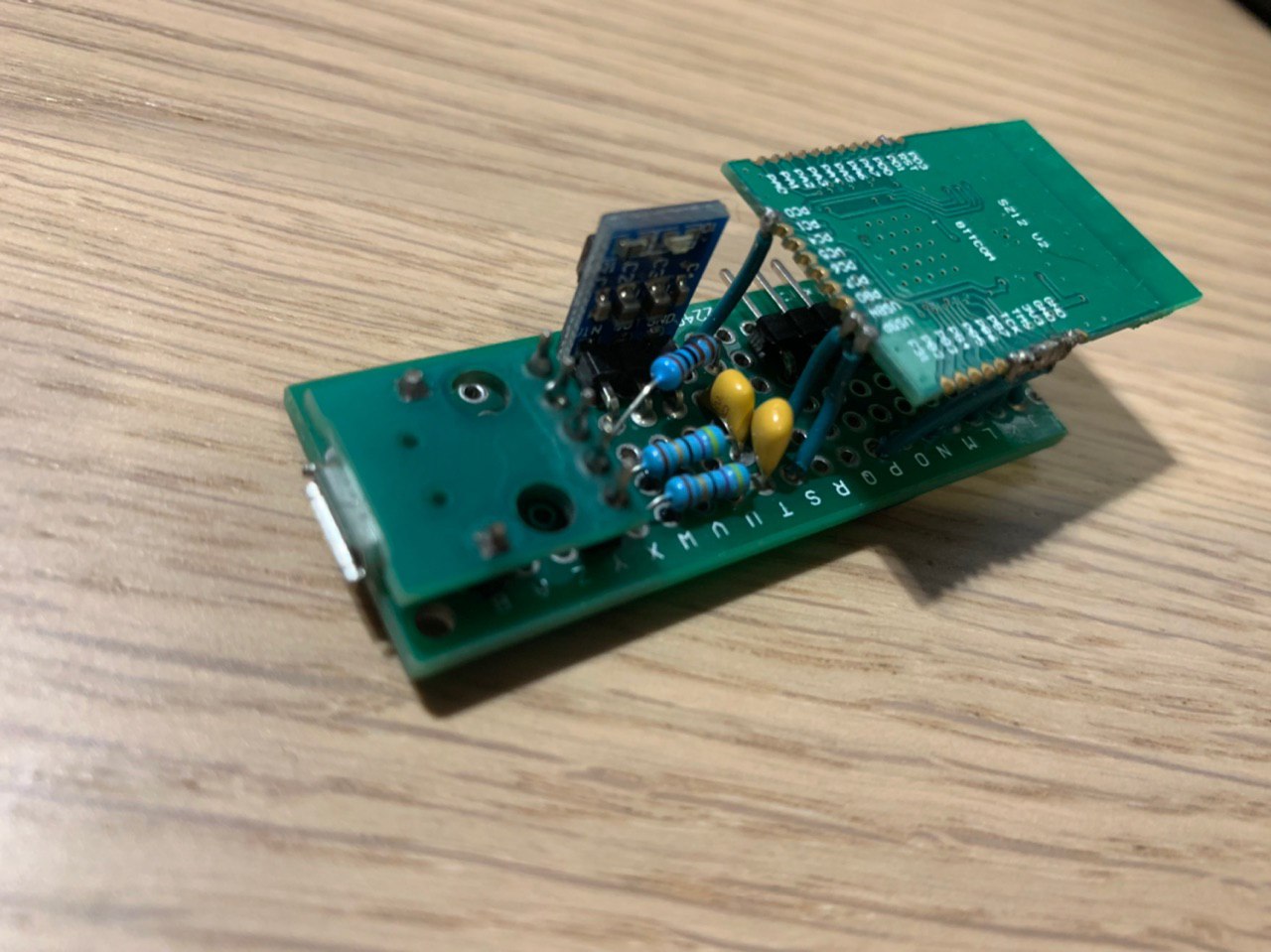
And this is beta-version of the stick I have (it slightly differs from release)
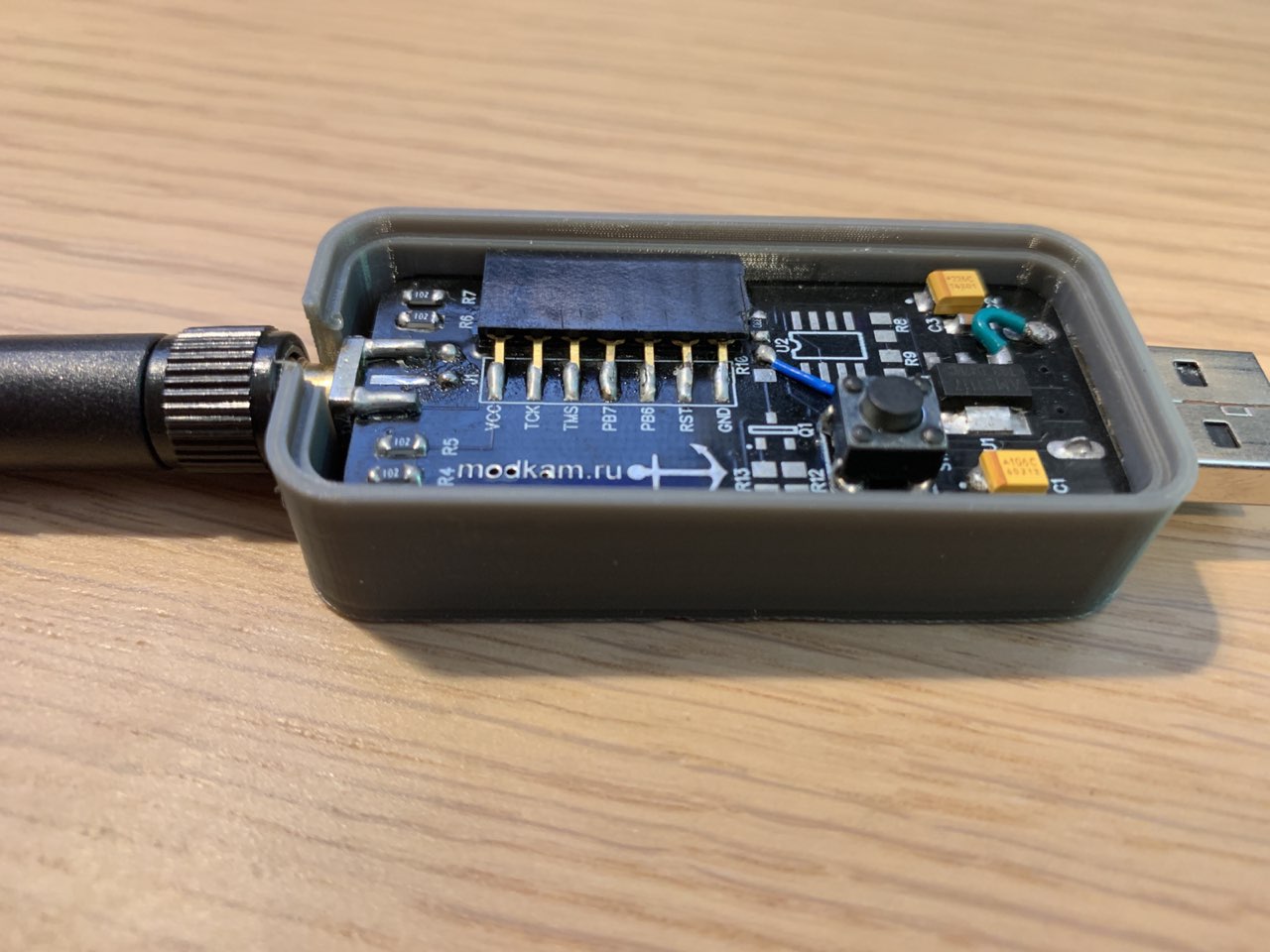
And this was very first alpha (which was running my home mesh for 3 months) :)
antst
on 8 Aug 2019
@antst this is awesome ... google translate will help ...
really thanks
i am pretty sure i will have a lot of question later ...but i will star buying the part right now
drbios
on 8 Aug 2019
is this BOM list OK??
LCSC_Exported_20190811_113655.xlsx
drbios
on 10 Aug 2019
https://www.aliexpress.com/item/32836343416.html?spm=a2g0o.productlist.0.0.14192026Y0Ka77&algo_pvid=623eeca3-3ba9-4e06-8b03-f0c120c44658&algo_expid=623eeca3-3ba9-4e06-8b03-f0c120c44658-3&btsid=fe0af402-baa3-4f29-9c85-dfd2c1b036ea&ws_ab_test=searchweb0_0,searchweb201602_5,searchweb201603_52
Total noob here, looking for cc2531 alternative that offers better range.
Will this work? It seems it has micro USB and SMA connector. Also, do I need J-link to flash it?
 halfcherry
on 11 Aug 2019
halfcherry
on 11 Aug 2019
@halfcherry there is cc2530 with antenna
JLFN
on 11 Aug 2019
@JLFN I'm using 1 cc2531 coordinator and 2 x cc2531 as router all with soldered antenna.
My understanding is that since cc2592 is a 20dbm PA which itself already has much better range than cc2531/cc2530. If I add a powered amplifier, it can even get better.
halfcherry
on 11 Aug 2019
@antst - in the blog post. It mentioned soldering a resistor when using an external antenna. Do you know what value the resistor should be?
 axiom00
on 15 Aug 2019
axiom00
on 15 Aug 2019
@antst - in the blog post. It mentioned soldering a resistor when using an external antenna. Do you know what value the resistor should be?
@antst - please disregard my question. Studying the images a little more, I can see the resistor is soldered to different trace depending if the application is using onboard or external antenna.
Parts ordered!
axiom00
on 15 Aug 2019
Due my extremely low soldering abilities I bought this :
US $14 | Mini cc2538 floor Cc2538mini base plate
https://s.click.aliexpress.com/e/vo2wJmo
drbios
on 16 Aug 2019
Successfully flashed a cc2538-stick without an amplifier. https://ru.aliexpress.com/item/4000016607626.html
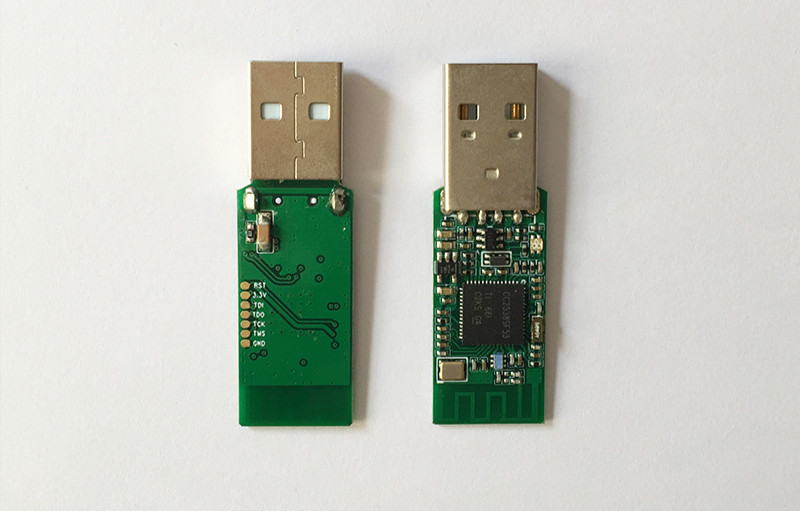
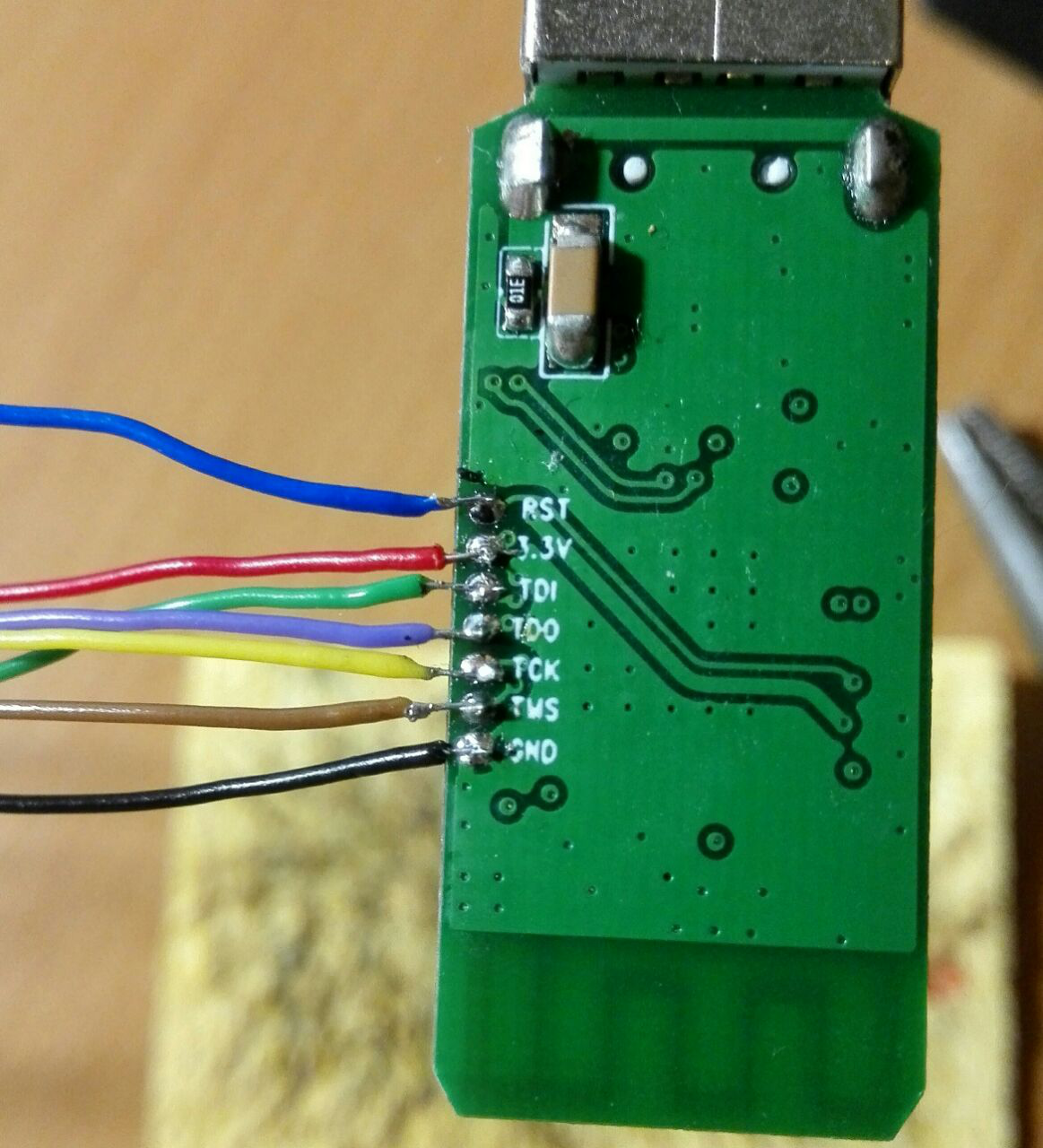
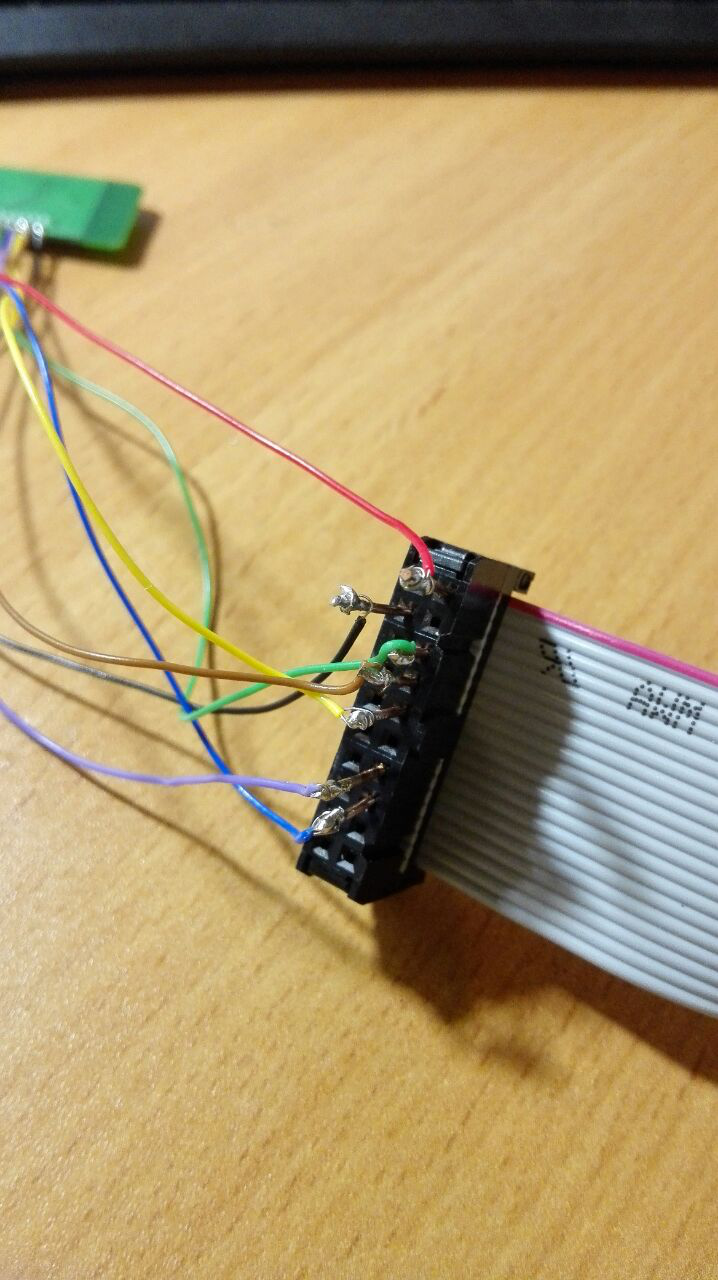
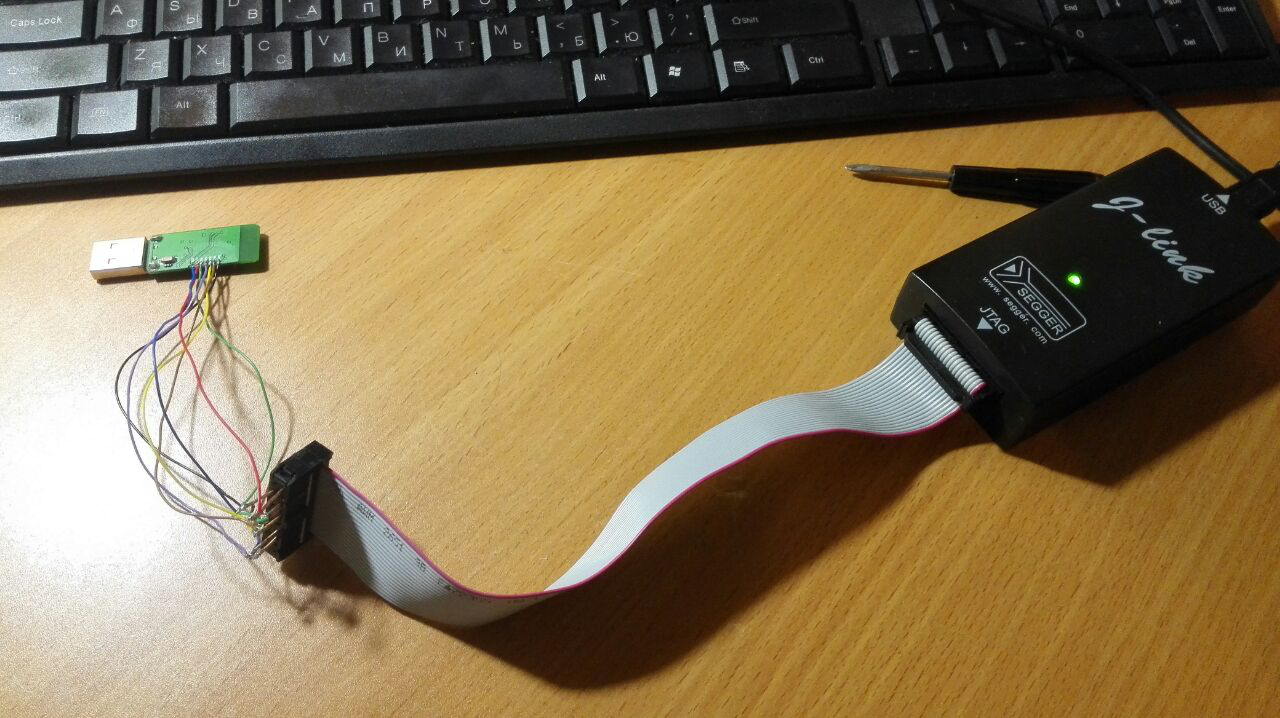
Firmware ZNP Z-Stack 3.0.2 without PA with USB, thanks to Anton @antst
Two days works fine with ioBroker.zigbee
kirovilya
on 3 Sep 2019
So, we have
1) PCB for cc2538PA module with frontend
2) we have ready-to use USB stick
3) apparently there is a base plate for this(?) module.
4) I am working on yet another version of coordinator, where it will have embedded flasher, so you have device which you can always and remotely reflash, reboot, etc. Which does not require separate J-link.
antst
on 3 Sep 2019
@antst the base Plate sadly is not for modules with a PA
drbios
on 4 Sep 2019
@antst When you release the modifield diff?
 dzungpv
on 4 Sep 2019
dzungpv
on 4 Sep 2019
@kirovilya
Do you always need a JTAG to flash or only for the first time?
@antst
_2. we have ready-to use USB stick ,_ Not quite ready-to use, because you need to solder (JTAG) and you must flash the stick.
 bertran1
on 6 Sep 2019
bertran1
on 6 Sep 2019
@bertran1 currently needed. have not yet learned how to update firmware without JTAG
kirovilya
on 6 Sep 2019
The CC2530/1 has a total device limit of 40 on Zigbee 3. What are the limits of this CC2538?
 choeflake
on 7 Sep 2019
choeflake
on 7 Sep 2019
@antst
A few friends and me had some pcbs made and soldered our first v3 coordinator.
So far it's working but suffering from an annoying problem.
After restarting zigbee2mqtt all router type devices (outlet switches, light bulbs etc.) are "lost" and have to be repaired.
Any idea, what could be the issue here?
What version of zibee2mqtt do you use? The last release (1.5.1) or the dev branch?
 ghost
on 7 Sep 2019
ghost
on 7 Sep 2019
@antst
The problem disappears when I remove the network key from configuration.yml.
Any Ideas, what the reason for this problem is?
ghost
on 8 Sep 2019
Problem is known and resolved. But you will need to apply patch to shepherds/herdsman or wait till Koen will change it in git. I am not at the computer, will upload instructions later today.
antst
on 8 Sep 2019
@antst
Could you please share details about this patch? The hardware is not very useful without it.
Thanks in advance and also for this nice design!
 TheDodger
on 11 Sep 2019
TheDodger
on 11 Sep 2019
@antst @TheDodger I was just working on this and just pushed it to the dev branch. Note that in order to activate this, you have to re-flash the CC2538 first and start it with the latest zigbee2mqtt dev afterwards.
 Koenkk
on 11 Sep 2019
Koenkk
on 11 Sep 2019
@kirovilya Could you share the modified change to Z-Stack to make it built in USB work? I try default ZNP project CC2538ZNP-with-SBL but z2mqtt not started. I don't need the diff just tell me what you change.
dzungpv
on 13 Sep 2019
=
Is there not a adapter for J-link so that you don't have to solder?
bertran1
on 14 Sep 2019
@dzungpv Sorry for delay. Are you asking for stick firmware without an amplifier? Here is it https://myzigbee.ru/attachments/2
I can’t say what exactly has changed - Anton @antst did it.
@bertran1 No. I did not find anything to connect to the stick without soldering.
kirovilya
on 16 Sep 2019
@kirovilya Thanks for your reply! Is it true that you don't see the USB device (CC2538 on Win), because there is no boot loader/firmware on the stick?
bertran1
on 16 Sep 2019
@bertran1 no. I can see USB port (even on Win) without bootloader firmware. otherwise how will z2m work with it ?!
kirovilya
on 17 Sep 2019
@kirovilya I thought maybe without bootloader or firmware he doesn't see the device?
Suddenly I have a DOA CC2538.
bertran1
on 17 Sep 2019
@bertran1 without firmware, it will definitely not see the port
kirovilya
on 18 Sep 2019
Just summarising my understanding for CC2538 as co-ordinator. Confirmation of the below would be great. Thanks in advance!
1) CC2538 is experimental, and needs latest dev version of Z2M. CC2538 can potentially allow a better experience since M3 CPU is faster and the CC2538 has more memory = more directly managed zigbee 2 and 3 devices
2) Migration of CC2538 requires repairing of all devices - there is currently no upgrade path.
3) CC2538 devices need JTAG programmer to flash co-ordinator f/w. (re)flash via USB is not possible until initial firmware with bootloader was flashed via JTAG
4) CC2538 internal USB is used for serial communication similar to CC2531
The USB "dongle" with CC2538 + PA and antenna port looks very promising - thanks for sharing your plans @antst :)
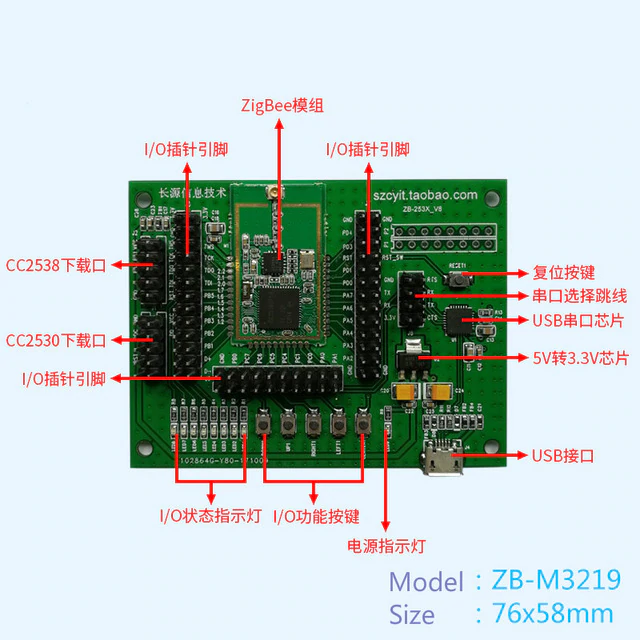
in the case where people want to jump in before that is finsihed/available, what is thought of these options that provide easier connectivity etc than the bare module?
https://www.aliexpress.com/item/32793336660.html: (currently $14)
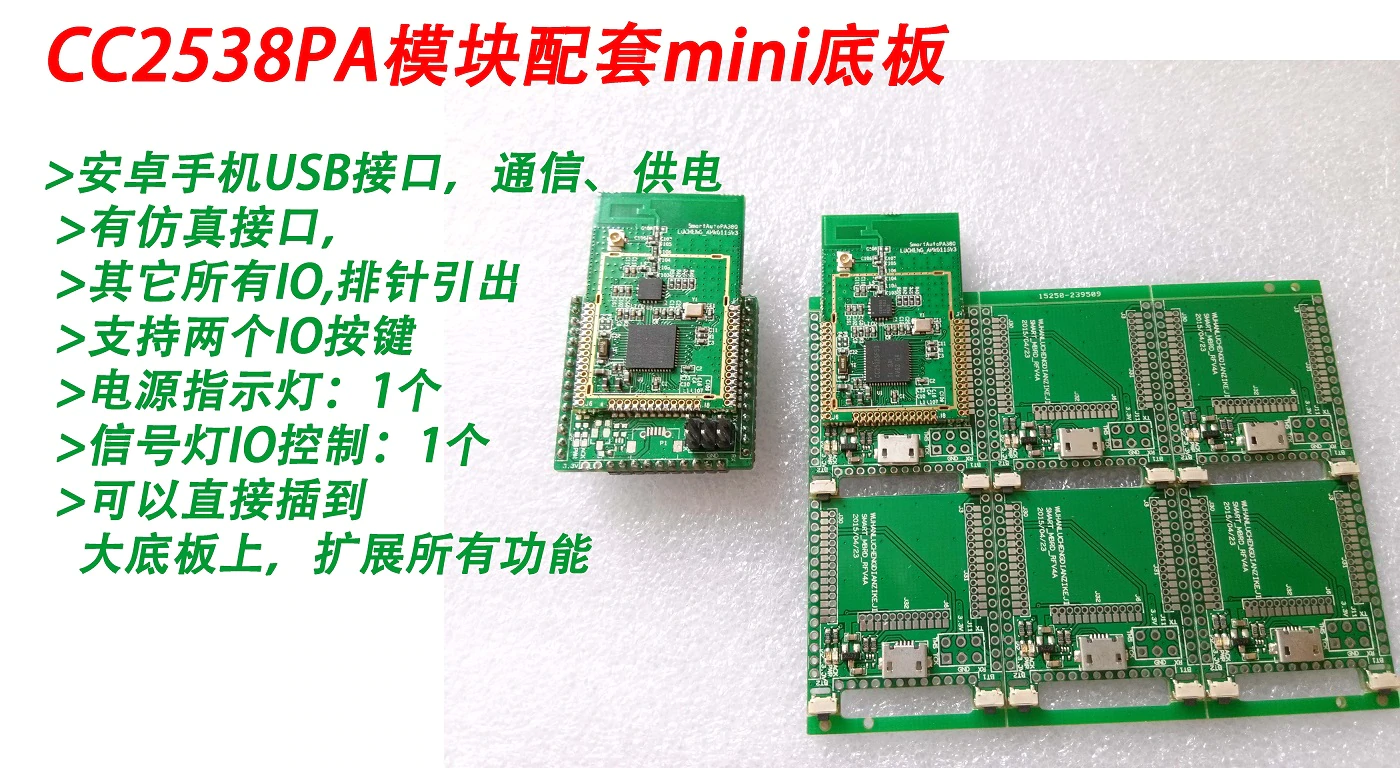
https://www.aliexpress.com/item/4000188620923.html: (currently $31.29)
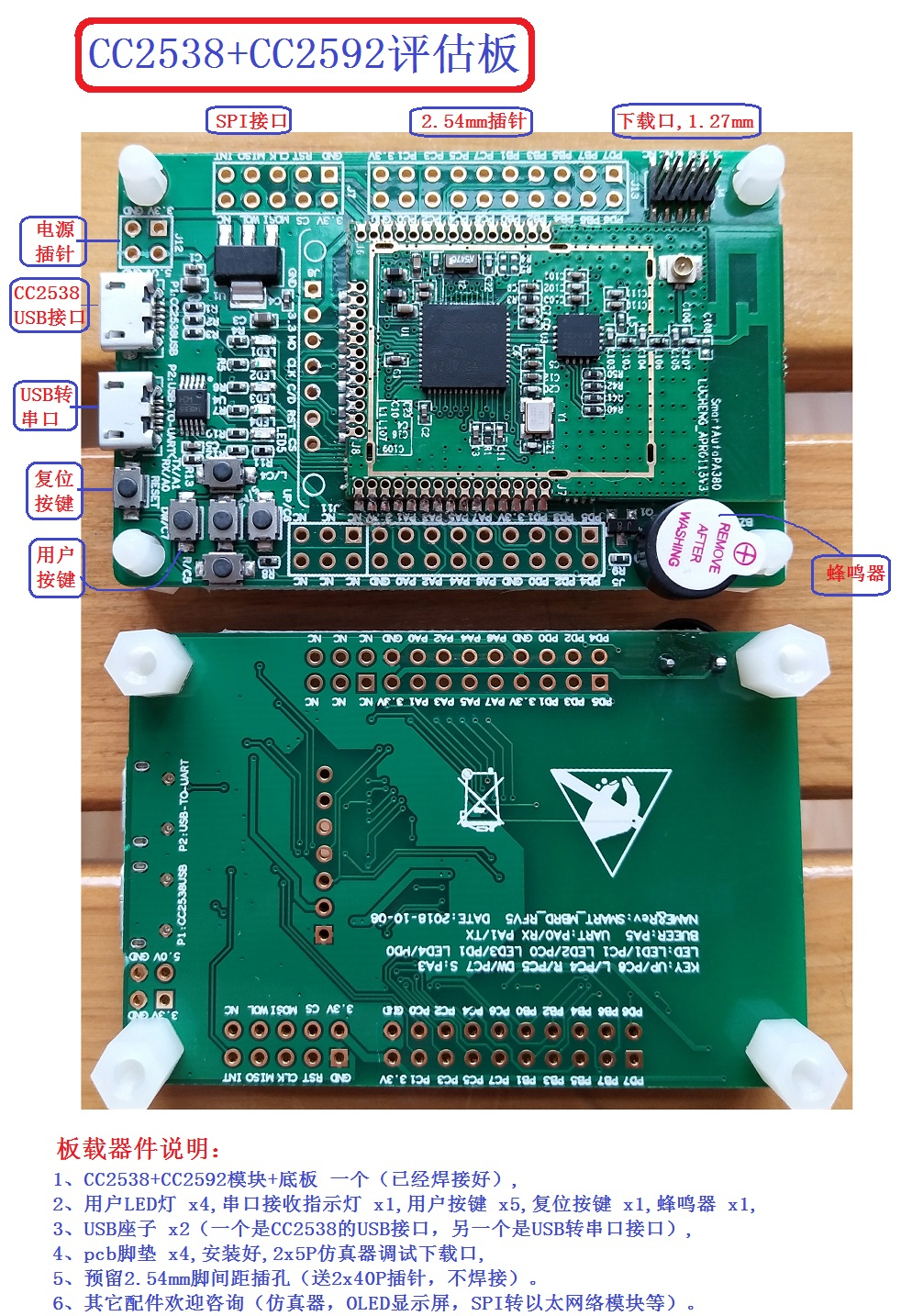
https://www.aliexpress.com/item/4000015412127.html: (currently $22.80 - see 2nd "color"/item)
 james-fry
on 20 Sep 2019
james-fry
on 20 Sep 2019
CC2538ZNP-UART-without-SBL-cc2592.hex.zip
Version of firmware for UART connection. 115200, no flow control.
antst
on 2 Oct 2019
@antst Could you, please, share the source PCB schematic files, rather than the gerber files, for the USB stick, so that I could export a pick-and-place (aka component place list) file for factory assembly?
 ginkage
on 2 Oct 2019
ginkage
on 2 Oct 2019
@antst I followed the instructions at https://modkam.ru/?p=1188 to flash the CC2538 but I am getting the following errors. Any idea what I am doing wrong?
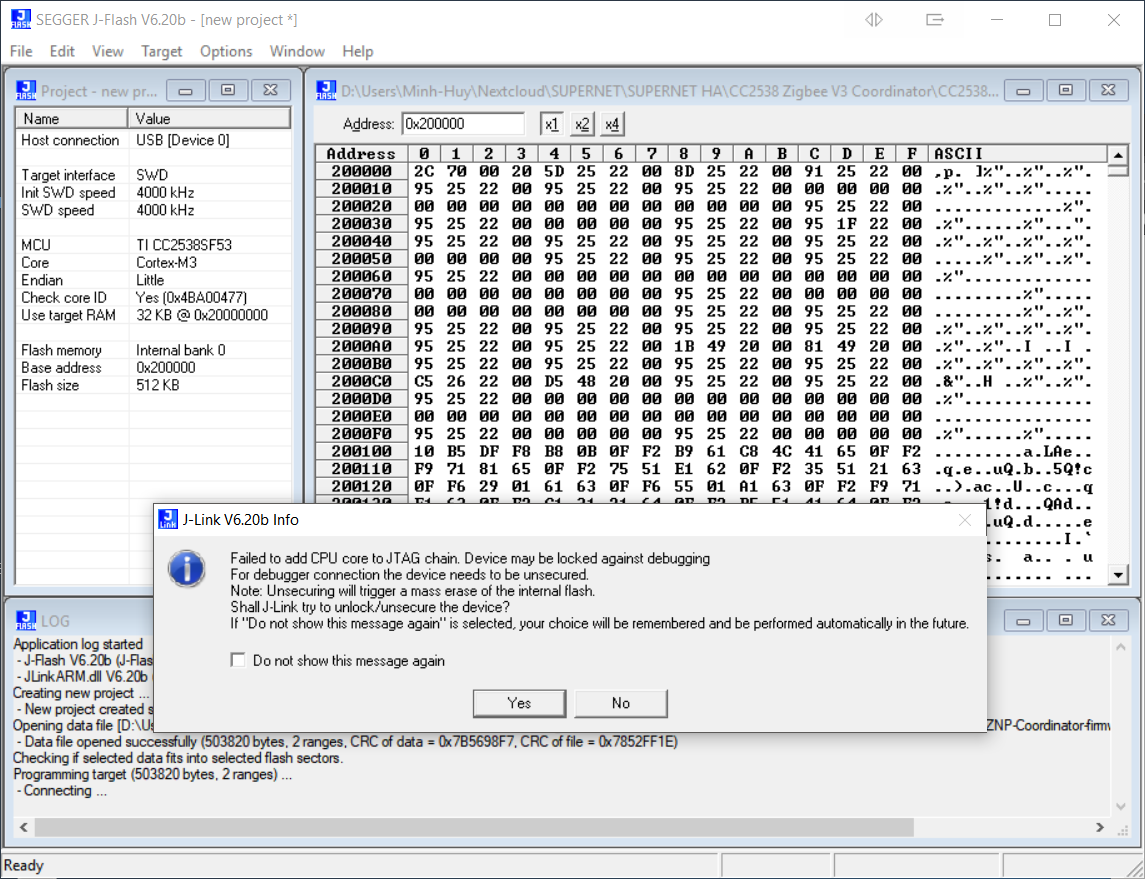
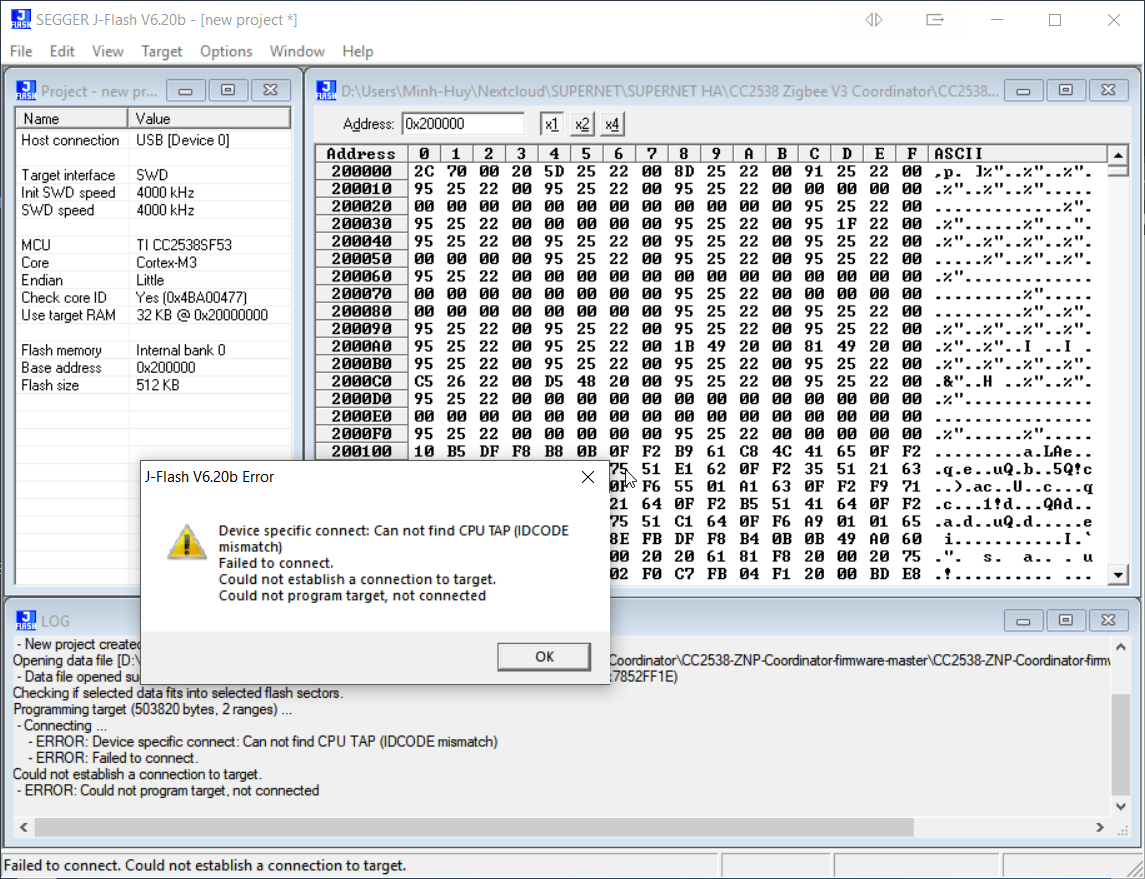
axiom00
on 7 Oct 2019
@axiom00 check out connections. I used J-Flash Lite for flashing
https://myzigbee.ru/link/4#bkmrk-%D0%92%D0%B0%D1%80%D0%B8%D0%B0%D0%BD%D1%82-2
kirovilya
on 8 Oct 2019
@kirovilya Thanks for the suggestion. I rechecked all my connections but it still couldn't see the CC2538. I then tried bypassing the ribbon cable and wired directly to the programmer and it worked perfectly! Initial testing is pretty good. Seems stable and great link quality.
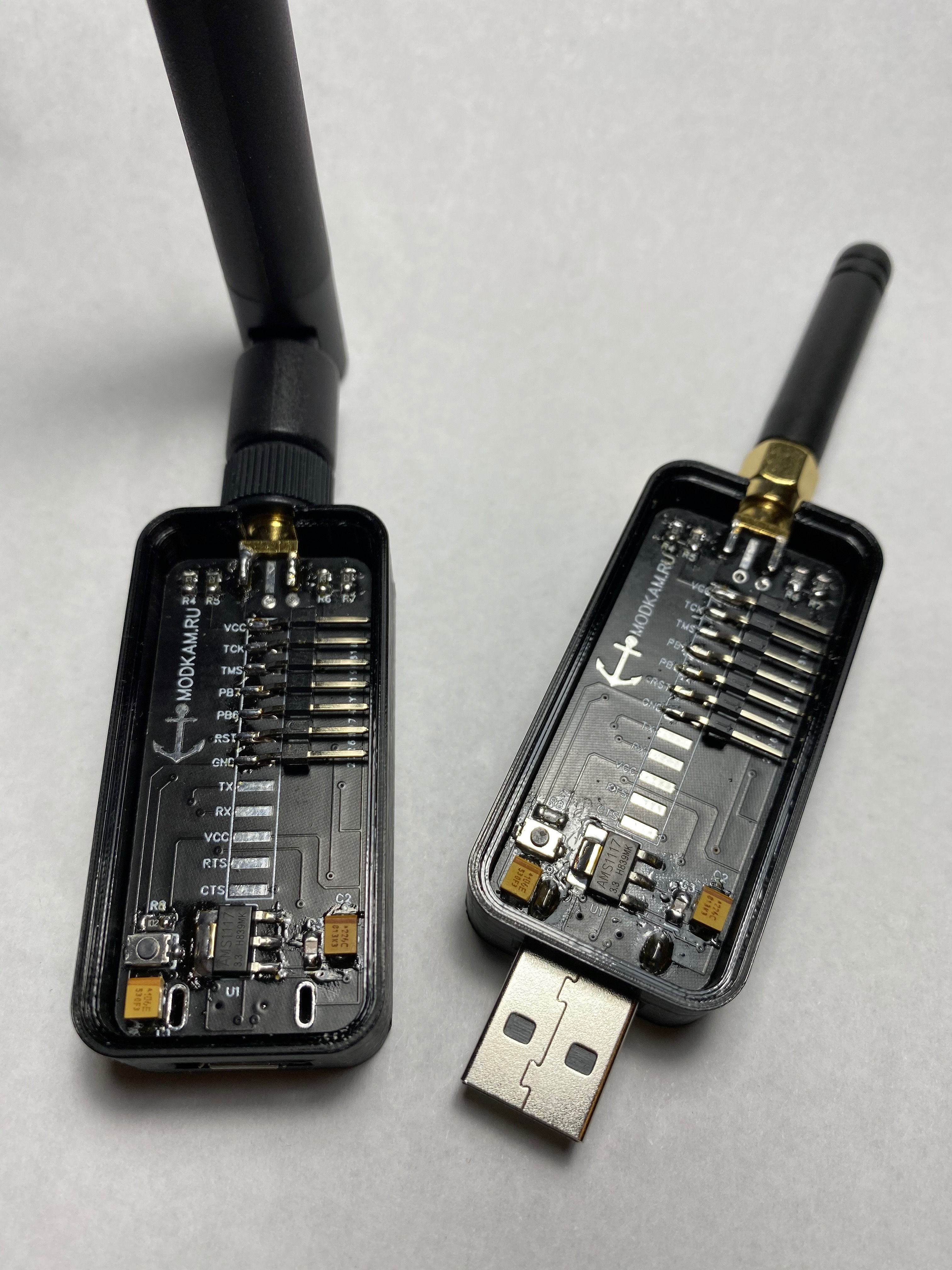
axiom00
on 9 Oct 2019
cc2538 USB Dongle (without PA) $25 https://ru.aliexpress.com/item/32861407474.html
kirovilya
on 10 Oct 2019
What is the max size of the whole network and max number of direct children? (When running Zstack 3 on the CC2538, Zigbee 3)
choeflake
on 11 Oct 2019
What is the max size of the whole network and max number of direct children? (When running Zstack 3 on the CC2538, Zigbee 3)
The CC2530 has 8KB SRAM and the CC2538 has 16KB (and additional an extra 16KB on power mode 2). So the max number of devices is roughly doubled (not counting base memory consumption of the firmware)? That should mean from 40 to 80 or 160 (power mode 2).
choeflake
on 18 Oct 2019
I have flashed this firmware https://myzigbee.ru/attachments/2 to this usb dongle https://www.aliexpress.com/item/4000016607626.html, but it doesn't seem to work. Any ideas what I could have done wrong?
[109037.057414] usb 1-1: new full-speed USB device number 49 using xhci_hcd
[109037.180751] usb 1-1: device descriptor read/64, error -71
[109037.410711] usb 1-1: device descriptor read/64, error -71
[109037.640637] usb 1-1: new full-speed USB device number 50 using xhci_hcd
[109037.767322] usb 1-1: device descriptor read/64, error -71
[109037.997338] usb 1-1: device descriptor read/64, error -71
[109038.104307] usb usb1-port1: attempt power cycle
[109038.747347] usb 1-1: new full-speed USB device number 51 using xhci_hcd
[109038.747530] usb 1-1: Device not responding to setup address.
[109038.954363] usb 1-1: Device not responding to setup address.
[109039.160851] usb 1-1: device not accepting address 51, error -71
[109039.284002] usb 1-1: new full-speed USB device number 52 using xhci_hcd
[109039.284198] usb 1-1: Device not responding to setup address.
[109039.490769] usb 1-1: Device not responding to setup address.
[109039.697341] usb 1-1: device not accepting address 52, error -71
[109039.697500] usb usb1-port1: unable to enumerate USB device
 cmorlok
on 19 Oct 2019
cmorlok
on 19 Oct 2019
@cmorlok Do you have a port in the system? Can you connect to the stick through Z-tool?
kirovilya
on 20 Oct 2019
@kirovilya It's completely unreliable. I have switched to Windows, installed J-Flash and Z-Tool for testing. Same result:
In 9 of 10 tries, I get the error message above. And a similar one in Windows, and no connection possible with Z-tool. If I re-plug the dongle a couple of times, it finally works:
[  147.689420] usb 1-1: new full-speed USB device number 13 using xhci_hcd
[  147.831641] usb 1-1: New USB device found, idVendor=0451, idProduct=16c8, bcdDevice= 1.00
[  147.831647] usb 1-1: New USB device strings: Mfr=1, Product=2, SerialNumber=0
[  147.831651] usb 1-1: Product: CC2538 USB CDC
[  147.831654] usb 1-1: Manufacturer: Texas Instruments
[  147.833371] cdc_acm 1-1:1.0: ttyACM0: USB ACM device
I am not sure if this is anyhow related to the firmware, or if my dongle is broken. Unfortunately, there is currently no seller who offers a similar dongle.
cmorlok
on 20 Oct 2019
 hobbyquaker
on 20 Oct 2019
kirovilya
on 21 Oct 2019
kirovilya
on 21 Oct 2019
cmorlok
on 21 Oct 2019
hobbyquaker
on 21 Oct 2019
hobbyquaker
on 20 Oct 2019
kirovilya
on 21 Oct 2019
kirovilya
on 21 Oct 2019
cmorlok
on 21 Oct 2019
hobbyquaker
on 21 Oct 2019
 imdos
on 22 Oct 2019
hobbyquaker
on 22 Oct 2019
drbios
on 3 Nov 2019
kirovilya
on 3 Nov 2019
drbios
on 3 Nov 2019
kirovilya
on 3 Nov 2019
drbios
on 3 Nov 2019
kirovilya
on 3 Nov 2019
drbios
on 4 Nov 2019
axiom00
on 6 Nov 2019
drbios
on 24 Nov 2019
kirovilya
on 24 Nov 2019
imdos
on 22 Oct 2019
hobbyquaker
on 22 Oct 2019
drbios
on 3 Nov 2019
kirovilya
on 3 Nov 2019
drbios
on 3 Nov 2019
kirovilya
on 3 Nov 2019
drbios
on 3 Nov 2019
kirovilya
on 3 Nov 2019
drbios
on 4 Nov 2019
axiom00
on 6 Nov 2019
drbios
on 24 Nov 2019
kirovilya
on 24 Nov 2019
 MaxBec
on 25 Nov 2019
drbios
on 25 Nov 2019
kirovilya
on 25 Nov 2019
lolorc
on 25 Nov 2019
drbios
on 25 Nov 2019
kirovilya
on 26 Nov 2019
cmorlok
on 1 Dec 2019
ginkage
on 1 Dec 2019
cmorlok
on 1 Dec 2019
ginkage
on 1 Dec 2019
cmorlok
on 1 Dec 2019
axiom00
on 1 Dec 2019
cmorlok
on 3 Dec 2019
MaxBec
on 25 Nov 2019
drbios
on 25 Nov 2019
kirovilya
on 25 Nov 2019
lolorc
on 25 Nov 2019
drbios
on 25 Nov 2019
kirovilya
on 26 Nov 2019
cmorlok
on 1 Dec 2019
ginkage
on 1 Dec 2019
cmorlok
on 1 Dec 2019
ginkage
on 1 Dec 2019
cmorlok
on 1 Dec 2019
axiom00
on 1 Dec 2019
cmorlok
on 3 Dec 2019
 reverieline
on 17 Dec 2019
cmorlok
on 17 Dec 2019
reverieline
on 17 Dec 2019
reverieline
on 17 Dec 2019
cmorlok
on 17 Dec 2019
reverieline
on 17 Dec 2019
 turboproc
on 4 Jan 2020
reverieline
on 10 Jan 2020
turboproc
on 4 Jan 2020
reverieline
on 10 Jan 2020
 papperone
on 10 Jan 2020
turboproc
on 10 Jan 2020
reverieline
on 11 Jan 2020
ginkage
on 12 Jan 2020
drbios
on 12 Jan 2020
ginkage
on 12 Jan 2020
dzungpv
on 12 Jan 2020
ginkage
on 12 Jan 2020
dzungpv
on 12 Jan 2020
ginkage
on 12 Jan 2020
papperone
on 10 Jan 2020
turboproc
on 10 Jan 2020
reverieline
on 11 Jan 2020
ginkage
on 12 Jan 2020
drbios
on 12 Jan 2020
ginkage
on 12 Jan 2020
dzungpv
on 12 Jan 2020
ginkage
on 12 Jan 2020
dzungpv
on 12 Jan 2020
ginkage
on 12 Jan 2020
 h4nc
on 12 Jan 2020
ginkage
on 12 Jan 2020
h4nc
on 12 Jan 2020
ginkage
on 12 Jan 2020
 verjus
on 13 Jan 2020
verjus
on 13 Jan 2020
 co-Palko
on 15 Jan 2020
fluppie
on 15 Jan 2020
co-Palko
on 15 Jan 2020
fluppie
on 15 Jan 2020
 a1ien
on 16 Jan 2020
bertran1
on 19 Jan 2020
h4nc
on 19 Jan 2020
cmorlok
on 19 Jan 2020
h4nc
on 19 Jan 2020
james-fry
on 19 Jan 2020
bertran1
on 19 Jan 2020
fluppie
on 19 Jan 2020
james-fry
on 19 Jan 2020
james-fry
on 19 Jan 2020
bertran1
on 20 Jan 2020
a1ien
on 16 Jan 2020
bertran1
on 19 Jan 2020
h4nc
on 19 Jan 2020
cmorlok
on 19 Jan 2020
h4nc
on 19 Jan 2020
james-fry
on 19 Jan 2020
bertran1
on 19 Jan 2020
fluppie
on 19 Jan 2020
james-fry
on 19 Jan 2020
james-fry
on 19 Jan 2020
bertran1
on 20 Jan 2020
 m-larin
on 28 Jan 2020
m-larin
on 28 Jan 2020
 hwhw
on 30 Jan 2020
hwhw
on 30 Jan 2020
 Gamester17
on 2 Feb 2020
Gamester17
on 2 Feb 2020
 Pascal51882
on 12 Feb 2020
hwhw
on 13 Feb 2020
Pascal51882
on 13 Feb 2020
Pascal51882
on 13 Feb 2020
Pascal51882
on 14 Feb 2020
cmorlok
on 14 Feb 2020
Pascal51882
on 12 Feb 2020
hwhw
on 13 Feb 2020
Pascal51882
on 13 Feb 2020
Pascal51882
on 13 Feb 2020
Pascal51882
on 14 Feb 2020
cmorlok
on 14 Feb 2020
 Uriziel01
on 18 Feb 2020
hwhw
on 19 Feb 2020
kirovilya
on 19 Feb 2020
hwhw
on 19 Feb 2020
antst
on 19 Feb 2020
hwhw
on 19 Feb 2020
antst
on 19 Feb 2020
hwhw
on 19 Feb 2020
antst
on 19 Feb 2020
hwhw
on 19 Feb 2020
cmorlok
on 19 Feb 2020
hwhw
on 19 Feb 2020
verjus
on 20 Feb 2020
kirovilya
on 20 Feb 2020
Pascal51882
on 20 Feb 2020
cmorlok
on 20 Feb 2020
Pascal51882
on 20 Feb 2020
kirovilya
on 20 Feb 2020
Pascal51882
on 20 Feb 2020
Gamester17
on 20 Feb 2020
kirovilya
on 20 Feb 2020
Pascal51882
on 20 Feb 2020
cmorlok
on 20 Feb 2020
Pascal51882
on 20 Feb 2020
hwhw
on 20 Feb 2020
Gamester17
on 20 Feb 2020
Gamester17
on 21 Feb 2020
turboproc
on 22 Feb 2020
hwhw
on 24 Feb 2020
Pascal51882
on 26 Feb 2020
m-larin
on 9 Apr 2020
Uriziel01
on 18 Feb 2020
hwhw
on 19 Feb 2020
kirovilya
on 19 Feb 2020
hwhw
on 19 Feb 2020
antst
on 19 Feb 2020
hwhw
on 19 Feb 2020
antst
on 19 Feb 2020
hwhw
on 19 Feb 2020
antst
on 19 Feb 2020
hwhw
on 19 Feb 2020
cmorlok
on 19 Feb 2020
hwhw
on 19 Feb 2020
verjus
on 20 Feb 2020
kirovilya
on 20 Feb 2020
Pascal51882
on 20 Feb 2020
cmorlok
on 20 Feb 2020
Pascal51882
on 20 Feb 2020
kirovilya
on 20 Feb 2020
Pascal51882
on 20 Feb 2020
Gamester17
on 20 Feb 2020
kirovilya
on 20 Feb 2020
Pascal51882
on 20 Feb 2020
cmorlok
on 20 Feb 2020
Pascal51882
on 20 Feb 2020
hwhw
on 20 Feb 2020
Gamester17
on 20 Feb 2020
Gamester17
on 21 Feb 2020
turboproc
on 22 Feb 2020
hwhw
on 24 Feb 2020
Pascal51882
on 26 Feb 2020
m-larin
on 9 Apr 2020
 zslibra
on 12 Apr 2020
zslibra
on 12 Apr 2020
 hzx1987227
on 13 Apr 2020
axiom00
on 13 Apr 2020
zslibra
on 14 Apr 2020
zslibra
on 14 Apr 2020
axiom00
on 14 Apr 2020
zslibra
on 15 Apr 2020
hzx1987227
on 13 Apr 2020
axiom00
on 13 Apr 2020
zslibra
on 14 Apr 2020
zslibra
on 14 Apr 2020
axiom00
on 14 Apr 2020
zslibra
on 15 Apr 2020
 uzsito
on 16 Apr 2020
co-Palko
on 17 Apr 2020
uzsito
on 16 Apr 2020
co-Palko
on 17 Apr 2020
 piit79
on 17 Apr 2020
piit79
on 17 Apr 2020
 flower87lucky
on 20 May 2020
flower87lucky
on 20 May 2020
 wes1993
on 3 Jun 2020
verjus
on 3 Jun 2020
wes1993
on 4 Jun 2020
verjus
on 4 Jun 2020
wes1993
on 4 Jun 2020
wes1993
on 3 Jun 2020
verjus
on 3 Jun 2020
wes1993
on 4 Jun 2020
verjus
on 4 Jun 2020
wes1993
on 4 Jun 2020
 liambrugaro
on 13 Jun 2020
liambrugaro
on 13 Jun 2020
 dinhchinh82
on 3 Jul 2020
dinhchinh82
on 3 Jul 2020
 MadDoct
on 4 Jul 2020
verjus
on 4 Jul 2020
MadDoct
on 4 Jul 2020
verjus
on 4 Jul 2020
MadDoct
on 4 Jul 2020
JLFN
on 8 Jul 2020
MadDoct
on 8 Jul 2020
JLFN
on 8 Jul 2020
MadDoct
on 8 Jul 2020
MadDoct
on 4 Jul 2020
verjus
on 4 Jul 2020
MadDoct
on 4 Jul 2020
verjus
on 4 Jul 2020
MadDoct
on 4 Jul 2020
JLFN
on 8 Jul 2020
MadDoct
on 8 Jul 2020
JLFN
on 8 Jul 2020
MadDoct
on 8 Jul 2020
 cooldude204
on 24 Jul 2020
MadDoct
on 24 Jul 2020
cooldude204
on 24 Jul 2020
MadDoct
on 24 Jul 2020
 enesbcs
on 30 Jul 2020
MadDoct
on 30 Jul 2020
ginkage
on 30 Jul 2020
enesbcs
on 30 Jul 2020
MadDoct
on 30 Jul 2020
enesbcs
on 30 Jul 2020
MadDoct
on 30 Jul 2020
ginkage
on 30 Jul 2020
enesbcs
on 30 Jul 2020
MadDoct
on 30 Jul 2020
 codmpm
on 7 Aug 2020
MadDoct
on 7 Aug 2020
codmpm
on 7 Aug 2020
codmpm
on 7 Aug 2020
MadDoct
on 7 Aug 2020
codmpm
on 7 Aug 2020
 alexius8
on 9 Aug 2020
kirovilya
on 9 Aug 2020
codmpm
on 9 Aug 2020
alexius8
on 9 Aug 2020
codmpm
on 11 Aug 2020
alexius8
on 9 Aug 2020
kirovilya
on 9 Aug 2020
codmpm
on 9 Aug 2020
alexius8
on 9 Aug 2020
codmpm
on 11 Aug 2020
 wolverinevn
on 20 Aug 2020
wolverinevn
on 20 Aug 2020
 dony71
on 21 Aug 2020
codmpm
on 21 Aug 2020
dony71
on 22 Aug 2020
dony71
on 25 Aug 2020
dony71
on 27 Aug 2020
codmpm
on 27 Aug 2020
MadDoct
on 27 Aug 2020
dony71
on 27 Aug 2020
MadDoct
on 28 Aug 2020
dony71
on 28 Aug 2020
MadDoct
on 29 Aug 2020
dony71
on 29 Aug 2020
MadDoct
on 29 Aug 2020
dony71
on 1 Sep 2020
dony71
on 1 Sep 2020
codmpm
on 8 Sep 2020
9600
on 8 Sep 2020
codmpm
on 8 Sep 2020
9600
on 8 Sep 2020
codmpm
on 8 Sep 2020
9600
on 8 Sep 2020
dony71
on 21 Aug 2020
codmpm
on 21 Aug 2020
dony71
on 22 Aug 2020
dony71
on 25 Aug 2020
dony71
on 27 Aug 2020
codmpm
on 27 Aug 2020
MadDoct
on 27 Aug 2020
dony71
on 27 Aug 2020
MadDoct
on 28 Aug 2020
dony71
on 28 Aug 2020
MadDoct
on 29 Aug 2020
dony71
on 29 Aug 2020
MadDoct
on 29 Aug 2020
dony71
on 1 Sep 2020
dony71
on 1 Sep 2020
codmpm
on 8 Sep 2020
9600
on 8 Sep 2020
codmpm
on 8 Sep 2020
9600
on 8 Sep 2020
codmpm
on 8 Sep 2020
9600
on 8 Sep 2020
 realroywalker
on 14 Sep 2020
realroywalker
on 14 Sep 2020
 falmanna
on 22 Sep 2020
falmanna
on 22 Sep 2020
 marsjan155
on 12 Oct 2020
kirovilya
on 15 Oct 2020
marsjan155
on 12 Oct 2020
kirovilya
on 15 Oct 2020
 jandy123
on 19 Oct 2020
kirovilya
on 19 Oct 2020
jandy123
on 19 Oct 2020
jandy123
on 19 Oct 2020
jandy123
on 19 Oct 2020
jandy123
on 19 Oct 2020
kirovilya
on 19 Oct 2020
jandy123
on 19 Oct 2020
jandy123
on 19 Oct 2020
jandy123
on 19 Oct 2020
 public-radiation
on 25 Oct 2020
public-radiation
on 25 Oct 2020
 Multipage
on 26 Oct 2020
verjus
on 26 Oct 2020
Multipage
on 27 Oct 2020
verjus
on 27 Oct 2020
Multipage
on 27 Oct 2020
verjus
on 27 Oct 2020
Multipage
on 28 Oct 2020
Multipage
on 28 Oct 2020
jandy123
on 28 Oct 2020
Multipage
on 29 Oct 2020
public-radiation
on 3 Nov 2020
MadDoct
on 3 Nov 2020
jandy123
on 4 Nov 2020
Multipage
on 26 Oct 2020
verjus
on 26 Oct 2020
Multipage
on 27 Oct 2020
verjus
on 27 Oct 2020
Multipage
on 27 Oct 2020
verjus
on 27 Oct 2020
Multipage
on 28 Oct 2020
Multipage
on 28 Oct 2020
jandy123
on 28 Oct 2020
Multipage
on 29 Oct 2020
public-radiation
on 3 Nov 2020
MadDoct
on 3 Nov 2020
jandy123
on 4 Nov 2020
 wizu
on 5 Nov 2020
verjus
on 5 Nov 2020
wizu
on 6 Nov 2020
wizu
on 5 Nov 2020
verjus
on 5 Nov 2020
wizu
on 6 Nov 2020
Related issues
 Courty40
·
4Comments
Courty40
·
4Comments
 tb-killa
·
3Comments
tb-killa
·
3Comments
 mpuff
·
3Comments
mpuff
·
3Comments
 CodeFinder2
·
4Comments
CodeFinder2
·
4Comments
 z4rn0x
·
3Comments
z4rn0x
·
3Comments
Most helpful comment
teaser )