Zigbee2mqtt: IKEA TRADFRI remote control, color temperature not working
Hello,
after updating to the latest coordinator firmware (stable, January 2019) I was able to connect my IKEA TRADFRI floalt panel und the Ikea 5 button remote control...
Over zigbee2mqtt I have full control to the IKEA light panel (on/off, brightness, color temperature)
With the remote control I lost the ability to change the color temperature... So I can only switch it on and off and change brightness...
Very weird behavior... 😁
Somebody any idea how that can be happen and how to solve it.?
 ripperle
All 117 comments
Did you try this: http://www.zigbee2mqtt.io/information/binding.html#ikea-tradri-remote-control-e1524 ?
 Koenkk
on 10 Mar 2019
Koenkk
on 10 Mar 2019
No, not yet,
I don't want do use the remote in zigbee2mqtt so I thought that wouldn't be necessary
ripperle
on 11 Mar 2019
@koenkk I am having a similar issue. I have followed the cc sniffer guidance and bound the switch to a light fitting with three bulbs. The on/off switch and brightness work flawlessly but the change colour buttons do not change colour temperature like they used to when using the tradfri hub.
 timstanley1985
on 12 Mar 2019
timstanley1985
on 12 Mar 2019
I noticed that the normal IKEA panel supports only 3 different color temperatures...
With zigbee2mqtt I can set more than that! Maybe the firmware of the panel gets in an unknown state or something?!
ripperle
on 12 Mar 2019
I've just checked and indeed setting colour temperature is not possible using this method. Perhaps some extra setup is done, need to do some more sniffing..
Koenkk
on 13 Mar 2019
I have just paired a second remote to a full colour tradfri bulb. Set up went well and it integrates well with home assistant but the arrow buttons do not change colour with this bulb too
timstanley1985
on 19 Mar 2019
In my environment the IKEA remote control works very well with the IKEA bulbs, inclusive setting of the color temperature.
What I've done
- Complete new setup after two crashes due to tests of the reporting feature (but that's another story)
- Paired some IKEA bulbs
- Paired IKEA Remote Control
- Found out and added the group number of the Remote Control
- Added the bulbs to the group of the Remote Control (no bind!)
- every feature works well
zigbee2mqtt version 1.2.1 (commit #e5ca977)
Coordinator firmware version: '20190223'
Great Job!
Thanks to Koenkk and all contributors!
 didiht
on 20 Mar 2019
didiht
on 20 Mar 2019
@didiht
So you don't paired the remote directly with the IKEA lamps?
Are the remote working without the zigbee2mqtt coordinater?
ripperle
on 21 Mar 2019
@ripperle
No, I did not pair the remote directly with the IKEA bulbs.
Yes, the remote control works with the IKEA bulbs, even without the zigbee2mqtt coordinator.
I made following test:
- Delete the lamp from the group of the IKEA remote control -> IKEA remote does not work with the bulb anylonger
- Add lamp again to the group of the IKEA remote -> it works again, toggle, brightness, color temperature
With the 'bind' feature I had no success to set the color_temperature with the IKEA remote previously, but I didin't test this with the current version.
didiht
on 22 Mar 2019
@didiht
I tried exactly your setup: reset everything, pair control and lights to cc2530 controller, sniff the group, add lights to group. Switching on/off and changing brightness works like a charm. However: setting the color temperature via IKEA remote control ist not working.
Can I help doing some sniffing? When I press the arrow buttons on the IKEA remote control I receive the following message in Wireshark: ZCL Scenes: Unknown Command, Seq: xx There ist no "response" from the "receiving" lamp.
Frame 581: 55 bytes on wire (440 bits), 55 bytes captured (440 bits) on interface 0
IEEE 802.15.4 Data, Dst: 0xa041, Src: 0xf909
ZigBee Network Layer Data, Dst: Broadcast, Src: 0xf909
ZigBee Application Support Layer Data, Group: 0xb62e, Src Endpt: 1
Frame Control Field: Data (0x0c)
Group: 0xb62e
Cluster: Scenes (0x0005)
Profile: Home Automation (0x0104)
Source Endpoint: 1
Counter: 7
ZigBee Cluster Library Frame, Mfr: Unknown (0x117c)
Frame Control Field: Cluster-specific (0x05)
Manufacturer Code: Unknown (0x117c)
Sequence Number: 88
Command: Unknown (0x07)
Payload
zigbee2mqtt version 1.2.1 (commit #e5ca977)
Coordinator firmware version for CC2530 (via USB): '20190223'
 bjobo
on 23 Mar 2019
bjobo
on 23 Mar 2019
@bjobo
Maybe I have to mention that before pairing to z2m all IKEA devices were paired to the IKEA bridge to get the newest firmware.
I also sniffed an arrow-left-click and identified two frames:
- The first one with external source address of the remote (Frame 2)
- The second one with external source address of the bulb (Frame 4)
Frame 2: 115 bytes on wire (920 bits), 115 bytes captured (920 bits) on interface 0
Internet Protocol Version 4, Src: 192.168.1.3, Dst: 192.168.1.3
User Datagram Protocol, Src Port: 17754 (17754), Dst Port: 17754 (17754)
ZigBee Encapsulation Protocol, Channel: 11, Length: 55
IEEE 802.15.4 Data, Dst: 0x6e92, Src: 0x0409
ZigBee Network Layer Data, Dst: Broadcast, Src: 0x0409
Frame Control Field: 0x0248, Frame Type: Data, Discover Route: Enable, Security Data
ZigBee Application Support Layer Data, Group: 0x7a2a, Src Endpt: 1
Frame Control Field: Data (0x0c)
Group: 0x7a2a
Cluster: Scenes (0x0005)
Profile: Home Automation (0x0104)
Source Endpoint: 1
Counter: 25
ZigBee Cluster Library Frame, Mfr: Unknown (0x117c)
Frame Control Field: Cluster-specific (0x05)
Manufacturer Code: Unknown (0x117c)
Sequence Number: 77
Command: Unknown (0x07)
Data (4 bytes)
0000 01 01 0d 00 ....
Frame 4: 115 bytes on wire (920 bits), 115 bytes captured (920 bits) on interface 0
Internet Protocol Version 4, Src: 192.168.1.3, Dst: 192.168.1.3
User Datagram Protocol, Src Port: 17754 (17754), Dst Port: 17754 (17754)
ZigBee Encapsulation Protocol, Channel: 11, Length: 55
IEEE 802.15.4 Data, Dst: Broadcast, Src: 0x6e92
ZigBee Network Layer Data, Dst: Broadcast, Src: 0x0409
Frame Control Field: 0x0248, Frame Type: Data, Discover Route: Enable, Security Data
ZigBee Application Support Layer Data, Group: 0x7a2a, Src Endpt: 1
Frame Control Field: Data (0x0c)
Group: 0x7a2a
Cluster: Scenes (0x0005)
Profile: Home Automation (0x0104)
Source Endpoint: 1
Counter: 25
ZigBee Cluster Library Frame, Mfr: Unknown (0x117c)
Frame Control Field: Cluster-specific (0x05)
Manufacturer Code: Unknown (0x117c)
Sequence Number: 77
Command: Unknown (0x07)
Data (4 bytes)
0000 01 01 0d 00 ....
Maybe that helps.
If I can do any further investigation just tell me.
didiht
on 26 Mar 2019
@ripperle @bjobo
Now I had the same issue: Removing, and pairing again (6 x powercycle) lost the ability of changing the color_temp with the (grouped) remote.
But following procedure leads in my environment to the expected functionality:
- remove the bulb from the zigbee2mqtt bridge
- stop zigbee2mqtt bridge
- pair the bulb to the IKEA bridge with the IKEA remote via Tradfri app
- remove the bulb from the bridge via Tradfri app
- power off the bulb
- start zigbee2mqtt bridge
- power on the bulb nearby the CC253x (no powercycle!)
- add the bulb to the group of the IKEA Remote
- SUCCESS color_temp is working again with the IKEA remote
It seems there is a (small?) difference of the initial states (reset with powercycle, reset by pairing and removing from IKEA bridge) that leads to the variance of functionality.
Could you test this please?
@Koenkk
Maybe we could give a hint in the documentation after others have tested this procedure and confirm that it works?
didiht
on 28 Mar 2019
So it seems the tradfri hub does some special setup, could you sniff the zigbee traffic when pairing it to the hub? http://www.zigbee2mqtt.io/how_tos/how_to_sniff_zigbee_traffic.html
Koenkk
on 28 Mar 2019
@didiht
I have no IKEA gateway or IKEA app 😁
ripperle
on 28 Mar 2019
@Koenkk
Finally I could sniff the traffic during pairing. Involved components are IKEA hub, IKEA App, IKEA remote and IKEA bulb LED1545G12 (white spectrum).
But I don't have the Khow How to analyze.
What next? Shall I upload the WS file?
didiht
on 1 Apr 2019
@didiht
Hooray! Today I finaly got time to test your procedure. I can confirm that color changing now ist working.
I'd support your hypothesis that the key aspect is not to powercycle the bulb after removing it from the TRADFRI app.
However, this evening I was not able to filter the IKEA TRADFRI connect from the zigbee traffic due to too much 'noise' of other zigbee devices (and missing experience with wireshark and the zigbee protocol). If necessary I'v to try again at the weekend.
But following procedure leads in my environment to the expected functionality:
* remove the bulb from the zigbee2mqtt bridge

* stop zigbee2mqtt bridge

* pair the bulb to the IKEA bridge with the IKEA remote via Tradfri app

* remove the bulb from the bridge via Tradfri app

* power off the bulb

* start zigbee2mqtt bridge

* power on the bulb nearby the CC253x (no powercycle!)

* add the bulb to the group of the IKEA Remote

* **SUCCESS** color_temp is working again with the IKEA remote
It seems there is a (small?) difference of the initial states (reset with powercycle, reset by pairing and removing from IKEA bridge) that leads to the variance of functionality.
bjobo
on 3 Apr 2019
@didiht could you upload it here?
Koenkk
on 4 Apr 2019
@bjobo
I am glad to be able to help :smile:
@Koenkk here it is:
Ws.zip
didiht
on 4 Apr 2019
Hi,
same problem here.
Is there an Solution without Tradfri Bridge?
Devices are LED1624G9 and LED1546G12.
coordinator_firmware 20190223
Zigbee2MQTT version1.3.1
After reset the bulbs and tradfri remote
to factory and pairing with Zigbee2MQTT, no more ability to change colors / color temp with the remote.
After adding the bulbs to Tradfri remotes group, even no luck.
Same sniffer output like https://github.com/Koenkk/zigbee2mqtt/issues/1232#issuecomment-475870840
On/Off and brightness on Tradfri remotes working good.
 djusHa
on 4 May 2019
djusHa
on 4 May 2019
I've did some further investigation but didn't manage to decrypt the network.
I think the only hope to ever solve this issue is that IKEA shares the required Zigbee commands. I've asked them here: https://www.reddit.com/r/tradfri/comments/bpx9qf/what_magic_setup_does_the_e1524_ikea_tradfri/, fingers crossed..
Koenkk
on 17 May 2019
This issue has been automatically marked as stale because it has not had recent activity. It will be closed if no further activity occurs. Thank you for your contributions.
![stale[bot] picture](https://avatars3.githubusercontent.com/in/1724?v=4&s=40) stale[bot]
on 17 Jul 2019
stale[bot]
on 17 Jul 2019
Does the coordinator know which bulbs the remote is paired to?
Maybe introduce a device option for the remote to emulate the original behavior by sending commands to change the color temperature on left/right button presses?
 vogler
on 17 Jul 2019
vogler
on 17 Jul 2019
i have the two problems.
1. Colortemp
my steps:
- http://www.zigbee2mqtt.io/information/binding.html#ikea-tradri-remote-control-e1524
- pair the Device check
- toggle check
- brightness check
- color temp not working.
in FHEM i see, press arrow_left_click or arrow_right_click but no change of color temp.
2. lamp state
- in FHEM the power state not changing, when i switch the lamp with the remote control???
what can i do?
 BafHS
on 17 Jul 2019
BafHS
on 17 Jul 2019
@vogler I think the whole idea of this is that it works when zigbee2mqtt is down, note that your solution can already be achieved via e.g. a home assistant automation.
@BafHS for 2 you can use the reporting feature: http://www.zigbee2mqtt.io/information/report.html
Koenkk
on 18 Jul 2019
that it works when zigbee2mqtt is down
Would be nice, but you wrote it's not easy to do without information from Ikea?
be achieved via e.g. a home assistant automation
Of course everyone could fix it outside (what are the colors of the scenes?), but IMHO it's better to just make it behave as expected. Less confusion and bug reports.
Is there anything speaking against it?
vogler
on 18 Jul 2019
@vogler for that, first #1716 has to be implemented.
Koenkk
on 20 Jul 2019
thx, it works fine...
@BafHS for 2 you can use the reporting feature: http://www.zigbee2mqtt.io/information/report.html
BafHS
on 23 Jul 2019
This issue has been automatically marked as stale because it has not had recent activity. It will be closed if no further activity occurs. Thank you for your contributions.
stale[bot]
on 21 Sep 2019
My assumption has always been that this will select the next/previous scene that have been setup with the IKEA app on the Tradfri bridge. The 3 color Temp scenes are just the default. Not using IKEA app and Gateway anymore, so unable to verify this assumption myself.
 groenmarsmannetje
on 26 Sep 2019
groenmarsmannetje
on 26 Sep 2019
This issue has been automatically marked as stale because it has not had recent activity. It will be closed if no further activity occurs. Thank you for your contributions.
stale[bot]
on 25 Nov 2019
I find your experiences quite awkward, since I got this working from the very first day just using zigbee2mqtt, and I never had the official Tradfri gateway.
As described here (https://github.com/Koenkk/zigbee2mqtt/issues/3485) I had this working, and suddenly (I can find the trigger, maybe there was one, but I can't recall which) it stopped working. However, I never had the official Tradfri gateway, so there must be something else.
 jd1900
on 4 May 2020
jd1900
on 4 May 2020
With the latest firmware update of the remote and/or the bulb something has changed. I have bulbs paired before the upgrade where color temperature still can be controlled by the remote.
With a newly paired bulb it is not possible to control color temp anylonger.
didiht
on 4 May 2020
For me it's the other way around. Changing color temp did not work.
Then I updated my remote and bulbs last week, paired the remote to the coordinator and then to the bulb, and it worked.
vogler
on 4 May 2020
For me it's the other way around. Changing color temp did not work.
Then I updated my remote and bulbs last week, paired the remote to the coordinator and then to the bulb, and it worked.
I'll try to re-pair the bulb and comment back to see if that works.
Maybe is something related to pairing. I think that in one of my tests I did a direct pairing using the Ikea motion detector which "destroyed" my pairing, and I had to re-pair.
Maybe that's the trigger which made me loose the functionality.
I repaired but with the coordinator a bit farther away than the first pairing, and maybe that had something to do.
Well..., and I has an outdated firmware in the first pairing, and this pairing was with the newest pairing...
jd1900
on 4 May 2020
I've set up zigbee2mqtt properly for the first time last week and it's not working for any of my bulbs. I haven't done firmware updates in weeks either.
 ngdio
on 5 May 2020
ngdio
on 5 May 2020
I've tried repairing the bulb. Same thing.
And I think I know whats the problem. The older firmwares had included different scenes prebuilt. This latest firmware doesn't. So if you re-pair using latest firmware, you "loose" those scenes, that have to be set again into the bulb, probably using genScenes cluster, if that makes sense.
The thing is, how to "insert" / "add" scenes into the bulb?
EDIT: This should be enough to achieve what we are looking for: https://github.com/Koenkk/zigbee2mqtt/issues/2069
jd1900
on 6 May 2020
After reading all the comments here and in #2069 looks like there is no solution right now :( Is there a way to downgrade the ikea bulbs firmware to get them back to its original settings with the scenes integrated?
 vide
on 9 May 2020
vide
on 9 May 2020
@vide My bulb still has all its scenes and I can change them with the remote. Both updated to the newest firmware.
vogler
on 9 May 2020
@vogler Did you bind the remotes to the groups before or after the update? This problem only occurs in the latter scenario, as far as I can tell.
ngdio
on 9 May 2020
@vogler Did you bind the remotes to the groups before or after the update? This problem only occurs in the latter scenario, as far as I can tell.
I'd rather say when was the pairing. Binding shouldn't affect.
jd1900
on 9 May 2020
First I updated the remote which then didn't work anymore. So I paired it again: first to the coordinator (press 4 times), then to the bulb (pressed 10s). I could see messages from the remote on the coordinator and the bulb worked with it including left/right for changing scenes.
Then I updated all bulbs. Did not have to pair them. Kept working with coordinator and remote.
vogler
on 9 May 2020
@vogler just tried to pair again the remote to the bulb (10 second reset button) and nothing. I would tell you if you want to risk to pair again the bulbs with the controller. The arrows should stop working (no more scenes to control)
vide
on 9 May 2020
Ok, thanks, than I will avoid re-pairing them :)
vogler
on 9 May 2020
I'm facing the same problem with a color bulb (IKEA LED1624G9).
I have noticed exactly the same things:
- Pairing the bulb directly with the remote allows to control everything, including scenes.
- Pairing the remote and the bulb to the coordinator allows to control ON/OFF and brightness, but not scenes.
- Upgrading the bulb while already paired to the coordinator magically restores scene control.
- Re-pairing the bulb after an upgrade breaks scene control again (game over if no new firmware is available).
My guess is that factory reset (which is the only known way to trigger pairing mode) erases some kind of scene configuration from the bulb. This configuration may be initialized either by a firmware upgrade, or by the Tradfri remote itself when paired directly to the bulb.
If these assumptions are correct, there would be two options:
- Generate the same commands as the Tradfri remote does when configuring paired bulbs.
- Find a way to pair bulbs without factory reset.
 connesc
on 11 May 2020
connesc
on 11 May 2020
If these assumptions are correct, there would be two options:
- Generate the same commands as the Tradfri remote does when configuring paired bulbs.
- Find a way to pair bulbs without factory reset.
I'd go for first option.
As linked above it may be related to this: https://github.com/Koenkk/zigbee2mqtt/issues/2069
We need someone with sniffer and both gateways.
jd1900
on 11 May 2020
We need someone with sniffer and both gateways.
I have both gateways (Tradfri & CC26X2R1) and could use a CC2531 as sniffer.
How exactly can I help?
 Dennis14e
on 12 May 2020
Dennis14e
on 12 May 2020
We need someone with sniffer and both gateways.
I have both gateways (Tradfri & CC26X2R1) and could use a CC2531 as sniffer.
How exactly can I help?
The thing would be to sniff a pairing of the bulb with the latest firmware (reset and re-pair in the official gateway).
But..., we would need someone with enough skills in zigbee2mqtt to implement it afterwards. Anyway, that would be useful anyway.
Another useful sniffing would be to add / remove scenes from the bulb in the official gateway.
jd1900
on 14 May 2020
Please can someone explain how scenes pay a role with regards to the issue? Is setting a color = a scene that needs to be present/initialized in a bulb (hence it is not an issue with IKEA E1524 remote control)?
 dmak
on 29 May 2020
dmak
on 29 May 2020
I recently added another puck remote and after updating it, the color selection was indeed working (it wasn't before)... so the upgrade must internally have the remote rebind to the old group and do the setup.
I sadly did not capture the upgrade, but I did just capture me left,right,left,left,right,right on it. Not sure it's helpful, @Koenkk should have the network key.
 sjorge
on 5 Jun 2020
sjorge
on 5 Jun 2020
@sjorge the commands still seem to be the non standard commands like it used to send before. Perhaps the remote did some setup on the bulb side so that it now responds.
Koenkk
on 7 Jun 2020
Should it in theory be possible to pair a remote to a bulb directly and sniff the traffic?
We won't have the decryption key in that case I guess?
sjorge
on 7 Jun 2020
@sjorge if it commissions that to the same network you should be able to sniff that indeed.
Koenkk
on 7 Jun 2020
Here are my findings on this issue:
- Binding procedure
- Create a group for required devices (LIGHT_GROUP)
- Unbind controller from default group
- Bind controller to LIGHT_GROUP
- Bind bulb/bulbs to LIGHT_GROUP
- Color temperature change
- Not working on LED1545G12 with firmware 2.3.007, working on firmware 2.3.050
- Working on LED1537R6 with firmware 2.0.023
- Other functions working great
 drzony
on 9 Jun 2020
drzony
on 9 Jun 2020
I have the same problem.. do you know also if we can downgrade the firmware?
 wes1993
on 15 Jun 2020
wes1993
on 15 Jun 2020
For my bulbs this is the latest firmware, I just needed to update them (the update was released during the last month). I don't think downgrade is supported by zigbee2mqtt, but there may be some weird manual method to do that.
drzony
on 15 Jun 2020
Thanks a lot for your reply :)
So for now I can’t use the option to change the color is correct?
wes1993
on 15 Jun 2020
Which bulbs do you have? What firmware do they have? My LED1545G12 and LED1537R6 are working fine
drzony
on 15 Jun 2020
My lamp are LED1537R6/LED1739R5 Firmware version is 2.0.023.
Remote is E1524/E1810
wes1993
on 15 Jun 2020
Just use the instructions provided here: https://www.zigbee2mqtt.io/devices/E1524_E1810.html
Make sure your remote has the 2.3.014 firmware
drzony
on 15 Jun 2020
I have do all in the wiki but won't work... latest firmware.. :-(
2.3.014.
wes1993
on 15 Jun 2020
I don' know why.. the brightness work and also onn and off but no color.. :-(
wes1993
on 15 Jun 2020
You can try this:
- Create a group in config, put this in your configuration.yaml:
groups:
  '50':
    friendly_name: my_bulbs
- Remove controller from default group by pressing a button on the controller and sending MQTT message to
zigbee2mqtt/bridge/unbind/[CONTROLLER_FRIENDLY_NAME]payloaddefault_bind_group - When you press a button on the controller you should now get message with group 0 (if not, then do the same as in point 4 but with
[CONTROLLER_FRIENDLY_NAME]as payload) - Make sure bulbs are powered on and remove bulbs from all groups by sending MQTT message to
zigbee2mqtt/bridge/group/remove_allwith payload[BULB_FRIENDLY_NAME] - Add bulb/bulbs to group
zigbee2mqtt/bridge/group/my_bulbs/addwith payload[BULB_FRIENDLY_NAME] - Bind controller to group, by pressing a button on the controller and sending MQTT message to
zigbee2mqtt/bridge/bind/[CONTROLLER_FRIENDLY_NAME]with payloadmy_bulbs
Remember to replace all things in [] with your names.
That's how it worked on my side.
If it still doesn't work, try the following:
- Open the back of the controller
- Get the controller close to the bulb and press "link" button on the back of the controller
- After a few seconds the bulb should flash softly
- All functions of the controller should work now, but it won't be properly configured in zigbee2mqtt
- Repeat the configuration steps from the first part of this comment
drzony
on 16 Jun 2020
You can try this:
- Create a group in config:
groups:
  '50':
    friendly_name: my_bulbs
- Remove controller from default group by sending MQTT message to
zigbee2mqtt/bridge/unbind/[CONTROLLER_FRIENDLY_NAME]payloaddefault_bind_group- When you press a button on controller you should no get message with group 0 (if not, then do the same as in point 4 but with
[CONTROLLER_FRIENDLY_NAME]as payload)- Remove bulbs from all groups by sending MQTT to
zigbee2mqtt/bridge/group/remove_allwith payload[BULB_FRIENDLY_NAME]- Add controller to group
zigbee2mqtt/bridge/group/my_bulbs/addwith payload[CONTROLLER_FRIENDLY_NAME]- Add bulb to group
zigbee2mqtt/bridge/group/my_bulbs/addwith payload[BULB_FRIENDLY_NAME]Remember to replace all things in
[]with your names.
That's how it worked on my side.If it still doesn't work, try the following:
- Open the back of the controller
- Get the controller close to the bulb and press "link" button on the back of the controller
- After a few seconds the bulb should flash softly
- All functions of the controller should work now, but it won't be properly configured in zigbee2mqtt
- Repeat the configuration steps from the first part of this comment
Thanks a lot for you reply :-D
sorry but i'm at work, i'm tried but i receive this error..
zigbee2mqtt:error 2020-06-16 16:53:32: Failed to call 'Groups' 'onMQTTMessage' (Error: Command 0xec1bbdfffe85eaf9/1 genGroups.add({"groupid":50,"groupname":""}, {"timeout":10000,"disableResponse":false,"disableDefaultResponse":true,"direction":0,"srcEndpoint":null,"reservedBits":0,"manufacturerCode":null,"transactionSequenceNumber":null}) failed (Error: Timeout - 34352 - 1 - 4 - 4 - 0 after 10000ms)
at Endpoint.
at Generator.throw (
at rejected (/zigbee2mqtt-1.14.0/node_modules/zigbee-herdsman/dist/controller/model/endpoint.js:6:65))
wes1993
on 16 Jun 2020
Did you put:
groups:
  '50':
    friendly_name: my_bulbs
In your configuration.yaml and restarted zigbe2mqtt?
drzony
on 16 Jun 2020
@wes1993 if you are at work I guess you don't have physical access to the remote, you should press any button while issueing the commands to wake the remote up otherwise you get the 10 seconds timeout because it's in power saving mode
vide
on 16 Jun 2020
@vide Thanks for your reply,
I'm working from Home, i have pressed the button many times but without luck. :-(
wes1993
on 16 Jun 2020
I have updated my instructions a bit. Can you copy-paste all topics and messages you are sending to MQTT?
drzony
on 16 Jun 2020
Here is part of my configuration.yaml and the commands:
devices:
  '0x1234123412341234':
    friendly_name: IKEA Controller
  '0x5634123412341234':
    friendly_name: IKEA GU10 Warm
groups:
  '50':
    friendly_name: my_bulb
Press button and send: default_bind_group to zigbee2mqtt/bridge/unbind/IKEA Controller
Press button and send: IKEA Controller to zigbee2mqtt/bridge/group/remove_all
Make sure bulb is powered and send: IKEA GU10 Warm to zigbee2mqtt/bridge/group/remove_all
Press button and send: IKEA Controller to zigbee2mqtt/bridge/group/my_bulbs/add
Send: IKEA GU10 Warm to zigbee2mqtt/bridge/group/my_bulbs/add
You may get some error that some element cannot be removed, this will happen if it's not in any group, so don't worry and send all commands.
drzony
on 16 Jun 2020
Sorry for the delay but yesterday was a busy day for me.. :-D now i'm ready again :-D give me some minutes to do what you have told me
wes1993
on 17 Jun 2020
@drzony
The List:
- Press button and send: default_bind_group to zigbee2mqtt/bridge/unbind/IKEA Controller

Response:

- Press button and send: IKEA Controller to zigbee2mqtt/bridge/group/remove_all

Response

But the remote work with the lights in the group so i have sended also this:

Response:


Cannot remove... second try:

same problem...
My Groups.yaml file:

seems that the button is not present but i can power off and on the lights..
wes1993
on 17 Jun 2020
I see you are using Home Assistant, are you sure you do not have some automations configured when pressing the button, that may be the cause why the remote is working even if not in group?
Did you add the bulbs to the group using MQTT or only in config file?
Error when removing from group is OK if the controller is not in this group. Change log level to debug and see what group you are getting when pressing the button.
You should get something like this:
debug 2020-06-17 20:25:19: Received Zigbee message from 'IKEA Controller', type 'commandToggle', cluster 'genOnOff', data '{}' from endpoint 1 with groupID 50
If it's something other than 50 or 0, then it may mean that you have older FW on your controller. If it's 0 then adding to group should work OK.
drzony
on 17 Jun 2020
@drzony
Thanks a lot fro your help
i have removed the device from zigbee2mqtt and added again
i will try everything again
i will create the group etc ;-D

wes1993
on 17 Jun 2020
Group 901 usually means that it's bound to default group, that means that either unbind did not work or you have firmware <2.3.014 on the remote. Make sure you press the button before sending commands
drzony
on 17 Jun 2020
I will check again i'm sure that i have the latest FW i remember that i have upgraded the versione last week
After the command:

The group ID is 0 now
The command remove_all group

Removed the lamp from the group:

The group of the remote:

The group of the lamp:

wes1993
on 17 Jun 2020
@drzony
Ok after some test i can't add the button to the group CameraZ

Same response the group of the remote is 0
If i add the light no converter available?

I have tried with other lamp same problem...

Can't also bind Remote directly eith lamp.

I have also binded the Lamp directly with te remote... no luck... :( no colo only brightness
wes1993
on 17 Jun 2020
- Binding directly with lamp is not supported by the controller, only binding to group
- Try using the button on the back of the remote as I described here, this should reset the lamp and you should be able to control everything (but it won't work properly with zigbee2mqtt). If this works, then try to repair everything with zigbee2mqtt and then repeat the first procedure.
drzony
on 17 Jun 2020
Thanks a lot for your reply @drzony
Nothing... same problem... i have tried everything...
I have resetted and deleted the lamps, registered with the remote without Zigbee2Mqtt and everything work, paired everything again and no luck....
i don't know why.. i can't add the remote to the group with this command:
Press button and send: IKEA Controller to zigbee2mqtt/bridge/group/my_bulbs/add
same error...
I can only use this but only on off and brightness work..
zigbee2mqtt/bridge/bind/my_remote with payload my_group
wes1993
on 17 Jun 2020
I can't in this days but the only thing we can try is to buy a new kit or:
- Delete everything (zigbee2mqtt/mqtt etc from HA)
- pair the bulb with the remote
- install new (zigbee2mqtt/mqtt etc in HA)
- pair again and hope!
@Koenkk / @drzony do you have other suggestions?
wes1993
on 17 Jun 2020
@wes1993 It's a bit hard to understand what exactly you are doing.
From you post it seems that you cannot add controller to the group (you need to have "groupId 50" information after pressing the button). For me usually the problem was that the controller was turning off, so you can try to keep pressing the button every 2 seconds until you get the info with "groupId 50"
drzony
on 18 Jun 2020
@drzony Thanks a lot for you patience :-D
I can't add the controller.. i have tried by pressing the butto every second but nothing... same error i can only bind the remote with the group but cannot add in the group...
I can remove the remote from the stock group only...
My next ste is to go at ikea and change the lights :-D
wes1993
on 18 Jun 2020
@wes1993 Sorry my mistake, you do not add controller to the group, only bind it. I've updated my previous comment.
As for changing the lights, it may not help. It seems that somehow the remote is resetting "scenes" when pairing using the back button. Zigbee2mqtt is missing this part and IKEA is not sharing how to do it.
Which coordinator are you using? You could sniff the reset process so it could be fixed. Unfortunately I do not have required hardware to do that.
The only thing I can think of is to re-pair all the bulbs by resetting them using 5-on-5-off and then adding them to group.
drzony
on 18 Jun 2020
@drzony Thanks again for your reply :)
I’m using CC2538+CC2592 and I have a CC2531 for sniffing but I don’t know how can I do... :(
wes1993
on 18 Jun 2020
Here is the tutorial: https://www.zigbee2mqtt.io/how_tos/how_to_sniff_zigbee_traffic.html
What we need is the dump of Zigbee traffic when the bulb is paired with the controller using the button on the back of the controller.
drzony
on 18 Jun 2020
@drzony I'm reading this wiki but where can i read the network encryption key (Transport Key)?
i don't know what is for the ikea controller/bulb.. :-(
wes1993
on 18 Jun 2020
It's described in the wiki:
Next we need to figure out the network encryption key (Transport Key). There are two ways to do this:
- By default, if you haven’t changed network_key in your configuration.yaml this will be 01:03:05:07:09:0B:0D:0F:00:02:04:06:08:0A:0C:0D. If you changed your network_key, then convert each number into its 2-digit hexadecimal value, and combine them all with : between. E.g. [1, 3, 5, 7, 9, 11, 13, 15, 0, 2, 4, 6, 8, 10, 12, 13] -> 01:03:05:07:09:0B:0D:0F:00:02:04:06:08:0A:0C:0D
- If you don’t want to manually translate the numbers, the network encryption key is also exposed when a device joins the network. Pair a new device to the network (or re-pair an existing one) and grab the message where the Info is Device Announcement….. Open the message and expand ZigBee Network Layer Data -> ZigBee Security Header.
drzony
on 18 Jun 2020
@drzony
I have read this but for making the secenes workind i need to reset the bulb and the remote and bind directly without zigbee2mqtt so the network key is not the samere as the zigbee2mqtt i think they will create a different network..
wes1993
on 18 Jun 2020
- If you don’t want to manually translate the numbers, the network encryption key is also exposed when a device joins the network. Pair a new device to the network (or re-pair an existing one) and grab the message where the Info is Device Announcement….. Open the message and expand ZigBee Network Layer Data -> ZigBee Security Header.
This should show up in sniffed traffic. I don't think they create another network, just try dumping the traffic. I don't have the hardware, so I cannot walk you through it, just try it and attach the dump, then we can go from there
drzony
on 18 Jun 2020
You don't need to reset the bulb, just get it close to the controller and hold the button on the back
drzony
on 18 Jun 2020
@drzony perfect when i take the pc with the software for programmi cc2531 with arduino i will try to test ;-D no i have only the router firmware inside.. :-(
For now i'm trying this:
https://xaviml.github.io/controllerx
There is this:
Controlling just the color with E1810 and z2m because toggle and brightness is controlled with zigbee groups.
nameOfYourInstanceApp:
module: controllerx
class: E1810Controller
controller: sensor.controller_action
integration: z2m
light: light.light1
actions:
- arrow_left_hold
- arrow_left_release
- arrow_right_hold
- arrow_right_release
- arrow_right_click
- arrow_left_click
wes1993
on 18 Jun 2020
You can do that using HA automations, without using ControllerX.
The idea with binding a controller is that it works even if HA/zigbee2mqtt is down.
drzony
on 18 Jun 2020
@drzony
Yes infact is beautiful if i can change the color without z2m but for now i can use only this.. i will try to sniff the packet!!! ;-D
I know but i think with automation is more complex
Thanks again
Stefano
wes1993
on 18 Jun 2020
@Koenkk Initially I had the same issue. The remote worked fine with on/off and brightness, but color (temperature) did not work using binding. However, after OTA updating both the LED1624G9 (TRADFRI LED with color xy) and the L1529 (TRADFRI FLOALT) the remotes could both change the colors/temperatures of the lights.
Unfortunately, I had to reset the LED1624G9 due to a power outage and now it doesn't work anymore. Already on latest firmware now, so also not able to trigger an update again...
Any ideas?
 Sir-Pandalot
on 4 Jul 2020
Sir-Pandalot
on 4 Jul 2020
This issue has been automatically marked as stale because it has not had recent activity. It will be closed if no further activity occurs. Thank you for your contributions.
stale[bot]
on 8 Aug 2020
Is support for scenes in z2m being tracked in a different issue? If so, then I guess this issue can be duped to that. It would be nice to get the colour temperature buttons to work without depending on an IKEA bulb firmware upgrade being available.
 crowbarz
on 12 Aug 2020
crowbarz
on 12 Aug 2020
I've got the same problem. Can i help? I have an IKEA Floalt Panel, some IKEA bulbs, an E1524 remote, an IKEA gateway and a sniffer.
 marcus5187
on 30 Aug 2020
marcus5187
on 30 Aug 2020
@marcus5187 try sniffing the traffic when manually binding the remote to the bulb (long pressing the button on the remote when close to the bulb)
drzony
on 30 Aug 2020
@drzony i've captured the process when both devices were paired to the IKEA gateway ikea_sniff-01.zip. Unfortunatelly i haven't found the network key.
I've captured the process when both device were paired to zigbee2mqtt, too ikea_sniff-02.zip.
marcus5187
on 31 Aug 2020
@marcus5187 The announcement message is missing, so there is no network key. You need to repair the device after starting capture. Try starting the capture, then pressing the button on the back of the remote 4 times. Then without stopping the capture, get the remote close to the bulb and press the button until the bulb flashes.
drzony
on 31 Aug 2020
@drzony okay i think i've got it. I switched the bulb on off 6 times, pressed the button 4 times on the remote and held the button pressed near to the bulb. I sniffed on channel 11 and got the following ikea_sniff-03.zip.
The network key is 01:03:05:07:09:0B:0D:0F:00:02:04:06:08:0A:0C:0D (its the zigbee2mqtt default key) i can change the color temperature.
marcus5187
on 31 Aug 2020
The only weird thing I can see is the still encrypted "APS: Command". Are you using IKEA gateway as a coordinator or CCXXX dongle? I can only see "Rejoin" messages, so it seems that it's re-pairing with a coordinator.
drzony
on 31 Aug 2020
There was no active gateway (zigbee2mqtt was shut down) when i linked the remote to the bulb. They were paired with the CCxxxx dongle but i've got a tradfri gateway, too.
Should i pair the two devices with the tradfri gateway and then do the same process again?
marcus5187
on 31 Aug 2020
Was the gateway down too? Were there any other devices powered? It seems that nothing other than this mysterious "APS: Command" happens. I'm wondering where it came from. Try to pair the bulb with z2mqtt CCxxx dongle and then bind it to remote using long-press method, maybe it will reset its key for this "APS: Command" message. If not, that would mean that IKEA has some internal transport key which will be hard to acquire. Also try the same with IKEA gateway. Keep both attempts separate, so we can get the encryption keys for both. I don't think that the gateway key can be changed so keep in mind that sharing this capture may pose a security risk for your IKEA zigbee network (someone close to your house can sniff on it/send fake packets), so please think this through before sharing. If you're not comfortable with it, then maybe just send the unencrypted payload from "APS: Command"
drzony
on 31 Aug 2020
I also have this issue. Any updates on a fix?
 esbenr
on 13 Sep 2020
esbenr
on 13 Sep 2020
Is here any progress? Can I help?
 b-reich
on 21 Sep 2020
b-reich
on 21 Sep 2020
@b-reich Can you sniff the traffic as mentioned in several posts before? A dump of such traffic decrypted would be great. As I mentioned before in order to keep your key private you wold need to decrypt it on your side and then copy the contents.
drzony
on 21 Sep 2020
@drzony I dont have a separate sniffer :/
b-reich
on 22 Sep 2020
Maybe there could be a workaround with reflashing the actual firmware of the bulbs?
b-reich
on 22 Sep 2020
I have the same issue. Color didn't work on LED1736G9 until I have upgraded the firmware. Then color started to work, however recently I had to reset/re-pair all devices because of moving to v3 stack. After resetting the bulb, color stopped working. When trying to upgrade it I get the following in the log
info  2020-09-22 10:44:10: Updating 'ikea_lamp' to latest firmware
error 2020-09-22 10:44:12: Update of 'ikea_lamp' failed (No new image available)
Is there any possibility to "force" OTA? I think it should be possible and this way we can bring color support back.
@Koenkk Initially I had the same issue. The remote worked fine with on/off and brightness, but color (temperature) did not work using binding. However, after OTA updating both the LED1624G9 (TRADFRI LED with color xy) and the L1529 (TRADFRI FLOALT) the remotes could both change the colors/temperatures of the lights.
Unfortunately, I had to reset the LED1624G9 due to a power outage and now it doesn't work anymore. Already on latest firmware now, so also not able to trigger an update again...
Any ideas?
dmak
on 22 Sep 2020
For me changing the color temperature via the remote control also started working after I updated the FLOALT panels to the latest firmware. BTW: I had to use the dev branch and set the url to use http instead of https to make the firmware update succeed.
 reneklootwijk
on 22 Sep 2020
reneklootwijk
on 22 Sep 2020
scene support might resolve this issue. i think the tradfri remote color temperature switcher is just changing through pre-set zigbee scenes in bulbs or groups. if we are able to set scenes for bulbs and groups (which we can as of https://github.com/Koenkk/zigbee-herdsman-converters/pull/1531), we can test if we can set scenes/color temperatures for bulbs or groups that resemble and function like the ikea preset.
 diplix
on 22 Sep 2020
diplix
on 22 Sep 2020
Just updated to the jam-packed zigbee2mqtt 1.15.0 with scenes support.
And adding scenes to bulbs / groups of bulbs worked fine. Also can recall scenes via MQTT, and the bulbs are transitioning beautifully to the set scenes.
But unfortunately I can't figure out how to get the TRADFRI remote control to work with the scenes.
If I press the arrow button which should switch scenes, the debug output is:
Zigbee2MQTT:debug 2020-10-01 20:53:03: Received Zigbee message from 'couch_remote', type 'commandTradfriArrowSingle', cluster 'genScenes', data '{"value":256,"value2":13}' from endpoint 1 with groupID 50
Zigbee2MQTT:info  2020-10-01 20:53:03: MQTT publish: topic 'zigbee2mqtt/couch_remote', payload '{"action":"arrow_right_click","battery":60,"linkquality":99,"update":{"state":"idle"},"update_available":false}'
Zigbee2MQTT:info  2020-10-01 20:53:03: MQTT publish: topic 'zigbee2mqtt/couch_remote', payload '{"action":"","battery":60,"linkquality":99,"update":{"state":"idle"},"update_available":false}'
Zigbee2MQTT:info  2020-10-01 20:53:03: MQTT publish: topic 'zigbee2mqtt/couch_remote/action', payload 'arrow_right_click'
But nothing happens (brightness control and on/off meanwhile work fine).
In the web interface - awesome release! - I now tried to somehow "bind" the scene of the remote to the group.
But in the clusters I can only see "OnOff", "LevelCtrl" etc., no "genScenes".
I feel like I am really close to getting the remote to work, but can't quite figure out what I am still missing.
 lukas-hetzenecker
on 1 Oct 2020
lukas-hetzenecker
on 1 Oct 2020
i couldn’t get manually set scenes to work with my remote either. i also tried to recall the pre-set scenes by invoking {"scene_recall": xx} (xx cycling from 0 to 2000) on the bound groups and lights but with no success. and there’s another thread trying to get behind the ikea build in scene support: https://github.com/Koenkk/zigbee2mqtt/issues/4414
diplix
on 1 Oct 2020
After sniffing the traffic generated by the arrow-keys, it seems to me they send a non-standard manufacturer-specific command to the group. So maybe we are out of luck on this, until IKEA switches to standard-conformant scene recall commands in a future firmware-update. But I am not an expert on the ZigBee protocoll, so take this with a good grain of salt.
ZigBee Application Support Layer Data, Group: 0x4ad3, Src Endpt: 1
ZigBee Cluster Library Frame, Mfr: Ikea of Sweden (0x117c)
    Frame Control Field: Cluster-specific (0x05)
        .... ..01 = Frame Type: Cluster-specific (0x1)
        .... .1.. = Manufacturer Specific: True
        .... 0... = Direction: Client to Server
        ...0 .... = Disable Default Response: False
    Manufacturer Code: Ikea of Sweden (0x117c)
    Sequence Number: 24
    Command: Unknown (0x07)
Data (4 bytes)
PS:
I just wanted to try using the binding capability of the E1524/E1810 remotes with newer firmware to see if they issue standard-conformant scene-commands when bound to the group. But it seems remotes with the new firmware (2.3.014) lack the scene-cluster which the ones with the old FW (1.2.223) have completely:
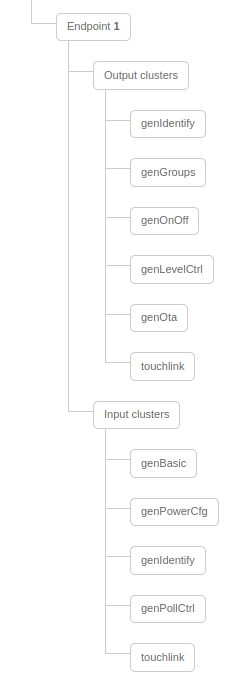
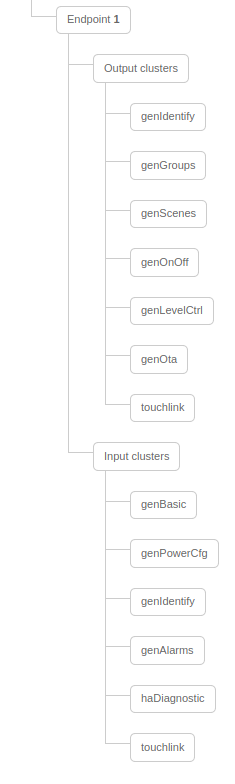
Is this a quirk of Z2M not recognizing the scene-cluster on these?
 jkrenzer
on 20 Oct 2020
jkrenzer
on 20 Oct 2020
If having one deCONZ its possible forcing downgrading devices firmware.
I was doing it for 2 weeks ago with one Control Outlet (V-2.0.024) to V 2.0,022 and unpairing it then it was finished and pairing it in ZHA and its was updating it to the current version 2.0.024) with the OTA fixes applied.
Have done it with the round dimmer before so its verified working but must selecting the OTA file manual for the device and the "converted" file (117C-1101-20022623.zigbee).
I think its not helping finding the "Magic" IKEA is doing but can working for getting the "factory" behavior back for some users.
I have not trying downgrading Zigbee 3 devices to LL (firmware version 1.XX) but i think it should also working but no guarantee.
 MattWestb
on 21 Oct 2020
MattWestb
on 21 Oct 2020
After sniffing the traffic generated by the arrow-keys, it seems to me they send a non-standard manufacturer-specific command to the group. So maybe we are out of luck on this, until IKEA switches to standard-conformant scene recall commands in a future firmware-update. But I am not an expert on the ZigBee protocoll, so take this with a good grain of salt.
ZigBee Application Support Layer Data, Group: 0x4ad3, Src Endpt: 1
ZigBee Cluster Library Frame, Mfr: Ikea of Sweden (0x117c)
    Frame Control Field: Cluster-specific (0x05)
        .... ..01 = Frame Type: Cluster-specific (0x1)
        .... .1.. = Manufacturer Specific: True
        .... 0... = Direction: Client to Server
        ...0 .... = Disable Default Response: False
    Manufacturer Code: Ikea of Sweden (0x117c)
    Sequence Number: 24
    Command: Unknown (0x07)
Data (4 bytes)
PS:
I just wanted to try using the binding capability of the E1524/E1810 remotes with newer firmware to see if they issue standard-conformant scene-commands when bound to the group. But it seems remotes with the new firmware (2.3.014) lack the scene-cluster which the ones with the old FW (1.2.223) have completely:
Is this a quirk of Z2M not recognizing the scene-cluster on these?
I found this as well yesterday. It's not possible to bind the scenes cluster to a group.
However checking the Z2M logs, when clicking the arrow buttons on remote, it does show a message coming in from the genScenes cluster..
Being more or less a noob to ZigBee, is the supported clusters shown in Z2M something that the device reports during pairing?
If so, I guess it's bug on the remote side as it's obviously using genScenes cluster.
It it possible to force a binding to the cluster, even it's not reported as available?
 Kardidk
on 9 Nov 2020
Kardidk
on 9 Nov 2020
For me changing the color temperature via the remote is working. At first, directly after I had paired the remote with Zigbee2MQTT via a ConbeeII adapter it did not work. But all of a sudden, in remembrance it was just after a firmware update of the FLOALT panels, is started to work.
reneklootwijk
on 9 Nov 2020
Its for the moment its not possible binding the scene cluster then the remote dont having it but you can using the groupe the remote is sending the scene commands and doing one groupe for it and adding the bulbs to it and adding new scenes.
Doing one firmware upgrade is restoring the "default" scenes for the groupe 0xff09 (65289) so its working until resetting the bulb.

The 65289 groupe is the sniffed one and the scenes is working form both with remote and from HA then being added in deCONZ.
Z2M user have not testing it but suld working. https://github.com/Koenkk/zigbee2mqtt/issues/4414
MattWestb
on 9 Nov 2020
Related issues
 tb-killa
·
3Comments
tb-killa
·
3Comments
 ophilips
·
4Comments
ophilips
·
4Comments
 sylarevan
·
5Comments
sylarevan
·
5Comments
 LCerebo
·
3Comments
LCerebo
·
3Comments
 mpuff
·
3Comments
mpuff
·
3Comments
Most helpful comment
@didiht
Hooray! Today I finaly got time to test your procedure. I can confirm that color changing now ist working.
I'd support your hypothesis that the key aspect is not to powercycle the bulb after removing it from the TRADFRI app.
However, this evening I was not able to filter the IKEA TRADFRI connect from the zigbee traffic due to too much 'noise' of other zigbee devices (and missing experience with wireshark and the zigbee protocol). If necessary I'v to try again at the weekend.