Zigbee2mqtt: change network key -> repair devices
Dear all,
I want to change the network key now.
What does it mean to repair the devices afterwards?
What network key is allowed? only numbers? is there a restriction?
Many thanks
 chiefe86
All 9 comments
Because the network key changes, the devices cannot communicate with the coordinator, therefore you have to repair all devices.
Only an array of 16 numbers is allowed. I would recommend to just copy https://koenkk.github.io/zigbee2mqtt/how_tos/how_to_secure_network.html and change some of the numbers.
 Koenkk
on 22 Jan 2019
Koenkk
on 22 Jan 2019
Thank you for your reply.
How can I repair them?
Do I have to pair them again, or repair them? Sorry for the confusion...
chiefe86
on 22 Jan 2019
Yes that term gets quite confusing here. You will need to re-pair (pair again) not repair (as in some fixing).
 ryanbeaton
on 23 Jan 2019
ryanbeaton
on 23 Jan 2019
advanced:
  network_key: [7, 3, 5, 7, 9, 11, 13, 15, 0, 2, 4, 6, 8, 11, 12, 13],
Should the above have the comma on the end?
If I put that in my config it fails to load if I remove the comma it loads OK. I have yet to add any devices as I have just started setting it up.
 daveyrb
on 27 Jan 2019
daveyrb
on 27 Jan 2019
There shouldnt be a comma (otherwise its not valid yaml)
Koenkk
on 27 Jan 2019
@koenk I also switched changed my network key.
I also had to delete that comma at the end to be able to set it up. Otherwise I got an error in the zigbee logs. This error pointet to this comma
So instead of
advanced: network_key: [7, 3, 5, 7, 9, 11, 13, 15, 0, 2, 4, 6, 8, 11, 12, 13],
this:
advanced: network_key: [7, 3, 5, 7, 9, 11, 13, 15, 0, 2, 4, 6, 8, 11, 12, 13],
Of course with other numbers. Also after saving without comma and rebooting the addon, my yaml now looks like this (not my real code).
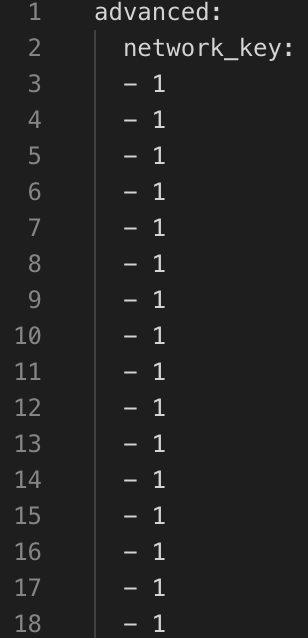
Could you also add the restriction to that network_key to the docs?
Like
- 16 numbers
- only one or two characters (so 1, 11)? Is 99 allowed? Is 999 allowed?
 h4nc
on 30 Jan 2019
h4nc
on 30 Jan 2019
@h4nc this is already being worked on: #963 #969
Koenkk
on 30 Jan 2019
Ok great, but what about the comma thing? And is it normal that it changes the format (see picture in last posting).
Nevermind, found the answer myself. It's normal like this.
h4nc
on 30 Jan 2019
@h4nc fixed in #963. I assume this can be closed now.
Koenkk
on 31 Jan 2019
Related issues
 CodeFinder2
·
4Comments
CodeFinder2
·
4Comments
 andreasbrett
·
4Comments
andreasbrett
·
4Comments
 sylarevan
·
5Comments
sylarevan
·
5Comments
 jwilling
·
4Comments
jwilling
·
4Comments
 rm2kdev
·
3Comments
rm2kdev
·
3Comments
Most helpful comment
Yes that term gets quite confusing here. You will need to re-pair (pair again) not repair (as in some fixing).