Zigbee2mqtt: Philips motion sensor LED off option
Feature request:
The Philips motion sensor has this bright red LED that usually does not blink on motion.
When pairing it with zigbee2mqtt it does show the red led on motion.
Would it be possible to have this a as an option (default off)?
I'm running a CC2530 coordinator firmware 28-11-2018 and zigbee2mqtt 1.0.1 on hass.io
If so, consider this a feature request :)
 HA-TB303
All 86 comments
Is this a configurable option when using it together with the hue bridge? If so this can be supported when we know the commands being send (by sniffing zigbee traffic of the hue bridge)
 Koenkk
on 20 Jan 2019
Koenkk
on 20 Jan 2019
As far as I know the LED is not supposed to blink at all on motion, but only on the pairing process or if that fails. https://www2.meethue.com/nl-nl/ondersteuning/motion-sensor/top/where-is-the-led-indicator-of-the-hue-motion-sensor-located-and-what-does-it-indicate
There is no way to set it on/off in the app, this is probably done at pairing to the bridge.
HA-TB303
on 20 Jan 2019
Maybe this helps: https://github.com/dresden-elektronik/deconz-rest-plugin/issues/20#issuecomment-322221174
config.ledindication RW 0x0000 0x0033 bool (0x10)
Did some extensive sniffing on the Hue motion sensor, connected to the Hue bridge, see https://github.com/dresden-elektronik/deconz-rest-plugin/wiki/Philips-Hue-sniffing#hue-motion-sensor.
As a summary, below is the full mapping of the Hue motion sensor's API attributes to ZCL attributes. Note that the hue bridge sets up attribute reporting for all these ZCL attributes. The attributes without a corresponding ZigBee attribute are maintained by the Hue bridge.
Attribute Cluster Attribute Data Type
state.presenceR 0x0406 0x0000 bool (0x18)*
state.lightlevelR 0x0400 0x0000 uint16 (0x21)
state.darkR -- -- bool
state.daylightR -- -- bool
state.temperatureR 0x0402 0x0000 int16 (0x29)
state.lastupdatedR -- -- string
config.onRW -- -- bool
config.batteryR 0x0001 0x0021 uint8 (0x20)
config.reachableR -- -- bool
config.alertW 0x0003 -- string
config.ledindicationRW 0x0000 0x0033 bool (0x10)
config.usertestRW 0x0000 0x0032 bool (0x10)
config.duration* RW 0x0406 0x0010 uint16 (0x21)
config.sensitivityRW 0x0406 0x0030 uint8 (0x20)
config.sensitivitymaxR 0x0406 0x0031 uint8 (0x20)
config.tholddarkRW -- -- uint16
config.tholddaylightRW -- -- uint16
*)state.presencehas type 8-bit bitmap, but is mapped to bool.
*)config.durationis not supported by the Hue bridge.
HA-TB303
on 20 Jan 2019
Could you try adding
(cb) => device.foundation('genBasic', 'write', [{attrId: 51, dataType: 16, attrData: false}], cb),
to https://github.com/Koenkk/zigbee-shepherd-converters/blob/master/devices.js#L766
Koenkk
on 21 Jan 2019
I would, but I am on hass.io and I don't know how to modify this file on that.
HA-TB303
on 21 Jan 2019
@michel72 use https://koenkk.github.io/zigbee2mqtt/how_tos/how_to_support_new_devices_on_hassio.html to get into the docker container, the file can then be found under node_modules/zigbee-shepherd-converters/devices.js
Koenkk
on 22 Jan 2019
Had to search a little and since I'm a little more the "nano" kind of guy, that was a little tricky ;)
It's line 716 in my version 1.01 and I added it.

Do I need to do anything else, because the RED light is still blinking on motion?
HA-TB303
on 22 Jan 2019
Can you post the startup log (20 first seconds)?
Koenkk
on 22 Jan 2019
I'm not sure I follow you. When I restart zigbee2mqtt it restarts the docker container and that removes my change.
In the log are all my devices. Can I post that publicly?
HA-TB303
on 22 Jan 2019
As I am just a average user and not a coder or expert, I don't know how much further I can help.
I managed to save the setting by restarting the container first and then zigbee2mqtt, but I'm not sure what log information you are looking for and I am not comfortable posting all my ID's publicly.
HA-TB303
on 23 Jan 2019
@michel72 On the beginning of the log you should see a message: Successfully configured.... or Failed to configure for this device (you can recognize it by the device ID).
Koenkk
on 23 Jan 2019
zigbee2mqtt:info 2019-1-23 16:47:13 0x001788010213XXXX (0x001788010213XXXX): 9290012607 - Philips Hue motion sensor (EndDevice)
zigbee2mqtt:info 2019-1-23 16:47:25 Succesfully configured 0x001788010213XXXX 0x001788010213XXXX
HA-TB303
on 23 Jan 2019
The sensor works, but the LED (still) lights up RED on motion.
HA-TB303
on 23 Jan 2019
Can you try with
(cb) => device.foundation('genBasic', 'write', [{attrId: 51, dataType: 16, attrData: true}], cb),
I have changed it to:
``` configure: (ieeeAddr, shepherd, coordinator, callback) => {
const device = shepherd.find(ieeeAddr, 2);
        const actions = [
            (cb) => device.foundation('genBasic', 'write', [{attrId: 51, dataType: 16, attrData: true}], cb),,
            (cb) => device.bind('genPowerCfg', coordinator, cb),
            (cb) => device.bind('msIlluminanceMeasurement', coordinator, cb),
            (cb) => device.bind('msTemperatureMeasurement', coordinator, cb),
            (cb) => device.bind('msOccupancySensing', coordinator, cb),
            (cb) => device.report('genPowerCfg', 'batteryPercentageRemaining', 0, 1000, 0, cb),
            (cb) => device.report('msOccupancySensing', 'occupancy', 0, 600, null, cb),
            (cb) => device.report('msTemperatureMeasurement', 'measuredValue', 30, 600, 1, cb),
            (cb) => device.report('msIlluminanceMeasurement', 'measuredValue', 0, 600, null, cb),
        ];
```
restarted the docker container, but the LED still lights up RED on motion.
Is the procedure I use correct?
Make the change, restart the container and test on motion?
I do NOT restart zigbee2mqtt in hass.io.
HA-TB303
on 23 Jan 2019
Yes, you need to make the change and restart zigbee2mqtt. Can you confirm that the changes are still there after restarting zigbee2mqtt?
Koenkk
on 24 Jan 2019
No, they are not.
What I do is:
Enter the docker container with:
docker exec -it [some-id] bash
make the change and save it using VI
Restart the docker container with:
docker restart [some-id]
check if the change is still there [confirmed]
Restart zigbee2mqtt,
enter the container
check the change [failed]
HA-TB303
on 24 Jan 2019
Please see Persisting a custom devices.js
Koenkk
on 26 Jan 2019
Sorry, I totally overlooked that one.
I tried both lines, followed by a restart.
The first one does not work.
The second one, does not work either, but throws this warning:
zigbee2mqtt:warn 2019-1-28 09:39:53 No converter available for '9290012607' with cid 'genBasic', type 'devChange' and data '{"cid":"genBasic","data":{"zclVersion":1,"appVersion":2,"stackVersion":1,"hwVersion":1,"manufacturerName":"Philips","modelId":"SML001","dateCode":"20160630","powerSource":3,"swBuildId":"6.1.0.18912"}}'
HA-TB303
on 28 Jan 2019
Do you see successfully configured for both?
Koenkk
on 29 Jan 2019
(cb) => device.foundation('genBasic', 'write', [{attrId: 51, dataType: 16, attrData: false}], cb),
  zigbee2mqtt:info 2019-1-29 15:36:16 0x001788010213XXXX (0x001788010213XXXX): 9290012607 - Philips Hue motion sensor (EndDevice)
  zigbee2mqtt:info 2019-1-29 15:36:16 0x001788010213XXXX (0x001788010213XXXX): 9290012607 - Philips Hue motion sensor (EndDevice)  zigbee2mqtt:info 2019-1-29 15:36:16 MQTT publish: topic 'homeassistant/binary_sensor/0x001788010213XXXX/occupancy/config', payload '{"payload_on":true,"payload_off":false,"value_template":"{{ value_json.occupancy }}","device_class":"motion","state_topic":"zigbee2mqtt/0x001788010213XXXX","availability_topic":"zigbee2mqtt/bridge/state","name":"0x001788010213XXXX_occupancy","unique_id":"0x001788010213XXXX_occupancy_zigbee2mqtt","device":{"identifiers":"zigbee2mqtt_0x001788010213XXXX","name":"0x001788010213XXXX","sw_version":"Zigbee2mqtt 1.0.1","model":"Hue motion sensor (9290012607)","manufacturer":"Philips"}}'
  zigbee2mqtt:info 2019-1-29 15:36:16 MQTT publish: topic 'homeassistant/sensor/0x001788010213XXXX/temperature/config', payload '{"unit_of_measurement":"°C","device_class":"temperature","value_template":"{{ value_json.temperature }}","json_attributes":["linkquality","battery","voltage"],"state_topic":"zigbee2mqtt/0x001788010213XXXX","availability_topic":"zigbee2mqtt/bridge/state","name":"0x001788010213XXXX_temperature","unique_id":"0x001788010213XXXX_temperature_zigbee2mqtt","device":{"identifiers":"zigbee2mqtt_0x001788010213XXXX","name":"0x001788010213XXXX","sw_version":"Zigbee2mqtt 1.0.1","model":"Hue motion sensor (9290012607)","manufacturer":"Philips"}}'
  zigbee2mqtt:info 2019-1-29 15:36:16 MQTT publish: topic 'homeassistant/sensor/0x001788010213XXXX/illuminance/config', payload '{"unit_of_measurement":"lx","device_class":"illuminance","value_template":"{{ value_json.illuminance }}","json_attributes":["linkquality","battery","voltage"],"state_topic":"zigbee2mqtt/0x001788010213XXXX","availability_topic":"zigbee2mqtt/bridge/state","name":"0x001788010213XXXX_illuminance","unique_id":"0x001788010213XXXX_illuminance_zigbee2mqtt","device":{"identifiers":"zigbee2mqtt_0x001788010213XXXX","name":"0x001788010213XXXX","sw_version":"Zigbee2mqtt 1.0.1","model":"Hue motion sensor (9290012607)","manufacturer":"Philips"}}'
  zigbee2mqtt:info 2019-1-29 15:36:16 MQTT publish: topic 'homeassistant/sensor/0x001788010213XXXX/battery/config', payload '{"device_class":"battery","value_template":"{{ value_json.battery }}","json_attributes":["linkquality","voltage","action","sensitivity"],"state_topic":"zigbee2mqtt/0x001788010213XXXX","availability_topic":"zigbee2mqtt/bridge/state","name":"0x001788010213XXXX_battery","unique_id":"0x001788010213XXXX_battery_zigbee2mqtt","device":{"identifiers":"zigbee2mqtt_0x001788010213XXXX","name":"0x001788010213XXXX","sw_version":"Zigbee2mqtt 1.0.1","model":"Hue motion sensor (9290012607)","manufacturer":"Philips"}}'
  zigbee2mqtt:error 2019-1-29 15:36:46 Failed to configure 0x001788010213XXXX 0x001788010213XXXX
(cb) => device.foundation('genBasic', 'write', [{attrId: 51, dataType: 16, attrData: true}], cb),
  zigbee2mqtt:info 2019-1-29 14:50:52 0x001788010213XXXX (0x001788010213XXXX): 9290012607 - Philips Hue motion sensor (EndDevice)
  zigbee2mqtt:info 2019-1-29 14:50:52 MQTT publish: topic 'zigbee2mqtt/0x001788010213XXXX', payload '{"battery":97,"linkquality":0,"temperature":13.49,"illuminance":12598,"occupancy":false}'
  zigbee2mqtt:info 2019-1-29 14:50:52 MQTT publish: topic 'homeassistant/binary_sensor/0x001788010213XXXX/occupancy/config', payload '{"payload_on":true,"payload_off":false,"value_template":"{{ value_json.occupancy }}","device_class":"motion","state_topic":"zigbee2mqtt/0x001788010213XXXX","availability_topic":"zigbee2mqtt/bridge/state","name":"0x001788010213XXXX_occupancy","unique_id":"0x001788010213XXXX_occupancy_zigbee2mqtt","device":{"identifiers":"zigbee2mqtt_0x001788010213XXXX","name":"0x001788010213XXXX","sw_version":"Zigbee2mqtt 1.0.1","model":"Hue motion sensor (9290012607)","manufacturer":"Philips"}}'
  zigbee2mqtt:info 2019-1-29 14:50:52 MQTT publish: topic 'homeassistant/binary_sensor/0x001788010213XXXX/occupancy/config', payload '{"payload_on":true,"payload_off":false,"value_template":"{{ value_json.occupancy }}","device_class":"motion","state_topic":"zigbee2mqtt/0x001788010213XXXX","availability_topic":"zigbee2mqtt/bridge/state","name":"0x001788010213XXXX_occupancy","unique_id":"0x001788010213XXXX_occupancy_zigbee2mqtt","device":{"identifiers":"zigbee2mqtt_0x001788010213XXXX","name":"0x001788010213XXXX","sw_version":"Zigbee2mqtt 1.0.1","model":"Hue motion sensor (9290012607)","manufacturer":"Philips"}}'
  zigbee2mqtt:info 2019-1-29 14:50:52 MQTT publish: topic 'homeassistant/sensor/0x001788010213XXXX/temperature/config', payload '{"unit_of_measurement":"°C","device_class":"temperature","value_template":"{{ value_json.temperature }}","json_attributes":["linkquality","battery","voltage"],"state_topic":"zigbee2mqtt/0x001788010213XXXX","availability_topic":"zigbee2mqtt/bridge/state","name":"0x001788010213XXXX_temperature","unique_id":"0x001788010213XXXX_temperature_zigbee2mqtt","device":{"identifiers":"zigbee2mqtt_0x001788010213XXXX","name":"0x001788010213XXXX","sw_version":"Zigbee2mqtt 1.0.1","model":"Hue motion sensor (9290012607)","manufacturer":"Philips"}}'
  zigbee2mqtt:info 2019-1-29 14:50:52 MQTT publish: topic 'homeassistant/sensor/0x001788010213XXXX/temperature/config', payload '{"unit_of_measurement":"°C","device_class":"temperature","value_template":"{{ value_json.temperature }}","json_attributes":["linkquality","battery","voltage"],"state_topic":"zigbee2mqtt/0x001788010213XXXX","availability_topic":"zigbee2mqtt/bridge/state","name":"0x001788010213XXXX_temperature","unique_id":"0x001788010213XXXX_temperature_zigbee2mqtt","device":{"identifiers":"zigbee2mqtt_0x001788010213XXXX","name":"0x001788010213XXXX","sw_version":"Zigbee2mqtt 1.0.1","model":"Hue motion sensor (9290012607)","manufacturer":"Philips"}}'
  zigbee2mqtt:info 2019-1-29 14:50:52 MQTT publish: topic 'homeassistant/sensor/0x001788010213XXXX/illuminance/config', payload '{"unit_of_measurement":"lx","device_class":"illuminance","value_template":"{{ value_json.illuminance }}","json_attributes":["linkquality","battery","voltage"],"state_topic":"zigbee2mqtt/0x001788010213XXXX","availability_topic":"zigbee2mqtt/bridge/state","name":"0x001788010213XXXX_illuminance","unique_id":"0x001788010213XXXX_illuminance_zigbee2mqtt","device":{"identifiers":"zigbee2mqtt_0x001788010213XXXX","name":"0x001788010213XXXX","sw_version":"Zigbee2mqtt 1.0.1","model":"Hue motion sensor (9290012607)","manufacturer":"Philips"}}'
  zigbee2mqtt:info 2019-1-29 14:50:52 MQTT publish: topic 'homeassistant/sensor/0x001788010213XXXX/battery/config', payload '{"device_class":"battery","value_template":"{{ value_json.battery }}","json_attributes":["linkquality","voltage","action","sensitivity"],"state_topic":"zigbee2mqtt/0x001788010213XXXX","availability_topic":"zigbee2mqtt/bridge/state","name":"0x001788010213XXXX_battery","unique_id":"0x001788010213XXXX_battery_zigbee2mqtt","device":{"identifiers":"zigbee2mqtt_0x001788010213XXXX","name":"0x001788010213XXXX","sw_version":"Zigbee2mqtt 1.0.1","model":"Hue motion sensor (9290012607)","manufacturer":"Philips"}}'
  zigbee2mqtt:error 2019-1-29 14:51:22 Failed to configure 0x001788010213XXXX 0x001788010213XXXX
Could you update to the latest dev branch and try again (-edge for hassio). This includes logging why configure failed.
Koenkk
on 29 Jan 2019
Could you give me a little hint about how risky that would be? This is an "production environment" for me as I actively use all that stuff in my house ;)
If the risk is "low" I'm more then willing to test.
HA-TB303
on 29 Jan 2019
@michel72 you can use zigbee2mqtt 1.1 (just released)
Koenkk
on 29 Jan 2019
I'm afraid 1.1 is not yet available for hass.io.
I'll test right after it's available and post the logs.
HA-TB303
on 30 Jan 2019
I have tried both changes with 1.1.0, but no more errors, In both cases:
zigbee2mqtt:info 2019-1-31 20:12:32 Succesfully configured 0x001788010213XXXX (0x001788010213XXXX)
But the LED still blinks on motion ;)
HA-TB303
on 31 Jan 2019
Can you post the log when running with
                (cb) => device.foundation('genBasic', 'write', [{attrId: 51, dataType: 16, attrData: true}], cb),
                (cb) => device.foundation('genBasic', 'read', [{attrId: 51}], cb),
  zigbee2mqtt:warn 2019-1-31 21:00:43 No converter available for '9290012607' with cid 'genBasic', type 'devChange' and data '{"cid":"genBasic","data":{"51":null}}'
  zigbee2mqtt:warn 2019-1-31 21:00:43 Please see: https://koenkk.github.io/zigbee2mqtt/how_tos/how_to_support_new_devices.html.
  zigbee2mqtt:info 2019-1-31 21:00:49 Succesfully configured 0x001788010213XXXX(0x001788010213XXXX)
Hi Koen,
Anything else I could try?
HA-TB303
on 2 Feb 2019
I don't know how to continue from here, the correct commands are send (as far as I can see). Perhaps somebody with the Hue bridge could do some sniffing and help us.
Koenkk
on 2 Feb 2019
I have a hue bridge with several motion sensors on it. I should be able to sniff, probably won't be able to analyse the data ;)
HA-TB303
on 2 Feb 2019
If you can post a screenshot of wireshark I can help with this. Please capture the command when the behaviour of the LED is changed.
Koenkk
on 2 Feb 2019
The problem is that the hue app does not allow the led to be controlled on or off. The default behavior is ALWAYS OFF, even on motion.
I have 2 full captures: One of the pairing process and a capture of detecting motion.
I just don't know what to look for and since you need my keys to decrypt I can't post them publicly. I am willing to send them to you privately though.
HA-TB303
on 2 Feb 2019
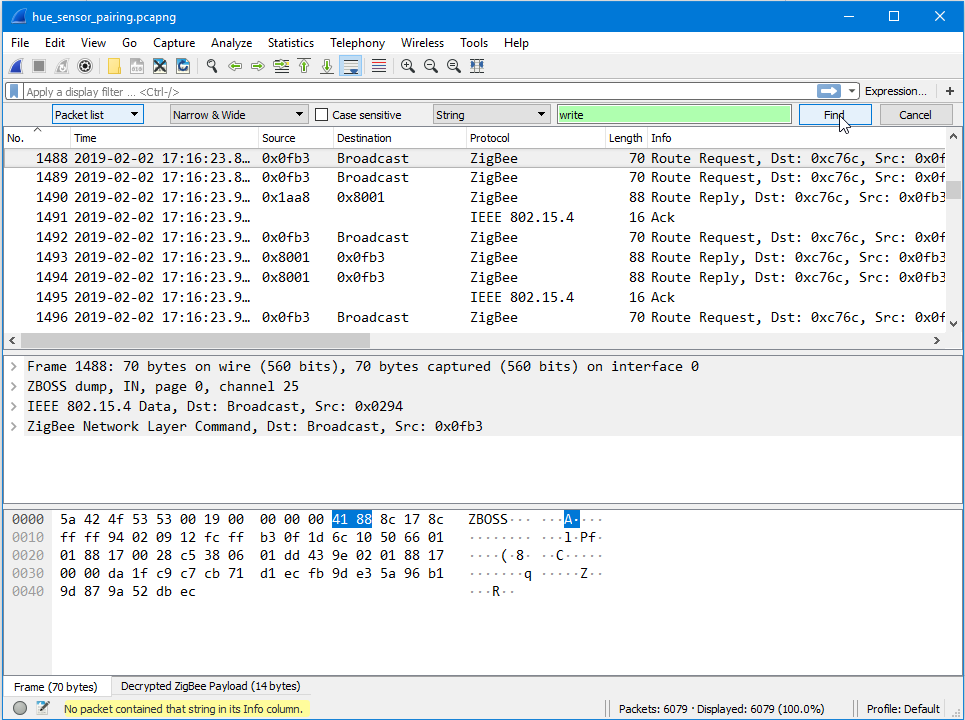
@michel72 if you filter on write commands to the basic cluster, how much messages are left?
Koenkk
on 2 Feb 2019
I'm quit a noob on the wireshark front. Can you give me the filter rule?
HA-TB303
on 2 Feb 2019
If you are looking for the string "write" in the info column, there is none.
HA-TB303
on 2 Feb 2019
Could you filter based on the cluster? genBasic, cluster ID: 0x00.
Koenkk
on 3 Feb 2019
I know little about the zigbee protocol and little about zigbee sniffing. If you could only give me the filter rule like "zbee_zcl.cmd.id == 0x00" I can send you the results.
When I apply the above filter I find al sorts of read attributes, but I really don't know what you are looking for.
HA-TB303
on 3 Feb 2019

HA-TB303
on 3 Feb 2019
I don't know about the wireshark query/search stuff.
But I'm looking for messages send to Cluster: Basic (0x0000). The screenshot shows Cluster: On/Off (0x0006).
Edit: perhaps "zbee_zcl.cluster.id == 0x0000"?
Koenkk
on 3 Feb 2019
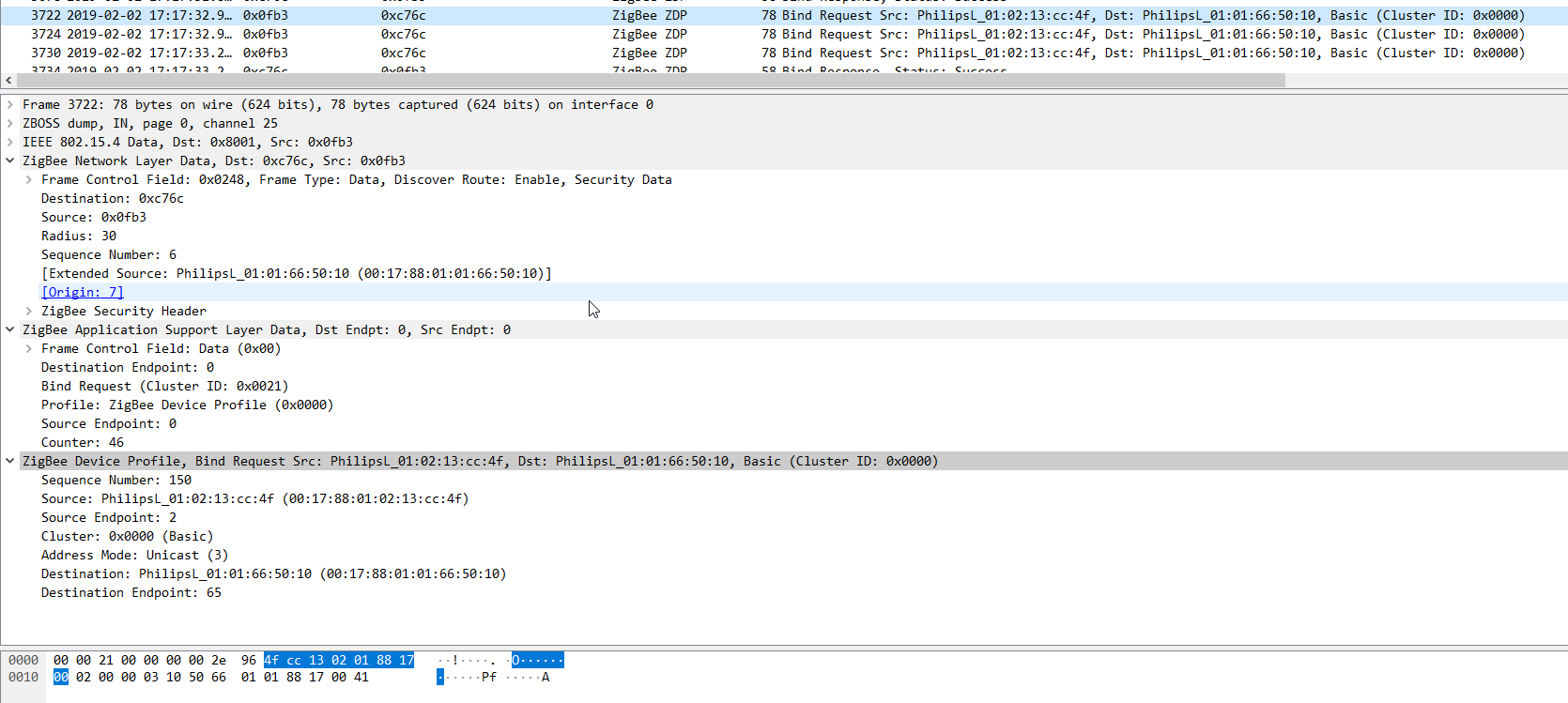
This?
HA-TB303
on 3 Feb 2019
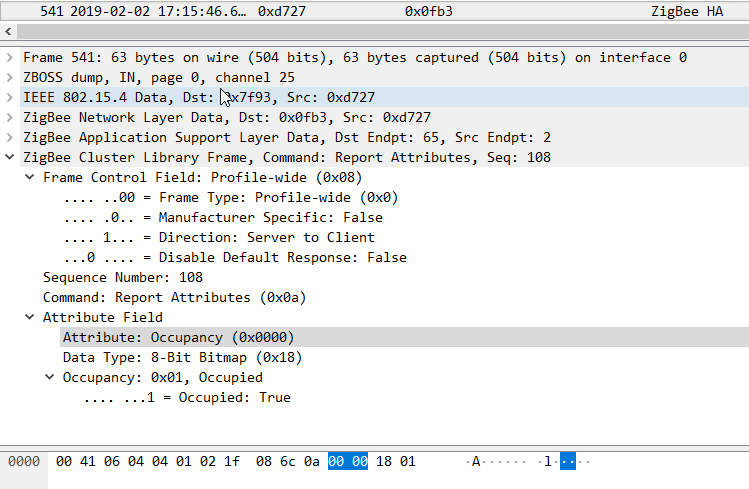
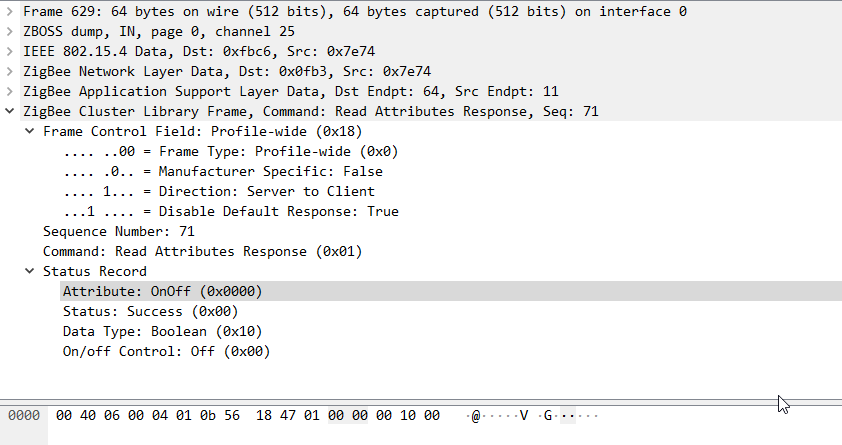
@michel72 yes that's the correct cluster, beside the bind requests, do you see any other messages of this cluster?
Koenkk
on 4 Feb 2019
HA-TB303
on 4 Feb 2019
HA-TB303
on 4 Feb 2019
Besides current level and Lux nothing else...
HA-TB303
on 4 Feb 2019
So it seems that device.foundation('genBasic', 'write', [{attrId: 51, dataType: 16, attrData: true}], cb), is not done by the Hue bridge. Could you perhaps share the wireshark file with me so I can take a look?
Koenkk
on 4 Feb 2019
Sure, where can I send it?
HA-TB303
on 4 Feb 2019
Can you contact me on telegram (Koenkk)?
Koenkk
on 4 Feb 2019
I'm also interested in fixing this. Let me know if I can be of help for testing. Running zigbee2mqtt straight from source (on hassbian).
 y0ast
on 13 Feb 2019
y0ast
on 13 Feb 2019
Can you test this:
add this attribute:
"ledindication":{"id":51,"type":"boolean"}},
to:
https://github.com/Koenkk/zcl-id/blob/master/definitions/cluster_defs.json#L18
and then test these:
https://github.com/Koenkk/zigbee2mqtt/issues/897#issuecomment-459477849
here: https://github.com/Koenkk/zigbee-shepherd-converters/blob/master/devices.js#L852
Koen asked me to test this on hass.io, but that is not possible since the changes are gone after a restart of zigbee2mqtt.
Please post your results here.
HA-TB303
on 14 Feb 2019
Updated to latest master with commit 92d88b6
step 1: add:
"ledindication":{"id":51,"type":"boolean"}},
after L18 of node_modules/zcl-id/definitions/cluster_defs.json (and remove one of two } of line before)
step 2: add:
                (cb) => device.foundation('genBasic', 'write', [{attrId: 51, dataType: 16, attrData: true}], cb),
                (cb) => device.foundation('genBasic', 'read', [{attrId: 51}], cb),
after L774: node_modules/zigbee-shepherd-converters/devices.js (node pulled in version 7.0.27)
Step 3: start zigbee2mqtt using npm start and see following in log:
  zigbee2mqtt:warn 2/18/2019, 9:05:16 PM No converter available for '9290012607' with cid 'genBasic', type 'devChange' and data '{"cid":"genBasic","data":{"51":null}}'
  zigbee2mqtt:warn 2/18/2019, 9:05:16 PM Please see: https://www.zigbee2mqtt.io/how_tos/how_to_support_new_devices.html.
  zigbee2mqtt:info 2/18/2019, 9:05:16 PM Succesfully configured 0x0017880102112db2 (0x0017880102112db2)
Also the red light still shows.
@michel72 @Koenkk Let me know if I can try anything else or if you spot any issue with my setup.
y0ast
on 18 Feb 2019
I did some more poking around (and reading about the Zigbee protocol).
I've tried binding first to cluster 0x0000:
(cb) => device.bind('genBasic', coordinator, cb),
I've tried specifically setting the usertest attribute:
                (cb) => device.foundation('genBasic', 'write', [{attrId: 50, dataType: 16, attrData: false}], cb),
                (cb) => device.foundation('genBasic', 'write', [{attrId: 51, dataType: 16, attrData: false}], cb),
                (cb) => device.foundation('genBasic', 'read', [{attrId: 51}], cb),
I've played with just setting false the attribute false and not reading it out again, perhaps it's a write only. But no, red light remains.
I dug into how deCONZ does this and found this reference: https://github.com/dresden-elektronik/deconz-rest-plugin/blob/d976ed33dfe4f27de33869b248f826de8aff2c10/bindings.cpp#L1267
However it doesn't seem that much special is going on. Just an attribute write.
I read this analysis of a data dump: https://github.com/dresden-elektronik/deconz-rest-plugin/wiki/Philips-Hue-sniffing#hue-motion-sensor but also nothing special.
The red light simply disappears the moment you connect the sensor to the hue hub (it comes back on briefly if you configure the sensor in the app, to aid with setting the sensitivity correctly).
I'm a bit lost for options here. Curious to hear your opinion @michel72 and @Koenkk. If we figure this out then there are a number of other attributes on the sensor that are worth exposing (duration and sensitivity).
y0ast
on 25 Feb 2019
Can you try with:
(cb) => device.foundation(
  'genBasic',
  'write',
  [{attrId: 51, dataType: 16, attrData: false}],
  {manufSpec: 1, manufCode: 0x100B},
  cb,
),
Thanks @Koenkk! The attribute can now be set/read, but weirdly the led continues to be on with movement, regardless of the setting 0 or 1.
Output of first setting then reading (both using manufCode):
  zigbee2mqtt:warn 2/27/2019, 7:46:55 PM No converter available for '9290012607' with cid 'genBasic', type 'devChange' and data '{"cid":"genBasic","data":{"51":0}}'
  zigbee2mqtt:warn 2/27/2019, 7:46:55 PM Please see: https://www.zigbee2mqtt.io/how_tos/how_to_support_new_devices.html.
  zigbee2mqtt:info 2/27/2019, 7:46:55 PM Succesfully configured 0x0017880102112db2 (0x0017880102112db2)
With attrData: True:
  zigbee2mqtt:warn 2/27/2019, 7:51:59 PM No converter available for '9290012607' with cid 'genBasic', type 'devChange' and data '{"cid":"genBasic","data":{"51":1}}'
  zigbee2mqtt:warn 2/27/2019, 7:51:59 PM Please see: https://www.zigbee2mqtt.io/how_tos/how_to_support_new_devices.html.
  zigbee2mqtt:info 2/27/2019, 7:51:59 PM Succesfully configured 0x0017880102112db2 (0x0017880102112db2)
I can also read usertest, but not sensitivity:
(cb) => device.foundation(
  'msOccupancySensing',
  'read',
  [{attrId: 48}],
  {manufSpec: 1, manufCode: 0x100B},
  cb,
),
Gets ignored, I think I'm not setting the cluster id quite right.
y0ast
on 27 Feb 2019
The read looks good, can you try to write it? (should set sensitivity to high).
(cb) => device.foundation(
  'msOccupancySensing',
  'write',
  [{attrId: 48, dataType: 32, attrData: 0x02}],
  {manufSpec: 1, manufCode: 0x100B},
  cb,
),
just a short note from my tests:
By setting the usertest bit to true, I can switch the led from red to green.
(cb) => device.foundation(
  'genBasic',
  'write',
  [{attrId: 50, dataType: 16, attrData: false}],
  {manufSpec: 1, manufCode: 0x100B},
  cb,
),
By setting both to true the led is green, by setting both to false the led is red.
Out of my tests the value of the ledindication has no effect to the led at all...
It would be great if someone can try to sniff the sensor in a hue enviroment. You can switch on the ledindication when you start the setup process of the sensitifity in the hue app...
 MrLight
on 4 Mar 2019
MrLight
on 4 Mar 2019
I can verify the green led light too with usertest set to true.
It seems like the first occupancy does not blink the led, but every subsequent one does.
There is a peculiar section in the deconz code: https://github.com/dresden-elektronik/deconz-rest-plugin/blob/d976ed33dfe4f27de33869b248f826de8aff2c10/bindings.cpp#L1744
which seems to do some minimal delay, but I don't fully understand it.
@Koenkk even after your suggested write, the read of sensitivity just gets ignored. Configuring is successful though.
y0ast
on 5 Mar 2019
@y0ast is it possible to set the sensitivity from the Hue hub?
Koenkk
on 5 Mar 2019
Yep, when my motion sensor was still paired to the hub I was able to adjust
the sensitivity from the hue app. I was also able to empirically verify
that the sensitivity was different.
On Tue, 5 Mar 2019 at 15:45, Koen Kanters notifications@github.com wrote:
@y0ast https://github.com/y0ast is it possible to set the sensitivity
from the Hue hub?—
You are receiving this because you were mentioned.
Reply to this email directly, view it on GitHub
https://github.com/Koenkk/zigbee2mqtt/issues/897#issuecomment-469730470,
or mute the thread
https://github.com/notifications/unsubscribe-auth/AAdpkv5YK1UQSIhfj3UHYDMoTnX25QDNks5vTpEpgaJpZM4aJiiA
.
y0ast
on 5 Mar 2019
Could you sniff that? We need to find the difference with what zigbee2mqtt sends. Please post 2 captures, one with the hue hub, one with zigbee2mqtt.
Koenkk
on 5 Mar 2019
Unfortunately I only have one CC2531 stick (so can't sniff zigbee2mqtt itself) and I only have access to an OSX machine.
The how-to seem to indicate that it's only possible with ubuntu/windows:
https://www.zigbee2mqtt.io/how_tos/how_to_sniff_zigbee_traffic.html
@michel72 could you perhaps help out with the sniffing?
y0ast
on 5 Mar 2019
@y0ast it works well with vmware fusion (doing that on my macbook).
Koenkk
on 5 Mar 2019
I've ordered a second CC2531, so will report back when it arrives (might be a few weeks).
y0ast
on 6 Mar 2019
OK here is an update. I did some sniffing this afternoon and have seen that the hue bridge is Configure Reporting all three values (ledindication, usertest and sensitivity).
After playing around I found a partly solution for our Problem:
I added the following to the device.js:
(cb) => device.foundation('genBasic', 'configReport', [{direction: 0, attrId: 51, dataType: 16, minRepIntval: 5,
maxRepIntval: 7200, repChange: 0}], {manufSpec: 1, manufCode: 0x100B}, cb),
Additionally I added ,fz.ignore_basic_report to fromZigbee:
When you now rebind the sensor this will keep the led to stay off for a bit of time and the sensor is reporting motion events to mqtt. After some time the sensor is crashing. A short look into the debugging does not show any faults.
After restarting zigbee2mqtt the device is falling back into the old way of operation... So it is working but the LED is on after motion.
I also found out that the led is always on during motion when the sensor has lost "connection" to the bridge. This is also true for a hue environment. I suppose that the sensor is than alerting the user and is increasing sensitivity to max to get max attention.
I'm not quiet sure whats wrong. If someone has a hint let me know. I will try to take a deeper look into the recordings. When is zigbee2mqtt announcing the Configure Reporting after every restart?
Btw: Posted one message before, had to delete it because my findings were totally wrong...
MrLight
on 7 Mar 2019
Thanks for the sniffing @MrLight ! From the deconz page:
I see several ZDO: BindReq requests from the bridge to the motion sensor for the usual clusters: 0x0400, 0x0402, 0x0406, 0x0001; but also for: 0x0000.
I see several ZCL: Configure reporting requests, from the bridge to the motion sensor, for the usual attributes: 0x0400/0x0000, 0x0402/0x0000, 0x0406/0x0000, 0x0001/0x0021; but also for: 0x0000/0x0033, 0x0000/0x0032, 0x0406/0x0030.
I see several ZCL: Report attribute commands from the motion sensor to the bridge: for attributes: 0x0406/0x0000, 0x0402/0x0000, 0x0400/0x0000, 0x0001/0x0021, but also for: 0x0000/0x0033, 0x0406/0x0030. More or less consistent with the reporting configuration - maybe I just missed the 0x0000/0x0032 in the capture.
I see several ZCL: Read attribute response commands: for 0x0000/0x0030, 0x0000/0x0033, 0x0000/0x0032, 0x0406/0x0030, 0x0406/0x0031. I suspect the 0x0406/0x0030 and 0x0406/0x0031 to be config.sensitivity and config.sensitivitymax - both have value 0x02.
The Configure report is now done. But perhaps the bindreq and the read attribute reponse are also necessary? Do you see the reported attributes for 0x0000/0x0033 in the sniffing?
y0ast
on 8 Mar 2019
OK so actually I'm out of ideas...
Yes the capture shows a binding for genBasics and reads on all of the three values (led, usertest, sens...)
I have tried to somehow make a maximal device specification which should end in the same flow as the capture does.
For now the sensor is still reporting values to zigbee2mqtt but the led is still flashing red.
I have the feeling, that the sensor never ends the pairing process. After every restart when all of the bindings and configuration is done. I get the following messages:
zigbee2mqtt:info 3/8/2019, 8:07:07 PM Succesfully configured 0x0017880102011206 (0x0017880102011206)
``` zigbee-shepherd:af dispatchIncomingMsg(): type: zclIncomingMsg, msg: [object Object] +40ms
zigbee2mqtt:debug 3/8/2019, 8:07:11 PM Received zigbee message of type 'devInterview' with data '"0x0017880102011206"'
zigbee-shepherd Device: 0x0017880102011206 join the network. +21s
zigbee2mqtt:debug 3/8/2019, 8:07:11 PM Received zigbee message of type 'devIncoming' with data '"0x0017880102011206"' of device 'SML001' (0x0017880102011206)
zigbee2mqtt:info 3/8/2019, 8:07:11 PM Device incoming...
zigbee2mqtt:info 3/8/2019, 8:07:11 PM MQTT publish: topic 'zigbee2mqtt/bridge/log', payload '{"type":"pairing","message":"device incoming"}'
zigbee2mqtt:debug 3/8/2019, 8:07:11 PM Received zigbee message of type 'devStatus' with data '"online"' of device 'SML001' (0x0017880102011206)
But the device is already listed in the database. Removing and repairing does not help...

Here are my actions:
- All values out of the capture file.
- The read on the sensitivity is reading two attributes?
- the order is like in the capture file. Changing the order hasn't had a positive effect. (or i missed it)
const actions = [
(cb) => device.bind('msOccupancySensing', coordinator, cb),
(cb) => device.bind('msTemperatureMeasurement', coordinator, cb),
(cb) => device.bind('msIlluminanceMeasurement', coordinator, cb),
(cb) => device.bind('genPowerCfg', coordinator, cb),
(cb) => device.bind('genBasic', coordinator, cb),
    (cb) => device.report('msOccupancySensing', 'occupancy', 1, 300, null, cb),
    (cb) => device.report('msTemperatureMeasurement', 'measuredValue', 10, 300, 1, cb),
    (cb) => device.report('msIlluminanceMeasurement', 'measuredValue', 5, 300, null, cb),
    (cb) => device.report('genPowerCfg', 'batteryPercentageRemaining', 7200, 7200, 0, cb),

    (cb) => device.foundation('genBasic', 'read', [{attrId: 51}], {manufSpec: 1, manufCode: 0x100B}, cb,),
    (cb) => device.foundation('genBasic', 'configReport', [{direction: 0, attrId: 51, dataType: 16, minRepIntval: 5,
        maxRepIntval: 7200, repChange: null}], {manufSpec: 1, manufCode: 0x100B}, cb),
    (cb) => device.foundation('genBasic', 'read', [{attrId: 50}], {manufSpec: 1, manufCode: 0x100B}, cb,),

    (cb) => device.foundation('genBasic', 'configReport', [{direction: 0, attrId: 50, dataType: 16, minRepIntval: 5,
        maxRepIntval: 7200, repChange: null}], {manufSpec: 1, manufCode: 0x100B}, cb),
    (cb) => device.foundation('msOccupancySensing', 'read',
          [{attrId: 48},{attrId: 49}], {manufSpec: 1, manufCode: 0x100B}, cb,),
    (cb) => device.foundation('msOccupancySensing', 'configReport', [{direction: 0, attrId: 48, dataType: 32, minRepIntval: 5,
        maxRepIntval: 7200, repChange: null}], {manufSpec: 1, manufCode: 0x100B}, cb),
        ];
```
If someone would like to have a look into the capture files let me know...
MrLight
on 8 Mar 2019
I suspect its not a setting exactly, but that the device expects some special ACK back from the controller for its messages, or it goes into this mode where the next motion triggers this warning flash.
• Long red flash at detection*: Sensor cannot reach bridge (if this happens often, please consider a Zigbee channel change using the Philips Hue app (Settings > Hue bridges > Zigbee > Change Channel)
 darkskiez
on 3 May 2019
darkskiez
on 3 May 2019
It seems so and at least for me it even stops working for some time afterwards.
 janvotava
on 3 May 2019
janvotava
on 3 May 2019
@janvotava does this still happen with the latest dev firmware? 20190425 https://github.com/Koenkk/Z-Stack-firmware/tree/dev/coordinator/Z-Stack_Home_1.2/bin
Koenkk
on 3 May 2019
@Koenkk thanks a lot, it seems to work now (was not working with 20190315) and sorry for actually hijacking totally unrelated issue.
janvotava
on 4 May 2019
I still have this on both the normal Hue motion sensor and the outdoor one.
Running latest version of the firmware and edge.
I can put the led to green as commented earlier, but that reverts to red after a few minutes on the outdoor sensor. On the indoor one it stays.
Would love to be able to change the led to off and set the motion sensitivity.
 Mace404
on 25 Jun 2019
Mace404
on 25 Jun 2019
@Mace404 motion sensitivity can be set in the dev branch (https://github.com/Koenkk/zigbee2mqtt.io/blob/dev/devices/9290012607.md)
Koenkk
on 25 Jun 2019
Great, maybe it stops responding on cats now :)
For now I'm putting the outdoor sensor back on the Hue bridge because that led lights up the whole bubble and that thing is almost brighter than the light bulb it triggers :p
Mace404
on 25 Jun 2019
So sensitivity is now supported in release 1.5. Did anyone check if it fixes the led issue?
If not, are there any leads for fixing it?
y0ast
on 18 Jul 2019
This issue has been automatically marked as stale because it has not had recent activity. It will be closed if no further activity occurs. Thank you for your contributions.
![stale[bot] picture](https://avatars3.githubusercontent.com/in/1724?v=4&s=40) stale[bot]
on 16 Sep 2019
stale[bot]
on 16 Sep 2019
This is still an open problem. I would like to move my motion sensor from the hue hub to Z2M but cannot with the red LED.
y0ast
on 17 Sep 2019
If someone could provide me a wireshark log when pairing this device with the HUE bridge I can give it another try.
Koenkk
on 17 Sep 2019
Hi Koenkk,
it would be great if you can give it another try. I just looked for my old recordings. Both recordings in the attachment should contain a pairing process between the HUE Bridge and the SML001.
Hue_SML001 Pairing.zip
MrLight
on 17 Sep 2019
@MrLight could you share the network keys which are needed for decryption?
Koenkk
on 17 Sep 2019
Hi Koenkk,
I'm not really sure which is the right key since I've done the captures a while ago. I think the captures have different key's... My complete Wireshark zigbee key File is in the attachment. Let me know if it is not enough.
Thank you very much for investigating into this problem!
zigbee_pc_keys.txt
MrLight
on 17 Sep 2019
From my reading online I don't think it's only a pairing issue, I think the
gateway sends a sort of ping request to the coordinator and flashes red on
movement to warn of connectivity issues.
On Tue, 17 Sep 2019, 21:23 MrLight, notifications@github.com wrote:
Hi Koenkk,
I'm not really sure which is the right key since I've done the captures a
while ago. I think the captures have different key's... My complete
Wireshark zigbee key File is in the attachment. Let me know if it is not
enough.
Thank you very much for investigating into this problem!
zigbee_pc_keys.txt
https://github.com/Koenkk/zigbee2mqtt/files/3623072/zigbee_pc_keys.txt—
You are receiving this because you commented.
Reply to this email directly, view it on GitHub
https://github.com/Koenkk/zigbee2mqtt/issues/897?email_source=notifications&email_token=AACN2BJ76YNKMJ3UYBX37WLQKEVEVA5CNFSM4GRGFCAKYY3PNVWWK3TUL52HS4DFVREXG43VMVBW63LNMVXHJKTDN5WW2ZLOORPWSZGOD65T5MI#issuecomment-532364977,
or mute the thread
https://github.com/notifications/unsubscribe-auth/AACN2BKROKLFFXT5HYYL523QKEVEVANCNFSM4GRGFCAA
.
darkskiez
on 18 Sep 2019
Could it be that we just need to send a response message after each occupancy message?
If I compare the wireshark log from a hue bridge:
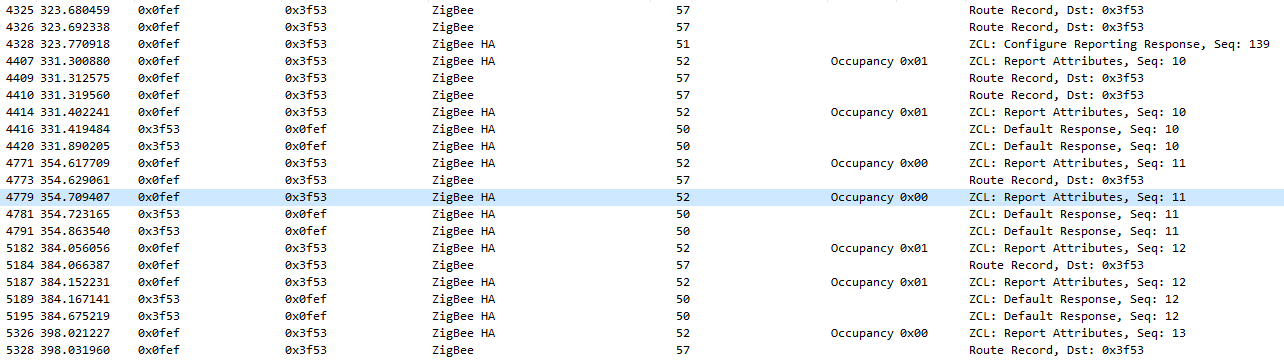
with a zigbee2mqtt log:

 ZzetT
on 30 Sep 2019
ZzetT
on 30 Sep 2019
@ZzetT that could be the case! Can you try with the latest zigbee2mqtt dev branch? As this should already be implemented here.
If not let me know; I will receive my Hue motion sensor and bridge today/tomorrow.
Koenkk
on 1 Oct 2019
I just received the motion sensor and paired it to the zigbee2mqtt dev branch; The LED on the motion sensor doesn't turn on when it detects motion so I assume that the dev branch fixes this issue.
Can anybody confirm so we can close this issue?
Koenkk
on 1 Oct 2019
I can confirm that it is working with the current dev branch.
Thank you very much! My HUE Bridge will be disabled when I have moved all Motion Sensors to zigbee2mqtt!
MrLight
on 2 Oct 2019
@MrLight thanks for confirming!
Koenkk
on 3 Oct 2019
Related issues
 tb-killa
·
3Comments
tb-killa
·
3Comments
 jwilling
·
4Comments
jwilling
·
4Comments
 CodeFinder2
·
4Comments
CodeFinder2
·
4Comments
 mpuff
·
3Comments
mpuff
·
3Comments
 ophilips
·
4Comments
ophilips
·
4Comments