Zigbee2mqtt: Testing: group support
This issue is used to gather feedback on the group support feature (#15).
Todo:
- [ ] Refresh state of bulbs when changed via group.
Notes:
- Documentation is available here
- Integrating with Home Assistant
- At least firmware version
20181224is required! (available here) - 1.4.0 is required.
 Koenkk
All 264 comments
Thanks for this! I'm having one issue, when I call zigbee2mqtt/bedroom_lights/set, I get the following error:
Failed to find device with ieeAddr: 'bedroom_lights'
 dcshoes23
on 27 Dec 2018
dcshoes23
on 27 Dec 2018
I used zigbee2mqtt/group/bedroom_lights/set instead and it works! Awesome job!
dcshoes23
on 27 Dec 2018
@dcshoes23 please update to the latest dev branch, zigbee2mqtt/group/bedroom_lights/set is the "old" api (I've changed it a few hours ago).
Koenkk
on 27 Dec 2018
@Koenkk Just pulled the latest-dev now and it works with zigbee2mqtt/bedroom_lights/set, thanks!
dcshoes23
on 27 Dec 2018
This new fw, does it reduce the number of devices the coordinator can hold ?
 subzero79
on 27 Dec 2018
subzero79
on 27 Dec 2018
@subzero79 the CC2531 firmware released together with zigbee2mqtt 1.0.0 had a limit of 20, the new firmware has a limit of 15 (because the stack has to be increased for stability reasons).
In case you only have battery powered devices (aka don't have any routers) you can use the max devices firmware which has a limit of 44 devices.
Koenkk
on 27 Dec 2018
@Koenkk zigbee2mqtt/bridge/groups/[GROUP_FRIENDLY_NAME]/add worked with the old version and now it doesn't do anything. There is nothing shown in the logs
dcshoes23
on 27 Dec 2018
@dcshoes23 it's zigbee2mqtt/bridge/group/[GROUP_FRIENDLY_NAME]/add (group without s) now.
EDIT: fixed the docs.
Koenkk
on 27 Dec 2018
@Koenkk that worked, thanks!
dcshoes23
on 27 Dec 2018
looks awesome! setting about 15 GU10 spots so groups are welcome!
 trekker25
on 28 Dec 2018
trekker25
on 28 Dec 2018
How likely is the fw to be changed again in the future?
For example to be able to poll an attribute from a device on demand (like xiaomi plugs power, waiting for that feature) when is implemented do you think it will need fw rebuild?
Having to repair all devices is not something I look forward to.
subzero79
on 30 Dec 2018
How likely is the fw to be changed again in the future?
For example to be able to poll an attribute from a device on demand (like xiaomi plugs power, waiting for that feature) when is implemented do you think it will need fw rebuild?
Having to repair all devices is not something I look forward to.
agree on that. currently only have 4 devices, but think on upgrading soon, but upgrading the firmware without some kind of export / import seems unworkable with 30+ device.s
trekker25
on 30 Dec 2018
@subzero79 polling attributes doesn't require a firmware update.
Koenkk
on 30 Dec 2018
How does this integrate in best way with Hass?
trekker25
on 1 Jan 2019
@trekker25 the OP contains a link on how to do this
Koenkk
on 1 Jan 2019
Sorry how could I miss that. In 6 weeks my new kitchen is ready and then can work with it.
Group of 4, another group of 4 and a group of 9 gu10 spots. Curious how this will work out as I only work with wireless switches and sensors and not adding physical switches.
trekker25
on 1 Jan 2019
Hello,
Can i flash the .hex file (extracted from the zip in https://github.com/Koenkk/Z-Stack-firmware/tree/dev/coordinator/CC2531/bin/) with the alternative flashing method? (Via Arduino, described here: https://koenkk.github.io/zigbee2mqtt/information/alternative_flashing_methods.html)
Thanks in advance!
 STcraft
on 1 Jan 2019
STcraft
on 1 Jan 2019
@stcraft If I remember correctly, no
Koenkk
on 1 Jan 2019
@Koenkk
I've done a bit of research and testing.
It seems removing this line near the bottom of the .hex file:
:0400000500002DD0FA
will do the trick to get the file to flash. (otherwise, the script will spit an error out mentioning something about 05)
I found this out after diff-ing the two hex files (one modded and the other not, Located here: https://github.com/kirovilya/files)
This was the only change being made.
STcraft
on 4 Jan 2019
I still haven't flashed the group fw, i have 4 plugs in the attic, overall 24 devices. How does the group works if you want to change brightness or color temp? or it can just control on/off?
Also is it possible to add a group to another group? or can one device be in more than one group?
subzero79
on 7 Jan 2019
@subzero79 its the same as controlling a single device, meaning that color and color temperature can also be changed via a group.
A device can be in multiple groups.
Koenkk
on 7 Jan 2019
Is it just me or does switching on/off a group not refresh the status of the light bulbs in Home Assistant? If I switch on group "Living Room" the four lights "Living1" - "Living4" still say that they are switched off. When I try to use the switch in Home Assistant on a light in the group then I get these lines from time to time:
2019-1-9 01:12:55 - info: Zigbee publish to device '0x7cb03eaa00a1184a', genOnOff - on - {} - {"manufSpec":0,"disDefaultRsp":0} - null
2019-1-9 01:12:58 - error: Zigbee publish to device '0x7cb03eaa00a1184a', genOnOff - on - {} - {"manufSpec":0,"disDefaultRsp":0} - null failed with error Error: request timeout
In the other cases it just changes the switch to the now correct setting (ON) and I can switch the light off after the extra step.
 dreimer1986
on 9 Jan 2019
dreimer1986
on 9 Jan 2019
@dreimer1986 this is indeed not updated, added this as a todo to the OP.
Koenkk
on 9 Jan 2019
Thx for fixing it in advance ^^Did not test if color values etc are synced, but I guess not.
dreimer1986
on 10 Jan 2019
unfortunately it wont work for me. After stopping zigbee2mqtt need to unplug CC2531 and press reset button to start it again. even with that it can start only with clear config without devices.
With clean config (without devices) i managed to add 3 xiaomi enddevices. but after restart wont start again.
log below
[email protected] start /opt/zigbee2mqtt-dev
node index.js
zigbee2mqtt:info 2019-1-16 20:19:52 Logging to directory: 'data/log/2019-01-16.20-19-52'
zigbee2mqtt:debug 2019-1-16 20:19:52 Removing old log directory 'data/log/2019-01-16.20-08-26'
zigbee2mqtt:debug 2019-1-16 20:19:53 Using zigbee-shepherd with settings: '{"net":{"panId":6754,"channelList":[11],"precfgkey":[1,3,5,7,9,11,13,15,0,2,4,6,8,10,12,13]},"dbPath":"/opt/zigbee2mqtt-dev/data/database.db","sp":{"baudRate":115200,"rtscts":true}}'
zigbee2mqtt:debug 2019-1-16 20:19:53 Loaded state from file /opt/zigbee2mqtt-dev/data/state.json
zigbee2mqtt:info 2019-1-16 20:19:53 Starting zigbee2mqtt version 1.0.1 (commit #28e3288)
zigbee2mqtt:info 2019-1-16 20:19:53 Starting zigbee-shepherd
zigbee2mqtt:info 2019-1-16 20:19:54 zigbee-shepherd started
zigbee2mqtt:info 2019-1-16 20:19:54 Coordinator firmware version: '20181224'
zigbee2mqtt:debug 2019-1-16 20:19:54 zigbee-shepherd info: {"enabled":true,"net":{"state":"Coordinator","channel":11,"panId":"0x1a62","extPanId":"0xdddddddddddddddd","ieeeAddr":"0x00124b0018ecde53","nwkAddr":0},"firmware":{"transportrev":2,"product":0,"version":"2.6.3","revision":20181224},"startTime":1547669994,"joinTimeLeft":0}
zigbee2mqtt:info 2019-1-16 20:19:54 Currently 3 devices are joined:
zigbee2mqtt:info 2019-1-16 20:19:54 0x00158d000274fe84 (0x00158d000274fe84): MCCGQ11LM - Xiaomi Aqara door & window contact sensor (EndDevice)
/opt/zigbee2mqtt-dev/node_modules/q/q.js:155
throw e;
^
TypeError: Cannot read property 'replace' of undefined
at Object.findByZigbeeModel (/opt/zigbee2mqtt-dev/node_modules/zigbee-shepherd-converters/index.js:20:46)
at Controller.getDeviceStartupLogMessage (/opt/zigbee2mqtt-dev/lib/controller.js:193:54)
at devices.forEach (/opt/zigbee2mqtt-dev/lib/controller.js:82:30)
at Array.forEach (
at Controller.onZigbeeStarted (/opt/zigbee2mqtt-dev/lib/controller.js:81:17)
at zigbee.start (/opt/zigbee2mqtt-dev/lib/controller.js:149:26)
at shepherd.start (/opt/zigbee2mqtt-dev/lib/zigbee.js:64:17)
at /opt/zigbee2mqtt-dev/node_modules/q/q.js:2055:17
at runSingle (/opt/zigbee2mqtt-dev/node_modules/q/q.js:137:13)
at flush (/opt/zigbee2mqtt-dev/node_modules/q/q.js:125:13)
npm ERR! code ELIFECYCLE
npm ERR! errno 1
npm ERR! [email protected] start: node index.js
npm ERR! Exit status 1
npm ERR!
npm ERR! Failed at the [email protected] start script.
npm ERR! This is probably not a problem with npm. There is likely additional logging output above.
npm ERR! A complete log of this run can be found in:
npm ERR! /root/.npm/_logs/2019-01-16T20_19_54_639Z-debug.log
is it something with dongle ? or with fw or edge version ?
Thanks
 timota
on 16 Jan 2019
timota
on 16 Jan 2019
After updating to the dev branch, did you do a rm -rf node_modules && npm install?
Koenkk
on 17 Jan 2019
what i did:
- completely remove zigbee2mqtt directory (prod and dev)
- git clone DEV
- npm install & and all necessary steps described on the wiki
- reflash CC2531
- reboot NUC
and after all these steps it starts working again.
i see 2 issues:
linux kernel somehow stuck with module, didnt check if it was loaded before reboot.
incorrectly and fully switch dev and prod for zigbee2mqtt
timota
on 17 Jan 2019
So I'm running the latest dev branch (as of 21:00 1/22) using the standard cc2531 firmware, and I started noticing some strange behavior with groups.
On an ungrouped light, I can toggle the light on/off as fast as humanly possible and zigbee2mqtt + cc2531 will chug along happily. However, if I take the same light and add it to a 1 device group, i can barely toggle the light 4 times before the cc2531's buffer will fill up (Keeps throwing rsp error: 17) and stop taking any more requests. It'll flush itself out over the next 3-5 seconds, but the rate at which I can steadily toggle on/off without overflowing the buffer is maybe once every 1-2 seconds vs 5+ times a second for a normal light.
Anybody else hitting this and/or any ideas on how to improve this?
zigbee2mqtt      | 2019-01-23T02:05:54.965Z serialport:bindings read                                                                                                                                              [153/83079]
zigbee2mqtt      | 2019-01-23T02:05:54.966Z serialport:unixRead Starting read
zigbee2mqtt      | Wed, 23 Jan 2019 02:05:54 GMT cc-znp:SRSP <-- AF:dataRequestExt, { status: 17 }
zigbee2mqtt      | 2019-01-23T02:05:54.967Z zigbee-shepherd:request RSP <-- AF:dataRequestExt, status: 17
zigbee2mqtt      |   zigbee2mqtt:error 2019-1-23 02:05:54 Zigbee publish to group '2', genOnOff - off - {} - {"manufSpec":0,"disDefaultRsp":0} - null failed with error Error: rsp error: 17
zigbee2mqtt      | 2019-01-23T02:05:54.973Z serialport:unixRead waiting for readable because of code: EAGAIN
zigbee2mqtt      | 2019-01-23T02:05:54.973Z serialport:poller Polling for "readable"
zigbee2mqtt      |   zigbee2mqtt:debug 2019-1-23 02:05:55 Received MQTT message on 'zigbee2mqtt/office_lights/set' with data '{"state": "ON"}'
zigbee2mqtt      |   zigbee2mqtt:info 2019-1-23 02:05:55 Zigbee publish to group '2', genOnOff - on - {} - {"manufSpec":0,"disDefaultRsp":0} - null
zigbee2mqtt      | 2019-01-23T02:05:55.110Z zigbee-shepherd:request REQ --> AF:dataRequestExt, transId: 186
zigbee2mqtt      | Wed, 23 Jan 2019 02:05:55 GMT cc-znp:SREQ --> AF:dataRequestExt, { dstaddrmode: 1, dstaddr: '0x0000000000000002', destendpoint: 255, dstpanid: 0, srcendpoint: 1, clusterid: 6, transid: 186, options: 32, radius: 30, len: 3, data: <Buffer 01 b9 01> }
zigbee2mqtt      | 2019-01-23T02:05:55.115Z serialport:main _write 28 bytes of data
zigbee2mqtt      | 2019-01-23T02:05:55.115Z serialport:bindings write 28 bytes
zigbee2mqtt      | 2019-01-23T02:05:55.117Z serialport:unixWrite Starting write 28 bytes offset 0 bytesToWrite 28
zigbee2mqtt      | 2019-01-23T02:05:55.118Z serialport:unixWrite write returned null 28
zigbee2mqtt      | 2019-01-23T02:05:55.119Z serialport:unixWrite wrote 28 bytes
zigbee2mqtt      | 2019-01-23T02:05:55.120Z serialport:unixWrite Finished writing 28 bytes
zigbee2mqtt      | 2019-01-23T02:05:55.122Z serialport:main binding.write write finished
zigbee2mqtt      | 2019-01-23T02:05:55.124Z serialport:poller received "readable"
zigbee2mqtt      | 2019-01-23T02:05:55.124Z serialport:bindings read
zigbee2mqtt      | 2019-01-23T02:05:55.125Z serialport:unixRead Starting read
zigbee2mqtt      | 2019-01-23T02:05:55.125Z serialport:unixRead Finished read 6 bytes
zigbee2mqtt      | 2019-01-23T02:05:55.126Z serialport:main binding.read finished
zigbee2mqtt      | Wed, 23 Jan 2019 02:05:55 GMT cc-znp { sof: 254,
zigbee2mqtt      |   len: 1,
zigbee2mqtt      |   type: 'SRSP',
zigbee2mqtt      |   subsys: 'AF',
zigbee2mqtt      |   cmd: 'dataRequestExt',
zigbee2mqtt      |   payload: { status: 17 },
zigbee2mqtt      |   fcs: 118,
zigbee2mqtt      |   csum: 118 }
zigbee2mqtt      | 2019-01-23T02:05:55.131Z serialport:main _read reading
zigbee2mqtt      | 2019-01-23T02:05:55.131Z serialport:bindings read
zigbee2mqtt      | 2019-01-23T02:05:55.132Z serialport:unixRead Starting read
zigbee2mqtt      | Wed, 23 Jan 2019 02:05:55 GMT cc-znp:SRSP <-- AF:dataRequestExt, { status: 17 }
zigbee2mqtt      | 2019-01-23T02:05:55.135Z zigbee-shepherd:request RSP <-- AF:dataRequestExt, status: 17
zigbee2mqtt      |   zigbee2mqtt:error 2019-1-23 02:05:55 Zigbee publish to group '2', genOnOff - on - {} - {"manufSpec":0,"disDefaultRsp":0} - null failed with error Error: rsp error: 17
zigbee2mqtt      | 2019-01-23T02:05:55.142Z serialport:unixRead waiting for readable because of code: EAGAIN
zigbee2mqtt      | 2019-01-23T02:05:55.144Z serialport:poller Polling for "readable"
zigbee2mqtt      |   zigbee2mqtt:debug 2019-1-23 02:05:56 Check online 0x00158d000237dd9b 0x00158d000237dd9b
zigbee2mqtt      |   zigbee2mqtt:debug 2019-1-23 02:05:56 Check online 0x00158d000237dc1a 0x00158d000237dc1a
zigbee2mqtt      |   zigbee2mqtt:debug 2019-1-23 02:05:56 Check online 0x00158d000237ddb6 0x00158d000237ddb6
zigbee2mqtt      |   zigbee2mqtt:debug 2019-1-23 02:05:56 Check online 0x00158d000237dc52 0x00158d000237dc52
zigbee2mqtt      | 2019-01-23T02:05:56.466Z zigbee-shepherd:request REQ --> ZDO:nodeDescReq
zigbee2mqtt      | Wed, 23 Jan 2019 02:05:56 GMT cc-znp:SREQ --> ZDO:nodeDescReq, { dstaddr: 9722, nwkaddrofinterest: 9722 }
zigbee2mqtt      | 2019-01-23T02:05:56.470Z serialport:main _write 9 bytes of data
zigbee2mqtt      | 2019-01-23T02:05:56.470Z serialport:bindings write 9 bytes
zigbee2mqtt      | 2019-01-23T02:05:56.471Z zigbee-shepherd:request REQ --> ZDO:nodeDescReq
zigbee2mqtt      | 2019-01-23T02:05:56.472Z zigbee-shepherd:request REQ --> ZDO:nodeDescReq
zigbee2mqtt      | 2019-01-23T02:05:56.473Z zigbee-shepherd:request REQ --> ZDO:nodeDescReq
zigbee2mqtt      | 2019-01-23T02:05:56.475Z serialport:unixWrite Starting write 9 bytes offset 0 bytesToWrite 9
zigbee2mqtt      | 2019-01-23T02:05:56.475Z serialport:unixWrite write returned null 9
 glentakahashi
on 23 Jan 2019
glentakahashi
on 23 Jan 2019
Has anyone tested the work of groups with OSRAM devices (lamps and plugs)? we can't get them to work through groups. https://github.com/ioBroker/ioBroker.zigbee/issues/153
 kirovilya
on 23 Jan 2019
kirovilya
on 23 Jan 2019
I have 4 osram gu10 paired and grouped by zigbee2mqtt.
subzero79
on 23 Jan 2019
@subzero79 and you can control these lamps through zigbee2mqtt groups?
kirovilya
on 23 Jan 2019
just added two Osram Smart Plugs to my hallway group and both are working (controlled through mqtt hallway group)
 sehraf
on 23 Jan 2019
sehraf
on 23 Jan 2019
@kirovilya yes I can control them
No problem. On/off and brightness.
subzero79
on 23 Jan 2019
I can confirm that groups are working on cc2530.
I have few pros/cons, so I will report them here.
Facts:
- Latest commit of
devbranch ofzigbee2mqtt - Latest commit of
devbranch ofhome-assistant CC2530flashed withCC2530ZNP-Prod_20181224.hex- Currently network contains
1 x coordinator cc2530,6 x LED1545G12bulbs (they are acting like routers!) (5 in one group, 6th standalone),Philips Hue dimmer/switch
Pros:
- Group is working, I was able to add devices to a group, and control them as a group via mqtt. It's working much better then starting them alone (5 bulbs), before it was disaster where I had 5% of chance that bulbs will act like they should (too many timeouts). Good job in there!
- Basic integration of mqtt switch is working just fine from Home-Assistant
Cons:
- When buttons are pushed too fast? I'm getting
rsp error: 17(same as @glentakahashi ) and communications seems blocked for specific action liketurning off bulbs. I'm able to dim them and turn off faster then just turn off. It's weird. - Home-assistant integration is not working in 100%. I can only turn off/on devices withing
switch/mqttconfiguration. Looks like those params:
  color_temp: true
  brightness: true
  rgb: true
are ignored.
- Starting zigbee2mqtt has become more PITA then before, here's what I mean:
  zigbee2mqtt:info 1/24/2019, 3:10:37 AM Starting zigbee-shepherd
  zigbee2mqtt:info 1/24/2019, 3:10:40 AM Error while starting zigbee-shepherd, attemping to fix... (takes 60 seconds)
/home/hass/zigbee2mqtt/node_modules/q/q.js:155
                throw e;
                ^

TypeError: Cannot read property 'close' of undefined
    at shepherd.start (/home/hass/zigbee2mqtt/lib/zigbee.js:45:47)
    at /home/hass/zigbee2mqtt/node_modules/q/q.js:2059:17
    at runSingle (/home/hass/zigbee2mqtt/node_modules/q/q.js:137:13)
    at flush (/home/hass/zigbee2mqtt/node_modules/q/q.js:125:13)
    at process._tickCallback (internal/process/next_tick.js:61:11)
npm ERR! code ELIFECYCLE
npm ERR! errno 1
npm ERR! [email protected] start: `node index.js`
npm ERR! Exit status 1
npm ERR!
npm ERR! Failed at the [email protected] start script.
npm ERR! This is probably not a problem with npm. There is likely additional logging output above.

npm ERR! A complete log of this run can be found in:
npm ERR!     /home/hass/.npm/_logs/2019-01-24T02_10_40_606Z-debug.log
I have tried disconnecting and connecting it back, but looks like it's not only factor to get things working. After n-th try I got it connected - so for now... I won't touch it anymore. Frankly speaking, it's not stable at all.
Some questions:
- Is this possible to change default behavior of bulbs after getting powered on (physically) so they will stay with brightness set to 0?
- As I saw, 15 devices is limit for cc2530. Is there a way to compile
max_devicesfw like cc2531 have? if so, has anyone tried running it? I have over 30 devices in plans (on small area) so I was thinking about using one device for all of them.
 lenisko
on 24 Jan 2019
lenisko
on 24 Jan 2019
@lenisko i'm hitting the rsp: 17 errors a lot as well. I spent a few hours sniffing zigbee traffic to see what was up, but honestly I'm not sure what might be causing the hang ups. out of curiosity, how many routers do you have in your network? One thing I noticed is that when you send a command to a group, all the routers in the network repeat the broadcast as well. I'm not sure how broadcasts+groups+coordinators work, but one thing I'm wondering is if the coordinator gets overflowed with requests from each of the routers as well.
glentakahashi
on 24 Jan 2019
@glentakahashi updated my message facts and added questions at the end. Currently it's one coordinator on cc2530. I don't have sniffer device yet so checks on my side have to wait a bit. I will answer in few hours :-)
lenisko
on 24 Jan 2019
@lenisko yea you should definitely be able to, if you basically repeat the steps at https://github.com/Koenkk/Z-Stack-firmware/tree/dev/coordinator/CC2531/alternatives/max_devices but do it for CC2530, you should be able to recompile with more devices.
FIRMWARE_CC2530_MAX_DEVICES doesn't exist, so you'll have to create it, but it should be fairly easy. Copy the FIRMWARE_CC2530_DEFAULT and change add #define MAX_NEIGHBOR_ENTRIES 1 (or 0 if you have literally no routers) and then keep bumping up #define NWK_MAX_DEVICE_LIST 15 until it stops building, and then go back to the last successful one.
And interesting, so even without any other routers in your network, you're still seeing the same issues. There must be something about the size or timeout of group broadcasts vs normal commands.
After reading http://ww1.microchip.com/downloads/en/AppNotes/Atmel-42687-ZigBee-Broadcast-Message-Handling-and-Implementation-in-BitCloud-SDK_AT14615_ApplicationNote.pdf, I wonder if this has to do with the size of the Broadcast Transaction Table filling up the buffer very quickly.
Also in reading the z-stack code and http://www.deyisupport.com/cfs-file.ashx/__key/communityserver-discussions-components-files/104/5468.Application_2D00_Level-Tuning-of-Z_2D00_Stack.pdf, it seems that BCAST_DELIVERY_TIME is how long (in 100ms increments - ZDNwkMgr.h:92) a broadcast should be stored in the table. The default in ZGlobals.h is 30, which means that it's keeping around these broadcasts for 3 seconds each. MAX_BCAST (number of entries stored) is also by default set to 4, so this means that you can only have 4 active broadcasts at a given time it seems.
Maybe tomorrow (or this weekend) I'm going to retry building a firmware that increases MAX_BCAST to say, 16, and see if I can send out more group commands at a faster rate without hitting rsp: 17 error. I'm still not even sure rsp:17 would be thrown if MAX_BCAST is full, but I'll find out.
The obvious downside here is that the network could start getting congested if you're sending out lots of broadcasts, which is why i presume they have such conservative defaults, but I'll see from my testing if I experience any more flakiness.
glentakahashi
on 24 Jan 2019
@subzero79 @sehraf Thanks for the info, we found a problem - we didn’t update the coordinator’s firmware :(
kirovilya
on 24 Jan 2019
Don’t worry not the only one. on my first attempt I didn’t realize the fw was on the dev branch. I repaired 23 devices including 4 plugs in the attic (40 degrees in there) to realize after that I flashed the wrong fw.
subzero79
on 24 Jan 2019
@glentakahashi sorry for misinformation. Like @Koenkk pointed out I HAVE already 6 routers in my network (IKEA LED bubls). I wish you luck with new firmware :-) keep us informed.
lenisko
on 24 Jan 2019
Freeze and lack of ability to "restart" zigbee2mqtt
Steps:
- Restarted Hass at 2:44
- I wasn't able to get attention from any devices connected to zigbee network after 2:44:33
- Stopped zigbee2mqtt at 2:47:19
- Wasn't able to bring it up, had to plug out&in and wait some time to get it working back
I had same problem before, so it's not one time
log/debug https://hastebin.com/malipusole / https://pastebin.com/raw/MzfT6FtC
EDIT
Looks like soft_reset_timeout: 120 is bad idea on this setup, device crashed overnight without any reason.
https://pastebin.com/raw/9fZzQjKn
Currently my configuration looks like that
homeassistant: true
permit_join: false
mqtt:
  base_topic: zigbee2mqtt
  server: 'mqtt://192.168.1.1'
serial:
  port: /dev/zigbee
advanced:
  rtscts: false
  channel: 11
  baudrate: 115200
  log_level: debug
  log_directory: data/log/
  cache_state: true
  soft_reset_timeout: 0
  network_key: [secret]
groups:
  '1':
    friendly_name: salon_light
devices:
  ...
one coordinator standard firmware.
3 groups... one with 4 (gu10)one with 3(gu10) and other with 2(e26) all seems to work fine.
the big issue is pairing devices I still have few xiaomi sensors refusing to pair and 4 ikea lights.
 alinelena
on 26 Jan 2019
alinelena
on 26 Jan 2019
@alinelena keep those sensors close to router/coordinator that helped me for most xiaomi aqara devices with one exception (one of two door sensor is not pairing at all)
lenisko
on 26 Jan 2019
@lenisko of course i keep them close. i paired 5 door/window sensors... unfortunately one of them is stuck in 1/26/2019, 8:57:14 PM - info: door_kitchen (0x00158d0002333401): unkown - undefined unknown (EndDevice)
funny bit is xiaomi sensors in past where easy like a breeze... only a motion sensors gave me a hard time
empirically i noticed i can get the first 10 sensors, bulbs ikea/xioami without any issues. 10-20 you need to swat a little bit after 20 seems to be a pain.
My thought is: we may need to look on more reliable hw for larger networks.
a picture of the network is here.

alinelena
on 27 Jan 2019
is there any need for a specific router firmware... i see the one in branch dev is sep 2018.
alinelena
on 27 Jan 2019
Yes you need 20181224 see first post
* At least firmware version `20181224` is required! (available [here](https://github.com/Koenkk/Z-Stack-firmware/tree/dev/coordinator))
 BudBundi
on 27 Jan 2019
BudBundi
on 27 Jan 2019
That's for coordinator @BudBundi. Router isn't mentioned in there
lenisko
on 27 Jan 2019
@lenisko @BudBundi seems both master and dev have the same for router.. flashed that one... and at least connects. groups seem to work reliable I am more worried of latency not that network grew...
would be nice if groups can be highlighted somehow in the map.

alinelena
on 27 Jan 2019
ok so indeed it seems this firmware is somehow troublesome.
pros:
when it works groups work fine and everything is brilliant
cons:
both yesterday and today things stopped working... yesterday was enough to restart and everything re-paired... today things did not work seems nothing re-pairs.
alinelena
on 30 Jan 2019
for group support in Hass i need to define it as a light?
like this:
light:
- platform: mqtt
schema: json
name: light_spots_kozijn
command_topic: "zigbee2mqtt/group_spots_kozijn/set"
state_topic: "zigbee2mqtt/group_spots_kozijn/set"
brightness: true
correct?
trekker25
on 1 Feb 2019
@trekker25 yes that's correct (documentation: https://koenkk.github.io/zigbee2mqtt/integration/home_assistant.html#groups)
Koenkk
on 1 Feb 2019
@trekker25 yes that's correct (documentation: https://koenkk.github.io/zigbee2mqtt/integration/home_assistant.html#groups)
yes i got a little confused as the word light: was not in front of it and was looking into the Hass group documentation. But it's logical it's acting as a single light.
Already have an idea how to implement the state of bulbs? I assume than you need the members of the group also in the zigbee2mqtt config yaml. Or other smart ideas?
trekker25
on 1 Feb 2019
@trekker25 need to check that, first priority is to get reporting working (when state of a bulb is changed via a group the state of the bulb itself is not updated yet).
Koenkk
on 1 Feb 2019
@Koenkk I know it's not something big, but it's just me
  - platform: mqtt
    schema: json
    name: "Salon Light"
    command_topic: "zigbee2mqtt/salon_light/set"
    state_topic: "zigbee2mqtt/salon_light/set"
    retain: true
    color_temp: true
    brightness: true
that color_temp and brightness are not working on hass/dev ?
-- my mistake. I had this configuration under switch not light group.
lenisko
on 1 Feb 2019
This is only visible after turning the device on.
Koenkk
on 2 Feb 2019
@Koenkk
Some feedback
Threr's 25 devices in the network, including 5 routers (IKEA LEDs)
My netgraph https://i.imgur.com/qLCsFbR.png
I'm using latest fw on CC2530
__zigbee2mqtt version 1.1.1 (commit #c0326ec)__
Broken flow Start zigbee2mqtt -> Restart Hass -> ???
As you can see office_switch_desk is responding correctly, after restarting hass zigbee2mqtt is stopping responding to this and any other device in the network (was trying to click things after 4:32 - no luck, waiting for devChange from temp sensors didn't bring anything as well).
  zigbee2mqtt:debug 2/2/2019, 4:31:17 PM Received MQTT message on 'zigbee2mqtt/salon_light/set' with data '{"state": "OFF"}'
  zigbee2mqtt:error 2/2/2019, 4:31:17 PM Failed to find device with ieeAddr: 'salon_light'
  zigbee2mqtt:debug 2/2/2019, 4:31:17 PM Mounted the cieApp (epId 11)
  zigbee2mqtt:debug 2/2/2019, 4:31:20 PM Received zigbee message of type 'attReport' with data '{"cid":"genOnOff","data":{"onOff":1}}' of device 'lumi.sensor_switch.aq2' (0x00158d0002134f7d)
  zigbee2mqtt:info 2/2/2019, 4:31:20 PM MQTT publish: topic 'zigbee2mqtt/office_switch_desk', payload '{"click":"single","linkquality":78}'
  zigbee2mqtt:debug 2/2/2019, 4:31:20 PM Received zigbee message of type 'devChange' with data '{"cid":"genOnOff","data":{"onOff":1}}' of device 'lumi.sensor_switch.aq2' (0x00158d0002134f7d)
  zigbee2mqtt:debug 2/2/2019, 4:31:28 PM Received zigbee message of type 'attReport' with data '{"cid":"genOnOff","data":{"onOff":1}}' of device 'lumi.sensor_switch.aq2' (0x00158d0002134f7d)
  zigbee2mqtt:info 2/2/2019, 4:31:28 PM MQTT publish: topic 'zigbee2mqtt/office_switch_desk', payload '{"click":"single","linkquality":86}'
  zigbee2mqtt:debug 2/2/2019, 4:31:38 PM Received MQTT message on 'hass/status' with data 'online'
  zigbee2mqtt:error 2/2/2019, 4:31:54 PM Failed to configure salon_switch_1 (0x0017880104ad39e6) ('undefined')
  zigbee2mqtt:error 2/2/2019, 4:32:00 PM Failed to configure salon_switch_2 (0x0017880104ad3c67) ('undefined')
Stopping npm and trying to start it again is failing as well
  zigbee2mqtt:info 2/2/2019, 4:33:53 PM Starting zigbee2mqtt version 1.1.1 (commit #c0326ec)
  zigbee2mqtt:info 2/2/2019, 4:33:53 PM Starting zigbee-shepherd
  zigbee2mqtt:info 2/2/2019, 4:33:56 PM Error while starting zigbee-shepherd, attemping to fix... (takes 60 seconds)
  zigbee2mqtt:info 2/2/2019, 4:34:56 PM Starting zigbee-shepherd
  zigbee2mqtt:error 2/2/2019, 4:34:59 PM Error while starting zigbee-shepherd!
  zigbee2mqtt:error 2/2/2019, 4:34:59 PM Press the reset button on the stick (the one closest to the USB) and start again
  zigbee2mqtt:error 2/2/2019, 4:34:59 PM Failed to start
        {"message":"request timeout","stack":"Error: request timeout\n    at CcZnp.<anonymous> (/home/hass/zigbee2mqtt/node_modules/cc-znp/lib/ccznp.js:255:22)\n    at Object.onceWrapper (events.js:273:13)\n    at CcZnp.emit (events.js:182:13)\n    at Timeout.<anonymous> (/home/hass/zigbee2mqtt/node_modules/cc-znp/lib/ccznp.js:234:18)\n    at ontimeout (timers.js:436:11)\n    at tryOnTimeout (timers.js:300:5)\n    at listOnTimeout (timers.js:263:5)\n    at Timer.processTimers (timers.js:223:10)"}
Stopping and trying to start it again is producing same error. To fix it, I had to unplug and plug again device.
I had same problem before 1.1.0, and on dev branch - I will monitor how zigbee2mqtt is performing under normal daily routine, without restarting hass.
lenisko
on 2 Feb 2019
things somehow started to stabilise... it run for two days without issues. responsive... I cannot pair end devices.. i had no issued adding more bulbs... I still have to pair a xiaomi swtich and aqara Tph sensor... never had issues pairing these before... to make things worst asking for the map results in having the Tph sensor and button reported as as connected and online... while routers i know are online... ikea builbs are listed as offline.
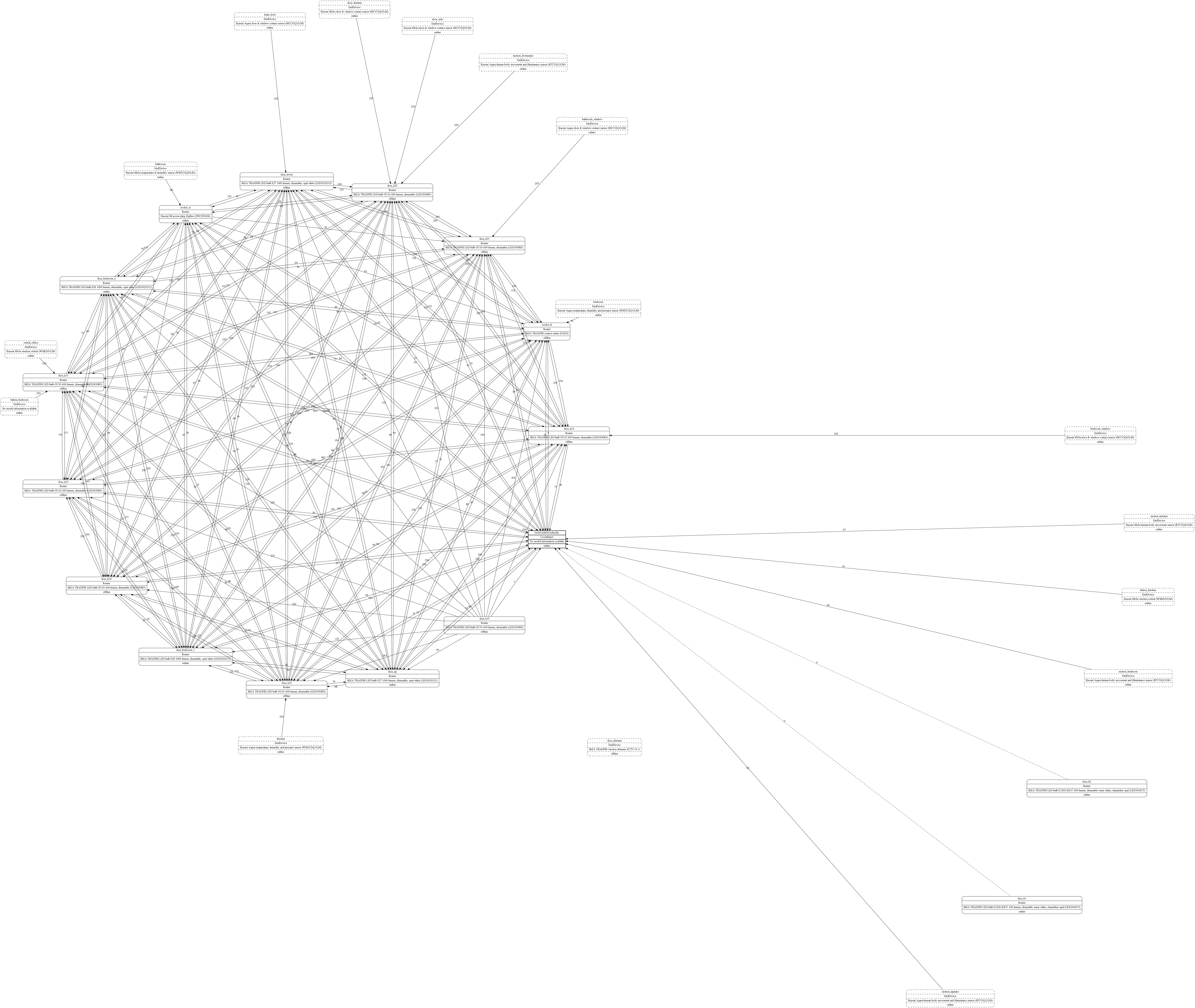
alinelena
on 2 Feb 2019
Not sure if it is the right place or just timing.
I have added an 'TRADFRI bulb GU10 WS 400lm' and after sending the message to add it to a group, I get this message:
zigbee2mqtt:info 2/3/2019, 7:50:44 PM Zigbee publish to device '0x90fd9ffffe8f027e', genGroups - add - {"groupid":"3","groupname":""} - null - null
  zigbee2mqtt:info 2/3/2019, 7:50:44 PM Successfully add 0x90fd9ffffe8f027e to Flur
  zigbee2mqtt:warn 2/3/2019, 7:50:44 PM No converter available for 'LED1537R6' with cid 'genGroups', type 'devChange' and data '{"cid":"genGroups","data":{"65533":1,"nameSupport":0}}'
  zigbee2mqtt:warn 2/3/2019, 7:50:44 PM Please see: https://koenkk.github.io/zigbee2mqtt/how_tos/how_to_support_new_devices.html.
Database entries for the bulb:
{"id":20,"type":"Router","ieeeAddr":"0x90fd9ffffe8f027e","nwkAddr":26410,"manufId":4476,"manufName":"IKEA of Sweden","powerSource":"Mains (single phase)","modelId":"TRADFRI bulb GU10 WS 400lm","epList":[1],"status":"offline","joinTime":null,"endpoints":{"1":{"profId":49246,"epId":1,"devId":544,"inClusterList":[0,3,4,5,6,8,768,2821,4096],"outClusterList":[5,25,32,4096],"clusters":{"genBasic":{"dir":{"value":1},"attrs":{"10":{},"65533":1,"zclVersion":1,"appVersion":17,"stackVersion":87,"hwVersion":1,"manufacturerName":"IKEA of Sweden","modelId":"TRADFRI bulb GU10 WS 400lm","dateCode":"20170331","powerSource":1}},"genIdentify":{"dir":{"value":1},"attrs":{"65533":1,"identifyTime":0}},"genGroups":{"dir":{"value":1},"attrs":{}},"genScenes":{"dir":{"value":3},"attrs":{"65533":1,"count":0,"currentScene":0,"currentGroup":0,"sceneValid":0,"nameSupport":0}},"genOnOff":{"dir":{"value":1},"attrs":{"16387":1,"65533":1,"onOff":1,"globalSceneCtrl":1,"onTime":0,"offWaitTime":0}},"genLevelCtrl":{"dir":{"value":1},"attrs":{"15":0,"16384":254,"65533":1,"currentLevel":254,"remainingTime":0,"onOffTransitionTime":5,"onLevel":255}},"genOta":{"dir":{"value":2},"attrs":{}},"genPollCtrl":{"dir":{"value":2},"attrs":{}},"lightingColorCtrl":{"dir":{"value":1},"attrs":{"15":0,"16397":0,"16398":370,"65533":1,"remainingTime":0,"currentX":30138,"currentY":26909,"colorTemperature":370,"colorMode":2,"numPrimaries":0,"enhancedColorMode":2,"colorCapabilities":16,"colorTempPhysicalMin":250,"colorTempPhysicalMax":454}},"haDiagnostic":{"dir":{"value":1},"attrs":{"65533":1,"numberOfResets":0,"macRxBcast":0,"macTxBcast":0,"aPSRxBcast":0,"aPSTxBcast":0,"nwkFcFailure":0,"packetBufferAllocateFailures":0,"averageMacRetryPerApsMessageSent":0,"lastMessageLqi":84,"lastMessageRssi":-79}},"lightLink":{"dir":{"value":3},"attrs":{"65533":1}}}}},"_id":"V21GCc1cD5vMyF0D"}
{"id":20,"type":"Router","ieeeAddr":"0x90fd9ffffe8f027e","nwkAddr":26410,"manufId":4476,"manufName":"IKEA of Sweden","powerSource":"Mains (single phase)","modelId":"TRADFRI bulb GU10 WS 400lm","epList":[1],"status":"offline","joinTime":null,"endpoints":{"1":{"profId":49246,"epId":1,"devId":544,"inClusterList":[0,3,4,5,6,8,768,2821,4096],"outClusterList":[5,25,32,4096],"clusters":{"genBasic":{"dir":{"value":1},"attrs":{"10":{},"65533":1,"zclVersion":1,"appVersion":17,"stackVersion":87,"hwVersion":1,"manufacturerName":"IKEA of Sweden","modelId":"TRADFRI bulb GU10 WS 400lm","dateCode":"20170331","powerSource":1}},"genIdentify":{"dir":{"value":1},"attrs":{"65533":1,"identifyTime":0}},"genGroups":{"dir":{"value":1},"attrs":{}},"genScenes":{"dir":{"value":3},"attrs":{"65533":1,"count":0,"currentScene":0,"currentGroup":0,"sceneValid":0,"nameSupport":0}},"genOnOff":{"dir":{"value":1},"attrs":{"16387":1,"65533":1,"onOff":1,"globalSceneCtrl":1,"onTime":0,"offWaitTime":0}},"genLevelCtrl":{"dir":{"value":1},"attrs":{"15":0,"16384":254,"65533":1,"currentLevel":254,"remainingTime":0,"onOffTransitionTime":5,"onLevel":255}},"genOta":{"dir":{"value":2},"attrs":{}},"genPollCtrl":{"dir":{"value":2},"attrs":{}},"lightingColorCtrl":{"dir":{"value":1},"attrs":{"15":0,"16397":0,"16398":370,"65533":1,"remainingTime":0,"currentX":30138,"currentY":26909,"colorTemperature":370,"colorMode":2,"numPrimaries":0,"enhancedColorMode":2,"colorCapabilities":16,"colorTempPhysicalMin":250,"colorTempPhysicalMax":454}},"haDiagnostic":{"dir":{"value":1},"attrs":{"65533":1,"numberOfResets":0,"macRxBcast":0,"macTxBcast":0,"aPSRxBcast":0,"aPSTxBcast":0,"nwkFcFailure":0,"packetBufferAllocateFailures":0,"averageMacRetryPerApsMessageSent":0,"lastMessageLqi":84,"lastMessageRssi":-79}},"lightLink":{"dir":{"value":3},"attrs":{"65533":1}}}}},"_id":"V21GCc1cD5vMyF0D"}
BudBundi
on 3 Feb 2019
@BudBundi thanks, will be ignored in the next version.
Koenkk
on 3 Feb 2019
since dev is missing maybe instructions shall be updated...
today i turned off all routers to try to pair the troubled xiaomi sensors left... they still did not I started the routers again, ikea bulbs ikea plug and xiaomi plug... nothing wanted to come back or repair...
I had to reflash since simply I could not start again.
Repared all.. first xiaomi sensors then the bulbs and worked... I still have some door/window sensors to repair... i dread it.
I reflased with 20190109 firmware and master
up to now things seem to be ok.
alinelena
on 3 Feb 2019
Sorry for the super late reply @lenisko , but finally got around to testing a custom firmware that altered bcast settings.
upping MAX_BCAST did in fact reduce the rate of rsp: error 17 errors, however i still noticed that my bulbs in groups would get clogged after a few consecutive requests regardless. I did some sniffing and it looks as if the coordinator is properly broadcasting the on/off commands, so I determined this to mean that is my bulbs themselves that were the bottleneck. Given that i have cheap Sengled classic bulbs, it's very possible that they cannot handle the amount of broadcast requests that come through. Given how fragile even the CC2531 is with regards to memory, i assume that the Sengled bulbs have memory issues when receiving broadcasts and not freeing it fast enough. I can still use normal ZCL commands directly to the bulbs to turn them on/off as fast as possible, so it must not have the same issue memory issues with those directly, which would make more sense since they can immediately free up memory after receiving an ack.
If you would like to try this in your own network, rebuild the standard CC2531 firmware using the firmware.patch as default, except lower the amount of either MAX_NEIGHBOR_ENTRIES or NWK_MAX_DEVICE_LIST to free up space (reduces # of routers and # of end devices attached to cc2531 respectively) so that you can increase MAX_BCAST By changing MAX_NEIGHBOR_ENTRIES to 8, i was able to set MAX_BCAST to 23, which allowed me to send exactly 23 group commands in a 10 second window before hitting rsp: error 17, which is what is to be expected with the default BCAST_DELIVERY_TIME being 100.
If you do the above, please let me know how your network/bulbs perform! I am curious to see if you can get higher throughput than me, and my theory about my bulbs being cheap is correct.
glentakahashi
on 4 Feb 2019
@trekker25 need to check that, first priority is to get reporting working (when state of a bulb is changed via a group the state of the bulb itself is not updated yet).
How is this planned to be implemented? If I have a group of 3 devices and turn only one on. Will the group be on or off? It would be good to include a some selection on how this will be handled and or or
Another question: is it somehow technically possible to move the group members to the configuration.yaml of Zigbee2mqtt?
Maybe something like
groups:
  '1':
    friendly_name: group1
    members:
      - dev1
      - dev2
This would allow users to manage all group related stuff in the same place.
If this is not possible or I have overseen something it would be nice to have a MQTT message that shows all groups and their members.
 Bruceforce
on 5 Feb 2019
Bruceforce
on 5 Feb 2019
If this is not possible or I have overseen something it would be nice to have a MQTT message that shows all groups and their members.
Yea, being able to see that would be awesome.
It would also be nice if, and I know this isn't something Home Assistant can do (yet?), ZigBee groups could be discovered by HA and treated as real group (i.e. in the group domain, rather than defining a light that controls the group).
 kiall
on 5 Feb 2019
kiall
on 5 Feb 2019
It would also be nice if, and I know this isn't something Home Assistant can do (yet?), ZigBee groups could be discovered by HA and treated as real group (i.e. in the group domain, rather than defining a light that controls the group).
This depends on the group members I think. If it's a group of switches only, it should be added to the group domain. If it's a group of lights it should be added to the light domain and become a light group, so that you can control features like RGB color. Home assistant wouldn't let you handle RGB for a group in the group domain iirc.
Bruceforce
on 5 Feb 2019
@trekker25 need to check that, first priority is to get reporting working (when state of a bulb is changed via a group the state of the bulb itself is not updated yet).
How is this planned to be implemented? If I have a group of 3 devices and turn only one on. Will the group be on or off? It would be good to include a some selection on how this will be handled
andororAnother question: is it somehow technically possible to move the group members to the
configuration.yamlof Zigbee2mqtt?
Maybe something likegroups: '1': friendly_name: group1 members: - dev1 - dev2This would allow users to manage all group related stuff in the same place.
If this is not possible or I have overseen something it would be nice to have a MQTT message that shows all groups and their members.
This is something that is very hard to do, the devices decide in which group they are, not the coordinator.
Reporting of bulbs can be enabled with the report option for a device (note: not all devices support this! https://github.com/Koenkk/zigbee2mqtt/blob/dev/docs/configuration/device_specific_configuration.md)
Koenkk
on 5 Feb 2019
added report true to my bulbs... ikea...unfortunately does not seem to have any reaction. Do the ikea bulbs support it?
I am on 20190109 firmware and dev branch
alinelena
on 9 Feb 2019
Hello,
I'm trying to create group in which I would like to add 2 Hue bulbs.
When sending my first bulb friendly_name on zigbee2mqtt/bridge/group/sejour/add, I get:
Feb 09 13:51:30 raspberrypi npm[28969]: /opt/zigbee2mqtt/lib/util/settings.js:105
Feb 09 13:51:30 raspberrypi npm[28969]:         settings.groups[ID].friendly_name === friendlyName
Feb 09 13:51:30 raspberrypi npm[28969]:                             ^
Feb 09 13:51:30 raspberrypi npm[28969]: TypeError: Cannot read property 'friendly_name' of null
Feb 09 13:51:30 raspberrypi npm[28969]:     at Object.keys.find (/opt/zigbee2mqtt/lib/util/settings.js:105:29)
Feb 09 13:51:30 raspberrypi npm[28969]:     at Array.find (<anonymous>)
Feb 09 13:51:30 raspberrypi npm[28969]:     at getGroupIDByFriendlyName (/opt/zigbee2mqtt/lib/util/settings.js:104:41)
Feb 09 13:51:30 raspberrypi npm[28969]:     at Object.getGroupIDByFriendlyName (/opt/zigbee2mqtt/lib/util/settings.js:130:49)
Feb 09 13:51:30 raspberrypi npm[28969]:     at Groups.onMQTTMessage (/opt/zigbee2mqtt/lib/extension/groups.js:45:34)
Feb 09 13:51:30 raspberrypi npm[28969]:     at results.extensions.filter.map (/opt/zigbee2mqtt/lib/controller.js:134:27)
Feb 09 13:51:30 raspberrypi npm[28969]:     at Array.map (<anonymous>)
Feb 09 13:51:30 raspberrypi npm[28969]:     at Controller.onMQTTMessage (/opt/zigbee2mqtt/lib/controller.js:134:14)
Feb 09 13:51:30 raspberrypi npm[28969]:     at MQTT.onMessage (/opt/zigbee2mqtt/lib/mqtt.js:81:18)
Feb 09 13:51:30 raspberrypi npm[28969]:     at MqttClient.emit (events.js:189:13)
Feb 09 13:51:30 raspberrypi npm[28969]: npm ERR! code ELIFECYCLE
Feb 09 13:51:30 raspberrypi npm[28969]: npm ERR! errno 1
Feb 09 13:51:30 raspberrypi npm[28969]: npm ERR! [email protected] start: `node index.js`
Feb 09 13:51:30 raspberrypi npm[28969]: npm ERR! Exit status 1
Feb 09 13:51:30 raspberrypi npm[28969]: npm ERR!
Feb 09 13:51:30 raspberrypi npm[28969]: npm ERR! Failed at the [email protected] start script.
Feb 09 13:51:30 raspberrypi npm[28969]: npm ERR! This is probably not a problem with npm. There is likely additional logging output above.
Feb 09 13:51:30 raspberrypi npm[28969]: npm ERR! A complete log of this run can be found in:
Feb 09 13:51:30 raspberrypi npm[28969]: npm ERR!     /root/.npm/_logs/2019-02-09T12_51_30_191Z-debug.log
Feb 09 13:51:30 raspberrypi systemd[1]: zigbee2mqtt.service: Main process exited, code=exited, status=1/FAILURE
Feb 09 13:51:30 raspberrypi systemd[1]: zigbee2mqtt.service: Unit entered failed state.
Feb 09 13:51:30 raspberrypi systemd[1]: zigbee2mqtt.service: Failed with result 'exit-code'.
Feb 09 13:51:30 raspberrypi systemd[1]: zigbee2mqtt.service: Service hold-off time over, scheduling restart.
Feb 09 13:51:30 raspberrypi systemd[1]: Stopped zigbee2mqtt.
My configuration.yaml contains:
groups:
  # ID, each group should have a different numerical ID
    '1':
    # Name which will be used to control the group
    friendly_name: sejour
I'm using:
zigbee2mqtt:info 2/9/2019, 1:51:36 PM Starting zigbee2mqtt version 1.1.1 (commit #4fbb666)
zigbee2mqtt:info 2/9/2019, 1:51:37 PM Coordinator firmware version: '20190109'
Any idea on what's going on?
 sylarevan
on 9 Feb 2019
sylarevan
on 9 Feb 2019
wrong ident?
groups:
  '1':
    friendly_name: salon_light_main
  '2':
    friendly_name: salon_light_half
works just fine
lenisko
on 9 Feb 2019
wrong ident?
groups:
  '1':
    friendly_name: salon_light_main
  '2':
    friendly_name: salon_light_half
works just fine
I changed the name of the group (from sejour to lampes_sejour), and it is working now. Strange...
sylarevan
on 9 Feb 2019
I'm 90% sure it was ident problem.. you had mixed spaces and tabs in configuration.
lenisko
on 9 Feb 2019
You're probably right. My bad.
EDIT: so ok, group is working and sending { "state": "ON"} to zigbee2mqtt/lampes_sejour/set switches my bulbs on. But, the state of each bulb is not sent back, making Domoticz unaware of the state change. I've set report: true in configuration.yaml, but I only see
zigbee2mqtt:info 2/9/2019, 4:02:38 PM Zigbee publish to group '1', genOnOff - on - {} - {"manufSpec":0,"disDefaultRsp":0} - null
in z2m when sending a group command. Does it means that Hue bulbs do not support reporting of their state?
sylarevan
on 9 Feb 2019
@sylarevan can you post your startup log? (first 20 seconds)
Koenkk
on 9 Feb 2019
@Koenkk Sure, here it is.
sylarevan
on 9 Feb 2019
@sylarevan sorry, can you post it with log_level: debug (https://koenkk.github.io/zigbee2mqtt/configuration/configuration.html).
Koenkk
on 9 Feb 2019
And here again ;)
sylarevan
on 9 Feb 2019
log shows reporting was successfull for my ikea bulbs which are powered. still no state report in the logs for bulbs which are in groups
2/9/2019, 7:21:18 PM - debug: Setup reporting for 0x90fd9ffffe145892 - genLevelCtrl - currentLevel
2/9/2019, 7:21:19 PM - debug: Successfully setup reporting for 0x90fd9ffffe145892 - genLevelCtrl - currentLevel
2/9/2019, 7:21:19 PM - debug: Setup reporting for 0x90fd9ffffe167f47 - genOnOff - onOff
2/9/2019, 7:21:19 PM - debug: Successfully setup reporting for 0x90fd9ffffe167f47 - genOnOff - onOff
2/9/2019, 7:21:19 PM - debug: Setup reporting for 0x90fd9ffffe167f47 - genLevelCtrl - currentLevel
2/9/2019, 7:21:19 PM - debug: Successfully setup reporting for 0x90fd9ffffe167f47 - genLevelCtrl - currentLevel
2/9/2019, 7:21:19 PM - debug: Setup reporting for 0x000b57fffed6caf0 - genOnOff - onOff
2/9/2019, 7:21:19 PM - debug: Successfully setup reporting for 0x000b57fffed6caf0 - genOnOff - onOff
2/9/2019, 7:21:19 PM - debug: Setup reporting for 0x000b57fffed6caf0 - genLevelCtrl - currentLevel
2/9/2019, 7:21:19 PM - debug: Successfully setup reporting for 0x000b57fffed6caf0 - genLevelCtrl - currentLevel
2/9/2019, 7:21:19 PM - debug: Setup reporting for 0x90fd9ffffe2a3907 - genOnOff - onOff
2/9/2019, 7:21:19 PM - debug: Successfully setup reporting for 0x90fd9ffffe2a3907 - genOnOff - onOff
2/9/2019, 7:21:19 PM - debug: Setup reporting for 0x90fd9ffffe2a3907 - genLevelCtrl - currentLevel
2/9/2019, 7:21:20 PM - debug: Successfully setup reporting for 0x90fd9ffffe2a3907 - genLevelCtrl - currentLevel
2/9/2019, 7:21:20 PM - debug: Setup reporting for 0x90fd9ffffe33b077 - genOnOff - onOff
2/9/2019, 7:21:20 PM - debug: Successfully setup reporting for 0x90fd9ffffe33b077 - genOnOff - onOff
2/9/2019, 7:21:20 PM - debug: Setup reporting for 0x90fd9ffffe33b077 - genLevelCtrl - currentLevel
2/9/2019, 7:21:20 PM - debug: Successfully setup reporting for 0x90fd9ffffe33b077 - genLevelCtrl - currentLevel
2/9/2019, 7:21:20 PM - debug: Setup reporting for 0x000b57fffe89d203 - genOnOff - onOff
2/9/2019, 7:21:20 PM - debug: Setup reporting for 0x000b57fffe89d203 - genLevelCtrl - currentLevel
2/9/2019, 7:21:20 PM - debug: Setup reporting for 0x000b57fffe10e54e - genOnOff - onOff
2/9/2019, 7:21:21 PM - debug: Successfully setup reporting for 0x000b57fffe10e54e - genOnOff - onOff
2/9/2019, 7:21:21 PM - debug: Setup reporting for 0x000b57fffe10e54e - genLevelCtrl - currentLevel
2/9/2019, 7:21:21 PM - debug: Successfully setup reporting for 0x000b57fffe10e54e - genLevelCtrl - currentLevel
2/9/2019, 7:21:21 PM - error: Failed to setup reporting for 0x000b57fffe89d203 - genOnOff - onOff - (Error: AF data request fails, status code: 205. No network
 route. Please confirm that the device has (re)joined the network.)
2/9/2019, 7:21:21 PM - error: Failed to setup reporting for 0x000b57fffe89d203 - genLevelCtrl - currentLevel - (Error: AF data request fails, status code: 205.
 No network route. Please confirm that the device has (re)joined the network.)
2/9/2019, 7:21:21 PM - debug: Setup reporting for 0x000b57fffeac0439 - genOnOff - onOff
2/9/2019, 7:21:21 PM - debug: Setup reporting for 0x000b57fffeac0439 - genLevelCtrl - currentLevel
2/9/2019, 7:21:21 PM - info: Zigbee publish to group '1', genOnOff - on - {} - {"manufSpec":0,"disDefaultRsp":0} - null
2/9/2019, 7:21:21 PM - error: Failed to setup reporting for 0x000b57fffeac0439 - genOnOff - onOff - (Error: AF data request fails, status code: 205. No network
 route. Please confirm that the device has (re)joined the network.)
I can't see anything like that in the log I send above, while report: true is set for all my bulbs.
sylarevan
on 10 Feb 2019
@sylarevan indeeed that i why i posted mine but the effect is the same. no independent bulb reporting.
alinelena
on 10 Feb 2019
@Koenkk what thing I have noticed that it tries to setup the reporting before the bulbs are actually paired. happened few times. I wonder if pairing is asynchronous or something.
alinelena
on 10 Feb 2019
sorry i should have said acknowledged after a restart, rather than paired.
alinelena
on 10 Feb 2019
is there possible to use mqtt to set reporting for a device? i seem to fail using "report":true posted to
alinelena
on 10 Feb 2019
@alinelena could you please edit your posts instead of posting 4 times in a row to avoid notification spam?
Thanks
Bruceforce
on 10 Feb 2019
@glentakahashi If you do the above, please let me know how your network/bulbs perform! I am curious to see if you can get higher throughput than me, and my theory about my bulbs being cheap is correct.
I'm developing a dimmer that sends commands many times per second to provide "live" dimming. I experience the same when controlling individual bulbs, they can handle messages every 250ms really well. Sometimes they get a small delay and eventually (after half a second or so) go through all queued commands. This is fine, as this dimmer is just a proof of concept. Eventually this should probably be implemented with zigbee binding.
When sending messages to a group, this sadly breaks down after a few messages. I did not try editing the MAX_BCAST, so this is with default values with the following coordinator firmware:
zigbee2mqtt:info 2019-2-10 13:58:42 Coordinator firmware version: '20190109'
And this is a log of the problem occurring: https://hastebin.com/ufaqosoyul.cs. After the rsp error: 17, it takes very little time before the group responds again. This is with a group of "expensive" bulbs (2x Hue White ambiance), so I don't think your theory of cheap bulbs is correct. I am not quite sure how to continue debugging, so I figured I would post my findings thus far!
 EmilFlach
on 10 Feb 2019
EmilFlach
on 10 Feb 2019
@EmilFlach to clarify, do the bulbs ever not respond if you're not hitting rsp error: 17? MAX_BCAST will reduce the rate of error 17, which is caused by low memory on the cc2531 coordinator, but even after I had fixed that for my coordinator, my bulbs still weren't responding to the bcast requests.
Would you be willing to reflash your CC2531 with a firmware with higher MAX_BCAST to see if you get higher throughput? I could compile one for you if needed.
I'm also curious if @Koenkk is experiencing the same group throughput issues that we are.
glentakahashi
on 10 Feb 2019
And here again ;)
You need to switch to the dev branch.
Koenkk
on 10 Feb 2019
@glentakahashi the problem with group request is that they live longer in the network (to make sure ALL (not only devices in the group!) devices in the network receive this message).
@glentakahashi @EmilFlach how many request per second do you send in order to get the 17 error?
Koenkk
on 10 Feb 2019
@koenkk I only have to send about 6-8 in a 3 second period to hit rsp 17.
But even after recompiling with a higher max_bcast so I don’t hit rsp 17, my bulbs don’t respond to requests after about 8-10, and i have to give them 5-10 seconds to cool down before I send more requests.
When I did witeshark capture before it didn’t look like the network was overly congested, so I assumed it was also hardware limitations of either my routers or my lightbulbs. I’ll try and do some some sniffing later for more analysis
glentakahashi
on 10 Feb 2019
@glentakahashi good, I'm very interested in the results!
Koenkk
on 10 Feb 2019
And here again ;)
You need to switch to the dev branch.
Done. Still some reporting issues, as mentioned here.
sylarevan
on 10 Feb 2019
@glentakahashi to clarify, do the bulbs ever not respond if you're not hitting
rsp error: 17? MAX_BCAST will reduce the rate of error 17, which is caused by low memory on the cc2531 coordinator, but even after I had fixed that for my coordinator, my bulbs still weren't responding to the bcast requests.
That's an interesting question, but I don't think I can answer that with my current test setup. I have an idea how to tackle this, but I'll have to get back at you.
Would you be willing to reflash your CC2531 with a firmware with higher MAX_BCAST to see if you get higher throughput? I could compile one for you if needed.
I definitely would be willing to do this, especially if you could supply me with a compiled version!
@Koenkk I only have to send about 6-8 in a 3 second period to hit rsp 17.
I have similar results, about 8 messages in the same time frame.
EmilFlach
on 10 Feb 2019
  zigbee2mqtt:error 2019-2-15 10:15:42 Failed to setup reporting for 0x84182600000b8298 - lightingColorCtrl - currentX - (Error: AF data request fails, status code: 233. MAC no ack.)
  zigbee2mqtt:error 2019-2-15 10:15:44 Failed to setup reporting for 0x84182600000b79b7 - genLevelCtrl - currentLevel - (Error: AF data request fails, status code: 233. MAC no ack.)
  zigbee2mqtt:warn 2019-2-15 10:15:45 Failed to configure Motion (0x000d6f000e059aae) ('Error: AF data request fails, status code: 240. MAC transaction expired.') (attempt #1)
  zigbee2mqtt:warn 2019-2-15 10:15:45 This can be ignored if the device is working properly
  zigbee2mqtt:error 2019-2-15 10:15:45 Failed to setup reporting for 0x7cb03eaa00a1184a - lightingColorCtrl - currentX - (Error: AF data request fails, status code: 233. MAC no ack.)
  zigbee2mqtt:error 2019-2-15 10:15:46 Failed to setup reporting for 0x84182600000b743a - genOnOff - onOff - (Error: AF data request fails, status code: 205. No network route. Please confirm that the device has (re)joined the network.)
  zigbee2mqtt:error 2019-2-15 10:15:47 Failed to setup reporting for 0x84182600000b743a - lightingColorCtrl - colorTemperature - (Error: AF data request fails, status code: 205. No network route. Please confirm that the device has (re)joined the network.)
  zigbee2mqtt:error 2019-2-15 10:15:47 Failed to setup reporting for 0x84182600000b743a - genLevelCtrl - currentLevel - (Error: AF data request fails, status code: 205. No network route. Please confirm that the device has (re)joined the network.)
  zigbee2mqtt:error 2019-2-15 10:15:47 Failed to setup reporting for 0x84182600000b83ef - genOnOff - onOff - (Error: AF data request fails, status code: 233. MAC no ack.)
  zigbee2mqtt:error 2019-2-15 10:15:47 Failed to setup reporting for 0x84182600000b83ef - genLevelCtrl - currentLevel - (Error: AF data request fails, status code: 233. MAC no ack.)
  zigbee2mqtt:error 2019-2-15 10:15:47 Failed to setup reporting for 0x84182600000b743a - lightingColorCtrl - currentY - (Error: AF data request fails, status code: 205. No network route. Please confirm that the device has (re)joined the network.)
  zigbee2mqtt:error 2019-2-15 10:15:47 Failed to setup reporting for 0x84182600000b743a - lightingColorCtrl - currentX - (Error: AF data request fails, status code: 205. No network route. Please confirm that the device has (re)joined the network.)
  zigbee2mqtt:error 2019-2-15 10:15:48 Failed to setup reporting for 0x8418260000ca9270 - lightingColorCtrl - currentY - (Error: AF data request fails, status code: 233. MAC no ack.)
  zigbee2mqtt:error 2019-2-15 10:15:50 Failed to setup reporting for 0x7cb03eaa00a1184a - genLevelCtrl - currentLevel - (Error: AF data request fails, status code: 205. No network route. Please confirm that the device has (re)joined the network.)
I added reporting to all my bulbs, in a group or not. Reporting does not work, but on startup you see this after it reconnected to all Zigbee devices. Do I have to repair all my bulbs to make it work?
EDIT: Debug loglevel: https://h.kremowka.xyz/etayakilox.coffeescript
EDIT2: Sry.. wrong bug report...
dreimer1986
on 15 Feb 2019
@dreimer1986 to keep this thread clean, please report reporting issues here: https://github.com/Koenkk/zigbee2mqtt/issues/1064
Koenkk
on 15 Feb 2019
I tested groups with 1 group and 13 lightify light bulbs of type:
AA70155 - OSRAM LIGHTIFY LED A19 tunable white / Classic A60 TW (Router)AC03645 - OSRAM LIGHTIFY LED CLA60 E27 RGBW (Router)AA69697 - OSRAM Classic A60 RGBW (Router)AA70155 - OSRAM LIGHTIFY LED A19 tunable white / Classic A60 TW (Router)
The coordinator firmware was:
Coordinator firmware version: '20190215'
And I am on z2m-edge branch of hassio addon with:
Starting zigbee2mqtt version 1.1.1 (commit #3d15129)
Groups work as expected. Thx for this awesome project. Finaly no more Lightify/Hue and what not gateway.
 deisi
on 17 Feb 2019
deisi
on 17 Feb 2019
I found a new bug.
Docker image from 2019-02-17 15:20:49.
If I create a group eg
groups:
  '3':
    friendly_name: Flur
and control it over a mqtt group from HA, not problems occure.
If I want to use a group number of a IKEA remote and change it eg
groups:
  '0xe24c':
    friendly_name: Flur
if I try to control it zigbee2mqtt restart with an error.
zigbee2mqtt:info 2/18/2019, 3:20:04 AM Zigbee publish to group '57932', genOnOff - off - {} - {"manufSpec":0,"disDefaultRsp":0} - null
/app/node_modules/q/q.js:155
                throw e;
                ^
TypeError: Cannot destructure property 'type' of 'undefined' or 'null'.
    at Controller.getDeviceInfoForMqtt (/app/lib/controller.js:259:83)
    at Controller.publishEntityState (/app/lib/controller.js:251:42)
    at DevicePublish.handlePublished (/app/lib/extension/devicePublish.js:124:22)
    at zigbee.publish (/app/lib/extension/devicePublish.js:214:30)
    at callback_ (/app/lib/zigbee.js:282:21)
    at /app/node_modules/q/q.js:2055:17
    at runSingle (/app/node_modules/q/q.js:137:13)
    at flush (/app/node_modules/q/q.js:125:13)
    at process._tickCallback (internal/process/next_tick.js:61:11)
npm ERR! code ELIFECYCLE
npm ERR! errno 1
npm ERR! [email protected] start: 'node index.js'
npm ERR! Exit status 1
BudBundi
on 18 Feb 2019
Can you try with 57932 instead of '0xe24c'
Koenkk
on 18 Feb 2019
Can you try with
57932instead of '0xe24c'
Changed me group ids from hex to dec, now it works, maybe we should mention in documentation.
BudBundi
on 18 Feb 2019
@BudBundi done!
Koenkk
on 19 Feb 2019
I have the impression the group functionality is less stable since upgrading from 20181224 to 20190218: lights in a group now occasionally do not turn on/off in sync whereas in 20181224 I don't think this ever happened.
 apeeters
on 22 Feb 2019
apeeters
on 22 Feb 2019
@apeeter did you change anything within the zigbee network? However, I know similar issues/features from my zigbee network when it was based on lightify gateway/hue gateway. I think its probably an issue of the network itself. 2.4 GHz is busy + devices are cheap = dropped signal = randomly not working
deisi
on 23 Feb 2019
after today's update on dev i get something very strange... two bulbs each in agroup of 4 do not want to report the state. moved to general reporting see #1064
however the groups work ok with all 4 light bulbs as expected
trying to add or remove the bulb to/from the group results in
3/3/2019, 10:05:00 AM - debug: Received MQTT message on 'zigbee2mqtt/bridge/group/kitchen_lights_2/add' with data 'ikea_k24'
3/3/2019, 10:05:00 AM - info: Zigbee publish to device '0x000b57fffed78fcf', genGroups - add - {"groupid":"2","groupname":""} - null - null
3/3/2019, 10:05:02 AM - info: Successfully add 0x000b57fffed78fcf to kitchen_lights_2
3/3/2019, 10:05:02 AM - info: MQTT publish: topic 'zigbee2mqtt/bridge/log', payload '{"type":{"device":"ikea_k24","group":"kitchen_lights_2"}}'
3/3/2019, 10:05:02 AM - debug: Received zigbee message of type 'attReport' with data '{"cid":"genGroups","data":{"65533":1,"nameSupport":0}}' of device 'TRADFRI bulb GU10 W 400lm' (0x000b57fffed78fcf)
3/3/2019, 10:05:02 AM - warn: No converter available for 'LED1650R5' with cid 'genGroups', type 'attReport' and data '{"cid":"genGroups","data":{"65533":1,"nameSupport":0}}'
3/3/2019, 10:05:02 AM - warn: Please see: https://www.zigbee2mqtt.io/how_tos/how_to_support_new_devices.html.
another issue zigbee2mqtt/bridge/group/kitchen_lights_2/get_group_membership is not listed on the groups documentation and on top does not seem to work
does one need to use the dev firmware for dev branch again? I am on master january firmware
alinelena
on 3 Mar 2019
@alinelena where did you get that command from? The correct command is zigbee2mqtt/bridge/device/{device_id}/get_group_membership from https://github.com/Koenkk/zigbee2mqtt.io/pull/8/files (this is only on the dev branch)
glentakahashi
on 3 Mar 2019
@glentakahashi from
https://github.com/Koenkk/zigbee2mqtt.io/pull/8/files#diff-354baa9137cc8bcf26823f81f84dd959R45 line 45
alinelena
on 3 Mar 2019
@glentakahashi ok... I see the mistake. seems to work
alinelena
on 3 Mar 2019
The problem I'm having with groups is:
- If you switch on a group, the state of the individual device (in this case, Tradfri bulbs) is not updated
- Groups are not visible in HA (I am on dev from about a week ago, I see this is possibly in progress?)
Just as an example, if I turn off the group, I still get the following from the bulb:
{"state":"ON","linkquality":47,"color_temp":370,"color_mode":2,"color":{"x":0.46,"y":0.411},"brightness":254}
 timdonovanuk
on 10 Mar 2019
timdonovanuk
on 10 Mar 2019
@timdonovanuk please just read at least the first post in this issue. It already answers all your questions.
- This is still Todo
- There's a link to a readme document (the link is outdated but still easy to find https://www.zigbee2mqtt.io/integration/home_assistant.html )
Bruceforce
on 10 Mar 2019
Thanks. I know how to set up HA myself, and have it working fine, just noting that auto discovery does not work. It looks like it was committed into master 19 days ago though?
timdonovanuk
on 10 Mar 2019
https://www.zigbee2mqtt.io/information/report.html This is your way to get devices in sync. Works fine here.
dreimer1986
on 10 Mar 2019
@timdonovanuk I'm sorry - I misinterpreted your question. However the commit only says _Prepare_ Home Assistant discovery for group support
@Koenkk Maybe the first post should get an update with a link to the report feature and and the current state of HA group discovery
Bruceforce
on 10 Mar 2019
To use z2m on another server, where there is no possibility to edit the yaml configuration files, please add the creation and deletion of groups via mqtt. Not only adding features to a group, but also creating groups themselves. I would also like to see in a separate topic mqtt a list of groups and possibly devices that belong to it.
 directman66
on 11 Mar 2019
directman66
on 11 Mar 2019
https://www.zigbee2mqtt.io/information/report.html This is your way to get devices in sync. Works fine here.
I gave that advanced option a go today and I still don't get status updates from devices which I change using group MQTT commands. Is there any way I can push out a status request instead?
 chris-jennings
on 12 Mar 2019
chris-jennings
on 12 Mar 2019
@directman66 implemented in the dev branch, documentation: https://github.com/Koenkk/zigbee2mqtt.io/blob/dev/information/mqtt_topics_and_message_structure.md#zigbee2mqttbridgeconfigadd_group
@chris-jennings use the get commands, documentation: https://github.com/Koenkk/zigbee2mqtt.io/blob/master/information/mqtt_topics_and_message_structure.md#zigbee2mqttdevice_idget
Koenkk
on 12 Mar 2019
Hi everybody,
I'm just getting in to the zigbee groups. I'm running home assistant with the zigbee2mqtt plug-in and I noticed that when using groups the state is not saved when resetting home assistant. Which was the case running the lights individual.
Of course not much of a problem and maybe related to home assistant (I don't know), but I was wondering if more people have noticed this?
Edit:
Oh over looked the message of dreimer1986 and it fixed the problem!
https://www.zigbee2mqtt.io/information/report.html This is your way to get devices in sync. Works fine here.
 BadEendt
on 20 Mar 2019
BadEendt
on 20 Mar 2019
Just a thought: if all (or even some) of the devices in a group are ON, I think it is logical that that group should also be updated to state ON. And vice versa. If all lights in a group are switched off due to another group, it makes sense that both groups report OFF.
timdonovanuk
on 7 Apr 2019
The logic mentioned by @timdonovanuk is the same used in Osram Lightify gateways, and probably the Philips Hue as well.
 philhawthorne
on 8 Apr 2019
philhawthorne
on 8 Apr 2019
That will be implemented in #1351, however, I'm still wondering what the behaviour should be, what if e.g. only 1 bulb in a group is turned on, what state should the group report? (etc..)
Koenkk
on 8 Apr 2019
@Koenkk I feel as though @timdonovanuk approach is the correct way, as is the same done by Philips Hue and Osram Lightify.
If you have a group with 10 lights, if one of them is on, then the group is marked as on (and has the same settings as the bulb, ie colour/brightness). If two bulbs are on, then the group is marked as on, and a best approach for other attributes is done (brightness/colour).
Also applies for the opposite. So if all lights are off, then the group is off.
philhawthorne
on 8 Apr 2019
Wouldn't it be possible to do something like this
groups:
  # ID, each group should have a different numerical ID
  '1':
    # Name which will be used to control the group
    friendly_name: group_1
    # Set to conjunction if the group should be off, if ONE member is off. Set to disjunction if the group should be off if ALL members are off.
    on_off_logic: disjunction
So we're talking about an OR'ed or AND'ed group state.
conjunction => group_state = member1_state OR member2_state OR member3_state
disjunction => group_state = member1_state AND member2_state AND member3_state
 andreasbrett
on 8 Apr 2019
andreasbrett
on 8 Apr 2019
Rather than conjunction/disjunction - it may be easier for many people to understand "and" / "or" . Especially for non native English speakers.. Otherwise, if a single option is the only choice, I'd vote for conjunction/or - mimicking Home Assistants group logic (default group logic? I've never looked to see if that's an option..)
kiall
on 8 Apr 2019
HomeAssistant works as disjunction (if I understand the word correctly!). Even if one member of the group is on, the group is on. The group is only off when all members are off.
timdonovanuk
on 11 Apr 2019
HomeAssistant works as disjunction (if I understand the word correctly!). Even if one member of the group is on, the group is on. The group is only off when all members are off.
I think you have misunderstood the word, which kinda highlights my point :)
conjunction => group_state = member1_state OR member2_state OR member3_state
So, with that definition, the group is ON if any single bulb is on, like HA does.
kiall
on 11 Apr 2019
HomeAssistant works as disjunction (if I understand the word correctly!). Even if one member of the group is on, the group is on. The group is only off when all members are off.
I think you have misunderstood the word, which kinda highlights my point :)
conjunction => group_state = member1_state OR member2_state OR member3_state
So, with that definition, the group is ON if any single bulb is on, like HA does.
No, @timdonovanuk got it right. Disjunction means "logical or" https://en.wikipedia.org/wiki/Logical_disjunction#Truth_table
So it is:
disjunction: group_state = member1_state OR member2_state OR member3_state
In other words:
- disjunction: Group is on, if at least one member is on / Group is off if all members are off
- conjunction: Group is on, if all member are on / Group is off if one member is off
I thought that was clear - sorry.
Bruceforce
on 11 Apr 2019
Hah - I was going off the names+"formulas" quoted above ;)
Oh well, either way, it shows the names are confusing :)
kiall
on 11 Apr 2019
We definitely need some reporting of the group status (on/off, brightness, color, color temperature).
Currently, if those were changed not through group, status of the group in HA isn't updated.
Of course it is possible to create another group in HA, export brightness etc as sensors and modify on change value of group parameters. But this will lead to unnecessary complications, lie inability to set brightness individually, as this will be immediately overwritten but group setting. (HA will report change of brightness to the group, and all of them will set to value which was average after change of individual)
 antst
on 14 Apr 2019
antst
on 14 Apr 2019
I would like to get a list of all the groups and its members by publishing the MQTT request. This is necessary for compiling a list of groups and working directly with it.
directman66
on 17 Apr 2019
@directman66 at the moment, zigbee2mqtt does not know what devices are in a group. (still WIP)
Koenkk
on 17 Apr 2019
The configuration file contains a list of configuration.yaml. Can I ask him to add a request for getting a list of groups from this file via mqtt?
directman66
on 17 Apr 2019
It is already there. Check documentation for topic.
antst
on 17 Apr 2019
I have already re-read the documentation along and across) I see only getting a list of groups by device. You need to get a list of groups and get a list of group devices. There is no such documentation.
directman66
on 17 Apr 2019
‘list of all groups, this message can be triggered by sending a message to zigbee2mqtt/bridge/config/groups (payload doesn’t matter)’
antst
on 17 Apr 2019
antst
on 17 Apr 2019
I see
zigbee2mqtt/bridge/config/add_group
Allows you to add a group, payload should be the name of the group, e.g. my_group.
zigbee2mqtt/bridge/config/remove_group
Allows you to remove a group, payload should be the name of the group, e.g. my_group.
zigbee2mqtt/bridge/group/[friendly_name]/(add|remove|remove_all)
See Groups
Where get group list? Where get device list of group?
directman66
on 17 Apr 2019
‘list of all groups, this message can be triggered by sending a message to zigbee2mqtt/bridge/config/groups (payload doesn’t matter)’
thanks!!!! exactly what is needed
directman66
on 17 Apr 2019
But keep in mind, those only groups defined in config file. If some devices are members of some other groups by some reasons (for example, manually paired wit TRADFRI remote), this will be not reflected here.
The only way to get actual list of all groups really present in the network, is to check group membership of every device.
For example, by whatever reasons, one of my lamps is member of group with ID=0x01.
This is not reflected anywhere, as there is no such group in config file.
antst
on 17 Apr 2019
Hi, thanks for implementing groups. Groups are awesome.
Question about controlling groups. The docs (http://www.zigbee2mqtt.io/information/groups.html) state how to control a group, with message payload "state": "ON", but I am unable to get this to work.
I get a "Unrecognized command" error. I use MQTTlens to publish the message.
My logs:
} - {} - {"manufSpec":0,"disDefaultRsp":0} - null failed with error Error: Unrecognized command
  zigbee2mqtt:info 4/22/2019, 5:48:25 PM MQTT publish: topic 'zigbee2mqtt/bridge/log', payload '{"type":"zigbee_publish_error","message":"Error: Unrecognized command","meta":{"entity":{"ID":33651,"type":"group","friendlyName":"group_slaapkamer"},"message":"{\n  state: ON,\n}"}}'
Any pointers? Or am i missing something? I'm on zigbee2mqtt 1.3.1-arm32v6 and the latest max stability firmware.
Thanks in advance.
 lassieee
on 22 Apr 2019
lassieee
on 22 Apr 2019
@lassieee please try with payload {"state": "ON"}
Koenkk
on 24 Apr 2019
@Koenkk oops, I see I pasted the logging from the wrong attempt. I initially tried exactly like you stated, but when that didn't work I tried variations without quotes, but I couldn't get it to work :-(
lassieee
on 24 Apr 2019
@lassieee can you try with only ON as payload?
Koenkk
on 24 Apr 2019
@Koenkk Thanks, I'll try that and report back. I can't remember exactly which variations I've tried before, but I'll be sure to write them down if it doesn't work the first time.
lassieee
on 24 Apr 2019
@Koenkk That was it, payload with only ON.
Can't believe I didn't try that myself..
Thanks again!
lassieee
on 24 Apr 2019
Hi all,
I am hoping someone will be able to point out what i am doing wrong in hassio. I have added the following into the configuration.yaml file locate here > /share/zigbee2mqtt/configuration.yaml
groups:
  # ID, each group should have a different numerical ID
  '1':
    # Name which will be used to control the group
    friendly_name: group_1
in the publish a packet section, i have added a topic of
zigbee2mqtt/bridge/group/group_1/add
and a payload of
ikea_sitting_room_01
but in the zigbee2mqtt logs i get the following error
zigbee2mqtt:error 4/27/2019, 1:18:07 PM Group with friendly_name 'group_1' doesn't exist
i have checked to make sure i have saved the config file multiple times, reset hassio, and tried with different friendly names for the group, but it keeps happening. I am hoping it is something obvious i am missing!
I love the work @koenkk! thanks for everything you have done with the project :)
 TMCBackline
on 27 Apr 2019
TMCBackline
on 27 Apr 2019
Try sending empty payload to zigbee2mqtt/bridge/config/groups which should give you a list of known groups.
 gdave321
on 28 Apr 2019
gdave321
on 28 Apr 2019
Do people find their lights come on synchronised using groups? I have 3 bulbs grouped together, but quite often one lights up about 0.5 second before the others. Also if I toggle the lights faster than about 2 seconds (in HA) quite often there will be 1 bulb that remains ON even when set OFF. I am running the latest dev version of the service and the MAX STABILITY release of the firmware.
I push ON to zigbee2mqtt/lounge_left_ceiling_lights_z2m_group/set.
zigbee2mqtt:info 4/28/2019, 5:53:51 PM Zigbee publish to group '2', genOnOff - on - {} - {"manufSpec":0,"disDefaultRsp":0} - null

  zigbee2mqtt:info 4/28/2019, 5:53:51 PM MQTT publish: topic 'zigbee2mqtt/lounge_left_ceiling_lights_z2m_group', payload '{"state":"ON","brightness":255}'

  zigbee2mqtt:info 4/28/2019, 5:53:51 PM MQTT publish: topic 'zigbee2mqtt/lounge_ceiling_light_3', payload '{"state":"ON","linkquality":65,"brightness":254}'

  zigbee2mqtt:info 4/28/2019, 5:53:51 PM MQTT publish: topic 'zigbee2mqtt/lounge_ceiling_light_3', payload '{"state":"ON","linkquality":65,"brightness":254}'

  zigbee2mqtt:info 4/28/2019, 5:53:51 PM MQTT publish: topic 'zigbee2mqtt/lounge_ceiling_light_1', payload '{"state":"ON","linkquality":84,"brightness":254}'

  zigbee2mqtt:info 4/28/2019, 5:53:51 PM MQTT publish: topic 'zigbee2mqtt/lounge_ceiling_light_2', payload '{"state":"ON","linkquality":55,"brightness":254}'

  zigbee2mqtt:info 4/28/2019, 5:53:51 PM MQTT publish: topic 'zigbee2mqtt/lounge_ceiling_light_1', payload '{"state":"ON","linkquality":84,"brightness":254}'

  zigbee2mqtt:info 4/28/2019, 5:53:51 PM MQTT publish: topic 'zigbee2mqtt/lounge_ceiling_light_2', payload '{"state":"ON","linkquality":55,"brightness":254}'
Oh and here is a log where I've toggled them on/off in relatively quick succession - you can see despite sending on, two of them remain off:
zigbee2mqtt:info 4/28/2019, 6:03:36 PM Zigbee publish to group '2', genOnOff - on - {} - {"manufSpec":0,"disDefaultRsp":0} - null

  zigbee2mqtt:info 4/28/2019, 6:03:36 PM MQTT publish: topic 'zigbee2mqtt/lounge_left_ceiling_lights_z2m_group', payload '{"state":"ON","brightness":255}'

  zigbee2mqtt:info 4/28/2019, 6:03:36 PM MQTT publish: topic 'zigbee2mqtt/lounge_ceiling_light_1', payload '{"state":"OFF","linkquality":84,"brightness":254}'

  zigbee2mqtt:info 4/28/2019, 6:03:36 PM MQTT publish: topic 'zigbee2mqtt/lounge_ceiling_light_1', payload '{"state":"OFF","linkquality":84,"brightness":254}'

  zigbee2mqtt:info 4/28/2019, 6:03:36 PM MQTT publish: topic 'zigbee2mqtt/lounge_ceiling_light_2', payload '{"state":"OFF","linkquality":49,"brightness":254}'

  zigbee2mqtt:info 4/28/2019, 6:03:36 PM MQTT publish: topic 'zigbee2mqtt/lounge_ceiling_light_2', payload '{"state":"OFF","linkquality":49,"brightness":254}'

  zigbee2mqtt:info 4/28/2019, 6:03:38 PM MQTT publish: topic 'zigbee2mqtt/lounge_ceiling_light_3', payload '{"state":"ON","linkquality":60,"brightness":254}'

  zigbee2mqtt:info 4/28/2019, 6:03:38 PM MQTT publish: topic 'zigbee2mqtt/lounge_ceiling_light_3', payload '{"state":"ON","linkquality":63,"brightness":254}'
@timdonovanuk are these IKEA bulbs?
Koenkk
on 28 Apr 2019
These are indeed Tradfri Ikea bulbs, yep.
timdonovanuk
on 29 Apr 2019
Do people find their lights come on synchronised using groups? I have 3 bulbs grouped together, but quite often one lights up about 0.5 second before the others. Also if I toggle the lights faster than about 2 seconds (in HA) quite often there will be 1 bulb that remains ON even when set OFF. I am running the latest dev version of the service and the MAX STABILITY release of the firmware.
I push ON to zigbee2mqtt/lounge_left_ceiling_lights_z2m_group/set.
zigbee2mqtt:info 4/28/2019, 5:53:51 PM Zigbee publish to group '2', genOnOff - on - {} - {"manufSpec":0,"disDefaultRsp":0} - null

  zigbee2mqtt:info 4/28/2019, 5:53:51 PM MQTT publish: topic 'zigbee2mqtt/lounge_left_ceiling_lights_z2m_group', payload '{"state":"ON","brightness":255}'

  zigbee2mqtt:info 4/28/2019, 5:53:51 PM MQTT publish: topic 'zigbee2mqtt/lounge_ceiling_light_3', payload '{"state":"ON","linkquality":65,"brightness":254}'

  zigbee2mqtt:info 4/28/2019, 5:53:51 PM MQTT publish: topic 'zigbee2mqtt/lounge_ceiling_light_3', payload '{"state":"ON","linkquality":65,"brightness":254}'

  zigbee2mqtt:info 4/28/2019, 5:53:51 PM MQTT publish: topic 'zigbee2mqtt/lounge_ceiling_light_1', payload '{"state":"ON","linkquality":84,"brightness":254}'

  zigbee2mqtt:info 4/28/2019, 5:53:51 PM MQTT publish: topic 'zigbee2mqtt/lounge_ceiling_light_2', payload '{"state":"ON","linkquality":55,"brightness":254}'

  zigbee2mqtt:info 4/28/2019, 5:53:51 PM MQTT publish: topic 'zigbee2mqtt/lounge_ceiling_light_1', payload '{"state":"ON","linkquality":84,"brightness":254}'

  zigbee2mqtt:info 4/28/2019, 5:53:51 PM MQTT publish: topic 'zigbee2mqtt/lounge_ceiling_light_2', payload '{"state":"ON","linkquality":55,"brightness":254}'
Yep, my ikea bulbs are much more synchronized then before, now they are grouped. It's great.
Only thing is, when i switch them off too fast after switching them on, or changing the color temp too fast, say 2 changes in 2 seconds, then the bulbs do not respond. If i wait 2/3 seconds i can do another change and they respond again.
I'm running zigbee2mqtt-1.3.1 in docker and the latest CC2531 max stability firmware.
edit: fix spelling
lassieee
on 29 Apr 2019
Yep, my ikea bulbs are much more synchronized then before, now they are grouped. It's great.
I have 2 grouped Ikea bulbs in the bedroom that do come on together. The 3 in my lounge however hardly ever do. Interestingly I've noticed they do go off together, its really just coming on thats a problem.
Only thing is, when i switch them off too fast after switching them on, or changing the color temp too fast, say 2 changes in 2 seconds, then the bulbs do not respond.
Yep same. This happens even in my group of 2. I'm starting to think zigbee2mqtt is introducing too many hops in a setup, for example, to turn a light on, the flow is:
aqara button -> zigbee2mqtt -> mosquitto -> homeassistant -> nodered -> homeassistant -> mosquitto -> zigbee2mqtt -> bulb on! So 8 hops just to turn the bulb on. Then I've also got docker and also the mesh networking of zigbee...about 7 places for potential failures to stop a bulb coming on!
timdonovanuk
on 29 Apr 2019
@timdonovanuk @lassieee
- Even with groups, there could be a little delay, if the path of the message is e.g. coordinator -> spot A -> spot B. Spot A receives the message earlier and thus can respond earlier.
- IKEA devices tend to hang when they receive many zigbee messages. Even with the most simplistic setup possible (no bridge, just tradfri remote paired to bulb). See https://www.youtube.com/watch?v=LK9Llve8Xl8
Koenkk
on 29 Apr 2019
New functionality has been added!
- State changes (https://github.com/Koenkk/zigbee2mqtt.io/blob/dev/information/groups.md#state-changes)
- Configure members of groups via
configuration.yaml(https://github.com/Koenkk/zigbee2mqtt.io/blob/dev/information/groups.md#configuration).
NOTE: in order to use the above features, existing users need to add devices that are already in a group manually to configuration.yaml.
Koenkk
on 29 Apr 2019
Thanks Koenkk (in particular for the new updates, really will make using groups in HA much easier!)
Even with groups, there could be a little delay, if the path of the message is e.g. coordinator -> spot A -> spot B. Spot A receives the message earlier and thus can respond earlier.
This makes sense, but how does Ikea handle this using the Ikea hub? When grouped in the offical Ikea app, I've always had lights come on together. I assumed zigbee2mqtt was using the same zigbee grouping mechanisms as the Ikea app would (i.e. an inherent zigbee one)? Cheers.
timdonovanuk
on 1 May 2019
When one of the devices in a group changes it's state, the group state will also update.
E.g. device A is in group 1, when group A turns off, a message to zigbee2mqtt/1 with
payload {"state": "OFF"} will be published.
This I don't understand, everything goes via Friendly name but notification is sent to numerical groupid? Means that external HA software needs to keep track of that number as well.
gdave321
on 1 May 2019
@gdave321 Thanks for your response, when I tried sending an empty payload to the topic you mentioned, there was no response in the Z2MQTT logs, I tried some other topics, and Z2MQTT is definitely reciving mesages.
I then amended the groups in the configuration.yaml, and added the devices manualy, then reset hassio. I sent an empty payload to zigbee2mqtt/bridge/config/groups, and the response in the log is:
zigbee2mqtt:info 5/1/2019, 9:19:15 PM MQTT publish: topic 'zigbee2mqtt/bridge/log', payload '{"type":"groups","message":[]}'
So I looked at the configuration.yaml file again and I have what looks like a new section under the serial heading, that says:
groups: null
I am about 85% sure I have not seen this before. Does this need to be set to 'true'? I have not seen it in the documentation.
TMCBackline
on 1 May 2019
@TMCBackline are you sure you used the correct indentation? This looks like a YAML parsing problem.
Bruceforce
on 2 May 2019
@Bruceforce It looks like it is correct to me.
my config looks like this:
devices:
  '0x000d6ffffef9bd6a':
    friendly_name: ikea_sitting_room_01
    retain: false
  '0x000d6ffffefa5d43':
    friendly_name: Ikea_sitting_room_02
    retain: false
  '0x00124b001bb859cf':
    friendly_name: Zigbee_Router_01
    retain: false
  '0x00158d0001e881da':
    friendly_name: xiaomi_button_01
    retain: false
  '0x00158d0002e95cec':
    friendly_name: xiaomi_multisense_01
    retain: false
  '0x00158d0003051913':
    device_options:
      occupancy_timeout: 60
    friendly_name: xiaomi_pir_01
    qos: 1
    retain: true
homeassistant: true
mqtt:
  base_topic: zigbee2mqtt
  server: mqtt://homeassistant
permit_join: true
serial:
  disable_led: true
  groups: null
  port: /dev/ttyACM0

groups:
  '2':
    friendly_name: Sitting Room Main Lights
    devices:
      - '0x000d6ffffef9bd6a'
      - '0x000d6ffffefa5d43'
@TMCBackline This is what I get:
zigbee2mqtt:debug 5/2/2019, 4:29:11 PM Received MQTT message on 'zigbee2mqtt/bridge/config/groups' with data ''
zigbee2mqtt:info 5/2/2019, 4:29:11 PM MQTT publish: topic 'zigbee2mqtt/bridge/log', payload '{"type":"groups","message":{"1":{"friendly_name":"testgrp"}}}'
with this in configuration.yaml
groups:
'1':
friendly_name: testgrp
Wild guess, use a name without spaces ie. Sitting_Room_Main_Lights instead ?
gdave321
on 2 May 2019
@gdave321 Thanks for the help, unfortunatly im still getting:
zigbee2mqtt:info 5/2/2019, 7:10:41 PM MQTT publish: topic 'zigbee2mqtt/bridge/log', payload '{"type":"groups","message":[]}'
I have tried multiple group names, but still not having much luck
TMCBackline
on 2 May 2019
@timdonovanuk yes, the used group mechanism is equal to the one that the TRADFRI gateway uses. I guess this depends on how the mesh is formed (which could differ due to e.g. different devices).
@gdave321 thanks, this was a typo in the docs, the group state is indeed just published to the group friendly name.
Koenkk
on 2 May 2019
Thanks @Koenkk ! I've been testing groups this weekend with HA. Other than the lights not coming on in sync (my subjective opinion is this still worked better directly with the Ikea hub for some reason), it works amazingly well :) Thank you!
timdonovanuk
on 6 May 2019
Hi guys, just want to clear something up...
It used to say that you need to be on edge to use groups. I've just tried going back to production version 1.4.0 and groups seem to work just the same.
Since I've been using edge solely for that purpose is it safe to remove it now, or is there something going on under the hood to improve how groups work on edge?
This is what is says in the log when I turn on the group of IKEA bulbs:
zigbee2mqtt:info 5/23/2019, 1:18:29 PM Zigbee publish to group '1', genOnOff - on - {} - {"manufSpec":0,"disDefaultRsp":0} - null
 Notrial
on 23 May 2019
Notrial
on 23 May 2019
@Notrial this is not required anymore. 1.4.0 is fine.
Koenkk
on 23 May 2019
Thanks @Koenkk
Slightly off-topic...from what I read above (and in other places), people seem to have a lot of problem getting IKEA bulbs to turn on in sync.
I've tried many things (edge vs normal add-on), removing transitions in automations, adding groups by publishing packets and adding them in config, adding advanced reporting etc.
Nothing seems to work consistently. I have 2 + 2 + 3 bulbs (E27 cheapest) in 3 rooms (activated by buttons, sensors etc.) They always seem to turn off in sync though, and if I change brightness through Lovelace, but turning on is a problem (one bulb in group is always a few milliseconds late)
Funny things is, the 3 bulb group that works best is the old version (from 2 years ago, never updated fw). Other 2+2 are a mix purchased in last 6-8 months.
If anyone has any clues or ideas what to try next, please help...this is killing me :)
Notrial
on 24 May 2019
npm install
@serialport/[email protected] install /opt/zigbee2mqtt/node_modules/cc-znp/node_m odules/@serialport/bindings
prebuild-install --tag-prefix @serialport/bindings@ || node-gyp rebuild
prebuild-install WARN install No prebuilt binaries found (target=10.15.3 runtime =node arch=arm libc= platform=linux)
make: Entering directory '/opt/zigbee2mqtt/node_modules/cc-znp/node_modules/@ser ialport/bindings/build'
CXX(target) Release/obj.target/bindings/src/serialport.o
../src/serialport.cpp: In function ‘Nan::NAN_METHOD_RETURN_TYPE Open(Nan::NAN_ME THOD_ARGS_TYPE)’:
../src/serialport.cpp:41:75: warning: ‘v8::String::Utf8Value::Utf8Value(v8::Loca l
v8::String::Utf8Value path(Nan::To
^
In file included from /home/pi/.node-gyp/10.15.3/include/node/v8.h:26:0,
from /home/pi/.node-gyp/10.15.3/include/node/node.h:63,
from ../../../nan/nan.h:53,
from ../src/./serialport.h:6,
from ../src/serialport.cpp:1:
/home/pi/.node-gyp/10.15.3/include/node/v8.h:2892:28: note: declared here
explicit Utf8Value(Local
^
/home/pi/.node-gyp/10.15.3/include/node/v8config.h:324:3: note: in definition of macro ‘V8_DEPRECATED’
declarator __attribute__((deprecated(message)))
^~~~~~
CXX(target) Release/obj.target/bindings/src/serialport_unix.o
CXX(target) Release/obj.target/bindings/src/poller.o
CXX(target) Release/obj.target/bindings/src/serialport_linux.o
SOLINK_MODULE(target) Release/obj.target/bindings.node
COPY Release/bindings.node
make: Leaving directory '/opt/zigbee2mqtt/node_modules/cc-znp/node_modules/@seri alport/bindings/build'
npm WARN optional SKIPPING OPTIONAL DEPENDENCY: [email protected] (node_modules/fse vents):
npm WARN notsup SKIPPING OPTIONAL DEPENDENCY: Unsupported platform for fsevents@ 1.2.9: wanted {"os":"darwin","arch":"any"} (current: {"os":"linux","arch":"arm"} )
added 752 packages from 947 contributors and audited 861821 packages in 236.721s
found 2 moderate severity vulnerabilities
run npm audit fix to fix them, or npm audit for details
npm ERR! code ELIFECYCLE
npm ERR! errno 1
npm ERR! [email protected] start: node index.js
npm ERR! Exit status 1
npm ERR!
npm ERR! Failed at the [email protected] start script.
npm ERR! This is probably not a problem with npm. There is likely additional log ging output above.
npm ERR! A complete log of this run can be found in:
npm ERR! /home/pi/.npm/_logs/2019-05-26T08_57_37_676Z-debug.log
pi@raspberrypi:/opt/zigbee2mqtt $ npm stop
npm ERR! missing script: stop
npm ERR! A complete log of this run can be found in:
npm ERR! /home/pi/.npm/_logs/2019-05-26T08_58_16_482Z-debug.log
 bbkinghun
on 26 May 2019
bbkinghun
on 26 May 2019
Hey guys, i have succesfully migrated from ikea hub to zigbee2mqtt. Im playing with groups and I can control them by using manual mqtt commands. I'm not sure how to control this group from hass.io. Should it appear in the mqtt auto discovery list?
 nic-k
on 7 Jun 2019
Koenkk
on 7 Jun 2019
nic-k
on 7 Jun 2019
Koenkk
on 7 Jun 2019
if one want to have "toggle" similar to how HA works with it's groups (let say, 2 lamps, one is on, another is off, then toggle of the group will turn off the light), then it has to be more complicated. And such group will no have state updated if lights go on/off by some other controls.
antst
on 7 Jun 2019
Thnx antst, that was what I was looking for. Solved it by making a light group in hass.
nic-k
on 7 Jun 2019
Tell me how to delete a group through the MQTT? I see that there is a command to remove all devices from the group, but I don’t see the delete commands. It is recommended to extract from the configuration file. In the mode of integration with third-party automation systems, this line is very inconvenient. Please add the command to remove the group through MQTT.
directman66
on 16 Jun 2019
https://www.zigbee2mqtt.io/information/groups.html
zigbee2mqtt/bridge/group/[GROUP_FRIENDLY_NAME]/remove_all with payload DEVICE_FRIENDLY_NAME will remove a device from all groups.
There is a command to exclude devices from all groups. Tell me, why does this team need to send the name of the group to the topic?
Is it possible to make a similar command without a group name?
directman66
on 16 Jun 2019
Slightly off-topic...from what I read above (and in other places), people seem to have a lot of problem getting IKEA bulbs to turn on in sync.
Yeah, I cannot seems to solve this. I switched back to the Tradfri hub and I can confirm they do turn on in sync...so there is something different happening zigbee2mqtt vs tradfri hub.
timdonovanuk
on 17 Jun 2019
Slightly off-topic...from what I read above (and in other places), people seem to have a lot of problem getting IKEA bulbs to turn on in sync.
Yeah, I cannot seems to solve this. I switched back to the Tradfri hub and I can confirm they _do_ turn on in sync...so there is something different happening zigbee2mqtt vs tradfri hub.
Thanks dude. I'm thinking about buying the gateway after all just cause of this issue ... but I would hate to lose the repeater function that way :(
Wander if Deconz Conbee works properly regarding this...
Notrial
on 17 Jun 2019
@directman66 fixed! (https://github.com/Koenkk/zigbee2mqtt.io/blob/dev/information/groups.md#commands)
Koenkk
on 17 Jun 2019
@directman66 fixed! (https://github.com/Koenkk/zigbee2mqtt.io/blob/dev/information/groups.md#commands)
Thanks.
@Koenkk, deleting the group via MQTT will be implemented?
directman66
on 18 Jun 2019
@directman66 https://github.com/Koenkk/zigbee2mqtt/issues/764#issuecomment-502429127 sending a groupname is not required anymore for remove_all (https://github.com/Koenkk/zigbee2mqtt.io/blob/dev/information/groups.md#commands)
Koenkk
on 18 Jun 2019
@Koenkk i understood this, I'm interested in deleting groups in the system. NOT via configuration.yaml, but via MQTT request
directman66
on 18 Jun 2019
current configuration.yaml
groups:
  '1':
    friendly_name: group1
    devices:
      - '0x000d6ffffe20387e'
  '2':
    friendly_name: group1
    devices: []
  '3':
    friendly_name: group1
    devices: []
  '4':
    friendly_name: group1
    devices: []
  '5':
    friendly_name: group1
    devices: []
  '6':
    friendly_name: group1
    devices: []
  '7':
    friendly_name: group1
    devices: []
  '8':
    friendly_name: group1
    devices: []
  '9':
    friendly_name: group1
    devices: []
  '10':
    friendly_name: gledopto
    devices:
      - '0x00124b001ba6e3c0'
  '11':
    friendly_name: xiaomi
    devices:
      - '0x00158d0001a24770'
  '12':
    friendly_name: ikea
    devices:
      - '0x000d6ffffe20387e'
  '13':
    friendly_name: group1
    devices: []
why many groups with the same name were created? Some devices should be added to the existing one. But in extreme cases, the group should be removed.
As an option, it is proposed to request from mqtt the structure of groups to get the group structure from the configuration.yaml.
It is not always possible to view the configuration file, well, z2m it can be run on a remote service.
directman66
on 18 Jun 2019
As far as I see, there is no check for name duplications in the addGroup function. That way it is possible to add more than one group with the same name in the list. @Koenkk is it intended to be like that or it is a bug?
 r0b1n
on 18 Jun 2019
r0b1n
on 18 Jun 2019
@directman66 @r0b1n fixed, thanks!
Koenkk
on 19 Jun 2019
Can I request a list of groups with their devices?
directman66
on 20 Jun 2019
@directman66 yes, search for zigbee2mqtt/bridge/config/groups here http://www.zigbee2mqtt.io/information/mqtt_topics_and_message_structure.html
Koenkk
on 21 Jun 2019
This issue has been automatically marked as stale because it has not had recent activity. It will be closed if no further activity occurs. Thank you for your contributions.
![stale[bot] picture](https://avatars3.githubusercontent.com/in/1724?v=4&s=40) stale[bot]
on 20 Aug 2019
stale[bot]
on 20 Aug 2019
Again just to mention, I am finding groups wildly out of sync. I have some individual Ikea lights turning on in groups up to 5 seconds later than the rest. Same with turning off. I don't think I ever experienced this using the native Ikea hub. Maybe it's a different issue (such as my zigbee network is being spammed by something else, slowing it down)?
timdonovanuk
on 20 Aug 2019
@timdonovanuk this probably indicates connection issues (or network being too busy). Note that zigbee2mqtt uses the same group mechanism as the IKEA hub does.
I would recommend reading: https://www.zigbee2mqtt.io/how_tos/how_to_improve_network_range.html
If that doesn't fix it, the next step would be to investigate the network traffic when sending these group commands (https://www.zigbee2mqtt.io/how_tos/how_to_sniff_zigbee_traffic.html).
Koenkk
on 21 Aug 2019
Hello,
First of all thank you for the work done!
You were talking at the beginning of a todo: "Refresh state of bulbs when changed via group"
Have you made any progress on this point?
 Ricardo544
on 22 Aug 2019
Ricardo544
on 22 Aug 2019
@Ricardo544 you can use the reporting feature https://www.zigbee2mqtt.io/information/report.html
Koenkk
on 26 Aug 2019
@Koenkk
Great, I'm watching this. Thank you for your answer
It's perfect everything works fine
Ricardo544
on 26 Aug 2019
Is it possible to add a device with a specific endpoint directly to the configuration.yaml?
If so how should it be inputted.
 ahaghshenas
on 27 Aug 2019
ahaghshenas
on 27 Aug 2019
@ahaghshenas not yet, it can be fixed after #1888
Koenkk
on 28 Aug 2019
is it possible to add a group of lights to HomeAssistant through MQTT discovery?
maybe you would need the user to specify the group type in the group?
 jaburges
on 4 Sep 2019
jaburges
on 4 Sep 2019
Is it normal behaviour for the group to turn on in HA when I turn on only one member of that group?
I have three groups set up across 9 Ikea spotlights (first for three, second for six and third for all of them) Problem is, when I activate one it turns two groups on, one smaller and the one that has all of them grouped. This was working differently before 1.5 as I remember.
Is there something I am missing here?
 CMDR-Sloma
on 14 Sep 2019
CMDR-Sloma
on 14 Sep 2019
Yes that is HA policy. One element of a group turns on the complete group.
It was decided years ago as there is no right way of doing it.
CMDR-Sloma notifications@github.com schrieb am Sa., 14. Sep. 2019, 17:06:
Is it normal behaviour for the group to turn on in HA when I turn on only
one member of that group?I have three groups set up across 9 Ikea spotlights (first for three,
second for six and third for all of them) Problem is, when I activate one
it turns two groups on, one smaller and the one that has all of them
grouped. This was working differently before 1.5 as I remember.Is there something I am missing here?
—
You are receiving this because you commented.
Reply to this email directly, view it on GitHub
https://github.com/Koenkk/zigbee2mqtt/issues/764?email_source=notifications&email_token=ABJPMNA5JKRUF3BMIJR3P43QJT4W7A5CNFSM4GMMJWO2YY3PNVWWK3TUL52HS4DFVREXG43VMVBW63LNMVXHJKTDN5WW2ZLOORPWSZGOD6W5R7Q#issuecomment-531486974,
or mute the thread
https://github.com/notifications/unsubscribe-auth/ABJPMNAI46AJYJS5CUAKB6LQJT4W7ANCNFSM4GMMJWOQ
.
deisi
on 14 Sep 2019
Thx, that's a shame. I liked zigbee2mqtt was allowing me to have a group within a group.
CMDR-Sloma
on 14 Sep 2019
Is there a restriction in number of devices within a group? I try to make a group of 10 devices but most of the time 3-4 devices are randomly dropped after a restart. Strangely they are also automatically deleted from groups.yaml (hassio add-on). Which make it difficult to repair and maintain.
Is it possible to make a group of (smaller) groups as an alternative?
 groenmarsmannetje
on 15 Sep 2019
groenmarsmannetje
on 15 Sep 2019
Are you adding the devices to the group by hand editing groups.yaml?
If so, I found that unreliable - devices wouldn't always get added properly (I believe this is caused by the storm of zigbee messages when you restart zigbee2mqtt resulting in timeouts etc).
You use the group add MQTT messages once zigbee2mqtt is up and running + stable - I've found that much more reliable than editing the configs & restarting.
-------- Original Message --------
On 15 Sep 2019, 10:51, groenmarsmannetje wrote:
Is there a restriction in number of devices within a group? I try to make a group of 10 devices but most of the time 3-4 devices are randomly dropped after a restart. Strangely they are also automatically deleted from groups.yaml (hassio add-on). Which make it difficult to repair and maintain.
Is it possible to make a group of (smaller) groups as an alternative?
—
You are receiving this because you were mentioned.
Reply to this email directly, view it on GitHub, or mute the thread.
kiall
on 15 Sep 2019
I indeed did it by editing the groups.yaml file. I have not been able to send a correct group add MQTT message. Documentation mentions that device friendly name must be used as payload without showing an example. Is indeed friendly name expected or deviceId?
groenmarsmannetje
on 15 Sep 2019
Is it possible to send specific commands from a device to a group? I want a specific button to cause a toggle, but its not sending a toggle (e.g. right key) - but I guess that we cannot change?
 ciB89
on 16 Sep 2019
ciB89
on 16 Sep 2019
@CMDR-Sloma this behaviour can now be controlled trough the optimistic option (documentation: https://github.com/Koenkk/zigbee2mqtt.io/blob/develop/docs/information/groups.md). Feature is available in the dev branch.
Koenkk
on 17 Sep 2019
Sorry if this isn't the right place to post this, or if it already has been mentioned somewhere else.
In the binding guide (https://www.zigbee2mqtt.io/information/binding.html) it is mentioned that the Ikea remotes does not support binding, but it is possible to workaround that using groups.
And it is then explained how you can sniff the group id from a remote using a zigbee sniffer.
I think I might have found a way to do this without using a sniffer (mind you I don't own a remote, so I'm using the ON/OFF switch):
After adding the remote to the coordinator it is possible to bind/pair it with another device (I am using the outlet).
After pairing you can read the group id from the outlet device.
 MortenVinding
on 22 Sep 2019
MortenVinding
on 22 Sep 2019
- [ ] Refresh state of bulbs when changed via group.
Had a question about this todo. I know that reporting is being worked on, but since there are some issues (Like Hue bulbs sometimes not working/only reporting power status, not attributes) would it be feasible to add an option for a group to optimistically update each device inside it with the state and attributes that were pushed to it?
I know that this wouldn't be perfect, but since the coordinator is aware of what devices are in what groups, it should be possible (right?) and it would be better than what happens now if reporting fails to be setup.
 gabe565
on 23 Sep 2019
gabe565
on 23 Sep 2019
@gabe565 good idea, implemented in the dev branch, documentation: https://github.com/Koenkk/zigbee2mqtt.io/blob/develop/docs/information/groups.md#state-changes
Koenkk
on 25 Sep 2019
That was very quick! I'm really impressed with the project.
Problem, though. Enabling that seemed to put the devices within a group into an endless reporting loop and froze up Home Assistant.
gabe565
on 26 Sep 2019
Actually, I tested the setting out on some other groups, there seem to be issues if I have a device in more than one group. I end up with endless status messages. When a device is only in a single group, it works fine.
Also, the current functionality causes all other devices within a group to update when one device in a group is changed. I was more imagining an optimistic option to allow:
- the group to update when a device within it updates
- all devices within the group to update when the group itself updates
- when a device within the group updates, no other device is touched.
Thank you!
gabe565
on 26 Sep 2019
- the group to update when a device within it updates
- all devices within the group to update when the group itself updates
- when a device within the group updates, no other device is touched.
Thank you!
These seem to conflict with each other? e.g.
- Devices updates -> group updates (1)
- Because of this, the group updates so the devices within the group update (2), this conflicts with (3)
Koenkk
on 27 Sep 2019
I see what you mean, I think I'm not explaining it well. I don't mean the lights physically turn on, just the reported state gets changed.
So if a light turns on, the group should reflect that something inside it is on, but not actually turn on the other lights.
If the group is changed (Externally by Home Assistant), though, I would want the lights in it to turn on, and the state of all of the lights inside it to be updated (Even if reporting isn't working correctly).
I am basically trying to optimistically infer the state without affecting entities. Sorry if I'm being confusing!
Thanks!
gabe565
on 27 Sep 2019
So what should the options be? I'm thinking about:
State changes
By default when one of the devices in a group changes it's state, the group state will also change. This can be controlled through the optimistic setting which supports the modes below.
To explain the different modes we will use the following example; group group_1 has the following devices in it: device_1 and device_2.
disable: no state changes are published whendevice_1ordevice_2changes it state.group(default): whendevice_1ordevice_2changes it state,group_1will reflect this state. When the state ofgroup_1is changed by a direct command (so not via a state change ofdevice_1ordevice_2), all devices in the group will reflect this state.
Koenkk
on 28 Sep 2019
I think that sounds perfect! About the same as how the Hue hub treats groups.
Do you have any other optimistic functionality planned for groups or should that just be a true/false in config?
gabe565
on 28 Sep 2019
@gabe565 implemented, new documentation can be found here: https://github.com/Koenkk/zigbee2mqtt.io/blob/develop/docs/information/groups.md#state-changes
Koenkk
on 29 Sep 2019
Updated and it is working great! Thanks for your help.
I have made a change to update other optimistic groups that child devices are in when a group is updated. Check #2055 and let me know if there are any changes I should make.
Do you think it would add too much complexity if it did not publish a new group state (keep it ON) if any child devices are ON when another is turned OFF? It would make these groups behave more similarly to Home Assistant groups.
gabe565
on 30 Sep 2019
@gabe565 merged, can you confirm that everything is working as expected now? Then I will close this issue.
Koenkk
on 30 Sep 2019
Great, looks like other groups that contain a device get updated now when a group state is changed.
Do you think it would add too much complexity if it did not publish a new group state (keep it ON) if any child devices are ON when another is turned OFF? It would make these groups behave more similarly to Home Assistant groups.
Before you close this, what do you think about this?
gabe565
on 30 Sep 2019
Hey there,
is it planned or even possible to add let it call "Hue color scene" support?
What I mean is that we could define a scene with different colors for different bulbs in a group (scenes) and when we trigger them all bulbs turned on within the same second (and geht the different colors).
At the moment my problem is, that I've got some Hue color bulbs for ambient light in my living room. When I define a scene in Home Assistant and trigger it, one bulb will turn on after the other. That's pretty ugly. With Hue hub the bulbs would turn on in the same second. I've tried it with HA scripts, scenes and node red flows but the bulbs would never turn on like they did with the Hue hub.
This is the only reason I use a hue hub for these lights. Time to get rid of it.
 sti0
on 30 Sep 2019
sti0
on 30 Sep 2019
@sti0 scenes are not supported yet by zigbee2mqtt, can you create a new issue of this (feature request)
Koenkk
on 2 Oct 2019
so, after creating groups in z2m and defining those in Home Assistant, shouldn't I be able to trigger those groups like a regular light switch ? Even if all lights in a group is on the switch in HA is off and if I trigger it to on it just reverts back to off see config here https://hastebin.com/anidaxatoz.bash
 atxbyea
on 3 Oct 2019
atxbyea
on 3 Oct 2019
I have 2 "TRADFRI ON/OFF switch (E1743)" and they report the same groupID. Is here a way to change the groupID?
 TheModin
on 12 Oct 2019
TheModin
on 12 Oct 2019
@TheModin Yes, with the bind command, see https://www.zigbee2mqtt.io/devices/E1743.html.
First you have to unbind or pair again as I remember
 didiht
on 12 Oct 2019
didiht
on 12 Oct 2019
@didiht Thanks but they both report GroupID 0. And it doesn't work to unbind the dimmer from that group. I get the following error:
zigbee2mqtt:debug 2019-10-13T09:12:10: Received MQTT message on 'zigbee2mqtt/bridge/unbind/Bedroom Window Lamp Dimmer' with data 'Group Kitchen'
zigbee2mqtt:debug 2019-10-13T09:12:10: unbinding cluster 'genOnOff' from 'Bedroom Window Lamp Dimmer' to 'Group Kitchen'
zigbee2mqtt:error 2019-10-13T09:12:20: Failed to unbind cluster 'genOnOff' from 'Bedroom Window Lamp Dimmer' to 'Group Kitchen' (Error: AREQ - ZDO - unbindRsp after 10000ms)
zigbee2mqtt:debug 2019-10-13T09:12:20: unbinding cluster 'genLevelCtrl' from 'Bedroom Window Lamp Dimmer' to 'Group Kitchen'
zigbee2mqtt:debug 2019-10-13T09:12:27: Saving state to file /share/zigbee2mqtt/state.json
zigbee2mqtt:error 2019-10-13T09:12:30: Failed to unbind cluster 'genLevelCtrl' from 'Bedroom Window Lamp Dimmer' to 'Group Kitchen' (Error: AREQ - ZDO - unbindRsp after 10000ms)
Even with version 1.6.0 (commit #ba92f73) groups do not reflect the real status in home assistant, and triggering the group does nothing, it always reverts to off
atxbyea
on 13 Oct 2019
@TheModin The dimmer is in sleep mode. You have to press a button to wake it up after sending a command.
didiht
on 13 Oct 2019
@didiht unfortunately it doesn't work even if I press the dimmer. I no longer get the error message when trying to unbind, but nothing happens. It still controls the lights in group 0.
TheModin
on 13 Oct 2019
@TheModin The bind command to another group should work now.
If not, try to remove the switch and pair again first before binding it.
didiht
on 13 Oct 2019
@didiht Thanks, it works now. I had to remove the lights from Group 0 and put them in a new group and then I could bind the dimmer to the new group. It seems like the dimmer always controls group 0 even if it's not bound to it.
Do you know if the "TRADFRI control outlet E1603/E1702" supports groups or binding? I can't get it to work with the dimmer.
TheModin
on 14 Oct 2019
@TheModin You are welcome.
Yes, the Tradfri control outlet support groups like the lights.
didiht
on 15 Oct 2019
I have two of these https://www.zigbee2mqtt.io/devices/AIRAM-CTR.U.html and both of them are using same groupID out of the box:
Received Zigbee message from '0x00158d0001b70237', type 'commandOff', cluster 'genOnOff', data '{}' from endpoint 1 with groupID 16387
Received Zigbee message from '0x00158d0001b6beee', type 'commandOff', cluster 'genOnOff', data '{}' from endpoint 1 with groupID 16387
So far I have been trying to get groupID changed with following methods:
On config I have this:
groups:
  '16387':
    friendly_name: Remote01
    retain: false
  '16380':
    friendly_name: Remote02
    retain: false
I tried to use 'zigbee2mqtt/bridge/unbind/0x00158d0001b6beee' with data 'Remote01' to remove device from group.
I got these:
unbinding cluster 'genScenes' from '0x00158d0001b6beee' to 'Remote01'
Successfully unbound cluster 'genScenes' from '0x00158d0001b6beee' to 'Remote01'
unbinding cluster 'genOnOff' from '0x00158d0001b6beee' to 'Remote01'
Successfully unbound cluster 'genOnOff' from '0x00158d0001b6beee' to 'Remote01'
unbinding cluster 'genLevelCtrl' from '0x00158d0001b6beee' to 'Remote01'
Successfully unbound cluster 'genLevelCtrl' from '0x00158d0001b6beee' to 'Remote01'
Not working, device still speaks to groupID 16387
I tried to get device out of group using 'zigbee2mqtt/bridge/group/Remote01/remove' with data '0x00158d0001b6beee'
Resulting:
Removing '0x00158d0001b6beee' from 'Remote01'
and a bit later:
Failed to call 'Groups' 'onMQTTMessage' (Error: Timeout - 36262 - 1 - 6 - 3 after 10000ms
    at Timeout.object.timer.setTimeout [as _onTimeout] (/opt/zigbee2mqtt/node_modules/zigbee-herdsman/dist/utils/waitress.js:44:24)
    at ontimeout (timers.js:436:11)
    at tryOnTimeout (timers.js:300:5)
    at listOnTimeout (timers.js:263:5)
    at Timer.processTimers (timers.js:223:10))
I also tried 'zigbee2mqtt/bridge/bind/0x00158d0001b6beee' with data 'Remote02' to bind device to another group.
binding cluster 'genScenes' from '0x00158d0001b6beee' to 'Remote02'
Successfully bound cluster 'genScenes' from '0x00158d0001b6beee' to 'Remote02'
binding cluster 'genOnOff' from '0x00158d0001b6beee' to 'Remote02'
Successfully bound cluster 'genOnOff' from '0x00158d0001b6beee' to 'Remote02'
binding cluster 'genLevelCtrl' from '0x00158d0001b6beee' to 'Remote02'
Successfully bound cluster 'genLevelCtrl' from '0x00158d0001b6beee' to 'Remote02'
Not working, device still speaks to groupID 16387
Any ideas what to try in my quest to getting these remotes speaking to different groupIDs?
 Kryzek
on 17 Oct 2019
Kryzek
on 17 Oct 2019
I am unable to add my device QBKG03LM with specific endpoint to a group, i recieve the following in the log
Oct 24 12:56:05 openhab npm[16038]:   zigbee2mqtt:debug 10/24/2019, 12:56:05 PM Received MQTT message on 'zigbee2mqtt/bridge/group/lights/add' with data 'twogangswitch/left'
Oct 24 12:56:05 openhab npm[16038]:   zigbee2mqtt:error 10/24/2019, 12:56:05 PM Failed to find device with entity ID 'twogangswitch'
Oct 24 12:56:05 openhab npm[16038]: /opt/zigbee2mqtt/lib/extension/groups.js:151
Oct 24 12:56:05 openhab npm[16038]:         const {entityID, endpointID} = this.parseID(ID);
Oct 24 12:56:05 openhab npm[16038]:                ^
Oct 24 12:56:05 openhab npm[16038]: TypeError: Cannot destructure property `entityID` of 'undefined' or 'null'.
Oct 24 12:56:05 openhab npm[16038]:     at Groups.updateDeviceGroup (/opt/zigbee2mqtt/lib/extension/groups.js:151:45)
Oct 24 12:56:05 openhab npm[16038]:     at Groups.onMQTTMessage (/opt/zigbee2mqtt/lib/extension/groups.js:235:14)
Oct 24 12:56:05 openhab npm[16038]:     at results.extensions.filter.map (/opt/zigbee2mqtt/lib/controller.js:152:27)
Oct 24 12:56:05 openhab npm[16038]:     at Array.map (<anonymous>)
Oct 24 12:56:05 openhab npm[16038]:     at Controller.onMQTTMessage (/opt/zigbee2mqtt/lib/controller.js:152:14)
Oct 24 12:56:05 openhab npm[16038]:     at MQTT.onMessage (/opt/zigbee2mqtt/lib/mqtt.js:108:18)
Oct 24 12:56:05 openhab npm[16038]:     at MqttClient.emit (events.js:198:13)
Oct 24 12:56:05 openhab npm[16038]:     at MqttClient._handlePublish (/opt/zigbee2mqtt/node_modules/mqtt/lib/client.js:1162:12)
Oct 24 12:56:05 openhab npm[16038]:     at MqttClient._handlePacket (/opt/zigbee2mqtt/node_modules/mqtt/lib/client.js:351:12)
Oct 24 12:56:05 openhab npm[16038]:     at work (/opt/zigbee2mqtt/node_modules/mqtt/lib/client.js:283:12)
Oct 24 12:56:05 openhab npm[16038]: npm ERR! code ELIFECYCLE
Oct 24 12:56:05 openhab npm[16038]: npm ERR! errno 1
Oct 24 12:56:05 openhab npm[16038]: npm ERR! [email protected] start: `node index.js`
Oct 24 12:56:05 openhab npm[16038]: npm ERR! Exit status 1
Oct 24 12:56:05 openhab npm[16038]: npm ERR!
Oct 24 12:56:05 openhab npm[16038]: npm ERR! Failed at the [email protected] start script.
Oct 24 12:56:05 openhab npm[16038]: npm ERR! This is probably not a problem with npm. There is likely additional logging output above.
Oct 24 12:56:05 openhab npm[16038]: npm ERR! A complete log of this run can be found in:
Oct 24 12:56:05 openhab npm[16038]: npm ERR!     /home/openhabian/.npm/_logs/2019-10-24T08_56_05_531Z-debug.log
Oct 24 12:56:05 openhab systemd[1]: zigbee2mqtt.service: Main process exited, code=exited, status=1/FAILURE
Oct 24 12:56:05 openhab systemd[1]: zigbee2mqtt.service: Failed with result 'exit-code'.
Oct 24 12:56:05 openhab systemd[1]: zigbee2mqtt.service: Service RestartSec=100ms expired, scheduling restart.
Oct 24 12:56:05 openhab systemd[1]: zigbee2mqtt.service: Scheduled restart job, restart counter is at 1.
Oct 24 12:56:05 openhab systemd[1]: Stopped zigbee2mqtt.
Oct 24 12:56:05 openhab systemd[1]: Started zigbee2mqtt.
yaml
homeassistant: false
permit_join: true
mqtt:
  base_topic: zigbee2mqtt
  server: 'mqtt://localhost'
serial:
  port: /dev/ttyACM0
advanced:
  log_level: debug
devices:
  '0x00158d000309d476':
    friendly_name: clicker
    retain: false
  '0x00158d0003590b69':
    friendly_name: twogangswitch
    retain: false
  '0x00158d0003533af2':
    friendly_name: tempsensor
    retain: false
  '0x00158d0003583262':
    friendly_name: bt_doorsensor
    retain: false
  '0x00158d0003a00e45':
    friendly_name: br_doorsensor
    retain: false
  '0x00158d00030a189e':
    friendly_name: tl_motionsensor
    retain: false
    occupancy_timeout: 60
  '0x00158d00030a18e6':
    friendly_name: bt_motionsensor
    retain: false
    occupancy_timeout: 60
  '0x00158d000309c774':
    friendly_name: fr_doorsensor
    retain: false
  '0x00158d0003583370':
    friendly_name: tl_doorsensor
    retain: false
  '0x00158d0003f10c4e':
    friendly_name: fr_motionsensor
    retain: false
    occupancy_timeout: 60
  '0x00158d000395615a':
    friendly_name: br1_motionsensor
    retain: false
    occupancy_timeout: 60
  '0x00158d0003f10cce':
    friendly_name: br2_motionsensor
    retain: false
    occupancy_timeout: 60
groups:
  '1':
    friendly_name: lights
@ahaghshenas is this with latest dev? (https://www.zigbee2mqtt.io/how_tos/how-to-switch-to-dev-branch.html)
Koenkk
on 25 Oct 2019
This issue has been automatically marked as stale because it has not had recent activity. It will be closed if no further activity occurs. Thank you for your contributions.
stale[bot]
on 24 Dec 2019
Hi. Should HA auto discovery work for zigbee2mqtt groups or I have to add the groups manually to HA as a device? I am unable to see recently added group in HA. Thank you.
 humpedli
on 19 Feb 2020
Koenkk
on 19 Feb 2020
humpedli
on 19 Feb 2020
Koenkk
on 19 Feb 2020
Hi Koenkk,
first, let me thank you for the great work!!!
I´ve been installing zigbee2mqtt via a docker container package promoted by the geman mag "C´t".
Its ver. 1.10.0.
After writing a simple groups-entry into configuration.yaml and restarting,
the container falls into a restarting loop without creating any logfile.
Does someone have an idea what i´m doing wrong?
Thanx in advance,
Guido
 GLauer0815
on 3 Mar 2020
GLauer0815
on 3 Mar 2020
- Stop zigbee2mqtt
- Remove the group lines from the configuration.yaml
- Start zigbee2mqtt (check if log file exists)
- Add a group with the publish commands shown on the website
- depending on remote type unbind from existing group
- Bind remote to your added group
- Add devices to group
All with publish commands
 Anjerlaan
on 3 Mar 2020
Anjerlaan
on 3 Mar 2020
Ty, Anjerlaan!
Is it possible to add a group that was created by a zigbee-remote?
GLauer0815
on 4 Mar 2020
Apologies if this has been asked ( i did check docs)
Is there a way to find out which groups a light belongs to?
 arnonel
on 13 Apr 2020
arnonel
on 13 Apr 2020
zigbee2mqtt/bridge/device/[friendly_name]/get_group_membership
Anjerlaan
on 13 Apr 2020
Ty, Anjerlaan!
Is it possible to add a group that was created by a zigbee-remote?
Best is to unbind remote from default group.
Then create new group, and bind remote to new group. Then add devices to group
Anjerlaan
on 13 Apr 2020
Is it possible to create the group using MQTT, without first adding the group to the configuration.yaml file?
I would like to first create the group using mqtt, and then add devices to the group using the group add mqtt command.
 alexjorgensen
on 6 Jun 2020
alexjorgensen
on 6 Jun 2020
@alexjorgensen
-https://www.zigbee2mqtt.io/information/mqtt_topics_and_message_structure.html#zigbee2mqttbridgeconfigadd_group
Koenkk
on 6 Jun 2020
Thank you very much, I overlook the commands to create group in the bridge config section.
Btw. I really enjoy using zigbee2mqtt, so thank you for all the work you've done.
alexjorgensen
on 6 Jun 2020
Is there any way to get the current state of a group? From groups.html#commands I know there is a /set command, but it does not appear that /get is supported.
The problem I'm trying to solve is that I'm (manually) adding a group to Home Assistant. When Home Assistant first starts up, it knows none of the states, so you can have an automation to query the state of all lights such that Home Assistant can learn this information. For lights this works great using zigbee2mqtt/
 stefanheule
on 15 Jul 2020
stefanheule
on 15 Jul 2020
@stefanheule groups itself have no state, you can do a /get on one of the members of the group, that should also update the group state.
Koenkk
on 15 Jul 2020
Hi Koenkk,
first let me thank you for your great work on this project.
Right now I’m having a problem with the group functionality. Sadly, I did not find anyone else suffering from this, so I would be very happy if you could help me.
I’m using zigbee2mqtt version 1.14.1 on a raspberry pi.
I have a group containing one single item. If I have a look into the database.db and the configuration.yaml I can see the group and also there it contains one single item with its Ieee address. But when I publish a command to this group not only the one single item reacts, but all the items known to the coordinator react.
In the log of the zigbee2mqtt I see not only one single MQTT message, but two:
MQTT publish: topic 'zigbee2mqtt/RGB 2', payload '{"update_available":false,"state":"OFF","linkquality":2,"color":{"x":0,"y":0},"color_temp":400,"brightness":0}'
MQTT publish: topic 'zigbee2mqtt/only_tw', payload '{"state":"OFF","brightness":0,"color_temp":400,"color":{"x":0,"y":0}}'
Where “only_tw” is the MQTT group I’m publishing to and “RGB 2'” is one MQTT item I did not publish to and that isn’t part of the group eater.
Can you help me, what am I doing wrong?
Manny thanks from Germany
 ChBetz
on 19 Jul 2020
ChBetz
on 19 Jul 2020
@ChBetz can you post the debug logging from the moment you execute the MQTT command + 30 seconds? Please post it on pastebin.com and link it here.
To enable debug logging set in configuration.yaml:
advanced:
  log_level: debug
@Koenkk thanks for your fast response. You can find my log content HERE
ChBetz
on 20 Jul 2020
@ChBetz is the ID of the group 0?
Koenkk
on 20 Jul 2020
Hm, that is strange, because the data files say the ID is 1:
database.db:
{"id":6,"type":"Group","groupID":1,"members":[{"deviceIeeeAddr":"0x7cb03eaa00000a41","endpointID":3}],"meta":{}}
configuration.yaml:
groups:
  '1':
    friendly_name: only_tw
    devices:
      - 0x7cb03eaa00000a41/3
ChBetz
on 20 Jul 2020
Can you send me the herdsman debug logging when sending commands to the group?
To enable herdsman debug logging, see https://www.zigbee2mqtt.io/information/debug.html#zigbee-herdsman-debug-logging
Koenkk
on 21 Jul 2020
Hi Koenkk, thanks for your effort, you an find the log HERE
ChBetz
on 23 Jul 2020
@ChBetz this does not contain the herdsman debug logging, note that that is not logged to the log files but only to STDOUT.
Also could you clarify:
But when I publish a command to this group not only the one single item reacts, but all the items known to the coordinator react.
Does the actual (physical) state change of the item (bulb turned on/off) or do you meant that the physical state is not changed but an MQTT message is published?
Koenkk
on 24 Jul 2020
Hi Koenkk, sorry for the mistake. HERE you find the log including the herdsman debug.
What I wanted to say was when I send the command:
zigbee2mqtt/only_tw/set -m '{"state":"ON"}'
to the group "only_tw" all the devices in the network are turned on physically. What I did expect is that only the one single bulb, that is member of the group is turned on.
Thanks for your help
ChBetz
on 24 Jul 2020
@ChBetz can you try creating a new group with ID 2 and add device TW to it, when controlling group 2 now do all devices still change state?
Koenkk
on 25 Jul 2020
@Koenkk
in that case we have the same problem again. All the devices are reacting instead of only those, witch are member of the group.
confuguration.yaml:
groups:
  '1':
    friendly_name: only_tw
    devices:
      - 0x7cb03eaa00000a41/3
  '2':
    friendly_name: group_id2
    devices:
      - 0x7cb03eaa00000a41/3
databse.db:
{"id":6,"type":"Group","groupID":1,"members":[{"deviceIeeeAddr":"0x7cb03eaa00000a41","endpointID":3}],"meta":{}}
{"id":7,"type":"Group","groupID":2,"members":[{"deviceIeeeAddr":"0x7cb03eaa00000a41","endpointID":3}],"meta":{}}
HERE you find the herdsman debug.
Thanks for your help
ChBetz
on 26 Jul 2020
@ChBetz this is getting very strange, can you execute the MQTT command zigbee2mqtt/bridge/device/Dim only/get_group_membership with an empty payload and provide the log of that?
Koenkk
on 27 Jul 2020
@Koenkk HERE is the Log for this command.
I don’t have the device „Dim only” in the network for several months. But it is still known by the broker. Could this perhaps cause the problem?
Should I try to delete it from the broker and try it again?
ChBetz
on 28 Jul 2020
@ChBetz can you execute that command for a device which is NOT in the group but responds to commands?
Koenkk
on 28 Jul 2020
You can find the log HERE.
Seems like the device it is still in two other groups ...
I created a new group now with id=5 and added items to it. There it worked fine and only the items in the group reacted. But after I deleted the group using the mqtt command for it, and asking the device again for its group memberships the group 5 was still there. It seems like the zigbee2mqtt/bridge/config/remove_group command does not unsubscribe the items correctly from the group.
ChBetz
on 29 Jul 2020
@ChBetz that issue has been fixed in zigbee2mqtt 1.14.2
Koenkk
on 29 Jul 2020
@Koenkk many thanks for your help 👍
ChBetz
on 2 Aug 2020
Hi Koenkk,
Thank you for this great project.
I'm integrating in HA a baseboard heating system based on Sinope thermostats. The individual zigbee2mqtt commands and readings are working great. Now, I want to set some parameters in "group", like outdoor temp and time.
When I use set parameters on a group, I get the error "No converter available for..."
I reproduced this error with a group containing a single device. Everything I see in groups.yaml, devices.yaml and in database.db seems ok for me. I would appreciate if you can help me.
I'm using Zigbee2mqtt Hass.io Add-on version 1.14.3 on a Raspberry Pi.
==== From the logs =====
Zigbee2MQTT:debug 2020-08-29 21:37:17: Received MQTT message on 'zigbee2mqtt/all_sinope_thermostats/set/thermostat_outdoor_temperature' with data '6'
Zigbee2MQTT:error 2020-08-29 21:37:17: No converter available for 'thermostat_outdoor_temperature' (6)
Zigbee2MQTT:debug 2020-08-29 21:39:01: Received MQTT message on 'zigbee2mqtt/thermostat1/set/thermostat_outdoor_temperature' with data '6'
Zigbee2MQTT:debug 2020-08-29 21:39:01: Publishing 'set' 'thermostat_outdoor_temperature' to 'thermostat1'
===== groups.yaml =====
'1':
friendly_name: all_sinope_thermostats
devices:
- 0x500b914000016201/1
===== devices.yaml =====
'0x500b914000016201':
friendly_name: 'thermostat1'
'0x500b914000011111':
friendly_name: 'thermostat2'
===== database.db (partial) ======
{"id":4,"type":"Group","groupID":1,"members":[{"deviceIeeeAddr":"0x500b914000016201","endpointID":1}],"meta":{}}
 embak
on 30 Aug 2020
embak
on 30 Aug 2020
@embak should be fixed now.
Changes will be available in the latest dev branch in a few hours (https://www.zigbee2mqtt.io/how_tos/how-to-switch-to-dev-branch.html)
Koenkk
on 30 Aug 2020
@Koenkk
I switched to zigbee2mqtt_edge one hour ago. Now I get " TypeError: entity.write is not a function " when publishing to the thermostat_group. Works fine when publishing directly to the thermostat in this group.
======= Logs ========
Zigbee2MQTT:debug 2020-08-30 09:26:59: Received MQTT message on 'zigbee2mqtt/th1/set/thermostat_outdoor_temperature' with data '5'
Zigbee2MQTT:debug 2020-08-30 09:26:59: Publishing 'set' 'thermostat_outdoor_temperature' to 'th1'
Zigbee2MQTT:debug 2020-08-30 09:27:43: Received MQTT message on 'zigbee2mqtt/thermostat_group/set/thermostat_outdoor_temperature' with data '6'
Zigbee2MQTT:debug 2020-08-30 09:27:43: Publishing 'set' 'thermostat_outdoor_temperature' to 'thermostat_group'
Zigbee2MQTT:error 2020-08-30 09:27:43: Publish 'set' 'thermostat_outdoor_temperature' to 'thermostat_group' failed: 'TypeError: entity.write is not a function'
Zigbee2MQTT:debug 2020-08-30 09:27:43: TypeError: entity.write is not a function
at Object.convertSet (/app/node_modules/zigbee-herdsman-converters/converters/toZigbee.js:1884:30)
at EntityPublish.onMQTTMessage (/app/lib/extension/publish.js:214:52)
at Controller.callExtensionMethod (/app/lib/controller.js:365:44)
at Controller.onMQTTMessage (/app/lib/controller.js:262:14)
at MQTT.emit (events.js:315:20)
at MQTT.onMessage (/app/lib/mqtt.js:95:14)
at MqttClient.emit (events.js:315:20)
at MqttClient._handlePublish (/app/node_modules/mqtt/lib/client.js:1271:12)
at MqttClient._handlePacket (/app/node_modules/mqtt/lib/client.js:410:12)
at work (/app/node_modules/mqtt/lib/client.js:321:12)
====== goups.yaml ========
'1':
friendly_name: thermostat_group
devices:
- 0x500b914000016201/1
====== devices.yaml =======
'0x500b914000011111':
friendly_name: 'th2'
'0x500b914000016201':
friendly_name: 'th1'
embak
on 30 Aug 2020
@embak write commands for group were not supported yet, fixed this now.
Changes will be available in the latest dev branch in a few hours (https://www.zigbee2mqtt.io/how_tos/how-to-switch-to-dev-branch.html)
Koenkk
on 30 Aug 2020
@Koenkk
Tested mqtt publish messages with a group of 1 and 2 thermostats and it is working... Great !
Thanks for your help
embak
on 31 Aug 2020
As this closed report still is used for some general problems regarding groups, too... I have a question regarding this home assistant integration:
light:
  - platform: mqtt
    schema: json
    name: Schränke
    unique_id: schranke
    command_topic: zigbee2mqtt/group_4/set
    state_topic: zigbee2mqtt/group_4
    color_temp: true
    brightness: true
    xy: true
    brightness_scale: 254
It's mainly being talked about color_temp, brightness and rgb as settings to set according to your devices in the group.
So are these xy and brightness_scale taken from the lamp MQTT manual integration (OSRAM Flex RGBW indoor) on zigbee2mqtt.io needed or better, do they work at all?
dreimer1986
on 1 Sep 2020
I have created a group by the tab Zigbee2mqtt in Domoticz. I use 3 RGBWW spots from Gledopto but I can only turn the group on/off. No dimming or color change function.
How is that possible?
 cndian
on 22 Sep 2020
cndian
on 22 Sep 2020
It is not working for me.
Is this syntax ok?
`mosquitto_pub -t zigbee2mqtt/radiadores_salon/set/child_lock -m LOCK
zigbee2mqtt/bridge/config
"revision":20190608,
"type":"zStack12"}
"version":"1.15.0"`
 pirracas77
on 23 Oct 2020
pirracas77
on 23 Oct 2020
Related issues
Koenkk
·
3Comments
 jwilling
·
4Comments
jwilling
·
4Comments
 mpuff
·
4Comments
mpuff
·
4Comments
 Courty40
·
4Comments
Courty40
·
4Comments
 z4rn0x
·
3Comments
z4rn0x
·
3Comments
Most helpful comment
New functionality has been added!
configuration.yaml(https://github.com/Koenkk/zigbee2mqtt.io/blob/dev/information/groups.md#configuration).NOTE: in order to use the above features, existing users need to add devices that are already in a group manually to
configuration.yaml.