Zigbee2mqtt: (BREAKING CHANGE) Zigbee2mqtt 1.0 will break Home Assistant entity_ids
NOTE 1: Only applies when you used MQTT discovery
NOTE 2: At least Home Assistant >= 0.84 is required!
Zigbee2mqtt (to be released) could change the current entity_id of your Zigbee2mqtt devices discovered via MQTT discovery.
Why?
This breaking change is required in order to integrate with the Home Assistant Device Registry. In order to support this, Zigbee2mqtt always has to provide a unique_id. In Zigbee2mqtt < 1.0 the unique_id was only send when no friendly_name was set (which is the case when you initially pair the device). As Home Assistant only determines the entity_id the first time it is registered, the new entity_id of your device will look like: 0x00158d0001d82999_occupancy.
What are the advantages?
The device registry has several advantages. When a device is registered by the device registry:
- You can change Home Assistants
friendly_nameandentity_idvia the web interface without restarting Home Assistant. - You can show which entities belong to which device.

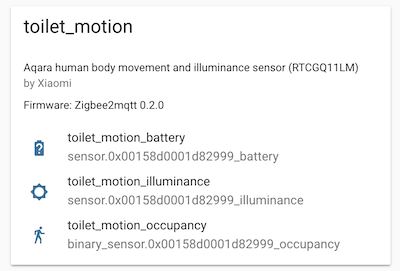
What do I have to do?
Fix the entity_id of your devices via the Home Assistant web interface.
I'm confused about the different device IDs, names and friendly names
- Home Assistant
entity_id: determined on first discovery of the device, can only be changed via the Home Assistant web interface afterwards. Used to control/read the state from the device (e.g. in automations) - Zigbee2mqtt
friendly_name: used to change the MQTT topic where the device listens and publishes to. - Home Assistant
name: name shown in the Home Assistant UI (unless overridden via afriendly_nameincustomize.yaml). If not changed via the Home Assistant web interface, it is equal to the Zigbee2mqttfriendly_name. Is updated if the Zigbee2mqttfriendly_namechanges (requires restart of Home Assistant) - Home Assistant
friendly_name(customize.yaml): overrides the name in the Home Assistant web interface.
 Koenkk
All 35 comments
I'm confused. I had this in my zigbee2mqtt settings:
  '0x00158d....9f':
    friendly_name: mijia_socket_switch
And now HomeAssistant detects it as:
switch.0x00158d....9f_switch | off | friendly_name: mijia_socket_switch_switch
Why is the name (id) not mijia_socket_switch_switch as before? Is it not possible anymore to define a (unique) name outside of home assistant?
 jwillmer
on 19 Dec 2018
jwillmer
on 19 Dec 2018
@jwillmer only upon first discover (which is probably done when you pair the device)
Koenkk
on 19 Dec 2018
So we need to re-pair everything to get the software to adopt using the friendly name in the data/configuration.yaml? There isn't another way?
 bbrendon
on 21 Dec 2018
bbrendon
on 21 Dec 2018
@bbrendon that won't help, as the devices are already known by home assistant. You have to change the names in home assistant itself.
Koenkk
on 21 Dec 2018
I updated to HASS 0.84.6 + ZigBee 1.0.1 (was 0.82.1 + 0.2.0).
And I not understand wat I must to do for all works again from that description...
All my sensors have friendly_names in zigbee2mqtt's configuration.yaml. So all hass's configs uses this friendly names.
Additional I have "manual" sensors for batteries in hass's sensors.yaml like this:
- platform: mqtt
state_topic: "zigbee2mqtt/home_door"
name: home_door_battery
availability_topic: "zigbee2mqtt/bridge/state"
payload_available: "online"
payload_not_available: "offline"
unit_of_measurement: '%'
device_class: battery
value_template: "{{ value_json.battery|round(0) }}"
json_attributes:
- "voltage"
- "linkquality"
I relaced friendly names from zigbee2mqtt's configuration.yaml to their "first pair" values like
friendly_name: '0x00sjhj38fjkf...sf'
So zigbee2mqtt logs topics like 'zigbee2mqtt/0x00sjhj38fjkf...sf'.
But as befor, I see in hass's menu Configuration->Integrations->MQTT: configuration.yaml
only something like this (only for manual sensors, I don't touch their config yet):
http://saveimg.ru/show-image.php?id=426ae08a532b6b29cb4e816a0c04cca2
My real sensors do not appear anywhere in HASS :(
So, I temporarily clean manual sensors, customize.yaml and so on. Configuration->Integrations->MQTT: configuration.yaml not changes - same fantom cards like in sceenshot.
I found hass's .storage/core.device_registry and .storage/core.entity_registry where this cards and clean.
Now Configuration->Integrations->MQTT: configuration.yaml empty - no old trash. But no and real sensors.
 MikeVRT
on 23 Dec 2018
MikeVRT
on 23 Dec 2018
@Koenkk I think it would help if you'd replace device_id with entity_id in the instruction above.
@MikeVRT, I don't really understand what your issue is, but after the upgrade, all you need to do is fix any entity_ids under Integrations->MQTT. Click any entity there, click the cog icon at the top right, and rename the entity_id to what it was before the upgrade, i.e. the friendly_name of this entity in the zigbee2mqtt configuration. Then click save at the top right again.
 IceEyz
on 23 Dec 2018
IceEyz
on 23 Dec 2018
Click any entity there, click the cog icon at the top right, and rename
Entity like on my screenshot not clickable at all... they like static cards (no cog too - you can see it on screenshot). And this cards only was for manual sensors. So no real sensor's cards (nothing to rename).
I will try ask another question :)
Do I need change something in zigbee2mqtt's configuration.yaml looks like:
devices:
'0x001ksfjkdfslfklasda':
friendly_name: hallway_smoke
retain: false
'0x00158sfdfsdl1fb6':
friendly_name: kitchen_leak
retain: false
As I wrote, I allready tried back it to view as after first pair:
devices:
'0x001ksfjkdfslfklasda':
friendly_name: '0x001ksfjkdfslfklasda'
retain: false
'0x00158sfdfsdl1fb6':
friendly_name: '0x00158sfdfsdl1fb6'
retain: false
Without results. Nothing new in Integrations->MQTT
MikeVRT
on 23 Dec 2018
I changed entity_id via integrations, so my sensor showed up again in the dashboard, like before, using my earlier templates.
but now it's "entity unavailable" at the integrations menu, and when I want to change it's entity_id again - I have no option to do that, right? how can I fix it?
EDIT: just for others to know
do not use capital letters in the names! that will break an ability to edit entities via web!
in case you'll do it anyway [like me], look for:
\config\.storage\core.entity_registry
fix the names, reboot & profit :)
 pejotigrek
on 23 Dec 2018
pejotigrek
on 23 Dec 2018
Hm, my core.entity_registry looks like:
        {
            "config_entry_id": null,
            "device_id": null,
            "disabled_by": null,
            "entity_id": "sensor.0x001dkfjkdsfj882c2_temperature",
            "name": null,
            "platform": "mqtt",
            "unique_id": "0x.0x001dkfjkdsfj882c2_temperature_zigbee2mqtt"
        },
So no capital letters, but Integrations->MQTT is empty now - as I understood, cards in that place from core.device_registry not from core.entity_registry
MikeVRT
on 24 Dec 2018
@IceEyz unique_id != device_id. unique_id is an identifier which doesn't change, device_id something that can be changed.
Koenkk
on 25 Dec 2018
The IDs that for me needed fixing in the webgui were the entity_ids, not
the device_ids.
IceEyz
on 25 Dec 2018
@IceEyz thanks, updated the OP.
Koenkk
on 26 Dec 2018
Still can't solve problem - Integrations->MQTT is empty
In HASS's log one warning:
WARNING (MainThread) [hbmqtt.mqtt.protocol.handler] BrokerProtocolHandler Unhandled exception in reader coro: IncompleteReadError('0 bytes read on a total of 1 expected bytes',)
In zigbee2mqtt's log nothing unusual - all my sensors attached and reporting.
How to better cleanup HASS's ".storage" (only core.device_registry and core.entity_registry ?). To many trash inside with null values like (core.entity_registry):
{
"config_entry_id": null,
"device_id": null,
"disabled_by": null,
"entity_id": "sensor.0x00789d00023235c1_temperature",
"name": null,
"platform": "mqtt",
"unique_id": "0x00789d00023235c1_temperature_zigbee2mqtt"
},
MikeVRT
on 27 Dec 2018
Let's face it the migration path description is insufficient. Could we get some clear tutorial on the available migration options? I would like to get a predictable device id on Hass to be able to make a clean redeploy of hass (with all my scripts) and everything is working again - not changing anything via gui.
jwillmer
on 27 Dec 2018
@jwillmer the only wat to do that is to stop homeassistant and remove .storage/core.entity_registry
Koenkk
on 27 Dec 2018
only wat to do that is to stop homeassistant and remove
.storage/core.entity_registry
I removed all '.storage' folder and it didn't help: Integrations->MQTT This integration has no devices.
After restart HASS in zigbee2mqtt' log I see this:
What means topics starts with 'homeassistant/'? If them special for HASS why still "This integration has no devices."?
My zigbee2mqtt config about HASS:
homeassistant: true
permit_join: true
mqtt:
  base_topic: zigbee2mqtt
  server: 'mqtt://localhost'
In HASS cfg:
mqtt:
  discovery: true
  birth_message:
    topic: 'hass/status'
    payload: 'online'
  will_message:
    topic: 'hass/status'
    payload: 'offline'
p.s. here was some similar: https://github.com/Koenkk/zigbee2mqtt/issues/468 , in HASS's log same exception with BrokerProtocolHandler.
MikeVRT
on 28 Dec 2018
@MikeVRT are you running hassio?
Koenkk
on 28 Dec 2018
@Koenkk, no - base installation (virtual environment)
MikeVRT
on 28 Dec 2018
@mikevrt looking at the log, everything from the zigbee2mqtt side seems to be going well. Do you see anything in the home assistant log?
Koenkk
on 29 Dec 2018
@Koenkk only one warning:
WARNING (MainThread) [hbmqtt.mqtt.protocol.handler] BrokerProtocolHandler Unhandled exception in reader coro: IncompleteReadError('0 bytes read on a total of 1 expected bytes',)
p.s. for sure I deleted '.storage' - HASS recreated files inside but nothing changed - Integrations->MQTT empty with 'This integration has no devices.' message.
MikeVRT
on 29 Dec 2018
I found issue https://github.com/Koenkk/zigbee2mqtt/issues/733 with device_id = null as in my preview post https://github.com/Koenkk/zigbee2mqtt/issues/668#issuecomment-449677460
But in my case null not only device_id
MikeVRT
on 29 Dec 2018
Does home assistant read anything from MQTT? (e.g. when you create an mqtt sensor manually)
Koenkk
on 30 Dec 2018
@Koenkk I made rollback to 0.77.x + 0.2.0 (it's possible because I use virtual machine with snapshots). All works. Than updated again to 0.84.6 + 1.0.1. Befor update I removed all manual sensors temporarily (they was for each sensor's battery and for pressure in mmhg) and clean customize.yaml from manual friendly_name(s).
After fist start zigbee2mqtt and hass I saw that in integration: https://ibb.co/3SSbHkN
All looks ok. Sensors clickable and I can change name and friendly name. After change each sensor you will got "(entity unavailable)" https://ibb.co/19TJ82p but it's known issue - page refresh will helps and you see new naming.
But... big problem. All it works after first start. You see sensors on overview. If you will rename it in gui - you will see it in overview with new names. But after restart whole system/hass sensors will disappear from overview and still visible in intergration as not clickable.
I'm not sure that it's zigbee2mqtt error of cause, @Koenkk - don't worry about it :)
MikeVRT
on 30 Dec 2018
By the way - I tried to re-pair one sensor (I knew how to do it) and got strange log from zigbee2mqtt:
2018-12-31 03:18:52 - warn: Message without device!
2018-12-31 03:19:03 - warn: Device with modelID 'undefined' is not supported.
2018-12-31 03:19:03 - warn: Please see: https://koenkk.github.io/zigbee2mqtt/how_tos/how_to_support_new_devices.html
2018-12-31 03:19:03 - warn: Device with modelID 'undefined' is not supported.
2018-12-31 03:19:03 - warn: Please see: https://koenkk.github.io/zigbee2mqtt/how_tos/how_to_support_new_devices.html
2018-12-31 03:19:03 - warn: Device with modelID 'undefined' is not supported.
2018-12-31 03:19:03 - warn: Please see: https://koenkk.github.io/zigbee2mqtt/how_tos/how_to_support_new_devices.html
2018-12-31 03:19:06 - warn: Message without device!
2018-12-31 03:19:06 - warn: Device with modelID 'undefined' is not supported.
2018-12-31 03:19:06 - warn: Please see: https://koenkk.github.io/zigbee2mqtt/how_tos/how_to_support_new_devices.html
2018-12-31 03:19:06 - warn: Device with modelID 'undefined' is not supported.
2018-12-31 03:19:06 - warn: Please see: https://koenkk.github.io/zigbee2mqtt/how_tos/how_to_support_new_devices.html
2018-12-31 03:19:06 - warn: Device with modelID 'undefined' is not supported.
2018-12-31 03:19:06 - warn: Please see: https://koenkk.github.io/zigbee2mqtt/how_tos/how_to_support_new_devices.html
2018-12-31 03:19:10 - warn: Device with modelID 'undefined' is not supported.
2018-12-31 03:19:10 - warn: Please see: https://koenkk.github.io/zigbee2mqtt/how_tos/how_to_support_new_devices.html
2018-12-31 03:19:10 - warn: Device with modelID 'undefined' is not supported.
2018-12-31 03:19:10 - warn: Please see: https://koenkk.github.io/zigbee2mqtt/how_tos/how_to_support_new_devices.html
2018-12-31 03:19:10 - warn: Device with modelID 'undefined' is not supported.
2018-12-31 03:19:10 - warn: Please see: https://koenkk.github.io/zigbee2mqtt/how_tos/how_to_support_new_devices.html
2018-12-31 03:19:12 - warn: Message without device!
2018-12-31 03:19:13 - warn: Message without device!
2018-12-31 03:19:13 - warn: Device with modelID 'undefined' is not supported.
2018-12-31 03:19:13 - warn: Please see: https://koenkk.github.io/zigbee2mqtt/how_tos/how_to_support_new_devices.html
2018-12-31 03:19:13 - warn: Device with modelID 'undefined' is not supported.
2018-12-31 03:19:13 - warn: Please see: https://koenkk.github.io/zigbee2mqtt/how_tos/how_to_support_new_devices.html
2018-12-31 03:19:13 - warn: Device with modelID 'undefined' is not supported.
2018-12-31 03:19:13 - warn: Please see: https://koenkk.github.io/zigbee2mqtt/how_tos/how_to_support_new_devices.html
2018-12-31 03:19:16 - warn: Message without device!
2018-12-31 03:19:17 - warn: Device with modelID 'undefined' is not supported.
2018-12-31 03:19:17 - warn: Please see: https://koenkk.github.io/zigbee2mqtt/how_tos/how_to_support_new_devices.html
2018-12-31 03:19:17 - warn: Device with modelID 'undefined' is not supported.
2018-12-31 03:19:17 - warn: Please see: https://koenkk.github.io/zigbee2mqtt/how_tos/how_to_support_new_devices.html
2018-12-31 03:19:17 - warn: Device with modelID 'undefined' is not supported.
2018-12-31 03:19:17 - warn: Please see: https://koenkk.github.io/zigbee2mqtt/how_tos/how_to_support_new_devices.html
Since the update it does not work. When I try to change the entity_is I get "save failed: Entity is already registered"
Example, the old id of a light was 'light.0x000b57fffeb9601f' now it is 'light.0x000b57fffeb9601f_light', when i try to change to the old id (deleting the '_light' suffix) i get this error.
Any idea?
 horchi
on 31 Dec 2018
horchi
on 31 Dec 2018
The other problem is that I can't switch the light anymore, I try to switch it without changing the Name just by clicking the new appeared lights at the web interface I get this in the zigbee2mqtt log:
2018-12-31 12:50:22 - debug: Received MQTT message on 'zigbee2mqtt/0x000b57fffec03383/set' with data '{"state": "ON"}'
and nothing happend
horchi
on 31 Dec 2018
Now I backuped the whole data of home assistant and zigbee2mqtt and started wit a new plain installation. The zigbee Temp Sensors and the switches are working after paaring but none of the lights are working, the paaring of the bulbs succeeded but I can't switch them off/on.
This is still the only masses when try to switch the light by web interface.
2018-12-31 14:05:42 - debug: Received MQTT message on 'zigbee2mqtt/0x000b57fffec03383/set' with data '{"state": "ON"}'
horchi
on 31 Dec 2018
@horchi, read this comment https://github.com/Koenkk/zigbee2mqtt/issues/771#issuecomment-450489804 about lights
MikeVRT
on 31 Dec 2018
I Reflashed CC2531 with latest fw, and got undefined+unsupported device again (on clear system):
2018-12-31 17:17:08 - info: Logging to directory: '/opt/zigbee2mqtt/data/log/2018-12-31.17-17-08'
2018-12-31 17:17:20 - info: Starting zigbee2mqtt version 1.0.1 (commit #9380bbc)
2018-12-31 17:17:20 - info: Starting zigbee-shepherd
2018-12-31 17:17:21 - info: zigbee-shepherd started
2018-12-31 17:17:21 - info: Coordinator firmware version: '20181024'
2018-12-31 17:17:21 - info: Currently 0 devices are joined:
2018-12-31 17:17:21 - warn: `permit_join` set to  `true` in configuration.yaml.
2018-12-31 17:17:21 - warn: Allowing new devices to join.
2018-12-31 17:17:21 - warn: Set `permit_join` to `false` once you joined all devices.
2018-12-31 17:17:21 - info: Zigbee: allowing new devices to join.
2018-12-31 17:17:21 - info: Connecting to MQTT server at mqtt://localhost
2018-12-31 17:17:22 - info: zigbee-shepherd ready
2018-12-31 17:17:22 - info: Connected to MQTT server
2018-12-31 17:17:22 - info: MQTT publish: topic 'zigbee2mqtt/bridge/state', payload 'online'
2018-12-31 18:25:25 - info: New device with address 0x00158d00023235c1 connected!
2018-12-31 18:25:25 - info: MQTT publish: topic 'zigbee2mqtt/bridge/log', payload '{"type":"device_connected","message":"0x00158d00023235c1"}'
2018-12-31 18:25:25 - warn: Device with modelID 'undefined' is not supported.
2018-12-31 18:25:25 - warn: Please see: https://koenkk.github.io/zigbee2mqtt/how_tos/how_to_support_new_devices.html
2018-12-31 18:25:25 - warn: Device with modelID 'undefined' is not supported.
2018-12-31 18:25:25 - warn: Please see: https://koenkk.github.io/zigbee2mqtt/how_tos/how_to_support_new_devices.html
2018-12-31 18:25:25 - warn: Device with modelID 'undefined' is not supported.
2018-12-31 18:25:25 - warn: Please see: https://koenkk.github.io/zigbee2mqtt/how_tos/how_to_support_new_devices.html
2018-12-31 18:25:28 - info: MQTT publish: topic 'zigbee2mqtt/0x00158d00023235c1', payload '{"temperature":22.95,"linkquality":155}'
2018-12-31 18:25:28 - info: MQTT publish: topic 'homeassistant/sensor/0x00158d00023235c1/temperature/config', payload '{"unit_of_measurement":"°C","device_class":"temperature","value_template":"{{ value_json.temperature }}","json_attributes":["linkquality","battery","voltage"],"state_topic":"zigbee2mqtt/0x00158d00023235c1","availability_topic":"zigbee2mqtt/bridge/state","name":"0x00158d00023235c1_temperature","unique_id":"0x00158d00023235c1_temperature_zigbee2mqtt","device":{"identifiers":"zigbee2mqtt_0x00158d00023235c1","name":"0x00158d00023235c1","sw_version":"Zigbee2mqtt 1.0.1","model":"Aqara temperature, humidity and pressure sensor (WSDCGQ11LM)","manufacturer":"Xiaomi"}}'
2018-12-31 18:25:28 - info: MQTT publish: topic 'homeassistant/sensor/0x00158d00023235c1/humidity/config', payload '{"unit_of_measurement":"%","device_class":"humidity","value_template":"{{ value_json.humidity }}","json_attributes":["linkquality","battery","voltage"],"state_topic":"zigbee2mqtt/0x00158d00023235c1","availability_topic":"zigbee2mqtt/bridge/state","name":"0x00158d00023235c1_humidity","unique_id":"0x00158d00023235c1_humidity_zigbee2mqtt","device":{"identifiers":"zigbee2mqtt_0x00158d00023235c1","name":"0x00158d00023235c1","sw_version":"Zigbee2mqtt 1.0.1","model":"Aqara temperature, humidity and pressure sensor (WSDCGQ11LM)","manufacturer":"Xiaomi"}}'
2018-12-31 18:25:28 - info: MQTT publish: topic 'homeassistant/sensor/0x00158d00023235c1/pressure/config', payload '{"unit_of_measurement":"hPa","device_class":"pressure","value_template":"{{ value_json.pressure }}","json_attributes":["linkquality","battery","voltage"],"state_topic":"zigbee2mqtt/0x00158d00023235c1","availability_topic":"zigbee2mqtt/bridge/state","name":"0x00158d00023235c1_pressure","unique_id":"0x00158d00023235c1_pressure_zigbee2mqtt","device":{"identifiers":"zigbee2mqtt_0x00158d00023235c1","name":"0x00158d00023235c1","sw_version":"Zigbee2mqtt 1.0.1","model":"Aqara temperature, humidity and pressure sensor (WSDCGQ11LM)","manufacturer":"Xiaomi"}}'
2018-12-31 18:25:28 - info: MQTT publish: topic 'zigbee2mqtt/0x00158d00023235c1', payload '{"temperature":22.95,"linkquality":155,"humidity":22.11}'
2018-12-31 18:25:28 - info: MQTT publish: topic 'zigbee2mqtt/0x00158d00023235c1', payload '{"temperature":22.95,"linkquality":155,"humidity":22.11,"pressure":999}'
It's simple WSDCGQ11LM (Aqara Temperature Humidity Sensor) thats works befor without problems on zigbee2mqtt 0.1.x-0.2.x
Cleaned HASS (was deleted ".storage" folder) not see anything (in overview, in integration). (Cleaning was befor reflash and fresh pair).
MikeVRT
on 31 Dec 2018
Possible I found reason. I don't know why but mqtt without password caused all this bugs & strange behavior...
But in any case - zigbee2mqtt (version 1.0.1 (commit #9380bbc)) log now show when pairing:
2018-12-31 20:25:24 - warn: Device with modelID 'undefined' is not supported.
But joined devices has right names (not undefined) after restart zigbee2mqtt, for example:
2018-12-31 20:33:58 - info: Currently 2 devices are joined:
2018-12-31 20:33:58 - info: 0x00158d00023235c1 (0x00158d00023235c1): WSDCGQ11LM - Xiaomi Aqara temperature, humidity and pressure sensor (EndDevice)
2018-12-31 20:33:58 - info: 0x00158d0002322792 (0x00158d0002322792): WSDCGQ11LM - Xiaomi Aqara temperature, humidity and pressure sensor (EndDevice)
And ONLY after restart zigbee2mqtt we can see in HASS not empty data from new paired sensors or binary sensors changes (like water leak, door&window).
Same time - in zigbee2mqtt's log we can see status changing (true->false for example)
and befor restart zigbee2mqtt - but no actual data in HASS - only after zigbee2mqtt restart.
So, we have not best algorithm for pair:
- press buttons on sensor for pair
- sensor will
a. appear in zigbee2mqtt's log with "warn: Device with modelID 'undefined' is not supported"
b. appear in HASS without data from sensor like temp. and without reacting for binary sensors - If sensor sends data/state change - we can see it in zigbee2mqtt's log but not in HASS
- after restart zigbee2mqtt we can see data/status changes in HASS too.
Another problem - router based on CC2530 not connecting now at all (no trys in log after power on as on preview versions of zigbee2mqtt). But coordinator was updated to '20181024' when I made reflash. New firmware for router I didn't see.
MikeVRT
on 31 Dec 2018
@MikeVRT it seems it was an MQTT issue then. A new router firmware is not needed, however when reflashing the coordinator you need to repair all your device, including the CC2530 router, which can only be done reflashing the CC2530 router.
Koenkk
on 1 Jan 2019
which can only be done reflashing the CC2530 router
oh... yes, you are right! I forget about it :(
MikeVRT
on 2 Jan 2019
It's running again :). After furthermore rebuild (npm) and new pairing of all the bulbs it is working now.
horchi
on 2 Jan 2019
This issue has been automatically marked as stale because it has not had recent activity. It will be closed if no further activity occurs. Thank you for your contributions.
![stale[bot] picture](https://avatars3.githubusercontent.com/in/1724?v=4&s=40) stale[bot]
on 3 Mar 2019
stale[bot]
on 3 Mar 2019
Related issues
 jwilling
·
4Comments
jwilling
·
4Comments
 sylarevan
·
5Comments
sylarevan
·
5Comments
 Courty40
·
4Comments
Courty40
·
4Comments
 ophilips
·
4Comments
ophilips
·
4Comments
 jerrychong25
·
4Comments
jerrychong25
·
4Comments
Most helpful comment
Let's face it the migration path description is insufficient. Could we get some clear tutorial on the available migration options? I would like to get a predictable device id on Hass to be able to make a clean redeploy of hass (with all my scripts) and everything is working again - not changing anything via gui.