Zigbee2mqtt: Tradfri dimmer automation
Could someone post his/hers tradfri dimmer automation?
I have an automation but this one won't turn off the lights at brightness 0.
- alias: Tradfri Dimmer WZ
  initial_state: 'on'
  trigger:
    platform: state
    entity_id: sensor.zigbee_dimmer_wz
  action:
    - service: light.turn_on
      data_template:
        entity_id: sensor.zigbee_dimmer_wz
        brightness: '{{ state.sensor.zigbee_dimmer_wz.state }}'
 h4nc
h4nc
All 34 comments
this code works:
- alias: Tradfri Dimmer WZ
initial_state: 'on'
trigger:
platform: mqtt
topic: 'zigbee2mqtt/Zigbee Dimmer WZ'
# condition:
# condition: template
# value_template: "{{ trigger.payload_json.action in ['rotate_right', 'rotate_left'] }}"
action:
- service: light.turn_on
data:
entity_id: light.stimmungslicht
- service: light.turn_on
data_template:
entity_id: light.stimmungslicht
brightness: '{{ states.sensor.zigbee_dimmer_wz.state }}'
- condition: template
value_template: "{{ states.sensor.zigbee_dimmer_wz.state == '0' }}"
- service: light.turn_off
data:
entity_id: light.stimmungslicht
However I think I will need a conditon, because if its sends battery status org something this automation will trigger the light to turn on.
Any ideas are welcome.
h4nc
on 4 Dec 2018
This is what I use:
- alias: Ikea Dimmer
trigger:
- platform: state
entity_id: sensor.ikea_dimmer
action:
- service: mqtt.publish
data_template:
topic: zigbee2mqtt/ikea_light_1/set
payload_template: >-
{% if is_state('sensor.ikea_dimmer', '0') %}
{"state":"OFF"}
{% else %}
{"state":"ON","brightness": {{ states("sensor.ikea_dimmer") }} }
{% endif %}
 tutis51
on 16 Dec 2018
tutis51
on 16 Dec 2018
Thanks, this is what I came up with:
- alias: Tradfri Dimmer WZ
initial_state: 'on'
trigger:
platform: mqtt
topic: 'zigbee2mqtt/Zigbee Dimmer WZ'
action:
- service: light.turn_on
data_template:
entity_id: light.licht_im_wohnzimmer
brightness: '{{ states.sensor.zigbee_dimmer_wz.state }}'
- condition: template
value_template: "{{ states.sensor.zigbee_dimmer_wz.state == '0' }}"
- service: light.turn_off
data:
entity_id: light.licht
But I think I will change it to yours, because if there ever will be another state in that topic (battery), than my automation would be triggered.
Do you get the link quality and battery state values of the device?
h4nc
on 17 Dec 2018
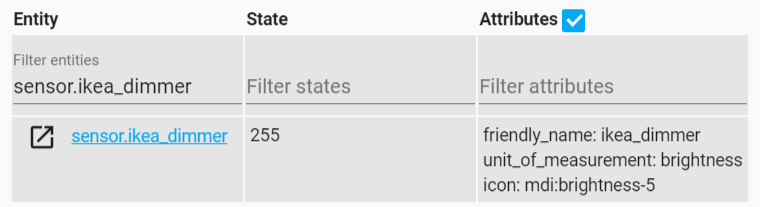
I never got link quality or battery state in HA. I am not sure if battery state at all possible to get. In zigbee2mqtt log I see only link quality state attribute, but still not available in HA:
info: MQTT publish, topic: 'homeassistant/sensor/0x000b57fffe240ee2/brightness/config', payload: '{"unit_of_measurement":"brightness","icon":"mdi:brightness-5","value_template":"{{ value_json.brightness }}","json_attributes":["linkquality"],"state_topic":"zigbee2mqtt/ikea_dimmer","availability_topic":"zigbee2mqtt/bridge/state","name":"ikea_dimmer"}'
info: MQTT publish, topic: 'zigbee2mqtt/ikea_dimmer', payload: '{"brightness":255}'
tutis51
on 17 Dec 2018
It's the same behaviour for me. It looks like the the dimmer doesn't send a battery state.
I think the link quality would be available but isn't implemanted to be send in the mqtt payload.
Maybe someone who is able do add this, read this. Would be great to have the link quality.
h4nc
on 17 Dec 2018
Do you get smooth dimming and brightening using those automations? Or does the light go directly to the final brightness?
 johnnyletrois
on 23 Dec 2018
johnnyletrois
on 23 Dec 2018
it goes directly to the final brightness because the dimmer sends it value after the rotation is finished.
To get a smooth dimming the dimmer would have to send values nonstop. I don't know if this is possible with a wireless battery powered device.
However, I often have connectivity issues with the ikea dimmer, so I added an aqara button next to it. I push this button when the dimmer fails (turn light to 50%). Could also be my zigbee network, but I can say that my other zigbee devices work reliable.
h4nc
on 23 Dec 2018
This is what I use:
- alias: Ikea Dimmer trigger: - platform: state entity_id: sensor.ikea_dimmer action: - service: mqtt.publish data_template: topic: zigbee2mqtt/ikea_light_1/set payload_template: >- {% if is_state('sensor.ikea_dimmer', '0') %} {"state":"OFF"} {% else %} {"state":"ON","brightness": {{ states("sensor.ikea_dimmer") }} } {% endif %}
Can I adapt this for the dimmer to control multiple bulbs?
 Morphy99
on 23 Jan 2019
Morphy99
on 23 Jan 2019
spend some time on mine to find a way to play nice when the brightness is out of sync.
Main issue is that the dimmer reports a brightness rather than a +/- value.
(and i haven't found a way to set the dimmer's brightness)
- alias: 'Ikea Dimmer Bad'
hide_entity: true
trigger:
platform: mqtt
topic: 'zigbee2mqtt/0x000b12abcd345e67'
condition:
- condition: state
entity_id: light.bad_01
state: 'on'
action:
- service: light.turn_on
entity_id: light.bad_01
data_template:
brightness: >
{% set dimmer = states.sensor.dimmer_01_brightness.state | int %}
{% set bulb = states.light.bad_01.attributes.brightness | int %}
{% set increment = 40 %}
{% if dimmer > 245 %}
{% if bulb < 245 %}
{{ (bulb + increment) }}
{% else %}
254
{% endif %}
{% else %}
{% if bulb > 250 %}
{{ ( (249 / increment) | round(0) * increment | int ) }}
{% else %}
{{ ( ((dimmer / increment) | round(0) * increment) + 3 | int ) }}
{% endif %}
{% endif %}
Note: the dimmer wont turn the bulb on or off.
(using a door sensor with defined brightness levels / scenes)
 Pockrandt
on 27 Jan 2019
Pockrandt
on 27 Jan 2019
We would realy need an section for this automations.
Just trying to come up with one wich relies on the MQTT message only.
 Underknowledge
on 4 Mar 2019
Underknowledge
on 4 Mar 2019
@Pockrandt could you explain your code?
brightness: >
{% set dimmer = states.sensor.dimmer_01_brightness.state | int %}
{% set bulb = states.light.bad_01.attributes.brightness | int %}
{% set increment = 40 %}
{% if dimmer > 245 %}
{% if bulb < 245 %}
{{ (bulb + increment) }}
{% else %}
254
{% endif %}
{% else %}
{% if bulb > 250 %}
{{ ( (249 / increment) | round(0) * increment | int ) }}
{% else %}
{{ ( ((dimmer / increment) | round(0) * increment) + 3 | int ) }}
{% endif %}
{% endif %}
I tried it but it didn't work good for me. Specially I'm interessented in an explanation for the /increment section in your code.
h4nc
on 4 Mar 2019
@h4nc sure, here it is
{% set dimmer = states.sensor.dimmer_01_brightness.state | int %}
{% set bulb = states.light.bad_01.attributes.brightness | int %}
get the current brightness from the dimmer and bulb which i renamed with HA's device registry.
{% set increment = 40 %}
define a step in which the brightness will be changed.
(because dimmer > HA > bulb is somewhat delayed I prefer larger steps like 40)
{% if dimmer > 245 %} # when i turn my dimmer it almost never hits the 255 max so using 245 for a 'turn to max'
{% if bulb < 245 %}
# when my dimmer is on the upper end (245 above) and the blub is below this then
# increase the brightness of the blub by the step (40)
{{ (bulb + increment) }}
{% else %}
# if the blub is above my 'max' then simply set it to 254
# (could also be 255 not sure why i choose 254)
254
{% endif %}
{% else %}
# when my dimmer is below my 'upper end' just do some basic math for steppping
{% if bulb > 250 %}
# when the blub is above 250 we use a fixed brightness of 249 to calculate the new one
# take the fixed value of 249 and divide if by the stepping (40) = 6,225
# rounded to zero precision = 6
# multiplied by the stepping ( 6 * 40) = 240
# transform to 'int'
{{ ( (249 / increment) | round(0) * increment | int ) }}
{% else %}
# else use the dimmer value to calculate the new brightness like
# dimmer turned to like '150' divided by the stepping (40) = 3,75
# rounded to zero precision = 3
# again multiply by the stepping (40) = 120
# (do this to get a multiply of our stepping ( 40+40+40 = 120 =/= initial 150 from the dimmer)
# increase the value by 3 for when you accently turn the dimmer to zero (0)
{{ ( ((dimmer / increment) | round(0) * increment) + 3 | int ) }}
{% endif %}
{% endif %}
The reason this is somewhat complicated is because I like to set a defined brightness when opening my door base on my scene's and roaming buttons.
(feel free to take a look https://github.com/Pockrandt/hassio-conf )
Pockrandt
on 5 Mar 2019
Thanks @Pockrandt, I see so every dimmer value between 120 and 159 will lead to 120 because you cut off the decimals.
160 to 199 will always make 160 ans so on.
h4nc
on 5 Mar 2019
@h4c correct, because of the delay IHMO the dimmer isn't useful for 'fine tuning' so i choose a more rough way of interacting.
try to lower the increment for a way you prefer it.
You might as well connect the dimmer directly to the bulb with https://www.zigbee2mqtt.io/information/binding.html
Pockrandt
on 5 Mar 2019
Unfortunately, I can't connect it directly, because the light I dimm with it is not zigbee but an mqtt light.
I also want to be able to turn off the light with the dimmer. This is the automation I use.
The only thing what I doesn't like on my automation is when it is out of sync. But I think your automation also cannot help with this.
So when I turn the light on with alexa to 50% (255/2) and afterwards I use the dimmer that has the value 240 before, the light will have a sudden bump to nearly 100%, even if I turn down the dimmer.
So Light is at 50%, Dimmer value is at 95%. I turn in down and want to go under 50% not knowing the value of the dimmer, and than it will go to like 80% (but I wanted to turn it down).
I think you get what I mean. I don't think that we can change that behaviour, because the dimmer always will report an absolute value.
This product is made to use it as the only remote and not inputs too.
h4nc
on 5 Mar 2019
everything is possible with a little bit of code.
like try use 'condition' like this
- service: light.turn_on
entity_id: light.bad_01
data_template:
brightness: >
...
- condition: numeric_state
entity_id: light.bad_01
value: states.light.bad_01.attributes.brightness
below: 10
- service: homeassistant.turn_off
entity_id: light.bad_01
(untested so check spacing and paramaters)
I think you get what I mean. I don't think that we can change that behaviour, because the dimmer always will report an absolute value.
thats true but if i remember correctly when you turn your dimmer from 95 to 40 then
trigger.to_state.state i should be 40
and
states.sensor.dimmer_01_brightness.stateshould still be the old ( 95)
so with some basic math and if then else we can simulate a desired action (like i done it above)
Pockrandt
on 5 Mar 2019
Forgot to paste my code, I already have a condition like the one you mentioned to turn off the bulb when dimmer == 0.
So this is my automation:
- alias: Ikea Dimmer
initial_state: 'on'
trigger:
platform: mqtt
topic: 'zigbee2mqtt/Zigbee Dimmer'
condition:
- condition: state
entity_id: light.licht_wz
state: 'on'
action:
- service: light.turn_on
data_template:
entity_id: light.licht_wz
brightness: "{{ states.sensor.zigbee_dimmer.state }}"
- condition: template
value_template: "{{ states.sensor.zigbee_dimmer.state == '0' }}"
- service: light.turn_off
data:
entity_id: light.licht_wz
well unless there is a way to set the dimmer's brightness we only can so some magic with math to calculate proximity.
One way would be like:
take the difference between old and new value of the dimmer and apply it to light brightness setting.
add some checked like negativ oder higher than 255 brightness and your done.
Pockrandt
on 5 Mar 2019
Yes, thats a good idea, but the difference will very a lot, and will have nothing to do with the angle I turn the ikea dimmer.
The basic idea is good, but we would have to make it better. Maybe something like.
If old dimmer value > brightness and new dimmer value > brightness
set brightness to brightness - (old dimmer value - new dimmer value)
If old dimmer value < brightness and new dimmer value < brightness
set brightness to dimmer value
If old dimmer value > brightness and new dimmer value < brightness
...
If old dimmer value < brightness and new dimmer value > brightness
...
But again there will be the issue that if the dimmer is already 255, turning up will result in staying 255. Same with zero.
But your code could be a workaround for that right?
h4nc
on 5 Mar 2019
How about using fixed step's if the difference is zero because the dimmer stays at 255?
if difference == 0
If bulb < (255 - 40)
255
else
bulb + 40
else
...
Do you know how to get the old dimmer value? Or how to save the old one?
h4nc
on 5 Mar 2019
Shouldn't states.sensor.dimmer_01_brightness.states still have the old value while executing?
Else make a hidden input that stores the old value after each run.
see https://www.home-assistant.io/components/input_number/
Pockrandt
on 5 Mar 2019
maybe @Petro31 could help with that question.
h4nc
on 5 Mar 2019
This issue has been automatically marked as stale because it has not had recent activity. It will be closed if no further activity occurs. Thank you for your contributions.
![stale[bot] picture](https://avatars3.githubusercontent.com/in/1724?v=4&s=40) stale[bot]
on 4 May 2019
stale[bot]
on 4 May 2019
Stay open
h4nc
on 4 May 2019
I asked for https://github.com/Koenkk/zigbee2mqtt/issues/1191 - Makes automations way easyer.
Underknowledge
on 5 May 2019
@WagnerBeccard could you show your automation?
h4nc
on 7 May 2019
Hi. The entire project is supercool, so I want to contribute too - at least with my idea how to make good responsive brightness control for IKEA dimmer.
I have migrated to AppDaemon, so do not have my old .yaml for the automations - but my logic worked with .yaml too.
Yes #1191 indeed was a great feature.
The main trick I used is I calculated milliseconds between rotation start and rotation stop. My logic:
- as soon as dimmer rotation starts, automations triggers slow transition from current brightness in either direction (up or down)
- time for this transition is caclucated based on current position and direction till 0 or 100 %
- as soon as rotation stops i get milliseconds difference and calculate what should be exact brigtness to set
- this exact brightness is sent to the bulb and this also stops slow trinsition
So it give really good responsive control over when to stop rotation (as soon as you are satisfied with the current level of brigtness you see with you own eyes). I think this logic is even better then factory logic which is glitchy and jumps from one level of brightness to another.
 sergiigladchuk
on 8 May 2019
sergiigladchuk
on 8 May 2019
@sergiigladchuk are you also able to handle this situation somehow?
Light is one because you turned it on by voice
Dimmer value = 0
Turn dimmer to the left because you want to dimm down, which means going from 0 to 0
Same thing for 100%
h4nc
on 8 May 2019
- alias: ikeadimmer_lights
initial_state: on
trigger:
platform: mqtt
topic: 'zigbee2mqtt/kueche_ikea'
condition:
condition: or
conditions:
- condition: template
value_template: "{{ 'rotate_right_quick' == trigger.payload_json.action }}"
- condition: template
value_template: "{{ 'rotate_left_quick' == trigger.payload_json.action }}"
- condition: template
value_template: "{{ 'rotate_stop' == trigger.payload_json.action }}"
action:
- service: light.turn_on
data_template:
entity_id: light.nachttisch
brightness: "{{ trigger.payload_json.brightness }}"
transition: 1
- wait_template: "{{ trigger.payload_json.brightness == '0' }}"
timeout: '00:00:01'
continue_on_timeout: 'false'
- service: light.turn_off
entity_id: light.nachttisch
only issue I have. sometimes that messages getting in too quick. then the coordinator getting clogged up and needs up to 20 secconds to react.
Underknowledge
on 8 May 2019
@sergiigladchuk are you also able to handle this situation somehow?
Light is one because you turned it on by voice
Dimmer value = 0
Turn dimmer to the left because you want to dimm down, which means going from 0 to 0Same thing for 100%
Just use MIN and MAX (for directions up and down respectively) in order to keep resulting brightnes_pct from 0 to 100. Here is few lines from my script in AppDaemon :
        if self.direction == 'up':
            self.br_pct = min([self.br_pct + int(elapsed / 1000 / self.args['transition_sec'] * 100), 100])
        else:
            self.br_pct = max([self.br_pct - int(elapsed / 1000 / self.args['transition_sec'] * 100), 1])
where br_pct is updated based on elapsed milliseconds. So if you have brightness on 0, and rotate the dimmer further it will stay 0.
One important thing I have not mentioned in my initial post - I do not care at all about brightness reported by the dimmer. You can either read brightness directly from the lamp or keep it in separate input_number (as I do). So I only care about rotations reported by the dimmer, and elapsed time between start and stop of the rotation.
sergiigladchuk
on 10 May 2019
@WagnerBeccard you can simplify your condition, just check if the payload contains 'action'
- alias: 'Ikea Dimmer Bad'
  trigger:
  - platform: mqtt
    topic: 'zigbee2mqtt/0x000b57fffe150d50'
  condition:
  - condition: template
    value_template: "{{ 'action' in trigger.payload }}"
  action:
  - service: light.turn_on
    data_template:
      entity_id: light.ikea_bad
      brightness: '{{ trigger.payload_json.brightness }}'
also you can remove that wait > turn_off since recently turn_on with 0 brightness turns the lamp off.
Pockrandt
on 10 May 2019
This issue has been automatically marked as stale because it has not had recent activity. It will be closed if no further activity occurs. Thank you for your contributions.
stale[bot]
on 9 Jul 2019
@sergiigladchuk thanks for your idea of counting milliseconds between start and stop, and starting transition when rotation starts. I think that's the only way of getting it to work nicely.
 patrickharris
on 27 Jul 2019
patrickharris
on 27 Jul 2019
Related issues
 Courty40
·
4Comments
Courty40
·
4Comments
 jwilling
·
4Comments
jwilling
·
4Comments
 jerrychong25
·
4Comments
jerrychong25
·
4Comments
 andreasbrett
·
4Comments
andreasbrett
·
4Comments
 tb-killa
·
3Comments
tb-killa
·
3Comments
Most helpful comment
Just use MIN and MAX (for directions up and down respectively) in order to keep resulting brightnes_pct from 0 to 100. Here is few lines from my script in AppDaemon :
where br_pct is updated based on elapsed milliseconds. So if you have brightness on 0, and rotate the dimmer further it will stay 0.
One important thing I have not mentioned in my initial post - I do not care at all about brightness reported by the dimmer. You can either read brightness directly from the lamp or keep it in separate input_number (as I do). So I only care about rotations reported by the dimmer, and elapsed time between start and stop of the rotation.