Zigbee2mqtt: Esp8266 as zigbee coordinator
Hello, it is possible to use the serial port in esp8266 to connect cc2531 and use it as a coordinator to send data to the mqtt gate. I ask because the server (Raspberry) I have in the basement and I would like the coordinator to be on the floor to get a better range. It would be a nice solution because I have wifi access in the whole house.
 lokomotionn
All 27 comments
No, but you could you use another raspberry pi instead of the esp8266.
 Koenkk
on 3 Oct 2018
Koenkk
on 3 Oct 2018
@lokomotionn I think it is possible 😉 I was doing an experiment yesterday...

The main idea is to make a virtual serialport that works on tcp with esp8266.
How will progress - I will write here. I also dream that the coordinator was separate from the server.
further, you can also transfer processing logic to esp8266 later.
 kirovilya
on 3 Oct 2018
kirovilya
on 3 Oct 2018
Why not just setup a router on your ground floor as act as the 'center' and then relay the info to the co-ordinator on the pi?
 BenNeumeister
on 3 Oct 2018
kirovilya
on 3 Oct 2018
BenNeumeister
on 3 Oct 2018
kirovilya
on 3 Oct 2018
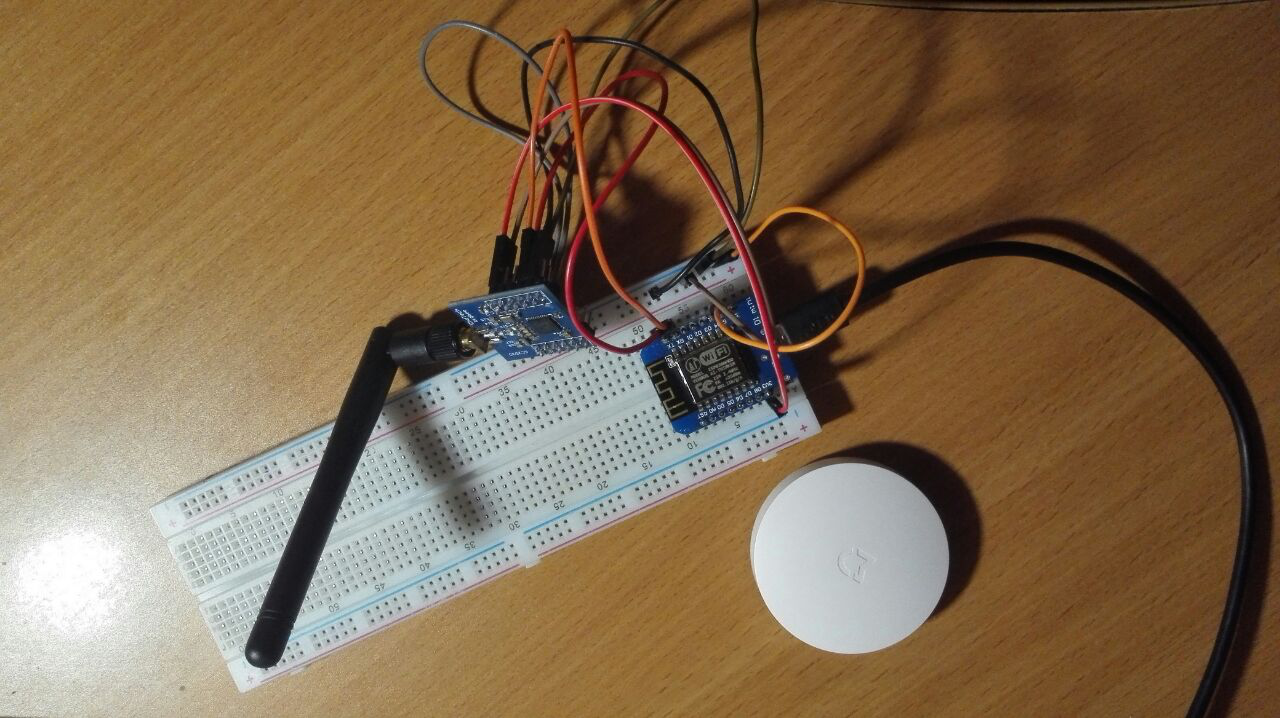
esp8266 (wemos d1 mini) flashing with Esp-link https://github.com/jeelabs/esp-link or Ser2Net from EspEasy https://github.com/letscontrolit/ESPEasy
Wiring:
ESP8266 -- CC2530
3v3 -- VCC
GND -- GND
TX -- P02
RX -- P03
GND -- P20
GND -- P04
GND -- P05
For windows virtual serialport https://www.hw-group.com/software/hw-vsp3-virtual-serial-port
For linux http://tibbo.com/support/downloads/vspdl.html (but I am not test)
kirovilya
on 3 Oct 2018
Esp8266 flashing
Press the Flashmode button when connection to the computer
Downlad the lastest https://github.com/letscontrolit/ESPEasy/releases
Extract the ESPMega zip file, and open ‘FlashESP8266.exe’
Select the right COM port and select the right Firmware (ESP_Easy_mega-XXXXXXXX_normal_ESP8266_4096.bin)
When it is ready close the flashing tool
The ESP8266 will now emit a wifi signal, connect with it with the following password: ‘configesp’ (more information at https://www.letscontrolit.com/wiki/index.php/ESPEasy#Introduction)
After connection a screen opens in which you can let the ESP8266 connect to your WIFI, if succesfull its new IP address will be shown.
Go to this IP address in your browser and click on devices
or Go to http://192.168.4.1/setup
Click on "Devices" Edit of the first task and select ‘Communication - Serial Server’ from the dropdown list
Fill in the form as following:
a. Name: ZIGBEE2MQTT
b. Enabled: checked
c. TCP Port: a number between 1000 and 9999 "1775"
d. Baud Rate: 115200
e. Data bits: 8
f. Parity: No Parity
g. Stop bits: 1
h. Reset target after boot: - none –
i. RX receive timeout: 0
j. Event processing: Generic
Press Submit
Then its complete the device will get devicename ESP-Easy-0 check your router for the IP or you will get directed after the setup of the Wifi the first time you connected to the device.
You can also try to use ser2net on Linux then use that port.
https://www.letscontrolit.com/wiki/index.php/Ser2Net
Mount with socat
.bash
apt-get install socat
socat -d -d pty,raw,echo=0,link=/opt/zigbee2mqttdev/vusb/zigbee_cc2530 tcp-connect:IP:PORT
**PLEASE * Make sure the zigbee2mqtt is not using the same chanel as WIFI.
 JLFN
on 4 Oct 2018
JLFN
on 4 Oct 2018
Ser2net has a virtual port client?
How to configure the configuration.yaml file for a virtual serial port?
homeassistant: false
permit_join: true
mqtt:
base_topic: zigbee2mqtt
server: 'mqtt: // localhost'
series:
port: / dev / ttyUSB1
lokomotionn
on 4 Oct 2018
@lokomotionn
You can mount with socat .
JLFN
on 18 Oct 2018
@lokomotionn Do you have this setup working? If so, its stable? Any downside?
 oriolism
on 15 Nov 2018
oriolism
on 15 Nov 2018
@lokomotionn and @oriolism check this out https://github.com/Koenkk/zigbee2mqtt/issues/665#issuecomment-445722057
JLFN
on 10 Dec 2018
Probably would be nicer to do the whole zigbee to mqtt translation on esp8266. It doesn't make sense to use it just as a wireless (virtual) serial port.
 randybb
on 10 Jan 2019
randybb
on 10 Jan 2019
Probably would be nicer to do the whole zigbee to mqtt translation on esp8266. It doesn't make sense to use it just as a wireless (virtual) serial port.
@randybb You probably should try to make it your self if you believe its possible with the low resource of esp8266 is enough.
JLFN
on 11 Jan 2019
Solved :)
JLFN
on 1 Feb 2019
close this see docs!
JLFN
on 6 Feb 2019
Koenkk
on 6 Feb 2019
Quick question about the IP used in the socat command - is it the ip of the ESP8266? I'm assuming so, because any other ip doesn't seem to make sense in this use case.
 enomam
on 12 Feb 2019
enomam
on 12 Feb 2019
@enomam yes
Koenkk
on 12 Feb 2019
Wow @kirovilya @JLFN @Koenkk. Was in need for something exactly like this!
This basically should act as multiple xiaomi hubs and can be placed anywhere in the house.
How has been your experience with this? How stable are they?
Any interference b/w zigbee of cc2530 and wifi of esp8266?
How's the lag compared to having a router cc2531/0 instead?
Thanks in anticipation
 2016for
on 28 Mar 2019
2016for
on 28 Mar 2019
@2016for i get lag when i controll 3 lamps the same time but i think controlling those as group might solve that. Else its fast response. No problem with interference if you choose right channel.
JLFN
on 28 Mar 2019
@JLFN Thanks for the reply mate. Are you using any motion/door sensors?
My current Xiaomi hub setup gives me instantaneous feedback/status of these sensors, really want to be able to replicate that.
2016for
on 28 Mar 2019
@JLFN Can I replace ESPEasy with ESPHome(https://github.com/esphome/esphome)? How to fill in the ESPHome configuration entry?
 JunShine
on 27 Sep 2019
JunShine
on 27 Sep 2019
Unfortunately this does not work with Docker :-(
As i understand Docker can't deal with symlinks.
 hdo
on 25 Oct 2019
hdo
on 25 Oct 2019
@koenkk is there a reason why the tutorial isn't online any more?
https://koenkk.github.io/zigbee2mqtt/how_tos/how_to_esp8266_with_cc2530.html
 h4nc
on 23 Nov 2019
h4nc
on 23 Nov 2019
It has been moved to https://www.zigbee2mqtt.io/information/connecting_cc2530.html which is reachable from the supported adapters page
Koenkk
on 23 Nov 2019
Hello,
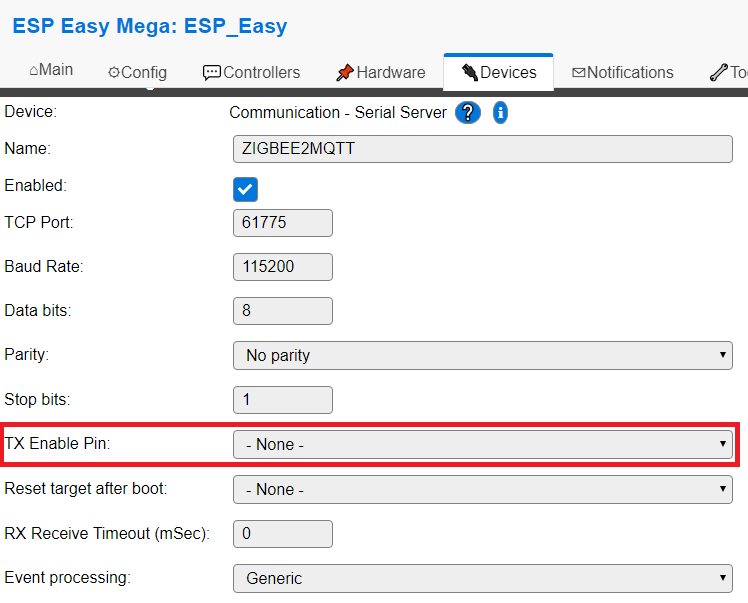
Meanwhile, the serial server configuration interface has changed. A new field called "TX Enable Pin" was added.
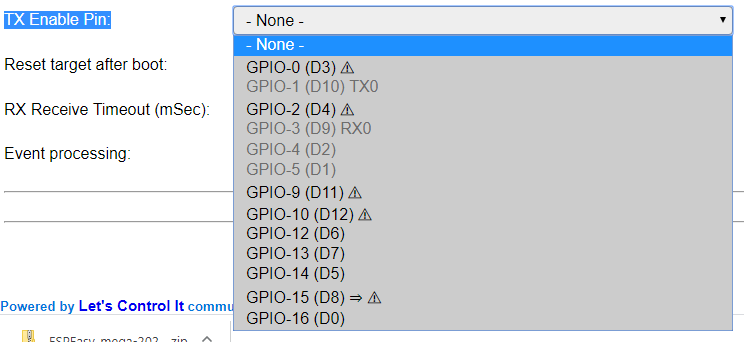
The values in the drop down list are listed in the second screenshot.
Can you please advise how to configure this setting?
Does this mean that one can assign the TX function to one of the GPIO 0, 2, 9, 10 [etc] pins?
Should it be set to "none", due to the fact we are already using the "nominal" TX pin, which is paired with P02 on the CC2530 pcb?
Thanks
 tlc76
on 27 Feb 2020
tlc76
on 27 Feb 2020
And second question: is the configuration mentioned in this post, applicable also to the CC2530+CC2591 version? Or only to the standalone CC2530?
I have the CC2530+CC2591 version and I need to connect it to a NodeMCU board.
Thanks again!
tlc76
on 27 Feb 2020
Is there an interest for building a decent hardware solution (open-source)?
Just sprung to my head, that I have everything (ESP module, CC2530+CC2592 module) on hand needed to built this.
 codmpm
on 12 Sep 2020
codmpm
on 12 Sep 2020
Related issues
 LCerebo
·
3Comments
LCerebo
·
3Comments
 mpuff
·
3Comments
mpuff
·
3Comments
 alwashe
·
4Comments
alwashe
·
4Comments
 jeroenterheerdt
·
3Comments
Koenkk
·
3Comments
jeroenterheerdt
·
3Comments
Koenkk
·
3Comments
Most helpful comment
Success! https://www.youtube.com/watch?v=HI4AkD0QGgM