Zigbee2mqtt: Help setting up a router
Hello everyone!
I am having some difficulties setting a secondary CC2531 as a router.
I have a couple of devices (Xiaomi buttons and a cube) a bit far away from my router so I get link quality 0.
I've flashed it successfully wit this firmware and managed to pair my coordinator and plugged in between both coordinator and the devices.
The problem is that nothing has changed: still get 0 link quality and the only thing that shows on the log is something related to the cube: 0x00158D00010B2E3E.
Here is my log: https://pastebin.com/iRasDgmJ
I am using it with Hassio and the oficial addon with the latest CC2531 coordinator FW.
Do I need to pair those far away devices directly with the router?
The main reason to extend the range is because sometimes when I press the button a single time, for example, many messages are received (long click), very annoying:
2018-9-19 23:33:44 - info: MQTT publish, topic: 'zigbee2mqtt/casa_xiaomi_botao_suite_01', payload: '{"battery":"100.00","voltage":3012,"linkquality":0,"click":"long"}'
2018-9-19 23:33:44 - info: MQTT publish, topic: 'zigbee2mqtt/casa_xiaomi_botao_suite_01', payload: '{"battery":"100.00","voltage":3012,"linkquality":0,"click":"long"}'
2018-9-19 23:33:44 - info: MQTT publish, topic: 'zigbee2mqtt/casa_xiaomi_botao_suite_01', payload: '{"battery":"100.00","voltage":3012,"linkquality":0,"click":"long"}'
2018-9-19 23:33:44 - info: MQTT publish, topic: 'zigbee2mqtt/casa_xiaomi_botao_suite_01', payload: '{"battery":"100.00","voltage":3012,"linkquality":0,"click":"long"}'
2018-9-19 23:33:44 - info: MQTT publish, topic: 'zigbee2mqtt/casa_xiaomi_botao_suite_01', payload: '{"battery":"100.00","voltage":3012,"linkquality":0,"click":"long_release","duration":85}'
2018-9-19 23:33:44 - info: MQTT publish, topic: 'zigbee2mqtt/casa_xiaomi_botao_suite_01', payload: '{"battery":"100.00","voltage":3012,"linkquality":0,"click":"long"}'
2018-9-19 23:33:44 - info: MQTT publish, topic: 'zigbee2mqtt/casa_xiaomi_botao_suite_01', payload: '{"battery":"100.00","voltage":3012,"linkquality":0,"click":"long_release","duration":47}'
You can see they are all sent at the same second...
Thanks a lot!
 tatunts
All 45 comments
This post https://community.home-assistant.io/t/zigbee2mqtt-getting-rid-of-your-proprietary-zigbee-bridges-xiaomi-hue-tradfri/52108/572 suggests that you need to re-pair your device to the router. But I have also seen somewhere that this shouldn't be necessary. Worth a try.
 nickrout
on 22 Sep 2018
nickrout
on 22 Sep 2018
Also, an end device need some time to find a new router. The device may sleep most time. So, you need to wake up your device (press a button on it).
 ptvoinfo
on 22 Sep 2018
ptvoinfo
on 22 Sep 2018
Thanks @nickrout and @ptvoinfo!
Someone said this on the router instructions:

I am not sure what to do here... I left the router plugged in for the last couple of days, Here is log: https://pastebin.com/FDnhRcMA
There are still no enhancements on link quality. The router itself shows as 0 quality.
Thanks!
tatunts
on 23 Sep 2018
Yeah that was the contrary advice I had seen but couldn't find it. Hard to know what is right, but why don't you try pairing to the router and see?
nickrout
on 23 Sep 2018
nickrout
on 23 Sep 2018
I pair all my new devices near the CC2531 coordinator and then I bring them to their final position. They connect automatically to the nearest CC2531 router.
 kaelsaes
on 24 Sep 2018
kaelsaes
on 24 Sep 2018
Yesterday evening I paired a new Xiaomi smoke sensor near a CC2531 router and it worked perfect. It was far away from my CC2531 coordinator.
So pairing should also work through routers...
kaelsaes
on 25 Sep 2018
The main problem here: not all routers may retransmit pairing requests. So, you should be sure that all your routers works correctly. I prefer to pair devices near the coordinator.
ptvoinfo
on 25 Sep 2018
Hello again! Can someone that have successfully managed to flash both coordinator and router and made they work together post the links for the correct FW you had used? Thanks a lot!
tatunts
on 25 Sep 2018
I used: http://ptvo.info/cc2531-based-router-firmware-136/ specifically CC2531-router-diag-usb.hex version (others didn't seem to work). Currently running a 32 node mesh with 3 CC2531 Routers and 1 CC2531 Coordinator. Seems to be running ok.
 basmeerman
on 30 Sep 2018
basmeerman
on 30 Sep 2018
Addition: Use the latest version for flashing see: https://github.com/Koenkk/zigbee2mqtt/issues/252#issuecomment-425373408
basmeerman
on 30 Sep 2018
I solved the tiresome topic "mesh network" with 2 Osram ZigBee Plugs.
Plug and play out of the box. The plugs paired independently and expanded my mesh network par excellence.
kaelsaes
on 12 Oct 2018
I solved the tiresome topic "mesh network" with 2 Osram ZigBee Plugs.
Plug and play out of the box. The plugs paired independently and expanded my mesh network par excellence.
Would you please point out, how you managed to use the Osrams as routers. Do I need some speciall config, a refined ordering in the pairing steps or ...? Which firmware do you use on your coordinator?
I am facing a star of Osrams but end nodes only attaches to the coordinator in my environment. See...

I apprechiate assistance.
 davekr8
on 23 Oct 2018
davekr8
on 23 Oct 2018
@davekr8 Xiaomi devices do not connect to the osram router (has something to do with manufacturer ID which Xiaomi forces). You can use the CC2531/CC2530 router from the wiki instead.
 Koenkk
on 24 Oct 2018
Koenkk
on 24 Oct 2018
@koenkk
I replaced all (3) my CC2531 routers with 3 Osram plugs and my network (about 20 Xiaomi devices) works perfect - in contrast to earlier with the CC2531.
The Osram plugs and the CC2531 coordinator are distributed over 2 floors - where the Xiaomi devices never ever could reach the coordinator if your statement would be right.
I first plugged in a Osram plug near the CC2531 coordinator. It paired automatically within 20 seconds and a new device was created in FHEM.
Then I plugged in the second Osram plug far away from coordinator and within 20 seconds I had a second device in FHEM.
The same with the third Osram plug far far away from coordinator.
After approximately an hour all my Xiaomi devices worked like a charm with the 3 Osram plugs. I only had to wait and do nothing else.
The Osram plugs build up a ZigBee mesh network which works without any problems with Xiaomi devices.
kaelsaes
on 24 Oct 2018
I solved the tiresome topic "mesh network" with 2 Osram ZigBee Plugs.
Plug and play out of the box. The plugs paired independently and expanded my mesh network par excellence.
I have done the same thing. I have a aqara temperature/humidity sensor and a aqara human body sensor somewhat further away from the coordinator, it looses connection most of the time. So I paired a Osram Lightify Plug to the coordinator and placed it in between the coordinator and the aqara devices but nothing changed :( The reception is still bad. I can control the lightify plug.
I had the same issue when I put the router firmware in a 2530. reception did not improve.
For me this is the main reason not to use zigbee2mqtt for "production" It's just not reliable enough for me.
 HA-TB303
on 24 Oct 2018
HA-TB303
on 24 Oct 2018
@michel72
Which Osram plug are you using?
I use this one:
https://www.amazon.de/Osram-schaltbare-fernbedienbar-Lichtsteuerung-kompatibel/dp/B074PZLX2P/ref=sr_1_1?ie=UTF8&qid=1540375548&sr=8-1&keywords=osram+plug
kaelsaes
on 24 Oct 2018
Yup, I have the same one. Just plugged it in, paired it to the coordinator and verified if I can switch it on/off. It just doesn't route the zigbee signal to the other (xiaomi aqara) devices.
HA-TB303
on 24 Oct 2018
@michel72
Which Osram plug are you using?
I use this one:
https://www.amazon.de/Osram-schaltbare-fernbedienbar-Lichtsteuerung-kompatibel/dp/B074PZLX2P/ref=sr_1_1?ie=UTF8&qid=1540375548&sr=8-1&keywords=osram+plug
yes, all the same.
davekr8
on 24 Oct 2018
@kaelsaes
The Osram plugs build up a ZigBee mesh network which works without any problems with Xiaomi devices.
it would be interesting to know, which firmware you are running on the coordinator.
davekr8
on 24 Oct 2018
From the log : Coordinator firmware version: 'undefined'
I have this coordinator:
https://s.click.aliexpress.com/e/Lm8b86G
and i have the equipment to flash a different firmware if required.
HA-TB303
on 24 Oct 2018
The firmware version could be the explanation why my ZigBee network works well with the Osram plugs.
A few weeks ago (only CC2531 coordinator and routers in use) I changed back to an older firmware version after a newer version didn't work well.
kaelsaes
on 24 Oct 2018
Whitch version exactly?
HA-TB303
on 24 Oct 2018
I'm not at home and can check this earliest on weekend.
kaelsaes
on 24 Oct 2018
https://github.com/Koenkk/zigbee2mqtt/issues/437#issuecomment-426348822
Coordinator firmware version: '20180815'
kaelsaes
on 24 Oct 2018
With this firmware version I don't have to repair all my Xiaomi devices after reflashing the coordinator. The devices reappear automatically within an hour.
kaelsaes
on 24 Oct 2018
Thx, I have a 2530, but i’ll try a few
HA-TB303
on 24 Oct 2018
Does anybody know what file to use exactly for this hardware as a coordinator?
http://s.aliexpress.com/AzqiqYj2
HA-TB303
on 24 Oct 2018
Coordinator firmware version: '20180815'
@kaelsaes, i am using the same ...
> [email protected] start /opt/zigbee2mqtt
> node index.js

  zigbee2mqtt:info 2018-10-24 19:36:12 Logging to directory: '/opt/zigbee2mqtt/data/log/2018-10-24.19-36-12'
  zigbee2mqtt:info 2018-10-24 19:36:12 Starting zigbee2mqtt version 0.1.8 (commit #97cc56b)
  zigbee2mqtt:info 2018-10-24 19:36:12 Starting zigbee-shepherd
  zigbee2mqtt:info 2018-10-24 19:36:13 zigbee-shepherd started
  zigbee2mqtt:info 2018-10-24 19:36:13 Coordinator firmware version: '20180815'
  zigbee2mqtt:info 2018-10-24 19:36:13 Currently 0 devices are joined:
Just tried: http://ptvo.info/wp-content/uploads/2018/09/cc2530_1.2.2a.44539_firmware.zip
CC2530ZNP-Pro-Secure_LinkKeyJoin.hex
and in the log:
zigbee2mqtt:info 2018-10-24 19:59:21 Coordinator firmware version: 'undefined'
HA-TB303
on 24 Oct 2018
I now flashed this one: https://github.com/Koenkk/Z-Stack-firmware.git
log:
zigbee2mqtt:info 2018-10-24 20:06:41 Coordinator firmware version: '20182308'
Where can I get this '20180815' version?
HA-TB303
on 24 Oct 2018
@kaelsaes, good news, started with a clean database and set up the osrams one after another I got it to work.

but, pairing many sensors seems to become a very unstable process and takes a lot of time... maybe the interference of pakets in the shared medium is the reason for long pairing process...
davekr8
on 24 Oct 2018
Where can I get this '20180815' version?
the one for the cc2530 was built on the 23., see https://github.com/Koenkk/Z-Stack-firmware/blob/master/coordinator/CC2530/bin/CC2530ZNP-Prod.hex
davekr8
on 24 Oct 2018
For me this is the main reason not to use zigbee2mqtt for "production" It's just not reliable enough for me.
I totally agree.
I would very much welcome that koenkk and friends professionalize ZigBee2MQTT to a reliable system.
In my opinion in the moment there are too many construction sites - new devices, network graphic, bugs, enhancements, ...
I would like to use my Xiaomi devices for security - smoke detector, water sensor, ... but in the moment the system is not really reliable.
The Osram plugs are a great progress for a reliable network but it's more a lucky coincidence because I use an old firmware version of the coordinator.
kaelsaes
on 25 Oct 2018
@davekr8 I'm using the latest firmwares from https://github.com/Koenkk/Z-Stack-firmware
I've done nothing special to have my xiaomi/aqara devices being routed by my osram plugs.
I'm using a fixed channel and a fixed panid, but I don't think it has anything to do with my mesh networks apart from the channel that should help with my wireless networks.
I'm not a zigbee expert, when I was using less than 15 devices I found that all devices would communicate through the coordinator directly even with routers physically in between.
But I suspect there could be some issues with the network map feature, sometimes it reports devices connected to my coordinator while they should be routed through one of my cc2531 router. (the cc2531 router does report its childs)
if you look at my network map, osram plug are marked as offline... (prise_*) that's also weird :-)
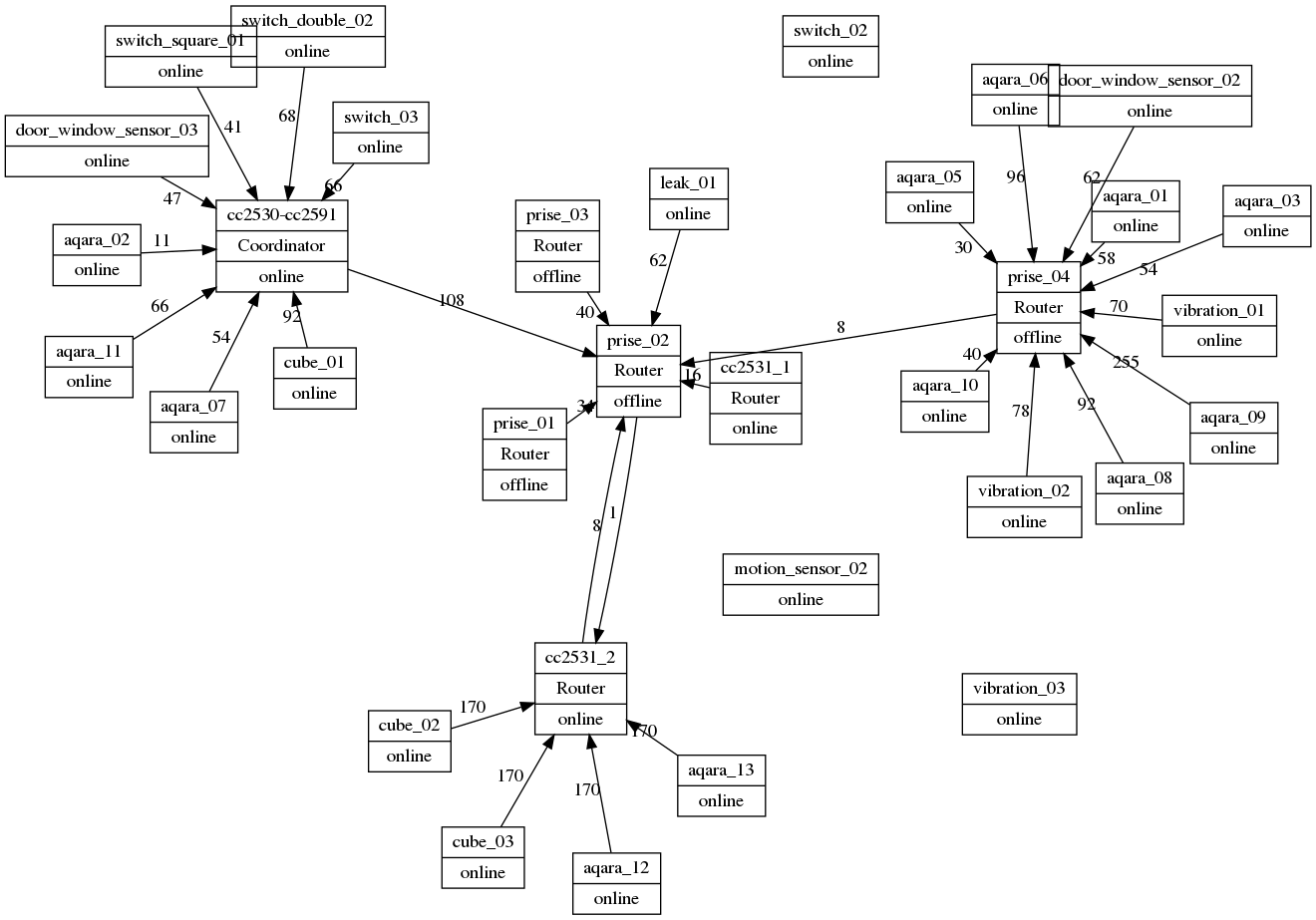
 lolorc
on 25 Oct 2018
lolorc
on 25 Oct 2018
I have deleted the configuration and database and started over. It now works. 👍
How do you create those network maps?
HA-TB303
on 25 Oct 2018
@michel72 see https://github.com/Koenkk/zigbee2mqtt/issues/417 and https://github.com/Koenkk/zigbee2mqtt/issues/252
lolorc
on 25 Oct 2018
@lolorc
In my graph all the devices are lined up in one row.
What am I doing wrong?
kaelsaes
on 25 Oct 2018
Usa a different layout, e.g. sfdp. Have a look at the graphviz tool docu (google it) there you find the different methods.
davekr8
on 25 Oct 2018
Thx
kaelsaes
on 25 Oct 2018
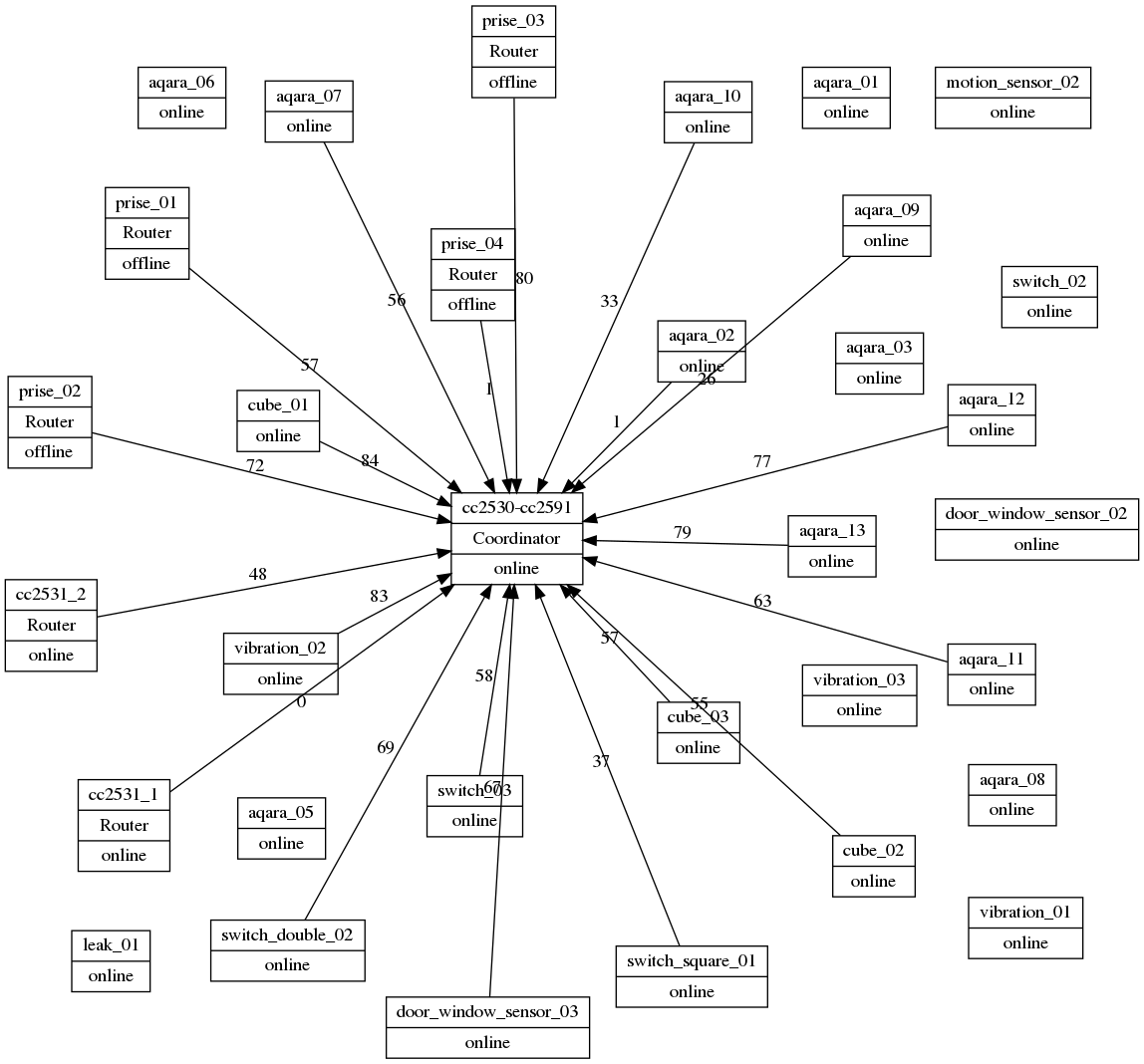
in the mean time,
Oct 26 10:17:14 zigbee2mqtt/cc2531_2 {"description":"41393/cc2531_1","type":"PARENT","rssi":0,"linkquality":49,"ts":1540541834214,"ls":44}
Oct 26 10:17:14 zigbee2mqtt/cc2531_2 {"description":"21516/aqara_13","type":"CHILD_RFD","rssi":170,"linkquality":49,"ts":1540541834348,"ls":134}
Oct 26 10:17:14 zigbee2mqtt/cc2531_2 {"description":"14379/aqara_12","type":"CHILD_RFD","rssi":170,"linkquality":49,"ts":1540541834354,"ls":6}
Oct 26 10:17:14 zigbee2mqtt/cc2531_2 {"description":"60044/cube_03","type":"CHILD_RFD","rssi":170,"linkquality":49,"ts":1540541834360,"ls":6}
Oct 26 10:17:14 zigbee2mqtt/cc2531_2 {"description":"28485/cube_02","type":"CHILD_RFD","rssi":170,"linkquality":49,"ts":1540541834373,"ls":13}
there's something funny with network map :-)
lolorc
on 26 Oct 2018
This issue has been automatically marked as stale because it has not had recent activity. It will be closed if no further activity occurs. Thank you for your contributions.
![stale[bot] picture](https://avatars3.githubusercontent.com/in/1724?v=4&s=40) stale[bot]
on 25 Dec 2018
stale[bot]
on 25 Dec 2018
Hi,
I flashed my CC2531 with router firmware linked on the docu page:
https://koenkk.github.io/zigbee2mqtt/information/zigbee_network.html
https://github.com/Koenkk/Z-Stack-firmware/tree/master/router/CC2531/bin
router-cc253x-std.hex.
Router is connecting to my network, but end-device doesn't seem to be using it?
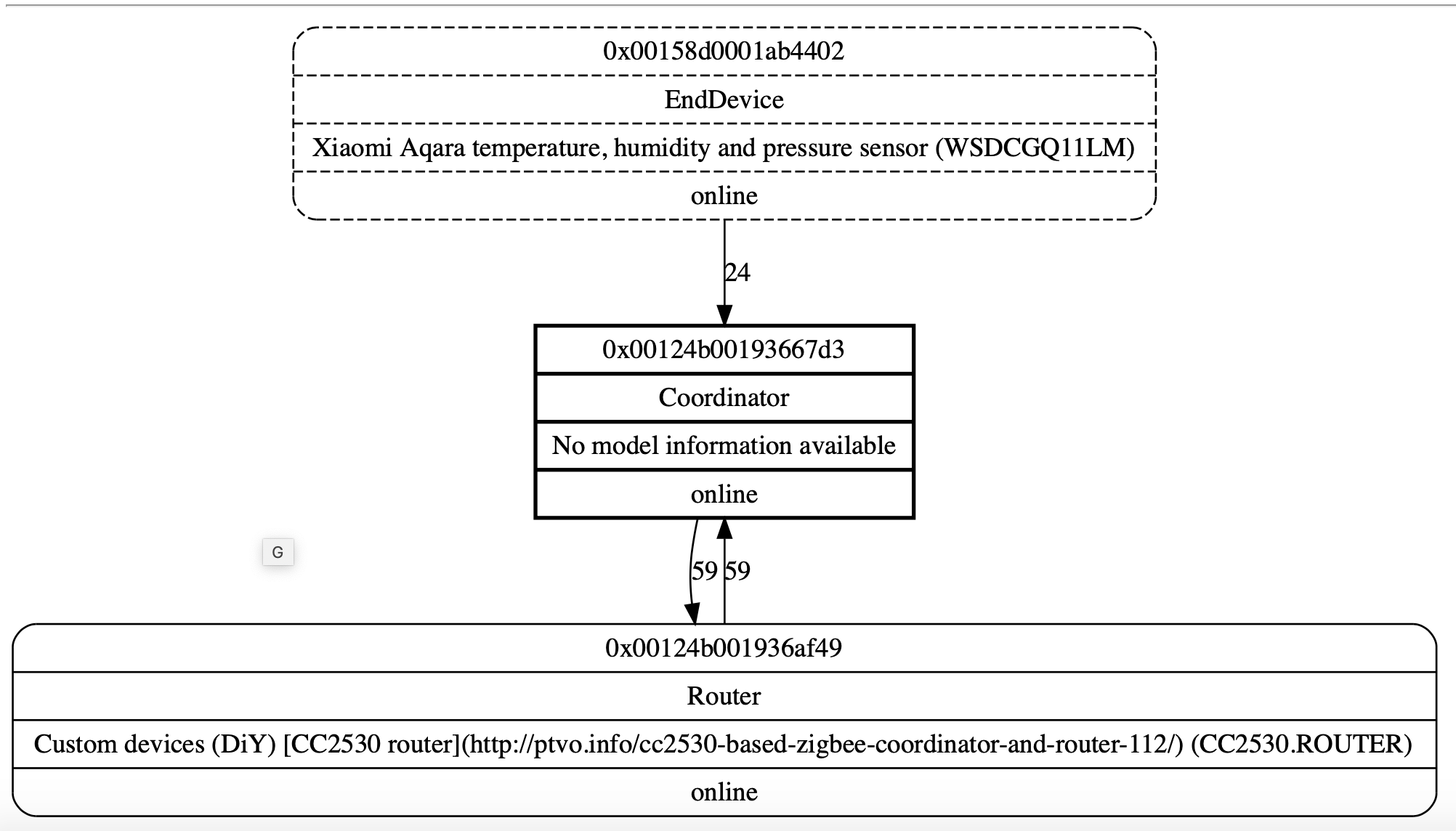
 adrianmihalko
on 4 Feb 2019
adrianmihalko
on 4 Feb 2019
Where are these three devices relative to each other?
How long have you left it between putting the router in place and creating this graph?
nickrout
on 4 Feb 2019
  zigbee2mqtt:info 2019-2-4 22:40:30 MQTT publish: topic 'zigbee2mqtt/0x00158d0001ab4402', payload '{"temperature":20.85,"linkquality":0,"humidity":59.66,"pressure":1014.5,"battery":74,"voltage":2955}'
  zigbee2mqtt:info 2019-2-4 22:41:15 MQTT publish: topic 'zigbee2mqtt/0x00124b001936af49', payload '{"state":true,"linkquality":23}'
After pressing SW1 on CC2531 I see state:true + led is green, I don't know if this matters.
I waited half hour, but EndDevice is still not connecting to router?

adrianmihalko
on 4 Feb 2019
Related issues
 rm2kdev
·
3Comments
rm2kdev
·
3Comments
 alwashe
·
4Comments
alwashe
·
4Comments
 pepp86
·
4Comments
pepp86
·
4Comments
 tb-killa
·
3Comments
tb-killa
·
3Comments
 mpuff
·
3Comments
mpuff
·
3Comments