Zigbee2mqtt: Problem with new Xiaomi switches
After pairing new Xiaomi switches (Aqara WXKG11LM) in payload the click value is missing.
Only battery value is transferred.
 kaelsaes
All 100 comments
Can you provide your log with debug enabled? https://github.com/Koenkk/zigbee2mqtt/wiki/Configuration
 Koenkk
on 16 Sep 2018
Koenkk
on 16 Sep 2018
Hi Koen,
thanks for your reply.
Could you please explain how to get the log with debug enabled?
I already have 3 Xiaomi Aqara switches working since a few weeks without this problem. Only the new ones show this problem.
I'm using 1 coordinator, 2 routers and 13 end devices. Could the problem be caused by the amount of devices?
Thx
kaelsaes
on 16 Sep 2018
 tb-killa
on 17 Sep 2018
tb-killa
on 17 Sep 2018
2018-9-17 19:28:47 - info: Logging to directory: '/opt/zigbee2mqtt/data/log/2018-09-17.19:28:47'
2018-9-17 19:28:47 - debug: Using zigbee-shepherd with settings: '{"net":{"panId":6754,"channelList":[11]},"dbPath":"/opt/zigbee2mqtt/data/database.db","sp":{"baudRate":115200,"rtscts":true}}'
2018-9-17 19:28:47 - debug: Loaded state from file /opt/zigbee2mqtt/data/state.json
2018-9-17 19:28:47 - info: Starting zigbee2mqtt version 0.1.3 (commit #c8c8417)
2018-9-17 19:28:47 - info: Starting zigbee-shepherd
2018-9-17 19:28:48 - info: zigbee-shepherd started
2018-9-17 19:28:48 - info: Coordinator firmware version: '20180815'
2018-9-17 19:28:48 - debug: zigbee-shepherd info: {"enabled":true,"net":{"state":"Coordinator","channel":11,"panId":"0x1a62","extPanId":"0xdddddddddddddddd","ieeeAddr":"0x00124b0012023512","nwkAddr":0},"firmware":{"transportrev":2,"product":0,"version":"2.6.3","revision":20180815},"startTime":1537205328,"joinTimeLeft":0}
2018-9-17 19:28:48 - info: Currently 18 devices are joined:
2018-9-17 19:28:48 - info: 0x00158d0001ef874e (0x00158d0001ef874e): WXKG11LM - Xiaomi Aqara wireless switch (EndDevice)
2018-9-17 19:28:48 - info: 0x00158d0001ef874f (0x00158d0001ef874f): WXKG11LM - Xiaomi Aqara wireless switch (EndDevice)
2018-9-17 19:28:48 - info: 0x00158d00022c75ed (0x00158d00022c75ed): WSDCGQ11LM - Xiaomi Aqara temperature, humidity and pressure sensor (EndDevice)
2018-9-17 19:28:48 - info: 0x00158d00022f6e4f (0x00158d00022f6e4f): SJCGQ11LM - Xiaomi Aqara water leak sensor (EndDevice)
2018-9-17 19:28:48 - info: 0x00158d00022f06d5 (0x00158d00022f06d5): SJCGQ11LM - Xiaomi Aqara water leak sensor (EndDevice)
2018-9-17 19:28:48 - info: 0x00158d00022f6e01 (0x00158d00022f6e01): SJCGQ11LM - Xiaomi Aqara water leak sensor (EndDevice)
2018-9-17 19:28:48 - info: 0x00158d00022cdd62 (0x00158d00022cdd62): WSDCGQ11LM - Xiaomi Aqara temperature, humidity and pressure sensor (EndDevice)
2018-9-17 19:28:48 - info: 0x00158d000233f425 (0x00158d000233f425): SJCGQ11LM - Xiaomi Aqara water leak sensor (EndDevice)
2018-9-17 19:28:48 - info: 0x00158d0002484ae3 (0x00158d0002484ae3): SJCGQ11LM - Xiaomi Aqara water leak sensor (EndDevice)
2018-9-17 19:28:48 - info: 0x00158d00023690cf (0x00158d00023690cf): SJCGQ11LM - Xiaomi Aqara water leak sensor (EndDevice)
2018-9-17 19:28:48 - info: 0x00158d00024a45cd (0x00158d00024a45cd): MFKZQ01LM - Xiaomi Mi smart home cube (EndDevice)
2018-9-17 19:28:48 - info: 0x00158d00022ca929 (0x00158d00022ca929): WSDCGQ11LM - Xiaomi Aqara temperature, humidity and pressure sensor (EndDevice)
2018-9-17 19:28:48 - info: 0x00124b0012023365 (0x00124b0012023365): CC2530.ROUTER - Custom devices (DiY) CC2530 router (Router)
2018-9-17 19:28:48 - info: 0x00158d0001e8900b (0x00158d0001e8900b): WXKG11LM - Xiaomi Aqara wireless switch (EndDevice)
2018-9-17 19:28:48 - info: 0x00124b00120231fc (0x00124b00120231fc): CC2530.ROUTER - Custom devices (DiY) CC2530 router (Router)
2018-9-17 19:28:48 - info: 0x00158d000215cabc (0x00158d000215cabc): WXKG11LM - Xiaomi Aqara wireless switch (EndDevice)
2018-9-17 19:28:48 - info: 0x00158d0001db95a1 (0x00158d0001db95a1): JTYJ-GD-01LM/BW - Xiaomi MiJia Honeywell smoke detector (EndDevice)
2018-9-17 19:28:48 - info: 0x00158d000215ca61 (0x00158d000215ca61): WXKG11LM - Xiaomi Aqara wireless switch (EndDevice)
2018-9-17 19:28:48 - warn: permit_join set to true in configuration.yaml.
2018-9-17 19:28:48 - warn: Allowing new devices to join.
2018-9-17 19:28:48 - warn: Set permit_join to false once you joined all devices.
2018-9-17 19:28:48 - info: Zigbee: allowing new devices to join.
2018-9-17 19:28:48 - info: Connecting to MQTT server at mqtt://localhost:1883
2018-9-17 19:28:49 - info: zigbee-shepherd ready
2018-9-17 19:28:49 - info: Connected to MQTT server
2018-9-17 19:28:49 - info: MQTT publish, topic: 'zigbee2mqtt/bridge/state', payload: 'online'
2018-9-17 19:28:49 - info: MQTT publish, topic: 'zigbee2mqtt/0x00158d0001ef874e', payload: '{"battery":"100.00","voltage":3045,"linkquality":47}'
2018-9-17 19:28:49 - info: MQTT publish, topic: 'zigbee2mqtt/0x00158d00022c75ed', payload: '{"battery":"98.33","voltage":2995,"linkquality":39,"humidity":43.99,"temperature":24.58,"pressure":964}'
2018-9-17 19:28:49 - info: MQTT publish, topic: 'zigbee2mqtt/0x00158d00022f6e4f', payload: '{"battery":"100.00","voltage":3035,"linkquality":18,"water_leak":false}'
2018-9-17 19:28:49 - info: MQTT publish, topic: 'zigbee2mqtt/0x00158d00022f06d5', payload: '{"battery":"100.00","voltage":3045,"linkquality":70,"water_leak":false}'
2018-9-17 19:28:49 - info: MQTT publish, topic: 'zigbee2mqtt/0x00158d00022f6e01', payload: '{"battery":"100.00","voltage":3025,"water_leak":false}'
2018-9-17 19:28:49 - info: MQTT publish, topic: 'zigbee2mqtt/0x00158d000233f425', payload: '{"battery":"100.00","voltage":3055,"linkquality":13,"water_leak":false}'
2018-9-17 19:28:49 - info: MQTT publish, topic: 'zigbee2mqtt/0x00158d0002484ae3', payload: '{"battery":"95.00","voltage":2985,"linkquality":10,"water_leak":false}'
2018-9-17 19:28:49 - info: MQTT publish, topic: 'zigbee2mqtt/0x00158d00023690cf', payload: '{"battery":"100.00","voltage":3045,"linkquality":26,"water_leak":false}'
2018-9-17 19:28:49 - info: MQTT publish, topic: 'zigbee2mqtt/0x00124b0012023365', payload: '{"description":"15428/0x00158D00022CA929","type":"CHILD_RFD","rssi":170,"state":false}'
2018-9-17 19:28:49 - info: MQTT publish, topic: 'zigbee2mqtt/0x00124b00120231fc', payload: '{"description":"44122/0x00158D00022C75ED","type":"CHILD_RFD","rssi":94,"linkquality":13,"state":false}'
2018-9-17 19:28:49 - info: MQTT publish, topic: 'zigbee2mqtt/0x00158d000215cabc', payload: '{"battery":"100.00","voltage":3195,"linkquality":60}'
2018-9-17 19:28:58 - debug: Recieved zigbee message with data {"cid":"genBinaryValue","data":{"description":"53730/0x00158D0001E8900B","inactiveText":"CHILD_RFD","presentValue":39,"relinquishDefault":2,"minimumOffTime":0}}
2018-9-17 19:28:58 - info: MQTT publish, topic: 'zigbee2mqtt/0x00124b0012023365', payload: '{"description":"53730/0x00158D0001E8900B","type":"CHILD_RFD","rssi":39,"state":false}'
2018-9-17 19:28:58 - debug: Recieved zigbee message with data {"cid":"genBinaryValue","data":{"description":"22537/0x00158D00022F6E01","inactiveText":"CHILD_RFD","presentValue":60,"relinquishDefault":2,"minimumOffTime":1}}
2018-9-17 19:28:58 - info: MQTT publish, topic: 'zigbee2mqtt/0x00124b0012023365', payload: '{"description":"22537/0x00158D00022F6E01","type":"CHILD_RFD","rssi":60,"state":false}'
2018-9-17 19:28:58 - debug: Recieved zigbee message with data {"cid":"genBinaryValue","data":{"description":"0/0x00124B0012023512","inactiveText":"COORD","presentValue":1,"relinquishDefault":0,"minimumOffTime":0}}
2018-9-17 19:28:58 - info: MQTT publish, topic: 'zigbee2mqtt/0x00124b0012023365', payload: '{"description":"0/0x00124B0012023512","type":"COORD","rssi":1,"state":false}'
2018-9-17 19:28:58 - debug: Recieved zigbee message with data {"cid":"genBinaryValue","data":{"description":"15428/0x00158D00022CA929","inactiveText":"CHILD_RFD","presentValue":170,"relinquishDefault":2,"minimumOffTime":1}}
2018-9-17 19:28:58 - info: MQTT publish, topic: 'zigbee2mqtt/0x00124b0012023365', payload: '{"description":"15428/0x00158D00022CA929","type":"CHILD_RFD","rssi":170,"state":false}'
2018-9-17 19:28:58 - debug: Recieved zigbee message with data {"cid":"genOnOff","data":{"onOff":0}}
2018-9-17 19:28:58 - info: MQTT publish, topic: 'zigbee2mqtt/0x00124b0012023365', payload: '{"description":"15428/0x00158D00022CA929","type":"CHILD_RFD","rssi":170,"state":false}'
2018-9-17 19:29:08 - debug: Saving state to file /opt/zigbee2mqtt/data/state.json
2018-9-17 19:29:08 - info: MQTT publish, topic: 'zigbee2mqtt/bridge/state', payload: 'offline'
2018-9-17 19:29:08 - info: Disconnecting from MQTT server
2018-9-17 19:29:08 - info: zigbee-shepherd stopped
kaelsaes
on 17 Sep 2018
That's the new Xiaomi Aqara switch:
2018-9-17 19:28:49 - info: MQTT publish, topic: 'zigbee2mqtt/0x00158d000215cabc', payload: '{"battery":"100.00","voltage":3195,"linkquality":60}'
The payload "click" is missing.... :-(
kaelsaes
on 17 Sep 2018
I don't see any clicks received.
Did you by any chance modify the zigbee2mqtt code? I see strange messages like:
2018-9-17 19:28:58 - debug: Recieved zigbee message with data {"cid":"genBinaryValue","data":{"description":"53730/0x00158D0001E8900B","inactiveText":"CHILD_RFD","presentValue":39,"relinquishDefault":2,"minimumOffTime":0}}
Hi Koen,
that's exactly my problem, the clicks don't appear in the payload.
In my smart home FHEM I only get this readings:
battery | ok | 2018-09-17 22:41:00
battery_level | 100.00 | 2018-09-17 22:41:00
linkquality | 49 | 2018-09-17 22:41:00
transmission-state | incoming publish received | 2018-09-17 22:41:00
voltage | 3155 | 2018-09-17 22:41:00
I didn't modify the code.
Is it possible that this strange message comes from the router?
kaelsaes
on 17 Sep 2018
This is one of my older, working switches:
Sep 17 22:54:48 Raspberry-MQTT npm[576]: zigbee2mqtt:debug 2018-9-17 22:54:48 Recieved zigbee message with data {"cid":"genOnOff","data":{"onOff":1}}
Sep 17 22:54:48 Raspberry-MQTT npm[576]: zigbee2mqtt:info 2018-9-17 22:54:48 MQTT publish, topic: 'zigbee2mqtt/0x00158d0001ef874f', payload: '{"battery":"100.00","voltage":3075,"linkquality":23,"click":"single"}'
And this is one of the new, not working switches:
Sep 17 22:58:01 Raspberry-MQTT npm[576]: zigbee2mqtt:debug 2018-9-17 22:58:01 Recieved zigbee message with data {"cid":"genBasic","data":{"65281":{"1":3155,"3":26,"4":5032,"5":54,"6":[0,196608],"10":0},"modelId":"lumi.sensor_switch.aq2"}}
Sep 17 22:58:01 Raspberry-MQTT npm[576]: zigbee2mqtt:info 2018-9-17 22:58:01 MQTT publish, topic: 'zigbee2mqtt/0x00158d000215cabc', payload: '{"battery":"100.00","voltage":3155,"linkquality":70}'
Sep 17 22:58:01 Raspberry-MQTT npm[576]: zigbee2mqtt:debug 2018-9-17 22:58:01 Recieved zigbee message with data {"cid":"genBasic","data":{"65281":[null,3155,null,26,null,54,[0,196608],null,null,null,0]}}
kaelsaes
on 17 Sep 2018
Can you try repairing?
And when running with DEBUG=* npm start do you see any messages appear once you press the button?
Koenkk
on 18 Sep 2018
@kaelsaes @Koenkk
I don't see any clicks received.
Did you by any chance modify the zigbee2mqtt code? I see strange messages like:
2018-9-17 19:28:58 - debug: Recieved zigbee message with data {"cid":"genBinaryValue","data":{"description":"53730/0x00158D0001E8900B","inactiveText":"CHILD_RFD","presentValue":39,"relinquishDefault":2,"minimumOffTime":0}}
I see this messages only ones in combination with router firmware:
http://ptvo.info/cc2530-based-zigbee-coordinator-and-router-112/
description – network and MAC address.
inactiveText – device role in a network.
presentValue – RSSI value of the last received packet (rxLqi).
relinquishDefault (optional) – path depth.
minimumOffTime (optional) – number of associated devices.
I repaired many times without success.
I will try to test with the debug option.
Is it possible that the new switch devices aren't recognized correctly by the zigbee2mqtt software?
Thx
kaelsaes
on 20 Sep 2018
serialport:unixRead Starting read +4s
serialport:unixRead Finished read 86 bytes +1ms
serialport:main binding.read finished +4s
cc-znp { sof: 254,
cc-znp len: 81,
cc-znp type: 'AREQ',
cc-znp subsys: 'AF',
cc-znp cmd: 'incomingMsg',
cc-znp payload:
cc-znp { groupid: 0,
cc-znp clusterid: 0,
cc-znp srcaddr: 43510,
cc-znp srcendpoint: 1,
cc-znp dstendpoint: 1,
cc-znp wasbroadcast: 0,
cc-znp linkquality: 31,
cc-znp securityuse: 0,
cc-znp timestamp: 9084513,
cc-znp transseqnumber: 0,
cc-znp len: 61,
cc-znp data:
cc-znp csum: 226 } +4s
serialport:main _read reading +15ms
serialport:bindings read +16ms
serialport:unixRead Starting read +16ms
cc-znp:AREQ <-- AF:incomingMsg, { groupid: 0, clusterid: 0, srcaddr: 43510, srcendpoint: 1, dstendpoint: 1, wasbroadcast: 0, linkquality: 31, securityuse: 0, timestamp: 9084513, transseqnumber: 0, len: 61, data:
zigbee-shepherd:msgHdlr IND <-- AF:incomingMsg, transId: 0 +24ms
serialport:unixRead waiting for readable because of code: EAGAIN +28ms
serialport:poller Polling for "readable" +46ms
zigbee-shepherd:af dispatchIncomingMsg(): type: zclIncomingMsg, msg: [object Object] +2ms
zigbee2mqtt:debug 2018-9-20 21:16:28 Recieved zigbee message with data {"cid":"genBasic","data":{"65281":{"1":3155,"3":33,"4":5032,"5":55,"6":[0,0],"10":0},"modelId":"lumi.sensor_switch.aq2"}}
zigbee2mqtt:info 2018-9-20 21:16:28 MQTT publish, topic: 'zigbee2mqtt/0x00158d000215cabc', payload: '{"battery":"100.00","voltage":3155,"linkquality":31}'
zigbee2mqtt:debug 2018-9-20 21:16:28 Recieved zigbee message with data {"cid":"genBasic","data":{"65281":[null,null,null,33,null,55]}}
kaelsaes
on 20 Sep 2018
Any ideas?
kaelsaes
on 24 Sep 2018
@kaelsaes I dont have the solution but I have what appears to be the same issue with a WXKG11LM. It was working previously (I think until the last update of of the docker addon)
Edit... it looks like it might be fixed:
https://github.com/Koenkk/zigbee-shepherd-converters/pull/89
 kiwinol
on 30 Sep 2018
kiwinol
on 30 Sep 2018
Thx.
I still get the message "Cannot get the Node Descriptor of the device" and the Aqara switch doesn't send the click payload.
kaelsaes
on 1 Oct 2018
Hi,
I have same issue too. Device is recognized byt action is not included in payload. See here:
  zigbee2mqtt:warn 2018-12-26 09:52:40 Message without device!
  zigbee2mqtt:warn 2018-12-26 09:52:43 Message without device!
  zigbee2mqtt:info 2018-12-26 09:52:43 Device incoming...
  zigbee2mqtt:info 2018-12-26 09:52:43 MQTT publish: topic 'zigbee2mqtt/bridge/log', payload '{"type":"pairing","message":"device incoming"}'
  zigbee2mqtt:info 2018-12-26 09:52:43 MQTT publish: topic 'homeassistant/sensor/0x00158d00027255ee/click/config', payload '{"icon":"mdi:toggle-switch","value_template":"{{ value_json.click }}","json_attributes":["linkquality","battery","voltage","action","duration"],"force_update":true,"state_topic":"zigbee2mqtt/0x00158d00027255ee","availability_topic":"zigbee2mqtt/bridge/state","name":"0x00158d00027255ee_click","unique_id":"0x00158d00027255ee_click_zigbee2mqtt","device":{"identifiers":"zigbee2mqtt_0x00158d00027255ee","name":"0x00158d00027255ee","sw_version":"Zigbee2mqtt 1.0.1","model":"Aqara wireless switch (WXKG11LM)","manufacturer":"Xiaomi"}}'
  zigbee2mqtt:info 2018-12-26 09:54:13 MQTT publish: topic 'zigbee2mqtt/0x00158d00027255ee', payload '{"battery":100,"voltage":3055,"linkquality":149}'
  zigbee2mqtt:info 2018-12-26 09:54:27 MQTT publish: topic 'zigbee2mqtt/0x00158d00027255ee', payload '{"battery":100,"voltage":3055,"linkquality":63}'
  zigbee2mqtt:info 2018-12-26 09:54:29 MQTT publish: topic 'zigbee2mqtt/0x00158d00027255ee', payload '{"battery":100,"voltage":3055,"linkquality":63}'
If I try to press and hold for 5 seconds middle button (not the reset one) it shows strange messages like message without device, button starts blinking for a while (like in pairing mode) and then stops. But behaviour is still same: after I press once button or twice, no action shown, it's still same message. If I press longer middle button then repeating again device shows message without device.
I'm using latest stable zigbee2mqtt firmware and latest available version of HA running in Hass.
zigbee2mqtt:info 2018-12-26 10:34:35 MQTT publish: topic 'zigbee2mqtt/bridge/config', payload '{"log_level":"info","permit_join":true}'
zigbee2mqtt:info 2018-12-26 10:35:36 MQTT publish: topic 'zigbee2mqtt/0x00158d00021327a4', payload '{"battery":100,"voltage":3055,"linkquality":205}'
zigbee2mqtt:warn 2018-12-26 10:35:40 Message without device!
zigbee2mqtt:error 2018-12-26 10:36:08 Cannot get the Node Descriptor of the Device: 0x00158d00021327a4 (Error: Timed out after 10000 ms)
zigbee2mqtt:error 2018-12-26 10:36:28 Cannot get the Node Descriptor of the Device: 0x00158d00021327a4 (Error: Timed out after 10000 ms)
zigbee2mqtt:warn 2018-12-26 10:36:42 Message without device!
zigbee2mqtt:warn 2018-12-26 10:36:45 Message without device!
zigbee2mqtt:warn 2018-12-26 10:36:48 Message without device!
zigbee2mqtt:info 2018-12-26 10:36:52 MQTT publish: topic 'zigbee2mqtt/0x00158d00021327a4', payload '{"battery":100,"voltage":3055,"linkquality":55}'
zigbee2mqtt:warn 2018-12-26 10:36:52 Message without device!
zigbee2mqtt:info 2018-12-26 10:36:52 Device incoming...
zigbee2mqtt:info 2018-12-26 10:36:52 MQTT publish: topic 'zigbee2mqtt/bridge/log', payload '{"type":"pairing","message":"device incoming"}'
zigbee2mqtt:info 2018-12-26 10:36:58 MQTT publish: topic 'zigbee2mqtt/0x00158d00021327a4', payload '{"battery":100,"voltage":3055,"linkquality":18}'
zigbee2mqtt:info 2018-12-26 10:37:03 MQTT publish: topic 'zigbee2mqtt/0x00158d00021327a4', payload '{"battery":100,"voltage":3055,"linkquality":39}'
zigbee2mqtt:info 2018-12-26 10:37:14 MQTT publish: topic 'zigbee2mqtt/0x00158d00021327a4', payload '{"battery":100,"voltage":3055,"linkquality":70}'
 MyKEms
on 26 Dec 2018
MyKEms
on 26 Dec 2018
@MyKEcz please try remove all entries of 0x00158d00027255ee from database.db and repair with the procedure from https://koenkk.github.io/zigbee2mqtt/getting_started/pairing_devices.html#xiaomi
Koenkk
on 27 Dec 2018
Hi @Koenkk ,
I tried to remove the 0x00158d00021327a4 from database (what I provided above - _0x00158d00027255ee_ was wrong device id, it was my temperature sensor and I don't know why I replaced when I posted here, my mistake).
So I removed the correct device 0x00158d00021327a4 from database.db and then started pairing again.
Here we can see device was correct recognized as _Aqara wireless switch (WXKG11LM)_ with following json attributes which should be provided in payload: _"linkquality","battery","voltage","action","duration"_
  zigbee2mqtt:info 2018-12-28 15:47:16 Zigbee: allowing new devices to join.
  zigbee2mqtt:info 2018-12-28 15:47:16 MQTT publish: topic 'zigbee2mqtt/bridge/config', payload '{"log_level":"info","permit_join":true}'
  zigbee2mqtt:warn 2018-12-28 15:49:13 Device with modelID 'undefined' is not supported.
  zigbee2mqtt:warn 2018-12-28 15:49:13 Please see: https://koenkk.github.io/zigbee2mqtt/how_tos/how_to_support_new_devices.html
  zigbee2mqtt:info 2018-12-28 15:49:16 MQTT publish: topic 'zigbee2mqtt/0x00158d00021327a4', payload '{"battery":100,"voltage":3035,"linkquality":99}'
  zigbee2mqtt:info 2018-12-28 15:49:16 MQTT publish: topic 'homeassistant/sensor/0x00158d00021327a4/click/config', payload '{"icon":"mdi:toggle-switch","value_template":"{{ value_json.click }}","json_attributes":["linkquality","battery","voltage","action","duration"],"force_update":true,"state_topic":"zigbee2mqtt/0x00158d00021327a4","availability_topic":"zigbee2mqtt/bridge/state","name":"0x00158d00021327a4_click","unique_id":"0x00158d00021327a4_click_zigbee2mqtt","device":{"identifiers":"zigbee2mqtt_0x00158d00021327a4","name":"0x00158d00021327a4","sw_version":"Zigbee2mqtt 1.0.1","model":"Aqara wireless switch (WXKG11LM)","manufacturer":"Xiaomi"}}'
  zigbee2mqtt:warn 2018-12-28 15:49:16 Message without device!
  zigbee2mqtt:warn 2018-12-28 15:49:19 Message without device!
  zigbee2mqtt:warn 2018-12-28 15:49:23 Message without device!
  zigbee2mqtt:warn 2018-12-28 15:49:26 Message without device!
  zigbee2mqtt:info 2018-12-28 15:49:26 Device incoming...
But after device is paired and I few times press button and it shows again only 3 json attributes: _"battery","voltage","linkquality"_
  zigbee2mqtt:info 2018-12-28 15:49:26 MQTT publish: topic 'zigbee2mqtt/bridge/log', payload '{"type":"pairing","message":"device incoming"}'
  zigbee2mqtt:info 2018-12-28 15:49:38 MQTT publish: topic 'zigbee2mqtt/0x00158d00021327a4', payload '{"battery":100,"voltage":3035,"linkquality":94}'
  zigbee2mqtt:info 2018-12-28 15:49:43 MQTT publish: topic 'zigbee2mqtt/0x00158d00021327a4', payload '{"battery":100,"voltage":3035,"linkquality":94}'
  zigbee2mqtt:info 2018-12-28 15:49:50 MQTT publish: topic 'zigbee2mqtt/0x00158d00021327a4', payload '{"battery":100,"voltage":3035,"linkquality":99}'
  zigbee2mqtt:info 2018-12-28 15:49:53 MQTT publish: topic 'zigbee2mqtt/0x00158d00021327a4', payload '{"battery":100,"voltage":3035,"linkquality":94}'
I don't understand why. I tried to remove that device from database.db three times with same result. I suspect my WXKG11LM switch is broken(?).
This is how my WXKG11LM switch looks in database.db:
{"id":5,"type":"EndDevice","ieeeAddr":"0x00158d00021327a4","nwkAddr":23228,"manufId":4151,"epList":[1],"status":"online","joinTime":1546008550,"endpoints":{"1":{"profId":260,"epId":1,"devId":24321,"inClusterList":[0,6,65535],"outClusterList":[0,4,65535],"clusters":{}}},"_id":"KFdwdYE0uEVtz9BV"}
{"id":5,"type":"EndDevice","ieeeAddr":"0x00158d00021327a4","nwkAddr":23228,"manufId":4151,"manufName":"LUMI","powerSource":"Battery","modelId":"lumi.sensor_switch.aq2","epList":[1],"status":"online","joinTime":1546008550,"endpoints":{"1":{"profId":260,"epId":1,"devId":24321,"inClusterList":[0,6,65535],"outClusterList":[0,4,65535],"clusters":{}}},"_id":"KFdwdYE0uEVtz9BV"}
{"id":5,"type":"EndDevice","ieeeAddr":"0x00158d00021327a4","nwkAddr":23228,"manufId":4151,"manufName":"LUMI","powerSource":"Battery","modelId":"lumi.sensor_switch.aq2","epList":[1],"status":"online","joinTime":1546008550,"endpoints":{"1":{"profId":260,"epId":1,"devId":24321,"inClusterList":[0,6,65535],"outClusterList":[0,4,65535],"clusters":{"genBasic":{"dir":{"value":3},"attrs":{}},"genGroups":{"dir":{"value":2},"attrs":{}},"genOnOff":{"dir":{"value":1},"attrs":{}},"manuSpecificCluster":{"dir":{"value":3},"attrs":{}}}}},"_id":"KFdwdYE0uEVtz9BV"}
Edit: I forget to mention anytime I press button on switch it will fast blink 2 times and report only 3 json attributes. No matter how often I press in a row, it's all the time 2 blinks.
MyKEms
on 28 Dec 2018
Can you provide the log when having advanced -> log_level: debug in your configuration.yaml?
Koenkk
on 29 Dec 2018
Here is debug log level after pairing enabled and in the end few times pressed button on aquara switch:
  zigbee2mqtt:debug 2018-12-29 09:56:23 Received MQTT message on 'zigbee2mqtt/bridge/config/permit_join' with data 'true'
  zigbee2mqtt:info 2018-12-29 09:56:23 Zigbee: allowing new devices to join.
  zigbee2mqtt:info 2018-12-29 09:56:23 MQTT publish: topic 'zigbee2mqtt/bridge/config', payload '{"log_level":"debug","permit_join":true}'
  zigbee2mqtt:debug 2018-12-29 09:57:07 Received zigbee message of type 'attReport' with data '{"cid":"genBasic","data":{"65281":{"1":3015,"3":35,"4":424,"5":12108,"6":[0,65536],"10":0},"modelId":"lumi.sensor_switch.aq2"}}' of device 'lumi.sensor_switch.aq2' (0x00158d00021327a4)
  zigbee2mqtt:info 2018-12-29 09:57:07 MQTT publish: topic 'zigbee2mqtt/0x00158d00021327a4', payload '{"battery":99,"voltage":3015,"linkquality":92}'
  zigbee2mqtt:info 2018-12-29 09:57:07 MQTT publish: topic 'homeassistant/sensor/0x00158d00021327a4/click/config', payload '{"icon":"mdi:toggle-switch","value_template":"{{ value_json.click }}","json_attributes":["linkquality","battery","voltage","action","duration"],"force_update":true,"state_topic":"zigbee2mqtt/0x00158d00021327a4","availability_topic":"zigbee2mqtt/bridge/state","name":"0x00158d00021327a4_click","unique_id":"0x00158d00021327a4_click_zigbee2mqtt","device":{"identifiers":"zigbee2mqtt_0x00158d00021327a4","name":"0x00158d00021327a4","sw_version":"Zigbee2mqtt 1.0.1","model":"Aqara wireless switch (WXKG11LM)","manufacturer":"Xiaomi"}}'
  zigbee2mqtt:debug 2018-12-29 09:57:07 Received zigbee message of type 'devInterview' with data '"0x00158d00021327a4"'
  zigbee2mqtt:warn 2018-12-29 09:57:07 Message without device!
  zigbee2mqtt:debug 2018-12-29 09:57:10 Received zigbee message of type 'devInterview' with data '"0x00158d00021327a4"'
  zigbee2mqtt:warn 2018-12-29 09:57:10 Message without device!
  zigbee2mqtt:debug 2018-12-29 09:57:17 Received zigbee message of type 'devInterview' with data '"0x00158d00021327a4"'
  zigbee2mqtt:warn 2018-12-29 09:57:17 Message without device!
  zigbee2mqtt:debug 2018-12-29 09:57:17 Received zigbee message of type 'devLeaving' with data '"0x00158d00021327a4"'
  zigbee2mqtt:warn 2018-12-29 09:57:17 Message without device!
  zigbee2mqtt:debug 2018-12-29 09:57:17 Received zigbee message of type 'devInterview' with data '"0x00158d00021327a4"'
  zigbee2mqtt:warn 2018-12-29 09:57:17 Message without device!
  zigbee2mqtt:debug 2018-12-29 09:57:17 Received zigbee message of type 'devIncoming' with data '"0x00158d00021327a4"' of device 'lumi.sensor_switch.aq2' (0x00158d00021327a4)
  zigbee2mqtt:info 2018-12-29 09:57:17 Device incoming...
  zigbee2mqtt:info 2018-12-29 09:57:17 MQTT publish: topic 'zigbee2mqtt/bridge/log', payload '{"type":"pairing","message":"device incoming"}'
  zigbee2mqtt:debug 2018-12-29 09:57:17 Received zigbee message of type 'devStatus' with data '"online"' of device 'lumi.sensor_switch.aq2' (0x00158d00021327a4)
  zigbee2mqtt:debug 2018-12-29 09:57:31 Received zigbee message of type 'attReport' with data '{"cid":"genBasic","data":{"65281":{"1":3015,"3":35,"4":424,"5":12108,"6":[0,0],"10":0},"modelId":"lumi.sensor_switch.aq2"}}' of device 'undefined' (0x00158d00021327a4)
  zigbee2mqtt:warn 2018-12-29 09:57:31 Device with modelID 'undefined' is not supported.
  zigbee2mqtt:warn 2018-12-29 09:57:31 Please see: https://koenkk.github.io/zigbee2mqtt/how_tos/how_to_support_new_devices.html
  zigbee2mqtt:warn 2018-12-29 09:57:37 Device with modelID 'undefined' is not supported.
  zigbee2mqtt:debug 2018-12-29 09:57:37 Received zigbee message of type 'attReport' with data '{"cid":"genBasic","data":{"65281":{"1":3015,"3":35,"4":424,"5":12108,"6":[0,0],"10":0},"modelId":"lumi.sensor_switch.aq2"}}' of device 'undefined' (0x00158d00021327a4)
  zigbee2mqtt:warn 2018-12-29 09:57:37 Please see: https://koenkk.github.io/zigbee2mqtt/how_tos/how_to_support_new_devices.html
  zigbee2mqtt:debug 2018-12-29 09:57:41 Received zigbee message of type 'attReport' with data '{"cid":"genBasic","data":{"65281":{"1":3015,"3":35,"4":424,"5":12108,"6":[0,65536],"10":0},"modelId":"lumi.sensor_switch.aq2"}}' of device 'lumi.sensor_switch.aq2' (0x00158d00021327a4)
  zigbee2mqtt:info 2018-12-29 09:57:41 MQTT publish: topic 'zigbee2mqtt/0x00158d00021327a4', payload '{"battery":99,"voltage":3015,"linkquality":81}'
  zigbee2mqtt:debug 2018-12-29 09:57:41 Received zigbee message of type 'devInterview' with data '"0x00158d00021327a4"'
  zigbee2mqtt:warn 2018-12-29 09:57:41 Message without device!
  zigbee2mqtt:debug 2018-12-29 09:57:45 Received zigbee message of type 'devInterview' with data '"0x00158d00021327a4"'
  zigbee2mqtt:warn 2018-12-29 09:57:45 Message without device!
  zigbee2mqtt:debug 2018-12-29 09:57:46 Received zigbee message of type 'attReport' with data '{"cid":"genBasic","data":{"65281":{"1":3015,"3":35,"4":424,"5":12108,"6":[0,196608],"10":0},"modelId":"lumi.sensor_switch.aq2"}}' of device 'lumi.sensor_switch.aq2' (0x00158d00021327a4)
  zigbee2mqtt:info 2018-12-29 09:57:46 MQTT publish: topic 'zigbee2mqtt/0x00158d00021327a4', payload '{"battery":99,"voltage":3015,"linkquality":86}'
  zigbee2mqtt:debug 2018-12-29 09:57:47 Received zigbee message of type 'devInterview' with data '"0x00158d00021327a4"'
  zigbee2mqtt:warn 2018-12-29 09:57:47 Message without device!
  zigbee2mqtt:debug 2018-12-29 09:57:50 Received zigbee message of type 'devInterview' with data '"0x00158d00021327a4"'
  zigbee2mqtt:warn 2018-12-29 09:57:50 Message without device!
  zigbee2mqtt:debug 2018-12-29 09:57:50 Received zigbee message of type 'devIncoming' with data '"0x00158d00021327a4"' of device 'lumi.sensor_switch.aq2' (0x00158d00021327a4)
  zigbee2mqtt:info 2018-12-29 09:57:50 Device incoming...
  zigbee2mqtt:info 2018-12-29 09:57:50 MQTT publish: topic 'zigbee2mqtt/bridge/log', payload '{"type":"pairing","message":"device incoming"}'
  zigbee2mqtt:debug 2018-12-29 09:57:50 Received zigbee message of type 'devStatus' with data '"online"' of device 'lumi.sensor_switch.aq2' (0x00158d00021327a4)
  zigbee2mqtt:debug 2018-12-29 09:57:52 Received zigbee message of type 'attReport' with data '{"cid":"genBasic","data":{"65281":{"1":3015,"3":35,"4":424,"5":12108,"6":[0,327680],"10":0},"modelId":"lumi.sensor_switch.aq2"}}' of device 'lumi.sensor_switch.aq2' (0x00158d00021327a4)
  zigbee2mqtt:info 2018-12-29 09:57:52 MQTT publish: topic 'zigbee2mqtt/0x00158d00021327a4', payload '{"battery":99,"voltage":3015,"linkquality":86}'
  zigbee2mqtt:debug 2018-12-29 09:57:52 Received zigbee message of type 'devChange' with data '{"cid":"genBasic","data":{"65281":[null,3015,null,35,424,12108,[0,327680],null,null,null,0],"modelId":"lumi.sensor_switch.aq2"}}' of device 'lumi.sensor_switch.aq2' (0x00158d00021327a4)
  zigbee2mqtt:debug 2018-12-29 09:57:56 Received zigbee message of type 'attReport' with data '{"cid":"genBasic","data":{"65281":{"1":3015,"3":35,"4":424,"5":12108,"6":[0,327680],"10":0},"modelId":"lumi.sensor_switch.aq2"}}' of device 'lumi.sensor_switch.aq2' (0x00158d00021327a4)
  zigbee2mqtt:info 2018-12-29 09:57:56 MQTT publish: topic 'zigbee2mqtt/0x00158d00021327a4', payload '{"battery":99,"voltage":3015,"linkquality":89}'
  zigbee2mqtt:debug 2018-12-29 09:57:58 Received zigbee message of type 'attReport' with data '{"cid":"genBasic","data":{"65281":{"1":3015,"3":35,"4":424,"5":12108,"6":[0,327680],"10":0},"modelId":"lumi.sensor_switch.aq2"}}' of device 'lumi.sensor_switch.aq2' (0x00158d00021327a4)
  zigbee2mqtt:info 2018-12-29 09:57:58 MQTT publish: topic 'zigbee2mqtt/0x00158d00021327a4', payload '{"battery":99,"voltage":3015,"linkquality":89}'
  zigbee2mqtt:debug 2018-12-29 09:58:01 Received zigbee message of type 'attReport' with data '{"cid":"genBasic","data":{"65281":{"1":3015,"3":35,"4":424,"5":12108,"6":[0,327680],"10":0},"modelId":"lumi.sensor_switch.aq2"}}' of device 'lumi.sensor_switch.aq2' (0x00158d00021327a4)
  zigbee2mqtt:info 2018-12-29 09:58:01 MQTT publish: topic 'zigbee2mqtt/0x00158d00021327a4', payload '{"battery":99,"voltage":3015,"linkquality":89}'
  zigbee2mqtt:debug 2018-12-29 09:58:04 Received zigbee message of type 'attReport' with data '{"cid":"genBasic","data":{"65281":{"1":3015,"3":35,"4":424,"5":12108,"6":[0,327680],"10":0},"modelId":"lumi.sensor_switch.aq2"}}' of device 'lumi.sensor_switch.aq2' (0x00158d00021327a4)
  zigbee2mqtt:info 2018-12-29 09:58:04 MQTT publish: topic 'zigbee2mqtt/0x00158d00021327a4', payload '{"battery":99,"voltage":3015,"linkquality":86}'
  zigbee2mqtt:debug 2018-12-29 09:58:06 Received zigbee message of type 'attReport' with data '{"cid":"genBasic","data":{"65281":{"1":3015,"3":35,"4":424,"5":12108,"6":[0,327680],"10":0},"modelId":"lumi.sensor_switch.aq2"}}' of device 'lumi.sensor_switch.aq2' (0x00158d00021327a4)
  zigbee2mqtt:info 2018-12-29 09:58:06 MQTT publish: topic 'zigbee2mqtt/0x00158d00021327a4', payload '{"battery":99,"voltage":3015,"linkquality":92}'
  zigbee2mqtt:debug 2018-12-29 09:58:09 Received zigbee message of type 'attReport' with data '{"cid":"genBasic","data":{"65281":{"1":3015,"3":35,"4":424,"5":12108,"6":[0,327680],"10":0},"modelId":"lumi.sensor_switch.aq2"}}' of device 'lumi.sensor_switch.aq2' (0x00158d00021327a4)
  zigbee2mqtt:info 2018-12-29 09:58:09 MQTT publish: topic 'zigbee2mqtt/0x00158d00021327a4', payload '{"battery":99,"voltage":3015,"linkquality":92}'
  zigbee2mqtt:debug 2018-12-29 09:58:12 Received zigbee message of type 'attReport' with data '{"cid":"genBasic","data":{"65281":{"1":3015,"3":35,"4":424,"5":12108,"6":[0,327680],"10":0},"modelId":"lumi.sensor_switch.aq2"}}' of device 'lumi.sensor_switch.aq2' (0x00158d00021327a4)
  zigbee2mqtt:info 2018-12-29 09:58:12 MQTT publish: topic 'zigbee2mqtt/0x00158d00021327a4', payload '{"battery":99,"voltage":3015,"linkquality":89}'
  zigbee2mqtt:debug 2018-12-29 09:58:15 Received zigbee message of type 'attReport' with data '{"cid":"genBasic","data":{"65281":{"1":3015,"3":35,"4":424,"5":12108,"6":[0,327680],"10":0},"modelId":"lumi.sensor_switch.aq2"}}' of device 'lumi.sensor_switch.aq2' (0x00158d00021327a4)
  zigbee2mqtt:info 2018-12-29 09:58:15 MQTT publish: topic 'zigbee2mqtt/0x00158d00021327a4', payload '{"battery":99,"voltage":3015,"linkquality":76}'
Can you indicate the messages produced when clicking the button?
Koenkk
on 29 Dec 2018
Could you please explain more detailed what do you mean by indicating of messages? I'm quite new to this so if you mean just to generate some message by automation when button is pressed or some different technique?
MyKEms
on 29 Dec 2018
@MyKEcz somehow your device refuses to report that it has been clicked. Do you also experience this with other WXKG11LM switches?
Koenkk
on 30 Dec 2018
Unfortunately no, I don't have any spare WXKG11LM switches. I have other 3 devices (temp, water, door sensors) which works great, except this switch.
I will try to order another one + older version of switch and report here if issue was in wrong piece or still persist. But delivery time will take longer time...
MyKEms
on 30 Dec 2018
Hi,
today i received two WXKG11LM and while one works as expected the other doesn't with the exact same symptoms as described here:
- Working one sends
{"cid":"genOnOff","data":{"onOff":1}}or{"cid":"genOnOff","data":{"32768":2}}as expected (depending on the amount of presses of course) resulting in the correct MQTT message. - The broken one only sends the following
{"cid":"genBasic","data":{"65281":{"1":2955,"3":27,"4":5032,"5":52,"6":[0,0],"10":0},"modelId":"lumi.sensor_switch.aq2"}}resulting in a useless MQTT messagepayload '{"battery":85,"voltage":2955,"linkquality":110,"last_seen":"2019-01-12T13:41:59.788Z"}'.
The values seem to change from time to time but are not related to the amount of presses.
I'm running dev branch (maybe one or two days old). I've repaired the device (removing it from database.db) with the same result. Using DEBUG=zigbee-shepherd* npm start.
Here is an snipped from the log https://pastebin.com/fRMR56Qk it doesn't show anything
useful to me and basically matches to what @MyKEcz has already posted. xxx.switch2 is the working one and xxx.switch the one that doesn't.
EDIT:
Here 65281 is mapped to something called lifeline. The corresponding parsing function is commented out but it seems as the 1 entry is the battery power... so nothing related to a switch. @Koenkk can it be that we are missing to "hook on some functions" like the code does it? (Though i would have expected to find any indication for this in the debug output ...)
 sehraf
on 12 Jan 2019
sehraf
on 12 Jan 2019
@sehraf when pressing the button on the switch, is there any zigbee message received?
Koenkk
on 13 Jan 2019
Yes (pressed one time):
  zigbee-shepherd:af dispatchIncomingMsg(): type: incomingMsg, msg: [object Object] +54s
  zigbee-shepherd:msgHdlr IND <-- AF:incomingMsg, transId: 0 +54s
  zigbee-shepherd:af dispatchIncomingMsg(): type: zclIncomingMsg, msg: [object Object] +50ms
  zigbee2mqtt:debug 1/13/2019, 6:59:18 PM Received zigbee message of type 'attReport' with data '{"cid":"genBasic","data":{"65281":{"1":2995,"3":27,"4":5032,"5":52,"6":[0,0],"10":0},"modelId":"lumi.sensor_switch.aq2"}}' of device 'lumi.sensor_switch.aq2' (0x0000000000000000)
  zigbee2mqtt:info 1/13/2019, 6:59:18 PM MQTT publish: topic 'zigbee2mqtt/xxx.switch', payload '{"battery":98.33,"voltage":2995,"linkquality":136,"last_seen":"2019-01-13T17:59:18.426Z"}'
  zigbee2mqtt:debug 1/13/2019, 6:59:18 PM Received zigbee message of type 'devChange' with data '{"cid":"genBasic","data":{"65281":[null,2995,null,27,5032,52,[0,0],null,null,null,0],"modelId":"lumi.sensor_switch.aq2"}}' of device 'lumi.sensor_switch.aq2' (0x0000000000000000)
Here is a second try (again one press) the values differ a bit or is almost null:
  zigbee-shepherd:af dispatchIncomingMsg(): type: incomingMsg, msg: [object Object] +2m
  zigbee-shepherd:msgHdlr IND <-- AF:incomingMsg, transId: 0 +2m
  zigbee-shepherd:af dispatchIncomingMsg(): type: zclIncomingMsg, msg: [object Object] +41ms
  zigbee2mqtt:debug 1/13/2019, 7:01:08 PM Received zigbee message of type 'attReport' with data '{"cid":"genBasic","data":{"65281":{"1":2995,"3":28,"4":5032,"5":52,"6":[0,0],"10":0},"modelId":"lumi.sensor_switch.aq2"}}' of device 'lumi.sensor_switch.aq2' (0x0000000000000000)
  zigbee2mqtt:info 1/13/2019, 7:01:08 PM MQTT publish: topic 'zigbee2mqtt/xxx.switch', payload '{"battery":98.33,"voltage":2995,"linkquality":131,"last_seen":"2019-01-13T18:01:08.482Z"}'
  zigbee2mqtt:debug 1/13/2019, 7:01:08 PM Received zigbee message of type 'devChange' with data '{"cid":"genBasic","data":{"65281":[null,null,null,28]}}' of device 'lumi.sensor_switch.aq2' (0x0000000000000000)
Let me know if there is anything else i can to to help debugging this.
sehraf
on 13 Jan 2019
Can you do some zigbee sniffing to check what the device send when you press the button? (https://github.com/Koenkk/zigbee2mqtt/blob/dev/docs/how_tos/how_to_sniff_zigbee_traffic.md)
Koenkk
on 13 Jan 2019
Do i need a second CC2531 or can i just reflash my existing one (and thus having no coordinator in the current network anymore)?
sehraf
on 13 Jan 2019
For the record, this is how one button press looks like with DEBUG=*
  serialport:poller received "readable" +4s
  serialport:bindings read +4s
  serialport:unixRead Starting read +4s
  serialport:unixRead Finished read 86 bytes +1ms
  serialport:main binding.read finished +4s
  cc-znp { sof: 254,
  cc-znp   len: 81,
  cc-znp   type: 'AREQ',
  cc-znp   subsys: 'AF',
  cc-znp   cmd: 'incomingMsg',
  cc-znp   payload:
  cc-znp    { groupid: 0,
  cc-znp      clusterid: 0,
  cc-znp      srcaddr: 16779,
  cc-znp      srcendpoint: 1,
  cc-znp      dstendpoint: 1,
  cc-znp      wasbroadcast: 0,
  cc-znp      linkquality: 131,
  cc-znp      securityuse: 0,
  cc-znp      timestamp: 8064651,
  cc-znp      transseqnumber: 0,
  cc-znp      len: 61,
  cc-znp      data:
  cc-znp       <Buffer 1c 5f 11 71 0a 05 00 42 16 6c 75 6d 69 2e 73 65 6e 73 6f 72 5f 73 77 69 74 63 68 2e 61 71 32 01 ff 42 1a 01 21 bd 0b 03 28 1a 04 21 a8 13 05 21 34 00 ... 11 more bytes> },
  cc-znp   fcs: 83,
  cc-znp   csum: 83 } +4s
  serialport:main _read reading +42ms
  serialport:bindings read +45ms
  serialport:unixRead Starting read +43ms
  cc-znp:AREQ <-- AF:incomingMsg, { groupid: 0, clusterid: 0, srcaddr: 16779, srcendpoint: 1, dstendpoint: 1, wasbroadcast: 0, linkquality: 131, securityuse: 0, timestamp: 8064651, transseqnumber: 0, len: 61, data: <Buffer 1c 5f 11 71 0a 05 00 42 16 6c 75 6d 69 2e 73 65 6e 73 6f 72 5f 73 77 69 74 63 68 2e 61 71 32 01 ff 42 1a 01 21 bd 0b 03 28 1a 04 21 a8 13 05 21 34 00 ... 11 more bytes> } +16ms
  zigbee-shepherd:af dispatchIncomingMsg(): type: incomingMsg, msg: [object Object] +4s
  zigbee-shepherd:msgHdlr IND <-- AF:incomingMsg, transId: 0 +4s
  serialport:unixRead waiting for readable because of code: EAGAIN +62ms
  serialport:poller Polling for "readable" +109ms
  zigbee-shepherd:af dispatchIncomingMsg(): type: zclIncomingMsg, msg: [object Object] +64ms
  zigbee2mqtt:debug 1/14/2019, 7:27:58 AM Received zigbee message of type 'attReport' with data '{"cid":"genBasic","data":{"65281":{"1":3005,"3":26,"4":5032,"5":52,"6":[0,0],"10":0},"modelId":"lumi.sensor_switch.aq2"}}' of device 'lumi.sensor_switch.aq2' (0x0000000000000000)
  zigbee2mqtt:info 1/14/2019, 7:27:58 AM MQTT publish: topic 'zigbee2mqtt/xxx.switch', payload '{"battery":100,"voltage":3005,"linkquality":131,"last_seen":"2019-01-14T06:27:58.110Z"}'
I gonna try sniffing next.
sehraf
on 14 Jan 2019
You need a second sniffer.
Koenkk
on 14 Jan 2019
OK, just bought one yesterday. Lets wait for shipping.
sehraf
on 14 Jan 2019
After shutting down the PRI and turn on , the Xiaomi temperature is lost connection. In home assistant I see last sensor values before shutting down.
To return the sensor to connect back enough press ~5 second pair button on the sensor. It is easy for 1 sensor , but it is terrible who has 30 sensors/switches.
How to prevent connection loss after פower outage?
 Ikif
on 28 Jan 2019
Ikif
on 28 Jan 2019
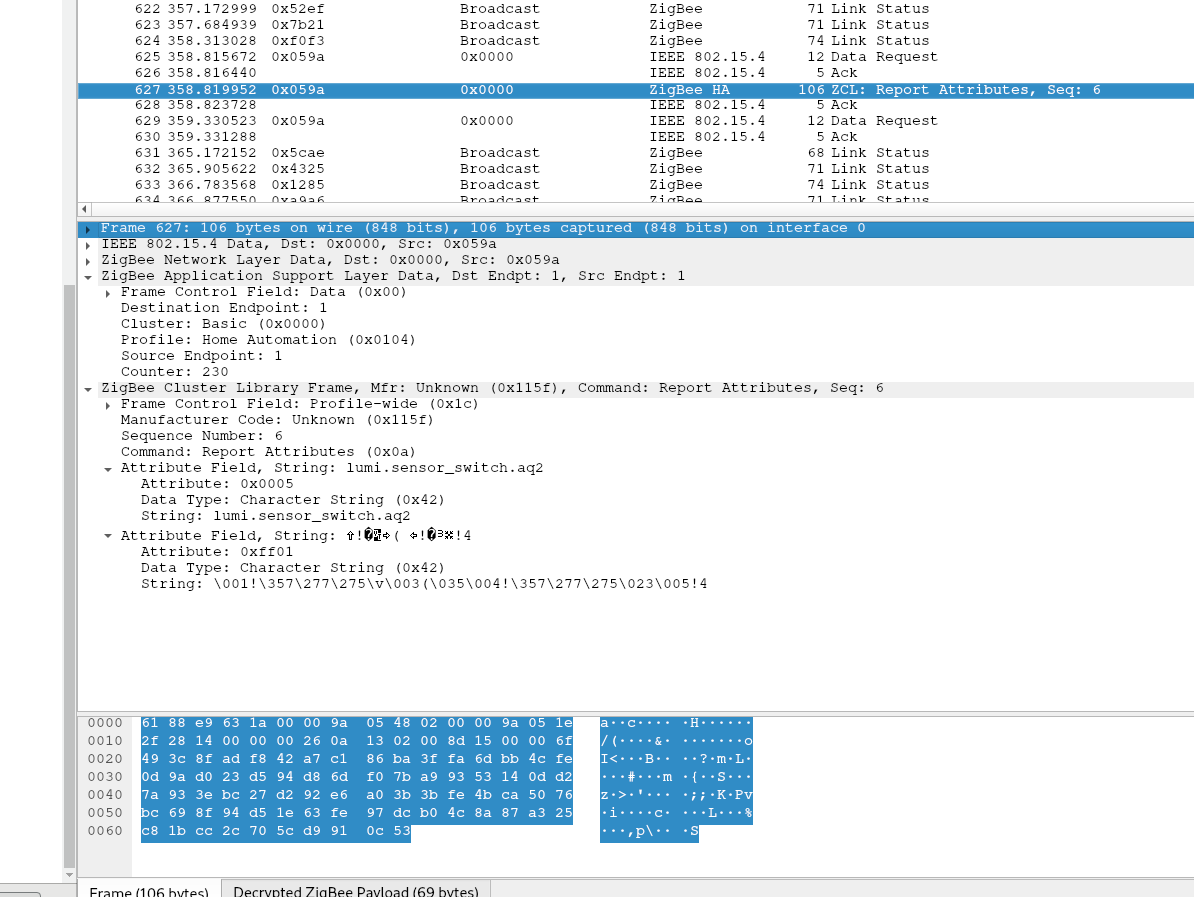
@Koenkk sniffer is up and running. What are we looking for? when i press the button i get the following:
sehraf
on 29 Jan 2019
It's really strange that they use the basic cluster for reporting button presses, as they have previously used the on off cluster. The problem is that this cluster is also used to report battery percentage, so I'm wondering if we could distinguish that from button pressed.
- What is send when you do a double, triple and long press?
- Could you sniff the traffic when paired with the original gateway (if you have one of course)?
Koenkk
on 30 Jan 2019
here you go
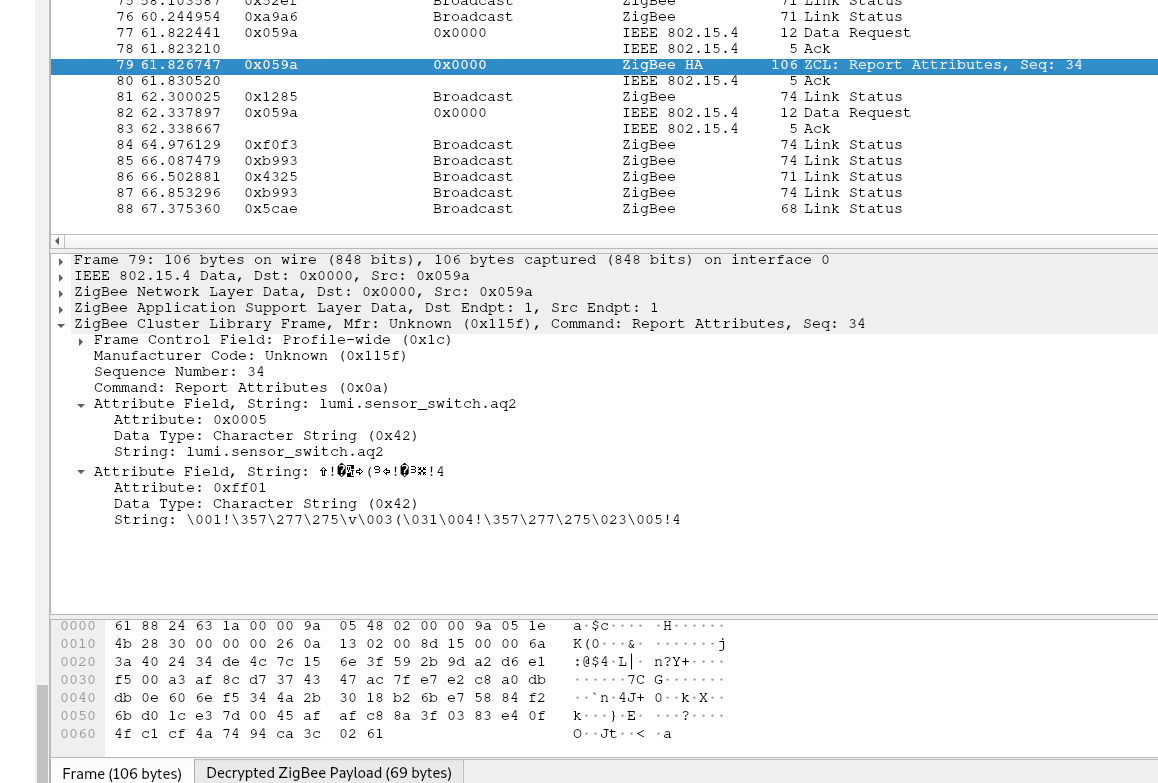
double:
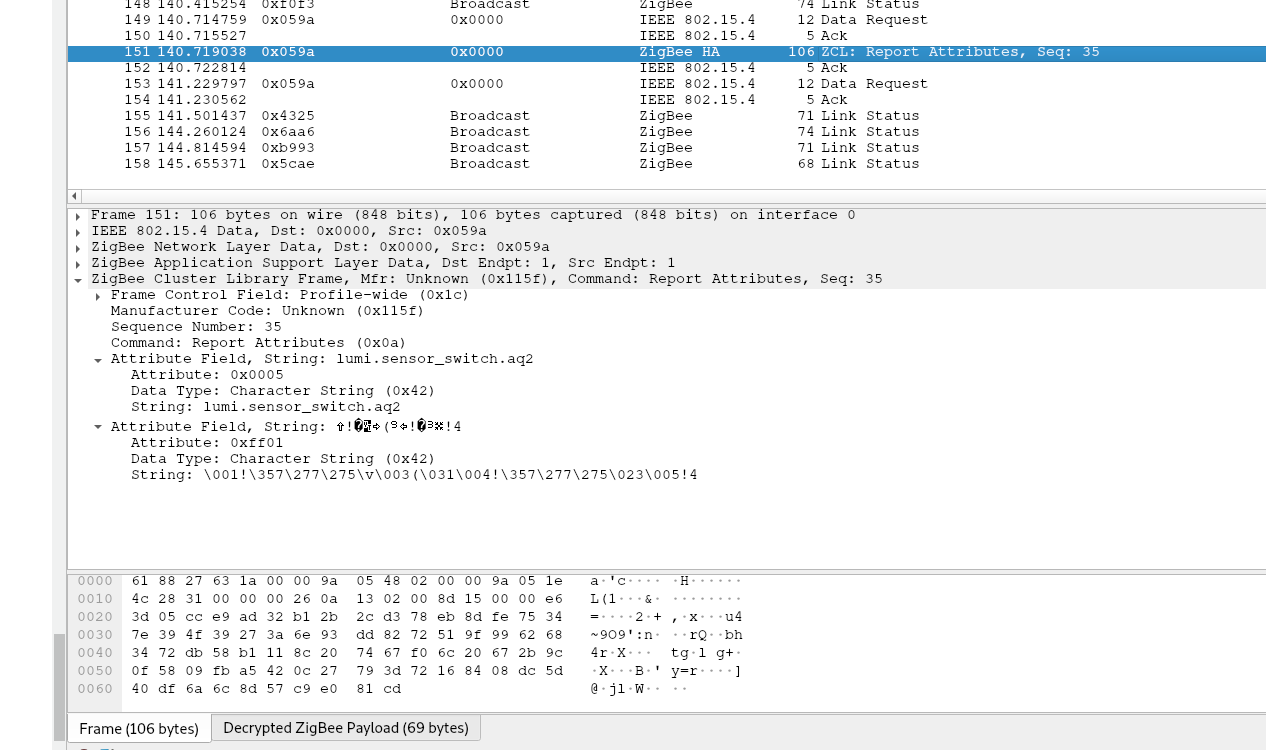
triple:
hold:
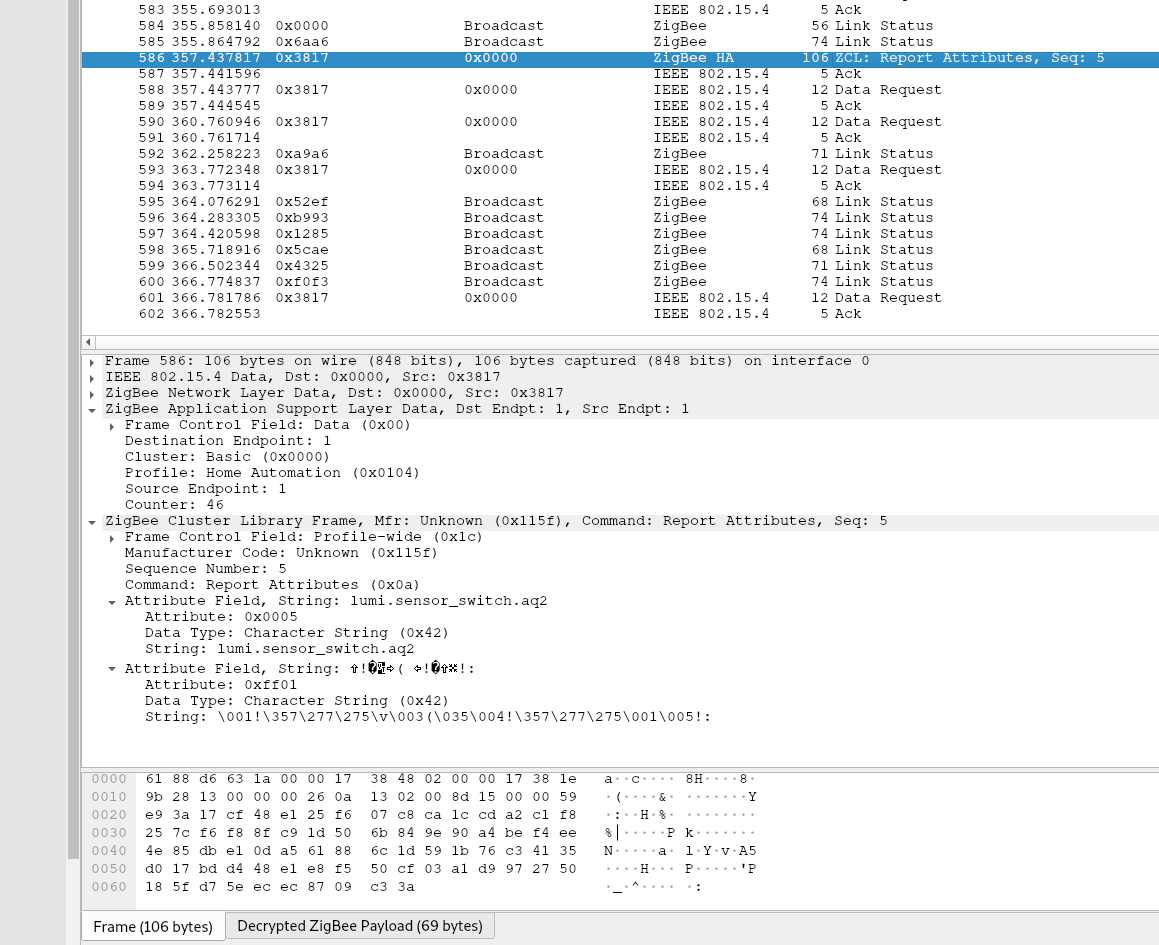
when trying to capture four presses i got two identical messages. Fun fact: holding also resets the device, when you hold it too long .... :upside_down_face:
Is it just me or do all traces look more or less the same?
Sadly, i don't have an original gateway.
sehraf
on 30 Jan 2019
@Ikif after a power outage the best you can do is waiting. Zigbee heals it self over time (and with time i mean not 30 seconds :wink:).
sehraf
on 30 Jan 2019
@sehraf ok thanks, at least we know what we see in the zigbee2mqtt log is indeed what is reported.
Could you connect the device to zigbee2mqtt again. Enable debug logging. And press the button 10 times with a 2 second interval. Let's see if we can distinguish the clicks somehow.
Koenkk
on 30 Jan 2019
one press every 2 seconds:
zigbee2mqtt:debug 1/30/2019, 7:56:35 PM Received zigbee message of type 'attReport' with data '{"cid":"genBasic","data":{"65281":{"1":2985,"3":28,"4":5032,"5":59,"6":[0,0],"10":0},"modelId":"lumi.sensor_switch.aq2"}}' of device 'lumi.sensor_switch.aq2' (0x00158d0002130a26)
zigbee2mqtt:info  1/30/2019, 7:56:35 PM MQTT publish: topic 'zigbee2mqtt/xxx.switch', payload '{"battery":91,"voltage":2985,"linkquality":126,"last_seen":"2019-01-19T10:03:14.977Z"}'
zigbee2mqtt:debug 1/30/2019, 7:56:35 PM Received zigbee message of type 'devChange' with data '{"cid":"genBasic","data":{"65281":[null,2985,null,28,5032,59,[0,0],null,null,null,0],"modelId":"lumi.sensor_switch.aq2"}}' of device 'lumi.sensor_switch.aq2' (0x00158d0002130a26)
zigbee2mqtt:debug 1/30/2019, 7:56:36 PM Received zigbee message of type 'attReport' with data '{"cid":"genBasic","data":{"65281":{"1":2985,"3":28,"4":5032,"5":59,"6":[0,0],"10":0},"modelId":"lumi.sensor_switch.aq2"}}' of device 'lumi.sensor_switch.aq2' (0x00158d0002130a26)
zigbee2mqtt:info  1/30/2019, 7:56:36 PM MQTT publish: topic 'zigbee2mqtt/xxx.switch', payload '{"battery":91,"voltage":2985,"linkquality":126,"last_seen":"2019-01-19T10:03:14.977Z"}'
zigbee2mqtt:debug 1/30/2019, 7:56:38 PM Received zigbee message of type 'attReport' with data '{"cid":"genBasic","data":{"65281":{"1":2985,"3":28,"4":5032,"5":59,"6":[0,0],"10":0},"modelId":"lumi.sensor_switch.aq2"}}' of device 'lumi.sensor_switch.aq2' (0x00158d0002130a26)
zigbee2mqtt:info  1/30/2019, 7:56:38 PM MQTT publish: topic 'zigbee2mqtt/xxx.switch', payload '{"battery":91,"voltage":2985,"linkquality":126,"last_seen":"2019-01-19T10:03:14.977Z"}'
zigbee2mqtt:debug 1/30/2019, 7:56:40 PM Received zigbee message of type 'attReport' with data '{"cid":"genBasic","data":{"65281":{"1":2985,"3":27,"4":5032,"5":59,"6":[0,0],"10":0},"modelId":"lumi.sensor_switch.aq2"}}' of device 'lumi.sensor_switch.aq2' (0x00158d0002130a26)
zigbee2mqtt:info  1/30/2019, 7:56:40 PM MQTT publish: topic 'zigbee2mqtt/xxx.switch', payload '{"battery":91,"voltage":2985,"linkquality":126,"last_seen":"2019-01-19T10:03:14.977Z"}'
zigbee2mqtt:debug 1/30/2019, 7:56:40 PM Received zigbee message of type 'devChange' with data '{"cid":"genBasic","data":{"65281":[null,null,null,27]}}' of device 'lumi.sensor_switch.aq2' (0x00158d0002130a26)
zigbee2mqtt:debug 1/30/2019, 7:56:42 PM Received zigbee message of type 'attReport' with data '{"cid":"genBasic","data":{"65281":{"1":2985,"3":28,"4":5032,"5":59,"6":[0,0],"10":0},"modelId":"lumi.sensor_switch.aq2"}}' of device 'lumi.sensor_switch.aq2' (0x00158d0002130a26)
zigbee2mqtt:info  1/30/2019, 7:56:42 PM MQTT publish: topic 'zigbee2mqtt/xxx.switch', payload '{"battery":91,"voltage":2985,"linkquality":126,"last_seen":"2019-01-19T10:03:14.977Z"}'
zigbee2mqtt:debug 1/30/2019, 7:56:42 PM Received zigbee message of type 'devChange' with data '{"cid":"genBasic","data":{"65281":[null,2985,null,28,5032,59,[0,0],null,null,null,0]}}' of device 'lumi.sensor_switch.aq2' (0x00158d0002130a26)
zigbee2mqtt:debug 1/30/2019, 7:56:44 PM Received zigbee message of type 'attReport' with data '{"cid":"genBasic","data":{"65281":{"1":2985,"3":28,"4":5032,"5":59,"6":[0,0],"10":0},"modelId":"lumi.sensor_switch.aq2"}}' of device 'lumi.sensor_switch.aq2' (0x00158d0002130a26)
zigbee2mqtt:info  1/30/2019, 7:56:44 PM MQTT publish: topic 'zigbee2mqtt/xxx.switch', payload '{"battery":91,"voltage":2985,"linkquality":126,"last_seen":"2019-01-19T10:03:14.977Z"}'
zigbee2mqtt:debug 1/30/2019, 7:56:46 PM Received zigbee message of type 'attReport' with data '{"cid":"genBasic","data":{"65281":{"1":2985,"3":28,"4":5032,"5":59,"6":[0,0],"10":0},"modelId":"lumi.sensor_switch.aq2"}}' of device 'lumi.sensor_switch.aq2' (0x00158d0002130a26)
zigbee2mqtt:info  1/30/2019, 7:56:46 PM MQTT publish: topic 'zigbee2mqtt/xxx.switch', payload '{"battery":91,"voltage":2985,"linkquality":126,"last_seen":"2019-01-19T10:03:14.977Z"}'
zigbee2mqtt:debug 1/30/2019, 7:56:47 PM Received zigbee message of type 'attReport' with data '{"cid":"genBasic","data":{"65281":{"1":2985,"3":28,"4":5032,"5":59,"6":[0,0],"10":0},"modelId":"lumi.sensor_switch.aq2"}}' of device 'lumi.sensor_switch.aq2' (0x00158d0002130a26)
zigbee2mqtt:info  1/30/2019, 7:56:47 PM MQTT publish: topic 'zigbee2mqtt/xxx.switch', payload '{"battery":91,"voltage":2985,"linkquality":126,"last_seen":"2019-01-19T10:03:14.977Z"}'
zigbee2mqtt:debug 1/30/2019, 7:56:49 PM Received zigbee message of type 'attReport' with data '{"cid":"genBasic","data":{"65281":{"1":2985,"3":28,"4":5032,"5":59,"6":[0,0],"10":0},"modelId":"lumi.sensor_switch.aq2"}}' of device 'lumi.sensor_switch.aq2' (0x00158d0002130a26)
zigbee2mqtt:info  1/30/2019, 7:56:49 PM MQTT publish: topic 'zigbee2mqtt/xxx.switch', payload '{"battery":91,"voltage":2985,"linkquality":147,"last_seen":"2019-01-19T10:03:14.977Z"}'
zigbee2mqtt:debug 1/30/2019, 7:56:51 PM Received zigbee message of type 'attReport' with data '{"cid":"genBasic","data":{"65281":{"1":2985,"3":28,"4":5032,"5":59,"6":[0,0],"10":0},"modelId":"lumi.sensor_switch.aq2"}}' of device 'lumi.sensor_switch.aq2' (0x00158d0002130a26)
zigbee2mqtt:info  1/30/2019, 7:56:51 PM MQTT publish: topic 'zigbee2mqtt/xxx.switch', payload '{"battery":91,"voltage":2985,"linkquality":131,"last_seen":"2019-01-19T10:03:14.977Z"}'
@sehraf
@Ikif after a power outage the best you can do is waiting. Zigbee heals it self over time (and with time i mean _not_ 30 seconds 😉).
I waited 2 hour.
Ikif
on 31 Jan 2019
@sehraf looks good, at least the values are consistent. Can you do the same for double clicks?
Koenkk
on 31 Jan 2019
here you go:
zigbee2mqtt:debug 31.1.2019, 22:00:30 Received zigbee message of type 'attReport' with data '{"cid":"genBasic","data":{"65281":{"1":3005,"3":30,"4":5032,"5":59,"6":[0,0],"10":0},"modelId":"lumi.sensor_switch.aq2"}}' of device 'lumi.sensor_switch.aq2' (0x00158d0002130a26)
zigbee2mqtt:info  31.1.2019, 22:00:30 MQTT publish: topic 'zigbee2mqtt/xxx.switch', payload '{"battery":100,"voltage":3005,"linkquality":123,"last_seen":"2019-01-19T10:03:14.977Z"}'
zigbee2mqtt:debug 31.1.2019, 22:00:30 Received zigbee message of type 'devChange' with data '{"cid":"genBasic","data":{"65281":[null,3005,null,null,5032,59,[0,0],null,null,null,0]}}' of device 'lumi.sensor_switch.aq2' (0x00158d0002130a26)
zigbee2mqtt:debug 31.1.2019, 22:00:32 Received zigbee message of type 'attReport' with data '{"cid":"genBasic","data":{"65281":{"1":3005,"3":30,"4":5032,"5":59,"6":[0,0],"10":0},"modelId":"lumi.sensor_switch.aq2"}}' of device 'lumi.sensor_switch.aq2' (0x00158d0002130a26)
zigbee2mqtt:info  31.1.2019, 22:00:32 MQTT publish: topic 'zigbee2mqtt/xxx.switch', payload '{"battery":100,"voltage":3005,"linkquality":131,"last_seen":"2019-01-19T10:03:14.977Z"}'
zigbee2mqtt:debug 31.1.2019, 22:00:32 Received zigbee message of type 'devChange' with data '{"cid":"genBasic","data":{"65281":[null,null,null,30]}}' of device 'lumi.sensor_switch.aq2' (0x00158d0002130a26)
zigbee2mqtt:debug 31.1.2019, 22:00:34 Received zigbee message of type 'attReport' with data '{"cid":"genBasic","data":{"65281":{"1":3005,"3":30,"4":5032,"5":59,"6":[0,0],"10":0},"modelId":"lumi.sensor_switch.aq2"}}' of device 'lumi.sensor_switch.aq2' (0x00158d0002130a26)
zigbee2mqtt:info  31.1.2019, 22:00:34 MQTT publish: topic 'zigbee2mqtt/xxx.switch', payload '{"battery":100,"voltage":3005,"linkquality":131,"last_seen":"2019-01-19T10:03:14.977Z"}'
zigbee2mqtt:debug 31.1.2019, 22:00:34 Received zigbee message of type 'devChange' with data '{"cid":"genBasic","data":{"65281":[null,3005,null,null,5032,59,[0,0],null,null,null,0]}}' of device 'lumi.sensor_switch.aq2' (0x00158d0002130a26)
zigbee2mqtt:debug 31.1.2019, 22:00:35 Received zigbee message of type 'attReport' with data '{"cid":"genBasic","data":{"65281":{"1":3005,"3":30,"4":5032,"5":59,"6":[0,0],"10":0},"modelId":"lumi.sensor_switch.aq2"}}' of device 'lumi.sensor_switch.aq2' (0x00158d0002130a26)
zigbee2mqtt:info  31.1.2019, 22:00:35 MQTT publish: topic 'zigbee2mqtt/xxx.switch', payload '{"battery":100,"voltage":3005,"linkquality":131,"last_seen":"2019-01-19T10:03:14.977Z"}'
zigbee2mqtt:debug 31.1.2019, 22:00:35 Received zigbee message of type 'devChange' with data '{"cid":"genBasic","data":{"65281":[null,null,null,30]}}' of device 'lumi.sensor_switch.aq2' (0x00158d0002130a26)
zigbee2mqtt:debug 31.1.2019, 22:00:37 Received zigbee message of type 'attReport' with data '{"cid":"genBasic","data":{"65281":{"1":3005,"3":30,"4":5032,"5":59,"6":[0,0],"10":0},"modelId":"lumi.sensor_switch.aq2"}}' of device 'lumi.sensor_switch.aq2' (0x00158d0002130a26)
zigbee2mqtt:info  31.1.2019, 22:00:37 MQTT publish: topic 'zigbee2mqtt/xxx.switch', payload '{"battery":100,"voltage":3005,"linkquality":131,"last_seen":"2019-01-19T10:03:14.977Z"}'
zigbee2mqtt:debug 31.1.2019, 22:00:37 Received zigbee message of type 'devChange' with data '{"cid":"genBasic","data":{"65281":[null,3005,null,null,5032,59,[0,0],null,null,null,0]}}' of device 'lumi.sensor_switch.aq2' (0x00158d0002130a26)
zigbee2mqtt:debug 31.1.2019, 22:00:39 Received zigbee message of type 'attReport' with data '{"cid":"genBasic","data":{"65281":{"1":3005,"3":30,"4":5032,"5":59,"6":[0,0],"10":0},"modelId":"lumi.sensor_switch.aq2"}}' of device 'lumi.sensor_switch.aq2' (0x00158d0002130a26)
zigbee2mqtt:info  31.1.2019, 22:00:39 MQTT publish: topic 'zigbee2mqtt/xxx.switch', payload '{"battery":100,"voltage":3005,"linkquality":128,"last_seen":"2019-01-19T10:03:14.977Z"}'
zigbee2mqtt:debug 31.1.2019, 22:00:39 Received zigbee message of type 'devChange' with data '{"cid":"genBasic","data":{"65281":[null,null,null,30]}}' of device 'lumi.sensor_switch.aq2' (0x00158d0002130a26)
didn't send any message here
zigbee2mqtt:debug 31.1.2019, 22:00:44 Received zigbee message of type 'attReport' with data '{"cid":"genBasic","data":{"65281":{"1":3005,"3":30,"4":5032,"5":59,"6":[0,0],"10":0},"modelId":"lumi.sensor_switch.aq2"}}' of device 'lumi.sensor_switch.aq2' (0x00158d0002130a26)
zigbee2mqtt:info  31.1.2019, 22:00:44 MQTT publish: topic 'zigbee2mqtt/xxx.switch', payload '{"battery":100,"voltage":3005,"linkquality":131,"last_seen":"2019-01-19T10:03:14.977Z"}'
zigbee2mqtt:debug 31.1.2019, 22:00:44 Received zigbee message of type 'devChange' with data '{"cid":"genBasic","data":{"65281":[null,3005,null,null,5032,59,[0,0],null,null,null,0]}}' of device 'lumi.sensor_switch.aq2' (0x00158d0002130a26)
zigbee2mqtt:debug 31.1.2019, 22:00:46 Received zigbee message of type 'attReport' with data '{"cid":"genBasic","data":{"65281":{"1":3005,"3":30,"4":5032,"5":59,"6":[0,0],"10":0},"modelId":"lumi.sensor_switch.aq2"}}' of device 'lumi.sensor_switch.aq2' (0x00158d0002130a26)
zigbee2mqtt:info  31.1.2019, 22:00:46 MQTT publish: topic 'zigbee2mqtt/xxx.switch', payload '{"battery":100,"voltage":3005,"linkquality":131,"last_seen":"2019-01-19T10:03:14.977Z"}'
zigbee2mqtt:debug 31.1.2019, 22:00:46 Received zigbee message of type 'devChange' with data '{"cid":"genBasic","data":{"65281":[null,null,null,30]}}' of device 'lumi.sensor_switch.aq2' (0x00158d0002130a26)
zigbee2mqtt:debug 31.1.2019, 22:00:48 Received zigbee message of type 'attReport' with data '{"cid":"genBasic","data":{"65281":{"1":3005,"3":30,"4":5032,"5":59,"6":[0,0],"10":0},"modelId":"lumi.sensor_switch.aq2"}}' of device 'lumi.sensor_switch.aq2' (0x00158d0002130a26)
zigbee2mqtt:info  31.1.2019, 22:00:48 MQTT publish: topic 'zigbee2mqtt/xxx.switch', payload '{"battery":100,"voltage":3005,"linkquality":126,"last_seen":"2019-01-19T10:03:14.977Z"}'
zigbee2mqtt:debug 31.1.2019, 22:00:48 Received zigbee message of type 'devChange' with data '{"cid":"genBasic","data":{"65281":[null,3005,null,null,5032,59,[0,0],null,null,null,0]}}' of device 'lumi.sensor_switch.aq2' (0x00158d0002130a26)
zigbee2mqtt:debug 31.1.2019, 22:00:49 Received zigbee message of type 'attReport' with data '{"cid":"genBasic","data":{"65281":{"1":3005,"3":30,"4":5032,"5":59,"6":[0,0],"10":0},"modelId":"lumi.sensor_switch.aq2"}}' of device 'lumi.sensor_switch.aq2' (0x00158d0002130a26)
zigbee2mqtt:info  31.1.2019, 22:00:49 MQTT publish: topic 'zigbee2mqtt/xxx.switch', payload '{"battery":100,"voltage":3005,"linkquality":131,"last_seen":"2019-01-19T10:03:14.977Z"}'
zigbee2mqtt:debug 31.1.2019, 22:00:49 Received zigbee message of type 'devChange' with data '{"cid":"genBasic","data":{"65281":[null,null,null,30]}}' of device 'lumi.sensor_switch.aq2' (0x00158d0002130a26)
and one single press for the record
zigbee2mqtt:debug 31.1.2019, 22:03:31 Received zigbee message of type 'attReport' with data '{"cid":"genBasic","data":{"65281":{"1":3005,"3":30,"4":5032,"5":59,"6":[0,0],"10":0},"modelId":"lumi.sensor_switch.aq2"}}' of device 'lumi.sensor_switch.aq2' (0x00158d0002130a26)
zigbee2mqtt:info  31.1.2019, 22:03:31 MQTT publish: topic 'zigbee2mqtt/xxx.switch', payload '{"battery":100,"voltage":3005,"linkquality":110,"last_seen":"2019-01-19T10:03:14.977Z"}'
@sehraf the report is exactly the same as the on of the single click. Do you by any chance have access to a Xiaomi gateway, I'm wondering if it works with their gateway.
Koenkk
on 1 Feb 2019
@Koenkk that is what i was afraid of. It looks like we are missing something essential ...
I don't know anybody with a Xiaomi gateway. I would buy one but not for ~40€ :disappointed: I'll keep an eye on eBay.
By the way, is there a difference between the aqara gateway (38€) and the mijia gateway (28€) beside homekit support? :confused:
sehraf
on 1 Feb 2019
@sehraf I don't know if you are open to this, but as I see you are from Germany, could you maybe send the button to me by post? How much would this cost (by brief post)? I have the Xiaomi gateway and could debug this further.
Koenkk
on 1 Feb 2019
Sure, that's a good idea. I'll check it at the weekend.
sehraf
on 1 Feb 2019
I've received the device of @sehraf, my observations:
- Paired with zigbee2mqtt, I got the same behaviour as @sehraf described
- The reset button behaved very strange, the blue light wasn't blinking sometimes when I pressed the reset button, when I pressed the button itself, it started blinking for a long time.
- It took me at least 20+ tries (of 20 seconds) to pair it to the Xiaomi gateway
- I've setup an automation, when the button is pressed, the Xiaomi gateway light should turn on:
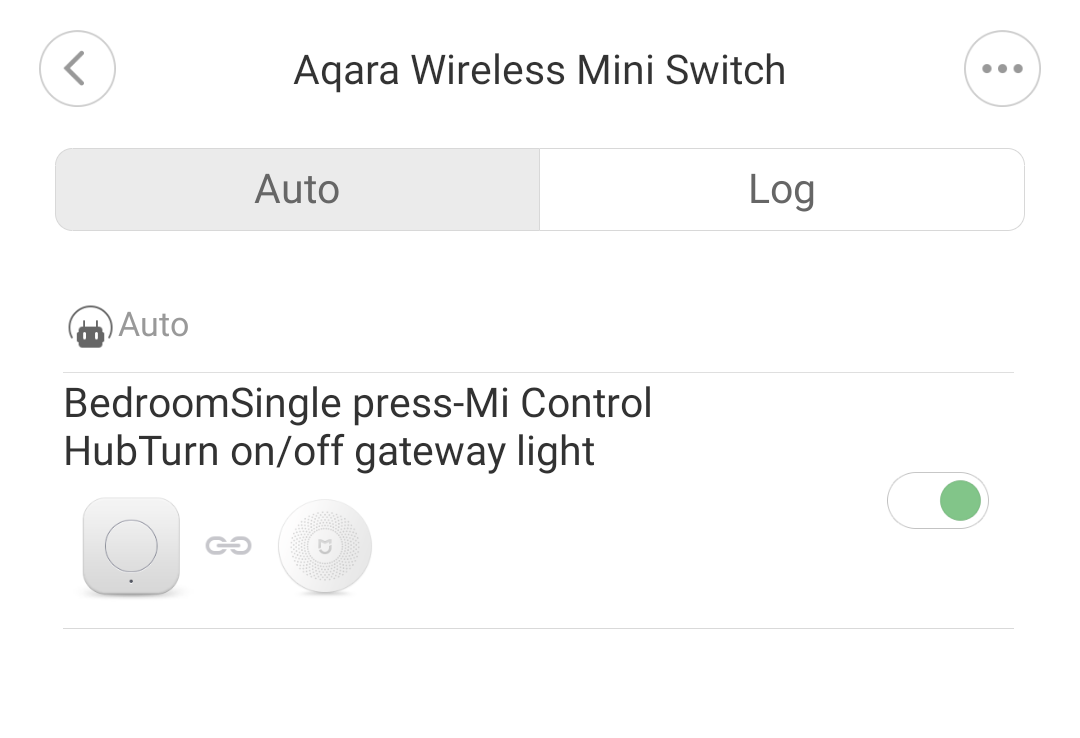
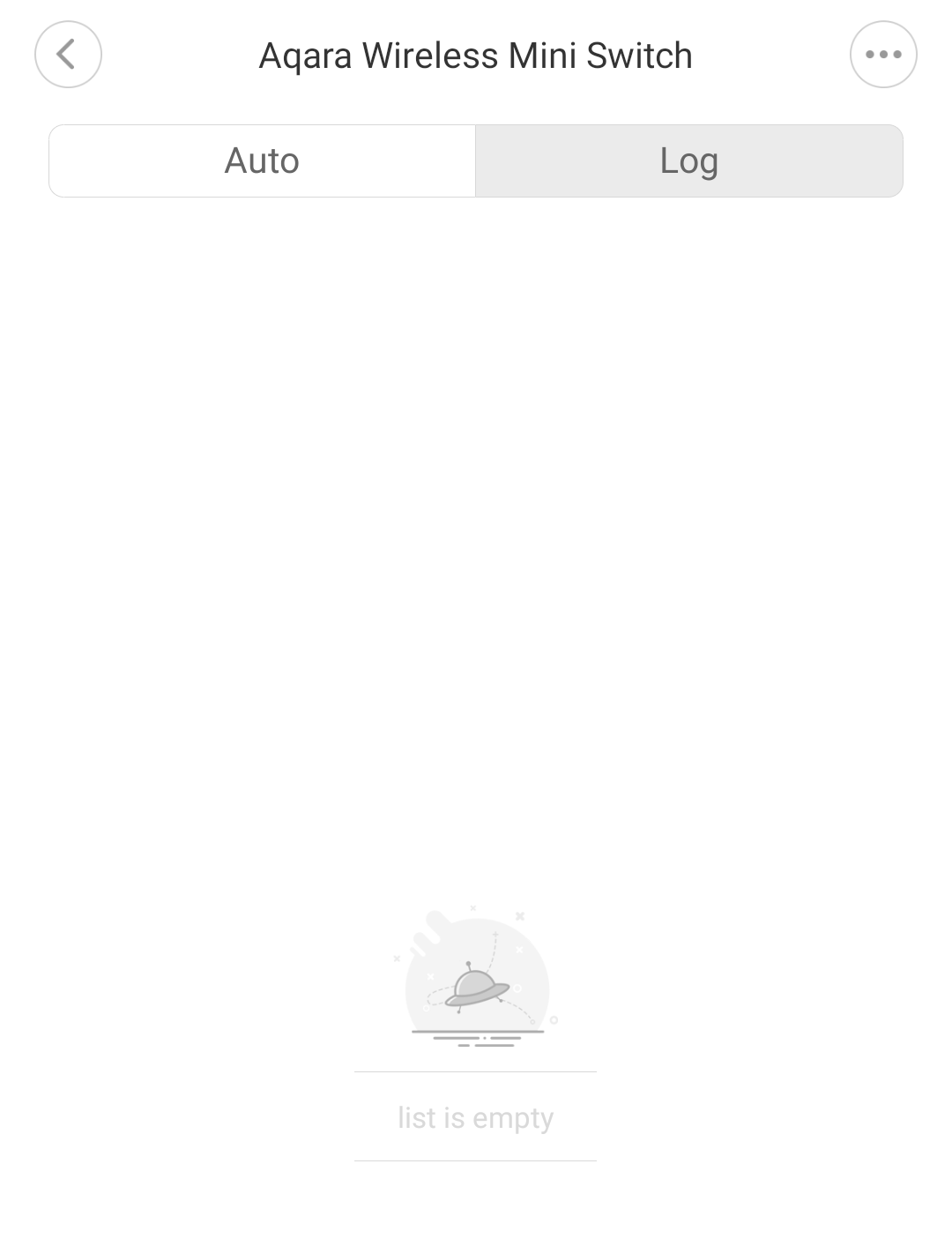
- When the button was pressed, nothing appeared in the log (I expect that the button clicks are logged here)
- The gateway did respond to button click but not in the way I expected it to. The automation did not trigger, which makes me assume that it doesn't detect a button press. However, it starts talking Chinese when I press the button. I will ask a Chinese colleague if he can translates it. Video: https://www.youtube.com/watch?v=GgxWC06Wc2c&feature=youtu.be
- I didn't see the possibility from the app to update the software of the button.
Koenkk
on 8 Feb 2019
According to a Chinese colleague, it says "连接正常,which means "connection is working normally"
 SpookyFM
on 12 Mar 2019
SpookyFM
on 12 Mar 2019
@SpookyFM my chinese colleague also confirmed this.
Koenkk
on 12 Mar 2019
I am having this exact problem. Running Add-on Version 1.2.1 and z-stack firmware CC2531_MAX_STABILITY_20190315.
The xiaomi button was paired and working for a long time, but after updating add-on and firmware i am only seeing battery and linkquality in the mqtt msg.
Did anyone else solved this?
 SalkinDK
on 26 Mar 2019
SalkinDK
on 26 Mar 2019
Did anyone else solved this?
i have same problem :( try to fix but not working.
 keitetran
on 27 Mar 2019
keitetran
on 27 Mar 2019
@Koenkk Any update on this?
My doorbell inst working at all, and just reports battery?
Anything i/we can do?
SalkinDK
on 1 Apr 2019
@SalkinDK please provide the log_level: debug log when pressing the button http://www.zigbee2mqtt.io/configuration/configuration.html
Koenkk
on 1 Apr 2019
same issue here with WXKG11LM
it does work a for a couple days/weeks then it stops working, I have re-pair
initially I was suspecting a poor battery quality or bad contact between the pins and the battery but thats not the case.
I was running zigbee2mqtt 1.1.1, i have just upgraded, will see if it gets better
 philuxe
on 16 Apr 2019
philuxe
on 16 Apr 2019
3/24/2019, 7:12:58 AM - info: WirelessSwitch (0x00158d0002041525): WXKG11LM - Xiaomi Aqara wireless switch (EndDevice)

3/24/2019, 7:12:59 AM - info: MQTT publish: topic 'zigbee2mqtt/WirelessSwitch', payload '{"battery":86,"voltage":2975,"linkquality":68}'
3/24/2019, 7:12:59 AM - info: MQTT publish: topic 'homeassistant/sensor/0x00158d0002041525/click/config', payload '{"icon":"mdi:toggle-switch","value_template":"{{ value_json.click }}","expire_after":1,"state_topic":"zigbee2mqtt/WirelessSwitch","json_attributes_topic":"zigbee2mqtt/WirelessSwitch","name":"WirelessSwitch_click","unique_id":"0x00158d0002041525_click_zigbee2mqtt","device":{"identifiers":"zigbee2mqtt_0x00158d0002041525","name":"WirelessSwitch","sw_version":"Zigbee2mqtt 1.2.1","model":"Aqara wireless switch (WXKG11LM)","manufacturer":"Xiaomi"},"availability_topic":"zigbee2mqtt/bridge/state"}'
3/24/2019, 7:12:59 AM - info: MQTT publish: topic 'homeassistant/sensor/0x00158d0002041525/battery/config', payload '{"unit_of_measurement":"%","device_class":"battery","value_template":"{{ value_json.battery }}","state_topic":"zigbee2mqtt/WirelessSwitch","json_attributes_topic":"zigbee2mqtt/WirelessSwitch","name":"WirelessSwitch_battery","unique_id":"0x00158d0002041525_battery_zigbee2mqtt","device":{"identifiers":"zigbee2mqtt_0x00158d0002041525","name":"WirelessSwitch","sw_version":"Zigbee2mqtt 1.2.1","model":"Aqara wireless switch (WXKG11LM)","manufacturer":"Xiaomi"},"availability_topic":"zigbee2mqtt/bridge/state"}'
3/24/2019, 7:12:59 AM - info: MQTT publish: topic 'homeassistant/sensor/0x00158d0002041525/linkquality/config', payload '{"unit_of_measurement":"-","value_template":"{{ value_json.linkquality }}","state_topic":"zigbee2mqtt/WirelessSwitch","json_attributes_topic":"zigbee2mqtt/WirelessSwitch","name":"WirelessSwitch_linkquality","unique_id":"0x00158d0002041525_linkquality_zigbee2mqtt","device":{"identifiers":"zigbee2mqtt_0x00158d0002041525","name":"WirelessSwitch","sw_version":"Zigbee2mqtt 1.2.1","model":"Aqara wireless switch (WXKG11LM)","manufacturer":"Xiaomi"},"availability_topic":"zigbee2mqtt/bridge/state"}'
When button click, data was send to USB zigbe but it send a payload to HASS MQTT without state. Then HASS will show state unknown when button click.
- Default state will show empty
- When button click state is Unknow.
THat is bug code or device is bad ?
keitetran
on 17 Apr 2019
Same problem here with brand new WXKG11LM and fresh install... I’m new, but trying hard to help fixing the problem!
 BenF1sh
on 19 Apr 2019
BenF1sh
on 19 Apr 2019
@BenF1sh please provide the log_level: debug log when pressing the button http://www.zigbee2mqtt.io/configuration/configuration.html
Koenkk
on 19 Apr 2019
This is what I found:
4/20/2019, 7:36:22 AM - debug: Received zigbee message of type 'attReport' with data '{"cid":"genBasic","data":{"65281":{"1":3015,"3":23,"4":5032,"5":2677,"6":[0,393216],"10":0},"modelId":"lumi.sensor_switch.aq2"}}' of device 'lumi.sensor_switch.aq2' (0x00158d00023dc329) of endpoint 1
4/20/2019, 7:36:22 AM - info: MQTT publish: topic 'zigbee2mqtt/0x00158d00023dc329', payload '{"battery":100,"voltage":3015,"linkquality":89}'
4/20/2019, 7:36:22 AM - debug: Received zigbee message of type 'devChange' with data '{"cid":"genBasic","data":{"65281":[null,3015,null,23,5032,2677,[0,393216],null,null,null,0],"modelId":"lumi.sensor_switch.aq2"}}' of device 'lumi.sensor_switch.aq2' (0x00158d00023dc329) of endpoint 1
4/20/2019, 7:36:28 AM - debug: Received zigbee message of type 'attReport' with data '{"cid":"genBasic","data":{"65281":{"1":3015,"3":23,"4":5032,"5":2677,"6":[0,393216],"10":0},"modelId":"lumi.sensor_switch.aq2"}}' of device 'lumi.sensor_switch.aq2' (0x00158d00023dc329) of endpoint 1
4/20/2019, 7:36:28 AM - info: MQTT publish: topic 'zigbee2mqtt/0x00158d00023dc329', payload '{"battery":100,"voltage":3015,"linkquality":76}'
4/20/2019, 7:36:31 AM - debug: Received zigbee message of type 'attReport' with data '{"cid":"genBasic","data":{"65281":{"1":3015,"3":23,"4":5032,"5":2677,"6":[0,393216],"10":0},"modelId":"lumi.sensor_switch.aq2"}}' of device 'lumi.sensor_switch.aq2' (0x00158d00023dc329) of endpoint 1
4/20/2019, 7:36:31 AM - info: MQTT publish: topic 'zigbee2mqtt/0x00158d00023dc329', payload '{"battery":100,"voltage":3015,"linkquality":78}'
BenF1sh
on 20 Apr 2019
@BenF1sh if that is what is reported on a click press, the switch is probably broken. See https://github.com/Koenkk/zigbee2mqtt/issues/376#issuecomment-461919228 (it also won't work with the original Xiaomi gateway).
Koenkk
on 22 Apr 2019
@Koenkk Sorry for the late reply, very busy at work.
Here is three button presses with debug log.
a Single press
zigbee2mqtt:debug 4/25/2019, 2:55:55 PM Received zigbee message of type 'attReport' with data '{"cid":"genBasic","data":{"65281":{"1":3125,"3":25,"4":5032,"5":26,"6":[0,0],"10":0},"modelId":"lumi.sensor_switch.aq2"}}' of device 'lumi.sensor_switch.aq2' (0x00158d0002134042) of endpoint 1
  zigbee2mqtt:info 4/25/2019, 2:55:55 PM MQTT publish: topic 'zigbee2mqtt/DoorBell', payload '{"battery":100,"voltage":3125,"linkquality":36}'
a double press
zigbee2mqtt:debug 4/25/2019, 2:54:38 PM Received zigbee message of type 'attReport' with data '{"cid":"genBasic","data":{"65281":{"1":3125,"3":25,"4":5032,"5":26,"6":[0,0],"10":0},"modelId":"lumi.sensor_switch.aq2"}}' of device 'lumi.sensor_switch.aq2' (0x00158d0002134042) of endpoint 1
  zigbee2mqtt:info 4/25/2019, 2:54:38 PM MQTT publish: topic 'zigbee2mqtt/DoorBell', payload '{"battery":100,"voltage":3125,"linkquality":28}'
and a single press again.
zigbee2mqtt:debug 4/25/2019, 2:53:19 PM Received zigbee message of type 'attReport' with data '{"cid":"genBasic","data":{"65281":{"1":3125,"3":25,"4":5032,"5":26,"6":[0,0],"10":0},"modelId":"lumi.sensor_switch.aq2"}}' of device 'lumi.sensor_switch.aq2' (0x00158d0002134042) of endpoint 1
  zigbee2mqtt:info 4/25/2019, 2:53:19 PM MQTT publish: topic 'zigbee2mqtt/DoorBell', payload '{"battery":100,"voltage":3125,"linkquality":36}'
  zigbee2mqtt:debug 4/25/2019, 2:53:19 PM Received zigbee message of type 'devChange' with data '{"cid":"genBasic","data":{"65281":[null,3125,null,25,5032,26,[0,0],null,null,null,0],"modelId":"lumi.sensor_switch.aq2"}}' of device 'lumi.sensor_switch.aq2' (0x00158d0002134042) of endpoint 1
Hope it can help, it worked flawlessly until i changed the firmware on my cc2531.
SalkinDK
on 25 Apr 2019
With what firmware did it work?
Koenkk
on 26 Apr 2019
@Koenkk One of the very early ones, it was before the got release numbers. :(
SalkinDK
on 26 Apr 2019
@SalkinDK could you try to re-pair the device?
Koenkk
on 28 Apr 2019
@Koenkk just tried that, unfortunately no chance in behavior.
Log:
zigbee2mqtt:info 5/1/2019, 1:06:20 PM MQTT publish: topic 'zigbee2mqtt/bridge/config', payload '{"version":"1.3.1","commit":"unknown","coordinator_firmware":20190315,"log_level":"info","permit_join":true}'
  zigbee2mqtt:info 5/1/2019, 1:08:36 PM New device 'undefined' with address 0x00158d0002134042 connected!
  zigbee2mqtt:info 5/1/2019, 1:08:36 PM MQTT publish: topic 'zigbee2mqtt/bridge/log', payload '{"type":"device_connected","message":"0x00158d0002134042","meta":{}}'
  zigbee2mqtt:warn 5/1/2019, 1:08:36 PM Device with modelID 'undefined' is not supported.
  zigbee2mqtt:warn 5/1/2019, 1:08:36 PM Please see: https://www.zigbee2mqtt.io/how_tos/how_to_support_new_devices.html
  zigbee2mqtt:info 5/1/2019, 1:08:49 PM Device incoming...
  zigbee2mqtt:info 5/1/2019, 1:08:49 PM MQTT publish: topic 'zigbee2mqtt/bridge/log', payload '{"type":"pairing","message":"device incoming"}'
  zigbee2mqtt:info 5/1/2019, 1:09:23 PM MQTT publish: topic 'zigbee2mqtt/0x00158d0002134042', payload '{"battery":100,"voltage":3055,"linkquality":36}'
SalkinDK
on 1 May 2019
- Do you have an original Xiaomi gateway and can you try the sensor with that?
- Could you sniff the traffic of the button when pressing it? http://www.zigbee2mqtt.io/how_tos/how_to_sniff_zigbee_traffic.html
Koenkk
on 2 May 2019
zigbee2mqtt 1.4.0 with current fw.
Simular Problem here. I'm using two Aqara WXKG11LM for a long time and they are working great.
Bought two new ones and they pair ok. They do send 1-3 clicks after repairing or at random after pressing the Range test button but than only send Battery status afterward.
I didn't sniff the Zigbee traffic yet.
There is also a "new" version with Gyro Sensor.
 pixeldoc2000
on 17 Jul 2019
pixeldoc2000
on 17 Jul 2019
Same issue, CC2531. Got one WXKG11LM that will not report the click: json value when pressed.
Got another button in the same shipment that works correctly.
That being said, I also have a RTCGQ01LM motion sensor that ALWAYS senses occupancy every 5 seconds, while another in the same batch is good. So I'm putting a few question marks on the production quality of some of these devices.
 wminno
on 17 Jul 2019
wminno
on 17 Jul 2019
I thought it was me... just received from Gearbest: 2x WXKG11LM and 1x WXKG12LM.
1x WXKG11LM was working normally but the other two are also having the strange behaviour as described above :'(
Took me a couple of time to pair and I thought it was added but some seconds later the device disappears from the hub.
 pascalsaul
on 18 Jul 2019
pascalsaul
on 18 Jul 2019
I got the same issue.
weird thing tho. Im running hassio on virtual box. Im on a clean install. Added all my sensors. The button was working. After a few hours it didn't. giving the same issue:
zigbee2mqtt/deurbel', payload '{"battery":100,"voltage":3125,"linkquality":36}'
I then returned to a snapshot before I added the sensors and added the button again.
lo and behold.
zigbee2mqtt:info 7/25/2019, 2:26:48 PM Device incoming...
  zigbee2mqtt:info 7/25/2019, 2:26:48 PM MQTT publish: topic 'zigbee2mqtt/bridge/log', payload '{"type":"pairing","message":"device incoming"}'
  zigbee2mqtt:debug 7/25/2019, 2:26:48 PM Received zigbee message of type 'devStatus' with data '"online"' of device 'lumi.sensor_switch.aq2' (0x00158d0001e88f9c) of endpoint 1
  zigbee2mqtt:debug 7/25/2019, 2:27:23 PM Received zigbee message of type 'attReport' with data '{"cid":"genOnOff","data":{"onOff":1}}' of device 'lumi.sensor_switch.aq2' (0x00158d0001e88f9c) of endpoint 1
  zigbee2mqtt:info 7/25/2019, 2:27:23 PM MQTT publish: topic 'zigbee2mqtt/0x00158d0001e88f9c', payload '{"click":"single","linkquality":44}'
  zigbee2mqtt:info 7/25/2019, 2:27:23 PM MQTT publish: topic 'zigbee2mqtt/0x00158d0001e88f9c', payload '{"linkquality":44,"click":""}'
  zigbee2mqtt:debug 7/25/2019, 2:27:23 PM Received zigbee message of type 'devChange' with data '{"cid":"genOnOff","data":{"onOff":1}}' of device 'lumi.sensor_switch.aq2' (0x00158d0001e88f9c) of endpoint 1
  zigbee2mqtt:debug 7/25/2019, 2:27:25 PM Received zigbee message of type 'attReport' with data '{"cid":"genOnOff","data":{"32768":2}}' of device 'lumi.sensor_switch.aq2' (0x00158d0001e88f9c) of endpoint 1
  zigbee2mqtt:info 7/25/2019, 2:27:25 PM MQTT publish: topic 'zigbee2mqtt/0x00158d0001e88f9c', payload '{"linkquality":52,"click":"double"}'
  zigbee2mqtt:info 7/25/2019, 2:27:25 PM MQTT publish: topic 'zigbee2mqtt/0x00158d0001e88f9c', payload '{"linkquality":52,"click":""}'
  zigbee2mqtt:debug 7/25/2019, 2:27:25 PM Received zigbee message of type 'devChange' with data '{"cid":"genOnOff","data":{"32768":2}}' of device 'lumi.sensor_switch.aq2' (0x00158d0001e88f9c) of endpoint 1
  zigbee2mqtt:debug 7/25/2019, 2:27:28 PM Received zigbee message of type 'attReport' with data '{"cid":"genOnOff","data":{"32768":2}}' of device 'lumi.sensor_switch.aq2' (0x00158d0001e88f9c) of endpoint 1
  zigbee2mqtt:info 7/25/2019, 2:27:28 PM MQTT publish: topic 'zigbee2mqtt/0x00158d0001e88f9c', payload '{"linkquality":47,"click":"double"}'
  zigbee2mqtt:info 7/25/2019, 2:27:28 PM MQTT publish: topic 'zigbee2mqtt/0x00158d0001e88f9c', payload '{"linkquality":47,"click":""}'
  zigbee2mqtt:debug 7/25/2019, 2:27:33 PM Received zigbee message of type 'attReport' with data '{"cid":"genOnOff","data":{"onOff":1}}' of device 'lumi.sensor_switch.aq2' (0x00158d0001e88f9c) of endpoint 1
  zigbee2mqtt:info 7/25/2019, 2:27:33 PM MQTT publish: topic 'zigbee2mqtt/0x00158d0001e88f9c', payload '{"linkquality":47,"click":"single"}'
  zigbee2mqtt:info 7/25/2019, 2:27:33 PM MQTT publish: topic 'zigbee2mqtt/0x00158d0001e88f9c', payload '{"linkquality":47,"click":""}'
its working again. then added the rest of the sensors check if it was stil working. Everthing fine.
After a couple of hours again same issue.
Weird thing is its just like koekk said, if i connect the button the the gateway it doenst work either only a chinese voice start speaking if i press the button.
i just now tried again to go back with a snapshot and add the button again. same result. it works again, the only questing is for how long.
This makes me wonder if the button really is broken as mentioned above. How can it be broken if it works after a restore of snapshot and i add the button again?
 rudolf1980
on 26 Jul 2019
rudolf1980
on 26 Jul 2019
Same problem here with one WXKG11LM:
 zigbee2mqtt:info 8/17/2019, 5:54:58 PM MQTT publish: topic 'zigbee2mqtt/bridge/log', payload '{"type":"pairing","message":"device incoming"}'
  zigbee2mqtt:info 8/17/2019, 5:55:24 PM MQTT publish: topic 'zigbee2mqtt/0x00158d000204a978', payload '{"battery":100,"voltage":3045,"linkquality":49}'
  zigbee2mqtt:info 8/17/2019, 5:55:27 PM MQTT publish: topic 'zigbee2mqtt/0x00158d000204a978', payload '{"battery":100,"voltage":3045,"linkquality":63}'
  zigbee2mqtt:info 8/17/2019, 5:59:27 PM MQTT publish: topic 'zigbee2mqtt/0x00158d000204a978', payload '{"battery":100,"voltage":3045,"linkquality":42}'
  zigbee2mqtt:info 8/17/2019, 6:00:59 PM MQTT publish: topic 'zigbee2mqtt/0x00158d000204a978', payload '{"battery":100,"voltage":3045,"linkquality":65}'
  zigbee2mqtt:info 8/17/2019, 6:02:02 PM MQTT publish: topic 'zigbee2mqtt/0x00158d000204a978', payload '{"battery":100,"voltage":3045,"linkquality":65}'
  zigbee2mqtt:info 8/17/2019, 6:02:12 PM MQTT publish: topic 'zigbee2mqtt/0x00158d000204a978', payload '{"battery":100,"voltage":3045,"linkquality":47}'
  zigbee2mqtt:warn 8/17/2019, 6:02:23 PM Message without device!
This peticular switch also did not work on the gateway; after pairing each button press is followed by a chinese voice talking; but no press is detected (same result as pressing reset button once). Keeping the button pressed for multiple seconds result is loosing the pairing. So it seems a bit like a short circuit between the button and the reset
 romulder
on 17 Aug 2019
romulder
on 17 Aug 2019
Any confirmation yet whether this is a hardware or software issue?
 b4dpxl
on 26 Sep 2019
b4dpxl
on 26 Sep 2019
@b4dpxl my guess is that it is an software issue of the buttons. And as it also doesn't work with the official Xiaomi gateway I think we cannot fix it.
Koenkk
on 27 Sep 2019
@b4dpxl I have same error with USB stick. I canot fix that.
keitetran
on 27 Sep 2019
Good to know, thanks @Koenkk/@keitetran. Any recommendations for a similar switch that works reliably? I was using it as a doorbell, till it stopped.
b4dpxl
on 27 Sep 2019
I am having the same issue. My second doorbell died, I have three another buttons and I believe these will die as well. Probably it is time to switch to door sensors (similar to https://www.reddit.com/r/homeassistant/comments/8a2jb1/i_made_a_simple_lock_sensor_with_xiaomi_door/)
 randybb
on 10 Oct 2019
randybb
on 10 Oct 2019
Same issue here. Not reporting click. Have someone resolved this? Maybe it's a hardware issue that can be solved doing something with the Aqara Button, but I dont get anything...
Thanks!!
 sermayoral
on 15 Nov 2019
sermayoral
on 15 Nov 2019
I have the issue as well, it works a couple of weeks. Signal power is pretty low (device is far away from the dongle) then it stops working. If I move the devices close to the dongle, do a couple of clics then it works again.
I'm pretty sure this ise signal strength related. I'm going to build a router to increase the signal range.
philuxe
on 15 Nov 2019
@philuxe I think it is not the same casuistry. In our case, the device don't send the click event anymore.
Maybe the reason is similar. If you leave the device out of reach of the zigbee network long time, the device enters in panic mode, and it does not send the click message anymore (even if you put the the device next to the router).
The question is: how to unlock that panic mode?
sermayoral
on 15 Nov 2019
Mine was within a few feet of several routing devices (1 bulb and 2 fully wired Xiaomi switches), so I'm not sure that is the issue. It also drops out when within <10 few feet of the coordinator
b4dpxl
on 15 Nov 2019
While I cannot conclude anything, I can contribute with my experiences with the Xiaomi buttons (WXKG11LM).
TL;DR: I don't _think_ this is a Z2M issue, as I also had issues with the buttons on the original Xiaomi GW.
In my case, I used the Xiaomi GW as a gateway and doorbell/speaker with about 2m to the button, mounted on the outside of a wooden wall.
When my first button died, it caused the GW to play a spoken chinese message (according to google translate "normal connection").
I figured the button had become defective, replaced it with a similar one, and all was good again.
After about 6 months of use, the same happened again, which was the catalyst for me to (finally) ditch the Xiaomi GW and setup Z2M on a RPi with a CC2531 (standard install, following the documentation). After installing Z2M, my button worked again, but only for two weeks or so.
The difference this time was that after switching to Z2M, I was able to see what was actually sent/received - and that the link quality was in the 70-80's, so I find it hard to believe that this is the cause.
After adding my two buttons to Z2M, there was an obvious difference; the old button only sent battery and linkquality when pressed - the second also sent the click state.
Fast forward two weeks, there is now no click state sent from the second button.
_I don't get how/why the button responds to a press by sending battery and link quality, but not the button state..?_
Even though the position of the button on the outside of my house does not leave it directly exposed to rain etc, I still have a feeling the Xiaomi buttons just may not be fit for outdoor use..
_Of all the other reports in this thread, how many of you have used the buttons indoor only?_
About a week ago, after some fruitless debugging, I ordered two new buttons, one WXKG11LM and one WXKG01LM - just to see, if there is a difference between the two models.
I also consider purchasing a samsung switch, to see if that model is more stable. I will report back with any interesting findings, when I have tested these.
When time allows, I will update to the newest Z2M release, as it seems @Koenkk has put in a lot of effort in improving communication and stability, especially for Xiaomi devices.
For the record:
I have 6 temp/humidity sensors, 2 motion sensors and a door sensor on the system, all Xiaomi, which all work great - even though it required some tweaks in homeassistant to get the motion sensors working again.
Have been Running Z2M v. 1.6.0 for about three weeks.
 knoer
on 19 Nov 2019
knoer
on 19 Nov 2019
Thanks @knoer for share your conclusions.
My button was not in the outdoor, but it was in a underground storage room with high humidity when it stopped working.
So, is possible you are right.
sermayoral
on 19 Nov 2019
I my case the button is also exposed to humidity (bathroom).
Le 19 nov. 2019 à 14:41, Sergio Mayoral Martínez notifications@github.com a écrit :
Thanks @knoerhttps://github.com/knoer for share your conclusions.
My button was not in the outdoor, but it was in a underground storage room with high humidity when it stopped working.
So, is possible you are right.
—
You are receiving this because you were mentioned.
Reply to this email directly, view it on GitHubhttps://github.com/Koenkk/zigbee2mqtt/issues/376?email_source=notifications&email_token=AD5UA3W6YOCBR5INME3W3M3QUPUHDA5CNFSM4FVLMOAKYY3PNVWWK3TUL52HS4DFVREXG43VMVBW63LNMVXHJKTDN5WW2ZLOORPWSZGOEEOHENI#issuecomment-555512373, or unsubscribehttps://github.com/notifications/unsubscribe-auth/AD5UA3WRYUBVAJLNBRW7VLTQUPUHDANCNFSM4FVLMOAA.
philuxe
on 19 Nov 2019
I've connected to the UART on one of my broken (DOA) Xiaomi / Aqara WXKG11LM Switch. But this gives me nothing 😞
UART
115200 bps
3,3v

Log
pZPSevent->eType = 0

pZPSevent->eType = 8

pZPSevent->eType = 0

pZPSevent->eType = 8

pZPSevent->eType = 0

pZPSevent->eType = 10

sNwkDiscoveryEvent.eStatus=0 sNwkDiscoveryEvent.u8NetworkCount=0

pZPSevent->eType = 0

pZPSevent->eType = 8

pZPSevent->eType = 0

pZPSevent->eType = 8

pZPSevent->eType = 0

pZPSevent->eType = 8

pZPSevent->eType = 0

pZPSevent->eType = 8

pZPSevent->eType = 0

pZPSevent->eType = 8

pZPSevent->eType = 0

pZPSevent->eType = 8

pZPSevent->eType = 0

pZPSevent->eType = 10

sNwkDiscoveryEvent.eStatus=0 sNwkDiscoveryEvent.u8NetworkCount=0

pZPSevent->eType = 0

pZPSevent->eType = 8

pZPSevent->eType = 0

pZPSevent->eType = 8

pZPSevent->eType = 0

pZPSevent->eType = 8

pZPSevent->eType = 0

pZPSevent->eType = 8

pZPSevent->eType = 0

pZPSevent->eType = 8

pZPSevent->eType = 0

pZPSevent->eType = 8

pZPSevent->eType = 0

pZPSevent->eType = 8

pZPSevent->eType = 0

pZPSevent->eType = 8

pZPSevent->eType = 0

pZPSevent->eType = 8

pZPSevent->eType = 0

pZPSevent->eType = 8

pZPSevent->eType = 0

pZPSevent->eType = 8

pZPSevent->eType = 0

pZPSevent->eType = 8

pZPSevent->eType = 0

pZPSevent->eType = 8

pZPSevent->eType = 0
I did not try this with a good working Switch yet to compare the Output.
pixeldoc2000
on 25 Nov 2019
yesterday my WXKG11LM was not reporting click information again.
I had to put it close to the corrdinator to get it reporting clicks's again, thats the only action I had to perform to get it working again...
philuxe
on 25 Nov 2019
Interesting to hear that the distance to the coordinator should have any influence on the data being sent/received from the button - but even though I never considered the distance between my button and coordinator to be too large, I will try this out also with my "defective" sensors..
I also received a WXKG01LM in the post this past weekend - will add it to my network soon to see if this model behaves differently.. -but it may be a long time before I am able to post any news on this..
@pixeldoc2000 Thanks for the share - was thinking of eventually doing some "destructive" debugging on my buttons..
-and/or trying to do a diy conformal coating of the PCB of a working Xiaomi button..
knoer
on 25 Nov 2019
I have finished building up my zigbee router (thanks to https://www.zigbee2mqtt.io/how_tos/how_to_create_a_cc2530_router.html , i'm using CC2530 + CC2591), I'll see whether it makes any improvement.
philuxe
on 25 Nov 2019
I will add to this conversation also:
I have a newer model of button WXKG12LM
which works over a year normally without any problem.
But it happens that i also got a WXKG11LM model lying around
for more than a year (it was never paired to anything) until recently
when i needed it. So i paired it and it had same problem as everybody describes!
button was new, unboxed, unused and etc.
some additonal info nobody spotted (or mine is even more special case):
In this state (non-working) this button has this behaviour:
1) Small reset button does not work at all (it does not reset, you can't pair with it)
2) Big button acts as "reset" button:
2.1) Long press on MAIN button does a reset, and i am able to pair.
2.2) Long press again, and button resets again, then you can "re-pair" it
2.3) After success pairing short pressing the button sends out not a CLICK, but
just a confirmation about device connection! That's why there is no "CLICK" event.
it acts same way as "reset" button on any Xiaomi device. Try short pressing
small reset button on Temperature sensor, or movement sensor. You
will receive same thing as you are getting with this "broken" button.
So conclusion: Device enters some weird state where reset button is inactive and MAIN button becomes "reset" button.
Question: Any ideas how to exit this mode? or is it permanent damage?
To future people: ONLY buy WXKG12LM's!! They are great and have accelerometer as a bonus.
 quarcko
on 2 Dec 2019
quarcko
on 2 Dec 2019
Interesting observation, @quarcko
Your description accurately matches the behavior of my defective buttons.
The reason I replaced the buttons was that my (now former) Xiaomi GW would respond to a main button click with at connection confirmation, which it would normally do when I short pressed on the reset/pairing button on any of my other Xiaomi sensors.
I have not observed which messages (if any) my defective buttons send, when pressing the reset/pairing button, but I will check up on this.
I have not had the time to try out my new WXKG01LM yet..
A quick thought:
Has anyone tried to hold one of the buttons when inserting batteries in the unit?
I have not tried this on any Xiaomi devices, but just did this on a bunch of radiator thermostats to get them to revert to factory settings...
knoer
on 2 Dec 2019
I am experiencing the same issue. The reset button does not work anymore. The big button now acts as a reset button. When i link the buttons to the hub holding the big button, the only respond i will get is " normal link confirmed " this normally should only happen pressing the reset button quickly. I used both switches as doorbells and the weather here is quite humid. I suspect this is permanent damage to the button. Well they advertise the switch as recommended doorbell. Did contact the seller but language barrier does make it hard to communicate.
 skitzow88
on 1 Mar 2020
skitzow88
on 1 Mar 2020
Maybe its a coincidence, but i solved my button this way: i unsoldered small button completely from PCB.
Afterwards i paired it using screwdriver to short contacts of small button on PCB.
And it works for this day normally.
Get BlueMail for Android
On Mar 1, 2020, 14:25, at 14:25, skitzow88 notifications@github.com wrote:
I am experiencing the same issue. The reset button does not work
anymore. The big button now acts as a reset button. When i link the
buttons to the hub holding the big button, the only respond i will get
is " normal link confirmed " this normally should only happen pressing
the reset button quickly.--
You are receiving this because you were mentioned.
Reply to this email directly or view it on GitHub:
https://github.com/Koenkk/zigbee2mqtt/issues/376#issuecomment-593091312
quarcko
on 1 Mar 2020
Nice! Gonna try that straight away with the 2 buttons i got
skitzow88
on 1 Mar 2020
Jep that worked for me! @quarcko thnx very much for sharing the information!
skitzow88
on 1 Mar 2020
Glad to help.
maybe it is worth to buy a replacement button and solder it so pairing still works if needed.
Get BlueMail for Android
On Mar 1, 2020, 16:13, at 16:13, skitzow88 notifications@github.com wrote:
Jep that worked for me! @quarcko thnx very much for sharing the
information!--
You are receiving this because you were mentioned.
Reply to this email directly or view it on GitHub:
https://github.com/Koenkk/zigbee2mqtt/issues/376#issuecomment-593101853
quarcko
on 1 Mar 2020
For now my doorbell works again so thats fine! I did make the switch splash proof by putting the chip in a ziplock bag. Completely off topic question:
I got a conbee 2 zigbee gateway. But my aqara hub still acts as doorbell and alarm systems. Does anybody recommend an alternative for this working in conbee? I did already remove the hue hub from setup due to conbee. But cant get my head arround how to get an alarm system and doorbell running trough Deconz?
skitzow88
on 1 Mar 2020
I can confirm that the issue is with the small switch/reset switch.
I've re-soldered it an it works well now.
 cocooma
on 9 Mar 2020
cocooma
on 9 Mar 2020
@quarcko
@cocooma
I can also confirm resoldering the small reset switch and the big switch fix the issus 👍 It's kinda weird, because i tested it with a multimeter and it looked fine before the resoldering.
_Looks like it is a manufacturing issus after all and its fixable. Nice!_
I've marked the places i resoldered:

Edit: Fixed my second Switch the same way.
pixeldoc2000
on 30 Mar 2020
resoldering fixed two of mine :) thanks @pixeldoc2000 for the photo and @quarcko for the tip
 ChankyTheConqueror
on 27 Apr 2020
ChankyTheConqueror
on 27 Apr 2020
Indeed, worked here also for the bad switches I had...
One other thing I noticed also is when I pair new devices within the 30 seconds to the gateway it doesn't get connected succesfully. After refresh on the home tab the device is added... The 'bad' switch I (re)paired was succesfully added but didn't work (offcourse). Strange behaviour but luckily you found the fix @quarcko and @pixeldoc2000 :)
pascalsaul
on 10 May 2020
@quarcko, @pixeldoc2000 - Could you advise how to open up the button without breaking the plastic?
 GSzabados
on 20 Jul 2020
GSzabados
on 20 Jul 2020
Just slowly work your way around the edges with paper knife slightly twisting it :)
July 20, 2020 6:50 PM, "GSzabados" <[email protected] (mailto:[email protected]?to=%22GSzabados%22%20notifications@github.com)> wrote:
@quarcko (https://github.com/quarcko), @pixeldoc2000 (https://github.com/pixeldoc2000) - Could you advise how to open up the button without breaking the plastic?
—
You are receiving this because you were mentioned.
Reply to this email directly, view it on GitHub (https://github.com/Koenkk/zigbee2mqtt/issues/376#issuecomment-661123695), or unsubscribe (https://github.com/notifications/unsubscribe-auth/AHQSI6JS2I5MQID5R6VBBBTR4RRUVANCNFSM4FVLMOAA).
quarcko
on 20 Jul 2020
Related issues
 mpuff
·
4Comments
mpuff
·
3Comments
Koenkk
·
3Comments
tb-killa
·
3Comments
mpuff
·
4Comments
mpuff
·
3Comments
Koenkk
·
3Comments
tb-killa
·
3Comments
 jwilling
·
4Comments
jwilling
·
4Comments
Most helpful comment
Maybe its a coincidence, but i solved my button this way: i unsoldered small button completely from PCB.
Afterwards i paired it using screwdriver to short contacts of small button on PCB.
And it works for this day normally.
Get BlueMail for Android
On Mar 1, 2020, 14:25, at 14:25, skitzow88 notifications@github.com wrote: