Zigbee2mqtt: Xiaomi WSDCGQ01LM Update Frequency
Hi,
according to the Xiaomi MiHome App the Temperature and Humidity Sensor updates data
a) if the temperature exceeds 0,5°C or the humidity variation exceeds 6%
b) if the temperature and humidity varies a bit only data will be reported once an hour.
I've migrated a few WSDCGQ01LM Sensors to zigbee2mqtt and now only a) is working as expected.
If you hold the Sensor in your hand it reports the data immediately if the change in temperature is > 0,5°C
It also reports the data every hour, but this seems to be the wrong data as it represents only the data from a)
For example:
2018-8-31 10:42:05 - info: MQTT publish, topic: 'zigbee2mqtt/living_temp', payload: '{"temperature":19.72,"linkquality":31,"humidity":53.17,"battery":"100.00","voltage":3205}'
2018-8-31 11:41:21 - info: MQTT publish, topic: 'zigbee2mqtt/living_temp', payload: '{"temperature":19.72,"linkquality":28,"humidity":53.17,"battery":"100.00","voltage":3205}'
2018-8-31 12:38:31 - info: MQTT publish, topic: 'zigbee2mqtt/living_temp', payload: '{"temperature":19.72,"linkquality":26,"humidity":53.17,"battery":"100.00","voltage":3205}''
It looks like the temperature and humidity don't have changed > 0,5°C or > 6% but there seems to be a genBasic report which represents the actual changed data:
The Data reported from 11:41:21 looks like this:
2018-8-31 11:41:21 - debug: Recieved zigbee message with data {"cid":"genBasic","data":{"65281":{"1":3205,"4":5032,"5":14,"6":[0,2],"10":43665,"100":1972,"101":5501}}}
2018-8-31 11:41:21 - info: MQTT publish, topic: 'zigbee2mqtt/living_temp', payload: '{"temperature":19.72,"linkquality":28,"humidity":53.17,"battery":"100.00","voltage":3205}'
2018-8-31 11:41:21 - debug: Recieved zigbee message with data {"cid":"genBasic","data":{"65281":[null,3205,null,null,5032,14,[0,2],null,null,null,43665,null,null,null,null,null,null,null,null,null,null,null,null,null,null,null,null,null,null,null,null,null,null,null,null,null,null,null,null,null,null,null,null,null,null,null,null,null,null,null,null,null,null,null,null,null,null,null,null,null,null,null,null,null,null,null,null,null,null,null,null,null,null,null,null,null,null,null,null,null,null,null,null,null,null,null,null,null,null,null,null,null,null,null,null,null,null,null,null,null,1972,5501]}}
...
...
The reported Temperature and Humidity is : 19.72°C and 53.17% and in genBasic 19,72°C and 55,01% ( 1972,5501)
The Data from 12:38 is the following:
2018-8-31 12:38:31 - debug: Recieved zigbee message with data {"cid":"genBasic","data":{"65281":{"1":3205,"4":5032,"5":14,"6":[0,2],"10":43665,"100":1956,"101":5656}}}
2018-8-31 12:38:31 - info: MQTT publish, topic: 'zigbee2mqtt/living_temp', payload: '{"temperature":19.72,"linkquality":26,"humidity":53.17,"battery":"100.00","voltage":3205}'
2018-8-31 12:38:31 - debug: Recieved zigbee message with data {"cid":"genBasic","data":{"65281":[null,null,null,null,null,null,null,null,null,null,null,null,null,null,null,null,null,null,null,null,null,null,null,null,null,null,null,null,null,null,null,null,null,null,null,null,null,null,null,null,null,null,null,null,null,null,null,null,null,null,null,null,null,null,null,null,null,null,null,null,null,null,null,null,null,null,null,null,null,null,null,null,null,null,null,null,null,null,null,null,null,null,null,null,null,null,null,null,null,null,null,null,null,null,null,null,null,null,null,null,1956,5656]}}
...
...
The reported Temperature and Humidity is : 19.72°C and 53.17% (it seems like it didn't change) but in genBasic 19,56°C and 56,56% (1956,5656) -> humidity changed from 55,01% to 56,56%
Looking at
/opt/zigbee2mqtt/node_modules/zigbee-shepherd-converters/devices.js you're skipping those genBasic reports with fz.ignore_basic_change.
Any chance we can use those real values in the genBasic report? Otherwise the Sensors in HomeAssistant seem to be stale and show only those rough changes (0,5°C and 6%)
Looking at a Sensor still running on the Xiaomi Gateway I can confirm those genBasic values seem to be correct.
The issue also applies to WSDCGQ11LM but for the simplicity I've only shown the reports for an WSDCGQ01LM Sensor.
You can check this issue quite easily, just press the pair Button and with the Aqura Gateway the actual Data shows up on HomeAssistant with zigbee2mqtt nothing happens because of the above Problem.
Thanks in advance!
 evildad
All 12 comments
I've digged a little bit deeper and the following ugly hack in fromZigbee.js seems to fix it.
xiaomi_battery_3v: {
        cid: 'genBasic',
        type: 'attReport',
        convert: (model, msg, publish, options) => {
            let voltage = null;
            //ugly fix to get more data
            let humidity = null;
            let temperature = null;
            //ugly fix to get more data

            if (msg.data.data['65281']) {
                voltage = msg.data.data['65281']['1'];
                //ugly fix to get more data
                temperature =  parseFloat(msg.data.data['65281']['100']) / 100.0;
                humidity = parseFloat(msg.data.data['65281']['101']) / 100.0;
                //ugly fix to get more data
            } else if (msg.data.data['65282']) {
                voltage = msg.data.data['65282']['1'].elmVal;
            }

            if (voltage) {
                return {
                    battery: toPercentage(voltage, battery3V.min, battery3V.max),
                    voltage: voltage,
                    //ugly fix to get more data
                    temperature : temperature,
                    humidity : humidity
                    //ugly fix to get more data
                };
            }
        },
    },
Clicking on the pair button immediately pushes the changed temperature/humidity, it also updates those values every hour.
evildad
on 2 Sep 2018
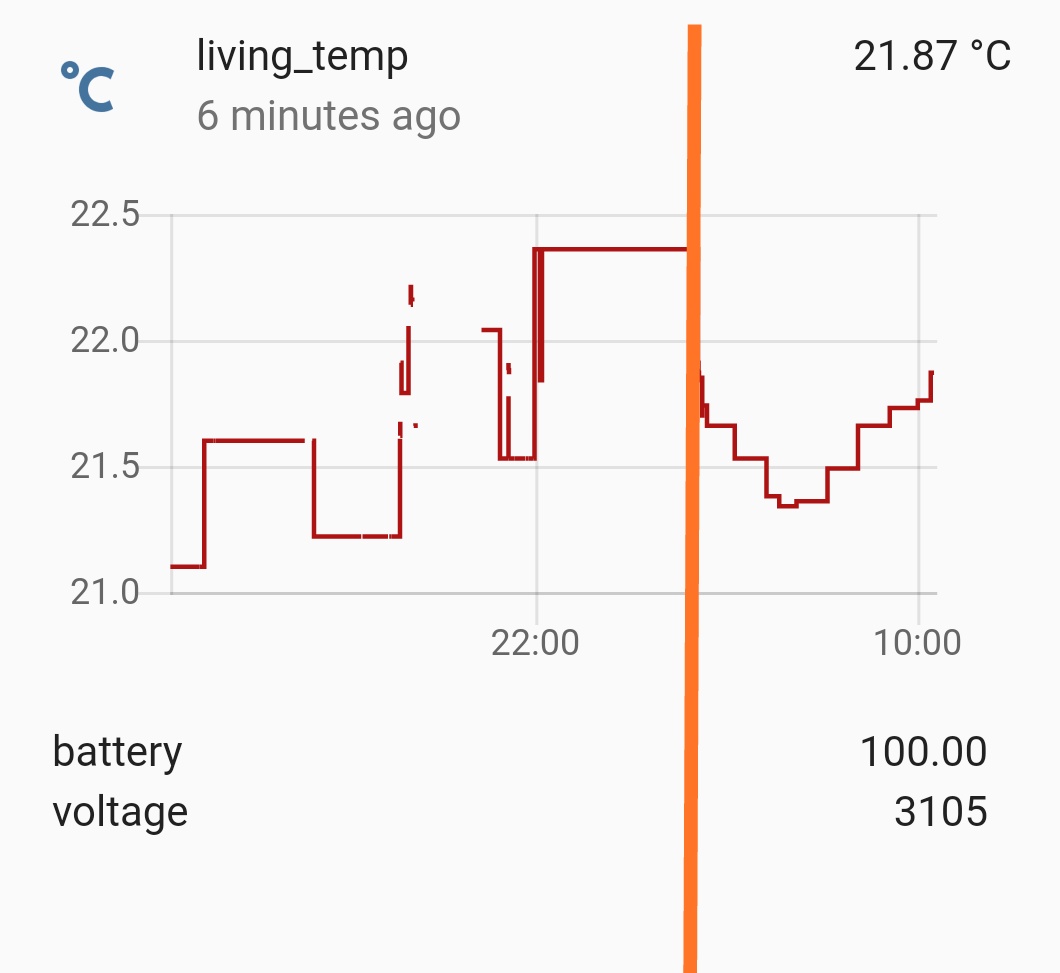
A picture is worth a thousand words.
Left before, right after the fix
evildad
on 2 Sep 2018
Great! Could you make a PR of this by adding a new converter?
 Koenkk
on 2 Sep 2018
Koenkk
on 2 Sep 2018
@evildad I can see how the ugly fix code would work with the 11:41:21 data as it included the voltage but the 12:38:31 has null as the voltage so the return block would not fire.
Sent with GitHawk
 ryanbeaton
on 2 Sep 2018
ryanbeaton
on 2 Sep 2018
the code refers to this zigbee-messages:
2018-8-31 11:41:21 - debug: Recieved zigbee message with data {"cid":"genBasic","data":{"65281":{"1":3205,"4":5032,"5":14,"6":[0,2],"10":43665,"100":1972,"101":5501}}}
````
and
2018-8-31 12:38:31 - debug: Recieved zigbee message with data {"cid":"genBasic","data":{"65281":{"1":3205,"4":5032,"5":14,"6":[0,2],"10":43665,"100":1956,"101":5656}}}
````
and both contain voltage under "1".
The part with a lot of nulls can be ignored, that was my initial thought,
it came from a genBasic devChange zigbee message but parsing didn't work for me.
The working one is a genBasic attReport zigbee message.
evildad
on 2 Sep 2018
it looks like an ugly fix indeed :-)
how could this be better fixed ? it feels like other sensors might also benefit from a proper fix.
 lolorc
on 2 Sep 2018
lolorc
on 2 Sep 2018
Oh my, this fix would make a lot of people happy.
 ciotlosm
on 3 Sep 2018
ciotlosm
on 3 Sep 2018
What do I have to do to use this new converter?
 kaelsaes
on 30 Sep 2018
kaelsaes
on 30 Sep 2018
@kaelsaes update zigbee2mqtt to the latest version.
Koenkk
on 1 Oct 2018
I updated but nothing changed. Than I realized that I use the new devices WSDCGQ11LM instead of the old devices WSDCGQ01LM.
Is there also a new converter for the WSDCGQ11LM available?
kaelsaes
on 4 Oct 2018
The converter is for both devices, old and new.
evildad
on 4 Oct 2018
hi there. i had to re-pair my sensor...now the reading show are always the same. what can i do?
thanks
 mclaudiopt
on 12 May 2019
mclaudiopt
on 12 May 2019
Related issues
 mpuff
·
4Comments
mpuff
·
4Comments
 jwilling
·
4Comments
jwilling
·
4Comments
 z4rn0x
·
3Comments
z4rn0x
·
3Comments
 LCerebo
·
3Comments
LCerebo
·
3Comments
 Underknowledge
·
4Comments
Underknowledge
·
4Comments
Most helpful comment
A picture is worth a thousand words.
Left before, right after the fix