Zettlr: [BUG] Too many "file has been modified remotely" notifications
Description
When I was testing syncing apps, I've seen many "remotely modified" notifications. After settling on one, I get like one a month, perfectly valid.
After upgrading to 1.7.0 beta, I see these notifications very often. It is completely unrelated to remote modifications, since I'm offline. There is something wrong in the saving code.
Reproducing
- Edit a file.
- Switch to another app.
- Retry until you see the message.
Expected behaviour
Not a single "file has been modified remotely" notification as long as I'm neither syncing with other machines, nor modifying files in different apps.
Platform
- OS and version: macOS 10.14.5
- Zettlr Version: 1.7.0-beta1
Additional information
I can debug this, but there's nothing useful in the console.
 Zverik
All 68 comments
Mh, it might be that the logic I use for ignoring the events being generated by the app still has some bugs to it, and doesn't ignore the events correctly on all systems. I'm running the app constantly with the console open, where correct Ignore-statements are displayed each time a "remote" change is being ignored as the origin is the app itself …
 nathanlesage
on 8 May 2020
nathanlesage
on 8 May 2020
Just got the notification again — typed some words, switched to another window, the popup appeared after a few seconds. Here are log contents:
[12:42:48]  Trying to run command through Application: file-save

[12:42:48]  <<< IPC OUT: tags-database
1: {"text":"1","count":2,"className":""}
...
wfh: {"text":"wfh","count":1,"className":""}

[12:42:48]  <<< IPC OUT: tags-database
1: {"text":"1","count":2,"className":""}
...
wfh: {"text":"wfh","count":1,"className":""}

[12:42:48]  <<< IPC OUT: mark-clean
hash: -268821158

[12:42:48]  <<< IPC OUT: file-replace
hash: -268821158
file: {"parent":83715665,"dir":"/Users/ilazverev/Sync/Zettel/Lyft","path":"/Users/ilazverev/Sync/Zettel/Lyft/lyft-2020-05-11.md","name":"lyft-2020-05-11.md","hash":-268821158,"ext":".md","id":"20200504194317","tags":["lyft","weekly"],"type":"file","wordCount":157,"charCount":937,"modtime":1589190071931.57,"creationtime":1588610574867.0217,"linefeed":"\n","modified":false}

[12:42:48]  <<< IPC OUT: tags-database
1: {"text":"1","count":2,"className":""}
...
wfh: {"text":"wfh","count":1,"className":""}

[12:42:48]  <<< IPC OUT: sync-files
0: -268821158

[12:42:48]  <<< IPC OUT: config-update

[12:42:48]  <<< IPC OUT: file-replace
hash: -268821158
file: {"parent":83715665,"dir":"/Users/ilazverev/Sync/Zettel/Lyft","path":"/Users/ilazverev/Sync/Zettel/Lyft/lyft-2020-05-11.md","name":"lyft-2020-05-11.md","hash":-268821158,"ext":".md","id":"","tags":[],"type":"file","wordCount":0,"charCount":0,"modtime":1589190168096.448,"creationtime":1588610574867.0217,"linefeed":"\n","modified":false}
(I wonder why there are 3 tags-database events)
Zverik
on 11 May 2020
Also, the panel that opens with "Develop → Open Logs" stops updating in less than a minute. I cannot inspect IPC logs anywhere else. Hence I'm not sure the log above is relevant.
Zverik
on 11 May 2020
Also, the panel that opens with "Develop → Open Logs" stops updating in less than a minute.
So even though you produce more log entries, it doesn't update them …?
(I wonder why there are 3 tags-database events)
Some events still are produced more often than needed for redundancy and because I haven't gotten to optimizing this.
switched to another window,
This MIGHT possibly have something to do with this
nathanlesage
on 11 May 2020
So even though you produce more log entries, it doesn't update them …?
Yes. For example, 12:42:00 app started, last line was from 12:42:48. Just now I've restarted Zettlr. First and last lines:
[17:15:59]  こんにちは! Booting Zettlr at Mon May 11 2020 17:15:59 GMT+0300 (Moscow Standard Time).
[17:15:59]  Electron reports ready state. Instantiating main process...
...
[17:16:17]  >>> IPC IN: file-modified
[17:16:17]  Trying to run command through Application: file-modified
[17:16:17]  No command registered with the application for command file-modified
Even though it's 17:18 already, and I've opened few notes and edited a saved them a few times after that.
Zverik
on 11 May 2020
I've made a separate issue for the stale log: #774.
Zverik
on 11 May 2020
I've made a separate issue for the stale log: #774.
Thanks! Concerning this issue, btw, I strongly suspect it is related to #773
nathanlesage
on 11 May 2020
I've noticed that when the notification appears, in the object logged along "replacing file", id and tags are empty, and wordCount and charCount are 0. In all previous logged objects for this page with "replacing file", these fields are filled properly.
Just now this notification appeared during me typing the same note! I had to stop typing, click "replace" and then continue typing.
Zverik
on 11 May 2020
in the object logged along "replacing file", id and tags are empty, and wordCount and charCount are 0.
lol, I think a bigger picture emerges that would also solve one fundamental problem that still bugged me: Because I notified after implementing the tabs that the additional file info under the tabs (if you keep your mouse over the tab for one second) also shows "wordCount 0" and "charCount 0" — and I couldn't explain that.
We might be on to something with these three issues, and I think if we find the culprit we can close issues big time <3
nathanlesage
on 11 May 2020
Are these gone in beta 5?
nathanlesage
on 16 May 2020
Just got another one. The process is the same: edit a note, quickly switch to another window, get a notification from Zettlr about an external modification.
Zverik
on 19 May 2020
Just now got a funny one: typed some text, and a few milliseconds before I pressed Cmd+S, a notification window about remote modification popped up. Alas, because of #774, I cannot look into logs.
Zverik
on 21 May 2020
Just now got a funny one: typed some text, and a few milliseconds before I pressed Cmd+S, a notification window about remote modification popped up
Maybe your installation of Zettlr has just developed its own will and is now trolling you :D
But just for clarification: Does this bug happen _no matter where your files are_? Or are there instanes where it does not happen?
nathanlesage
on 21 May 2020
I've been playing around with Zettlr and my files are in my auto-syncing OneDrive. I noticed that everytime I save and the OneDrive syncing isn't paused, the dialog box comes up. Even sometimes without saving, the dialog box would come up and disrupt my flow of writing.
When I pause OneDrive syncing, the dialog boxes go away.
Thanks!
 nielmistry
on 25 May 2020
nielmistry
on 25 May 2020
Yeah, I feared as much. I'm pretty sure this is something the folks from chokidar need to tend to, because it's pretty volatile — Zettlr does not know whether or not you sync files, it just sees the files on your file system, and if syncing services modify them (even if it's just setting a different modification time) this might be the cause.
However, I added a failsafe in beta number 3 that should log the following:
global.log.info(`The file ${descriptor.name} has not changed, but a change event was fired by chokidar.`)
On change events that did not actually modify the modification. Do such info lines (blue colour) appear in your logs at some point?
nathanlesage
on 25 May 2020
So, the good news is, the log panel now has all the lines for two days, instead of the first minute as before. I'd like an option to filter it by message severity — but for now I've just spent five minutes scrolling.
Bad news — no blue lines in there.
I noticed that after I have disables Syncthing (which uploads modified files to my phone), I'm receiving much less notifications: just 3-5 for the entire day. Is there a chance you are looking at file atime instead of mtime?
Zverik
on 27 May 2020
I'd like an option to filter it by message severity — but for now I've just spent five minutes scrolling.
Welcome to my life; currently the necessity to give that log window a decent UX and just scrolling because the other forest fires are hotter is balancing each other out 😆
Is there a chance you are looking at file atime instead of mtime?
umm … atime also accesses, so in fact this should … have more? Mh … Oh, I have an idea, maybe. Just check for all these timestamps, log them and see what is happening here
nathanlesage
on 28 May 2020
I've noticed that the notifications appear more often when a syncing tool is enabled — regardless of whether it syncs or not. This always happens for unsaved documents, even when I'm writing. More often it's just before I press Ctrl+S, or when a window has been switched without saving.
Zverik
on 1 Jun 2020
This is suuuuuuuper weird. I just had the thought the other day that maybe depending on the file system a large file being written emits more than one change (b/c writing in block chunks), but I haven't gotten around fiddling with that yet — because for me the notifications only pop up when I'm editing ridiculously large files
nathanlesage
on 1 Jun 2020
So I have started to notice a pattern: Cmd+S, a file is saved, then the notification, and this line appears in the log:
[15:26:05] [Info] Chokidar has detected a change event for file <saved_file>.md. Attempting to re-parse ..
Could it be a race condition? E.g. a thread to check for modifications reads file data, then I save it, and that thread did not update its data yet?..
Zverik
on 5 Jun 2020
Could it be a race condition? E.g. a thread to check for modifications reads file data, then I save it, and that thread did not update its data yet?..
This is what I've been fearing for some weeks right now, but I couldn't really wrap my head around it.
I just toyed around a little bit with the saving mechanism, and it certainly seems as if one of the change events doesn't line up with what the app expects.
For every save, the FSAL buffers an event it expects to see in a short amount of time, and as soon as the event arrives, the FSAL will first check if the event it just noticed is something it should ignore. So normally, for every save event one "change" event will be pushed into the buffer so as soon as chokidar notices the change, the FSAL will look into that buffer and see "Ah, I expected this event. Let's not do anything because the internal state is already correct!"
What I am currently suspecting is that in rare situations (or, maybe specific saving-behaviours?) the FSAL accidentally "swallows" two change events instead of one, so that in the third "change" event instance there is no expectation of that event, so Zettlr will assume someone has remotely changed the file. But I have not yet had the ideas I need of how I might monitor this behaviour :S So if you have an idea, I'm open to suggestions, because I'm out of ideas …
What I can say for sure is that there is exactly one "ignore change"-buffer generated for each saving run.
nathanlesage
on 5 Jun 2020
Hey all, based on the beta 11 notes just dropping in to say I experience this one too. Saw it in betas including beta 10.
Running on Windows 10 Pro AMD CPU and 64GB ram.
I had assumed it was because my note directory is in a Google Drive synchronised folder.
 smitec
on 15 Jun 2020
smitec
on 15 Jun 2020
Thanks for reporting! I just found something: Apparently the modtime which is being used to make sure a file is really modified somehow has 4 digits floating precision, which is new to me. I'll investigate this, but maybe the precision is too high for Zettlr's little bit sluggish process.
nathanlesage
on 15 Jun 2020
Alright everyone, I may have found something (no guarantee, though!):
- Zettlr up until 1.6 used
stat.mtime.getTime()in order to get the timestamp of modification from files - For the 1.7 beta and the FSAL refactor I switched to
stat.mtimeMs, because I figured it might be faster. However, this was also much more precise (four floating point precision instead of rounded numbers) - I have just re-stored the old behaviour, because maybe the high precision of
mtimeMswas the culprit.
What my theory is (and has been):
- Zettlr shall save the file, so it tells the watchdog to ignore the next change event
- Then it saves the file and updates the modification timestamp of the file descriptor afterwards
- The watchdog received the
changeevent, but ignores it as expected. - In some rare circumstances, mostly (but not always) in conjunction with synchronization applications, chokidar recieves yet another event, for which the
hasBeenModified-function is for that I retrofitted to the FSAL - Due to the high precision, the updated modtime was not precisely the same as what the file's inode had a few nanoseconds later
- Therefore, Zettlr assumed the files to be different and hence the whole remote notification disaster
Changing back to the mtime.getTime() is also indicated because now the whole mechanism works exactly like in the old file tree, hence the notifications should be gone again. So if anyone wants to test this, please feel free, unfortunately it's not in the most recent beta :(
nathanlesage
on 15 Jun 2020
Cloned the repository, followed the process with yarn, and tested it with my files and Dropbox with sync on. It still gave me this:
[14:56:37]  >>> IPC IN: file-save
[14:56:37]  Trying to run command through Application: file-save
[14:56:37]  <<< IPC OUT: tags-database
[14:56:37]  <<< IPC OUT: tags-database
[14:56:37]  <<< IPC OUT: mark-clean
[14:56:37]  <<< IPC OUT: file-replace
[14:56:37]  Chokidar has detected a change event for file test.md. Attempting to re-parse ...
[14:56:37]  <<< IPC OUT: tags-database
[14:56:37]  <<< IPC OUT: sync-files
[14:56:37]  The translation string was malformed: Open Logs!
[14:56:37]  <<< IPC OUT: config-update
[14:56:37]  <<< IPC OUT: sync-files
[14:56:37]  The translation string was malformed: Open Logs!
[14:56:37]  <<< IPC OUT: config-update
[14:56:37]  <<< IPC OUT: file-replace
[14:56:43]  <<< IPC OUT: replace-file-contents
In the console, I have
+++ WATCHDOG IGNORE +++ change:C:\Users\---\Dropbox\Zettelkasten\test.md
FSAL state changed: fileSaved
FSAL state changed: fileContents
FSAL state changed: openFiles
+++++ SYNCING OPEN FILES WITH RENDERER +++++
FSAL state changed: openFiles
+++++ SYNCING OPEN FILES WITH RENDERER +++++
FSAL state changed: file
Sending small file update
Pausing sync temporarily did not alter anything. Closing dropbox also didn't change anything.
Is it possible to store the current cursor position and just restore it when the file loads like that? It wouldn't fix things, but might make it more bearable.
 KarlClinckspoor
on 15 Jun 2020
KarlClinckspoor
on 15 Jun 2020
Is it possible to store the current cursor position and just restore it when the file loads like that? It wouldn't fix things, but might make it more bearable.
This is also an idea, yeah — but I want this bug solved, because it can't be that it is like that … so thanks for making sure it again didn't fix anything and I have to go back at it!
nathanlesage
on 15 Jun 2020
Commenting because of the update notification:
I have the same problem, but I notice it came up when I started using dropbox to share my files between multiple computers. I assumed it might have to do with Dropbox constantly altering the state of files in the system.
 PhilHem
on 16 Jun 2020
PhilHem
on 16 Jun 2020
I assumed it might have to do with Dropbox constantly altering the state of files in the system.
That was our all initial idea, but something is off. Furthermore, I sync all my files using Nextcloud, and I almost never get these notifications; I've had them like 3 times since I started with the betas. This is beginning to drive me crazy, as this bug clearly exists, but no indication why the f*** this would happen
nathanlesage
on 16 Jun 2020
I use iCloud and I get that notification all the time. (1.7.beta.10)
 emarshphd
on 16 Jun 2020
emarshphd
on 16 Jun 2020
iCloud is not recommended either way, because it doesn't really align with "default" cloud application behaviour … we've had A LOT of issues with iCloud in the past. Unfortunately we can't really break free from the constraints set by chokidar.
nathanlesage
on 16 Jun 2020
I use OneDrive and I had the issue for a few days after I started using the beta. This issue was limited only to files stored in OneDrive directory that is actively synced. On the other hand, I did not have any issues with files that are stored locally. However, I haven't encountered the issue recently.
 parthvnp
on 16 Jun 2020
parthvnp
on 16 Jun 2020
I upgraded to 1.7.0-beta.11 from 1.6.0 tonight, macOS 10.15.5.
I saw the error while writing a paper this evening. The files were stored in iCloud (well, specifically under ~/Library/Mobile Documents/com~apple~CloudDocs/).
I was just now able to trigger the error by pasting a ton of text into a document and then saving.
[23:45:24] Chokidar has detected a change event for file Blah Blah Blah.md. Attempting to re-parse ...
 cjp
on 17 Jun 2020
cjp
on 17 Jun 2020
error by pasting a ton of text into a document
This is something I have observed myself: It depends on the amount of code; something past 10,000 words seems to trigger this behaviour (which would be in favor of the two-event-theory).
You know what? I think I'll just for one beta simply log EVERY event detected by chokidar so that we can be certain what is happening under the hood.
nathanlesage
on 17 Jun 2020
Dear everyone, I have just increased the log verbosity on the watchdog, which means: EVERY event that the watchdog will emit will now be logged with a decent amount of verbosity so we can double-check this. It'll look like this:
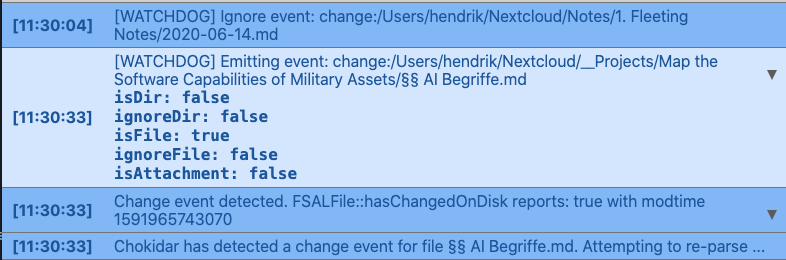
Watchdog Ignore Event means that the FSAL expected that event (e.g. when you save a file), whereas Watchdog Emitting Event means the FSAL did not expect that event, and hence wants to handle it. I have attached all the variables that are being checked to determine if we should discard the event or REALLY handle it (isDir & isFile == Does that exist on the hard drive? ignoreFile & ignoreDir == Is it a file or dir we care about? isAttachment == Is it an attachment?)
You can immediately begin to test it, or wait for the next beta. But the sooner we can pinpoint what is causing these notifications, the better :)
nathanlesage
on 18 Jun 2020
So guys, the beta's here, and just had an idea that I accidentally fixed this:
I noticed that I had duplicate code: When a root file has changed, and when a normal file has changed, but both were handled separately. I now migrated both into each other, so now it might even work! (The hasBeenModified-check did not occur for root files without a containing directory loaded into Zettlr, so this might've been the key!)
Please make sure to check the logs, just in case, but please also report back to me if these notifications are now gone!
nathanlesage
on 18 Jun 2020
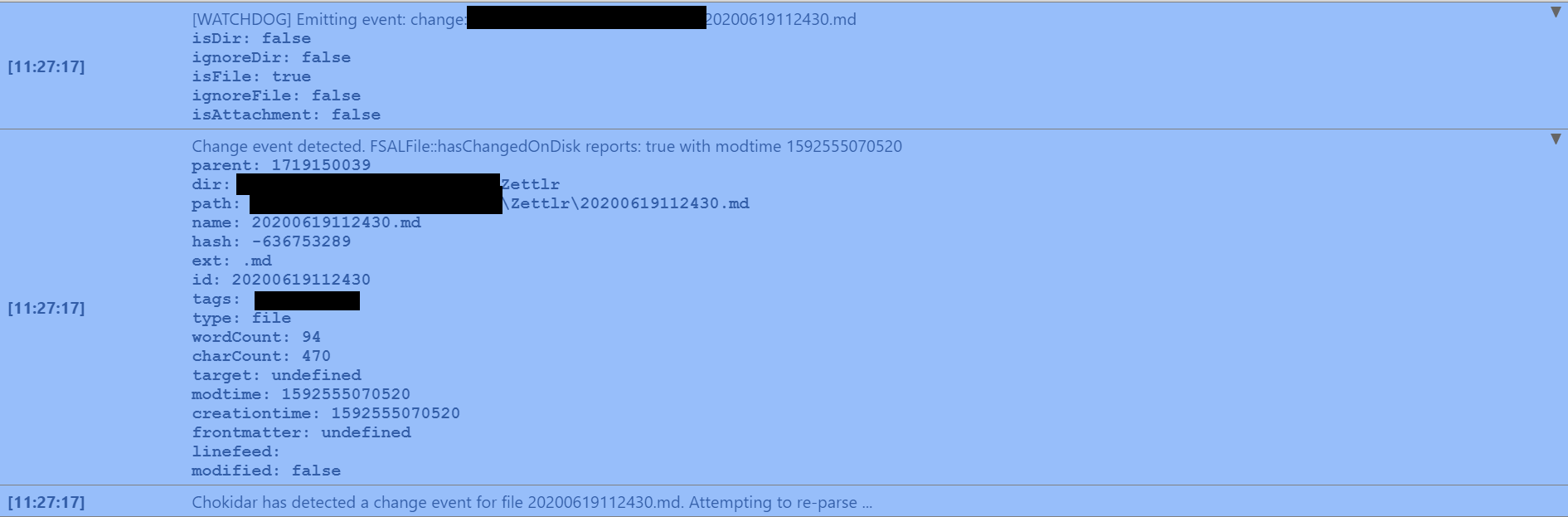
Still happening to me (Windows 10, Zettlr folder is syncing to Google Drive).
Below is the screenshot from what I think is that part of the logs. If it isn't let me know where else to look:
 BellLongworth
on 19 Jun 2020
BellLongworth
on 19 Jun 2020
Thanks for the notification! While I was still unable to reproduce this on my system, there seems something interesting. I did some research, and I found out the following:
- First, if you don't use the C-drive, it seems as if chokidar doesn't work at all currently, but this would be the opposite of this bug (too few notifications)
- Furthermore, apparently in some circumstances merely opening a file can emit the daunted change-event
But then I stumbled upon an issue mentioning the configuration option awaitWriteFinish. I did not use this option in the past, because it makes the whole process more "sluggish" (because it holds change-events for a considerable amount of time before actually emitting them), but decided to give it a shot, because of some significant sentences in the docs:
By default, the add event will fire when a file first appears on disk, before the entire file has been written. Furthermore, in some cases some change events will be emitted while the file is being written. In some cases, especially when watching for large files there will be a need to wait for the write operation to finish before responding to a file creation or modification.
This would verify a lot of hypotheses I've made for the cause of this issue, so here's what I am going to do:
- Add another configuration option in the Preferences ("Advanced"-tab) to activate file polling. So everyone who has this problem, can activate this option in chokidar and adjust the time in order to prevent these events firing too early to give Zettlr a chance to finish writing on slower disks before the events are emitted.
I'll be dropping a new beta containing this feature (by default file polling is inactive), so please make sure to check it out!
nathanlesage
on 19 Jun 2020
The beta is out now. Please play around a little bit with the newly added setting to see if that mitigates the issue, so that we can hopefully release 1.7 next week!
nathanlesage
on 19 Jun 2020
N.B.: A restart is necessary after changing this setting in order to apply it!
nathanlesage
on 19 Jun 2020
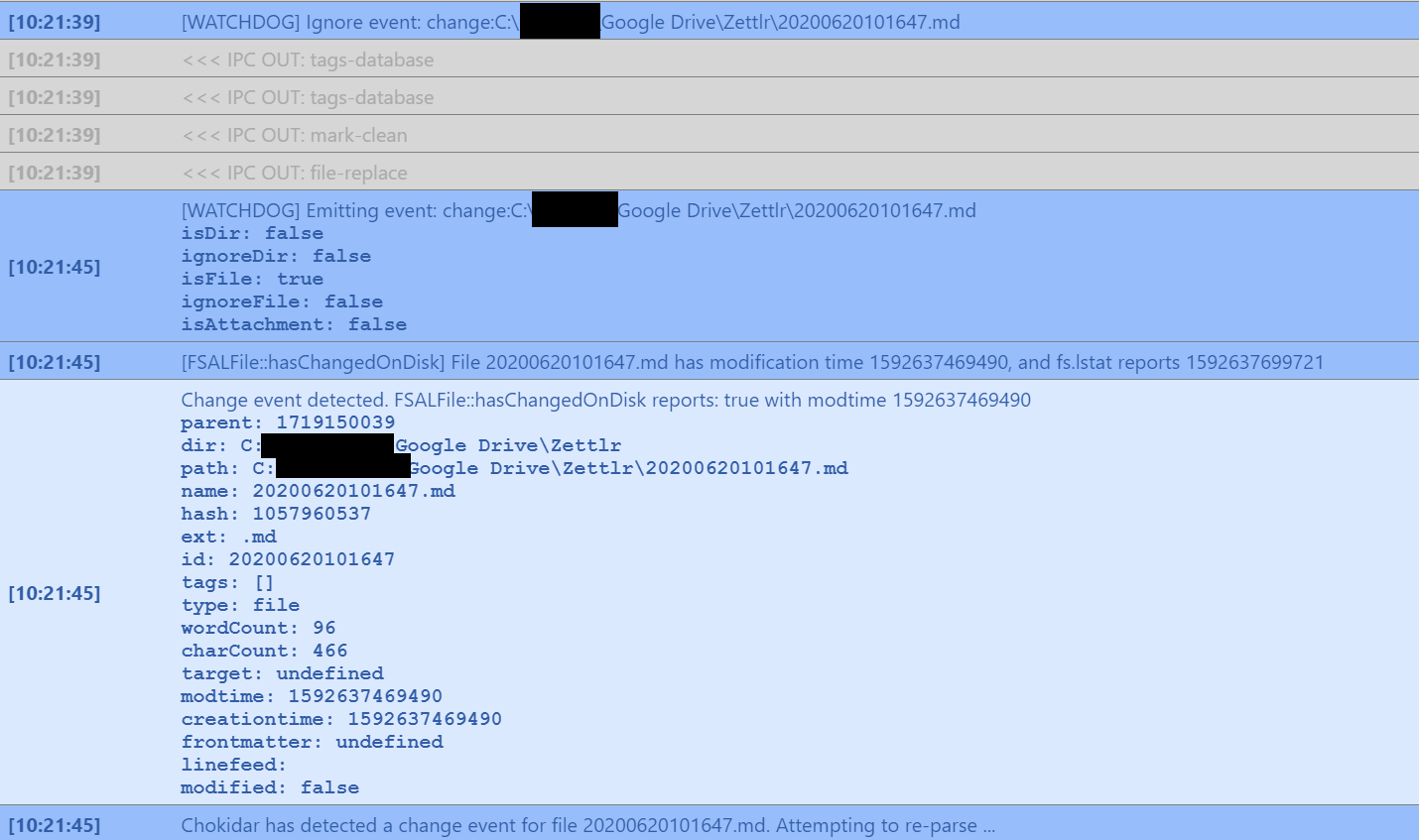
One more for you. Beta 13, default parameter.
BellLongworth
on 20 Jun 2020
Okay, there are 6 seconds between both events — which would translate to a threshold of at least 6000, maybe even 6500. But it indicates, that apparently Google Drive is also doing something to the file which triggers the change event.
That being said, @BellLongworth I doubt the problem you are facing is Zettlr's fault. 6 Seconds indicates that GDrive is doing something to the files, because I hardly think that 96 words need 6 seconds to write to disk. But I don't know what change this might be …
nathanlesage
on 20 Jun 2020
@Zverik Did you have the time to test it out yet?
nathanlesage
on 22 Jun 2020
In two days after installing beta 13 I haven't had a single notification.
Zverik
on 23 Jun 2020

nathanlesage
on 23 Jun 2020
(Let's hope it stays like this, though :D But at least we can now release 1.7)
nathanlesage
on 23 Jun 2020
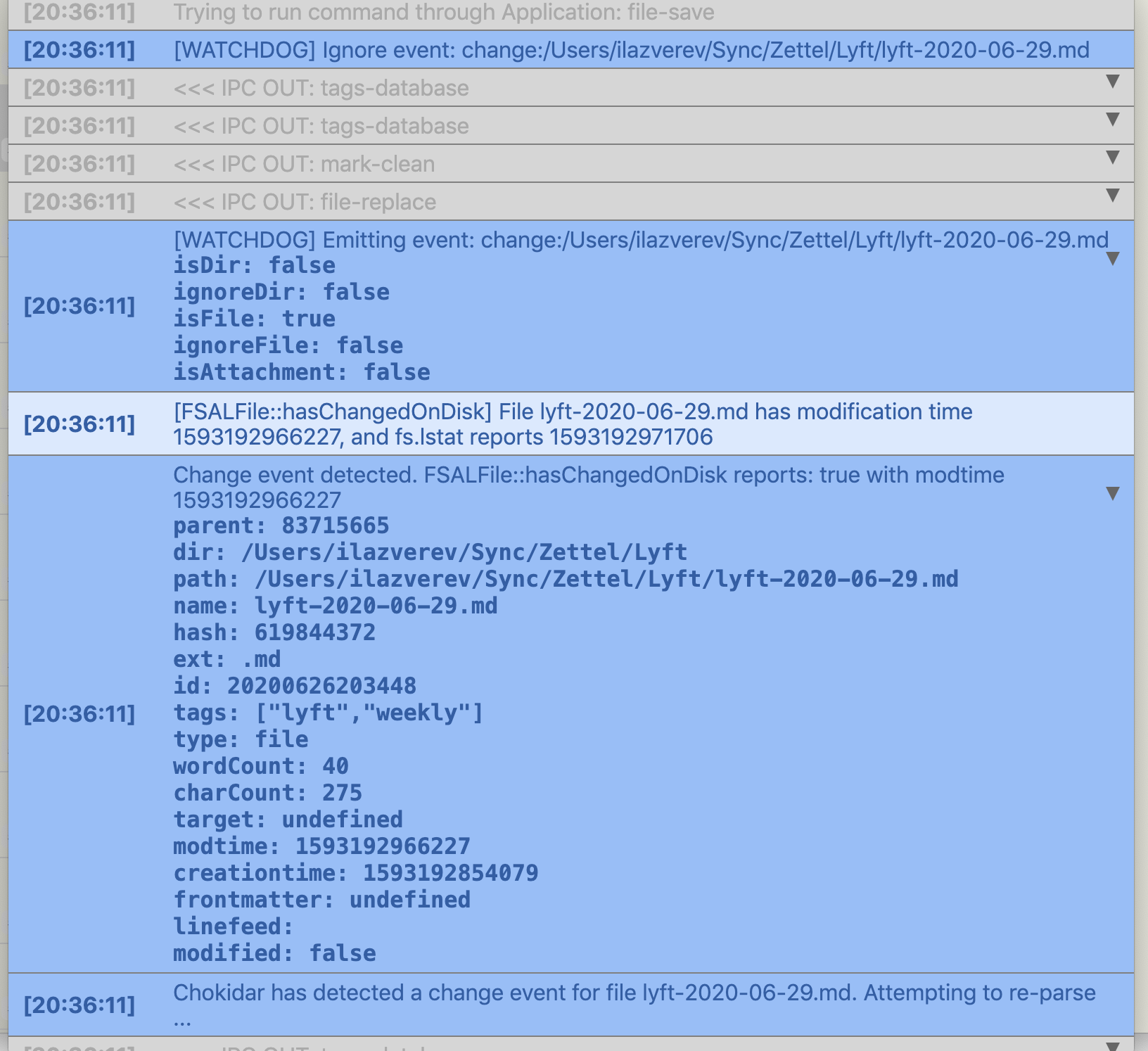
I've got the same notification multiple times in a row right after saving a note with Cmd+S (I'm on macOS. Using beta 13).
Zverik
on 26 Jun 2020
Yes, same for me, but this time I had the idea where to look: The FSALFile::hasChangedOnDisk notification is key: Because I now fear that the resolution was simpler than thought, because I never update the cache … there'll be some patches in the next hours!
nathanlesage
on 27 Jun 2020
In case it helps, on version 1.7.0 these 'file has been modified remotely' messages also appear when not using syncing software like Gdrive or Dropbox.
I can suppress those messages successfully with the 'watchdog', so it doesn't affect me as much, although that's just a way to hide the problem from what I understand.
 Jos512
on 4 Jul 2020
Jos512
on 4 Jul 2020
To be fair, the amount of these notifications is much lower than before. I get maybe one-two a day.
Zverik
on 8 Jul 2020
To be fair, the amount of these notifications is much lower than before. I get maybe one-two a day.
@Zverik At least, it's something I guess! :)
Still, something bugs me that I cannot pinpoint this issue. I think I'll have to take a good break from Zettlr for a few days and then have a look at the complete FSAL again to spot this issue.
I think we should also develop unit tests for the FSAL, because I'm sure that'll unearth some unknown bugs as well. I have neglected writing more tests for a better coverage for way too long …
nathanlesage
on 8 Jul 2020
Hello there! I'm running ver. 1.7.1 along with Google Backup and Sync in Windows 10 (64 bit, comp 2004), and I'm receiving this messages everytime the app syncs, so, almost every minute. If I select the option to update the files with the remote file, this results in my writing being deleted with every sync.
 glazcano
on 13 Jul 2020
glazcano
on 13 Jul 2020
Activating polling worked for a couple of minutes, but now it's back. It keeps activating with every save. Tried a couple of times, both shorter and longer that the default, to no avail.
EDIT
This appears to be a Google Backup and Sync problem, because Dropbox nor OneDrive gave me this problem, at least not with the frequency that Backup and Sync does (in Google it happens with every save)
EDIT 2
As per the comment above about the 6 second separation in the log, I put an extra long threshold in the Watchdog feature (10000 ms or 10 seconds), and the notifications ceased for Google Sync. Don't know if this is ideal for all cases tho. Also, the testing file was really short (<100 words)
glazcano
on 13 Jul 2020
I experienced this as well (with One Drive). Moving the directory out of One Drive seemed to help a bit: the pop up still shows up on almost every save, but when I choose to load the remote file from disk, at least it does not revert my changes any longer. I can edit in peace.
 canpolat
on 13 Jul 2020
canpolat
on 13 Jul 2020
I confirm this: last week I was editing some notes very actively, and got the notification on every second saving basically, which was a lot. Today I've enabled polling with the default 1 sec, and nothing has changed. I've increased the threshold to 10 seconds and it's better — although I'm not sure how sync updates will now be handled.
Zverik
on 13 Jul 2020
That's definitely odd. It more and more seems like a race condition with certain cloud providers, because for the love of good, I almost never get these notifications, and I also shove all my documents up the cloud o.O But it does seem to center around OneDrive, does it?
nathanlesage
on 13 Jul 2020
I have been getting these this with pCloud and then Syncthing, and I see Google Sync mentioned above.
Zverik
on 13 Jul 2020
I have been getting this a lot today, but pretty sure it was being triggered by the creation of other files (in this case image files) in the same directory as the open markdown document.
 marcusyoung
on 14 Jul 2020
marcusyoung
on 14 Jul 2020
it was being triggered by the creation of other files (in this case image files) in the same directory as the open markdown document.
Finally, a new clue! Thank you for reporting this!
(This issue does begin to feel a little bit like some RPG with quest clues coming in piece by piece :D)
nathanlesage
on 15 Jul 2020
Used it the whole morning, taking notes from a videomeeting. No messages since incrementing the threshold to 10 secs
glazcano
on 15 Jul 2020
So, I'm finally pinning this thing; this bug is getting out of hand and I'm still at a loss what causes it, as I fail to reproduce this thing every single time.
The only thing I noticed was that this sometimes happens to me when I create a file in Zettlr itself, but there is no pattern visible …
nathanlesage
on 23 Jul 2020
If it helps, I also came across this bug when editing files within Zettlr that were in a folder being synced with Google Backup and Sync.
As a workaround for now, I pause syncing while I'm editing those files in Zettlr and resume syncing once done.
 jsstanley
on 23 Jul 2020
jsstanley
on 23 Jul 2020
@nathanlesage I agree with @jsstanley. I think the easiest way is to start editing a file that is being actively synced via a cloud service (while the wathcdog polling is disbaled). I see this behavior when I edit files that are in my OneDrive folder and then it stops when I pause syncing.
canpolat
on 23 Jul 2020
Thanks for the responses!
nathanlesage
on 23 Jul 2020
Sooo, I'm currently playing around with logging a lot of information to see what's going on. So, while many times it works great, here we have a weird bug:

As you can see, as soon as the file is opened the watchdog already emits the event, and a second one after the file has been saved and the handler has been closed. So I'm more and more convinced that this is actually a bug in chokidar. I'll try downgrading chokidar to the version we had in 1.6 to see if this fixes the problem.
Further: This only seems to happen with bigger files of at least 2.000-3.000 words
nathanlesage
on 29 Jul 2020
I am a moron. You know what I just found out, rubberduck-debugging the whole saving process for the umptieth time just now? After each safe, we need to update the file metadata so that the new correct modification time is then part of the file object. Well, and that never happened, because instead of passing the path of the file to retrieve the modtime for, I passed the full file descriptor, obviously resulting in an error. And you know why I only found this by accident? Because I caught the errors and did nothing 🤦
Kids, remember always to log errors …
_(Releasing 1.7.3 in a few minuntes, so make sure to test it out)_
nathanlesage
on 1 Aug 2020
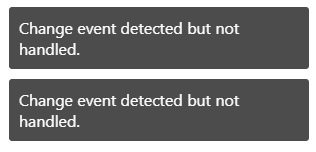
I've tested 1.7.3 a bit today (with OneDrive syncing ON and watchdog polling OFF). It seems to have been fixed. When I save a file I get (usually multiple) "Change vent detected but not handled" notifications. But my changes are no longer reverted. Looks good :) Thank you for the fix.
canpolat
on 1 Aug 2020
Hi! After updating to 1.7.3 I turned off the watchdog threshold thing, and I'm experiencing the same behaviour as @canpolat , with the "Change event detected but not handled" message. Now, this doesn't interrupts my workflow nor reverts the changes that I made to the file, so hoorray!
glazcano
on 1 Aug 2020
Perfect! 1.7.4 is in the oven, and removes that message :)
nathanlesage
on 1 Aug 2020
Related issues
 Noisecommander
·
3Comments
Noisecommander
·
3Comments
 tedesmac
·
5Comments
tedesmac
·
5Comments
 klaus7
·
4Comments
klaus7
·
4Comments
 volt4ire
·
4Comments
volt4ire
·
4Comments
 Alopex4
·
4Comments
Alopex4
·
4Comments
Most helpful comment
I am a moron. You know what I just found out, rubberduck-debugging the whole saving process for the umptieth time just now? After each safe, we need to update the file metadata so that the new correct modification time is then part of the file object. Well, and that never happened, because instead of passing the path of the file to retrieve the modtime for, I passed the full file descriptor, obviously resulting in an error. And you know why I only found this by accident? Because I caught the errors and did nothing 🤦
Kids, remember always to log errors …
_(Releasing 1.7.3 in a few minuntes, so make sure to test it out)_