Zettlr: Citations not rendering in Version 1.4.0-beta (1.4.0-beta)
Description
Citations not rendering anymore. None of my formerly rendering citations would render anymore. They are not recognized as citations when starting with the leading "@" character. The "View attachments" sidebar shows the message "References: Could not update bibliography!". I updated the database from Zotero, reconnected the file in the preferences and restarted the computer after updating to the new beta version. No new Java version available.
Reproducing
Starting new document. When trying to include new reference starting with "@" no reaction from Zettlr. After completion of correct citation statement (in my case @author-title-year) I get no rendering (either in text or in PDFs).
Expected behaviour
Proper connection to .json file? I assume, that's the problem.
Screenshots
Platform
- OS: MacOS
- OS Version 10.14.5 (18F132)
- Zettlr Version 1.4.0-beta)
Additional information
 jrennstich
All 17 comments
Does Zettlr offer you suggestions for titles when you type an @? If it does not, would you mind opening up the development console (Activate Develop mode in the advanced preferences, then from the Develop menu) and look out for any errors? Can't reproduce here using the same system configuration unfortunately …
 nathanlesage
on 6 Jul 2019
nathanlesage
on 6 Jul 2019
Does Zettlr offer you suggestions for titles when you type an
No :-(
Hope this helps
default 09-31-51.065271 +0200 loginwindow -.txt
jrennstich
on 7 Jul 2019
Not quite sure how to track/report errors using the Develop tools in Zettlr. If the file above (which I got from the Terminal filtering "Zettlr" is not helpful, I'd be grateful for some brief pointers how to look for errors using the Develop tools in Zettlr.
jrennstich
on 7 Jul 2019
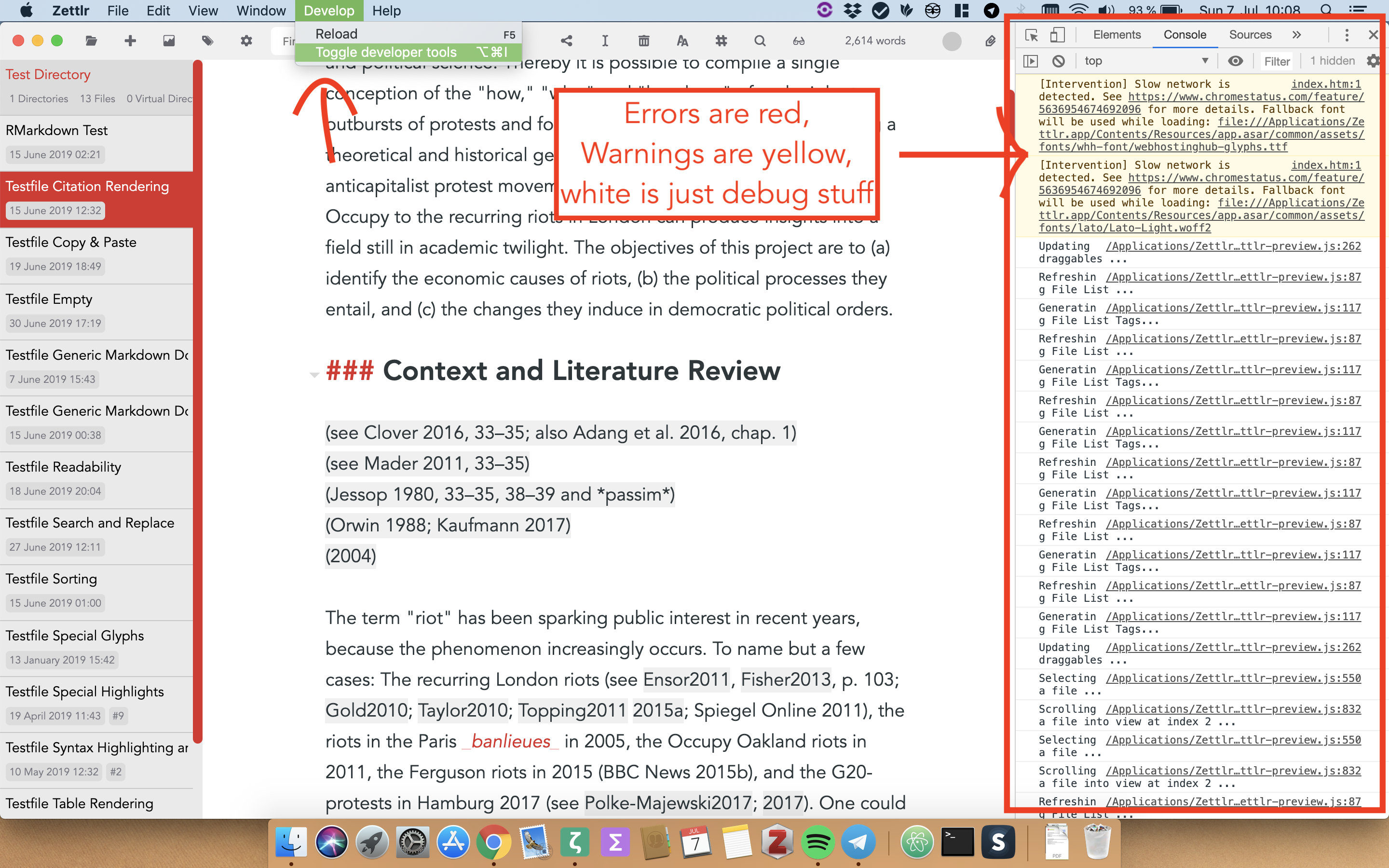
With the debug mode in the preferences on, here you go:
nathanlesage
on 7 Jul 2019
Ah, thx. V helpful. After I selected "Verbose" under levels I received the following errors:
[Violation] 'setTimeout' handler took 233ms
[Violation] Forced reflow while executing JavaScript took 40ms
[Violation] 'setTimeout' handler took 54ms
[Violation] Forced reflow while executing JavaScript took 47ms
/Applications/Zettlr.app/Contents/Resources/app.asar/node_modules/codemirror/lib/codemirror.js:7992 [Violation] 'mousewheel' handler took 172ms
/Applications/Zettlr.app/Contents/Resources/app.asar/node_modules/codemirror/lib/codemirror.js:148 [Violation] 'setTimeout' handler took 101ms
The Zotero .json file is 6.7 MB
There was always a noticeable time-lag when starting with @ but now nothing happens and the existing citations are not rendered.
jrennstich
on 7 Jul 2019
The Zotero .json file is 6.7 MB
6.7 Megabytes? o.O How many entries do you have? I have a file of just 350kb (~600 entries), and it works fine. Would you mind checking with a smaller file? What I could imagine is that probably the citeproc engine just takes a lot to initialise due to the size. Plus it might have a significant memory impact.
nathanlesage
on 7 Jul 2019
P.S.: These "Violations" are mainly indications that one could optimise the speed of some components, but nothing problematic :)
nathanlesage
on 7 Jul 2019
I feared as much. 13253 entries.
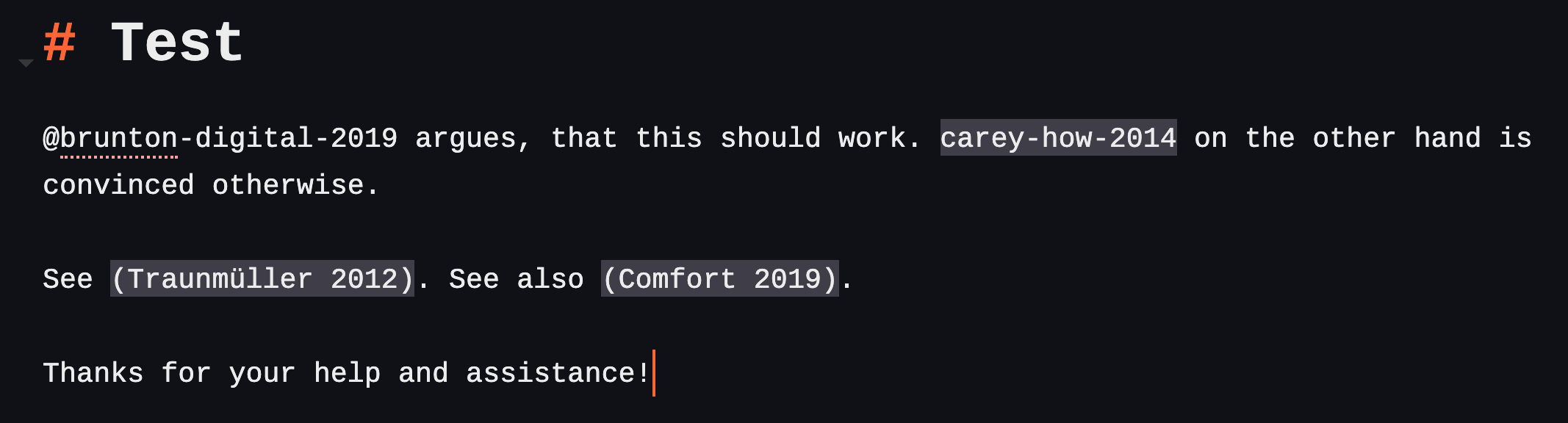
Works fine with test database. So it's the size. One problem remains: When using citations as in-text (that is without the []) then I get the result as pictured. Not sure if that's the regular behavior in Zettlr.
The references all appear in the sidebar list.
Thanks for clearing that up. I assume, with a large database that feature is not going to work then?
jrennstich
on 7 Jul 2019
One problem remains: When using citations as in-text (that is without the []) then I get the result as pictured.
Thanks for reporting, it's fixed now both in Citr and in Zettlr!
nathanlesage
on 7 Jul 2019
I assume, with a large database that feature is not going to work then?
I don't know. I mean, after all what should be inside that database file are only the literature references themselves. But it sounds as if you have put all notes and extracted annotations in it as well, so maybe it helps by telling BetterBibTex to only export the raw references (albeit I don't know from scratch where such an option would be).
nathanlesage
on 7 Jul 2019
Hmm. Im using BetterBibTeX as well and there I excluded the notes and abstracts and all. Is that possible in a simple export as well from Zotero? I wasn’t aware of that.
jrennstich
on 7 Jul 2019
Ah, so I would export using BBT but the .json format instead of one of the bibtex formats. That makes sense. I give that a try. Thx for the suggestion.
jrennstich
on 7 Jul 2019
BTW, the option is in the preferences of the BBT-tab under Zotero. First window/tab there. I’ll give it a try later.
jrennstich
on 7 Jul 2019
(First time posting here, so kudos for the great work! I've been using a custom SublimeText plugin, loosely based on sublime_zk, with a lot of hacks. Zettlr is the best out-of-the box solution I found for my workflow.)
If I understand correctly, the fix did not address the behavior reported in the original post, only the follow-up. Sorry if it's not the case.
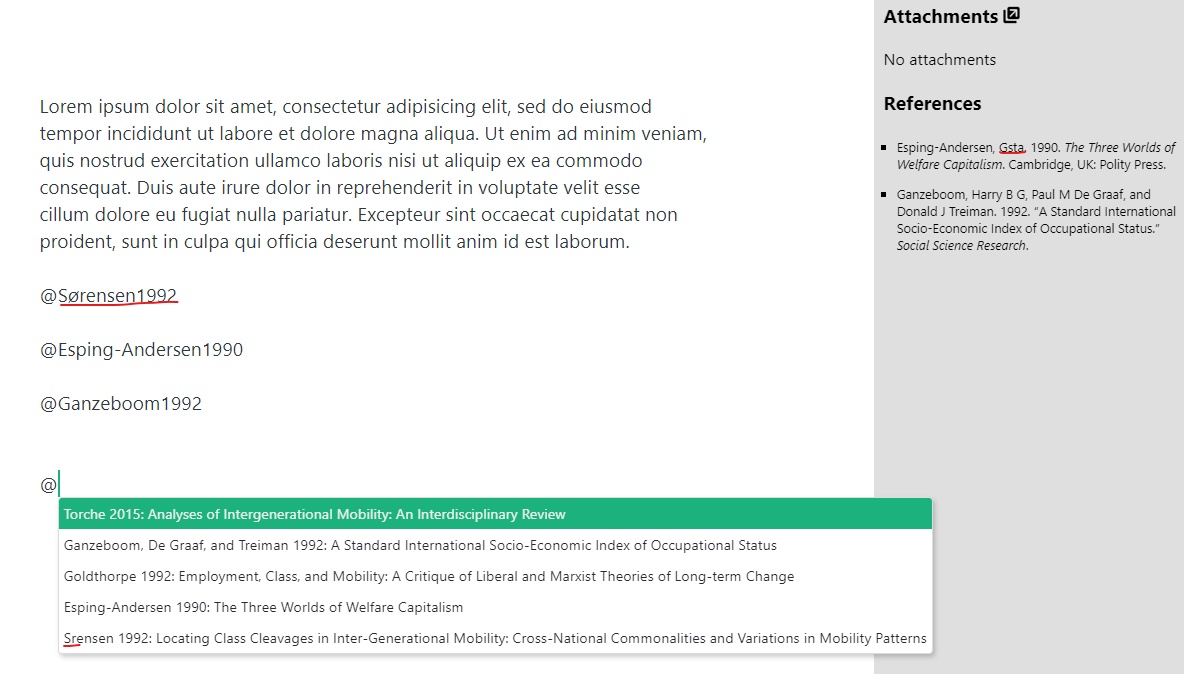
I'm experiencing similar behavior with version 1.4.0-beta on Windows 10: no suggestions shown when I type "@" and the attachments sidebar shows "References: Could not update bibliography!". But citations are rendered correctly when exporting to html or pdf. No errors shown in debug mode (as instructed above).
It doesn't seem to be the size: I use a .bib file (generated by Mendeley) of ~700kb and ~900 entries. I guess the problem has to do with special characters in citekeys. I did some tests with versions 1.3 and 1.4 and an example library with a few entries (attached, with extension changed to .txt).
Zettlr 1.3, library_original.bib:
Zettlr 1.4, library_original.bib:
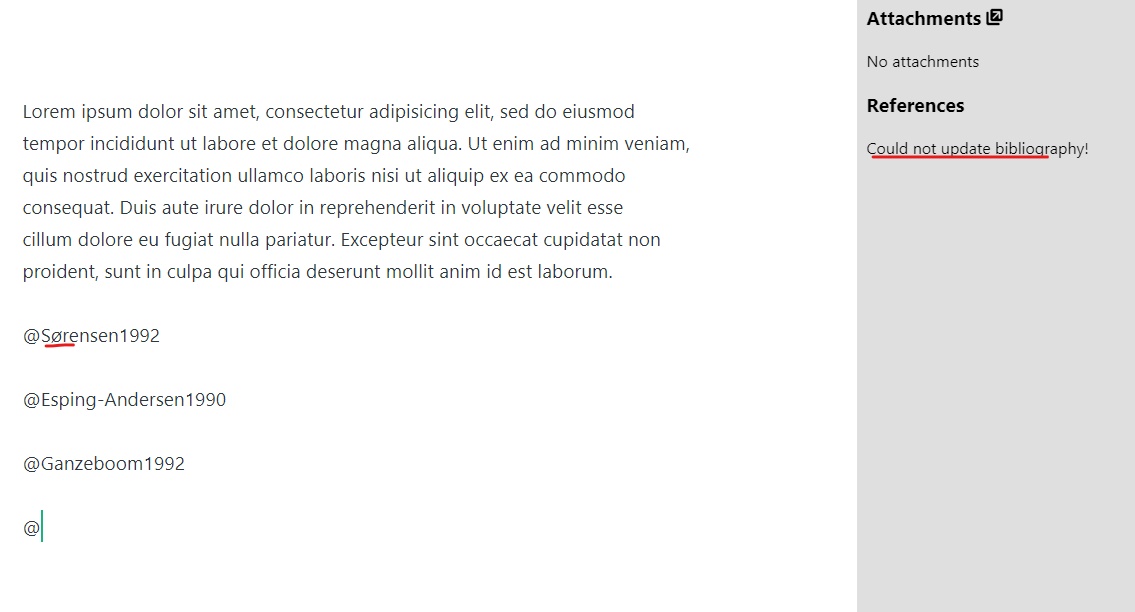
Zettlr 1.4, library_modified.bib(only difference is "o" instead of "ø" in line 47):
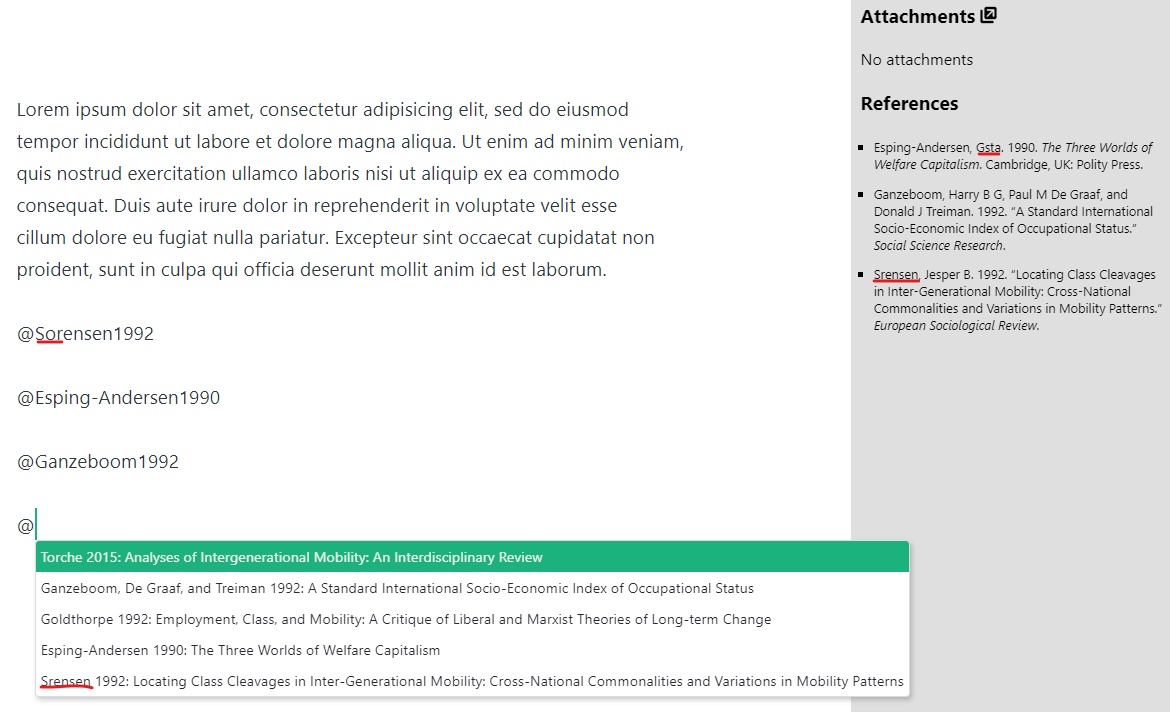
 weverthonmachado
on 1 Aug 2019
weverthonmachado
on 1 Aug 2019
There's a documentation of the citeproc behaviour at https://pandoc.org/demo/example19/Extension-citations.html.
I simply stick to their definition of CiteKeys, which included only "alphanumerics", hence: a-z, A-Z, 0-9 and some special chars. And if the references tell you "References: Could not update bibliography!", this means that Citeproc has reported an error during startup, which may very likely point to an error in its own startup mode.
After testing I can confirm that the Citr library produces the error, as it sticks to the official citeproc-documentation.
Due to the fact that special chars, which are mainly used by programs, can always cause problems, I personally tend to stick to this strict definition, because it ensures maximum compatibility with all parsers. Besides, citekeys are only used for reference, and therefore it shouldn't prove difficult to stick to ASCII-characters, or?
nathanlesage
on 1 Aug 2019
Yes, totally fine. I agree that it's better to stick to a strict definition for maximum compatibility. I only bumped into this because Mendeley creates citekeys automatically and includes special chars (they can be manually edited).
weverthonmachado
on 1 Aug 2019
Just double-checked with my Zotero installation — BetterBibTex converts umlauts into their ASCII equivalents, so they're also playing it safe. So unless it becomes a problem for anyone, I think I'll be sticking to the strict version, but I'll also add a notification that some keys are malformed, if there are any!
nathanlesage
on 1 Aug 2019
Related issues
 tedesmac
·
5Comments
tedesmac
·
5Comments
 klaus7
·
4Comments
klaus7
·
4Comments
 Noisecommander
·
3Comments
Noisecommander
·
3Comments
 danieltomasz
·
5Comments
danieltomasz
·
5Comments
 carregal
·
5Comments
carregal
·
5Comments