Zettlr: Add new 'Zettel' by clicking on a newly generated ID
First of all, I really want to thank you for your effort in writing Zettlr. As many other people here, I was/am in a constant negotiation with software implementations of the Zettelkasten method and my own workflow. Years ago I started using Daniel Lüdeckes great software. After the recent reconsideration of my current approach, I came to realize, that: a) I am using the software all wrong and therefore will never benefit from it as I was planning to; and b) since I already suffered twice from using software, that was at some point not usable anymore, I came to agree with the guys from zettelkasten.de and you,@nathanlesage, that the only sustainable way of dealing with this, is a plain-text approach. Nonetheless, I think Lüdeckes ZKN3 software is great, but – for me –, it obscures the fact that you have to do a lot of work yourself (I know, that is a user problem and not software-related).
That’s why I came across Zettlr in the first place. Then I saw that the books of your library in the background of your videos and the 'Zettels' you are writing for your own Zettelkasten. Since they are pretty exactly the same as my own areas of interest/work, I thought: This must be the right software for me. :-) Additionally, I really like your political conviction to FLOSS. :+1:
Now to my request:
Description
After long theoretical considerations of how to implement the Zettelkasten method and the question, if the 'Folgezettel' is the essential characteristic of Luhmann or not (for former argument see Daniel Lüdecke, for later see Sascha Fast) I had the idea, that it would be nice to create a 'Folgezettel' by generating a new ID in Zettlr and then click on it. So you would write [[new id]], then click on the link and find yourself in a new Zettel file, which already contains the generated ID and a Backlink to the former Zettel. I think this would be a good implementation of the ideas of Sascha Fast in the aforementioned blog post. The generated file would get the name new id.md and would be in the same directory as the original one.
I think this idea corresponds a little bit to the comment in another issue by @annargrs.
P.S.: @nathanlesage Thank you so much for writing this great software! Keep it up! :+1:
 mobamus
All 22 comments
I got this idea from sumblimeless_zk.
As a workaround for myself, I have written a simple Python script that does the following:
1) grab the text from the clipboard (that's the note title that I write and ctrl+x)
2) create a new note in my zettel folder titled as autogenerated id + the title text
3) paste the formatted [[id]] back into clipboard.
Then I can paste the formatted ref back into Zettlr, and then move into this note with a click as usual. So it currently takes me 4 actions to do this (keyboard shortcuts to cut, trigger the script, and paste + opening the new note).
 annargrs
on 5 May 2019
annargrs
on 5 May 2019
I think that a lot of things like these will be easier once Snippets are implemented (see #90) -- I'm hesitant hardcoding such things as every person will need a different approach. Still, there's much space for finetuning, once I get to implementing snippets!
 nathanlesage
on 7 May 2019
nathanlesage
on 7 May 2019
I think cmd-alt-click would be a great gesture for "find or create note." If a note with that ID exists, navigate directly to it. If not, create one.
This is a pretty nice workflow for creating an outline and then filling it out.
 patmaddox
on 19 Dec 2019
patmaddox
on 19 Dec 2019
The Alt-key would indeed be an idea to implement this. Wouldn't break existing workflows (I think I would be confused if it would create new notes :D) but enable this specific one :)
nathanlesage
on 20 Dec 2019
I realize that I mis-typed and said cmd-alt-click when I meant cmd-opt-click (on Mac).
Anyway, sounds like this would be a welcome feature, whatever the shortcut is that's used. In that case, I would like to take a stab at it :)
patmaddox
on 20 Dec 2019
Don't worry, Alt === Opt!
nathanlesage
on 27 Dec 2019
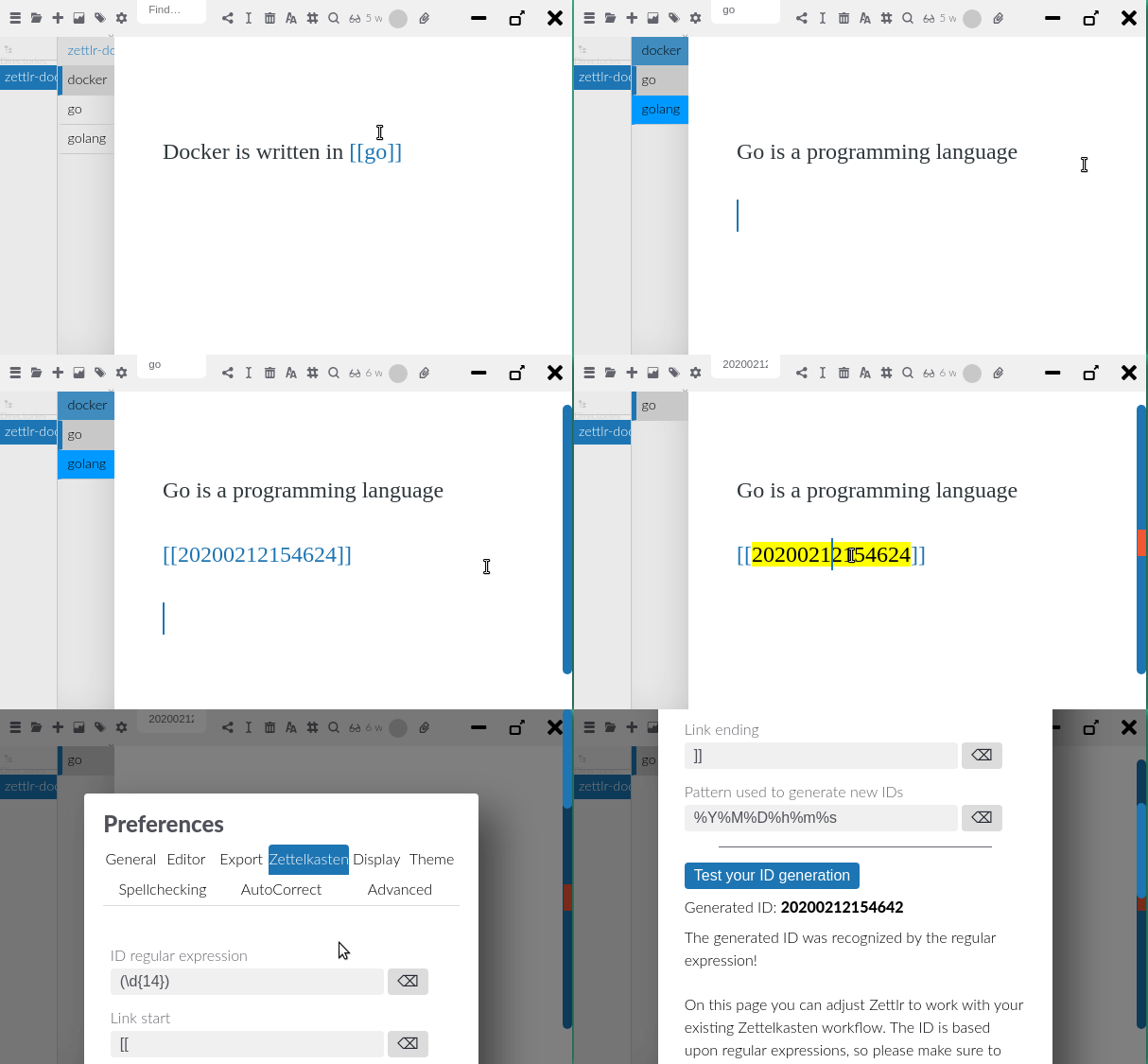
So, if I create a link to a nonexistent Zettel, can I create a new one now? Or is this issue about _that_ usecase?
 pihentagy
on 12 Feb 2020
pihentagy
on 12 Feb 2020
If you link to a nonexistent Zettlr, the link simply would go empty. As soon as you create a Zettl that fulfils the link requirements (e.g. has the correct ID or filename), the Link will start working.
nathanlesage
on 12 Feb 2020
I must be missing something, but still cannot go to the newly created link.
pihentagy
on 12 Feb 2020
Yeah, well, the ID's are currently fubar'd, comin' with the next beta!
nathanlesage
on 12 Feb 2020
Would be awesome to create new files automatically based on what is placed within the double square brackets.
For example, to create a named file, clicking on an [[Adam Smith]] link would create a file with Adam Smith as h1 header and new ID placed in the file.
Then, to create an file from a generated ID, clicking on [[20200225014336]] would create a file with the ID as name and ID placed in the file.
 Ziinc
on 24 Feb 2020
Ziinc
on 24 Feb 2020
Some prior art on this workflow of creating pages:
- MS sharepoint wiki page creation, under Add a wiki link to another page:
> To create the page later, someone can click the underlined placeholder link and then click Create.
>
> [[Dogs]] : A link to a page named Dogs in the same folder.
>
> [[Animals/Dogs]] : A link to a page named Dogs in a subfolder called Animals.
>
> [[List:Announcements/Welcome]] : A link to the item called Welcome in the Announcements list on this site.
- pros:
- folders are used and retain semantic meaning
- title of document is retained
- placeholder link (dotted lines) gives feedback to user that the page does not yet exist, i.e. broken link
- can click to create
- by default, displays the name of page and hides subfolder hierarchy (for 2nd example, link will be displayed as Dogs)
- cons:
- user may want to display text differently from file name
- no id, purely file-named based
- cannot specify certain location in page
- pros:
- nergal-perm / zettelkasten-vscode
> This will create a new link, like this:
>
>> (z:1507347558083) >
>
> Now, if you CTRL-click this link you will be prompted to create a new file with this identifier in your current workspace folder.
- features:
- unique identifier is used in the file name, outside of content
- file linking is based on the this id
- can click to create
- cons:
- no folder hierarchy can be specified in link creation
- features:
- Wikipedia linking
- features:
- pipes for alternative display names
- red links for highlighting non-existant pages
- use of
#for specifying section in page, e.g.[[my page#some section header]]
- cons:
- redirects unnecessary for zettelkasten
- features:
- Roam research
- features:
- Links becomes individual pages, identified by the page name. i.e. page name becomes the id
- makes arbitrary linking easy, for e.g. can link by topic
[[Dog]]and all links for Dog will point to the same page - each page contain backlinks, allowing users to see which pages that are linking in.
- cons:
- titles as identifiers prevents categorization of pages (e.g. with folders)
- no organization
- becomes an "organized mess"
- cannot specify context of the linked topic, requires more specific titles, e.g.
[[Amazon]]the company vs[[Amazon]]the rainforest
- features:
As mentioned in https://github.com/Zettlr/Zettlr/issues/559#issuecomment-590930259 , this is more of a UX issue for easy interlinking of notes. The implementation of how Zettlr parses/stores/maps/monitors the notes should be tranparent to the user.
- the user doesn't NEED to know how zettlr links to page, whether by ID or by file name, the linking suggestions menu would suffice, and a display of the file name is good enough.
- the user doesn't NEED to manually adjust the ID fo the file (except for power users), they just want to be able to reference their notes quickly and easily.
Regarding linking types
I also think that the two different ways of linking notes (file name vs id) makes things even more confusing & error prone.
Essentially, when a note doesn't have an ID, it is as if you are inserting a record into a database table without a generating a value for your primary key field.
Considering that zettlr is trying to be a file-system database of notes, file name linking is like querying said database table, not based on the primary ID key, but on the field file_name, which could result in multiple conflicting results.
Ziinc
on 25 Feb 2020
This issue has been automatically marked as stale because it has not had recent activity. It will be closed if no further activity occurs. Thank you for your contributions.
![stale[bot] picture](https://avatars3.githubusercontent.com/in/1724?v=4&s=40) stale[bot]
on 10 May 2020
stale[bot]
on 10 May 2020
I would like to implement this request but need to clarify how it should work.
Question: Should there be a setting to enable/disable this ability? If so where would it go in Preferences?
(From here on out assuming if there is a setting that it's enabled)
Beyond that it seems simple enough: A user types _[[some name here]]_ and then alt-click and if a file named _"some name here"_ doesn't exist it is created and opened.
But what about if a user searches from the search bar? Should there be a way to create a file that way as well? Perhaps a shortcut like alt-enter that tells Zettlr that you want to create a file with the given name if it doesn’t already exist? I’m not sure how easy or difficult that would be or if people think it’s even necessary. I thought of this when looking at The Archive and how the omnibar creates files.
 halcyonquest
on 10 May 2020
halcyonquest
on 10 May 2020
I guess someone might want to look for a note, and create it if it's not found. Wouldn't be me, though.
I also can't imagine anyone using ZK who wouldn't want to be able to create a new zettel while typing, so I'd vote to not bother with the disabling setting.
About clicks: would be nice to be able to do that without touching the mouse :) Maybe both alt-click and alt-enter (when the cursor is in the new file name), or something like that?
annargrs
on 10 May 2020
I agree with Anna. There doesn't really seem to be a need to disable the feature. As a user of Roam Research who wanted an open-source alternative, this has been the most promising option. In terms of the search bar, it would be awesome to have an option to create a file there. However, I think this feature would benefit from having the user confirm they want to create a new page.
 jasonminsookim
on 10 May 2020
jasonminsookim
on 10 May 2020
Is anyone on this? I would really find this feature extremely helpful.
 timtody
on 11 May 2020
timtody
on 11 May 2020
I just pinned the issue for the time being to prevent it being marked stale by the bot until we have come to an agreement of how this should be implemented.
nathanlesage
on 11 May 2020
I took a stab at this. Unless anyone objects I will submit my PR sometime today. For now I left the search bar out of it.
Here is what I did:
Current
- Alt/Opt + Click on a link performs a search
Changes
- Alt/Opt + Click Still performs a search
- Shift + Alt/Opt + Click Tells Zettlr to search for a file with that tag. If found the file is opened and if not a file is created in the current directory with that name and the new file is opened.
And for people who prefer keyboard:
_When doing this from the keyboard, the cursor needs to be anywhere inside the link or immediately before or after (no spaces)_
- Alt/Opt + Enter Now performs a search
- Shift + Alt/Opt + Enter opens/creates a file
I did it this way because it seemed more consistent, but I'm open to suggestions.
halcyonquest
on 11 May 2020
If you already have a PR ready sitting on your computer, this is great news, and to streamline this discussion I'd propose the following conduct:
- Open your PR with the changes so far, describe them etc. pp, so that we are all on the same page
- Link the PR in here so that all participants will be notified and can join us over at the PR discussion.
- Then we can discuss more and more specifics of that PR there until we all agree on how it should be done and we can merge it! I assume that I might have something to say about how the implementation has actually been done so seeing the code before my eyes will make my comments on it much more precise as I can depict concrete implementation details and don't have to resort to guessing :)
Thoughts?
nathanlesage
on 11 May 2020
I submitted the PR. It is #775. As I said in the PR, this is my first time with javascript/git/github so please feel free to ask me to make any corrections. It's a lot of new stuff for me, but it's been fun working on it and look forward to continue learning! :)
halcyonquest
on 11 May 2020
Thanks so much! For anyone else, the party has moved to that PR! :D (#775)
nathanlesage
on 11 May 2020
Related issues
 tupio
·
3Comments
tupio
·
3Comments
 volt4ire
·
4Comments
volt4ire
·
4Comments
 danieltomasz
·
5Comments
danieltomasz
·
5Comments
danieltomasz
·
5Comments
danieltomasz
·
5Comments
 manisabri
·
4Comments
manisabri
·
4Comments
Most helpful comment
I submitted the PR. It is #775. As I said in the PR, this is my first time with javascript/git/github so please feel free to ask me to make any corrections. It's a lot of new stuff for me, but it's been fun working on it and look forward to continue learning! :)