Zettlr: Long filenames truncated in folder view
Using Zettlr v1.2.3 on Ubuntu 18.10.
Depending on users' scenarios, the name of files may need to be lengthy.
In this case, long file names appear truncated in the folder view, leading to a usability issue.
I'm about to submit a pull request which solves the problem, but whose consequences when using such-called "snippets" are unknown to me, since the modified code has a comment mentioning them but I simply don't know what they are.
 ngirard
All 18 comments
Okay, here's the potential workaround:
- You have a lengthy filename, which you need to see in full length
- You hover over it with your mouse
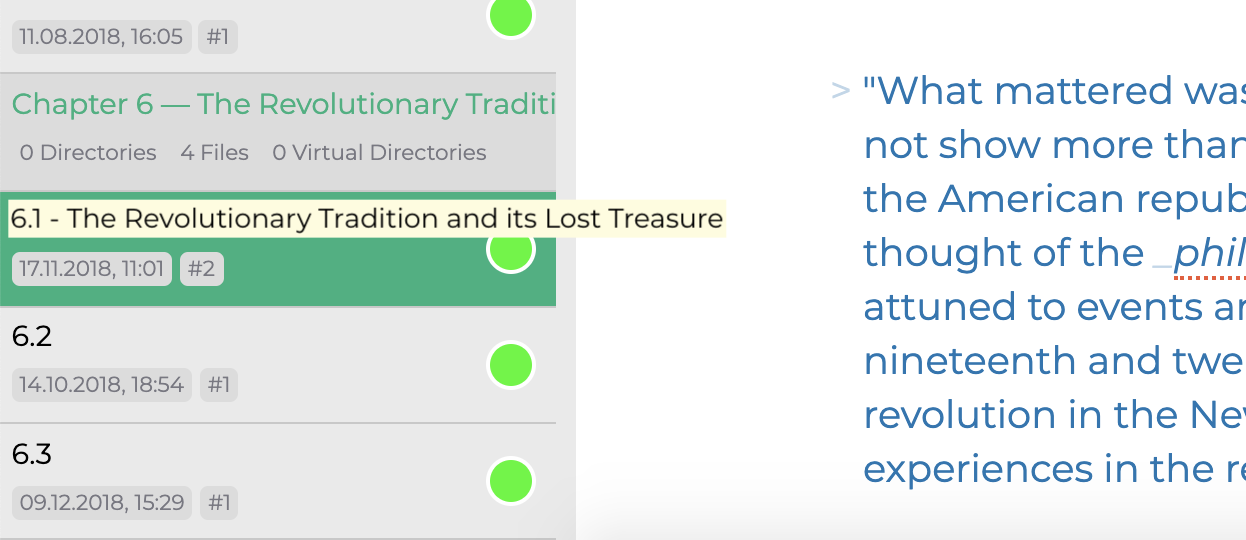
- Without delay (b/c hovering over such a confined element) an element is display exactly where the truncated filename is, only that this is not truncated.
Something like this (obviously with better CSS, b/c this is just a mockup):
 nathanlesage
on 22 Apr 2019
nathanlesage
on 22 Apr 2019
Okay, here's the potential workaround (...)
For sure, this would be better than nothing !
Allow me to paste here your explanations for the technical reason behind this defect, in case someone eventually comes up with a better solution:
To display even long file lists, Zettlr makes use of Clusterize.js, which does not display all files, but only the ones you see.
It basically creates a very high container (the height equals the amount of files), and only display approx. 100 (?) files at once. If you scroll, older files will be removed from the DOM, and new files are added where you scroll to. Removing the no-wrap from the file titles results in different height in the containers, and this can have severe consequences such that you may even have to re-start the GUI by reloading the thing.
It seems a bit odd to me, that a single component (Clusterize.js) takes both a model-related decision (what files to display) and a view-related decision (how tall the files shall be displayed).
But hey, you had the courage I never really had (yet!), to embrace the Javascript stack while not being fond of it, so I cannot but trust your choice to go with Clusterize.js !
ngirard
on 22 Apr 2019
But hey, you had the courage I never really had (yet!), to embrace the Javascript stack while not being fond of it
Well, it mainly was a weighting of reasons =D You simply can't do a real native-looking GUI with a single code base for all operating systems, so as I'm only one dev I had to make concessions. This is in part also a reason for why I've packed so many functions into the app in the first place, because I find it weird that an app that's about 200 Megabytes in size can — if one looks at the Electron default apps—have so few functions. I mean, there are people coding super small Tray apps using Electron …
And concerning Clusterize: Of course it would be better if it would allow for different-size elements, but it would be a lot of programming involved to calculate exact heights if they are variable (such as: how tall is the font effectively on a given system with a given display; when will the title break lines? How many lines will be rendered in the end? Etc...). I didn't know it before I switched to Clusterize.js, how much of a difference it makes if inside a list with >1.000 elements not all elements are rendered at once in terms of speed.
But concerning this:
takes both a model-related decision (what files to display) and a view-related decision (how tall the files shall be displayed)
This is not completely true, because it does not decide upon what files to display (it will display all files, it's only that you have to scroll to a given file for it to display the file), only _when_ ;)
nathanlesage
on 22 Apr 2019
There you go!
nathanlesage
on 1 Jun 2019
Hi @nathanlesage tried this on the latest version of Zettlr and wasn't able to get it to work. Is there any custom CSS alternative to have the file names wrapped?
 mohammedri
on 9 Feb 2020
mohammedri
on 9 Feb 2020
Ah, apparently I forgot to implement the filename mouseover when I ported the sidebar to vue 🙄
Please do not make use of CSS to wrap the filenames manually, because this will result in different-height file tiles, and this will break the virtual scroller the sidebar is using for long lists! Been there, tried that =D
nathanlesage
on 9 Feb 2020
btw is this now a zombie issue b/c I revived it after almost a year?
nathanlesage
on 9 Feb 2020
@nathanlesage has all kinds of powers, including creating zombies 😄
Thanks Nathan!
mohammedri
on 9 Feb 2020
This issue has been automatically marked as stale because it has not had recent activity. It will be closed if no further activity occurs. Thank you for your contributions.
![stale[bot] picture](https://avatars3.githubusercontent.com/in/1724?v=4&s=40) stale[bot]
on 10 May 2020
stale[bot]
on 10 May 2020
Truncated names still do not appear in popups, and I believe it should not be hard to implement.
 Zverik
on 12 May 2020
Zverik
on 12 May 2020
Would be possible to add the option to set the display of notes tiltles in available space in sidebar aligned to the right? I dont know how this will work, but in this moment 90% of space in my sidebar take the numerical identifiers of the zettelkasten;
If I could align to right in narrow setup (like half screen on small laptops) I could see the meaningful name for me, not numbers
 danieltomasz
on 13 May 2020
danieltomasz
on 13 May 2020
What exactly do you propose …? To exchange the file meta information with the file title?
nathanlesage
on 13 May 2020
What exactly do you propose …? To exchange the file meta information with the file title?
it's more like a hack, probably a bad idea
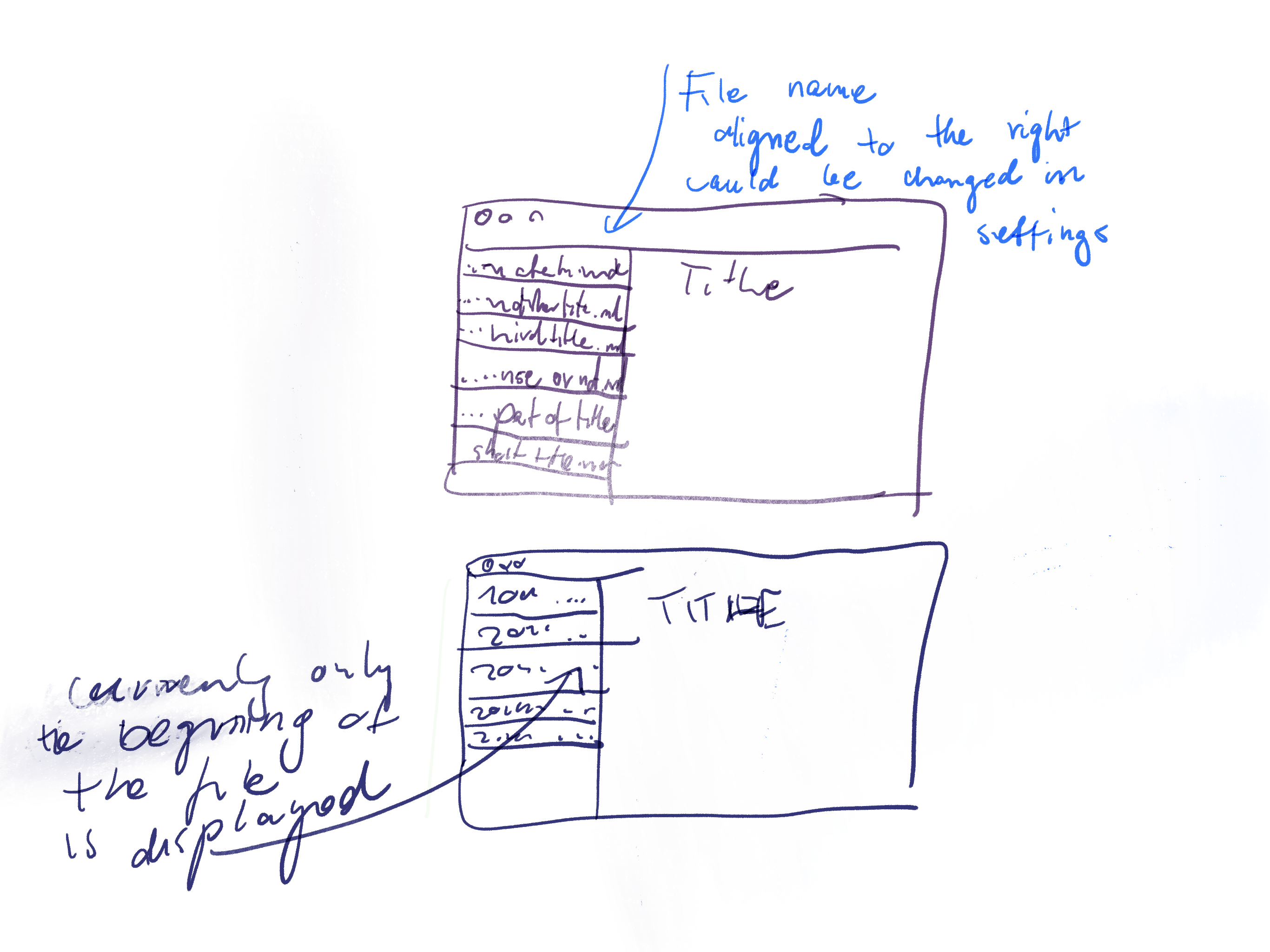
Displaying last n characters of filenames in the sidebar, instead of first n
danieltomasz
on 13 May 2020
… I'm afraid I don't follow o.o
nathanlesage
on 13 May 2020
… I'm afraid I don't follow o.o
ignore it, it is not so important :P
danieltomasz
on 13 May 2020
Okay 🙈
nathanlesage
on 13 May 2020
This issue has been automatically marked as stale because it has not had recent activity. It will be closed if no further activity occurs. Thank you for your contributions.
stale[bot]
on 12 Jul 2020
This issue has been automatically closed due to inactivity. If you believe that this issue is relevant for many users and should not be closed, feel free to comment so that the admins will be notified.
stale[bot]
on 19 Jul 2020
Related issues
 carregal
·
5Comments
carregal
·
5Comments
 tedesmac
·
5Comments
tedesmac
·
5Comments
 tupio
·
3Comments
tupio
·
3Comments
 Kangie
·
4Comments
Kangie
·
4Comments
 klaus7
·
4Comments
klaus7
·
4Comments