Description
PDF export fails to create file, no error, no log, in debug more or not
Reproducing
Create a file, click on share icon => pdf
Expected behaviour
A PDF fille...
Screenshots
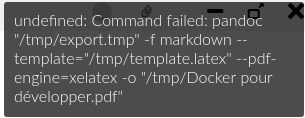
Pandoc and XeLaTeX are correctly installed:
$ which pandoc xelatex
/usr/bin/pandoc
/usr/bin/xelatex
$ pandoc --version
pandoc 2.1.2
Compiled with pandoc-types 1.17.3.1, texmath 0.10.1.2, skylighting 0.6
$ xelatex --version
XeTeX 3.14159265-2.6-0.99999 (TeX Live 2018)
kpathsea version 6.3.0
Platform
- OS: [e.g. iOS] Linux
- OS Version [e.g. 11] Fedora 29
- Zettlr Version [e.g. 0.15] 1.1.0
Additional information
 metal3d
All 21 comments
I also tried to change xelatex and pandoc path to the absolute path, same error. Where can I find logs ?
metal3d
on 1 Mar 2019
I got a similar issue on Pop OS (Ubuntu). I upgraded to 1.2 beta 1 and the error message pointed on a missing latex package.
 essicolo
on 1 Mar 2019
essicolo
on 1 Mar 2019
@metal3d What @essicolo says. I forgot to implement a better error message until the 1.2 beta, so it'll simply throw these useless notifications at you. From 1.2 on it displays the full output so that you can figure out what went wrong!
 nathanlesage
on 2 Mar 2019
nathanlesage
on 2 Mar 2019
With 1.2 beta on Ubuntu I get the following error message on PDF export. Does anyone know what package is missing?
kpathsea:make_tex: Invalid filename Times New Roman', contains ' '
kpathsea:make_tex: Invalid filenameTimes New Roman', contains ' '
Error producing PDF.
!!!!!!!!!!!!!!!!!!!!!!!!!!!!!!!!!!!!!!!!!!!!!!!!
!
! fontspec error: "font-not-found"
!
! The font "Times New Roman" cannot be found.
!
! See the fontspec documentation for further information.
!
! For immediate help type H
!...............................................
l.56 \setsansfont
 anthrolisp
on 7 Mar 2019
anthrolisp
on 7 Mar 2019
FIXED: Changed font settings in PDF preferences
anthrolisp
on 7 Mar 2019
I'll see to what I could make to alleviate some of the issues concerning font selection, such as escaping them etc.!
nathanlesage
on 7 Mar 2019
OK, thanks. I'll check in a couple of hours/days
metal3d
on 7 Mar 2019
Maybe you can reopen the issue, the error is still present
Error producing PDF.
! Undefined control sequence.
<argument> \chapter
                    {Docker pour developper}\label {docker-pour-developper}
l.160 ...evelopper}\label{docker-pour-developper}}
OK... this is because I set "documentclass: book" in yaml header, pandoc is able to make it working but it seems that a problem appears with Zettlr.
Just in case... is there any reason to use "XeLaTeX" instead of the legacy one LaTeX ?
metal3d
on 7 Mar 2019
Yeah, well, the documentclass book is not supported by XeLaTeX, which is why you'd have to refer to KOMA classes.
Sometimes it also happens that I forgot some packages that are necessary (for instance I just added the ulem package to provide strikethrough and underline text), but in this case it's with the compiler itself.
Zettlr uses XeLaTeX because of much better Unicode font support, and because it's more modern. The app is aimed at a wide audience and to be as compatible as possible, not to cover up every special case. I'll provide a way to choose the binary to use in the future, but I can't make any promise as to when it will come. Probably 1.3, but the way to choose the LaTeX compiler would definitely be a separate issue that you can open if you wish!
Further: If you notice some undefined control sequence errors, please let me know so I can add the package to the default template!
nathanlesage
on 7 Mar 2019
Ok, thanks for that complete answer.
Actually I wanted to use Zettlr to write a book, this is not so complicated for me to avoid to use the PDF export and to use my own pandoc command in my workflow.
For now, Zettlr is probably one of the most better markdown editor I've used (I tried Markedit that is nice but that changes my source md file in some part I don't want it to change... and Abricontine that is nice but that hasn't enough configuration options)
On the other hand, I will probably provide you a better french translation that the one you provide, there are some options that have really "funny" translation and that has no sense :)
metal3d
on 8 Mar 2019
On the other hand, I will probably provide you a better french translation that the one you provide, there are some options that have really "funny" translation and that has no sense :)
Well, that happens if you take a guy with some broken knowledge of French and give to him Google Translate :D
I would really appreciate it if you could fix the French translations! :) And please share with us some of the more funny quotes so that we can all have a laugh!
nathanlesage
on 8 Mar 2019
Yes, I understand, no problem.
One of the nicer mistake I found "Ouvrier" instead of "Ouvrir", one little letter changes and the pronunciation is different and, more, doesn't mean the same:
- Ouvrier = "worker" (human worker)
- Ouvrir = open
metal3d
on 8 Mar 2019
@metal3d There are many things to correct in the French translation. I'm working on it, about halfway through.
essicolo
on 9 Mar 2019
That is both funny and sad at the same time …
but thank's anyway for helping me out with correct French :)
nathanlesage
on 9 Mar 2019
@essicolo @metal3d Btw, in case you're wondering: I've created an app that allows translations to be updated continuously at https://translate.zettlr.com/.
The reason why I would advise to use this tool is that I can add new and changed translation keys at any time, eliminating the need for continuous checking of the translation files whether or not something has changed. Additionally, it helps alleviating some of the heavy lifting of translating. So please consider moving the translations there :)
nathanlesage
on 15 Mar 2019
I'm having several variants of the following error regardless of the font specified, whether it's the family name, file name, etc of the installed font.
! Package fontspec Error: The font "Liberation Serif Regular" cannot be found.
I'm running Archlinux. Is there a particular command that I can run to determine what exactly I should put in the font field inside PDF preferences?
Many thanks in advance!
anthrolisp
on 6 Apr 2019
For Ubuntu I used following now:
Primary: "Liberation Serif"
Secondary: "Liberation Sans"
 yashha
on 20 Jul 2019
yashha
on 20 Jul 2019
Hi,
I have set the Primary and Secondary Font to Liberation Serif and Sans in the PDF-Preferences Tab but nonetheless I get the following error:
[WARNING] Note with key '11500882562' defined at line 274 column 1 but not used.
kpathsea:make_tex: Invalid fontname
Times New Roman', contains ' '
kpathsea:make_tex: Invalid fontname Times New Roman', contains ' '
kpathsea:make_tex: Invalid fontnameTimes New Roman', contains ' '
Error producing PDF.
!!!!!!!!!!!!!!!!!!!!!!!!!!!!!!!!!!!!!!!!!!!!!!!!
!
! fontspec error: "font-not-found"
!
! The font "Times New Roman" cannot be found.
!
! See the fontspec documentation for further information.
!
! For immediate help type H
!...............................................
l.58 \setmainfont{Times New Roman}`
What should I do about it?
Thanks and Greetings, Simon
[EDIT: Found out the solution by myself:
I had to change the Font inside the "Project Settings" Tab of the Project.
 Sklanfurt
on 28 Aug 2020
Sklanfurt
on 28 Aug 2020
Would you mind to try encapsulating it with "?
nathanlesage
on 30 Aug 2020
On Debian (I believe also Ubuntu), you can install the Times New Roman font by issuing sudo apt install ttf-mscorefonts-installer . That worked for me.
 norrs
on 6 Oct 2020
norrs
on 6 Oct 2020
Related issues
 klaus7
·
4Comments
klaus7
·
4Comments
 danieltomasz
·
5Comments
danieltomasz
·
5Comments
 bit-hug
·
4Comments
bit-hug
·
4Comments
 Kangie
·
4Comments
Kangie
·
4Comments
 Alopex4
·
4Comments
Alopex4
·
4Comments
Most helpful comment
For Ubuntu I used following now:
Primary: "Liberation Serif"
Secondary: "Liberation Sans"