Zettlr: JavaScript error occured in the main process msg when trying to remove a folder
Reproduce
Currently 100% reproducible
- create folder and open it in left menu pane of zetler
- inside of that empty folder right-click on folder name and from the contextual menu select "remove folder"
Workaround is to move up one level in the folder structure and delete from there.
Currently
This results in below error message.
Expected
Folder should be removed and user be brought to the next higher level of folder structure.

Platform
- OS: macOS 10.14.3
- Zettlr 1.1.0
 foss-
foss-
All 22 comments
This has already been discussed here.
There was an error but @nathanlesage already fixed it. You just have to re-download and subsequently re-install the app. Works fine afterwards.
 subi54
on 9 Feb 2019
subi54
on 9 Feb 2019
@subi54 Unfortunately, this is a different bug (albeit all of them are some sort of "Javascript Errors"). I'll see into it!
I've had this kind of problem many times now. Somehow these directory-bugs keep returning with every other release 🙄
 nathanlesage
on 9 Feb 2019
nathanlesage
on 9 Feb 2019
@foss- One quick question: Does it on your machine also ask for confirmation of removing the parent folder instead of the empty one? This would indicate an even worse problem as it would try to remove a folder that's completely different from the one you supposedly want to remove!
nathanlesage
on 9 Feb 2019
Apologies @foss- & @nathanlesage.
subi54
on 9 Feb 2019
@subi54 did look and find your issue, but as yours should have been fixed decided to file a new one.
@nathanlesage I am not at that machine, but iirc no. Confirmation dialog did show but was only about the folder I wanted to delete and not the parent folder. Also I think there was no confirmation dialog at all, but I instantly saw the error message.
Not at the machine in question atm, so if you want me to double check and be 100% certain, let me know.
foss-
on 9 Feb 2019
@foss- Double-Checking would indeed be appreciated. Especially I would be interested to know what element in the user interface did you right-click to remove the directory? The error message does indicate that a faulty hash has been passed to the function responsible to remove the directory and this would mean that there must've been a hiccup in the building of one of the lists!
nathanlesage
on 10 Feb 2019
I am in subfolder with no files. Folder structure is:
Folder
    Subfolder
In the left pane I only see Subfolder. I right-click on that folder name, select "remove folder" and receive the error.
foss-
on 10 Feb 2019
Ah alright, that's weird. I just tried it (and received a completely different error), but I could in fact remove the folder, so I can't reproduce this on my machine. Hmm.
nathanlesage
on 10 Feb 2019
I did a stupid thing and added a folder with ~250 txt files to zettlr. I was able to remove that directory. but something got b0rked. So to get rid of any internal database glitches, I removed Zettlr and all pref files. After re-installing I am still able to reproduce the problem with a newly created folder + subfolder. Sent you some contact info via contact website...
foss-
on 10 Feb 2019
@foss- Yeah, I've received it — unfortunately I've got nothing XMPP-like …
but concerning removing Zettlr: Don't worry, Zettlr is completely database-less, so the file issues won't persist during restarts of the app (there's no cache that could be compromised etc), in the worst case the only thing you would need to remove is the config.json. But it's still weird that I cannot reproduce the bug on my system (which is exactly the same as yours)
nathanlesage
on 10 Feb 2019
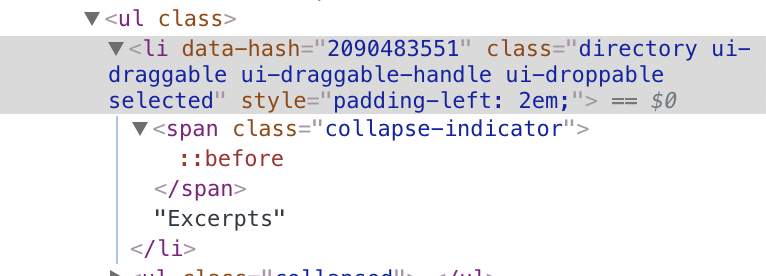
Oh, one idea. Would you mind enabling the debug mode in settings, open the developer tools and "inspect" the GUI element that you are right clicking and pasting the full HTML of that element? This should give me some insights into what is happening!
EDIT: Should look like this:
nathanlesage
on 10 Feb 2019
I seem to be unabel to right-click at all on the folder in question or at least no contextual menu is showing.
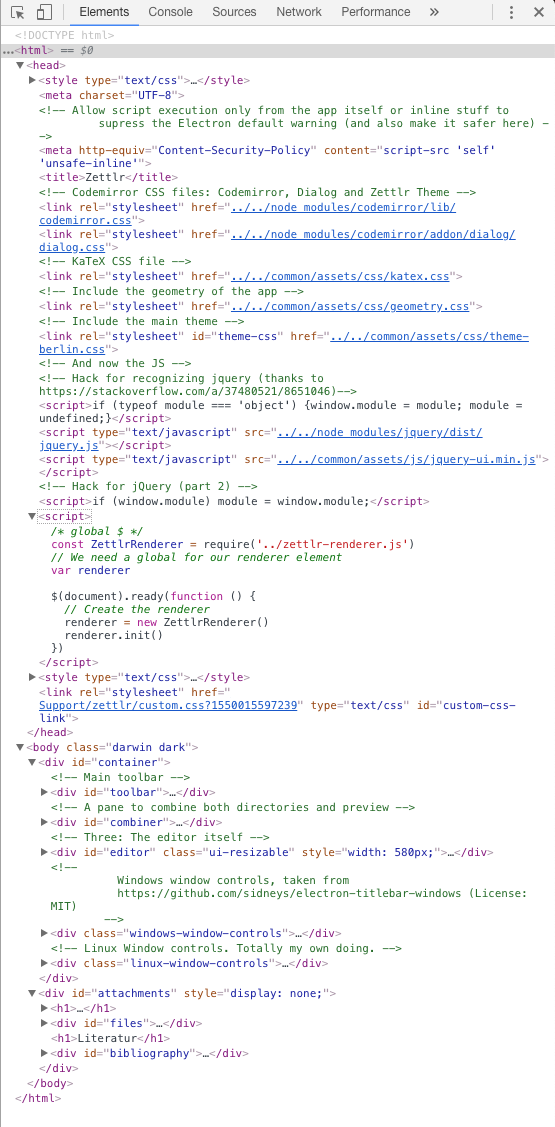
not sure if the following screenshot captures what you are looking for. please provide more specific instructions if not. the output does not change, even when switching views.
foss-
on 13 Feb 2019
Hey, sorry for getting back so late! Yes, I just assumed it would be natural what to do, because I do it every day, sorry for this assumption!
After opening up the developer tools, you see the mouse pointer inside the square on the top left edge? Click that and then click the element that you've right clicked. Then it will automatically highlight it in the part which you've screenshotted!
nathanlesage
on 15 Feb 2019
<li class="directory" data-hash="-682631488" data-sorting="name-up">subfolder
is that what you were asking for?
foss-
on 15 Feb 2019
Yes! Now we can at least exclude that something bad is happening in the GUI, because the hash is correctly passed by this directory. But this still leaves us with the question of why this happens :(
I'll continue to dig deeper into this, but I think to ease up bug hunting, I'll firstly need to implement way better error handling and do some refactoring to the code. You said that you could circumvent the bug by now, right?
nathanlesage
on 15 Feb 2019
The behaviour is inconsistent. I can currently not trigger the bug as I can no longer right click on the subfolder which is a requirement to trigger this bug, as I was trying to remove the folder in question via contextual menu. It's not a serious high priority bug. I just started playing with zettlr and ran into this and thought I'd let you know. If you do want to debug this on my machine if you are unable to reproduce, do let me know and I'll get in touch.
foss-
on 15 Feb 2019
Thanks! So … you cannot right click on the subfolder?
Wait a moment. I think I just realised what the bug was: You right-clicked the directory in the file list, not in the tree view, right? Then I think I know where the bug comes from.
nathanlesage
on 15 Feb 2019
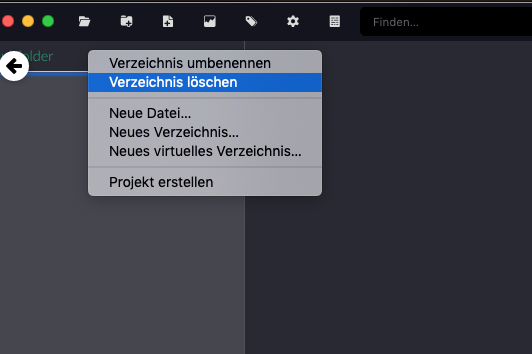
Just reproduced by right-clicking. I was able to right click after playing a bit with that structure: create another subfolder, create a file, remove file and other subfolder from tree-view and then was able to right-click when in the subfolder.
Off-topic: you should consider signing up for an xmpp account :3
foss-
on 15 Feb 2019
AH! There we go! This context menu has been buggy from the beginning. Originally, it wasn't thought to pop up there at all, but this explains everything 🙈
I just discovered so many bugs in the buildup of this context menu in the file tree, oh my God … errm, I think I know what my Friday should consist of.
And ad XMPP: Yeah, I'm still trying to figure out where to put like a cool small chat-like stuff for my users, I already have a mattermost installation running, but I'm not quite convinced, albeit it's perfect for such discussions
nathanlesage
on 15 Feb 2019
Such things happen. Good luck with the cleanup whenever you find the time.
Re chat: Rocket.Chat is pretty sweet although painful in the setup.
foss-
on 15 Feb 2019
Already did the clean up =D Wasn't that difficult after I figured out what happened!
For context, what was happening:
- The context menu was handled by a class that I instantiated once on boot, and then it was rebuild everytime you right-clicked somewhere.
- The context menu would by this always fetch the necessary information from the element you've right-clicked, built the menu and show it to you.
- But not all elements have context menu elements. Therefore, on some elements, you shouldn't be able to have a context menu.
- But if you then right-clicked a file in the file list, the context menu would remain in memory, and if you THEN right-clicked a directory item in the file list, it would simply grab the "old" context menu and present it to you.
I fixed it by re-instantiating everytime someone right-clicked on an element.
As to why it shouldn't be possible to right-click directories in the file list: Zettlr's idea is that you have three separate groups of elements that are present on your disk, represented by the tree view (directories), the file list (Markdown and TeX-files) and the attachment sidebar (all other files). So you should only be able to do directory-based stuff in the tree view, Markdown based stuff in the file list and attachments in the sidebar. I think I'll put up a video tutorial on this to explain why it does this :)
Concerning the chat: I'll have a look into it! But generally speaking, what would you think? Have a chat for discussions around Zettlr, or more like an old-fashioned forum?
nathanlesage
on 15 Feb 2019
That was quick. Thanks for sharing those details. That's both insightful and interesting to learn what went wrong.
Re: Chat: 2 cents incoming: personally tend to dislike forums. then again, forums can work great to discuss feature requests and build a community discussing workflows etc.
foss-
on 15 Feb 2019
Related issues
 danieltomasz
·
5Comments
danieltomasz
·
5Comments
 Kangie
·
4Comments
Kangie
·
4Comments
 volt4ire
·
4Comments
volt4ire
·
4Comments
 maehr
·
3Comments
maehr
·
3Comments
 tupio
·
3Comments
tupio
·
3Comments