Zerotierone: high cpu usage after the version 1.4.0 update
On raspberry pi running raspbian,
uname -a
Linux raspberrypi 4.19.58-v7l+ #1245 SMP Fri Jul 12 17:31:45 BST 2019 armv7l GNU/Linux
Before, the zerotier-one process hardly uses more than 5% cpu; after the 1.4.0 update, the cpu usage is almost always around 10% (even after zerotier-cli leave <id> so that there's no connection). Anything changed that may be a cause for this, and is there something I can do to reduce the cpu usage? Thanks!
 daviehh
All 29 comments
This appears to be happening on several of our x86 hosts too
 trobotham
on 31 Jul 2019
trobotham
on 31 Jul 2019
I can confirm this is happening on Debian 9 stretch x86_64 running 1.4.0 . It constantly floats around above 9% CPU utilization.
 meguroyama
on 31 Jul 2019
meguroyama
on 31 Jul 2019
I also have the same issue. I updated to 1.4.0 today and the cpu on all of the devices is steady and much higher than it used to be.
On my Mac, the cpu is averaging about 10% between the two zerotier processes (root and user). It has an 2.4 GHz Intel Core i7 processor.
Same thing on Ubuntu 18.04 the cpu on an Atom based device is averaging around 15%.
Same thing on a Raspberry Pi as reported by @daviehh
On a NVIDIA Jetson Nano device running Linux4Tegra/Ubuntu 18.04.2, there are 2 processes each running at just under 20% for a total cpu just for zerotier being almost 40%.
Can/should we revert to the previous version or do you have any ideas how to fix it?
 adit-s
on 31 Jul 2019
adit-s
on 31 Jul 2019
@adit-s Thanks for confirming! For me on macbook pro 13" it's at about 7~8% cpu and often lower, not sure if it's like that before since such cpu usage is not that noticeable on regular pc/macs but on low-power devices like raspberry pi it's quite noticeable.
daviehh
on 31 Jul 2019
@daviehh do you want to update the title so it reports high cpu usage across all platforms instead of just the raspberry pi so it will get the developers attention?
adit-s
on 31 Jul 2019
@adit-s sure, thanks!
daviehh
on 31 Jul 2019
Same issue in Ubuntu 18.04 on a Thinkpad. The CPU it's almost always between 6 - 9% on zerotier-cli.
I'm sure that this will be solved with an update. ;)
 pdus
on 31 Jul 2019
pdus
on 31 Jul 2019
Thanks, we'll pay some attention to performance in the next release then. It could be related to multi path code.
 adamierymenko
on 1 Aug 2019
adamierymenko
on 1 Aug 2019
@adamierymenko can you give us an idea of when the next release will be issued?
Also, will it be upgradeable via the Ubuntu PPAs?
adit-s
on 1 Aug 2019
It is pretty bad, it has some of my instances pegged to 100%
below is 5 seconds of strace:
strace: Process 16426 detached
strace: Process 16427 detached
strace: Process 16432 detached
strace: Process 16434 detached
% time     seconds  usecs/call     calls    errors syscall
------ ----------- ----------- --------- --------- ----------------
 35.39    0.337761       18765        18           select
 35.07    0.334661          11     29527           nanosleep
 29.39    0.280427        4451        63        13 recvfrom
  0.07    0.000661          17        40        12 sendto
  0.04    0.000349         349         1           open
  0.01    0.000132         132         1           stat
  0.01    0.000109          18         6           socket
  0.01    0.000061          61         1           read
  0.01    0.000061           9         7           close
  0.01    0.000058           2        37           gettimeofday
  0.00    0.000011          11         1           restart_syscall
------ ----------- ----------- --------- --------- ----------------
100.00    0.954291                 29702        25 total
Can you try current dev and see if this persists?
adamierymenko
on 1 Aug 2019
@adamierymenko I've updated one pegged (100%) instance to the dev branch (the controller itself), no issues so far
trobotham
on 1 Aug 2019
Hi, CPU usage is pretty bad here too (VM and Pi).
The 1.2.12 version as been removed from https://download.zerotier.com/debian/buster|stretch, is there any way too rollback to 1.2.12 without compiling?
 fauust
on 1 Aug 2019
fauust
on 1 Aug 2019
fauust
on 1 Aug 2019
fauust
on 1 Aug 2019
Hi @fauust were you able to successfully roll back to 1.2.12?
Can you post the instructions for how you did and which image you used for the Pi?
Thanks.
adit-s
on 1 Aug 2019
I was able to downgrade all of my devices to 1.2.12 and everything seems to be working fine and the cpu utilization is back to normal.
I used the following steps for the Debian/Ubuntu based devices:
- Identify the package with "sudo apt list --installed | grep zerotier"
- Use curl to download the appropriate 1.2.12 package from the links provided by @fauust
- Install the 1.2.12 package with "sudo dpkg -i zerotier-one_1.2.12_armhf.deb"
- I rebooted but it may not be necessary.
- Confirm the version with "sudo zerotier-cli -v"
adit-s
on 1 Aug 2019
Is this increased CPU related to LF at all?
 luckman212
on 1 Aug 2019
luckman212
on 1 Aug 2019
No, LF is not part of ZT core at all and isn't used yet.
adamierymenko
on 1 Aug 2019
@adamierymenko I've updated one pegged (100%) instance to the dev branch (the controller itself), no issues so far
So you're saying the change I made in dev fixed it?
If so we might hit a 1.4.2 soon since this performance regression is rather annoying on small devices.
adamierymenko
on 1 Aug 2019
On the single device that I deployed it on, it seems to be resolved but I’m not completely sure because the issue seemed to be sporadic, I can deploy it more widely tonight to get you a more solid answer and update you
trobotham
on 1 Aug 2019
4. I rebooted but it may not be necessary.Not necessary:
$ sudo systemctl stop zerotier-one (warning if you are connected through zerotier network)
backup /var/lib/zerotier-one just in case
$ sudo apt remove zerotier-one
$ wget/curl zerotier....deb
$ sudo dpkg -i zerotier...deb
$ sudo systemctl start zerotier-one
5. Confirm the version with "sudo zerotier-cli -v"
fauust
on 1 Aug 2019
@adamierymenko I've updated one pegged (100%) instance to the dev branch (the controller itself), no issues so far
So you're saying the change I made in
devfixed it?If so we might hit a 1.4.2 soon since this performance regression is rather annoying on small devices.
I tested dev on 2 machines (debian Buster+Stretch), where the high CPU usage was fixed.
 jgspiro
on 1 Aug 2019
jgspiro
on 1 Aug 2019
Fixed in dev will close after 1.4.2 ships
adamierymenko
on 2 Aug 2019
I saw a new 1.4.2 release but only builds for wd nas, are the others building?
luckman212
on 8 Aug 2019
Looks like it's resolved for mac and raspberry with version 1.4.2. Thanks a lot!
daviehh
on 13 Aug 2019
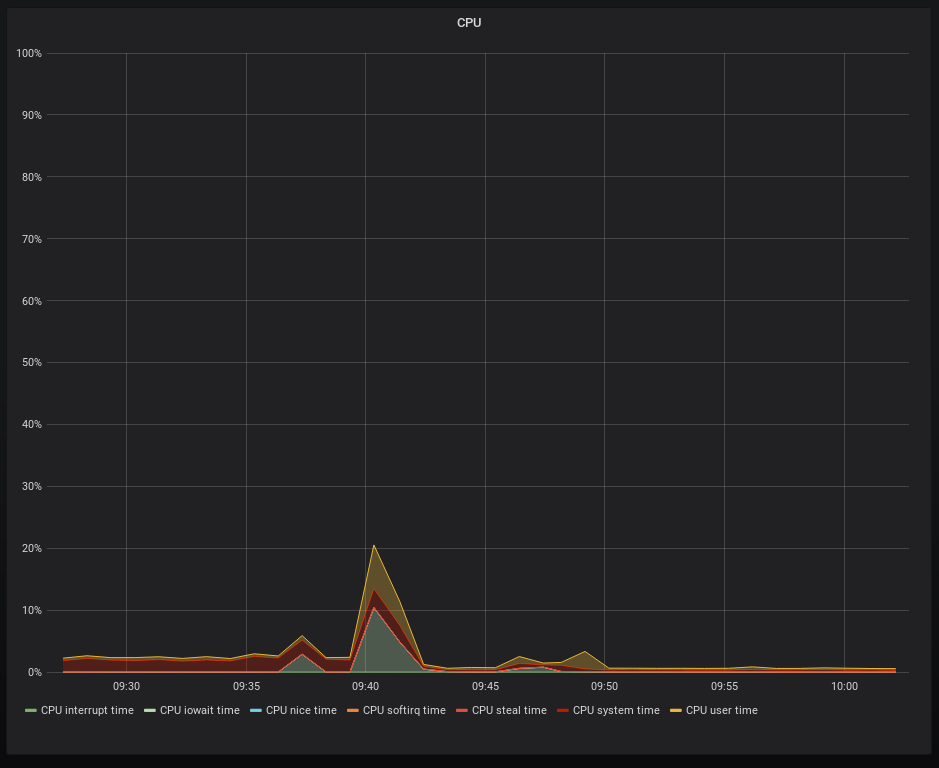
Yep it's clearly better here too (PI3)
fauust
on 13 Aug 2019
Yes, thanks for this update!. It runs perfectly now.
pdus
on 13 Aug 2019
Running well for me too (Mac) - thanks!
luckman212
on 13 Aug 2019
Fixed in 1.4.2
adamierymenko
on 14 Aug 2019
Related issues
 Fastidious
·
5Comments
Fastidious
·
5Comments
 kblackcn
·
3Comments
kblackcn
·
3Comments
 paweljacewicz
·
4Comments
paweljacewicz
·
4Comments
 kulheim
·
5Comments
kulheim
·
5Comments
 williamheinz
·
5Comments
williamheinz
·
5Comments