Zerotierone: Some of my zerotier networks fall for a few minutes in one particular device and get back online without intervention
Describe the bug
I have created 4 networks. They are all with exact characteristics as far as I know. Some have more devices, some less, some are raspberry pi's with linux, some are windows 8, some routers with openwrt.
The problem is that 2 of them, and only in one desktop computer with windows, dissapear for a short period of time... maybe 5 minutes, and then, without notice, they come back again. Without doing anything special. (during those periods, the zerotier networks are ok in other machines, and I can communicate without problem on other machines. So is a particular problem of one windows desktop)
I set 4 command prompt windows doing pings to some machine in each network:
-replay from 10.0.1.xx bytes=32 time=2ms TTL=64
-replay from 10.0.2.xx bytes=32 time=11ms TTL=64
-replay from 10.0.3.xx bytes=32 time=3ms TTL=64
-replay from 10.0.4.xx bytes=32 time=1ms TTL=64
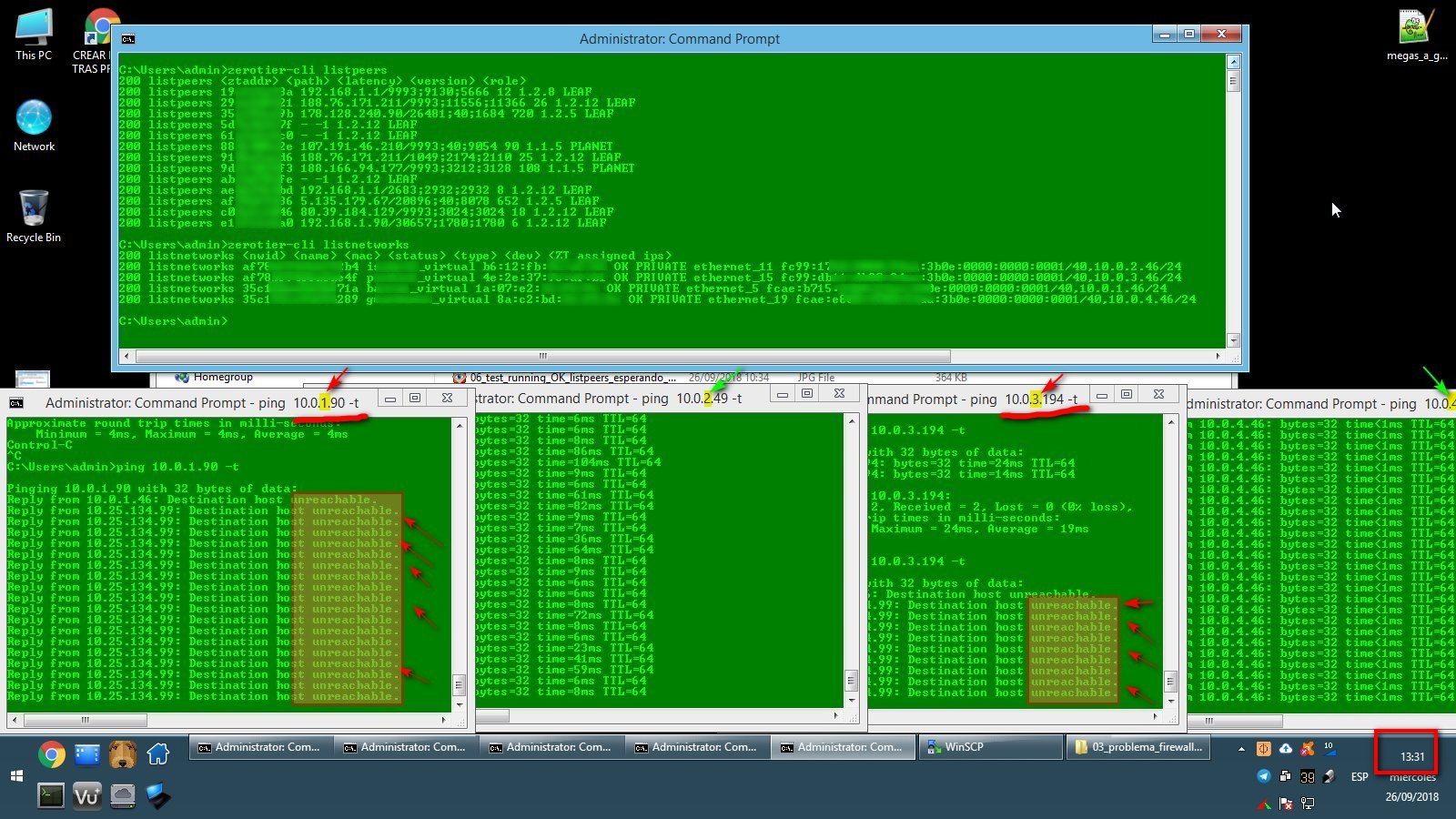
...no problem, but then suddenly ...networks 1 and 3 drop at the same time and start with:
-replay from xx.xx.xx.xx Destination host unreachable...............
-replay from 10.0.2.xx bytes=32 time=11ms TTL=64
-replay from xx.xx.xx.xx Destination host unreachable...............
-replay from 10.0.4.xx bytes=32 time=1ms TTL=64
It's always those two networks 1 and 3, and at the same time. If I wait, after some minutes they get back. It's interesting that I can force those networks go back alive instantly just by going to windows network -> properties -> select the zerotier adapter for network1, disable, and then re-enable it back. As soon as I do this, the pings start responding on network1.
Then do the same with adapter3 and it gets back online too.
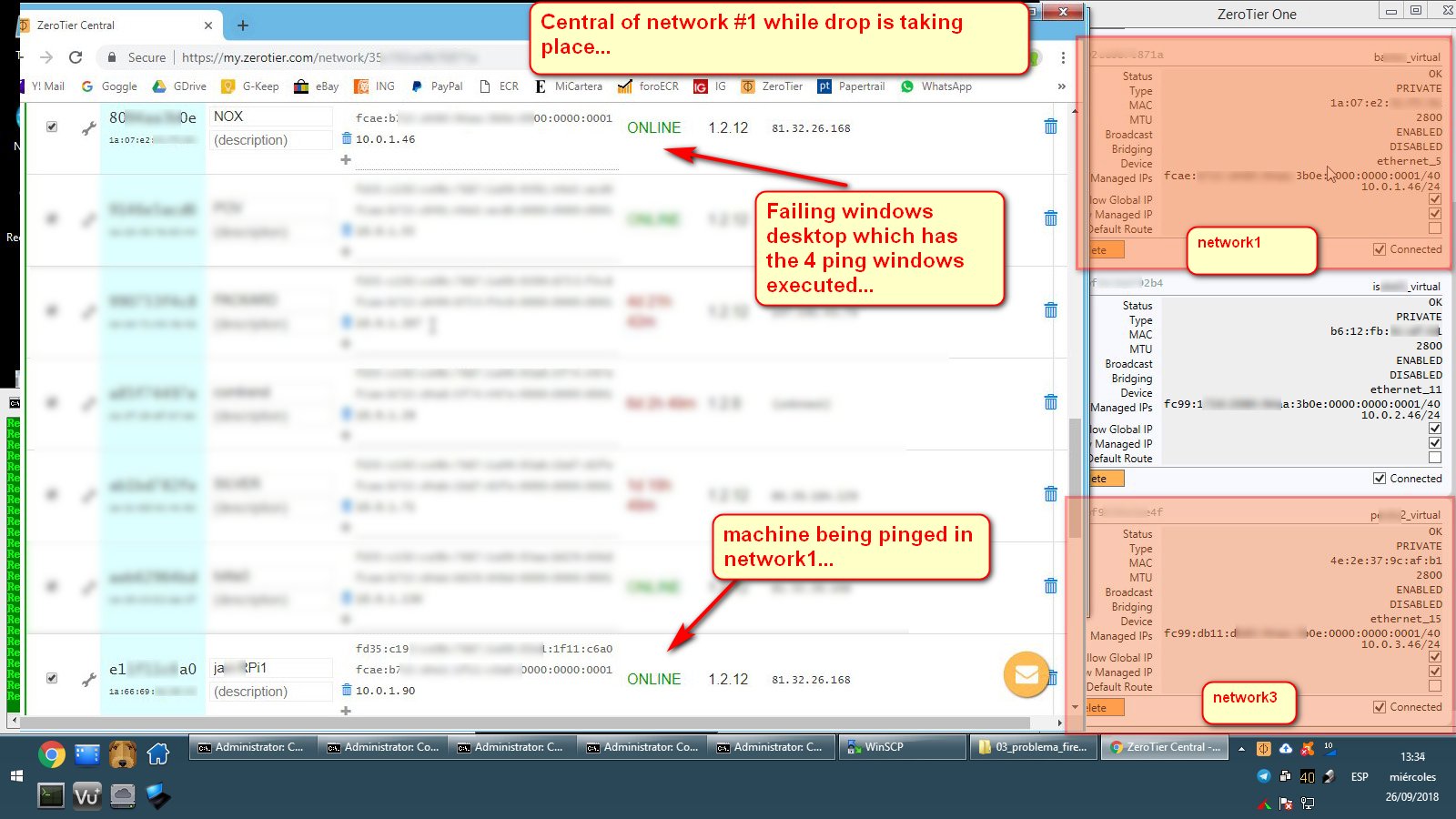
I have to say that in every moment, zerotier icon is correctly in the tray, it shows check marks on all four networks. Selecting 'show networks' shows connected on all four. If I connect to central, this computer shows ONLINE on every network, so everything shows as if nothing wrong is happening. but... no ping and no any other communication on those two networks during those periods of time. Nothing work on those two until I disable/enable them or wait some minutes and they get back online alone.
To Reproduce
I can't reproduce. It happens for example one time each hour... and it is not droping just some pings, it's that the network is not responding to anything for some minutes.
Screenshots

Desktop (please complete the following information):
- OS: failing machine is windows 8.1
- ZeroTier Version 1.2.12
- Desktop computer. I7 16gb ram.
Additional context
They all 4 has:
[X] Allow global IP (selected)
[X] Allow managed IP (selected)
[ ] Allow default route (unselected)
I have try to follow some of the advices on the zerotier site for communication problems, and enable uPnp on my dd-wrt router (my devices populate the table with a port each), used dhcp ip6 apart from ipv4. Added rules to IP ranges on those networks in the firewall, but finally disable the firewall completely to test, same results. Disable avast antivirus to be sure it was not doing anything strange, etc.
I think the key is that if I disable and re-enable that particular zerotier adapter for those networks, pings start being answered as soon as i do it, and eveything work again as normal.
If you could point me to somethe that I can investigate or try, let me know. Sorry for making you loose your time.
 user514
All 12 comments
Hi, thanks for writing this up. That's pretty strange. What is the second device that fails?
Could it be similar to #759 ?
You could watch the output of zerotier-cli listpeers (in an admin prompt)
 laduke
on 26 Sep 2018
laduke
on 26 Sep 2018
Thanks laduke. I didn't explain well. It's only one device failing. A windows desktop computer. What fail are 2 of the 4 networks in that particular machine (not 2 devices).
About issue #759, I didn't have OPNsense installed. I have stopped windows firewall completelly and avast antivirus, so now I dont have any firewall at all. Also the dd-wrt firewall of the router is disable.
Now everything is running normal. I'm uploading a screen capture from the problematic device with the output of listpeers and listnetworks. Right now pinging without problem on the 4 networks. When I get the drop of networks 1 and 3 (which are the ones that fail), I will post the output of listpeers, listnetworks, to compare.
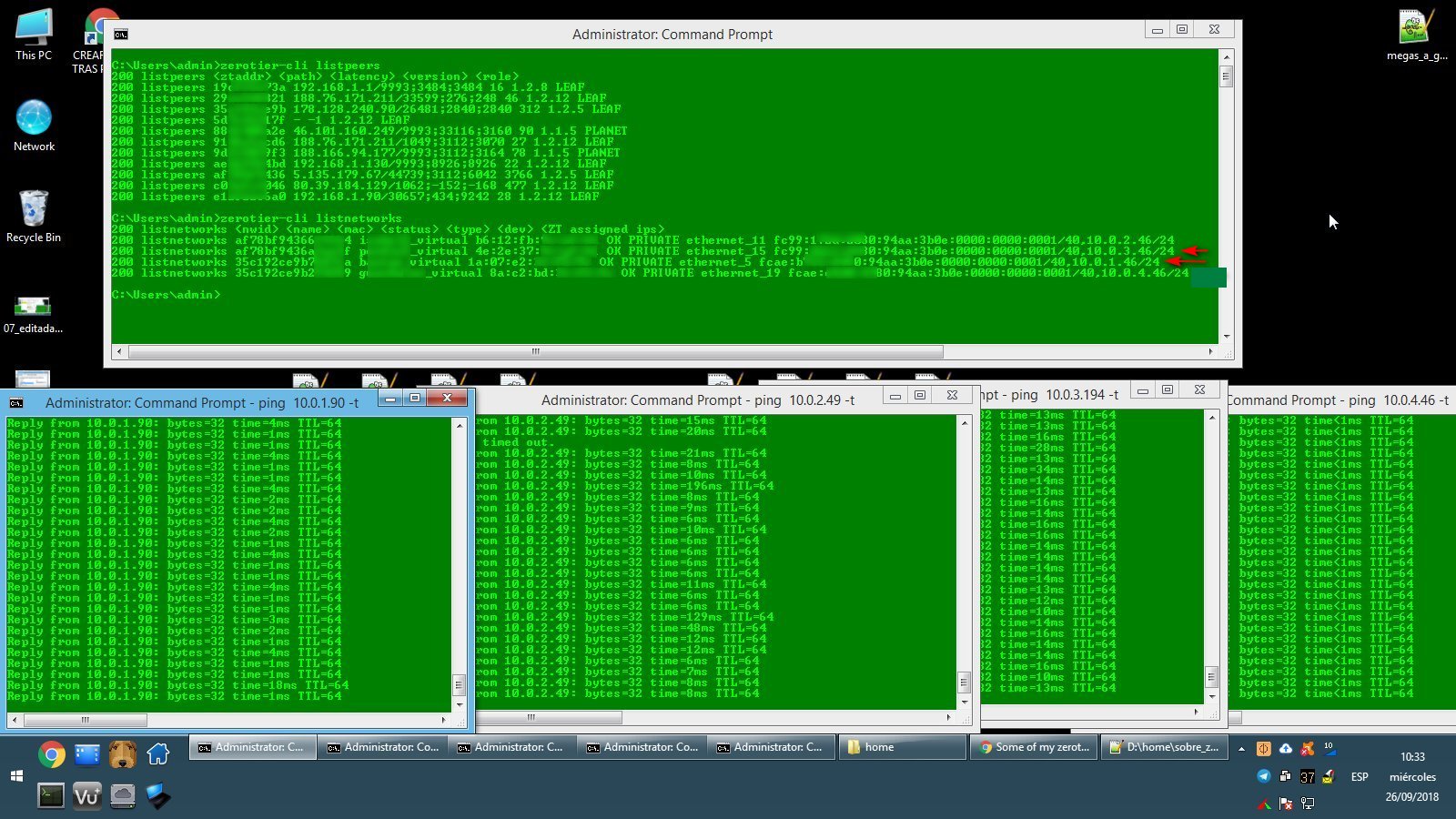
As said, right now the 4 networks are responding ok. Marked with an arrow the 2 networks that will fail. I will try to catch up a new capture when the 2 networks are failing. I will post the updated screen when that happens.
(edited; I made a mistake editing the screen capture, now is corrected)
user514
on 26 Sep 2018
Would like to add that in any case zerotier is wonderful!. Best piece of software I have seen in years. Sorry, need to say it.
user514
on 26 Sep 2018
As promised, here are the networks 1 and 3 falling for around ten minutes. Not doing anything strange on this computer when both networks drop (the unresponsive networks affects only this computer, which can't access any device on those two networks during the fail, other devices communicate ok between them during the fail).
Two networks stop responding at 13:31 in my NOX desktop device::
.
.
.
Status at central and at zerotier systray while drop is taking place (failing machine and ping destination machine seems right online):
.
.
.
.
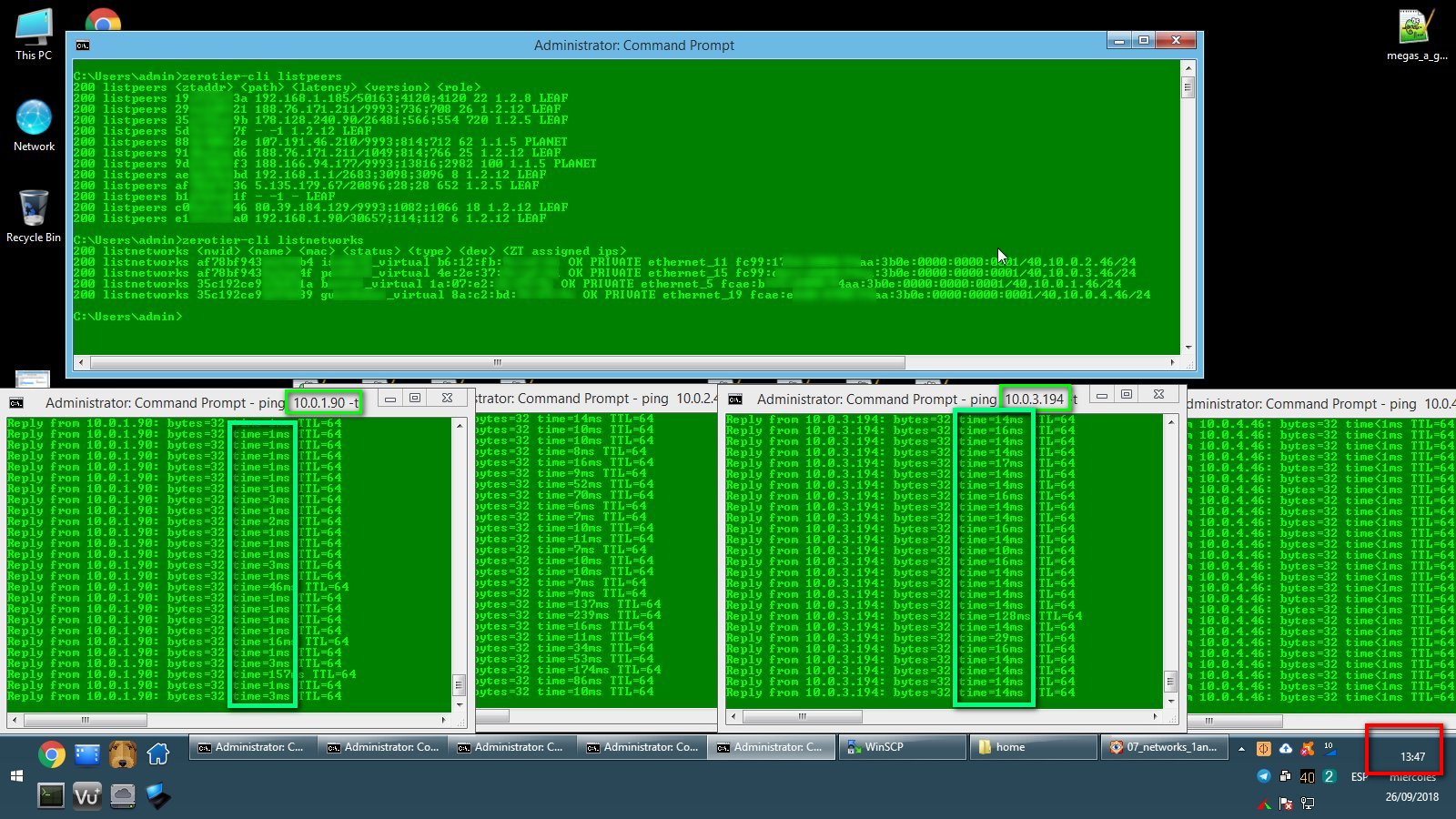
Now the capture at 13:47 when both networks starts responding again without doing anything. (I could have forced them to come back online just by selecting zerotier adapter and disable/re-enable it, but for this test I prefer to leave them alone and wait for them to come back by it's own, it used to take about 5 or 10 minutes to come back if I did not force them... and wait for the next fail).
If somebody guess whats going on, or something i could try, let me know. And if this happens to anyone, let me know too. Thanks. I will let you know if I make any progress to solve it.
user514
on 26 Sep 2018
Hey sorry for making you do all that. I don't think I see anything strange.
You could also monitor/check
route print- cpu usage of zerotier-one ?
laduke
on 26 Sep 2018
Hey sorry for making you do all that. I don't think I see anything strange.
No, thanks to you for telling things to check. Here is the route and the cpu usage, but right now 4 networks are ok. I'll try to check again and compare when 1 and 3 goes down.
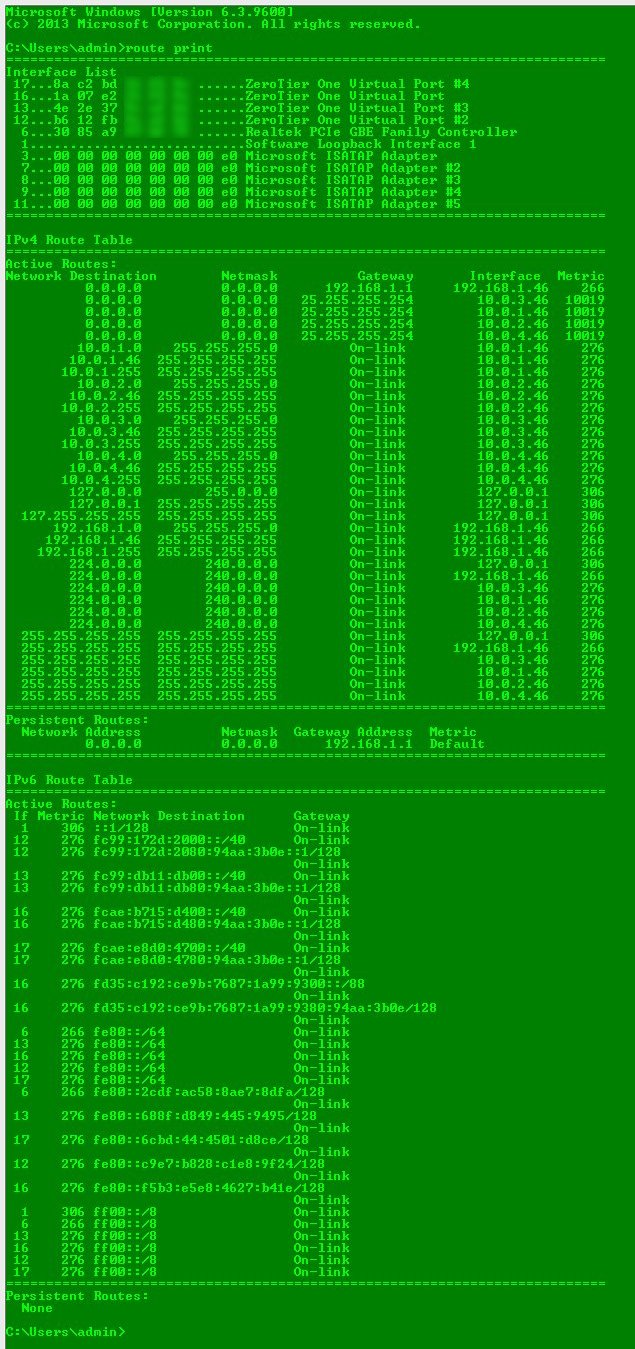

To me it looks like I have something installed in this machine that is conflicting with zerotier networks. If somebody appears with the same problem we could check what we both have installed, and look for coincidences.
...let me know if something catch your attention. Thanks.
user514
on 27 Sep 2018
Pending confirmation, but I have to say that it's been 3 or 4 days without zerotier networks droping in my system. Maybe it was a problem of recent changes on zerotier site (I think I read it somewhere that this days they were changing things on servers). I will confirm if there is no problems in the next days.
edited: problems come up again, and again on networks 1 and 3. I Keep investigating...
user514
on 2 Oct 2018
Just to update that I think I have detected the problem. Right now I'm testing if I have solved it, and I will post the reason/solution in the next days after I confirm it is fixed...
user514
on 5 Oct 2018
Ok. I think I found what was causing my problems.
Here is a summary of the situation:
I have 4 zerotier networks 1, *2, *3, *4. Two of them (1 and *3) drop for around 10 minutes, one time each hour.
The culprit is one particular windows 10 computer that send a udp packet for uPnP machines discovery through the zerotier network, that make that another computer in the same network (NOX) get lost, and since that moment, NOX couldn't communicate with any of the other members of the network for the next 10 minutes.
background info:
POV(culprit): 10.0.1.55. Desktop computer with windows 10 that sends the upd packet for uPnP discovery.
NOX(sufferer): 10.0.1.46. Desktop computer with windows 8.1 that receives the packet and get lost, not seeing any partner in the network for 9-10 minutes.
FAILED_NETWORK: 10.0.1.xx
ALWAYS_WORKING_NETWORK: 10.0.2.xx
FAILED_NETWORK: 10.0.3.xx
ALWAYS_WORKING_NETWORK: 10.0.4.xx
Why it happen only in two of the networks?. Because the sufferer computer (NOX) is member of the 4 networks, BUT the culprit computer (POV) causing NOX to get lost, is only member of two of the networks: *1 and *3 (the ones that fail).
How did I knew what was causing the problem?. I set two pings in NOX trying to reach computers in zerotier networks *1 and *2. At the same time I used wireshark in NOX to capture all packets in those networks. I saw pings being responded ok for some time. Suddenly pings from network *1 got unresponded as always.
What happen in wireshark between working pings and the first not_responding ping?. As you can see in this picture, a udp packet from machine 10.0.1.55 (POV the culprit). I'm not an expert in telecommunications, but it seems to be a uPnP packet that machines send (ssdp:discover) to see if there is any other machine around with uPnP active to create ports and communicate.
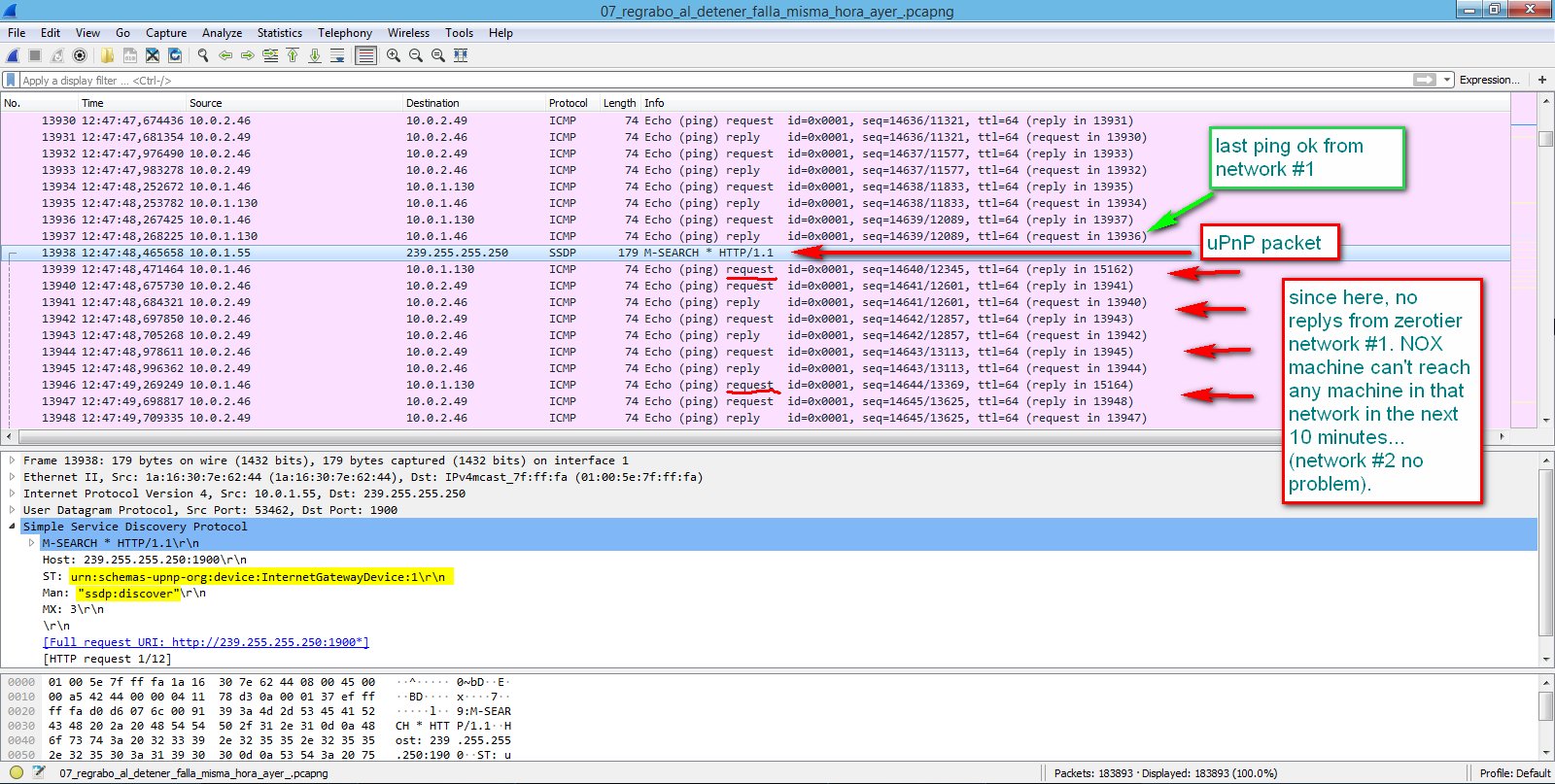
The full text content of the damned packet is as follows:
(damned packet):
`13938 12:47:48,465658 10.0.1.55 239.255.255.250 SSDP 179 M-SEARCH * HTTP/1.1
Frame 13938: 179 bytes on wire (1432 bits), 179 bytes captured (1432 bits) on interface 1
Interface id: 1 (\Device\NPF_{7A6CB92-[HIDDEN]-35203971B67D})
Encapsulation type: Ethernet (1)
Arrival Time: Oct 4, 2018 12:47:48.465658000 Romance Daylight Time
[Time shift for this packet: 0.000000000 seconds]
Epoch Time: 1538650068.465658000 seconds
[Time delta from previous captured frame: 0.197433000 seconds]
[Time delta from previous displayed frame: 0.197433000 seconds]
[Time since reference or first frame: 1129.196113000 seconds]
Frame Number: 13938
Frame Length: 179 bytes (1432 bits)
Capture Length: 179 bytes (1432 bits)
[Frame is marked: False]
[Frame is ignored: False]
[Protocols in frame: eth:ethertype:ip:udp:ssdp]
[Coloring Rule Name: UDP]
[Coloring Rule String: udp]
Ethernet II, Src: 1a:16:30:[HIDDEN]:44 (1a:16:30:[HIDDEN]:44), Dst: IPv4mcast_7f:ff:fa (01:00:5e:[HIDDEN]:fa)
Destination: IPv4mcast_7f:ff:fa (01:00:5e:[HIDDEN]:fa)
Source: 1a:16:30:[HIDDEN]:44 (1a:16:30:[HIDDEN]:44)
Type: IPv4 (0x0800)
Internet Protocol Version 4, Src: 10.0.1.55, Dst: 239.255.255.250
0100 .... = Version: 4
.... 0101 = Header Length: 20 bytes (5)
Differentiated Services Field: 0x00 (DSCP: CS0, ECN: Not-ECT)
0000 00.. = Differentiated Services Codepoint: Default (0)
.... ..00 = Explicit Congestion Notification: Not ECN-Capable Transport (0)
Total Length: 165
Identification: 0x4244 (16964)
Flags: 0x0000
Time to live: 4
Protocol: UDP (17)
Header checksum: 0x78d3 [validation disabled]
[Header checksum status: Unverified]
Source: 10.0.1.55
Destination: 239.255.255.250
User Datagram Protocol, Src Port: 53462, Dst Port: 1900
Source Port: 53462
Destination Port: 1900
Length: 145
Checksum: 0x393a [unverified]
[Checksum Status: Unverified]
[Stream index: 87]
Simple Service Discovery Protocol
M-SEARCH * HTTP/1.1\r\n
Host: 239.255.255.250:1900\r\n
ST: urn:schemas-upnp-org:device:InternetGatewayDevice:1\r\n
Man: "ssdp:discover"\r\n
MX: 3\r\n
\r\n
[Full request URI: http://239.255.255.250:1900*]
[HTTP request 1/12]
[Next request in frame: 15165]
`
Pings started working again 10 minutes later after another ssdp:discover packet from (POV) 10.0.1.55 was sent.
How did I get rid of the problem?. I have to stop POV machine from sending that kind of discovery requests through the network. Started 'services.msc' on windows 10 and disable both services:

Dont know exactly what is causing this behavior, but being involved, upnp's, internetGatewaysDevice's, etc... I wanted to mention it here because if some other users get similar problems, at least here is some background info they could check if it is related.
note1:
In my previous post, I mistakenly thought NOX computer was not failing anymore without intervention... but the reason was that culprit computer, was switched off in the remote location during the whole weekend which makes NOX not receive any damned packet and not fail in 2-3 days.
note2:
I stop this two services, and also set the 4 zerotier networks as public in windows adapter settings, but I'm almost sure that what make NOX stop receiving ssdp packets from POV was stoping those two services.
note3:
After deactivating ssdps on POV, I keep receving some packets very similar to the damned packet:
They are also from:
10.0.1.55 (POV)
 also SSDP protocol
 also 'ST: urn:schemas-upnp-org:device:InternetGatewayDevice:2\r\n'
 also 'MAN: "ssdp:discover"\r\n'
but a closer look in wireshark to the packet shows:
USER-AGENT: syncthing/1.0\r\n
So, this other packets are sent by syncthing. A software I use for folder sincronization. They are innocuous and are not causing any harm. What I see is that damned packets are not showing any USER- AGENT field information. Those seem to be sent by the windows 10 itself and are the ones causing problems with my zerotier, because as soon as I stop those two services in windows 10 remote computer, I only receive innocuous packets from/with 'USER-AGENT: syncthing'.
note4:
It's been 10 hours now monitoring tcp packets with POV and NOX machines online, and no drop of zerotier network since then. Stopping those two services in remote machine (pov) seem to have worked for me.
note5:
not IT professional here, just trying to post my tests.
user514
on 5 Oct 2018
wow! thanks for tracking that down.
Can I suggest some possible work-arounds?
- With a local.conf file, you can black list interfaces or subnets. Not sure if this applies
- You could maybe block those discovery packets with the zerotier network rules
- You might be able to use 1 zerotier network instead of 4, and segment it with the rules; Something like The Classified System Pattern
laduke
on 5 Oct 2018
Can I suggest some possible work-arounds?
Thanks laduke.
- With a local.conf file, you can black list interfaces or subnets. Not sure if this applies
The failing machine is a windows desktop. Probably local.conf is not an option here (not sure). I have other linux clients (raspberrys and routers) and they work without problems.
- You might be able to use 1 zerotier network instead of 4, and segment it with the rules; Something like The Classified System Pattern
Don't know why, but for my configuration (some machines belong to 1 network, some belong to 2, some are in the 4 networks), seems much more straight way to me to do it creating 4 networks (matching real geographical location) and keep them separated, without complicating to much with segmentation of only one network. Just an abstract perception.
- You could maybe block those discovery packets with the zerotier network rules
This sounds really good way of doing it. Thanks for reminding me the flow rules. I collapsed the option in the zerotier central in the first days, thinking I will not complicate myself that much, but, now it seems the proper way of fixing this.
This will keep the problem solved, without having to worry rechecking things as I introduce a new client in the network, future re-installation of equipments, etc.
My way of fixing it disabling the two services was much more rude and could affect other functions of the implied machines. This way I could keep them with services up and let zerotier do the firewall task, just avoiding the problematic packet.
Thanks again laduke. I will post the rule, as soon as I can read about the correct syntax and do some tests with it.
user514
on 5 Oct 2018
How did I get rid of the problem? (version 2, more efficiently)
I just enter this simple rule in zerotier central to stop all ssdp packets travelling through my zerotier networks. As you can see in my wireshark monitor, ssdp packets stops from remote computers in real time after the rule is saved in zerotier central. This seems to have solved my problems without remote machine intervention, and regardless of any new machine being added to any of my networks, or reinstalled, etc.
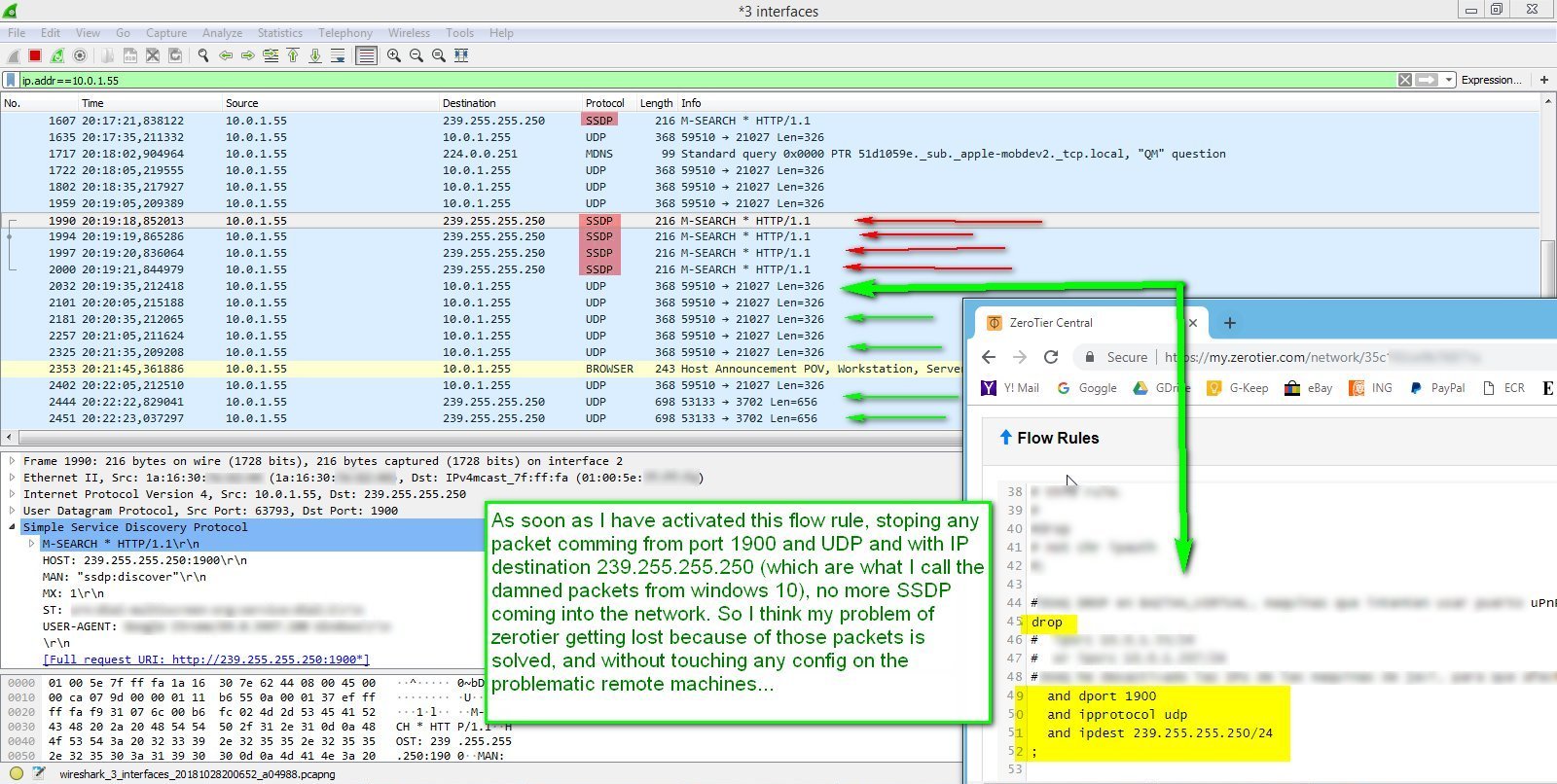
Thanks laduke. Hope it helps someone.
edit: in the image, it says 'packet comming from port 1900' but it should say 'packet destinated to port 1900'.
user514
on 28 Oct 2018
Related issues
 tim77
·
4Comments
tim77
·
4Comments
 nolanl
·
4Comments
nolanl
·
4Comments
 paweljacewicz
·
4Comments
paweljacewicz
·
4Comments
 kblackcn
·
3Comments
kblackcn
·
3Comments
 MaskRay
·
4Comments
MaskRay
·
4Comments