Zerotierone: iphone 6 issues after 1.2.4 -> 1.2.9 upgrade
Several issues exist after upgrading ZeroTier iOS app from 1.2.4 -> 1.2.8, on iphone 6 (MG4N2LL/A, 11.3.1). (1) default/managed routes no longer work. (2) specifying dns prevents VPN activation. (3) specifying dns during setup is difficult from an ui/ux standpoint.
When default route is enabled, the safari app is unable to load any websites. When default route is disabled safari works but only for public destinations - no managed routes configured via my.zerotier.com are accessible. In both situations, the VPN icon appears next to the wifi strength indicator after enabling the network via zerotier. Since both default and managed routes work fine from MacOS system running 1.2.8 build 0 - it seems to be either my iphone or the zt app changes since 1.2.4.
If a custom dns server of 8.8.8.8 (ipv4) is specified, the VPN icon does not appear next to the wifi strength indicator. Access of myip.dnsomatic.com reveals actual ip-address, not ip-address of vultr vm where packets should be popping out.
Specifying a custom dns server during network setup on the iphone 6 is difficult/not-intuitive. The page will not scroll and therefore "Add network" remains hidden by the keyboard popup, when "Use Custom DNS servers" is activated and the cursor is in one of the text fields. The only way around this is to deactivate/reactivate Use custom dns toggle - which takes the cursor out of the text field deactivating the keyboard. Perhaps this is not an issue with larger screens of the more recent iphones.
 gsfjohnson
All 12 comments
hey @gsfjohnson can you update to 1.2.9 and let us know if anything persists?
 laduke
on 16 May 2018
laduke
on 16 May 2018
@laduke Currently using 1.2.9.
It appears the problem specifically is with dns packets, when they are sent through zt via a zt route. In all situations, websites are accessible by ip-address.
gsfjohnson
on 16 May 2018
You can tap anywhere on the screen that's not an input field to hide the keyboard. Next release should have some improvements on that UI so that you can scroll when the keyboard is up, though.
Also, lots of people complained about the default of using google public DNS so that was removed and the option is given to enter your own. You have to specify DNS servers when enabling default route, because you likely won't be able to access the DNS servers on the local LAN anymore
 glimberg
on 17 May 2018
glimberg
on 17 May 2018
1.2.12-1 version has the same issue, iphone6 as well
VPN icon is not shown with default route enabled, the actual IP address is revealed with online checkers. I've used 1.1.1.1 as custom DNS but it doesn't seem to matter.
Desktop client working fine with the same network, no additional tweaking.
 rokka-n
on 28 Dec 2018
rokka-n
on 28 Dec 2018
I can confirm behaviour described above. Tested with 2 iPhones( 6+ and 7+) and an ipad pro 9.7", all running latest IOS that we are observing the same problem described above.
When you set a custom DNS server address, the [VPN] icon does not appear and no traffic will pass.
I was TCPdumping on another working node on my network and saw no traffic. zerotier central shows an assigned IP to the client.
When I removed the custom DNS configuration on the IOS device config, the [VPN] icon appeared, and traffic passed. I was also able to ping the IOS devices from another host on my zt network.
Keen to have this problem fixed - I need to be able to resolve hosts with DNS on my network via ZT for IOS clients.
Happy to help with debugging for devs if needed.
 ShaunDwyer
on 9 Jan 2019
ShaunDwyer
on 9 Jan 2019
Regarding (3): Editing DNS settings after setup would be an UI improvement. Feature request for Android: #790
 michaelfgeiger
on 21 Jan 2019
michaelfgeiger
on 21 Jan 2019
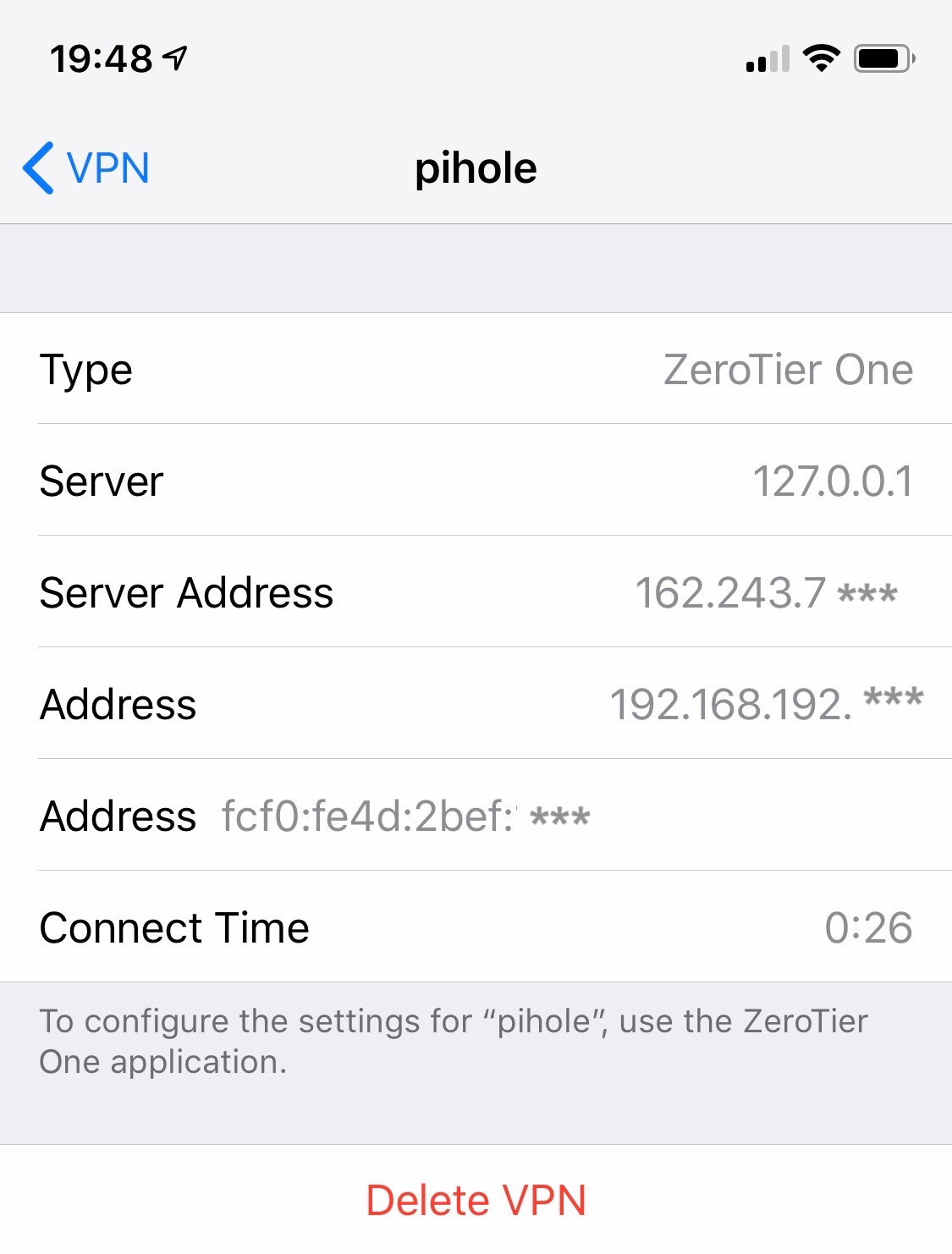
I have found a partial work around. I filled both IPs for the DNS server with the address of my DNS. iOS successfully connected to the ZeroTier VPN, however the DNS server was unreachable!
I looked at the VPN configuration in the Settings app and noticed that there is no entry for DNS (iPhone Xs / iOS 12.2 / ZeroTier One 1.2.12-1)
 gouldjames
on 3 Apr 2019
gouldjames
on 3 Apr 2019
I just confirmed this on iphone 6 and ipad mini. In full tunl mod, I am able to open website by ip but not by domain name. Looks like the problem is related with DNS.
 ChaoshunZuo
on 18 Apr 2019
ChaoshunZuo
on 18 Apr 2019
same here custom DNS isn't working :(
 rad182
on 25 Apr 2019
rad182
on 25 Apr 2019
@adamierymenko not sure why is this closed? is there a new iOS update coming?
rad182
on 12 Jun 2019
@rad182 there is; not sure exactly when yet
in the current version, if you fill in all four dns fields, you may have better luck
laduke
on 12 Jun 2019
Still no news about this? I still cannot override iOS DNS by using the latest ZeroTier One 1.4.4-1 on iOS 13.3.
 mniuop
on 29 Dec 2019
mniuop
on 29 Dec 2019
Related issues
 kblackcn
·
3Comments
kblackcn
·
3Comments
 MaskRay
·
4Comments
MaskRay
·
4Comments
 paweljacewicz
·
4Comments
paweljacewicz
·
4Comments
 williamheinz
·
5Comments
williamheinz
·
5Comments
 hhhnb
·
4Comments
hhhnb
·
4Comments
Most helpful comment
I can confirm behaviour described above. Tested with 2 iPhones( 6+ and 7+) and an ipad pro 9.7", all running latest IOS that we are observing the same problem described above.
When you set a custom DNS server address, the [VPN] icon does not appear and no traffic will pass.
I was TCPdumping on another working node on my network and saw no traffic. zerotier central shows an assigned IP to the client.
When I removed the custom DNS configuration on the IOS device config, the [VPN] icon appeared, and traffic passed. I was also able to ping the IOS devices from another host on my zt network.
Keen to have this problem fixed - I need to be able to resolve hosts with DNS on my network via ZT for IOS clients.
Happy to help with debugging for devs if needed.