Zeronet: How to properly enable tor for Zeronet in Kali Linux ?
Step 1: Please describe your environment
- ZeroNet version: last
- Operating system: Kali
- Web browser: Firefox 58.0.2
- Tor status: available
- Tor version: 0.3.2.9
- Opened port: no
- Special configuration: ____
Step 2: Describe the problem:
I'm Using Tor network through nipe. When I run Zeronet.sh it stucks on:
TorManager Connecting to Tor Controller 127.0.0.1:9051
My /home/user/ZeroBundle/ZeroNet/tools/tor/torrc file has this config :
# Tor config for ZeroNet

DataDirectory data
DirReqStatistics 0
GeoIPFile geoip\geoip
GeoIPv6File geoip\geoip6

# Log notice file data\notice.log

ControlPort 49051
SOCKSPort 49050

CookieAuthentication 1
My etc/torrc file has this config:
DataDirectory /var/lib/tor
PidFile /var/run/tor/tor.pid
RunAsDaemon 1
User debian-tor

ControlSocket /var/run/tor/control
ControlSocketsGroupWritable 1

CookieAuthentication 1
CookieAuthFileGroupReadable 1
CookieAuthFile /var/run/tor/control.authcookie

Log notice file /var/log/tor/log


ClientOnly 1
TransPort 9051
TransListenAddress 127.0.0.1
DNSPort   9061
DNSListenAddress 127.0.0.1

VirtualAddrNetwork 10.66.0.0/255.255.0.0
AutomapHostsOnResolve 1
How to fix this ?
 AccountCreatr
All 4 comments
@AccountCreatr I do not know what is wrong in your configuration, but this can be helpful: how-to-make-zeronet-work-with-tor-under-linux
 slrslr
on 13 Feb 2018
slrslr
on 13 Feb 2018
@slrslr , tried.
root@kali:/home/user# echo 'deb http://deb.torproject.org/torproject.org jessie main'>> /etc/apt/sources.list.d/tor.list
root@kali:/home/user# ls /etc/ap
apache2/ apg.conf apm/ apparmor/ apparmor.d/ apt/
root@kali:/home/user# ls /etc/apt/sources.list.d/
tor.list
root@kali:/home/user# cat /etc/apt/sources.list.d/tor.list
deb http://deb.torproject.org/torproject.org jessie main
root@kali:/home/user# gpg --keyserver keys.gnupg.net --recv 886DDD89
gpg: keybox '/root/.gnupg/pubring.kbx' created
gpg: keyserver receive failed: Server indicated a failure
root@kali:/home/user# gpg --export A3C4F0F979CAA22CDBA8F512EE8CBC9E886DDD89 | apt-key add -
gpg: WARNING: nothing exported
gpg: no valid OpenPGP data found.
root@kali:/home/user# apt-get update
Get:1 http://deb.torproject.org/torproject.org jessie InRelease [4262 B]
Err:1 http://deb.torproject.org/torproject.org jessie InRelease
The following signatures couldn't be verified because the public key is not available: NO_PUBKEY 74A941BA219EC810
Get:2 http://archive-3.kali.org/kali kali-rolling InRelease [30.5 kB]
Err:2 http://archive-3.kali.org/kali kali-rolling InRelease
The following signatures were invalid: EXPKEYSIG ED444FF07D8D0BF6 Kali Linux Repository devel@kali.org
Reading package lists... Done
W: GPG error: http://deb.torproject.org/torproject.org jessie InRelease: The following signatures couldn't be verified because the public key is not available: NO_PUBKEY 74A941BA219EC810
E: The repository 'http://deb.torproject.org/torproject.org jessie InRelease' is not signed.
N: Updating from such a repository can't be done securely, and is therefore disabled by default.
N: See apt-secure(8) manpage for repository creation and user configuration details.
I'll write if I find fix. You can help us, if you now how to fix this.
AccountCreatr
on 13 Feb 2018
@AccountCreatr i do not know, but i Googled and you may try to open first 2 search results: https://www.google.cz/search?q=torproject+NO_PUBKEY
slrslr
on 13 Feb 2018
I recreated torrc file like here, edited as needed & now I havent problem where:
I'm Using Tor network through nipe. When I run Zeronet.sh it stucks on:
TorManager Connecting to Tor Controller 127.0.0.1:9051
But ------ |
|
v
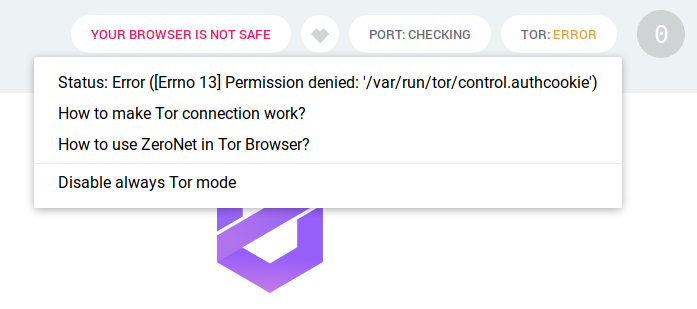
usermod -a -G debian-tor [yourlinuxuser] - command runned. Maybe after logout & relogin it will works like charm.
Relogined. And now browser shows me this msg :
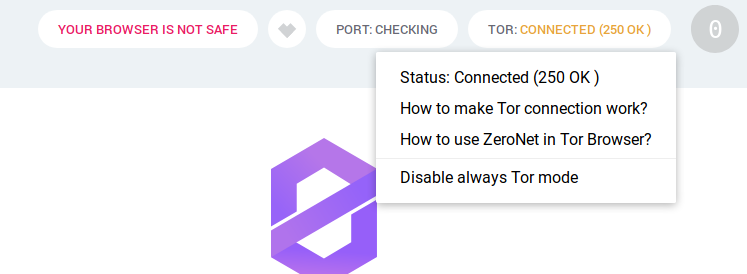
Is it normal ? and why there is "Your browser is not safe" ?
_Some minutes later...._
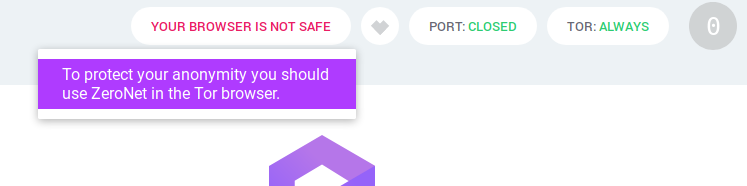
Nice ! I think problem solved. It's just "_Use Tor Browser for more anonimity_". Should I use Torbrowser or not is another story, I guess.
AccountCreatr
on 14 Feb 2018
Related issues
 DaniellMesquita
·
3Comments
DaniellMesquita
·
3Comments
DaniellMesquita
·
3Comments
DaniellMesquita
·
3Comments
 mkg20001
·
3Comments
mkg20001
·
3Comments
 trenta3
·
3Comments
trenta3
·
3Comments
 iShift
·
3Comments
iShift
·
3Comments
Most helpful comment
I recreated torrc file like here, edited as needed & now I havent problem where:
But ------ |
|
v
usermod -a -G debian-tor [yourlinuxuser] - command runned. Maybe after logout & relogin it will works like charm.
Relogined. And now browser shows me this msg :
Is it normal ? and why there is "Your browser is not safe" ?
_Some minutes later...._
Nice ! I think problem solved. It's just "_Use Tor Browser for more anonimity_". Should I use Torbrowser or not is another story, I guess.