Zeronet: [suggestion] Sign & Publish in one button?
Step 1: Please describe your environment
- ZeroNet version: 0.6.0 rev3178
- Operating system: Windows 10
- Web browser: Tor borwser
- Tor status: always
Step 2: Describe the problem:
When i do "Publish" (without "Sign"), it tells me: "Content published to 5/5 peers." which mislead me into believing changes was published to all people.
If i have to do "Sign" before "Publish" then i think it should tell me: "You have not signed changes, content was not published to peers." Why it should tell me publishing was done if there was no signed changes so nothing new was published to peers?
It may be helpfull if the button is more noob friendly like [ Sign & Publish changes ] or the notification popup messages more talkative so even noob knows what to do.
Thank You
 slrslr
All 27 comments
I sometimes sign without publishing. One of the reasons for this is if I update my database schema, I can sign it to test it out. After testing, then I publish.
Also, it should be a given that you will have to know certain things to make ZeroNet zites. This is one of those things. You should know that you need to Sign changes before publishing. And anyways, imo it isn't that hard to remember considering if you know what these buttons do, it makes complete sense that you would have to sign before publishing.
So I propose that instead of dumbing things down, maybe people should learn how to make zites. I have a zite that provides tutorials for this: ZeroNet Dev Center
Otherwise, your idea of it telling you whether there is unsigned changes would be good. But I don't think it's necessary because whenever I want to publish something, I always hit the Sign button first regardless of if there were any changes.
 krixano
on 30 Dec 2017
krixano
on 30 Dec 2017
@krixano:
I sometimes sign without publishing. One of the reasons for this is if I update my database schema, I can sign it to test it out. After testing, then I publish.
Technically your changes can be downloaded by other peers without publishing. In your case, you can press Reload database.
Otherwise, your idea of it telling you whether there is unsigned changes would be good.
I am not sure, but that would be difficult to check. Example: you recieve update from another computer, then press Publish. We think nothing changed, but for ZeroNet it did.
But I don't think it's necessary because whenever I want to publish something, I always hit the Sign button first regardless of if there were any changes.
There are cases when you want to only sign, only publish or both sign & publish. Adding all will take much space.
 imachug
on 30 Dec 2017
imachug
on 30 Dec 2017
So if i click only "Publish" without "Sign", Zeronet have no reasonable/quick way to discover if i made any changes on my site, so it can not tell me in return "You have not changed your site, nothing new was published to peers" and instead it is confusing me by saying "Content published to 5/5 peers."?
There are cases when you want to only sign, only publish or both sign & publish. Adding all will take much space.
@imachug
What is the purpose of the "Publish" button if the "Sign" button is not used please? Assuming i have not modified my site which would require "Sign" button to propagate modifications to other peers i think?
slrslr
on 30 Dec 2017
E.g. you are offline, you sign & publish, notice you are offline, connect to WiFi. Now you should publish - why sign again then?
imachug
on 30 Dec 2017
I am not sure, but that would be difficult to check. Example: you recieve update from another computer, then press Publish. We think nothing changed, but for ZeroNet it did.
Actually it's probably not that hard. Just check whether the hashes of the files match what's in the content.json file, if not then there were changes.
If ZeroNet received an update, then the content.json with the new hashes would also be updated, which would work correctly with what I said above. And anyways, most updates are going to be for user content.json files, which don't get signed if you are just signing the main content.json file.
krixano
on 30 Dec 2017
If ZeroNet received an update, then the content.json with the new hashes would also be updated, which would work correctly with what I said above.
Then write some pseudocode which will check if it is necessary to sign. Maybe there is such possibility which I didn't find yet.
imachug
on 30 Dec 2017
Other thing may be a drop-down menu called example "Sign / Publish", when you click it, you can choose all three options, while third one is "Sign & Publish".
Or the Publish button triggering some check and returns error if there are changes but are not Signed. It would tell noob that his changed was not sent to peers instead of making him believe otherwise by telling "Content published to 5/5 peers."
slrslr
on 30 Dec 2017
get hashes of current files
Check if all hashes match the hashes in content.json
If they do there were no changes.
krixano
on 30 Dec 2017
Obviously leaving out the ignored files in the ignore regex. It's literally the same as what Sign does. and it's only done when you click publish.
You said you didn't know how it would be done. I gave one way to do it. You said nothing about performance. Yes, perhaps the performance isn't the best.
krixano
on 30 Dec 2017
@slrslr: Content published to 5/5 peers means that content.json was really published to those peers. They did recieve them. But they noticed that they have the same content.json and reject them.
imachug
on 30 Dec 2017
@krixano: Then maybe we should add a noob option to zeronet.conf (wait, if someone finds zeronet.conf they aren't noobs) which will be not-so-good-performance-but-easier-to-use.
imachug
on 30 Dec 2017
Would looking at modified dates of the files work? That would certainly be faster.
krixano
on 30 Dec 2017
Would looking at modified dates of the files work?
Maybe that would be faster. Yeah, a good idea. @HelloZeroNet
imachug
on 30 Dec 2017
So if that would be as slow as signing, we don't need publish only. Also, you may notice that sitePublish API command signs automatically, and the button on sidebar sends a special argument to publish w/o signing.
imachug
on 30 Dec 2017
So maybe this is OK?
| content.json | Sign | Publish |
+---------------------+------+---------+
| Sign & Publish |
+--------------------------------------+
What about something like this from @slrslr :
Other thing may be a drop-down menu called example "Sign / Publish", when you click it, you can choose all three options, while third one is "Sign & Publish".
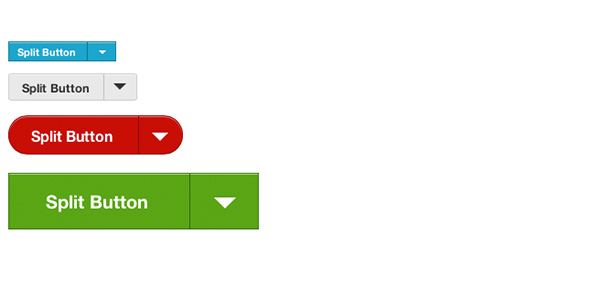
It could be a button for sign and publish. Then on the right side, there could be a dropdown with the other two options "only sign" and "only publish". It's kinda like a button merged with a dropdown/select.
krixano
on 30 Dec 2017
Like this?
| content.json        | Sign & Publish v |
+---------------------+------------------+
                      | Sign only        |
                      +------------------+
                      | Publish only     |
                      +------------------+
Yeah. Here's a better image that I found:
krixano
on 30 Dec 2017
Was it from some post with CSS/JS or just an image?
imachug
on 30 Dec 2017
No, it was from google images.
krixano
on 30 Dec 2017
I'll try to implement this then.
imachug
on 30 Dec 2017
The image uses these type of buttons from the Foundation framework.
This is the code it suggests:
<a class="button dropdown" href="#" data-dropdown="drop1">Dropdown Button </a>

</pre>
<ul class="f-dropdown" id="drop1" data-dropdown-content="">
    <li><a href="#">This is a link</a></li>
    <li><a href="#">This is another</a></li>
    <li><a href="#">Yet another</a></li>
</ul>
<pre>
@imachug I am going to delete everything that I've said that's not related to this topic if that's fine.
krixano
on 30 Dec 2017
This is the code it suggests:
Yeah, something like this.
imachug
on 30 Dec 2017
I don't think that code is correct though, I think they messed up with the article. Because the text next to it says there should be something with a split class or something.
The final layer of flexibility you have to play with is the option to add a split in your buttons. This can be used to indicate the availability of a dropdown, a download, whatever you want really. Add it onto your button using the ‘split’ class and a span element that should include the same ‘data-dropdown’ attribute we used earlier in our dropdown example.
Also the code from above just looks like a dropdown button, which is different.
krixano
on 30 Dec 2017
Not classes, but at least HTML is correct.
imachug
on 30 Dec 2017
imachug
on 30 Dec 2017
Related issues
 DaniellMesquita
·
3Comments
DaniellMesquita
·
3Comments
 yurivict
·
4Comments
yurivict
·
4Comments
 yurkobb
·
3Comments
yurkobb
·
3Comments
 trenta3
·
3Comments
trenta3
·
3Comments
 Forbo
·
3Comments
Forbo
·
3Comments
Most helpful comment
Like this?