is it possible to run over https? mean via cloudflare on port 8080
 scriptzteam
All 15 comments
nginx?
 piperswe
on 2 Mar 2016
piperswe
on 2 Mar 2016
Would be great if ZeroNet included support for https://letsencrypt.org/ built in. :)
 war59312
on 3 Mar 2016
war59312
on 3 Mar 2016
Are you guys talking about HTTPS to the localhost:43110 interface? Not sure what https, Cloudflare or Lets Encrypt add here?
 OliverCole
on 3 Mar 2016
OliverCole
on 3 Mar 2016
That's what I'm talking about yes and it would help because I could run it on a server and share it with friends and have it running with a real trusted cert. :)
Or just do what Adguard does. Install your own cert and make it trusted by the computer by default.
war59312
on 4 Mar 2016
If you use nginx you can use a config like this:
nginx.conf
server {
        listen       43110 ssl;
        server_name FQDN;

        include ssl.conf;

        location / {
            proxy_pass http://127.0.0.1:43111;
            proxy_http_version 1.1;
            proxy_set_header Upgrade $http_upgrade;
            proxy_set_header Connection "upgrade";
            proxy_set_header Host $host;
            proxy_set_header X-Real-IP $remote_addr;
            proxy_set_header X-Forwarded-For $proxy_add_x_forwarded_for;
        }
   }
These three lines (in the above config):
proxy_http_version 1.1;
proxy_set_header Upgrade $http_upgrade;
proxy_set_header Connection "upgrade";
are required to get the websocket connection to work.
ssl.conf
ssl_certificate                 /etc/letsencrypt/live/FQDN/fullchain.pem;
ssl_certificate_key             /etc/letsencrypt/live/FQDN/privkey.pem;
ssl_trusted_certificate         /etc/letsencrypt/live/FQDN/fullchain.pem;
You may want to check out https://mozilla.github.io/server-side-tls/ssl-config-generator/ for other recommended ssl parameters.
As you may have noticed, nginx is listening to port 43110 and ZeroNet is listening on port 43111, which can be invoked with zeronet.py --ui_port 43111
 bim9262
on 10 Mar 2016
bim9262
on 10 Mar 2016
Lots of ZeroNet gateways are running HTTPS now. Instead of using a self-signed certificate, the gateways have domain names and use certificates from Let's Encrypt. Closing?
 MuxZeroNet
on 17 Apr 2017
MuxZeroNet
on 17 Apr 2017
@bim9262 I try it but it's not work.
nginx version: nginx/1.10.3 (Ubuntu)
server {
listen 80 default_server;
listen [::]:80 default_server;
add_header Strict-Transport-Security max-age=604800;
return 301 https://$host$request_uri;
}
server {
listen 443 ssl default_server;
listen [::]:443 ssl default_server;
server_name _;
ssl on;
ssl_certificate /root/ZeroBundle/ssl/zeronet.crt;
ssl_certificate_key /root/ZeroBundle/ssl/zeronet.key;
client_max_body_size 0;
location / {
proxy_pass http://127.0.0.1:43110;
proxy_http_version 1.1;
proxy_set_header Upgrade $http_upgrade;
proxy_set_header Connection "upgrade";
proxy_set_header Host $host;
proxy_set_header X-Scheme $scheme;
proxy_set_header X-Real-IP $remote_addr;
proxy_set_header X-Forwarded-Proto $scheme;
proxy_set_header X-Forwarded-For $proxy_add_x_forwarded_for;
proxy_set_header X-Forwarded-Port $server_port;
}
}
always like this
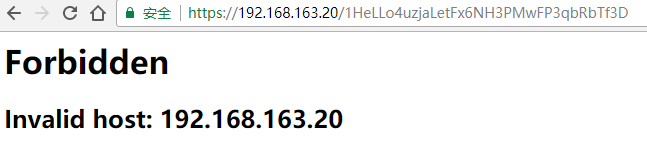
anyone can help me ?
 tldzyx
on 27 Sep 2017
tldzyx
on 27 Sep 2017
start zeronet with --ui_host "192.168.163.20"
 HelloZeroNet
on 27 Sep 2017
HelloZeroNet
on 27 Sep 2017
@HelloZeroNet I can open it via https://192.168.163.20 now
zeronet.conf
[global]
ui_ip = *
ui_port = 43110
ui_host = 192.168.163.20
but when I set router NAT the port from WAN to LAN, it's can't open again, and I try to set the zeronet.conf make ui_host = 192.168.163.20 192.168.1.163, but it's not work with multiple ips, so, it can support multiple ips? If it can do it, what is the right format set the ui_host?
In fact, I want to shared zeronet for my friends via my server, so if ui_host can support any is perfect(and I try to set ui_host to * just like ui_ip = *, but it's not work).
tldzyx
on 27 Sep 2017
Try this way:
[global]
ui_ip = *
ui_port = 43110
ui_host =
 192.168.163.20
 192.168.1.163
It's work ! thanks very much O(∩_∩)O
tldzyx
on 27 Sep 2017
only the sidebar(which contains stats) is loaded, the rest is blank, why??
 m0len
on 27 Sep 2017
m0len
on 27 Sep 2017
Hit F12 in the browser and see what "errors" or "warnings" are displayed.
ZeroNet does NOT work at all for me anymore in Chrome due to badly implemented Content Security Policy.
war59312
on 29 Sep 2017
hi!I got a error code 403 with two files, 'https://mydomain/1HeLL.../css/all.css' and 'https://mydomain/1HeLL.../js/all.js'.
m0len
on 29 Sep 2017
Can you please specify the exact error message you get? F12 > Network tab > all.js > Response
HelloZeroNet
on 10 Oct 2017
Related issues
 Forbo
·
3Comments
Forbo
·
3Comments
 iShift
·
3Comments
iShift
·
3Comments
 yurivict
·
4Comments
yurivict
·
4Comments
 imachug
·
3Comments
imachug
·
3Comments
 BenMcLean
·
3Comments
BenMcLean
·
3Comments
Most helpful comment
If you use nginx you can use a config like this:
nginx.conf
These three lines (in the above config):
are required to get the websocket connection to work.
ssl.conf
You may want to check out https://mozilla.github.io/server-side-tls/ssl-config-generator/ for other recommended ssl parameters.
As you may have noticed, nginx is listening to port 43110 and ZeroNet is listening on port 43111, which can be invoked with
zeronet.py --ui_port 43111