Zero-to-jupyterhub-k8s: AWS LoadBalancer health checks failing when using release 0.9.0 but not 0.8.2
Bug description
I have been successfully running a relatively heavily modified instance of JupyterHub-k8 (modifications primarily around using an NFS server for file storage and per-user customization options) for the past year using JupyterHub-k8 from git commit d25bcd9e38aca2734f90e51c2bc9a0bf9d90ca3e (I wasn't using the official 0.8.2 release because I needed hub init containers). I have been running this on AWS, and it has worked flawlessly for teaching multiple classes at the university I work at. I give this background to say that I don't think I'm making a stupid mistake that is causing my error, but I might be.
I have been testing out the 0.9.0 release, and there seems to be some incompatibility with AWS LoadBalancer health checks. I am using eksctl to set up the cluster using eks (Kubernetes version 1.15). I then use a minimal example following the exact steps in the JupyterHub guide (starting from https://zero-to-jupyterhub.readthedocs.io/en/latest/setup-jupyterhub/setup-helm.html). I use the following basic config file:
proxy:
  secretToken: "<REDACTED>"
All containers start fine, and the logs for all containers seem normal. However, I cannot access the hub page by going to the specified address from the load balancer. When I check the load balancer, it tells me that the connection to the "instance id" that is associated with the workers associated with the hub containers are "OutOfService" due to "Instance has failed at least the UnhealthyThreshold number of health checks consecutively." Oddly, I have gotten to the hub page successfully a few times for about 30 seconds, and then it fails. I think this is because it takes some time for the health checks to reach a threshold where they fail enough to kick the instance, and during that time, I can successfully reach it.
I then tried the exact above configuration (using the same kubernetes cluster) with 0.8.2 and things worked as expected. So, I do not think it is a misconfiguration of the cluster, but for the life of me, I have no idea where the problem would have been introduced. Given that my existing setup works using commit d25bcd9e38aca2734f90e51c2bc9a0bf9d90ca3e, it seems likely the problem was introduced after that commit, but that commit was almost a year ago.
I am very happy to help troubleshoot, but I'm not entirely sure where to start.
Expected behaviour
The hub should be reachable at the web address that you get from running kubectl --namespace=jhub get svc
Actual behaviour
I get an error message saying:
This page isn’t workinga
<REDACTED>.us-east-1.elb.amazonaws.com didn’t send any data.
ERR_EMPTY_RESPONSE
When I try to go to the indicated page
How to reproduce
My eksctl config file is as below:
# Only need this if there isn't an existing cluster already.
apiVersion: eksctl.io/v1alpha5
kind: ClusterConfig

metadata:
  name: develop-jupyterhub
  region: us-east-1

nodeGroups:
  - name: control-nodes-1
    instanceType: t3.small
    minSize: 1
    maxSize: 3
    # privateNetworking: true
    labels:
      autoscaling: enabled
    iam:
      withAddonPolicies:
        autoScaler: true
    availabilityZones: ["us-east-1a", "us-east-1b", "us-east-1c", "us-east-1d"]

  - name: worker-nodes-m5-xlarge
    instanceType: m5.xlarge
    minSize: 0
    maxSize: 10
    labels:
      "hub.jupyter.org/node-purpose": user
      autoscaling: enabled
    taints:
      "hub.jupyter.org/dedicated": "user:NoSchedule"
    tags:
      "k8s.io/cluster-autoscaler/node-template/label/hub.jupyter.org/node-purpose": user
      "k8s.io/cluster-autoscaler/node-template/taint/hub.jupyter.org/dedicated": "user:NoSchedule"
      k8s.io/cluster-autoscaler/enabled: "true"
      k8s.io/cluster-autoscaler/develop-jupyterhub: "owned"
    availabilityZones: ["us-east-1a", "us-east-1b", "us-east-1c", "us-east-1d"]


  - name: worker-nodes-r5-4xlarge
    instanceType: r5.4xlarge
    minSize: 0
    maxSize: 10
    # privateNetworking: true
    labels:
      "hub.jupyter.org/node-purpose": user
      autoscaling: enabled
    taints:
      "hub.jupyter.org/dedicated": "user:NoSchedule"
    tags:
      "k8s.io/cluster-autoscaler/node-template/label/hub.jupyter.org/node-purpose": user
      "k8s.io/cluster-autoscaler/node-template/taint/hub.jupyter.org/dedicated": "user:NoSchedule"
      k8s.io/cluster-autoscaler/enabled: "true"
      k8s.io/cluster-autoscaler/develop-jupyterhub: "owned"
    availabilityZones: ["us-east-1a", "us-east-1b", "us-east-1c", "us-east-1d"]

availabilityZones: ["us-east-1a", "us-east-1b", "us-east-1c", "us-east-1d"]
To set up the eks cluster, I run eksctl create cluster -f <CLUSTER-CONFIG>.yaml. I then follow the instructions directly from the docs with the minimal configuration being
proxy:
  secretToken: "<REDACTED>"
I install the chart with helm upgrade --install $RELEASE jupyterhub/jupyterhub --namespace $NAMESPACE --version=0.9.0 --values config.yaml.
I then wait for the chart to come up, and check the load balancer tab in the EC2 instances and watch it indicate that they failed the health checks.
Your personal set up
- OS:
linux - Version:
AWS AMI2 - Configuration:
Using Helm versionv2.16.6.
 albertmichaelj
All 22 comments
Update: I've done some more digging, and I now know why the LoadBalancer health checks are failing, or at least, I know how to manually fix it. I still don't know what has changed in the chart to cause the behavior I'm seeing. I've installed both the 0.8.2 release and the 0.9.0 release on the same cluster, and when I run kubectl --namespace=jhub-0-9-0 get svc proxy-public (for the 0.9.0 release), I get:
NAME           TYPE           CLUSTER-IP      EXTERNAL-IP                                                              PORT(S)                      AGE
proxy-public   LoadBalancer   10.100.16.240   <REDACTED>.us-east-1.elb.amazonaws.com   443:31027/TCP,80:32760/TCP   37s
And when I run kubectl --namespace=jhub-0-8-2 get svc proxy-public I get:
NAME           TYPE           CLUSTER-IP      EXTERNAL-IP                                                               PORT(S)                      AGE
proxy-public   LoadBalancer   10.100.94.174   <REDACTED>.us-east-1.elb.amazonaws.com   80:32524/TCP,443:32509/TCP   12m
When I look at the health check for the 0.9.0 load balancer, I see that the health check is pinging port 31027 on the cluster nodes using TCP, which is the https port (443). When I look at the health checks for the 0.8.2 release, it is doing the health check by pinging the 32524 port, which is the http port (80). Apparently, pinging the https port is failing. If I manually edit the health checks on the 0.9.0 load balancer to instead ping port 32760 (the http port for 0.9.0), the health checks pass and I can use the jupyterhub deployment like normal.
It seems that the health check logic for the load balancer is picking up whatever port is listed first when you run the kubectl --namespace=jhub-0-8-2 get svc proxy-public. I have absolutely no idea why that is. It appears that in 0.9.0, the https port is listed first.
While manually editing the load balancer is not a huge deal, this doesn't seem like this should be happening, especially given that it wasn't necessary for 0.8.2. Any thoughts as to how to get the load balancer to automatically pick the right port to do the health check?
albertmichaelj
on 20 Apr 2020
Update again: My strong suspicion is that this is caused by this commit by @sstarcher. The commit seems to indicate that due to kubernetes 1.14, you need the ssl service first, but I've been using kubernetes 1.14 successfully with versions of jupyterhub from before that commit just fine. Why is this necessary?
In my simple config above, I am not setting https, so I'm not sure why there is an ssl port exposed at all.
albertmichaelj
on 20 Apr 2020
Sorry for the continuous updates, but I just realized that https is enabled by default. That combined with the re-ordering of the ports is causing the AWS LoadBalancer health check to fail. I'm not sure if it would still fail if you correctly had https set up. As it stands, the health check will always pass if you use the http port, so it seems like that is what we should be doing.
A working minimal config is as below (without manually modifying the load balancers health check port):
proxy:
  secretToken: "<REDACTED>"
  https:
    enabled: false
Why were the http and https blocks re-ordered @sstarcher? I'm assuming this is what the load balancer is keying in on when deciding how to conduct the health checks.
albertmichaelj
on 20 Apr 2020
@albertmichaelj wow excellent investigation! Thank you so much for digging down into this issue!
There are multiple health checks in play here I think, so to avoid some of my confusion, can you verify: the issue you experience is a health check from AWS's load balancer, rather than from the livenessProbe we have defined for the hub etc - right?
 consideRatio
on 20 Apr 2020
consideRatio
on 20 Apr 2020
To be frank, I don't have quite the terminology for the various AWS components (and the load balancer is honestly the most mysterious part of the whole jupyterhub kubernetes deployment as far as I'm concerned, though I've learned a little more about it over the weekend), but the thing that is failing is the health check from the load balancer on AWS (i.e. I go to the AWS management console, click on EC2, and then click on load balancers, and find the right load balancer). Nothing internal to the chart seems to be having any problems as far as I can tell. After I change the health check port in the AWS management console for the load balancer, things work, even with https enabled, so again, the health check seems to be unrelated to anything created by the chart itself.
Happy to provide any more details I can.
albertmichaelj
on 20 Apr 2020
:heart:
I don't have an environment to work this out, but as far as I know, this is only a quirk of the AWS setup and either way would work for the Helm chart itself - so if you and @sstarcher can find agreement on a change and perhaps a brief conclusion to document regarding this quirky behavior relating to AWS, I'm happy to merge PRs related to this or try help out myself if I can.
consideRatio
on 20 Apr 2020
Great! I'll wait for @sstarcher to chime in to understand why the commit was made in the first place. Once we understand that, then maybe there will be a path forward.
albertmichaelj
on 20 Apr 2020
consideRatio
on 20 Apr 2020
/cc: @mhs22 as I saw you havd interacted with https://github.com/jupyterhub/zero-to-jupyterhub-k8s/pull/1531 and I hope to gather more administrators of AWS deployments to figure out a good solution to this.
consideRatio
on 20 Apr 2020
It does seem like the clearest solution to this problem is to disable https by default as #1641 does. I am not sure why https was enabled by default, but this would solve this issue.
albertmichaelj
on 20 Apr 2020
Certainly, the default enabled HTTPS does not and can not work.
 sstarcher
on 20 Apr 2020
sstarcher
on 20 Apr 2020
It is a Helm configuration default value, but what does it do? It only impacts rendedered templates, so, in what way?
I did some inspection, and now I think we can get to the root of the issue. This isn't right.
0 - Variables in the helm chart templates
You will see some variables like $HTTPS, $manualHTTPS, $manualHTTPSwithsecret, and $autoHTTPS. Worth knowing is that only $HTTPS is becoming true by having proxy.https.enabled: true.
1 - service/proxy-public's ports
The single thing that is influenced by proxy.https.enabled: true alongside the default of proxy.https.type: letsencrypt without any proxy.https.hosts set - which it isn't by default, is this.
https://github.com/jupyterhub/zero-to-jupyterhub-k8s/blob/43b85009615ba9fbaec3d836a0447fe8493405f4/jupyterhub/templates/proxy/service.yaml#L43-L58
2 - deployment/proxy's ports
No need for the deployment/proxy container to expose ports about https if it doesn't have certificates to encrypt/decrypt, and when autohttps is used traffic will already be pure HTTP when it reaches this pod and container.
https://github.com/jupyterhub/zero-to-jupyterhub-k8s/blob/43b85009615ba9fbaec3d836a0447fe8493405f4/jupyterhub/templates/proxy/deployment.yaml#L103-L111
3 - deployment/proxy's actual server
Here is where we can find the root cause of this issue I think.
https://github.com/jupyterhub/zero-to-jupyterhub-k8s/blob/43b85009615ba9fbaec3d836a0447fe8493405f4/jupyterhub/templates/proxy/deployment.yaml#L54-L75
4 - HUB_SERVICE_PORT
https://github.com/jupyterhub/zero-to-jupyterhub-k8s/blob/43b85009615ba9fbaec3d836a0447fe8493405f4/jupyterhub/templates/proxy/deployment.yaml#L59
The environment variables you see mentioned there, are set by Kubernetes automatically. But. HUB_SERVICE_PORT is problematic, because there are multiple ports... So, ordering suddenly matters!
From this documentation section I found my way to the kubelet code base where these environment variables are created and we can see it only cares about the first port.
Wait btw... This isn't about HUB_SERVICE_PORT, there is always only one service/hub port, it is about PROXY_PUBLIC_SERVICE_PORT.
5 - PROXY_PUBLIC_SERVICE_PORT
Here is probably the issue, at least that is what is directly influenced by the ordering. In this case, we will configure jupyterhub to think it runs behind the wrong port because we added the port to the service conditionally while not doing anything else.
https://github.com/jupyterhub/zero-to-jupyterhub-k8s/blob/f046cf2b0166d250def3abfa266d06021c65ce6f/jupyterhub/files/hub/jupyterhub_config.py#L77-L78
What to do?
Not sure yet, but...
- We don't want to introduce breaking changes unless we require doing that. Making
proxy.https.enabled: falseby default would break a lot of configuration that only overrodeproxy.https.hosts: [mydomain.com]and relied on the default value of https being enabled. - We want configuration to be as secure by default, but HTTPS cannot be setup without manual action no matter what, in this case nothing really happens unless
proxy.https.hostsis added. - We don't want to mislead the user by having configuration not do anything or only something nonsensical. In this case, I think we are doing something nonsensical.
Concrete ideas:
- I think we should keep proxy.https.enabled remain to true to avoid breaking something.
- I think we should ensure the hub isn't configured to think it runs behind a HTTPS port when infra isn't configured for it.
- Figure out what c.JupyterHub.port (and ip while at it) impacts, and what makes sense.
Reference of relevance
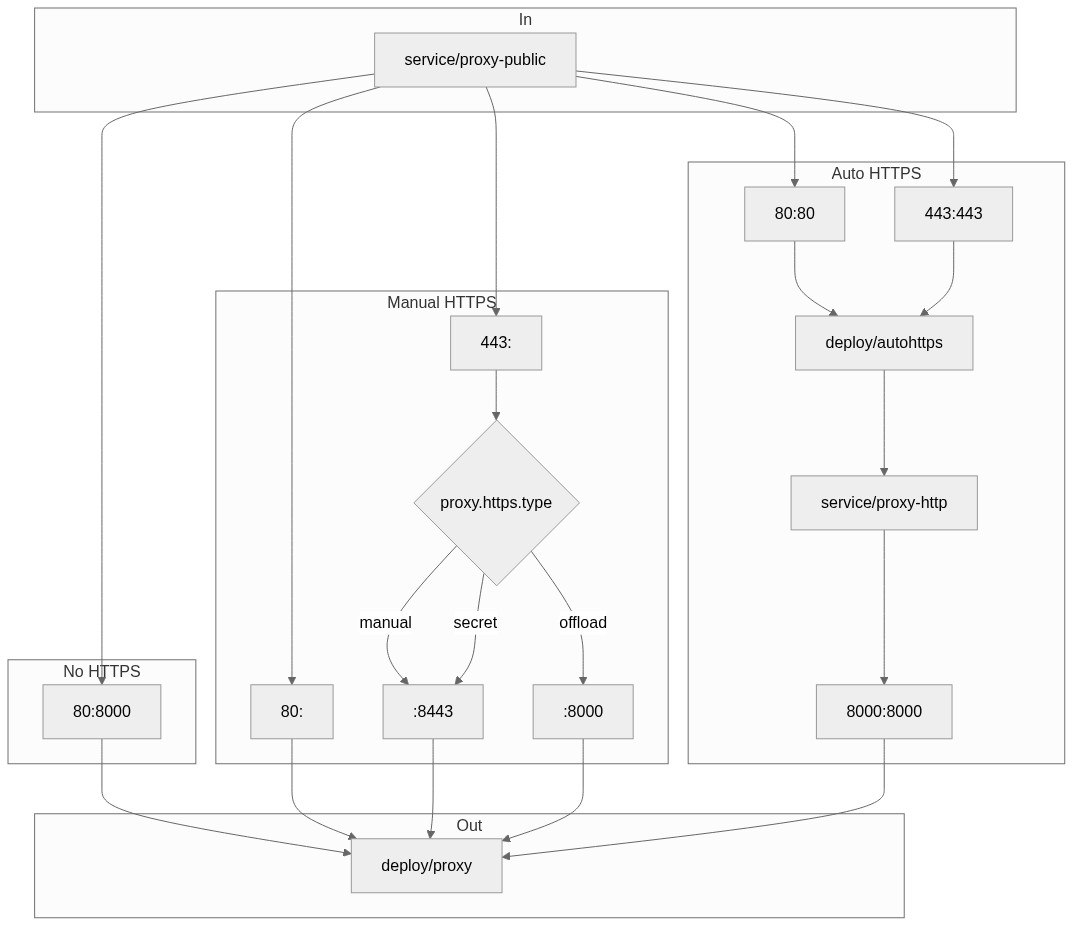
This may come in handy, it explains how the current logic works with regards to how traffic flow through the proxy-public service. From it we can see that we have no need for a HTTPS port defined on it when not actually using HTTPS, which we only do when it is sufficiently configured, which proxy.https.enabled: true implies by itself (it requires proxy.https.hosts to be set by default when the default proxy.https.type: letsencrypt is there).
 consideRatio
on 21 Apr 2020
consideRatio
on 21 Apr 2020
I think this is a great summary of the root of the issue. If we are to leave proxy.https.enabled true, then I'm not really sure the best way to proceed. If there are concrete things I can contribute, then I'm happy to do so, but I may be towards the end of my ability to contribute.
albertmichaelj
on 21 Apr 2020
If you know the values that must be set for proxy.https.enabled to be viable if one of those is not set you could not set the HTTPs port on the service. Overall I would consider it harmful to users to not break when it's incorrectly configured.
sstarcher
on 21 Apr 2020
If I'm following this issue correctly the default of proxy.https.enabled: true proxy.https.hosts: [] leads to a broken system? So would it work to replace all checks for proxy.https.enabled with proxy.https.enabled and proxy.https.hosts is-not-empty?
 manics
on 22 Apr 2020
manics
on 22 Apr 2020
That's half of it @manics
You have proxy.https.enabled and proxy.https.hosts will work when letsecrypt is turned on which is by default.
Your other option is proxy.https.enabled and specifying your own certificates.
sstarcher
on 22 Apr 2020
Sorry for the continuous updates, but I just realized that https is enabled by default. That combined with the re-ordering of the ports is causing the AWS LoadBalancer health check to fail. I'm not sure if it would still fail if you correctly had https set up. As it stands, the health check will always pass if you use the http port, so it seems like that is what we should be doing.
A working minimal config is as below (without manually modifying the load balancers health check port):
proxy:
  secretToken: "<REDACTED>"
  https:
    enabled: false
Why were the http and https blocks re-ordered @sstarcher? I'm assuming this is what the load balancer is keying in on when deciding how to conduct the health checks.
I had https disabled when updating to 0.9.0 and still had the health check problem. Changing the port manually in AWS worked perfectly
 edmolten
on 7 May 2020
edmolten
on 7 May 2020
@edmolten if you have https disabled the https port should not exist so I'm not sure how you could have this problem. Could you post your config along with the svc manifests.
sstarcher
on 7 May 2020
Another workaround is to use NLB (or maybe ALB) instead of the CLB and circumvent the issue altogether. This might be helpful if you are trying to put all your infra in code and avoid any manual UI changes. So your configuration could look like:
proxy:
  secretToken: '(snip)'
  service:
    annotations:
      service.beta.kubernetes.io/aws-load-balancer-internal: "true"
      service.beta.kubernetes.io/aws-load-balancer-type: "nlb"
hub:
(snip)
After skimming through a few documents about NLB vs CLB, I think it's OK to use NLB for most of the JupyterHub use cases, but I would recommend everyone look into it before switching. I found the product comparison chart to be really helpful.
I tested NLB and it is working. I am doing HTTPS offloading so my config looks like this:
proxy:
  networkPolicy:
    enabled: true
  https:
    enabled: true
    type: offload
  secretToken: '(snip)'
  service:
    annotations:
      service.beta.kubernetes.io/aws-load-balancer-internal: "true"
      service.beta.kubernetes.io/aws-load-balancer-type: "nlb"
      service.beta.kubernetes.io/aws-load-balancer-ssl-cert: "(snip)"
      service.beta.kubernetes.io/aws-load-balancer-backend-protocol: "tcp"
      service.beta.kubernetes.io/aws-load-balancer-ssl-ports: "https"
      service.beta.kubernetes.io/aws-load-balancer-connection-idle-timeout: "3600"
hub:
     (snip)
Also big props to @albertmichaelj for an amazing write up!
 kparaju
on 27 Aug 2020
kparaju
on 27 Aug 2020
https://github.com/jupyterhub/zero-to-jupyterhub-k8s/pull/1758 should fix it.
Until then, https://github.com/jupyterhub/zero-to-jupyterhub-k8s/issues/1637#issuecomment-616596444 is a very valid workaround.
 yuvipanda
on 27 Aug 2020
yuvipanda
on 27 Aug 2020
I think we should keep proxy.https.enabled remain to true to avoid breaking something.
IMO, I think this is ok change to make. It's currently broken for anyone on AWS, so I see this as 'fixing' it more so than as a breaking change.
yuvipanda
on 27 Aug 2020
Ok, I think https://github.com/jupyterhub/zero-to-jupyterhub-k8s/pull/1758 is now backwards compatible.
yuvipanda
on 27 Aug 2020
Related issues
consideRatio
·
3Comments
consideRatio
·
4Comments
 UsDAnDreS
·
4Comments
consideRatio
·
4Comments
UsDAnDreS
·
4Comments
consideRatio
·
4Comments
 sgibson91
·
3Comments
sgibson91
·
3Comments
Most helpful comment
Update: I've done some more digging, and I now know why the LoadBalancer health checks are failing, or at least, I know how to manually fix it. I still don't know what has changed in the chart to cause the behavior I'm seeing. I've installed both the
0.8.2release and the0.9.0release on the same cluster, and when I runkubectl --namespace=jhub-0-9-0 get svc proxy-public(for the0.9.0release), I get:And when I run
kubectl --namespace=jhub-0-8-2 get svc proxy-publicI get:When I look at the health check for the
0.9.0load balancer, I see that the health check is pinging port31027on the cluster nodes using TCP, which is the https port (443). When I look at the health checks for the0.8.2release, it is doing the health check by pinging the32524port, which is the http port (80). Apparently, pinging the https port is failing. If I manually edit the health checks on the0.9.0load balancer to instead ping port32760(the http port for0.9.0), the health checks pass and I can use the jupyterhub deployment like normal.It seems that the health check logic for the load balancer is picking up whatever port is listed first when you run the
kubectl --namespace=jhub-0-8-2 get svc proxy-public. I have absolutely no idea why that is. It appears that in0.9.0, the https port is listed first.While manually editing the load balancer is not a huge deal, this doesn't seem like this should be happening, especially given that it wasn't necessary for
0.8.2. Any thoughts as to how to get the load balancer to automatically pick the right port to do the health check?