Zephyr: Errors in copy paste lengthy script into Shell Console
Copy/pasting into shell console fails with long commands. The paste transforms into unexpected characters.
As a consequence commands cannot not be executed correctly.
This is a really weird issue for me, I will try to explain it as clearly as possible.
When I paste the following into shell console,
- I dont see any issue with 'bt test_tx 01 02 03 04 05 06 07 08 09 10 11 12 13 14 15 16 17 18' or lesser arguments

Fails with bt test_tx 01 02 03 04 05 06 07 08 09 10 11 12 13 14 15 16 17 18 19

Fails with bt test_tx 01 02 03 04 05 06 07 08 09 10 11 12 13 14 15 16 17 18 19 20

and so on
When I type the long command manually, I dont see this issue.
When I paste the long command in smaller chunks, I dont see this issue.
I have tried this with python pyserial, I see the same issue when I try to send a long command.
I am using screen on MacOS.
Can you please help me. I can provide any additional information needed.
 sandeep-airatechnology
All 18 comments
This is not unfamiliar issue. It happens when either UART is used in non interrupt-driven mode, or when buffer for interrupt-driven mode is not big enough.
@sandeep-airatechnology: To get any reasonable feedback of your report, you would need to fill in the data in the bug report template, which was presented to you when you submitted the bug (https://github.com/zephyrproject-rtos/zephyr/issues/new?assignees=&labels=bug&template=bug_report.md&title=)
 pfalcon
on 3 Sep 2020
pfalcon
on 3 Sep 2020
@pfalcon shall I close this and open a new bug in the said format?
sandeep-airatechnology
on 4 Sep 2020
@pfalcon shall I close this and open a new bug in the said format?
Will you please update this bug with information to reproduce?
 MaureenHelm
on 8 Sep 2020
MaureenHelm
on 8 Sep 2020
@sandeep-airatechnology I am affraid This is not a bug it is how UART works. You can enable flow control or use interrupt driven UART. In fact this was a reason why we have added interrupt driven option.
 jakub-uC
on 10 Sep 2020
jakub-uC
on 10 Sep 2020
Could be related to https://github.com/zephyrproject-rtos/zephyr/issues/28108#issuecomment-690611049.
 henrikbrixandersen
on 10 Sep 2020
henrikbrixandersen
on 10 Sep 2020
@henrikbrixandersen I think these are different problems. When you will use a shell with UART driver configured in polling mode you will observe that you are not able to paste a long text into the shell because not all characters will appear.
The problem here is before command is executed, before pressing the enter key.
jakub-uC
on 10 Sep 2020
@jakub-uC how do I enable interrupt driven UART? is it in config?
I have flow control turned ON from the PC side, is there something to be done on the board side?
I have the following in my .config,
CONFIG_UART_INTERRUPT_DRIVEN=y
CONFIG_SHELL_BACKEND_SERIAL_INTERRUPT_DRIVEN=y
sandeep-airatechnology
on 11 Sep 2020
@sandeep-airatechnology I have the following settings for nrf52840dk_nrf52840 board
CONFIG_SHELL_BACKEND_SERIAL_INTERRUPT_DRIVEN=y
CONFIG_SERIAL=y
CONFIG_SERIAL_SUPPORT_INTERRUPT=y
CONFIG_UART_INTERRUPT_DRIVEN=y
CONFIG_UART_0_INTERRUPT_DRIVEN=y
CONFIG_SHELL_BACKEND_SERIAL=y
CONFIG_SHELL_BACKEND_SERIAL_RX_RING_BUFFER_SIZE=128
CONFIG_SHELL_ARGC_MAX=128
I see that your working sequence bt test_tx 01 02 03 04 05 06 07 08 09 10 11 12 13 14 15 16 17 18 has 64 characters so it is the default CONFIG_SHELL_BACKEND_SERIAL_RX_RING_BUFFER_SIZE. Please increase this value in your proj.conf file to 128 and next try a longer sequence. It is working for me and should be working for you as well.
The bad news is that most likely your next problem will be an issue discovered by @henrikbrixandersen: #28108 .
As a temporary workaround, you can add:
CONFIG_SHELL_ARGC_MAX=128 in your prj.file.
jakub-uC
on 11 Sep 2020
@jakub-uC Thank-you for your response.
I have increased the CONFIG_SHELL_BACKEND_SERIAL_RX_RING_BUFFER_SIZE to 128 but it doesn't help.
I have attached the .config for your reference.
Also, I have tried the same on mac(screen) and linux(putty) to rule out OS specific issues.
copy/pasting bt test_tx 01 02 03 04 05 06 07 08 09 10 11 12 13 14 15 16 17 18 works
copy/pasting bt test_tx 01 02 03 04 05 06 07 08 09 10 11 12 13 14 15 16 17 18 19 20 does not work
config_copy.txt
sandeep-airatechnology
on 11 Sep 2020
@sandeep-airatechnology : what uC / board are you using?
jakub-uC
on 14 Sep 2020
@jakub-uC I am using NRF52840 devkit. PCA10056, 2.0.1, 2020.20.
sandeep-airatechnology
on 15 Sep 2020
Hi,
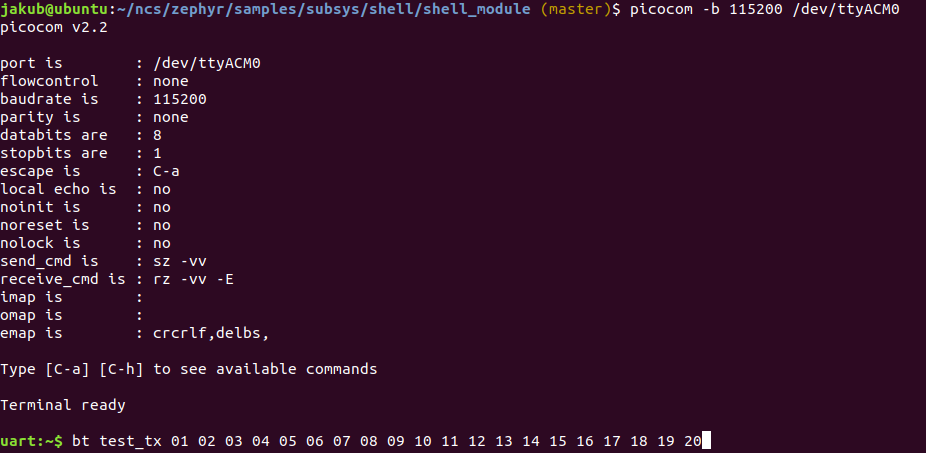
I've tested the sample: zephyr/samples/subsys/shell/shell_module
west build -b nrf52840dk_nrf52840
I've only changed CONFIG_SHELL_ARGC_MAX to 128 and it is working fine.
I will try to get MAC to reproduce it, but I am not sure when it will be possible.
jakub-uC
on 16 Sep 2020
I was using /zephyr/tests/bluetooth/shell/ example.
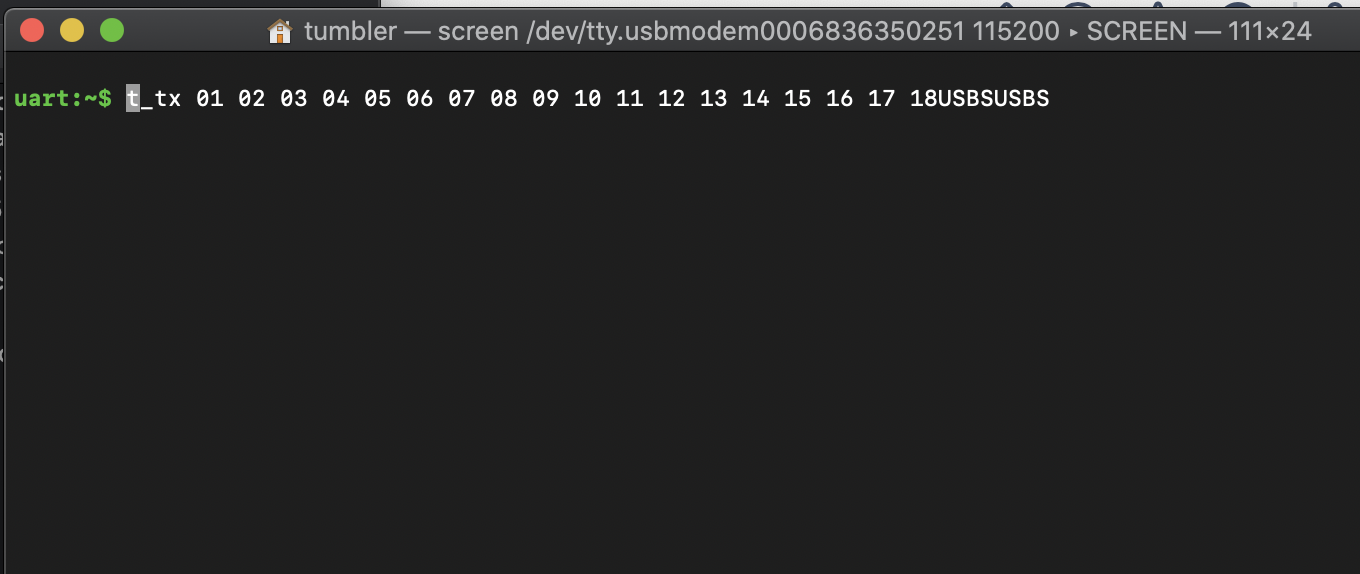
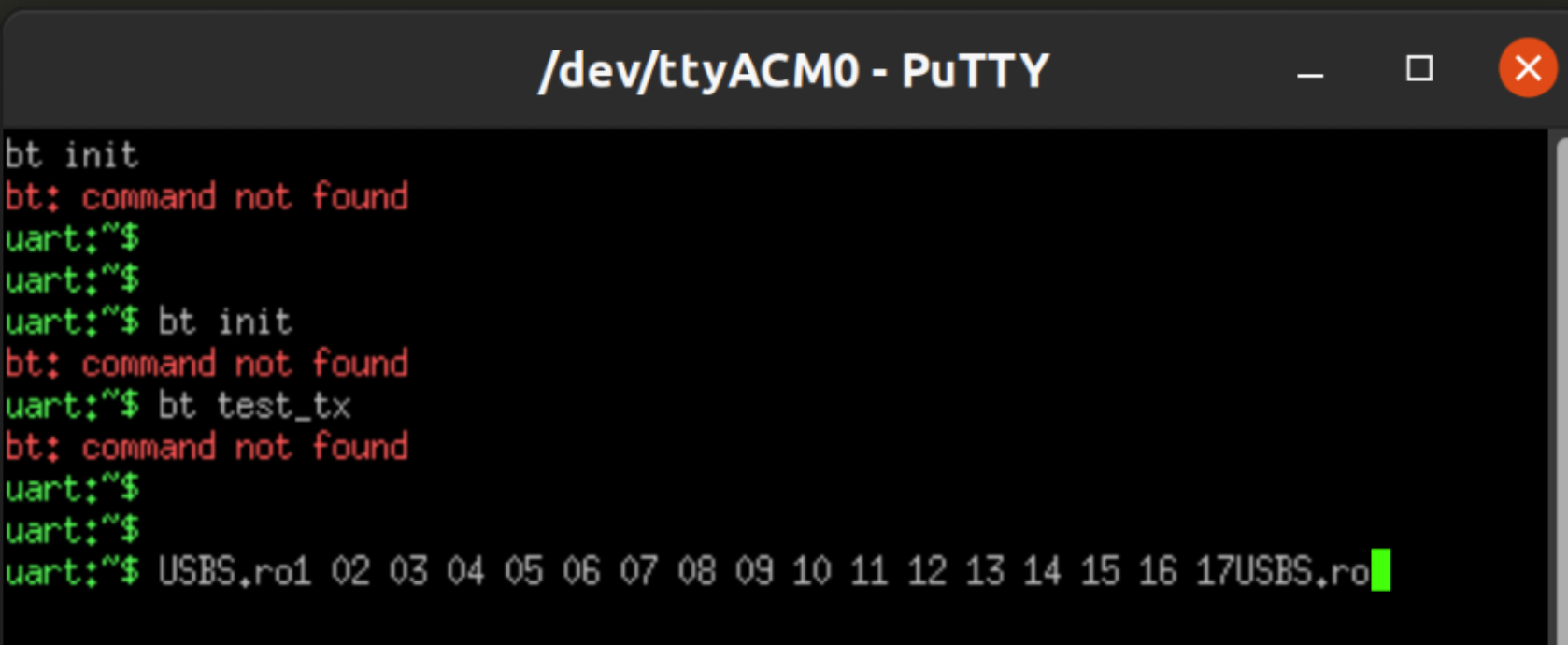
I tried zephyr/samples/subsys/shell/shell_module example. Changed the CONFIG_SHELL_ARGC_MAX to 128 and CONFIG_SHELL_BACKEND_SERIAL_RX_RING_BUFFER_SIZE to 128.
When the paste 'bt test_tx 01 02 03 04 05 06 07 08 09 10 11 12 13 14 15 16 17 18 19 20' the following shows up.
on mac,
on linux - putty,
Is there anything else I could try?
sandeep-airatechnology
on 17 Sep 2020
@sandeep-airatechnology: To be honest I am confused. I will look for the same eval board as you have because I am using some older version.
Nevertheless, would you mind attaching your hex file here? I will flash it and try to reproduce on my machine.
jakub-uC
on 17 Sep 2020
@jakub-uC I apologize for the delay.
PFA the hex and config file. I compiled the /zephyr/tests/bluetooth/shell/ example.
config copy.txt
sandeep-airatechnology
on 24 Sep 2020
@sandeep-airatechnology : I've tested your hex file with the combination: bt test_tx 01 02 03 04 05 06 07 08 09 10 11 12 13 14 15 16 17 18 19 20 and it is working fine on my machine. Everything was correctly printed out. I was using the board in version 0.10.0 so quite an old one.
I was keeping shift + insert pressed and I've had got the following result:
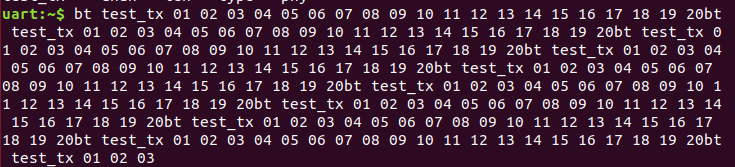
I will now try to arrange the same board version as you have and I will repeat the test.
@henrikbrixandersen Please let me know if can support us and verify the hex file on PCA10056 board as well?
jakub-uC
on 25 Sep 2020
I've run the test on PCA10056 in version 2.0.1 2020.20. I cannot observe the issue, everything is working well. I have no idea when I will have an access to MAC to verify it.
jakub-uC
on 29 Sep 2020
This issue has been marked as stale because it has been open (more than) 60 days with no activity. Remove the stale label or add a comment saying that you would like to have the label removed otherwise this issue will automatically be closed in 14 days. Note, that you can always re-open a closed issue at any time.
![github-actions[bot] picture](https://avatars2.githubusercontent.com/in/15368?v=4&s=40) github-actions[bot]
on 29 Nov 2020
github-actions[bot]
on 29 Nov 2020
Related issues
 ghost
·
3Comments
ghost
·
3Comments
 spoorthik
·
3Comments
ghost
·
4Comments
spoorthik
·
3Comments
ghost
·
4Comments
 pabigot
·
4Comments
pabigot
·
4Comments
 skylayer
·
4Comments
skylayer
·
4Comments
Most helpful comment
@henrikbrixandersen I think these are different problems. When you will use a shell with UART driver configured in polling mode you will observe that you are not able to paste a long text into the shell because not all characters will appear.
The problem here is before command is executed, before pressing the
enterkey.