Zephyr: Samples: BluetoothMesh: not able to connect with device over GATT to provision it
I'm successfully able to build & flash apps (with latest things) available in samples/boards/nrf52/mesh directory. After that they are advertising itself as unprovisioned BluetoothMesh Devices.
But as soon as we try to connect it with nRFMesh App, after that provisioning process does not get completed. Plus device stops advertising as Bluetooth Device so we have to reset it.
 vikrant8051
All 51 comments
@vikrant8051 could you give more details on which commit this was last working? Did you try bisecting?
 cvinayak
on 9 Oct 2019
cvinayak
on 9 Oct 2019
I have the same problem with a MESH app created to test Vega board.
test_mesh_2.zip
 George-Stefan
on 10 Oct 2019
George-Stefan
on 10 Oct 2019
Debugging shows that the continuous advertising (started from MESH) causes the connection for provisioning to fail.
I reproduced the issue in a simpler scenario wih peripheral_hr.
main_peripheral_hr.zip
George-Stefan
on 10 Oct 2019
@George-Stefan I tested your main.c file and I dont see any connection loss. Is this 100% reproducible or random?
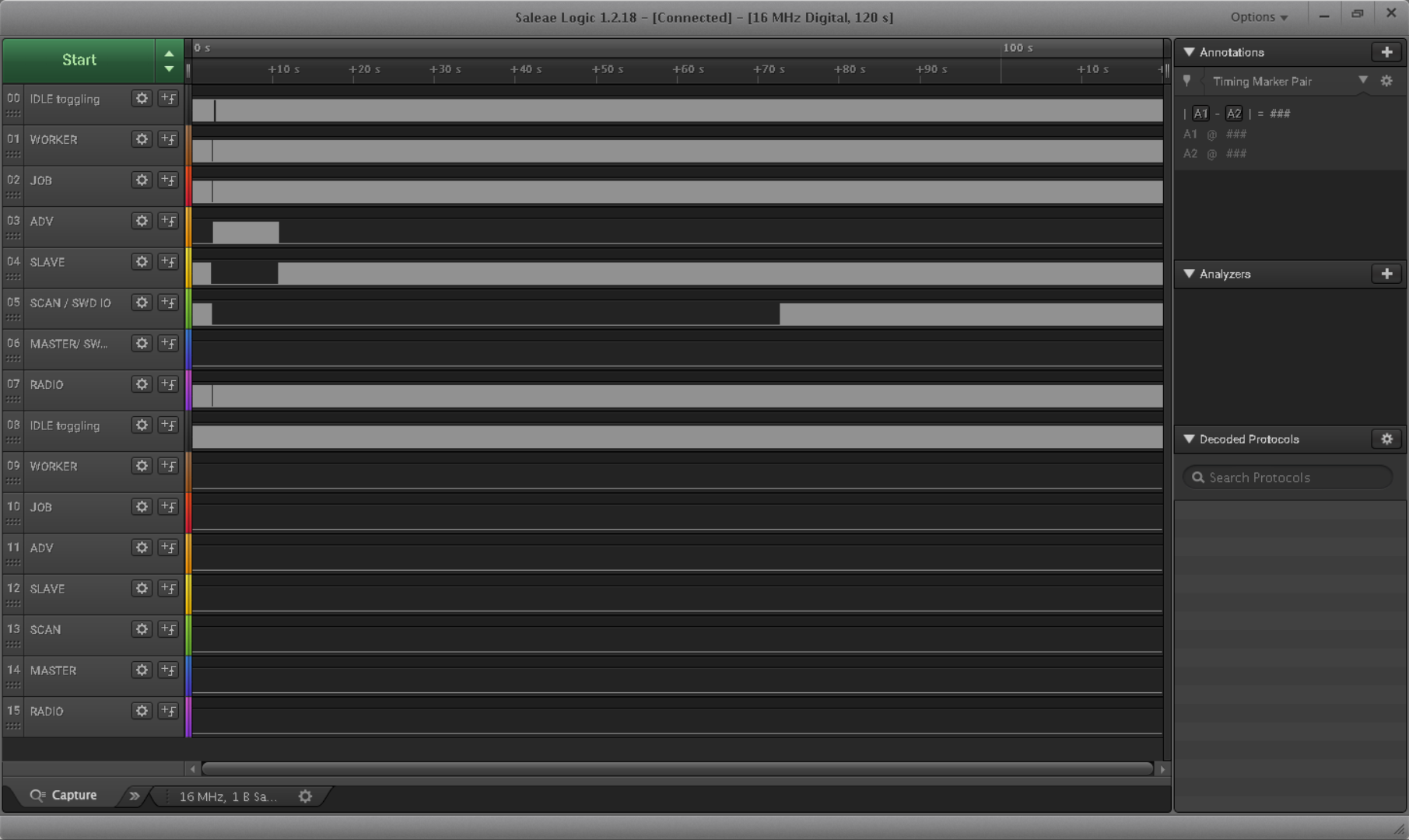
Below is the logic trace of advertisements transition to peripheral and then when heartrate is 160, continuous scanning is started, the link stays stable.
cvinayak
on 11 Oct 2019
I use NXP IoT Toolbox running on iphone to connect to the peripheral_hr running on Vega board.
The reproducibility is 100%.
Current connection fails with timeout (0x8 error code) and new connections fail with 0x3e (on slave side)
George-Stefan
on 11 Oct 2019
What is the connection interval in these connections?
cvinayak
on 11 Oct 2019
@cvinayak 48.7 ms (iphone), tried with an windows app too (50ms)
Checked all combinations of controller/ticker.
Enabled BT_CTLR_XTAL_ADVANCED, BT_CTLR_SCHED_ADVANCED.
It didn't make any difference, it fails as before
George-Stefan
on 11 Oct 2019
@George-Stefan I may know the issue (in the new split controller scheduling pipeline), if the intervals of two overlapping events are similar and are to be scheduled within a gap of 1.5 ms (pre-empt timeout) then the second in the pipeline is not able to pre-empt the currently occupying BLE event in the 'unreserved timespace' (in this case the continuous scanner does not yield and is not being pre-empted). The reason for this being, there is only one pre-empt ticker instance that is scheduled in 1.5 ms interval, and the other event in the pipeline cannot start it when it has been already started by the previous event in the pipeline.
The solution could be to chain the pre-empt ticker to start (on each expiry) with the ticks_to_expire of next in pipeline (if any).
@pskhansen ^^ @mtpr-ot ^^
@George-Stefan Please confirm that the issue is reproducible with CONFIG_BT_TICKER_COMPATIBILITY_MODE=y too?
No action from others in this issue, until I come back with more updates on a fix.
cvinayak
on 13 Oct 2019
@George-Stefan Please confirm that the issue is reproducible with CONFIG_BT_TICKER_COMPATIBILITY_MODE=y too?
Yes, it is
George-Stefan
on 14 Oct 2019
test_mesh_2.zip
I use the nRF Mesh app running on iphone to do the provisioning. The provisioning never completes
George-Stefan
on 15 Oct 2019
Is any PR under pipeline to solve this issue. ?
Till now with latest master branch not able to get rid off from this issue.
vikrant8051
on 16 Oct 2019
@vikrant8051 which board are you running this on?
 carlescufi
on 17 Oct 2019
carlescufi
on 17 Oct 2019
@carlescufi nrf52840_pca10056 board. But I think issue is board independent. Right ?
vikrant8051
on 17 Oct 2019
@vikrant8051 Can you check my scenario?
I use NXP IoT Toolbox running on iphone to connect to the peripheral_hr running on Vega board.
The reproducibility is 100%.
Current connection fails with timeout (0x8 error code) and new connections fail with 0x3e (on slave side)
Debugging shows that the continuous advertising (started from MESH) causes the connection for provisioning to fail.
I reproduced the issue in a simpler scenario wih peripheral_hr.
main_peripheral_hr.zip
George-Stefan
on 17 Oct 2019
@carlescufi nrf52840_pca10056 board. But I think issue is board independent. Right ?
@vikrant8051
Possibly, yes. Could you let us know exactly how to reproduce the issue with nrf52840_pca10056? We don't have Vega boards to test.
carlescufi
on 17 Oct 2019
@vikrant8051 could you please give us detailed steps on how to reproduce this problem? And if possible the version of master that you are using (commit SHA).
carlescufi
on 21 Oct 2019
@carlescufi
I have tested the things with latest master branch for all available #BluetoothMesh App in it on nrf52_pca10056 board.
You have to just build & flash the code as usual using West build & West flash & that's it.
After that Mesh Device not allow you to provision it.
(I also tried to erase entire flash & then burn the new image. Even after that getting same result)
I always prefer to do testing with Apps available in samples/boards/nrf52/mesh/ directory.
Kindly build & flash any one out of the two on nRF52_pca10056 board for confirmation.
Thank You!!
vikrant8051
on 21 Oct 2019
@vikrant8051
I wasn't able to reproduce this on nrf52_pca10056 with the Nordic Mesh Android app in any of the mesh or board samples. @George-Stefan mentioned he's using the iOS app, is this the case for you as well?
 trond-snekvik
on 24 Oct 2019
trond-snekvik
on 24 Oct 2019
@trond-snekvik
I've just upgraded my local repo & again tried but facing same issue.
Is your local repo sync with latest master branch ?
I also tried with Nordic, Silicon & Dialog Semiconductors Mesh Apps (on Android) but not able to complete Provisioning in any case.
vikrant8051
on 24 Oct 2019
@trond-snekvik
I tried with following Apps:
- zephyr/samples/bluetooth/mesh
- zephyr/samples/boards/nrf52/mesh/onoff-app
- zephyr/samples/boards/nrf52/mesh/onoff_level_lighting_vnd_app
None of these are allowing me to provision the nrf52840_pca10056 board.
vikrant8051
on 24 Oct 2019
@trond-snekvik
To avoid any confusion,
- deleted my GitHub forked version of Zephyr
- Local repo on Laptop
- Forked new Zephyr using GitHub's forked GUI button
- Clone this latest forked version on my laptop
Even after that getting same result. Your comments now surprising me !!
(Also test the things for thingy52: nrf52_pca20020)
@jhedberg @carlescufi @cvinayak Are you able to provision nrf52_pca10056 by flashing apps in samples/boards/nrf52/mesh ?
vikrant8051
on 24 Oct 2019
@vikrant8051
I tested samples/bluetooth/mesh and samples/boards/nrf52/mesh/onoff-app on commit 19d4caaaab. I've observed strange GATT behavior when changing the configuration, but it works consistently with the default config in both apps. Using the nRF Mesh App v2.0.5 on Android 9. Could you upload a compiled hexfile, so we can narrow it down a bit?
trond-snekvik
on 25 Oct 2019
@trond-snekvik
Why don't you test the things for latest Master branch (samples/boards/nrf52/mesh/onoff-app) ?
I had put default configurations. Even after that couldn't provision the board.
Please do the same to get that hexfile & share your result if you are successful.
Once I reach the home (at today evening), I will checkout with https://github.com/zephyrproject-rtos/zephyr/commit/19d4caaaabf751347c5289a1e6c05a1a2d86d24a this commit & inform you.
vikrant8051
on 25 Oct 2019
@trond-snekvik
https://github.com/zephyrproject-rtos/zephyr/commit/19d4caaaabf751347c5289a1e6c05a1a2d86d24a it has merged just before 23 hours. Means you are using almost latest master branch.
Then why I was facing the issue (I just checked yesterday night) ? Strange !!
vikrant8051
on 25 Oct 2019
@vikrant8051 Can you check my scenario?
I use NXP IoT Toolbox running on iphone to connect to the peripheral_hr running on Vega board.
The reproducibility is 100%.
Current connection fails with timeout (0x8 error code) and new connections fail with 0x3e (on slave side)Debugging shows that the continuous advertising (started from MESH) causes the connection for provisioning to fail.
I reproduced the issue in a simpler scenario wih peripheral_hr.
main_peripheral_hr.zip
George-Stefan
on 25 Oct 2019
@George-Stefan
Sorry but at present it is out of the scope for me. I am in process of submitting new PRs but waiting to solve this issue so that I can test my new changes.
Today I am going to execute 'West update' command & hope that may solve this issue.
vikrant8051
on 25 Oct 2019
@vikrant8051
I tested samples/bluetooth/mesh and samples/boards/nrf52/mesh/onoff-app on commit 19d4caa. I've observed strange GATT behavior when changing the configuration, but it works consistently with the default config in both apps. Using the nRF Mesh App v2.0.5 on Android 9. Could you upload a compiled hexfile, so we can narrow it down a bit?
@trond-snekvik
I installed entire 'zephyrproject' on freshly installed ubuntu 18.04 by following Zephyr Getting started guide & flash all Apps available in samples/boards/nrf52/mesh directory one by one.
None of them allowing me to provision nrf52840_pca10056 board..
Then I jump on this https://github.com/zephyrproject-rtos/zephyr/commit/19d4caaaabf751347c5289a1e6c05a1a2d86d24a commit & again test the things for two Apps in same directory. Result is same. Now how this can be possible that things are working for you & not for me ?
Each time I have put default configuration setting.
@jhedberg @carlescufi @cvinayak @nashif Please test one of the App from following list on nrf52840_pca10056 board & confirm about whether they are allowing to provision it or not with latest master branch?
- zephyr/samples/bluetooth/mesh
- zephyr/samples/boards/nrf52/mesh/onoff-app
- zephyr/samples/boards/nrf52/mesh/onoff_level_lighting_vnd_app
Plz find attachment of my zephyr/samples/boards/nrf52/mesh directory for your ref. which has hex files .....
mesh.zip
vikrant8051
on 26 Oct 2019
Is that mean, no one else facing this issue ?
vikrant8051
on 30 Oct 2019
Booting Zephyr OS build zephyr-v2.0.0-1633-gdbb561fd2fe2
Initializing...
Bluetooth initialized
[00:00:00.00Mesh initialized
power-> 100, color-> 100
Reset Counter -> 0
9,429]
[00:00:00.009,429]
[00:00:00.009,460]
[00:00:00.012,268]
[00:00:00.012,268]
[00:00:00.012,268]
[00:00:00.012,481]
[00:00:00.014,648]
[00:00:00.029,693]
[00:00:00.029,724]
[00:00:00.029,724]
[00:00:00.045,471]
[00:00:00.052,642]
[00:00:00.053,100]
[00:00:00.053,710]
[00:00:00.173,889]
[00:00:00.435,760]
[00:00:05.053,100]
[00:00:05.053,222]
[00:00:05.053,222]
[00:00:05.053,253]
Reset Counter set to Zero
[00:00:10.053,192]
[00:00:10.053,314]
[00:00:10.053,314]
In case of onoff_level_lighting_vnd_app, getting this log after enabling these config parameter ..
CONFIG_BT_DEBUG_LOG=y
CONFIG_BT_MESH_DEBUG=y
CONFIG_BT_MESH_DEBUG_PROV=y
CONFIG_BT_MESH_DEBUG_PROXY=y
vikrant8051
on 3 Nov 2019
[00:00:10.053,314] bt_mesh_proxy: Failed to stop advertising (err -5)
That's proxy.c that's failing to stop advertising, and the return value is EIO. The only place in hci_core.c that can return EIO is the bt_hci_cmd_send_sync() call. This will happen when the HCI_LE_Set_Adv_Enable(disable) command returns a non-zero command complete status. You'd need to add some more debug logs to the controller side to figure out why this HCI command is failing.
[00:00:10.053,314] bt_mesh_adv: Advertising failed: err -69
That's EALREADY and it's coming from adv.c i.e. the advertising bearer. Most likely cause is the previous error from proxy.c, i.e. since proxy.c was unable to stop connectable advertising adv.c is unable to start non-connectable advertising.
 jhedberg
on 7 Nov 2019
jhedberg
on 7 Nov 2019
@vikrant8051 the useful debugs to enable in this case are CONFIG_BT_DEBUG_HCI_CORE and CONFIG_BT_DEBUG_HCI_DRIVER. Disable any higher level stuff like the mesh debug logs - those are only causing unnecessary noise.
jhedberg
on 7 Nov 2019
@jhedberg @carlescufi @cvinayak @nashif Please test one of the App from following list on nrf52840_pca10056 board & confirm about whether they are allowing to provision it or not with latest master branch?
- zephyr/samples/bluetooth/mesh
- zephyr/samples/boards/nrf52/mesh/onoff-app
- zephyr/samples/boards/nrf52/mesh/onoff_level_lighting_vnd_app
@vikrant8051 I just ran the following test:
- Fetch upstream master, as of today
- Built
samples/bluetooth/meshand flashed on nrf52840_pca10056 - Opened up the nRF Mesh iOS application (version 2.0.0, running on iPhone 11)
- Pressed the top-right "+" button
- "Zephyr" appears
- Select it, click on "Provision"
- Select "No OOB"
- "Success. Provisioning Complete" appears on the screen
This seems to work fine. Can you try another board? Your board might have an issue.
carlescufi
on 8 Nov 2019
I have tested the samples/bluetooth/mesh sample with nRF mesh app version 2.1.0. And I can provision successfully.
cvinayak
on 8 Nov 2019
Hi @carlescufi @cvinayak
Could you please test one of the App from samples/boards/nrf52/mesh/ directory on that boards?
Yesterday, i also tried samples/bluetooth/mesh this app. Initially it works but after reprogramming it stops working.
I have already tested things with thingy52 & getting same issue
vikrant8051
on 8 Nov 2019
Hi @carlescufi @cvinayak
Could you please test one of the App from samples/boards/nrf52/mesh/ directory on that boards?Yesterday, i also tried samples/bluetooth/mesh this app. Initially it works but after reprogramming it stops working.
I have already tested things with thingy52 & getting same issue
@vikrant8051
I just tried samples/boards/nrf52/mesh/onoff-app using the exact same procedure and worked fine as well.
NOTE: I am flashing with west flash --erase every time to make sure there are no stale bonds or data in my flash.
carlescufi
on 8 Nov 2019
I tested the samples/boards/nrf52/mesh/onoff-app with nRF mesh app now, and successfully provisioned it, too.
cvinayak
on 8 Nov 2019
@cvinayak @carlescufi
That means your local repo is not synced with latest master branch !!
Because I've just sync mine & due to some stack level issue not able to build any previously mentioned Apps.
I can only test after resolving this issue.
I had also tried "nrfjprog --eraseall -f nrf52" before west flash
vikrant8051
on 8 Nov 2019
@cvinayak @carlescufi
That means your local repo is not synced with latest master branch !!
Because I've just sync mine & due to some stack level issue not able to build any previously mentioned App.
@vikrant8051 I literally just did:
git fetch upstream
git reset --hard upstream/master
west update
west build -b nrf52840_pca10056 samples/boards/nrf52/mesh/onoff-app
west flash --erase
And all works fine
carlescufi
on 8 Nov 2019
The last commit I tested is 740f6868a58d40d5963d592a9d19dce6cee8ea00
carlescufi
on 8 Nov 2019
@carlescufi after west update able to build the code.
vikrant8051
on 8 Nov 2019
But provisioning issue has not solved
vikrant8051
on 8 Nov 2019
But provisioning issue has not solved
I really don't know how to proceed from here @vikrant8051 . Do you have another board you can test with? or another phone? 3 or 4 different people have now tried to reproduce this and we can't.
carlescufi
on 8 Nov 2019
Now I used another phone with latest Android 9 & now able to provision
samples/boards/nrf52/mesh/onoff-app &
samples/bluetooth/mesh app.
But not same is happening in case of samples/boards/nrf52/mesh/onoff_level_lighting_vnd_app.
vikrant8051
on 8 Nov 2019
[00:00:00.109,771]
[00:00:00.109,771]
[00:00:00.109,771]
[00:00:00.109,802]
[00:00:00.109,802]
[00:00:00.109,832]
[00:00:00.109,832]
[00:00:00.109,832]
[00:00:00.109,863]
[00:00:00.308,044]
i am getting this debug log after enabling following config in case of samples/boards/nrf52/mesh/onoff_level_lighting_vnd_app.
CONFIG_BT_DEBUG_HCI_CORE=y
CONFIG_BT_DEBUG_HCI_DRIVER=y
CONFIG_BT_DEBUG_LOG=y
vikrant8051
on 8 Nov 2019
Hi @jhedberg,
Now I am able to provision
- samples/boards/nrf52/mesh/onoff-app &
- samples/bluetooth/mesh app.
Could you help me to solve the provisioning issue with onoff_level_lighting_vnd_app?
@carlescufi @cvinayak what is your experience in case of this particular App?
It was perfectly working few days back (before release of 2.0)
What is reason behind this BUS FAULT?
vikrant8051
on 9 Nov 2019
waiting for response.
vikrant8051
on 12 Nov 2019
@jhedberg @carlescufi @cvinayak Kindly note that I am still not able to provision samples/boards/nrf52/mesh/onoff_level_lighting_vnd_app. This is regression.
I've already shared debug log. Please guide me what to do next from my end to solve this issue.
vikrant8051
on 13 Nov 2019
@vikrant8051 I was able to reproduce this with onoff_level_lighting_vnd_app. Enabling some stack/thread debug Kconfig options immediately showed a stack overflow in the main thread. Increasing the main thread stack size from 512 to 1024 made the issue go away and I was able to provision successfully.
jhedberg
on 13 Nov 2019
Hi @jhedberg, after setting CONFIG_MAIN_STACK_SIZE=1024, now I
can provision the board (in case of onoff_level_lighting_vnd_app). Thank you for suggestion.
I will send PR shortly for this.
vikrant8051
on 13 Nov 2019
@jhedberg https://github.com/zephyrproject-rtos/zephyr/pull/20668 PR submitted to solve this issue.
vikrant8051
on 13 Nov 2019
Solved !!
vikrant8051
on 14 Nov 2019
Related issues
 akansal1
·
4Comments
akansal1
·
4Comments
 pdunaj
·
3Comments
pdunaj
·
3Comments
 spoorthik
·
3Comments
spoorthik
·
3Comments
 dhavalpanchalispl
·
3Comments
dhavalpanchalispl
·
3Comments
 ghost
·
4Comments
ghost
·
4Comments