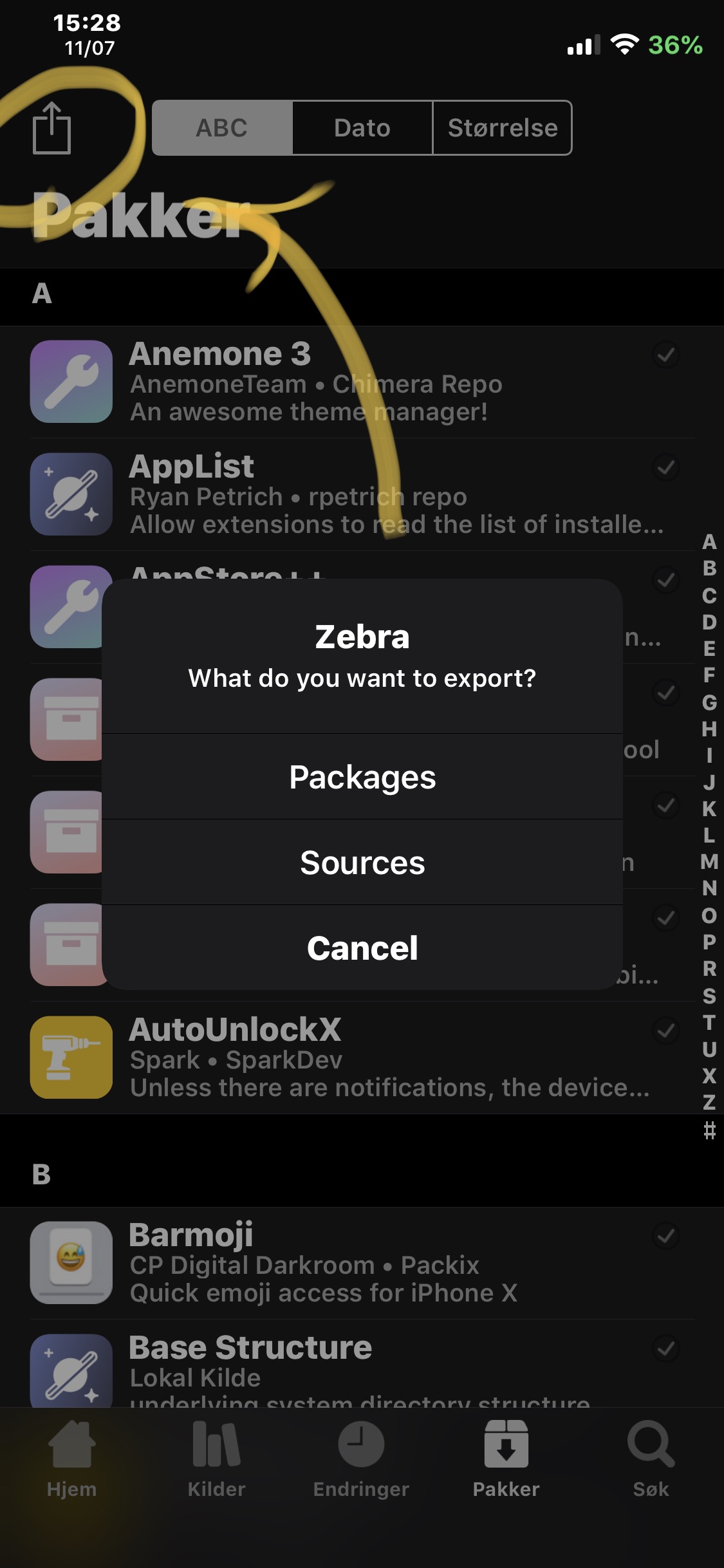
Zebra: Menu for exporting sources, packages list and wishlist
Is your feature request related to a problem? Please describe.
A clear and concise description of what the problem is. Ex. I'm always frustrated when [...]
No
Describe the solution you'd like
A clear and concise description of what you want to happen.
I would love the implementation shown in the screenshot below.
Describe alternatives you've considered
A clear and concise description of any alternative solutions or features you've considered.
Okapi for zebra offers this but okapi is broken and it would be nice if this was integrated directly into Zebra. Would just be a nice little ease of use adjustment.
Additional context
Add any other context or screenshots about the feature request here.
 worldlydev
All 9 comments
Update: maybe make it possible to export the wishlist as well? Would make it easy to move everything over to a new device.
worldlydev
on 19 Nov 2019
An option for "Both as well, like Flame does for Cydia.
Also, currently the native packages export of Zebra lists them as i.e. "com.chpwn.iconsupport".
Is it possible to export them in a more friendly way with a clean package name?
 Juvencus
on 19 Jan 2020
Juvencus
on 19 Jan 2020
Something could be done where Zebra would export everything like packages and sources and it could be imported back into Zebra and add all sources and all packages. It would be a bit complex but I think that is what is being requested here?
 wstyres
on 19 Jan 2020
wstyres
on 19 Jan 2020
Something could be done where Zebra would export _everything_ like packages and sources and it could be imported back into Zebra and add all sources and all packages. It would be a bit complex but I think that is what is being requested here?
I was more hoping for a menu such as the one showed above that lets you export wishlist, packages, or repos.
It would be cool with a sync feature perhaps that saves all settings (like installer) and the other stuff mentioned but that isn't what I'm requesting. Would be great but I already have batchomatic. The menu would just be nice for exporting those things specifically.
worldlydev
on 19 Jan 2020
Wishlist export was added in 3e04c44c. What improvements should be made to the Package/Source export screens? The Sources export is designed to be importable back into Zebra so I don't think that will change too much but improvements to the packages export can be made.
wstyres
on 12 Apr 2020
Wishlist export was added in 3e04c44. What improvements should be made to the Package/Source export screens? The Sources export is designed to be importable back into Zebra so I don't think that will change too much but improvements to the packages export can be made.
The Sources export is fine, although I think it glitches if the repo has a dash in the link like the Nepeta-Mirror.
Packages export should have the human-readable name of tweaks, instead of the internal package name e.g "IconSupport" instead of "com.chpwn.iconsupport".
 cxen
on 13 Apr 2020
cxen
on 13 Apr 2020
Wishlist export was added in 3e04c44. What improvements should be made to the Package/Source export screens? The Sources export is designed to be importable back into Zebra so I don't think that will change too much but improvements to the packages export can be made.
Like @cxen 's idea. At least partially.
Maybe something like this:
- xtweak by xauthor (xBundleID) via xsource
Such as:
- SmallSiri by Muirey03 (com.muirey03.smallsiri) via Packix
This makes it easy to read the author and tweak, gives the bundleID, and specifies the source as there are tweaks with the same name or that are hosted in multiple places.
Plus I'm still hoping for a menu to export sources, packages and wishlist items. Like Okapi offers but perhaps it could be through settings rather than a popup. Just a suggestion since I don't know how you want Zebra's UI to be. Either way it would be nice to have all the options in one place.
worldlydev
on 13 Apr 2020
I think for now we can just make it more detailed with the package name and source. It doesn't make much sense from a UX standpoint to have sources and wishlist be exported from the packages tab. We might revisit this in the future when more complex forms of export are available but for the time being I think the more detail will do.
wstyres
on 15 Apr 2020
Implemented the more detailed descriptions in a1e7ccae07cd665cd4573baa62d9762e857da73d. We will revise the export menu when doing more complex exports/imports in the future.
wstyres
on 15 Apr 2020
Related issues
 ashbruh
·
4Comments
ashbruh
·
4Comments
 gkeep
·
4Comments
gkeep
·
4Comments
 SeMoOo
·
3Comments
SeMoOo
·
3Comments
 aRvedk
·
5Comments
worldlydev
·
5Comments
aRvedk
·
5Comments
worldlydev
·
5Comments