Yuzu: Feature request: option to limit how many threads can work when loading a disk shader cache with OpenGL.
When loading a disk shader cache with OpenGL CPU usage goes up to 100% and makes temperatures go way too high, making almost all laptops with H letter processors (both Intel and AMD CPUs) thermal throttle.
Gray line is clock speed, purple is temperature, orange is CPU usage %. (This was loading a cache of ~5000 shaders in SWSH 4 consecutive times with Assembly shaders turned on, with it off is almost impossible to use a disk cache)
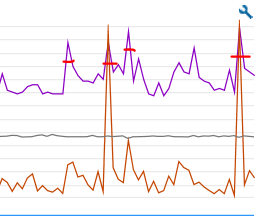
Parameters of the graphic above. Tested with an i7-9750H (Lenovo Y540)
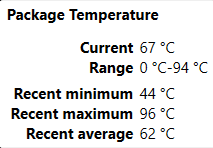
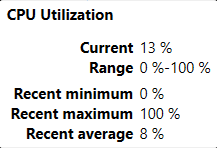
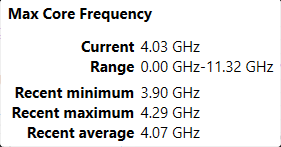
Request is to add an option to limit how many threads (suggestion 3-4) can be used to load the shader cache from disk on game boot, so that thermal throttling doesn't happen, these are the current gen laptop CPUs that suffer with the problem:
Intel:
i9-10980HK | 8c/16t
i7-10875H | 8c/16t
i7-10850H | 6c/12t
i7-10750H | 6c/12t
i5-10400H | 4c/8t
i5-10300H | 4c/8t
(Same goes for 8th and 9th gen, but those are very rarely sold anymore after 10th launched)
AMD:
Ryzen 5 4600H(S) | 6c/12t
Ryzen 7 4800H(S) | 8c/16t
Ryzen 9 4900H(S) | 8c/16t
(Ryzen 3000 series is underpowered and doesn't suffer nearly as much)
 RodrigoTR04
All 6 comments
- Is this specific to transferable or precompiled shaders?
- Do other heavy I/O operations suffer similarly?
I'm just trying to figure out which step is causing the spike in usage. If it is the Load() function (not the I/O operation), is it even possible to keep temps under control without reducing loading speed significantly?
(I'm not very familiar with yuzu's codebase, so sorry if I said something stupid.)
 adityaruplaha
on 5 Dec 2020
adityaruplaha
on 5 Dec 2020
Only used shaders compiled locally, didn't transfer, for other I/O operations I have no idea, slowing things down only makes matters worse, with Assembly shaders it's a bit too slow when you pass the ~4000 shaders so throttles for a split second, without it thermal throttles for a longer period because it still hits all the CPU threads.
RodrigoTR04
on 5 Dec 2020
Temporal workaround, migrate to AMD, their driver doesn't allow multithreaded building. ¯_(ツ)_/¯
 goldenx86
on 5 Dec 2020
goldenx86
on 5 Dec 2020
amd cpu ? seriously?
 NielsGx
on 6 Dec 2020
NielsGx
on 6 Dec 2020
amd cpu ? seriously?
Still thermal throttles, it's all about the laptop model. A properly cooled Intel can be 20°C less than a terribly cooled AMD and vice versa. It all depends on how well the likes of Lenovo, Asus, Dell, HP and others do their job.
RodrigoTR04
on 6 Dec 2020
Use task manager and limit yuzu affinity wise till its finished that can do for now
Sent from my iPhone
On Dec 5, 2020, at 7:25 PM, RodrigoTR04 notifications@github.com wrote:
amd cpu ? seriously?Still thermal throttles, it's all about the laptop model. A properly cooled Intel can be 20°C less than a terribly cooled AMD and vice versa.
—
You are receiving this because you are subscribed to this thread.
Reply to this email directly, view it on GitHub, or unsubscribe.
 ReaperOfSouls1909
on 6 Dec 2020
ReaperOfSouls1909
on 6 Dec 2020
Related issues
 ShalokShalom
·
6Comments
ShalokShalom
·
6Comments
 FranciscoReMo
·
4Comments
FranciscoReMo
·
4Comments
 youwereeatenbyalid
·
4Comments
youwereeatenbyalid
·
4Comments
 bukyapavankumar
·
4Comments
bukyapavankumar
·
4Comments
 ReinUsesLisp
·
3Comments
ReinUsesLisp
·
3Comments
Most helpful comment
Use task manager and limit yuzu affinity wise till its finished that can do for now
Sent from my iPhone