Yup: TypeError: Cannot read property 'fulfilled' of undefined
Describe the bug
I have a Codesandbox running a library called React Hook Form. If you add two friends in the code pen and then remove the first friend and then submit the form you see the error. The stack trace shows the error at a line in react-hook-form.js. BUT if you dig deeper the error is actually coming from line 84 of runValidations.js where the check for !r.fulfilled throws an error saying:
"TypeError: Cannot read property 'fulfilled' of undefined
    at eval (eval at <anonymous> (https://yycrz.csb.app/node_modules/yup/lib/util/runValidations.js), <anonymous>:1:3)
    at eval (https://yycrz.csb.app/node_modules/yup/lib/util/runValidations.js:84:17)
    at Array.filter (<anonymous>)
    at eval (https://yycrz.csb.app/node_modules/yup/lib/util/runValidations.js:83:32)
    at async Promise.all (index 0)
    at async validateWithSchema (https://yycrz.csb.app/node_modules/react-hook-form/dist/react-hook-form.js:383:21)
    at async eval (https://yycrz.csb.app/node_modules/react-hook-form/dist/react-hook-form.js:886:28)"
To Reproduce
https://codesandbox.io/s/react-hook-form-array-fields-validation-using-refs-yycrz?from-embed
Add two friends and then delete one friend. When you submit the form, you can see the error Chrome dev tools.
NOTE: if you do not provide a runnable reproduction the chances of getting feedback are significantly lower
Expected behavior
A clear and concise description of what you expected to happen.
Handle the scenario where r is undefined to fail gracefully so it does not break the running script.
Platform (please complete the following information):
- Browser [e.g. chrome, safari]
- Version [e.g. 22]
Additional context
Add any other context about the problem here.
Also, one of the folks at React Hook Form asked me to share this screenshot:

 thoughtassassin
All 18 comments
I faced same issue:
Unhandled Rejection (TypeError): r is undefined
which refer to this line: https://github.com/jquense/yup/blob/0c27f076668632912311226259745d19129bf9bb/src/util/runValidations.js#L62
 sijad
on 19 Nov 2019
sijad
on 19 Nov 2019
In some rare circumstances, you could work around this by adding array.compact to your schema.
Keep in mind this will not actually omit the empty values from the output of formik/react-hook-form/etc.
However, it might be useful if you're using yup directly, or in circumstances where you can combine it with something like .min(x).max(x), where x is the same number for both min() and max().
 VanTanev
on 30 Nov 2019
VanTanev
on 30 Nov 2019
I'm having the same issue, removing first element breaks validation. I'm using React Hook Form.
Adding check here
https://github.com/jquense/yup/blob/0c27f076668632912311226259745d19129bf9bb/src/util/runValidations.js#L62
.filter(r => r ? !r.fulfilled : false)
fixes it for me locally. Hope it will be fixed.
 Nightliss
on 16 Dec 2019
Nightliss
on 16 Dec 2019
Also running into this using React Hook Form :(
 WonderPanda
on 12 Feb 2020
WonderPanda
on 12 Feb 2020
@Nightliss I got this working. I actually realized I was using the register function improperly when attaching refs to my input elements which was causing things to explode when removing elements.
I was passing it in with the format ref={register} instead of ref={register({})
WonderPanda
on 13 Feb 2020
Is there any update in this issue?
 bsunderhus
on 2 Mar 2020
bsunderhus
on 2 Mar 2020
I have same issue (also using React Hooks Form).
In my case it happens when using additional sub inputs with checkboxes that reference to index of mapped out checkboxes.
When I submit form and validation is triggered, it does not like that my array starts from 3 or 5 etc.. when array 0 is undefined I get this:
"Cannot read property 'fulfilled' of undefined"
Also the field validation is way off if you compact the array, then the error reference stops working with the form (so no help there).
Here is a code sandbox showing my issue, if you submit first checkbox it works, if you submit any of the other not having index in numerical order it fails:
https://codesandbox.io/s/react-hook-form-checkbox-array-with-inputs-g6pd4?from-embed
 c0d3x
on 27 Apr 2020
c0d3x
on 27 Apr 2020
is there any solution to this issue yet?
 arpit016
on 20 Jun 2020
arpit016
on 20 Jun 2020
Hallo, I'm bumping into this issue. Using a mix of array.of, when, min-max and mixed. Not sure what causes problem, also have no timedesire to investigate. Please fix
Yup.array(
      Yup.object().shape({
        dataType: Yup.number(),
        minimum: Yup.mixed(),
        maximum: Yup.mixed(),
        value: Yup.mixed().when(
          ['dataType', 'minimum', 'maximum'],
          (
            dataType: CustomPropertyDataType,
            minimum: number,
            maximum: number
          ) => {
            switch (dataType) {
              case CustomPropertyDataType.Boolean: {
                return Yup.boolean();
              }
              // todo: no support for precision
              case CustomPropertyDataType.Number: {
                return Yup.number()
                  .min(minimum)
                  .max(maximum)
                  .typeError(
                    t(
                      'validate.common.minmaxnumber',
                      'Numeric value must be between {{minimum}} and {{maximum}}',
                      { minimum, maximum }
                    )
                  );
              }
              case CustomPropertyDataType.String: {
                return Yup.string();
              }
              default:
                return Yup.mixed();
            }
          }
        ),
      } as Omit<ObjectSchemaDefinition<EditAssetCustomPropertyItem>, 'init' | 'toJSON'>)
    )
 sdwvit
on 23 Jun 2020
sdwvit
on 23 Jun 2020
Hi ya'll, if someone wants to post a runnable repro using the code sandbox template that demonstrates the problem without using a form library i can troubleshoot what is wrong. I don't have the bandwidth to provide support for each of these form libraries as well as yup
 jquense
on 23 Jun 2020
jquense
on 23 Jun 2020
@jquense I'm going to find a workaround today, will post here. May give a clue on how to fix it
sdwvit
on 23 Jun 2020
@jquense I fixed the issue. The reason is that formik was tracking custom fields which were not on the schema and which were used in Yup. So the fix is in user code, but better error handling is required here for Yup. Cannot read property 'x' of undefined is not very helpful.
sdwvit
on 23 Jun 2020
happy to add better error handling but i don't know where this error is being thrown or why.
jquense
on 23 Jun 2020
@jquense Here is a simple reproduction code https://codesandbox.io/s/modest-spence-fn61p
It took me a while to get it down to this.
The issue arises of a combination of a sparse array + abortEarly: false
const schema = yup.array().of(yup.object({
  name: yup.string()
}));

const obj = {
  name: "Jill"
};

const arr = new Array(2)
arr[1] = obj

// throws TypeError: Cannot read property 'fulfilled' of undefined
await schema.validate(arr, {
  abortEarly: false,
  context: {},
})
@jquense So, this is the source of the bug:
https://github.com/jquense/yup/blob/27b287ba0dd8981ddb330c28123b41d85c4c8853/src/util/runValidations.js#L38-L49
Here, promises.map is supposed to map fulfilled and rejected promises to the appropriate value object. However, Array.map does not iterate over the empty spots in sparse arrays:

It can probably be said that the error originates here:
https://github.com/jquense/yup/blob/27b287ba0dd8981ddb330c28123b41d85c4c8853/src/array.js#L87
Here, no validation will be generated for empty Array positions.
It seems to me that for the purposes of this library, it makes sense to convert empty array positions to undefined in the output.
VanTanev
on 24 Jun 2020
well done @VanTanev
sdwvit
on 24 Jun 2020
here a stacktrace I managed to get with this error, maybe it helps
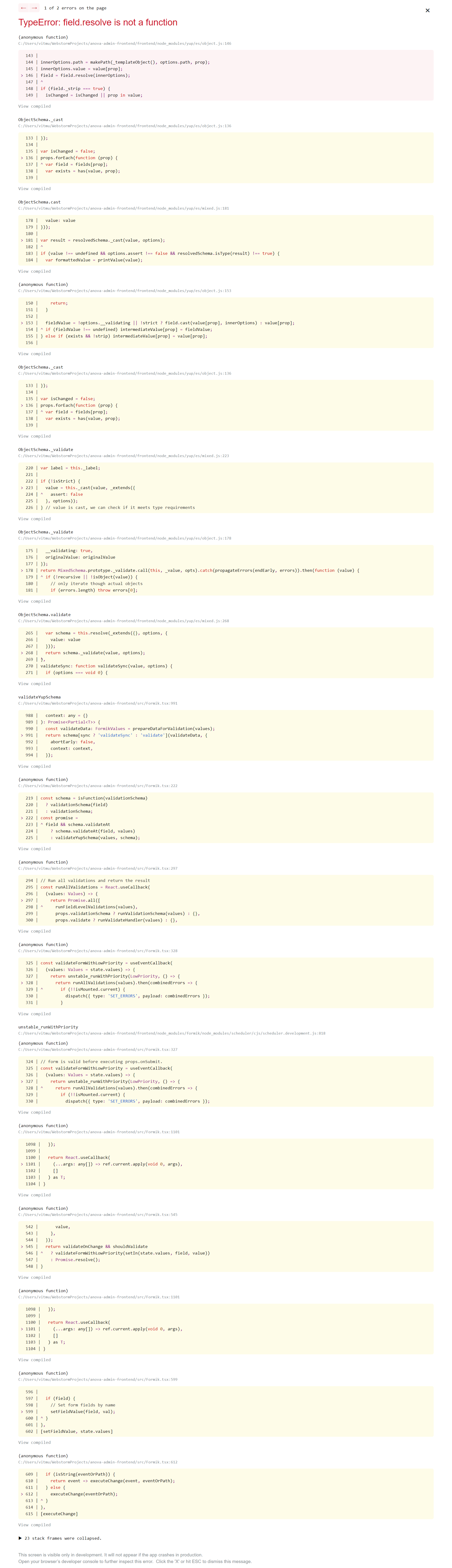
sdwvit
on 26 Jun 2020
@sdwvit there is a fix in #950.
In the mean time, what is most probably happening is that you have an array notation in a Field name, eg:
<Field name="user.friends[3].name" />
You can work around the problem by setting the initial values of that array manually to undefined:
<Formik initialValues={{
  user: { friends: [undefined, undefined, undefined, undefined] }
}}
More generally, every time you deal with a form field name that addresses an array position, make sure that the array position actually exists in the form's initialValues by doing new Array(5).fill(undefined).
Otherwise, formik / react-hook-form create sparse arrays, and Yup before #950 breaks when trying to validate a sparse array.
VanTanev
on 26 Jun 2020
Related issues
 juni0r
·
3Comments
juni0r
·
3Comments
 odesey
·
4Comments
odesey
·
4Comments
 the-daniel-rothig
·
4Comments
the-daniel-rothig
·
4Comments
 ghost
·
4Comments
ghost
·
4Comments
 dannief
·
4Comments
dannief
·
4Comments
Most helpful comment
@jquense So, this is the source of the bug:
https://github.com/jquense/yup/blob/27b287ba0dd8981ddb330c28123b41d85c4c8853/src/util/runValidations.js#L38-L49
Here,
promises.mapis supposed to map fulfilled and rejected promises to the appropriate value object. However,Array.mapdoes not iterate over the empty spots in sparse arrays:It can probably be said that the error originates here:
https://github.com/jquense/yup/blob/27b287ba0dd8981ddb330c28123b41d85c4c8853/src/array.js#L87
Here, no validation will be generated for empty Array positions.
It seems to me that for the purposes of this library, it makes sense to convert empty array positions to
undefinedin the output.