yup.number().nullable() does not allow `null` value
const quantity = number().positive().nullable(); does not work for me in case of quantity:null this input gives me this error
quantity must be a
numbertype, but the final value was:NaN(cast from the valueNaN).
ValidationError: quantity must be anumbertype, but the final value was:NaN(cast from the valueNaN).
 gastonovic
All 14 comments
Hey, you must pass a boolean value as argument to nullable
const quantity = number().positive().nullable(true);
 eddyw
on 27 Mar 2019
eddyw
on 27 Mar 2019
I have the same problem. nullable() is the same as nullable(true), so that's not the solution.
 mattleonowicz
on 25 Apr 2019
mattleonowicz
on 25 Apr 2019
quantity = number().positive().nullable()
quantity.validateSync(null) // No error

quantity = number().positive().nullable(false)
quantity.validateSync(null) // Error
If you check the original validation error, it has a property called params which should contain something like:
  params:
   { path: 'this', // or e.g 'someNestedObj.quantity`
     value: NaN, // <<<<<<<<<< when cast to number
     originalValue: null, // <<<<<<<<<< before cast to number (original)
     label: undefined,
     type: 'number' }
originalValue should contain the original .. value that was passed before Yup tried to cast it to number. Are you sure that what you're passing (as originalValue) when using nullable(true) is in fact null? I work on a project which has all types as nullable (including number) and it works well as expected.
I did encounter the issue when a value coming from an input was empty string (which is, of course NaN). If it happens that you want certain values such as empty string to be considered null, you can use transform first, something like:
const quantity = number().positive().nullable(true /* or false */).transform(v => v === '' ? null : v)
In which case, if nullable(true), then empty strings would also be valid. Otherwise, empty string would be transformed to null but fail if nullable(false)
eddyw
on 25 Apr 2019
I debugged what was wrong in my case, and actually I really did pass NaN to yup, so it was my fault. So the errror message was right after all. My fault was assuming that the error message must have been wrong! :D
mattleonowicz
on 26 Apr 2019
In my case, the value is an empty string, as a result of clearing an input field. I have the field defined as Yup.number().min(0).default(0). I was expecting the cast operation to convert the empty string to 0. Sort of like +'' || 0 but instead it gave me the nasty NaN error.
It looks like this was intended: https://github.com/jquense/yup/blob/1c1844293c69db5307b04764f20af3bbeaf8f265/src/number.js#L19
Only undefined falls back to a default. Is this ideal though because +'' casts to zero, so why exclude it?
 simoami
on 29 May 2019
simoami
on 29 May 2019
@simoami the way I was dealing with it was:
number().transform(v => v === '' ? void 0 : v)
I think the above makes sense (number.js:19) in that, we wouldn't always want default to 0 when it's an empty string. In my use case, an empty string (from input field) meant undefined and not 0
eddyw
on 30 May 2019
Thanks @eddyw, nice workaround.
In my use case, an empty string (from input field) meant undefined and not 0
Fundamentally, a numeric cast operation needs to output a number or NaN. so undefined is not in that range. This is similar to typeof always returning a string. It also returns 'undefined' as string instead of undefined. So typeof is honoring the contract and can be trusted to always return a string. Same thing with a numeric cast operation can be trusted to always return a numeric value. Here's some casting examples to use as reference:
+'0' -> 0 // a number
+'' -> 0 // a number
+'test' -> NaN
+'false' -> NaN
So why deviate from the native js behavior?
simoami
on 30 May 2019
Perhaps you can borrow from the.default(...) value when a cast doesn't work. So .default(undefined) would return the same for empty string and .default(0) would return 0 for an empty string.
Additionally, you can see how this error is nasty, (using yup and formik), which is why I came to post about it.
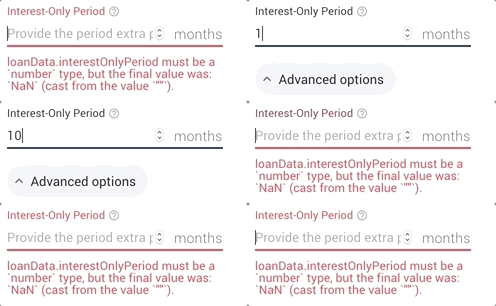
simoami
on 30 May 2019
I'm having the same problem with yup.string().nullable(), any other way to fix it?
field: yup.string().when('type', {
      is: type => type === true,
      then: yup
        .string()
        .required(),
      else: yup.string().nullable(true),
    }),
 sibelius
on 30 Jul 2019
sibelius
on 30 Jul 2019
If the schema passes the validation I would expect the same value be also castable via the schema.
This isn't the case right now.
const age = yup.number().nullable();
if (age.validate(null)) {
  age.cast(null); // quantity must be a number type, but the final value was: NaN (cast from the value NaN).
}
 jaripekkala
on 22 Nov 2019
jaripekkala
on 22 Nov 2019
.transform(v => v === '' ? null : v)
I used:
.transform((v, o) => o === '' ? null : v)
...after noting that transform supplies two arguments to the callback, the second being the originalValue which was the empty string for me.
 thismatters
on 27 Dec 2019
thismatters
on 27 Dec 2019
This seems like a bug in the number tests, which should basically bail if the number is null.
that said if you are dealing with empty string values they will not be coerced to null you'd need to do that yourself
 jquense
on 2 Jan 2020
jquense
on 2 Jan 2020
same here
 igtm
on 16 Jan 2020
igtm
on 16 Jan 2020
.transform(v => v === '' ? null : v)I used:
.transform((v, o) => o === '' ? null : v)...after noting that
transformsupplies two arguments to the callback, the second being theoriginalValuewhich was the empty string for me.
Also validating the NaN in case of numeric inputs
.transform((v) => (v === '' || Number.isNaN(v) ? null : v))
 haroldjcastillo
on 30 Jan 2021
haroldjcastillo
on 30 Jan 2021
Related issues
 haddyo
·
3Comments
haddyo
·
3Comments
 jakke-korpelainen
·
4Comments
jakke-korpelainen
·
4Comments
 jgcmarins
·
4Comments
jgcmarins
·
4Comments
 AmineIT
·
3Comments
AmineIT
·
3Comments
 dannief
·
4Comments
dannief
·
4Comments
Most helpful comment
I used:
...after noting that
transformsupplies two arguments to the callback, the second being theoriginalValuewhich was the empty string for me.