I'm really excited about this library, however I found an issue that I'm not sure how to deal with. I'd like to be able to validate a date range, but it doesn't seem to work. I've written two tests to show what does and does not work for me.
test('validate a number range', () => {
        return yup
            .object({
                start: yup.number().required(),
                end: yup.number().when('start', (st, schema) => {
                    return schema.min(st);
                }),
            })
            .validate({
                start: 5,
                end: 3,
            })
            .catch((e) => {
                expect(e.message).toEqual(
                    'end must be greater than or equal to 5', // works :)
                );
            });
});
    test('validates a date range', () => {
        return yup
            .object({
                start: yup.date().required(),
                end: yup.date().when('start', (st, schema) => {
                    return schema.min(st);
                }),
            })
            .validate({
                start: moment().toDate(),
                end: moment()
                    .subtract(1, 'days')
                    .toDate(),
            })
            .catch((e) => {
                expect(e).toEqual(1); // this line is never executed
            });
    });
The first test works, but I get an error message RangeError: Maximum call stack size exceeded on the second test. Is there something I can do differently to validate a date range?
 rowinf
All 11 comments
hmm this should work, can you provide an example without moment so i can play around with it?
 jquense
on 9 Aug 2018
jquense
on 9 Aug 2018
Unlike the documentation, I got this working by using yup instead of schema.
end: yup.date().when('start', (st, schema) => {
    return yup.date().min(st);
})
 andrewzamojc-pd
on 15 Dec 2018
andrewzamojc-pd
on 15 Dec 2018
Hi, im really new to the lib, but i have the same exact issue using 'when' with dates.
Say, i want to check a bunch of things and conditionally check for min/max date, so i have something like this:
yup.date().label('something')
.format(DATE_FORMAT, true)
.required('blah blah blah')
.max(TODAY, 'cannot be past today')
.when('something', (something, schema) => condition ? schema.min(YEAR_AGO, 'also can't be that far in the past') : schema;
attaching min/max to schema using 'when' leads to this problem.
Returning yup.date() as @andrewzamojc-pd mentioned solves the issue, BUT im losing my nifty schema there, which does not seem right.
 troqru
on 18 Feb 2019
troqru
on 18 Feb 2019
Really, thank you so much @andrewzamojc-pd I lost like two days trying different things but with your answer it DOES work!
 Laawe
on 7 Mar 2019
Laawe
on 7 Mar 2019
@andrewzamojc-pd actually if you want to use schema you should remove .date() because it is already defined at the begining of you expression so your code should look like this:
end: yup.date().when('start', (st, schema) => {
   schema.min(st);
})
 oussamaSh
on 14 Jun 2019
oussamaSh
on 14 Jun 2019
I've not had any luck with date range validation either. Very well may be going about it in the wrong way.
My schema is a bit different in that I have my date as an object with day and time fields. Trying to reference one of those fields, or reference the date obj in general, results in undefined.
eventStartDate: yup.object().shape({
    day: yup.date().required(),
    time: yup.date().required()
}),
eventEndDate: yup.object().shape({
    day: yup
        .date()
        .required()
        .when('eventStartDate', (eventStartDate, schema) =>  schema.min(eventStartDate.day)),
        time: yup.date().required()
})
 ahummel25
on 12 Jul 2019
ahummel25
on 12 Jul 2019
@ahummel25 From what I gather, you have day(I am assuming you mean date eg. 01-01-1970) and time(eg 10:00:00) separately, but you have mentioned day and time both to use date validator which might break, since JS date.parse() doesn't have ability to parse time alone.
I am hoping you could adapt your code in same way I have written the solution for in #642 making use of a time library like moment which would support time format without any date associated with it.
Please refer this Stackoverflow QnA to get more idea on what I mean.
 privateOmega
on 15 Oct 2019
privateOmega
on 15 Oct 2019
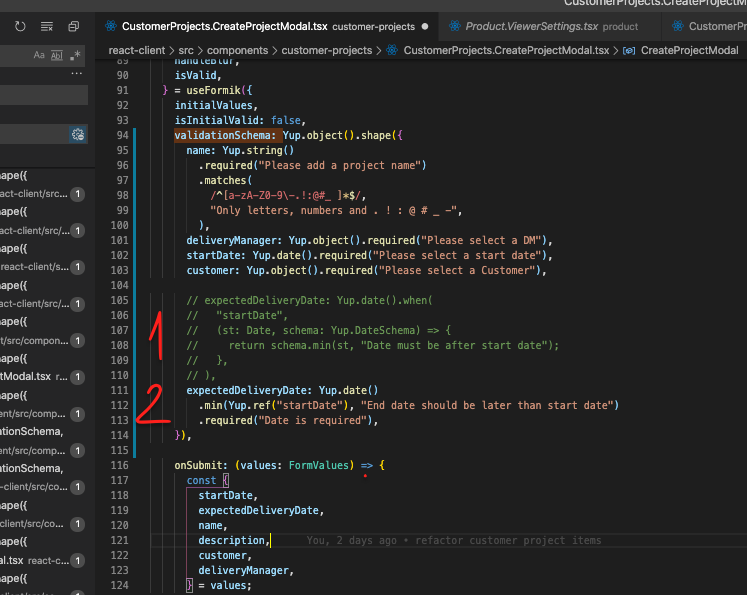
Here are two solutions that worked for me.
 SPeshov
on 23 Jan 2020
SPeshov
on 23 Jan 2020
I am using like this and its working
{
startTime: yup.date().default(function() {
return new Date();
}),
endTime:yup.date().min(yup.ref('startTime'),
'End date should be greator')
.default(function() {
return new Date();
})
}
 harshiths97
on 24 Apr 2020
harshiths97
on 24 Apr 2020
@harshiths97 I assume this will work fine since both startTime and endTime are siblings.
Not sure if there is way to do validation in an object like below, especially if you have a web form that allows user to pick date and time for events.
{
start: { date: '.....', time: '....'}
end: { date: '.....', time: '....'}
}
This something similar to what @ahummel25 mentioned at https://github.com/jquense/yup/issues/255#issuecomment-511041416.
 azizur
on 24 Apr 2020
azizur
on 24 Apr 2020
I am new to Yup. My validation needs to have 1 day less than ref('startDate'). I couldn't figure out a way to do it.
Please help!
regEndDate: Yup.date()
            .min(
                Yup.ref('regStartDate'),
                'Registration end date cannot be earlier than registration start date'
            )
            .max(
                                  Yup.ref('startDate'), ====> Need 'startDate' - 1
                'Registration end date needs to be earlier than event start date'
            )
            .required()
 RoosterH
on 6 Aug 2020
RoosterH
on 6 Aug 2020
Related issues
 mikkelwf
·
4Comments
mikkelwf
·
4Comments
 klvfn
·
4Comments
klvfn
·
4Comments
 rigids
·
3Comments
rigids
·
3Comments
 ScreamZ
·
4Comments
ScreamZ
·
4Comments
 the-daniel-rothig
·
4Comments
the-daniel-rothig
·
4Comments
Most helpful comment
Unlike the documentation, I got this working by using
yupinstead ofschema.